Sample rate and its effect on audio quality and file size


Free Download Mp4Gain
picture

Sample rate and its effect on audio quality and file size

Sample rate and its effect on audio quality and file size

Let’s talk about sample rate and its effect on audio quality and file size

Sample rate is one of the fundamental concepts in digital audio, affecting both the quality of sound and the size of the audio file. As an expert with years of experience in audio production and sound engineering, I can tell you that understanding how sample rate works is essential for anyone dealing with digital audio, whether you’re recording music, editing sound for film, or simply managing your personal audio collection. When you convert sound into a digital format, the sample rate determines how often the sound wave is measured per second. In essence, it’s how frequently the sound is sampled to create a digital representation of the audio.

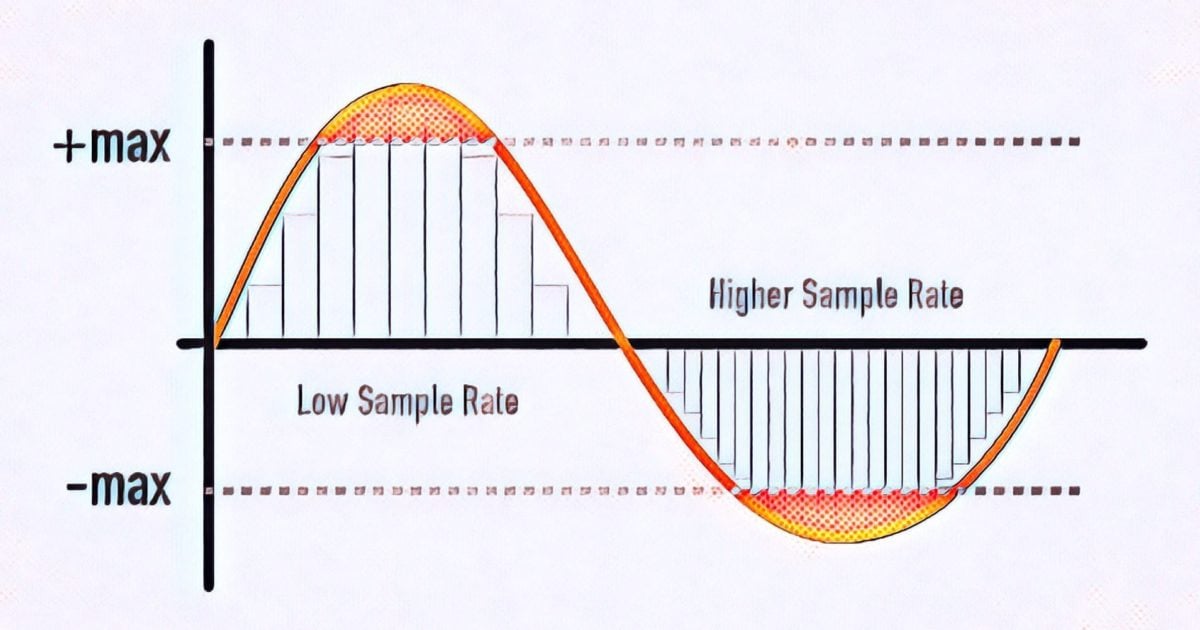
To give you a clearer picture, imagine taking photos at different intervals. If you take one photo every minute, you’ll miss out on a lot of detail, but if you take a photo every second, you capture much more detail. This is similar to what happens with audio. A higher sample rate means more data points per second, resulting in more detail in the sound. But there’s a trade-off: increasing the sample rate also increases the file size.

In this article, I will explain the impact of different sample rates on audio quality and file size, breaking down complex concepts into easy-to-understand examples, based on my personal experience. Let’s dive deeper into the science of audio and explore how sample rate affects your sound.

Understanding Sample Rate and Its Impact on Audio

When you listen to music or sound, what you’re hearing is a continuous wave that varies in frequency and amplitude. Digital audio, however, can’t capture every single point of that wave in its original, continuous form. Instead, it measures the wave at discrete intervals. This is where the sample rate comes in. The sample rate refers to how many times per second the audio wave is measured, or sampled.

A typical CD-quality sample rate is 44.1 kHz, meaning the sound is sampled 44,100 times per second. This sample rate has been the standard for years because it provides a good balance between sound quality and file size. Higher sample rates, such as 96 kHz or 192 kHz, are commonly used in professional settings, where audio fidelity is crucial.

One way to think about sample rate is by comparing it to a digital photo. A higher resolution photo has more pixels, and as a result, more detail. Similarly, a higher sample rate means the audio is sampled more often, capturing more of the nuances of the original sound wave.

How Sample Rate Affects Audio Quality

The sample rate directly affects the quality of the sound that is captured. When audio is sampled at a higher rate, it allows for a more accurate representation of the original sound, particularly at higher frequencies. Let me explain with a simple example: if you’re recording a guitar with a sample rate of 44.1 kHz, you capture the frequencies up to 22.05 kHz (half of the sample rate). Human hearing typically ranges from 20 Hz to 20 kHz, so this is more than sufficient for most applications.

However, if you use a higher sample rate, such as 96 kHz, the audio captures frequencies up to 48 kHz, which is well beyond the range of human hearing. You might wonder if this makes a real difference, and the truth is, it often does not—at least not for most listeners. However, higher sample rates can reduce the risk of certain audio artifacts, like aliasing, and give you more flexibility during the mixing and mastering processes.

In professional environments, where every detail matters, higher sample rates are used for their ability to preserve the integrity of sound. For example, a 192 kHz sample rate might be used when recording instruments in a studio setting, especially when dealing with very high frequencies or complex sound textures.

Sample Rate and File Size: The Trade-Off

Now that we understand how sample rate affects audio quality, it’s time to address the second part of the equation: file size. Simply put, the higher the sample rate, the larger the file. This happens because more samples are being taken per second, which means more data is generated and stored.

For instance, at a standard 44.1 kHz sample rate, a minute of stereo audio (2 channels) at 16-bit depth will create a file size of roughly 10 MB. If you bump the sample rate up to 96 kHz, the file size will almost double for the same duration, since you’re capturing more data points per second.

Here’s a breakdown to show how sample rate affects file size:

  • 44.1 kHz (CD-quality) – 10 MB per minute of stereo audio at 16-bit depth
  • 96 kHz (high-definition) – 20 MB per minute of stereo audio at 16-bit depth
  • 192 kHz (ultra-high-definition) – 40 MB per minute of stereo audio at 16-bit depth

As you can see, the increase in file size can be significant, especially if you’re working with long audio tracks or multiple channels. This is why most standard music tracks use 44.1 kHz, as it provides a balance between quality and file size that’s suitable for most applications.

When to Use Higher Sample Rates

So, when should you opt for higher sample rates? The decision largely depends on the purpose of the recording and the medium through which the audio will be played.

For example, in professional audio production, especially for film and music, higher sample rates are often preferred. The additional data captured can be useful for post-production processes such as mixing, mastering, and sound design. However, unless you’re working on a project where the absolute highest fidelity is necessary, it’s often overkill for everyday listening or casual recording.

On the other hand, for personal music libraries or podcasts, 44.1 kHz is more than sufficient. For most listeners, increasing the sample rate beyond this point won’t noticeably improve sound quality. Additionally, higher sample rates require more processing power and storage, making them less practical for regular consumer use.

How to Choose the Right Sample Rate

Choosing the right sample rate depends on a few factors:

  • Purpose: If you’re recording music for distribution, 44.1 kHz is typically the best choice. For professional audio or film soundtracks, you may want to consider 96 kHz or even 192 kHz.
  • Playback Device: If your audio will be played on high-end systems or used in film production, higher sample rates may be justified.
  • Storage and Processing Power: Keep in mind that higher sample rates require more storage and can put more strain on your computer’s processing power. If you’re limited in these areas, a lower sample rate like 44.1 kHz may be ideal.

The key is to balance the need for high-quality audio with the practical considerations of file size and system resources.

Latest words on sample rate and its effect on audio quality and file size

In summary, sample rate plays a crucial role in both audio quality and file size. Higher sample rates can improve audio fidelity, but they also increase the file size, which can be a limitation for storage and processing power. For most casual applications, 44.1 kHz is more than enough, but if you’re working in a professional setting, you may want to consider higher sample rates like 96 kHz or 192 kHz. Ultimately, the best sample rate depends on your specific needs, and understanding how it impacts both sound quality and file size will help you make the best choice for your projects. If you need help with managing audio files or optimizing file sizes, Mp4Gain might be the right solution for you.

FAQ

What is sample rate in digital audio?

Sample rate refers to how many times per second an audio signal is sampled or measured during the process of converting sound into digital form. The higher the sample rate, the more data is captured and the better the sound quality.

How does sample rate affect audio quality?

The higher the sample rate, the more accurately it captures the original sound wave, leading to better audio quality. Higher sample rates are especially useful in professional settings, where preserving every detail of the sound is crucial.

What sample rate should I use for music?

For music, 44.1 kHz is the standard sample rate. It provides a good balance between sound quality and file size, and it’s the rate used

for CD-quality audio. Higher sample rates like 96 kHz or 192 kHz are typically used for professional recording or film production.

How does sample rate affect file size?

Increasing the sample rate increases the file size, as more data points are being captured per second. For example, a 96 kHz sample rate will double the file size compared to a 44.1 kHz sample rate for the same duration of audio.

Is higher sample rate always better?

Not necessarily. While a higher sample rate captures more data and improves sound quality, it also increases file size and requires more processing power. For everyday use, 44.1 kHz is typically sufficient.

Can I hear the difference between 44.1 kHz and 96 kHz?

For most listeners, the difference between 44.1 kHz and 96 kHz is not noticeable. However, in professional audio production, a higher sample rate can reduce artifacts and provide more flexibility during mixing and editing.

Does higher sample rate affect processing power?

Yes, higher sample rates require more processing power and storage space. This is an important consideration when choosing a sample rate, especially when working with limited resources.

What is the best sample rate for podcasts?

For podcasts, 44.1 kHz is usually the best choice. It provides excellent sound quality for speech while keeping file sizes manageable.

Should I use a higher sample rate for gaming audio?

In gaming audio, a 44.1 kHz sample rate is often sufficient. Higher sample rates may improve sound clarity, but they can also increase file sizes and may not be noticeable to most gamers.

Comments:

I’ve always wondered about this! I had no idea that the sample rate could affect the file size so much. I’m going to pay more attention to my recording settings now. Thanks for this detailed breakdown! – JohnDoeMusic

This article is awesome! I’ve been using 44.1 kHz for my music, but after reading this, I’m curious about 96 kHz now. Do you really hear a difference on standard speakers, though? – AudioJoe

Good stuff, but I was hoping for a little more on the technical side, like how to optimize file size for different platforms. Anyone know how to compress without losing quality? – TechGuy89

Very clear explanation of how sample rates work. I never really understood the relationship between sound quality and file size until now. Great job explaining this! – JamminDude

Interesting read! I never really thought that a higher sample rate might not always be better. For simple podcasts, I think I’ll stick to 44.1 kHz from now on. Thanks for the advice! – SarahVibes

Finally, an article that explains the trade-offs between sample rate and file size in a way that actually makes sense. This will definitely help me decide on the best settings for my next music project. – AudioFileExpert


Free Download Mp4Gain
picture


Mp4Gain Main Window
picture


Mp4Gain Features
picture


Free Download Mp4Gain
picture

What does MP3 bitrate mean?

What does MP3 bitrate mean?

MP3 bitrate

Bit rate

mp3 bit rate

The rate at which a digital channel transmits digital signals is called the data transfer rate or bit rate.
The word bitrate has many translations, such as bitrate, etc., which indicates how many bits per second the encoded (compressed) audio data should be represented, and a bit is the smallest binary unit, either 0 or 0. 1. The relationship between bitrate and audio and video compression is simply that the higher the bitrate, the better the quality of the audio and video, but the larger the encoded file; if the bitrate is lower, the situation is reversed.

For example: encode audio and video at 500 Kbps.
where bps are bits 1K = 1010 = 1024
b is little
s is the second
p is for (for)
Therefore, encoding at 500 kbps means that the encoded audio and video data must be represented at 500 K bits per second.
In the baseband transmission system, the bit rate is used to represent the code rate of transmitted information.
The bit rate Rb refers to the unit of time
The number of binary bits transmitted within the unit, the unit is b/s. For example, the transmission speed of a computer serial port is up to 115200b/s.
The symbol rate or baud rate Rs refers to the number of modulation symbols transmitted per unit of time, that is, ternary and ternary
The information transmission rate of the multivariate digital code stream in the

In M-ary modulation, the relationship between the bit rate Rb and the baud rate Rs is:
Rb=Rslog2M
The sampling rate refers to the ratio of the sampling samples to the total number of samples, and the sampling rate refers to the number of samples per unit of time. If it is an instrument, the sampling rate is 40MSa/s, which indicates that the number of samples per second is 40M, but it cannot be represented by 40MHz.

The process of converting analog audio to digital audio is called sampling. In a nutshell, how much data is needed to record a 1 second duration of sound via waveform sampling. A sound with a sample rate of 44 KHz requires 44,000 data points to describe a 1-second sound waveform. In principle, the higher the sample rate, the better the sound quality.

What is bit rate? Knowledge of the MP3 audio format.

What is bit rate? Knowledge of the MP3 audio format.

mp3 bit rate

Digital audio formats are audio signals that are recorded, processed, and reproduced in digital form.

Mp3 bit rate

The emergence of digital audio formats is to meet the needs of high-fidelity playback, storage and transmission. Simply put, early analog audio formats had issues with playback distortion and glitches due to media wear. Since the advent of CD discs, audio files in digital format have become popular, but another problem has arisen: the limitation of storage volume and the phenomenon of CD disc wear is still present. Saving to a hard drive (in connection with longer storage time) is also not a good solution when storage media (mainly hard drives) are still expensive at the time. The rise of the Internet has created a requirement for long-distance file transmission. Under the restriction of bandwidth, the demand to reduce file size has become more intense. All this has led to the generation of lossy compressed digital audio formats from external factors!

In terms of internal factors, with the improvement of computing and coding capabilities, the progress of various acoustic psychological models has promoted the emergence of various lossy compressed digital audio formats. Some of the most commonly used audio formats in MP3 players are briefly introduced below: MP3 (CBR, VBR, ABR), WMA, WAV, ADPCM, and the emerging audio formats AAC, ASF, and OGG.

Before introducing various digital audio formats, let’s clarify one concept: bitrate.

In the field of computing, all information is digitized. Bit is the smallest unit of data in a computer, it refers to a number of 0 or 1, which is a mathematical binary number, a “0” or “1” , is a bit. For example, when we say a 2-digit number, it means that it is a two-digit binary number, and there are 4 combinations of “00”, “01”, “10” and “11”, which represent 0, “11” in decimal respectively. 1, 2 and 3 are four numbers.

Bit rate, what is it?

Bit rate, what is it?

Bit Rate

as a feature of digital audio and video

Bit rate

Bitrate: literally, the information bit rate. It is common to use the bit rate when measuring the effective information transmission rate through the channel, that is, the “payload” transmission rate (in addition to that, the channel can transmit service information, for example, start and stop symbols for asynchronous transmission or control symbols for redundant coding). The baud rate, which takes into account the total bandwidth of the channel, is measured in baud.

Bit rate is the number of units of information required to store (transmit) one second of a stream of data (generally audio and video files). It is generally measured in ‘kbps’, kilobits per second.

The term bit rate is used in two basic meanings
: channel or device characteristic: the maximum number of bits that can be transmitted per unit of time.
– The size of the data stream transmitted in real time (the minimum size of the channel that can pass this stream without delay).
– A special case is the compressed video or audio bit rate.
Bitrate is expressed in bits per second (bit / s, bps), as well as values ​​derived with the prefixes kilo, mega, etc.

The term bit rate (in conjunction with subjective quality criteria) is often used as a characteristic to evaluate the performance of lossy compression algorithms.

Bitrate characterizes both the density of the information package and its quality. For example, out of two MP3 files compressed with different bit rates, a file with a higher bit rate will have higher sound quality (close to the original). At the same time, a file of a different format, with the same bit rate, can offer both better and worse sound quality.

On an audio CD, information is losslessly encoded at a constant 1407 kbps bit rate.

The MP3 format allows you to encode audio information with constant or variable bit rates from 32 to 320 kbps, that is, they provide five times the compression compared to CD.

Bit rate as a characteristic of digital video and audio

In streaming video and audio formats (such as MPEG and MP3) that use lossy compression, the bit rate parameter expresses the degree of compression of the stream and therefore determines the size of the channel for which it is compressed data transmission. Most of the time, the audio and video bit rate is measured in kilobits per second (kilobits per second in English – kbps), less often – in megabits per second (for video only).

There are three compression modes for data transmission:

– with a constant bit rate (constant bit rate in English – CBR)
– with a variable bit rate (variable bit rate in English – VBR)
– with an average bitrate (English Average Bitrate – ABR)

Variable and average bit rate

The codec chooses the required bit rate based on the parameters (the level of the desired quality) and, during the encoded chunk, the bit rate may change. When compressing audio, the desired bit rate is determined based on the psychoacoustic model. ABR is a variation of VBR in which the codec is compressed to a specified average value.

What is bitrate: a clear explanation for beginners

Bit Rate

Once a student was teaching a class and asked me to give him the clearest possible explanation of what bitrate meant.

Today I am going to share with you that explanation that although it does not refer to sound but an image in the background, it is the same and is very easy to understand.

bit rate

Imagine that you put me in front of a beautiful landscape full of rivers and trees, mountains and Valleys with some Villas with Fields full of flowers and animals.

There is a lot of information there if I had to make a detailed description.

Imagine that you ask me to give you a description in 4 words.

It would have to make a very general description that, being very brief, Nova contains details. Maybe I’ll say something like “a beautiful autumn landscape.”

if after that you tell me that now I will have 14 words to describe what I am seeing.
I’ll be able to give more information Although it will really continue to be very summary, but you could already give some details.
“a beautiful autumn landscape with fields and mountains that have houses, flowers and animals”

If they ask me for the following explanation and they already allow me to use 50 words, I will be able to give many more details.
Although of course I will still have to omit a lot of details.

How many words might I need to give a detailed, spoken portrait of what I am looking at?

Well, this example that I just gave of the four words at the beginning then 15 words later have maybe 500 words later is exactly what the bit rate is.

We are talking about what is the amount of information that our audio or video file can transmit per second and obviously The higher the information There will be more details and therefore a higher quality and on the contrary the lower the information the lower the details and therefore lower quality.

That’s why a bit rate of 320 thousand bits per second will have a much higher audio quality than one of 90,000 bits per second.

Because in music, images and video, the quality always depends on the amount of information.

And in the specific case of audio and video, the amount of information is measured by seconds.

This means how much information it can transmit per second, that is, how many bits it can transmit per second, which means How much information and therefore How much detail, which is synonymous with quality.

With this we will understand very easily that as well as the sampling frequency is also very important and we will explain it in another article.
The rate of bits that are transmitted per second is crucial in determining the quality that an audio or video will have.

Of course, it must be understood that the higher the bit rate per second, the larger the size of the audio file will be because the greater the amount of information stored will be, but this will result in higher quality and greater definition.

Because here the definition concept is crucial.
The higher the bit rate the higher the definition and therefore the higher the quality.

The definition would be the detail of our initial explanation, if they let me use 2000 words to describe a landscape, I will be able to give many details and define them with great clarity. And that will mention a lot of quality.

This As-is applies to audio or video files.

Surely with this explanation it has been much clearer what is the rate of bits per second and why it is important.

Everything you need to know about samples and bits

I started delving into depth and sample rate in my last mixing / mastering tutorial, and while we’re not necessarily digital audio engineers, some background on what bit depth and sample rate is good information for anyone. participate in digital music. It’s something you always work with, whether you know it or not, and it’s great background information for understanding whether understanding the building blocks of digital audio is critical for personal gain or just to be able to sound smart just in case. where the conversation never comes up.

Samplerate

So the first thing to understand is that bit depth and sample rate only exist in digital audio. In digital audio, bit depth describes amplitude (vertical axis) and sample rate describes frequency (horizontal axis). So when we increase the number of bits we are using we are increasing the amplitude resolution of our sound and by increasing the number of samples per second we are using we are increasing the frequency resolution of our sound.

In an analog system (and in nature), the audio is continuous and fluid. In a digital system, the smooth analog waveform is only approximated by the samples and must be set to a limited number of amplitude values. When you sample a sound, the audio is divided into small sections (samples) and these samples are fixed at one of the available amplitude levels. The process of fixing the signal to an amplitude level is called quantization, and the process of creating the sample slices is, of course, called sampling.

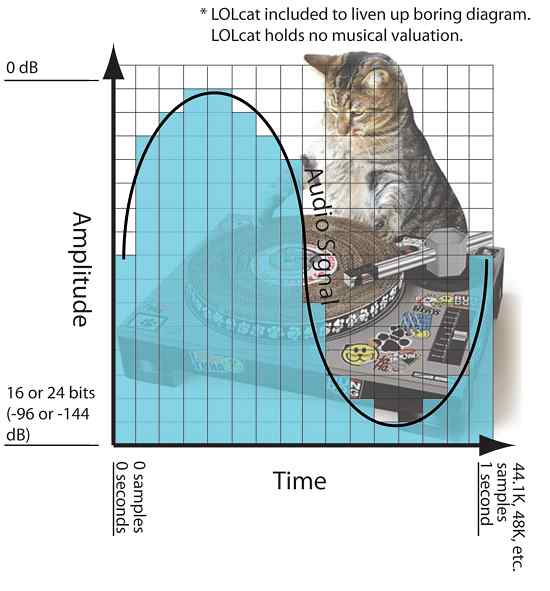
In the diagram below you can see a visualization of this where there is an organic sine wave playing for one second. It starts in 0 seconds and ends in 1 second. The blue bars represent the digital approximation of the sine wave where each bar is a sample and has been set to one of the available amplitude levels. (This diagram is obviously much grosser than in real life).

samplerate

This second of audio would have 44.1K, 48K, etc. samples. From left to right depending on the selected sample rate when recording and it will cover -144dB at 0dB at 24bit (or -96dB at 0dB at 16bit bit). The dynamic range resolution (the number of possible amplitude levels for the sample to rest) would be 65,536 at 16 bits, and get this, 16,777,216 when logged at 24 bits.

Therefore, increasing the bit depth greatly increases our amplitude resolution and dynamic range. What is not so obvious is where the increase in dynamic range occurs. The added dB is added to the softest part of the sound since the amplitude can never exceed 0 dB. What this does is allow you to hear more delicate sounds (like a reverb tail running at -130 dB) to be heard, which might otherwise be cut off to a 16-bit, -96 dB sample.

What is bitrate, a thorough explanation

Normally when people read or listen to some of the terms they use frequently referred to music or video when playing on a digital device, it is possible that some terms are very confusing for the common user.

Sometimes people do not understand at all what these terms refer to and therefore make bad decisions in this regard, it may also happen that they completely ignore this information which generates an unsatisfactory result.

That is bitrate, a complete explanation.

When we play music or video, we are transmitting information from a file to the medium that reproduces that information. Bitrate measures the amount of information What is transmitted every second.

let’s look at an example that will allow us to understand very clearly what exactly bitrate is.
Imagine that I must tell you what happened at a dinner, but I can only use three words to tell you what dinner was like.

I could say For example “it was very tasty” and already there use the three words you could use. Of course the description and information is too short.
and instead, I can use 10 words, my description will have information and therefore it will be a higher quality description.
“It was a tasty dinner, with a very familiar and warm atmosphere” if you look closely at crypto contains more information so much makes a better portrait of what happened that night.

And if instead of using 10 words I can use 300 words it could be a much clearer story, with better quality.

Well that’s exactly what happens with bitrate. when a song or video is played if only a small amount of bits can be transmitted every second, detail that can be displayed will be poor because many details will have to be omitted. on the other hand, as the amount of bits increases every second, the audio will continue to be enriched so much will be of higher quality.

So now we are clear. Because it is important the amount of information transmitted every second, going to have greater wealth is to say higher quality. then act to what the term bitrate refers and now we understand exactly what it means. It is obvious that more bits per second will take up more space on the hard disk. Why the file will contain much more information And in return we will get more details and more richness in reproduction.
We will have to decide if what we want is to save disk space and therefore we will choose a low bit rate or on the contrary our priority will be quality and in that case we will choose a higher bit rate, with much more information per second. but that will take up much more space on the hard drive.
in the same way that a description of three words occupied much less space but transmitted a much poorer description, on the other hand a description of 400 words will occupy much more space But it will offer description in much more detail and therefore with greater quality.
Did you see that it was very easy to understand what bitrate means?

Some details of the sample rate

For many years it was thought that the sample rate or sampling frequency did not decisively influence the final quality of the digital audio; There are currently several engineers who record in 44.1K or 48K without really knowing why they do it. With the advent of new and better computers, interfaces, ports and protocols, 88.2K, 96K and up to 192K entered the discussion table on the best sample rate to use. It has always been the subject of discussion between engineers and audiophiles; some argued that they did hear the difference between different sample rates and others that did not, and the topic has been subjected to millions of A / B tests with very high quality equipment, causing all kinds of opinions found and uncompromising, fights and friendships of years broken

samplerate

While this is a basic issue of digital audio, it is always surrounded by a halo of mystery, mysticism and magic (like every sound theme), which is well worth clarifying.

 What is the sample rate?

This topic, although it occurs in the first or second class of digital audio, is not always understood correctly. In scholastic thinking, sample rate is defined as the amount of audio samples transported and taken per second. Since this is a unit of measurement over a second and with events that occur cyclically, the Hertz (1 / Frequency) is used as a unit. Obviously we cannot talk about this subject without referring to the Nyquist sampling theorem, which was tested by Shannon almost twenty years after its publication and in which it is stated that for a signal of limited bandwidth (B) (for example, a vibraphone reaches 14.917Hz), the sampling frequency must be twice its bandwidth (2 * B). Then, taking the previous example, we can say that: 2 * B → 2 * 14.917Hz → The sampling frequency for 14.917Hz should be 29.834Hz. This would be equivalent to 29,834 samples per second (1/29, 834) to be able to regenerate the signal of a vibraphone without error. Hence, it is taken that the highest frequency that human beings listen to is 20kHz and if we apply Nyquist it should be 40kHz, but it takes 44.1kHz to meet the demanding ears and for a matter of multiples.

44.1K or 48K to 88.2K or 96K, the correct division

At the dawn of the digital audio era, Nyquist was used to use the sampling resolution of 44.1K, used at that time audio CD format that played at 16bit / 44.1kHz. With the advent of DVD and Blu Ray as video and audio formats, resolutions such as 24Bits / 48K or 24Bits / 96kHz began to be used. Although for many years there were recordings that were made in 24Bits / 88.2kHz or 24Bits / 96kHz, at a certain time of mastering, before sending it to the disk duplicator, the audio suffered a mutilation that reduced it to 16Bits / 44.1kHz as It was ordered by the CD format. This process should be carried out with equipment specially designed for this function and in stages so that the audio did not suffer a very noticeable cut and the bad conversion was evidenced. Although the old and dear Dither was applied since then to compensate for this process (something like “grain” in the cinema. Watch a film without “grain” and it will look like HD even though it was filmed in 1980 on tape and goes to notice until the makeup of the actor and the assembly of the special effects, something otherwise disagreeable).

Generally, to prevent the audio from mutilating or applying several conversions that degrade it, it was decided at what resolution to record before pressing the REC button (we will not mention those that come down directly with your DAW from 24Bits / 96kHz to 16Bits / 44.1kHz in one step to export the audio … there is a place reserved especially for them in hell). If the audio was going to end on CD, a 88.2kHz sample rate was generally applied, since at the time of mastering, with the symmetric re-sampling at “half”, it was 44.1kHz.

Sounds better?

The subjective point of this is that we expect recordings to “sound” better at a higher sample rate. The reality is that if we record in high sample rates, with very good sampling, our sound will not “sound better”, but will be more detailed. Obviously, if our sound source is bad, our microphones and preamps too and so on, no matter how much we record at 192K, the result will not be the best. Now, if we use a good sound source, good audio chain and a good converter, everything will be obviously good. But don’t confuse; We are talking about detail here, not if it will sound more “warm,” “fat,” or “full-bodied.” This translates into a more homogeneous capture of the entire frequency spectrum, both audible and non-audible.

sample rate

CPU, disk and plug-ins

Obviously, having a higher sample rate means that our processor must do more calculations, since it has to process more samples (or audio samples). Depending on the amount of plug-ins that we use before a multitrack in high resolution, our use of both DSP and native processors (the computer equipment), will increase significantly, making it very difficult or impossible to work. There are several options to overcome this problem, from buying more processor or DSP, using fewer processes or external equipment (hybrid mixing), to borrowing a machine. The only option that should never go through our minds is to lower the resolution of the audio, process and upload it again. The serious problem that comes with this is a cut in the audio, which is not reversible and what is limited and trimmed, so it stays.

Another aspect to consider is that the storage speed must be in accordance with the audio resolution we use. Suppose we want to record at 24Bits / 96kHz; The transfer rate would be: 2304kbits / second. Now, calculating the amount of tracks, we should use a disc that really reaches us in speed for this transfer rate (topic to be developed in another article).

In these times, storage size is not a problem, but speed is. Having three terabyte disk drives are generally used for 5400 rpm dish disks; the least that should be used if they are not solid state disks, would be 7200 rpm plate disc drives. Obviously, with 5400 rpm discs, we would have a third reduction in the final transfer speed and reading and writing possibilities called “iops” (in out per second or in and out per second), which have a certain number, depending on the disk, capacity and arrangement of the same (RAID) which, depending on how much we demand in the resolution of the audio, amount of channels, processing (plug-ins) and expected latency (if we record with real-time monitoring), we will surely face some problems like “clicks” and / or “pops” in our audio.

Clock

The importance of using a good clock (or clock) and being in sync with all the elements that belong to our audio chain is vital. Recall that a few articles ago we have exposed this topic in detail, but it should be reinforced in this article. Several ADC and DAC converters of economic interfaces do not perform sampling and quantization in the correct or expected manner; External clocks or protocols such as Dante help the synchronization between several devices to be correct and improve the audio quality. Much of the final quality of our work in audio is in this part of the process and it is important that if we take our work and passion seriously, we begin to pay attention to these kinds of details that are generally overlooked.