Samplerate, what is sample rate


Free Download Mp4Gain
picture

The sampling frequency is the time that results from the time between two samples. It is given in samples per second (S / s).

Sampling Rate

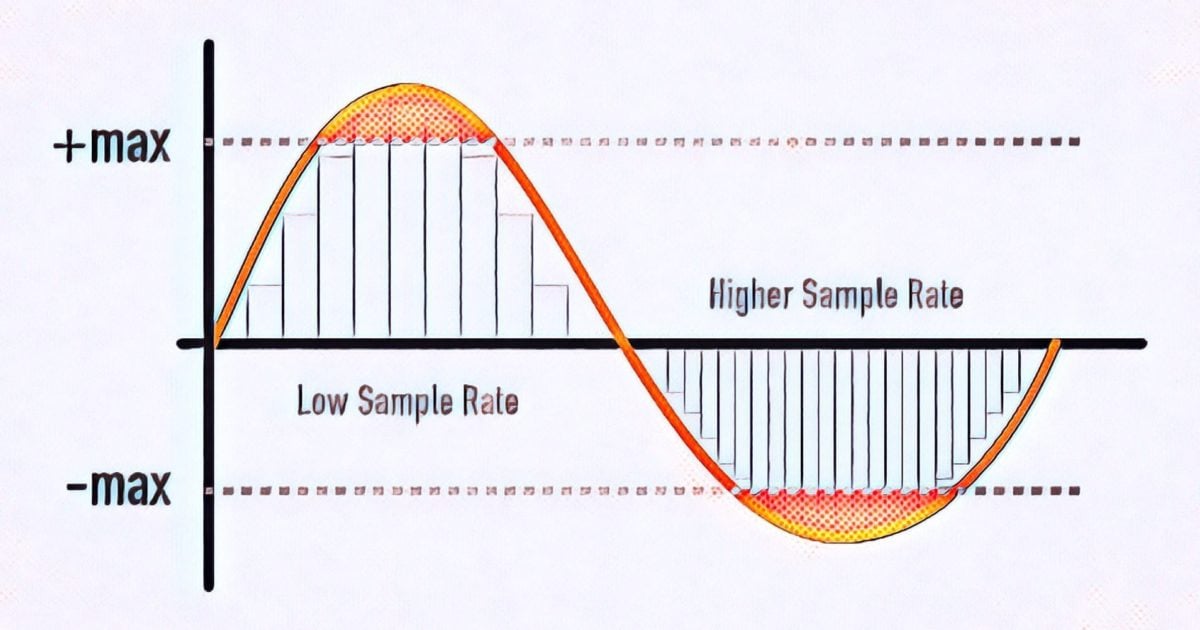
The level of the sampling frequency is a criterion for the reproducibility of the frequency of the sampled signal. The closer the sampling times are, the better the signal can be reproduced.

Sampling rate

Relationship between frequency and sampling frequency

For example, if an analog signal is sampled once per millisecond (ms), the sample rate is 1 kHz and the sample rate is 1000 samples per second. If the sampled signal has a frequency of 1 kHz, the signal is sampled once per period. It cannot be played. If, on the other hand, the frequency of the signal is 100 Hz, the signal is sampled ten times with the same sample rate. Therefore, the signal is easily reproducible. Therefore, the sampling frequency must be in a certain relation to the frequency of the signal. This relationship is through the given sampling theorem. Accordingly, the reproduction of the signal requires a sampling frequency that is at least twice the frequency of the signal. This applies to sine-type signals for their 1st harmonic, but not to square wave or pulse signals.

Audio sampling frequencies

In the case of voice transmission over ISDN with a maximum frequency range of 4 kHz, the sampling frequency is 8 kHz, which corresponds to a sampling interval of 125 µs. For audio with a maximum frequency range of 20 kHz, the sampling frequency is 44.1 kHz (22.67 µs) and 48 kHz (20.83 µs). For high-quality multi-channel audio, the sample rate can be up to 192 kHz. Much higher values ​​are found for video and HDTV. For digital video, this results in a 6.5 MHz bandwidth for the luminance signal, a sampling frequency of more than 13 MHz and a sampling interval of 74 ns. The sample rate for HDTV is even higher with 74 MHz and a sample rate of 13.5 ns.
In the case of pulse-shaped signals, the sampling frequency must be many times greater than its fundamental oscillation, since otherwise important pulse parameters cannot be determined. If the sample rate is many times higher than the theoretically required sample rate, we are talking about oversampling.


Free Download Mp4Gain
picture


Mp4Gain Main Window
picture


Mp4Gain Features
picture


Free Download Mp4Gain
picture

Everything you need to know about samples and bits

I started delving into depth and sample rate in my last mixing / mastering tutorial, and while we’re not necessarily digital audio engineers, some background on what bit depth and sample rate is good information for anyone. participate in digital music. It’s something you always work with, whether you know it or not, and it’s great background information for understanding whether understanding the building blocks of digital audio is critical for personal gain or just to be able to sound smart just in case. where the conversation never comes up.

Samplerate

So the first thing to understand is that bit depth and sample rate only exist in digital audio. In digital audio, bit depth describes amplitude (vertical axis) and sample rate describes frequency (horizontal axis). So when we increase the number of bits we are using we are increasing the amplitude resolution of our sound and by increasing the number of samples per second we are using we are increasing the frequency resolution of our sound.

In an analog system (and in nature), the audio is continuous and fluid. In a digital system, the smooth analog waveform is only approximated by the samples and must be set to a limited number of amplitude values. When you sample a sound, the audio is divided into small sections (samples) and these samples are fixed at one of the available amplitude levels. The process of fixing the signal to an amplitude level is called quantization, and the process of creating the sample slices is, of course, called sampling.

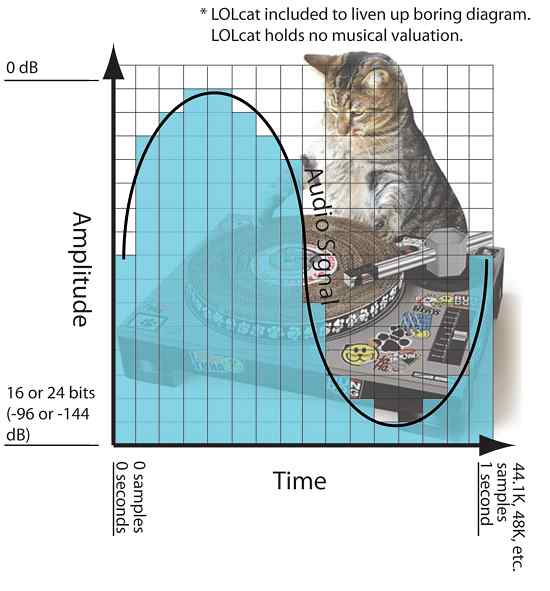
In the diagram below you can see a visualization of this where there is an organic sine wave playing for one second. It starts in 0 seconds and ends in 1 second. The blue bars represent the digital approximation of the sine wave where each bar is a sample and has been set to one of the available amplitude levels. (This diagram is obviously much grosser than in real life).

samplerate

This second of audio would have 44.1K, 48K, etc. samples. From left to right depending on the selected sample rate when recording and it will cover -144dB at 0dB at 24bit (or -96dB at 0dB at 16bit bit). The dynamic range resolution (the number of possible amplitude levels for the sample to rest) would be 65,536 at 16 bits, and get this, 16,777,216 when logged at 24 bits.

Therefore, increasing the bit depth greatly increases our amplitude resolution and dynamic range. What is not so obvious is where the increase in dynamic range occurs. The added dB is added to the softest part of the sound since the amplitude can never exceed 0 dB. What this does is allow you to hear more delicate sounds (like a reverb tail running at -130 dB) to be heard, which might otherwise be cut off to a 16-bit, -96 dB sample.