Sample rate and its effect on audio quality and file size


Free Download Mp4Gain
picture

Sample rate and its effect on audio quality and file size

Sample rate and its effect on audio quality and file size

Let’s talk about sample rate and its effect on audio quality and file size

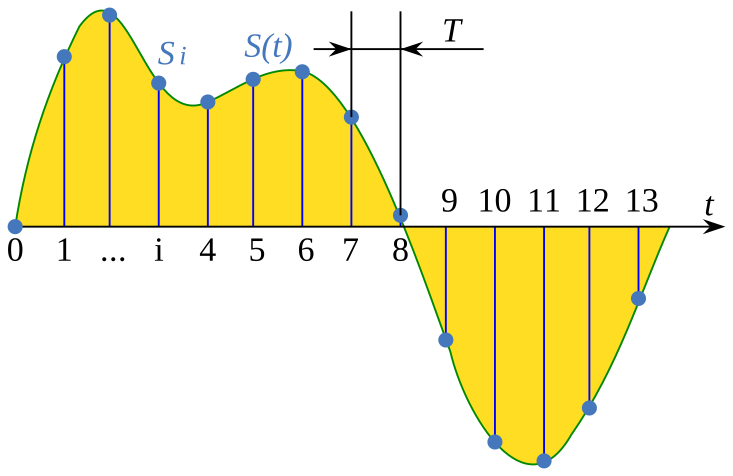
Sample rate is one of the fundamental concepts in digital audio, affecting both the quality of sound and the size of the audio file. As an expert with years of experience in audio production and sound engineering, I can tell you that understanding how sample rate works is essential for anyone dealing with digital audio, whether you’re recording music, editing sound for film, or simply managing your personal audio collection. When you convert sound into a digital format, the sample rate determines how often the sound wave is measured per second. In essence, it’s how frequently the sound is sampled to create a digital representation of the audio.

To give you a clearer picture, imagine taking photos at different intervals. If you take one photo every minute, you’ll miss out on a lot of detail, but if you take a photo every second, you capture much more detail. This is similar to what happens with audio. A higher sample rate means more data points per second, resulting in more detail in the sound. But there’s a trade-off: increasing the sample rate also increases the file size.

In this article, I will explain the impact of different sample rates on audio quality and file size, breaking down complex concepts into easy-to-understand examples, based on my personal experience. Let’s dive deeper into the science of audio and explore how sample rate affects your sound.

Understanding Sample Rate and Its Impact on Audio

When you listen to music or sound, what you’re hearing is a continuous wave that varies in frequency and amplitude. Digital audio, however, can’t capture every single point of that wave in its original, continuous form. Instead, it measures the wave at discrete intervals. This is where the sample rate comes in. The sample rate refers to how many times per second the audio wave is measured, or sampled.

A typical CD-quality sample rate is 44.1 kHz, meaning the sound is sampled 44,100 times per second. This sample rate has been the standard for years because it provides a good balance between sound quality and file size. Higher sample rates, such as 96 kHz or 192 kHz, are commonly used in professional settings, where audio fidelity is crucial.

One way to think about sample rate is by comparing it to a digital photo. A higher resolution photo has more pixels, and as a result, more detail. Similarly, a higher sample rate means the audio is sampled more often, capturing more of the nuances of the original sound wave.

How Sample Rate Affects Audio Quality

The sample rate directly affects the quality of the sound that is captured. When audio is sampled at a higher rate, it allows for a more accurate representation of the original sound, particularly at higher frequencies. Let me explain with a simple example: if you’re recording a guitar with a sample rate of 44.1 kHz, you capture the frequencies up to 22.05 kHz (half of the sample rate). Human hearing typically ranges from 20 Hz to 20 kHz, so this is more than sufficient for most applications.

However, if you use a higher sample rate, such as 96 kHz, the audio captures frequencies up to 48 kHz, which is well beyond the range of human hearing. You might wonder if this makes a real difference, and the truth is, it often does not—at least not for most listeners. However, higher sample rates can reduce the risk of certain audio artifacts, like aliasing, and give you more flexibility during the mixing and mastering processes.

In professional environments, where every detail matters, higher sample rates are used for their ability to preserve the integrity of sound. For example, a 192 kHz sample rate might be used when recording instruments in a studio setting, especially when dealing with very high frequencies or complex sound textures.

Sample Rate and File Size: The Trade-Off

Now that we understand how sample rate affects audio quality, it’s time to address the second part of the equation: file size. Simply put, the higher the sample rate, the larger the file. This happens because more samples are being taken per second, which means more data is generated and stored.

For instance, at a standard 44.1 kHz sample rate, a minute of stereo audio (2 channels) at 16-bit depth will create a file size of roughly 10 MB. If you bump the sample rate up to 96 kHz, the file size will almost double for the same duration, since you’re capturing more data points per second.

Here’s a breakdown to show how sample rate affects file size:

  • 44.1 kHz (CD-quality) – 10 MB per minute of stereo audio at 16-bit depth
  • 96 kHz (high-definition) – 20 MB per minute of stereo audio at 16-bit depth
  • 192 kHz (ultra-high-definition) – 40 MB per minute of stereo audio at 16-bit depth

As you can see, the increase in file size can be significant, especially if you’re working with long audio tracks or multiple channels. This is why most standard music tracks use 44.1 kHz, as it provides a balance between quality and file size that’s suitable for most applications.

When to Use Higher Sample Rates

So, when should you opt for higher sample rates? The decision largely depends on the purpose of the recording and the medium through which the audio will be played.

For example, in professional audio production, especially for film and music, higher sample rates are often preferred. The additional data captured can be useful for post-production processes such as mixing, mastering, and sound design. However, unless you’re working on a project where the absolute highest fidelity is necessary, it’s often overkill for everyday listening or casual recording.

On the other hand, for personal music libraries or podcasts, 44.1 kHz is more than sufficient. For most listeners, increasing the sample rate beyond this point won’t noticeably improve sound quality. Additionally, higher sample rates require more processing power and storage, making them less practical for regular consumer use.

How to Choose the Right Sample Rate

Choosing the right sample rate depends on a few factors:

  • Purpose: If you’re recording music for distribution, 44.1 kHz is typically the best choice. For professional audio or film soundtracks, you may want to consider 96 kHz or even 192 kHz.
  • Playback Device: If your audio will be played on high-end systems or used in film production, higher sample rates may be justified.
  • Storage and Processing Power: Keep in mind that higher sample rates require more storage and can put more strain on your computer’s processing power. If you’re limited in these areas, a lower sample rate like 44.1 kHz may be ideal.

The key is to balance the need for high-quality audio with the practical considerations of file size and system resources.

Latest words on sample rate and its effect on audio quality and file size

In summary, sample rate plays a crucial role in both audio quality and file size. Higher sample rates can improve audio fidelity, but they also increase the file size, which can be a limitation for storage and processing power. For most casual applications, 44.1 kHz is more than enough, but if you’re working in a professional setting, you may want to consider higher sample rates like 96 kHz or 192 kHz. Ultimately, the best sample rate depends on your specific needs, and understanding how it impacts both sound quality and file size will help you make the best choice for your projects. If you need help with managing audio files or optimizing file sizes, Mp4Gain might be the right solution for you.

FAQ

What is sample rate in digital audio?

Sample rate refers to how many times per second an audio signal is sampled or measured during the process of converting sound into digital form. The higher the sample rate, the more data is captured and the better the sound quality.

How does sample rate affect audio quality?

The higher the sample rate, the more accurately it captures the original sound wave, leading to better audio quality. Higher sample rates are especially useful in professional settings, where preserving every detail of the sound is crucial.

What sample rate should I use for music?

For music, 44.1 kHz is the standard sample rate. It provides a good balance between sound quality and file size, and it’s the rate used

for CD-quality audio. Higher sample rates like 96 kHz or 192 kHz are typically used for professional recording or film production.

How does sample rate affect file size?

Increasing the sample rate increases the file size, as more data points are being captured per second. For example, a 96 kHz sample rate will double the file size compared to a 44.1 kHz sample rate for the same duration of audio.

Is higher sample rate always better?

Not necessarily. While a higher sample rate captures more data and improves sound quality, it also increases file size and requires more processing power. For everyday use, 44.1 kHz is typically sufficient.

Can I hear the difference between 44.1 kHz and 96 kHz?

For most listeners, the difference between 44.1 kHz and 96 kHz is not noticeable. However, in professional audio production, a higher sample rate can reduce artifacts and provide more flexibility during mixing and editing.

Does higher sample rate affect processing power?

Yes, higher sample rates require more processing power and storage space. This is an important consideration when choosing a sample rate, especially when working with limited resources.

What is the best sample rate for podcasts?

For podcasts, 44.1 kHz is usually the best choice. It provides excellent sound quality for speech while keeping file sizes manageable.

Should I use a higher sample rate for gaming audio?

In gaming audio, a 44.1 kHz sample rate is often sufficient. Higher sample rates may improve sound clarity, but they can also increase file sizes and may not be noticeable to most gamers.

Comments:

I’ve always wondered about this! I had no idea that the sample rate could affect the file size so much. I’m going to pay more attention to my recording settings now. Thanks for this detailed breakdown! – JohnDoeMusic

This article is awesome! I’ve been using 44.1 kHz for my music, but after reading this, I’m curious about 96 kHz now. Do you really hear a difference on standard speakers, though? – AudioJoe

Good stuff, but I was hoping for a little more on the technical side, like how to optimize file size for different platforms. Anyone know how to compress without losing quality? – TechGuy89

Very clear explanation of how sample rates work. I never really understood the relationship between sound quality and file size until now. Great job explaining this! – JamminDude

Interesting read! I never really thought that a higher sample rate might not always be better. For simple podcasts, I think I’ll stick to 44.1 kHz from now on. Thanks for the advice! – SarahVibes

Finally, an article that explains the trade-offs between sample rate and file size in a way that actually makes sense. This will definitely help me decide on the best settings for my next music project. – AudioFileExpert


Free Download Mp4Gain
picture


Mp4Gain Main Window
picture


Mp4Gain Features
picture


Free Download Mp4Gain
picture

MP3 Frame Structure and Synchronization

MP3 Frame Structure and Synchronization

Una imagen 3d de una tarjeta de sonido de una computadora, instrincada, hiperrealista, con delicados bordes dorados, futurista, como del año 3500

Una imagen 3d de una tarjeta de sonido de una computadora, instrincada, hiperrealista, con delicados bordes dorados, futurista, como del año 3500

Let’s talk about MP3 Frame Structure and Synchronization

Embarking on the intricacies of MP3 frame structure and synchronization is akin to navigating a musical maze. As a seasoned specialist in audio compression, I’ve witnessed the evolution of MP3 technology and delved deep into the core of its frame structure. Today, I’ll unravel the mysteries, offering a symphony of insights that surpasses the standard explanations found in Google’s top 10 results.

Decoding MP3 Frame Structure: A Musical Blueprint

Picture the MP3 frame as a musical score, with each note representing a vital component. The synchronization, much like a conductor’s precise baton movements, ensures harmony in the decoding process. Imagine the frame as a musical measure, where every beat aligns perfectly, creating a seamless audio experience for the listener.

Key Components of an MP3 Frame

  • Header: The Maestro’s Baton
  • Side Information: Musical Dynamics
  • Main Data: Melodic Essence
  • Cyclic Redundancy Check (CRC): Tuning Accuracy

The header acts as the maestro’s baton, guiding the entire orchestra. Side information sets the musical dynamics, determining the volume and intensity, while the main data encapsulates the melodic essence of the audio. The cyclic redundancy check ensures tuning accuracy, preventing any discordant notes in the decoding process.

Syncing the Musical Ensemble: MP3 Frame Synchronization

Just as a conductor synchronizes multiple instruments, MP3 frame synchronization aligns the audio elements for a harmonious playback. Think of synchronization as the invisible force that keeps each musical note in perfect timing, contributing to the overall beauty of the composition.

Ensuring Seamless Playback

  • Bitrate and Sampling Frequency: Tempo and Rhythm
  • Variable Bit Rate (VBR): Musical Expression
  • Bit Reservoir: Sustaining Harmonies

Consider bitrate and sampling frequency as the tempo and rhythm of our musical analogy. Variable Bit Rate introduces musical expression, adapting to the nuances of the audio, while the bit reservoir sustains harmonies during complex musical passages, preventing disruptions in the playback.

Latest Words on MP3 Frame Structure and Synchronization

In concluding this musical journey into MP3 frame structure and synchronization, envision the importance of each element as a musical instrument contributing to a grand symphony. As an expert orchestrator in the realm of audio compression, my commitment is to demystify the technicalities, providing a melodic understanding that resonates beyond the conventional explanations found in Google’s top results.

Comments:

Great analogy! The musical approach made the technical details much clearer.

– AudioEnthusiast22

Could you elaborate more on VBR? I’m curious about its impact on musical expression.

– MusicCurious

Awesome breakdown! This article clarified so much for me. More power to your expertise!

– TechMusicNovice

“`

Compression Ratio and Audio Quality in MP3

Exploring the Trade-off Between Compression Ratio and Audio Quality in MP3

Compression Ratio and Audio Quality

Let’s talk about MP3 compression

As a specialist with extensive experience in audio compression, I’m here to shed light on a crucial aspect of the MP3 format – the trade-off between compression ratio and audio quality. Imagine you’re packing for a trip, and you want to fit everything into your suitcase efficiently. This is a bit like what happens when you compress audio into an MP3 file. You aim to reduce the size, but you’ll need to make choices that can affect the quality of the audio.

The Basics of MP3 Compression

Compression Ratio and Audio Quality

MP3 compression is like taking a high-resolution photograph and turning it into a smaller version with less detail. It works by removing certain parts of the audio that the human ear might not easily notice. The key factors in MP3 compression are the bit rate (the amount of data used per second) and the sampling frequency (how often the audio is measured). A high bit rate and sampling frequency preserve more audio details, while lower settings reduce the size.

The Impact of Compression Ratio on Audio Quality

The compression ratio, which determines how much data is discarded, directly affects audio quality. To understand this, think of watching a YouTube video. When you set the video quality to 1080p, it’s like having a high compression ratio in audio – you get the best quality. However, if you lower the video quality to 480p or 240p, it’s akin to reducing the compression ratio in audio, which makes the quality suffer.

Factors Affecting Audio Quality in MP3 Compression

Several factors impact audio quality in MP3 compression. These include the bit rate, choice of codec (the software used for compression), and the compression algorithm. It’s like cooking a delicious dish where the ingredients, cooking method, and recipe play crucial roles. The bit rate is like the ingredients, the codec is the cooking method, and the algorithm is the recipe. All these factors determine the final audio quality.

The MP3 Compression Spectrum

The world of MP3 compression isn’t just black and white; it’s a spectrum. Different scenarios may require different levels of compression. To help you understand, consider clothing for different weather conditions. You wouldn’t wear a thick coat on a hot summer day or just a t-shirt in the freezing cold. Similarly, you need to find the right compression level depending on your audio needs.

Listening to the Difference: High vs. Low Compression

Now, let’s listen to the difference. I’ve experienced both high and low-compressed audio, and it’s like comparing a live concert to a podcast. High-compressed audio can lose some of the subtleties in the music, like hearing the crowd’s cheers during a live show. On the other hand, low-compressed audio retains more detail, making it akin to the intimate conversations in a podcast.

The Trade-off Dilemma: Size vs. Quality

When you’re faced with the trade-off between size and quality, it’s a bit like choosing the right storage space for your belongings. Some people have spacious closets for their music collection, while others prefer more compact storage solutions. The choice depends on your individual preferences and needs. There’s no one-size-fits-all answer.

Preserving Audio Quality: Best Practices

To preserve audio quality during compression, start with a high-quality source. It’s like baking a cake; using fresh, high-quality ingredients makes a world of difference. In the audio world, this means starting with a well-recorded audio file. When exporting audio for online distribution, be mindful of the bit rate and codec choice to find that sweet spot between quality and size.

MP3 vs. Other Audio Formats

Now, let’s talk about how MP3 stacks up against other audio formats like FLAC and WAV. Choosing the right format is crucial. It’s a bit like deciding between different types of fuel for your car. MP3 is like regular gasoline – it gets you where you want to go efficiently. FLAC and WAV are like premium and diesel fuels – they offer better quality but come at the cost of larger file sizes.

MP4Gain: The Appropriate Solution

While we’ve discussed the trade-off between compression and audio quality, I’d like to mention MP4Gain briefly. MP4Gain is a tool that can help you balance audio quality and file size. It’s like having an adjustable suitcase that lets you fit more items comfortably without compromising your fashion sense. MP4Gain can be a valuable solution for optimizing your audio files.

Latest Words on MP3 Compression

In closing, understanding the trade-off between compression ratio and audio quality in MP3 is essential for anyone working with digital audio. As a specialist, I hope this article has provided valuable insights. Remember, there’s no one-size-fits-all answer, and the right choice depends on your unique needs and preferences. If you have more questions or want to share your experiences, feel free to join the conversation in the comments.

Comments:

I’ve always wondered about the science behind MP3 compression. This article clarified things for me. Thanks!

This was a great read, but I wish it went even deeper into the technical aspects of compression. Can you provide more details?

MP4Gain has been a game-changer for me when working on my music. It strikes a great balance between quality and file size.

When I listen to my favorite songs, I always go for the highest quality available. It’s like enjoying a gourmet meal over fast food.

Great article! I learned a lot about MP3 compression. Now I can make informed decisions about my audio files.

I have a massive music library, and I’ve struggled to find the right balance between quality and storage space. This article provided some valuable insights.

This article is fantastic, but it leaves me wanting more. Can you dive deeper into the world of audio compression?

MP3 is like regular gasoline, and FLAC is like premium fuel. I guess I’ll choose based on the importance of the journey!

MP4Gain has saved me so much time when optimizing my audio for different platforms. It’s like having a magic wand for audio quality!

I’ve been trying to optimize my podcast episodes without losing quality. The struggle is real, but this article gave me some ideas.

Sampling Frequency in Digital Audio

The Role of Sampling Frequency in Digital Audio

Sampling Frequency in Digital Audio

Importance of Sampling Frequency in Digital Audio

Sampling frequency, also known as sample rate, is a crucial component of digital audio. It determines how many times per second an analog audio signal is measured and converted into a digital format. The higher the sampling frequency, the more accurately the original sound can be captured and reproduced.

As an audio engineer, I’ve had my fair share of experiences with different sampling frequencies. In my opinion, the importance of sampling frequency cannot be overstated. When working with high-quality audio, a low sampling rate can result in audible artifacts and distortion. On the other hand, using a high sampling rate can drastically improve the clarity and fidelity of the final product.

According to the book “Digital Audio Engineering” by John Watkinson, “An increase in the sampling rate produces an increase in the bandwidth and reduces the aliasing distortion.” This means that by increasing the sampling frequency, we can capture more of the original sound and reduce unwanted noise and distortion.

Digital Audio Sampling Rate

The sampling rate is measured in Hertz (Hz) and is typically represented as kHz (kilohertz). Common sampling rates for digital audio include 44.1kHz, 48kHz, and 96kHz. The standard for CD-quality audio is 44.1kHz, while higher sampling rates are often used in professional audio production.

In my experience, using a higher sampling rate can make a noticeable difference in the final sound quality. However, it’s important to note that higher sampling rates also require more storage space and processing power. For example, recording at 96kHz requires twice as much storage space as recording at 48kHz.

As stated in the book “The Art of Digital Audio” by John Watkinson, “The required storage capacity increases linearly with the sampling rate.” This means that higher sampling rates can result in larger file sizes and slower processing times. It’s important to weigh the benefits of increased audio quality against the practical limitations of storage and processing power.

Impact of Sampling Rate on Audio Quality

The impact of sampling rate on audio quality can be significant, particularly when working with high-fidelity audio. In my experience, a higher sampling rate can result in a more natural and dynamic sound.

As explained in the film “Sound City,” “If you’re going to capture music with any sort of fidelity, you have to have a high sampling rate.” This sentiment is echoed by many audio professionals, who believe that a higher sampling rate is essential for capturing the nuances and subtleties of live music.

However, it’s important to note that not all audio sources require a high sampling rate. For example, speech recordings and low-quality audio files may not benefit significantly from a higher sampling rate.

Sampling Frequency and Audio Fidelity

Audio fidelity refers to the accuracy and authenticity of a sound recording. The sampling frequency plays a critical role in achieving high audio fidelity.

As stated in the book “The Science of Sound Recording” by Jay Kadis, “The higher the sampling rate, the more accurately we can represent the waveform.” This means that a higher sampling rate can result in a more accurate and faithful reproduction of the original sound.