Sample rate and its effect on audio quality and file size


Free Download Mp4Gain
picture

Sample rate and its effect on audio quality and file size

Sample rate and its effect on audio quality and file size

Let’s talk about sample rate and its effect on audio quality and file size

Sample rate is one of the fundamental concepts in digital audio, affecting both the quality of sound and the size of the audio file. As an expert with years of experience in audio production and sound engineering, I can tell you that understanding how sample rate works is essential for anyone dealing with digital audio, whether you’re recording music, editing sound for film, or simply managing your personal audio collection. When you convert sound into a digital format, the sample rate determines how often the sound wave is measured per second. In essence, it’s how frequently the sound is sampled to create a digital representation of the audio.

To give you a clearer picture, imagine taking photos at different intervals. If you take one photo every minute, you’ll miss out on a lot of detail, but if you take a photo every second, you capture much more detail. This is similar to what happens with audio. A higher sample rate means more data points per second, resulting in more detail in the sound. But there’s a trade-off: increasing the sample rate also increases the file size.

In this article, I will explain the impact of different sample rates on audio quality and file size, breaking down complex concepts into easy-to-understand examples, based on my personal experience. Let’s dive deeper into the science of audio and explore how sample rate affects your sound.

Understanding Sample Rate and Its Impact on Audio

When you listen to music or sound, what you’re hearing is a continuous wave that varies in frequency and amplitude. Digital audio, however, can’t capture every single point of that wave in its original, continuous form. Instead, it measures the wave at discrete intervals. This is where the sample rate comes in. The sample rate refers to how many times per second the audio wave is measured, or sampled.

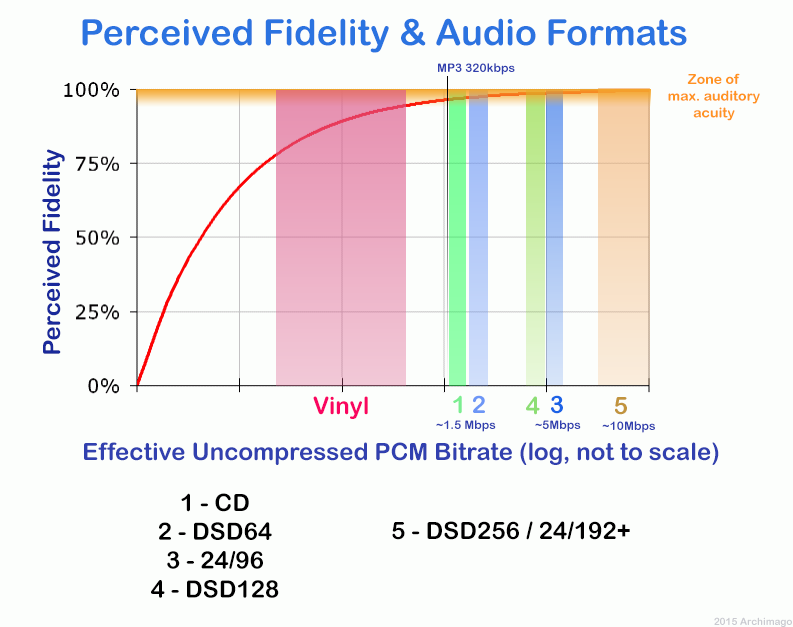
A typical CD-quality sample rate is 44.1 kHz, meaning the sound is sampled 44,100 times per second. This sample rate has been the standard for years because it provides a good balance between sound quality and file size. Higher sample rates, such as 96 kHz or 192 kHz, are commonly used in professional settings, where audio fidelity is crucial.

One way to think about sample rate is by comparing it to a digital photo. A higher resolution photo has more pixels, and as a result, more detail. Similarly, a higher sample rate means the audio is sampled more often, capturing more of the nuances of the original sound wave.

How Sample Rate Affects Audio Quality

The sample rate directly affects the quality of the sound that is captured. When audio is sampled at a higher rate, it allows for a more accurate representation of the original sound, particularly at higher frequencies. Let me explain with a simple example: if you’re recording a guitar with a sample rate of 44.1 kHz, you capture the frequencies up to 22.05 kHz (half of the sample rate). Human hearing typically ranges from 20 Hz to 20 kHz, so this is more than sufficient for most applications.

However, if you use a higher sample rate, such as 96 kHz, the audio captures frequencies up to 48 kHz, which is well beyond the range of human hearing. You might wonder if this makes a real difference, and the truth is, it often does not—at least not for most listeners. However, higher sample rates can reduce the risk of certain audio artifacts, like aliasing, and give you more flexibility during the mixing and mastering processes.

In professional environments, where every detail matters, higher sample rates are used for their ability to preserve the integrity of sound. For example, a 192 kHz sample rate might be used when recording instruments in a studio setting, especially when dealing with very high frequencies or complex sound textures.

Sample Rate and File Size: The Trade-Off

Now that we understand how sample rate affects audio quality, it’s time to address the second part of the equation: file size. Simply put, the higher the sample rate, the larger the file. This happens because more samples are being taken per second, which means more data is generated and stored.

For instance, at a standard 44.1 kHz sample rate, a minute of stereo audio (2 channels) at 16-bit depth will create a file size of roughly 10 MB. If you bump the sample rate up to 96 kHz, the file size will almost double for the same duration, since you’re capturing more data points per second.

Here’s a breakdown to show how sample rate affects file size:

  • 44.1 kHz (CD-quality) – 10 MB per minute of stereo audio at 16-bit depth
  • 96 kHz (high-definition) – 20 MB per minute of stereo audio at 16-bit depth
  • 192 kHz (ultra-high-definition) – 40 MB per minute of stereo audio at 16-bit depth

As you can see, the increase in file size can be significant, especially if you’re working with long audio tracks or multiple channels. This is why most standard music tracks use 44.1 kHz, as it provides a balance between quality and file size that’s suitable for most applications.

When to Use Higher Sample Rates

So, when should you opt for higher sample rates? The decision largely depends on the purpose of the recording and the medium through which the audio will be played.

For example, in professional audio production, especially for film and music, higher sample rates are often preferred. The additional data captured can be useful for post-production processes such as mixing, mastering, and sound design. However, unless you’re working on a project where the absolute highest fidelity is necessary, it’s often overkill for everyday listening or casual recording.

On the other hand, for personal music libraries or podcasts, 44.1 kHz is more than sufficient. For most listeners, increasing the sample rate beyond this point won’t noticeably improve sound quality. Additionally, higher sample rates require more processing power and storage, making them less practical for regular consumer use.

How to Choose the Right Sample Rate

Choosing the right sample rate depends on a few factors:

  • Purpose: If you’re recording music for distribution, 44.1 kHz is typically the best choice. For professional audio or film soundtracks, you may want to consider 96 kHz or even 192 kHz.
  • Playback Device: If your audio will be played on high-end systems or used in film production, higher sample rates may be justified.
  • Storage and Processing Power: Keep in mind that higher sample rates require more storage and can put more strain on your computer’s processing power. If you’re limited in these areas, a lower sample rate like 44.1 kHz may be ideal.

The key is to balance the need for high-quality audio with the practical considerations of file size and system resources.

Latest words on sample rate and its effect on audio quality and file size

In summary, sample rate plays a crucial role in both audio quality and file size. Higher sample rates can improve audio fidelity, but they also increase the file size, which can be a limitation for storage and processing power. For most casual applications, 44.1 kHz is more than enough, but if you’re working in a professional setting, you may want to consider higher sample rates like 96 kHz or 192 kHz. Ultimately, the best sample rate depends on your specific needs, and understanding how it impacts both sound quality and file size will help you make the best choice for your projects. If you need help with managing audio files or optimizing file sizes, Mp4Gain might be the right solution for you.

FAQ

What is sample rate in digital audio?

Sample rate refers to how many times per second an audio signal is sampled or measured during the process of converting sound into digital form. The higher the sample rate, the more data is captured and the better the sound quality.

How does sample rate affect audio quality?

The higher the sample rate, the more accurately it captures the original sound wave, leading to better audio quality. Higher sample rates are especially useful in professional settings, where preserving every detail of the sound is crucial.

What sample rate should I use for music?

For music, 44.1 kHz is the standard sample rate. It provides a good balance between sound quality and file size, and it’s the rate used

for CD-quality audio. Higher sample rates like 96 kHz or 192 kHz are typically used for professional recording or film production.

How does sample rate affect file size?

Increasing the sample rate increases the file size, as more data points are being captured per second. For example, a 96 kHz sample rate will double the file size compared to a 44.1 kHz sample rate for the same duration of audio.

Is higher sample rate always better?

Not necessarily. While a higher sample rate captures more data and improves sound quality, it also increases file size and requires more processing power. For everyday use, 44.1 kHz is typically sufficient.

Can I hear the difference between 44.1 kHz and 96 kHz?

For most listeners, the difference between 44.1 kHz and 96 kHz is not noticeable. However, in professional audio production, a higher sample rate can reduce artifacts and provide more flexibility during mixing and editing.

Does higher sample rate affect processing power?

Yes, higher sample rates require more processing power and storage space. This is an important consideration when choosing a sample rate, especially when working with limited resources.

What is the best sample rate for podcasts?

For podcasts, 44.1 kHz is usually the best choice. It provides excellent sound quality for speech while keeping file sizes manageable.

Should I use a higher sample rate for gaming audio?

In gaming audio, a 44.1 kHz sample rate is often sufficient. Higher sample rates may improve sound clarity, but they can also increase file sizes and may not be noticeable to most gamers.

Comments:

I’ve always wondered about this! I had no idea that the sample rate could affect the file size so much. I’m going to pay more attention to my recording settings now. Thanks for this detailed breakdown! – JohnDoeMusic

This article is awesome! I’ve been using 44.1 kHz for my music, but after reading this, I’m curious about 96 kHz now. Do you really hear a difference on standard speakers, though? – AudioJoe

Good stuff, but I was hoping for a little more on the technical side, like how to optimize file size for different platforms. Anyone know how to compress without losing quality? – TechGuy89

Very clear explanation of how sample rates work. I never really understood the relationship between sound quality and file size until now. Great job explaining this! – JamminDude

Interesting read! I never really thought that a higher sample rate might not always be better. For simple podcasts, I think I’ll stick to 44.1 kHz from now on. Thanks for the advice! – SarahVibes

Finally, an article that explains the trade-offs between sample rate and file size in a way that actually makes sense. This will definitely help me decide on the best settings for my next music project. – AudioFileExpert


Free Download Mp4Gain
picture


Mp4Gain Main Window
picture


Mp4Gain Features
picture


Free Download Mp4Gain
picture

What is the difference between 128k and 320k music? Part 2

What is the difference between 128k and 320k music? Part 2

Bit Rate

In simple terms, we can think of a sound wave as a curve.

Bit Rate

We know that the curve is made up of points, and the sampling rate is the number of points in the middle of the length per second (the horizontal axis in the figure above). Sampling precision is the number of points in the dynamic range (upper vertical axis). The finer the positioning of these two dimensions, the greater the true sound restoration and the better the sound quality. Of course, the larger the audio file will be. The customer mentioned by the above colleague said that the latest Hi-Res Audio format released by SONY is a 6-channel 192kHz/24-bit recorded audio file. The size of the lossless format, of course, will be more than 200 megabytes.

The sampling frequency is approximately the following depending on the type of use (k is the thousand-bit symbol, 1khz=1000hz):

8khz: used for phones etc, is enough to record human voices.

22.05khz: transmission use frequency.

44.1kb: Audio CD.

48khz: used in DVD and digital TV.

96khz-192khz: used for DVD-Audio, Blu-ray HD, etc.

The common range of sample precision is 8 bits to 32 bits, with 16 bits generally used on CD.

Having said that, my friends are starting to get confused. It’s not the bitrate that determines the sound quality, so why is everyone saying that 320kb sound quality is better than 128kb?

【Audio Compression】

Well, in fact, the bit rate should be said to be another dimension, it is a compression of audio files.

Nowadays, most of the audio formats we use regularly are based on the original “WAV” file of the audio CD (44.1khz sample rate, 16bit sample precision, 2ch). The original recorded sound data is stored in a matrix, which is in PCM format, while WAV format is an encoding format developed by Microsoft. Its function is to reproduce the data in PCM format through encoding.

Since the data in WAV basically completely restores the PCM data, MP3, AAC and other lossless encoding formats are basically recompressed based on the WAV files. Therefore, we can simply think that WAV is the original audio format and other audio formats are compressed formats.

When it comes to compression, storage and transmission are inseparable. The purpose of compression is to improve storage and transmission, so before we talk about compression, we need to understand the basic units of computers.

We all know that the computer is a binary number system, and the files stored by the computer are made up of two numbers, 0 and 1. Therefore, the computer’s transmission is based on each number, and each number is called 1 ” bit”. For example, for an audio piece, its basic data is “0,1,1,1,0,1, 1 ,0”, and when transmitting, these numbers are transmitted one by one. The sampling precision mentioned above is this unit.

The storage unit of the computer is “byte (Byte)”. In the computer, 1 byte consists of 8 bits, that is, 8b(bit)=1B(Byte). In computer parlance, data storage is expressed in decimal and data transmission is expressed in binary, so 1KB=1024B=1024×8b. This is also part of the reason why the hard drive capacity we see does not match the actual capacity.

Go back and talk about audio compression, the bitrate of the audio is actually the compression ratio. So the bitrate really just defines the size of the file, but because under normal conditions the larger the file, the less data you lose, so the sound quality is relatively higher. However, the bit rate itself does not directly affect the quality of the file. For example, if we take a 128kb file as the source file, even if it is converted to a 320kb file, the sound quality will not be better than 128kb. .

What is the difference between 128k and 320k music?

What is the difference between 128k and 320k music?

Bit rate comparision

192k is a turning point. Below 192K, the sound quality is relatively damaged, especially the high-frequency part above 16Khz will be cut off.

bitrate

In a nutshell, mp3s above 192k can no longer be listened to with CD sound quality on ordinary home devices, except for Golden Ears and Hifi devices. Of course, these data are not 100% reliable. There are always people on the internet sharing fake mp3 above 192K. In fact, they are converting low bitrate music to high bitrate through software, but the sound quality will not improve. be improved. Windows Media Player compresses it. The resulting mp3 is absolutely wonderful, no matter how high the compressed bitrate is, it will cut perfectly around 16K.

Some time ago, a colleague came across a very troubled client. The mess was said to have been caused by the client asking him to provide song files larger than 100MB-200MB in size. And my colleagues don’t know much about audio formats, so they started endlessly fumbling about FLAC, WAV and audio size. In the end, the colleague did not explain to the client what was going on.

After that, other things happened that made me feel that in the music industry there are too many practitioners around me who have an extremely poor understanding of music and even lack some basic knowledge related to music. I don’t even have the idea to understand, which makes me very sad. It seems that music has only one merchandise attribute, and our practitioners only need to organize the shelves, encode various merchandise, and use the big data of users’ purchase records to recommend merchandise to users, no matter why to users. they like this. features that these products have, and use cold data to provide users with various services.

Therefore, I think it is necessary to write something. I don’t expect practitioners to become people who really love music. I just hope that even if you still think of “her” as a commodity, you can first figure out what you’re selling. and what is..

PS: The content of the first lesson is about media files. Since the relevant content involves a lot of technical stuff, it seems a bit boring, but if you read it carefully, you will find that it is actually very easy to understand, but this basic knowledge can be very helpful.

Bit Rate, Sample Rate, Lossless, MP3, FLAC, APE, 320kb, 192kb, 128kb, 44.1khz, CBR, VBR. Does this bunch of various names make you both familiar and unknown?

The higher the bitrate, the better the sound quality. Lossless music is the highest sound quality, right? So, let’s start with the sound collection.

【Audio composition】

Nowadays, when we talk about audio, everything is digital audio. Digital audio consists of three parts: sample rate, sample precision, and number of sound channels.

Sample Rate: Both the sample rate, which refers to the number of samples per second when recording the sound, expressed in Hertz (Hz).

Sampling Precision: Refers to the dynamic range of the recorded sound, measured in bits (Bit).

Bit rate in DVR. What is it and what does it affect?

Bit rate in DVR. What is it and what does it affect?

Bitrate

When talking about digital video recording, the term bit rate will surely ring a bell. This is an important parameter that affects image quality. Including recording to a DVR.

bitrate

video playback [(000152) 2019-07-13-15-20-56] .png

If you are intimidated by foreign words, the bit rate can otherwise be called the recording speed or compression ratio. Because that’s exactly what happens: the compression of the video stream. How? Let’s take a look.

After the light strikes the matrix and subsequent digitization of the image, a very dense stream of digital video signal is obtained at the output. Also, the higher the video recording resolution and frame rate, the bulkier this stream will be. You cannot write it directly to a memory card; It will fill up very quickly with huge video files and you may just not be able to cope with such a flow of information. This is why the original video stream is compressed to an acceptable bit rate. This parameter is just the output data rate. Basically it reflects the speed at which the video is written to the memory card.

Bit rate can be calculated in bits, kilobits and megabits per second – (bit / s, bps, b / s), (kbps, kbit / s, kbps) (Mbps, Mbit / s, Mbps). Most of the time, in megabits. The bit rate of the recorded video can be checked on a computer with a video editor or via the file properties menu. By dividing the number by 8, you can determine it roughly in megabytes per second; it will be more convenient to compare it with the speed of your memory card.

The bit rate indicator depends, as you might guess, on the processor and the software and hardware that is properly optimized to process the video stream. If all conditions are met, the video stream will be compressed with high quality and with minimal loss. Otherwise, the video will have noise, blurred images, artifacts, and other nasty distortions.

The bit rate also affects the size of the file. For example, at a relatively low bit rate (less than 10 megabits per second) more clips can fit on the memory card and cheap low speed cards can be used, but the video quality and details will be low. At a higher bit rate (10-20 begabits per second and more), the image will be of higher quality and more detailed. But the file size will also increase, so you need a memory card of the appropriate size and speed (16GB and above, class 10).

Manufacturers rarely indicate the bitrate on the box, therefore it is almost impossible to find out this indicator before buying. However, sometimes on the packaging you can see promises, for example, “8 hours of video in maximum quality at 32 GB”. And in this case, the bit rate can be roughly calculated. The formula is not complicated:
We took 32 gigabytes and, using the school’s computer skills, we converted them to megabits by multiplying them by eight and by 1024. Then we divided the resulting number by the number of seconds in eight hours.
– (32x8x1024) / (8×3600) – We get the result of 9.1 megabits per second.

Let’s clarify that the result will be conditional. First, because the actual volume of any card is always less than indicated. Second, the promises in the box can be just promises. Therefore, before buying, it is better to carefully study the selected model, having learned the speed of writing in the reviews.
So what bit rate should I be aiming for?

Given the adequate quality of the filling of the recorder (matrix + processor + lens + software), according to our practice, let’s say that this figure is in the region of 15 to 45 megabits per second. This bit rate allows you to get a fairly adequate video quality during the day. Again, only during the day, because night recording, as we all know, is still a weak point of many recorders due to insufficient lens aperture and small matrix pixel size.

Note that currently the maximum bit rate for recorders has been reached: 45 megabits per second, but only when working with a card with a capacity of 32 gigabytes or more. Some companies, notably Datakam and BlackVUE, are introducing bit rate selection options in settings. We find this option controversial. In our opinion, all drivers are initially interested in the highest quality videos, and it is easier to set the maximum bit rate for the recorder right away and just choose the right memory card in terms of speed and volume.