High-end sample rate conversion


Free Download Mp4Gain
picture

High-end sample rate conversion

Sample Rate Conversion

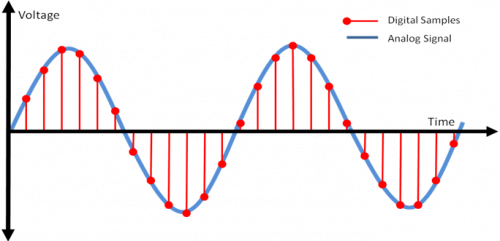
The sample rate is the number of measured digital signal samples (passes) per second.
Sample Rate Conversion

High-quality conversion (change) of the sample rate is quite a complicated and resource-intensive process. Especially if the frequencies of the input and output signals are not multiples of each other (44.1 and 96 kHz). Next, we will look at the characteristics of the audio sample rate conversion process that affect sound quality.

About the DSD sample rate conversion.

Sample rate converter for Mac OS X, Windows

AuI ConverteR 48×44 Free Download

Download the FREE AuI ConverteR 48×44 HD Audio Converter for Hi-Res Music
WAV, FLAC, AIFF, ALAC, (1 bit audio) ISO, DFF, DSF, WMA, mp3, CD-audio …
WARNING: DSF, DFF supports maximum PROduce-RD and Modula-R
FREE demo muted 2 seconds of silence in the middle of ISO, DSF, DFF tracks output
lasting more than 3 minutes

FREE DOWNLOAD
for WINDOWS FREE DOWNLOAD
for MAC OSX

Where are sample rate converters used?
Sample rate conversion can be: in real time (on the fly, converting the audio stream signal) or by converting files.

Sample rates are changed in real time when playing samples and mixing multiple audio tracks from the sequencer program (imported from external files with different sample rates).

In audio engineering, the 2 series of sample rates are mainly common:
1) CD: 44 100, 88 200, 176 400 Hz;
2) DVD Audio and DVD Video: 48,000, 96,000, 192,000 Hz.

Not only musicians and professional sound engineers need to bring the sample rate to the desired value, but also in the field of home audio and video. For example, when playing audio files, a media player may imperceptibly “adjust” the sample rate of the file to the sample rate set in the sound card settings.

Sample rate conversion algorithm
The algorithm for changing the sample rate (both hardware and software) consists of the following steps:
1) Increase the sampling frequency to a frequency that is a multiple of the sampling frequency of the output signal.
2) Filters out “spurious” signals (called “artifacts”) that are above half the output sample rate.
3) Multiple decimation subsampling (discarding) unnecessary samples.

Sample rate converter circuit

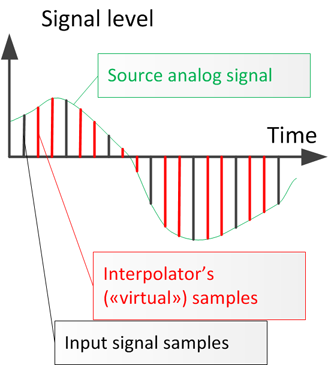
Up sampling is done by inserting additional samples (“virtual” – generated by the interpolator) between the existing samples in the input digital signal.

Sample interpolation: insert virtual samples between real ones

It is sometimes used to insert “virtual” samples with zero values ​​into the digital signal. This method is computationally faster. But this way of increasing the sample rate adds a significant amount of “artifacts” to those present in the interpolated signal.
Why do you need a superior sample? To complete point 3). Since it is easier to dilute the samples in multiples, simply discarding the excess ones.
The “spurious” signals (with frequencies above half the output sample rate) are then filtered. Otherwise, discarding “extra” samples will fall into the spectrum of the useful signal and distort it (add extraneous sounds).

What makes a high-end audio sample rate converter different from a medium-quality converter?
To introduce minimal distortion into the signal during conversion, we must interpolate it as accurately as possible. The interpolation precision is the maximum degree of repetition of the additional interpolator samples of the original analog signal. It should be remembered that the highest quality interpolator can accurately reconstruct the original analog signal. But not with 100% accuracy. Poor me. When the sampling frequency is increased, false signals will appear above half the sampling frequency of the output signal.


Free Download Mp4Gain
picture


Mp4Gain Main Window
picture


Mp4Gain Features
picture


Free Download Mp4Gain
picture

Some details of the sample rate

For many years it was thought that the sample rate or sampling frequency did not decisively influence the final quality of the digital audio; There are currently several engineers who record in 44.1K or 48K without really knowing why they do it. With the advent of new and better computers, interfaces, ports and protocols, 88.2K, 96K and up to 192K entered the discussion table on the best sample rate to use. It has always been the subject of discussion between engineers and audiophiles; some argued that they did hear the difference between different sample rates and others that did not, and the topic has been subjected to millions of A / B tests with very high quality equipment, causing all kinds of opinions found and uncompromising, fights and friendships of years broken

samplerate

While this is a basic issue of digital audio, it is always surrounded by a halo of mystery, mysticism and magic (like every sound theme), which is well worth clarifying.

 What is the sample rate?

This topic, although it occurs in the first or second class of digital audio, is not always understood correctly. In scholastic thinking, sample rate is defined as the amount of audio samples transported and taken per second. Since this is a unit of measurement over a second and with events that occur cyclically, the Hertz (1 / Frequency) is used as a unit. Obviously we cannot talk about this subject without referring to the Nyquist sampling theorem, which was tested by Shannon almost twenty years after its publication and in which it is stated that for a signal of limited bandwidth (B) (for example, a vibraphone reaches 14.917Hz), the sampling frequency must be twice its bandwidth (2 * B). Then, taking the previous example, we can say that: 2 * B → 2 * 14.917Hz → The sampling frequency for 14.917Hz should be 29.834Hz. This would be equivalent to 29,834 samples per second (1/29, 834) to be able to regenerate the signal of a vibraphone without error. Hence, it is taken that the highest frequency that human beings listen to is 20kHz and if we apply Nyquist it should be 40kHz, but it takes 44.1kHz to meet the demanding ears and for a matter of multiples.

44.1K or 48K to 88.2K or 96K, the correct division

At the dawn of the digital audio era, Nyquist was used to use the sampling resolution of 44.1K, used at that time audio CD format that played at 16bit / 44.1kHz. With the advent of DVD and Blu Ray as video and audio formats, resolutions such as 24Bits / 48K or 24Bits / 96kHz began to be used. Although for many years there were recordings that were made in 24Bits / 88.2kHz or 24Bits / 96kHz, at a certain time of mastering, before sending it to the disk duplicator, the audio suffered a mutilation that reduced it to 16Bits / 44.1kHz as It was ordered by the CD format. This process should be carried out with equipment specially designed for this function and in stages so that the audio did not suffer a very noticeable cut and the bad conversion was evidenced. Although the old and dear Dither was applied since then to compensate for this process (something like “grain” in the cinema. Watch a film without “grain” and it will look like HD even though it was filmed in 1980 on tape and goes to notice until the makeup of the actor and the assembly of the special effects, something otherwise disagreeable).

Generally, to prevent the audio from mutilating or applying several conversions that degrade it, it was decided at what resolution to record before pressing the REC button (we will not mention those that come down directly with your DAW from 24Bits / 96kHz to 16Bits / 44.1kHz in one step to export the audio … there is a place reserved especially for them in hell). If the audio was going to end on CD, a 88.2kHz sample rate was generally applied, since at the time of mastering, with the symmetric re-sampling at “half”, it was 44.1kHz.

Sounds better?

The subjective point of this is that we expect recordings to “sound” better at a higher sample rate. The reality is that if we record in high sample rates, with very good sampling, our sound will not “sound better”, but will be more detailed. Obviously, if our sound source is bad, our microphones and preamps too and so on, no matter how much we record at 192K, the result will not be the best. Now, if we use a good sound source, good audio chain and a good converter, everything will be obviously good. But don’t confuse; We are talking about detail here, not if it will sound more “warm,” “fat,” or “full-bodied.” This translates into a more homogeneous capture of the entire frequency spectrum, both audible and non-audible.

sample rate

CPU, disk and plug-ins

Obviously, having a higher sample rate means that our processor must do more calculations, since it has to process more samples (or audio samples). Depending on the amount of plug-ins that we use before a multitrack in high resolution, our use of both DSP and native processors (the computer equipment), will increase significantly, making it very difficult or impossible to work. There are several options to overcome this problem, from buying more processor or DSP, using fewer processes or external equipment (hybrid mixing), to borrowing a machine. The only option that should never go through our minds is to lower the resolution of the audio, process and upload it again. The serious problem that comes with this is a cut in the audio, which is not reversible and what is limited and trimmed, so it stays.

Another aspect to consider is that the storage speed must be in accordance with the audio resolution we use. Suppose we want to record at 24Bits / 96kHz; The transfer rate would be: 2304kbits / second. Now, calculating the amount of tracks, we should use a disc that really reaches us in speed for this transfer rate (topic to be developed in another article).

In these times, storage size is not a problem, but speed is. Having three terabyte disk drives are generally used for 5400 rpm dish disks; the least that should be used if they are not solid state disks, would be 7200 rpm plate disc drives. Obviously, with 5400 rpm discs, we would have a third reduction in the final transfer speed and reading and writing possibilities called “iops” (in out per second or in and out per second), which have a certain number, depending on the disk, capacity and arrangement of the same (RAID) which, depending on how much we demand in the resolution of the audio, amount of channels, processing (plug-ins) and expected latency (if we record with real-time monitoring), we will surely face some problems like “clicks” and / or “pops” in our audio.

Clock

The importance of using a good clock (or clock) and being in sync with all the elements that belong to our audio chain is vital. Recall that a few articles ago we have exposed this topic in detail, but it should be reinforced in this article. Several ADC and DAC converters of economic interfaces do not perform sampling and quantization in the correct or expected manner; External clocks or protocols such as Dante help the synchronization between several devices to be correct and improve the audio quality. Much of the final quality of our work in audio is in this part of the process and it is important that if we take our work and passion seriously, we begin to pay attention to these kinds of details that are generally overlooked.