The rate at which a digital channel transmits digital signals is called the data transfer rate or bit rate.
The word bitrate has many translations, such as bitrate, etc., which indicates how many bits per second the encoded (compressed) audio data should be represented, and a bit is the smallest binary unit, either 0 or 0. 1. The relationship between bitrate and audio and video compression is simply that the higher the bitrate, the better the quality of the audio and video, but the larger the encoded file; if the bitrate is lower, the situation is reversed.
For example: encode audio and video at 500 Kbps.
where bps are bits 1K = 1010 = 1024
b is little
s is the second
p is for (for)
Therefore, encoding at 500 kbps means that the encoded audio and video data must be represented at 500 K bits per second.
In the baseband transmission system, the bit rate is used to represent the code rate of transmitted information.
The bit rate Rb refers to the unit of time
The number of binary bits transmitted within the unit, the unit is b/s. For example, the transmission speed of a computer serial port is up to 115200b/s.
The symbol rate or baud rate Rs refers to the number of modulation symbols transmitted per unit of time, that is, ternary and ternary
The information transmission rate of the multivariate digital code stream in the
In M-ary modulation, the relationship between the bit rate Rb and the baud rate Rs is:
Rb=Rslog2M
The sampling rate refers to the ratio of the sampling samples to the total number of samples, and the sampling rate refers to the number of samples per unit of time. If it is an instrument, the sampling rate is 40MSa/s, which indicates that the number of samples per second is 40M, but it cannot be represented by 40MHz.
The process of converting analog audio to digital audio is called sampling. In a nutshell, how much data is needed to record a 1 second duration of sound via waveform sampling. A sound with a sample rate of 44 KHz requires 44,000 data points to describe a 1-second sound waveform. In principle, the higher the sample rate, the better the sound quality.
What is bit rate? Knowledge of the MP3 audio format. Part 2
Bitrate is a benchmark indicator of the efficiency of digital music compression.
The bit rate represents the number of bits bps (bit per second, bits per second) transmitted per unit of time (1 second). We usually use kbps (in simple terms, it is per second) clock 1000 bits) as the unit. The bit rate of digital music on CD is 1411.2 kbps (ie recording 1 second of CD music requires 1411.2 × 1024 bits of data). The higher the bit rate of the music file, the more data (Bit) must be processed in a unit of time (1 second), and the better the sound quality of the music file. However, when the bit rate is high, the file size increases, which will occupy a large amount of storage capacity. 8 to 320 kbps.
1. WMA (Windows Media Audio, Windows Media Audio)
As a Microsoft media compression method, it is a part of the technology that compresses only audio data in Windows Media Technologies. The sound quality is similar to MP3 and can be compressed with half the technology of MP3. It has the copyrighted Windows Media Rights Manager, which can be played by installing in WMP (Windows Media Player, Windows Media Player). Due to the strong influence of Microsoft and Windows, as well as major copyright reasons, the major American record companies EMI and BMG have officially confirmed that they use the WMA method developed and produced by Microsoft. It is believed that this advanced method will become even more popular in the future.
2. MP3 (CBR, VBR, ABR)
MP3 is currently the most widely used and widely used lossy compressed digital audio format, which has been explained above and will not be repeated here.
CBR (constant bit rate)
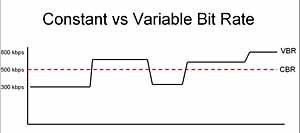
CBR is the oldest and simplest MP3 encoding (compression) method. When this method is used for encoding, the bit rate of the entire file is the same, in other words, the bit rate used by the MP3 file per second is the same. Although the music file has sections of varying complexity, the encoder always keeps the bit rate constant, unless you use the highest sound quality, otherwise the sound quality of the different sections of the MP3 file will vary. The more complex the passage, the worse the sound quality. Its biggest advantage is that the file size is fixed, which is convenient for calculating storage space.
What is bit rate? Knowledge of the MP3 audio format.
Digital audio formats are audio signals that are recorded, processed, and reproduced in digital form.
The emergence of digital audio formats is to meet the needs of high-fidelity playback, storage and transmission. Simply put, early analog audio formats had issues with playback distortion and glitches due to media wear. Since the advent of CD discs, audio files in digital format have become popular, but another problem has arisen: the limitation of storage volume and the phenomenon of CD disc wear is still present. Saving to a hard drive (in connection with longer storage time) is also not a good solution when storage media (mainly hard drives) are still expensive at the time. The rise of the Internet has created a requirement for long-distance file transmission. Under the restriction of bandwidth, the demand to reduce file size has become more intense. All this has led to the generation of lossy compressed digital audio formats from external factors!
In terms of internal factors, with the improvement of computing and coding capabilities, the progress of various acoustic psychological models has promoted the emergence of various lossy compressed digital audio formats. Some of the most commonly used audio formats in MP3 players are briefly introduced below: MP3 (CBR, VBR, ABR), WMA, WAV, ADPCM, and the emerging audio formats AAC, ASF, and OGG.
Before introducing various digital audio formats, let’s clarify one concept: bitrate.
In the field of computing, all information is digitized. Bit is the smallest unit of data in a computer, it refers to a number of 0 or 1, which is a mathematical binary number, a “0” or “1” , is a bit. For example, when we say a 2-digit number, it means that it is a two-digit binary number, and there are 4 combinations of “00”, “01”, “10” and “11”, which represent 0, “11” in decimal respectively. 1, 2 and 3 are four numbers.
VBR: An interesting feature of MP3 files is that they can be read and played, which is also in line with the most basic features of streaming media. That is, the player can play without first reading the entire content of the file and play where it reads, even if the file is partially damaged. Although mp3 can have a file header, it is not very important for mp3 format files. Because of this feature, each frame of an MP3 file can have a separate average data rate without a special decoding scheme. That is why there is a technology called VBR (Variable bitrate, dynamic data rate), which allows each segment or even each frame of an MP3 file to have a separate bitrate, the advantage of this is that the sound quality is guaranteed to the maximum. . File size is limited. The advantages of this technology are obvious, but it is really difficult to use, because it requires the encoder to know how to assign the bitrate to each segment, which is like a dummy for encoders without waveform analysis. As such, VBR technology didn’t seem glamorous as soon as it appeared.
Experts have found that the human ear has a protective effect through long-term acoustic research. The sound signal is actually a type of energy wave, which propagates in air or other media. The most direct response of the human ear to the amount of sound energy, that is, the volume or pressure of the sound, is to hear the size of the sound. We call it the volume, which means the volume. The unit of energy is the decibel (dB). Even sounds of the same volume can be perceived by people as different in size due to their different frequencies. The 500 Hz frequency is most easily heard by the human ear. No matter whether the frequency is increased or decreased, even if the volume is the same, everyone will feel the sound become smaller. But when the volume drops to a certain level, the human ear cannot hear it, and each frequency has a different value.
You can see that this curve basically forms a V. When the frequency exceeds 15000 Hz, the human ear will feel that the sound is very small. Many people who are not very good at hearing cannot hear the frequency of 20000 Hz at all, no matter how loud it is… When the human ear hears two sounds with different frequencies and different volume at the same time, the one with the lower volume will also be ignored. For example, it is hard to hear the sound of the computer cooling fan during the day, but it becomes a noise source at night. According to this principle, the encoder can filter out many inaudible sounds to simplify information complexity and increase the compression ratio without significantly reducing sound quality. This shading is called the simultaneous shading effect. However, sound A is protected by sound B. If A is within the protection range centered on B, the protection will be more obvious. This range is called the critical bandwidth. The critical bandwidth of each frequency is different and the higher the frequency, the larger the critical bandwidth.
Frequency (Hz) Critical Bandwidth (Hz) Frequency (Hz) Critical Bandwidth (Hz)
Based on this effect, the experts designed a mental model of human hearing. After this model was imported into mp3 encoding, it led to a momentous revolution in sound quality. gradually eluted. At this point, the VBR technology, which has been buried for a long time, shines brightly, and with the use of the psychological model, it can perform powerful temptation and lethality.
For a long time, many people have a bad impression of MP3. More and more people think that the best sound quality of WMA is better than MP3. This statement is not correct. At medium and high bit rates, properly encoded MP3 is much better than WMA. It’s close to CD quality, with not-so-great hardware support, not many people can tell the difference between the two, it’s not a fairy tale, though you used to be able to easily tell the difference between MP3 and CD blindly. listening, but now cannot guarantee that it can distinguish correctly. Because MP3 is an excellent codec that was buried before.
CBR vs VBR: A Detailed Comparison of Video Encoding
CBR (Constant Bit Rate) and VBR (Variable Bit Rate) are two popular video encoding methods used in digital multimedia applications. CBR, as the name suggests, maintains a consistent bit rate throughout the entire video, ensuring predictable file sizes but potentially sacrificing video quality in complex scenes. On the other hand, VBR adjusts the bit rate dynamically based on the complexity of each frame, resulting in higher quality in visually demanding scenes while optimizing file size during less complex parts. When deciding between CBR and VBR, content creators need to consider their specific needs and the trade-offs between consistent file sizes and varying video quality.
CBR vs VBR: The Impact on Video Quality and File Size
The CBR vs VBR debate often centers around video quality and file sizes. CBR ensures a stable bit rate, which can be beneficial for streaming applications where a consistent connection speed is required. However, this uniform bit rate might lead to over-allocating bits for simple frames, resulting in a lack of efficiency. On the other hand, VBR allocates more bits to visually complex scenes, leading to improved video quality and reduced file sizes in comparison to CBR. For applications where storage or bandwidth is a concern, VBR offers a compelling advantage, as it maximizes video quality while minimizing the overall file size. However, VBR’s dynamic nature can lead to challenges for real-time streaming or constrained network conditions, where a constant bit rate might be preferred for smoother playback.
CBR vs VBR: Choosing the Right Encoding Method for Your Video Content
When selecting between CBR and VBR, content creators must carefully assess their specific video content and its intended use. CBR is well-suited for scenarios where maintaining a constant bit rate is essential, such as video conferencing or live broadcasting, as it ensures consistent playback quality despite varying network conditions. On the other hand, VBR excels in applications where video quality and file size optimization are key considerations. This makes VBR an excellent choice for online streaming platforms, video distribution services, and media content with varying complexities. Ultimately, the decision between CBR and VBR will depend on the target audience, the platform of delivery, and the desired balance between consistent bit rates and varying video quality to deliver the best possible viewing experience.
Do you have a music CD and copy it to output in MP3, AAC, WMA, etc.? Or do you just need to convert one file format to another? In this case, we recommend reading this comparison between CBR and VBR first.
First we learn what exactly these abbreviations mean. It would also be useful to know their functionality, the significant difference between these file formats and encoding methods.
Important:
Please note that the terms CBR and VBR represent different aspects. For example, CBR for comic files saved on CDisplay and VBR for the volume boot record. However, you should know that none of these terms describe what we explain in this article comparison between CBR and VBR.
Coding of the CBR file format
CBR is the abbreviation that describes the term “constant bit rate”. In fact, it is an encoding method that allows the file bit rate to be maintained without changes. In the event that audio data is encoded (this is done by the codec), the file uses a fixed value for its bit rate. For example, the bit rate would be approximately 128 Kbit / s, 256 Kbit / s or 320 Kbit / s.
The most notable advantage of the CBR file format is that it offers faster data processing. This means that when comparing CBR and VBR in terms of data processing speed, CBR wins. However, when it comes to Quality Score, CBR output files don’t offer a better optimization. Again, VBR is better if CBR is compared to VBR in terms of quality. In short, it’s basically about choosing quality instead of speed, or vice versa.
If you need to stream multimedia files, CBR can be seen as a useful option. Suppose your connection supports only a certain bit rate (e.g. 320 kbit / s) for steam streaming. In this case, a constant bit rate (300 Kbit / s) or less makes sense. Compared to a format that constantly changes the bit rate during transmission, a format with a constant bit rate is better. If the bit rate exceeds the compatible bit rate value of the respective network, the transmission is interrupted. Therefore, it makes more sense to have a CBR file when it comes to activities like online streaming.
Encoding of the VBR file format
The abbreviation VBR refers to the term “variable bit rate”. Well, the term itself indicates its functionality. You just have to understand the difference between the terms “constant” and “variable”. In other words, the constant bit rate and the variable bit rate are concepts with exactly opposite meanings. VBR is an encoding method that increases or decreases the bit rate of audio files as needed. There is a target area when it comes to bit rates. For example, the range can be between 65 kbit / s and 320 kbit / s. VBR supports audio file formats such as MP3, WMA, OGG and many other formats.
VBR file formats have a special sound quality function compared to the file size ratio. In fact, this is the main advantage of VBR files over CBR. Because of this aspect, it is possible to get smaller files to match the quality of the video. For example, if the original sound quality of the file is low enough, VBR will resize the file. This way, low quality files are lightweight and high quality files do the opposite.
Under the VBR mechanism, the file bit rate for inaudible segments is significantly reduced. What about the more complex parts of the track (where there is a mix of frequencies)? Well, the bit rate of these segments automatically increases to a maximum of 320 kbps. Therefore, the sound quality is preserved in areas where this is absolutely necessary. Overall, this is a great way to get a relatively small file capacity while maintaining quality. All in all, you need less space to store VBR files than CBR.
The main disadvantage of VBR, however, is a compatibility problem. With floating bit rates in the encoding process, VBR is considered a more complex file format. As a result, this file format may not be compatible with some older devices. On the other hand, CBR files are compatible with practically all devices, including older ones.





/CBR-vs-VBR-069b3b5e6d554d53841e7e525092d25b.jpg)
:max_bytes(150000):strip_icc()/CBR-vs-VBR-069b3b5e6d554d53841e7e525092d25b.jpg)