What is CBR? (constant bit rate)


Free Download Mp4Gain
picture

What is CBR? (constant bit rate)

CBR (Constant Bit Rate)

CBR is an encoder to convert (compress) an audio file to mp3 format. In CBR encoding, the bit rate is kept constant throughout the file: the same number of bits are allocated to encode every second of audio, and within frames of the audio data they occur at regular and predictable intervals, thus that the full file size for a given audio length is predictable.
CBR


Therefore, CBR is the “opposite” of VBR. However, in some formats there may be some variability in the number of bits that contain the actual audio information from frame to frame.

This concept manifests itself in the MP3 bit repository. In MP3 CBR, even if the frames are of a fixed size, the audio data is not necessarily sequentially distributed among them; the audio for a frame may use fewer bits than the frame has, so this frame “adds” spare bits to a “bucket” that can fill in the allocated bits for the next block.

So the effective bit rate may vary slightly in CBR MP3, although there is a fixed number of frames in all audio. The degree of variability in the entire MP3 file is not as great as that of the VBR, but it is not negligible; a CBR encoder using repository inefficiently is more likely to produce a lower quality file than a VBR. Unlike VBR, the perceived quality of decoded audio will vary depending on the CBR file.

This is because CBR encoding is similar to the ABR form of VBR encoding in that it is typically based solely on the target bit rate and analysis of the input audio; often no attempt is made to use the lowest possible bit rate that will maintain a certain level of output quality. Technically, CBR implementations always involve predicting product quality, but they rely on fixed algorithms, rather than trial and error verification of results, as is done in VBR. Who should use this encoder: CBR is useful for people interested in maintaining maximum compatibility, especially with some streaming applications and some hardware decoders that do not support VBR.

CBR is also useful for people who want to be able to get accurate estimates of the bit rate or approximate length of a decoded audio file without scanning and partially decoding the entire file. VBR advocates are very vocal against CBR and often say that no one should use CBR when given a choice. Some reasonably argue that the goal of using a compression algorithm, especially in a lossy codec like MP3, is to store as many bits as possible while maintaining a certain level of quality, so CBR tends to use more bits than necessary. on simple passages, and using too little for complex passages is wasteful and should lead to worse results (at least in complex comps) than VBR.

However, these arguments need to be carefully refined and it would be incorrect to conclude that there are quality differences between CBR and VBR. In general, for most types of compression, considering identical input, encoding techniques, and reasonable goals for VBR quality and bit rate limits, VBR will almost always produce results of equal perceived quality. or better than CBR for files of the same size. This has been shown in numerous hearing tests.

CBR may exceed the quality of VBR if the comparison is not limited to the average bit rate or if the VBR encoding method does not take into account the actual output quality. For example, a 256 kbps CBR MP3 containing moderately complex audio is likely to sound noticeably better than a similarly encoded VBR, which averages 128 kbps, although VBR can use up to 320 kbps in some frames.

And even when VBR measures the quality of the output signal, there is a margin of error, especially when using psychoacoustic models of perception, so the encoder (even the highly respected LAME) can accidentally compress some segments, depending on the characteristics. audio, placing restrictions on quality and bit rate. At high bitrates, the quality difference between typical CBR and VBR files is close to zero, so for some CBR users it is quite acceptable, especially if the maximum savings in accommodation or hard drive space is not important. At low average bit rates, the quality difference between CBR and VBR is more pronounced with the same input signal, so VBR is often more desirable. At high bit rates, the quality difference between typical CBR and VBR files is close to zero, so for some CBR users it is quite acceptable.


Free Download Mp4Gain
picture


Mp4Gain Main Window
picture


Mp4Gain Features
picture


Free Download Mp4Gain
picture

Video Bitrate

Video Bitrate

CBR vs VBR

Bit rate types

CBR vs VBR

There are three types of bitrate:

Constant (CBR)

Variable (VBR)

Average (ABR)

Let us consider each of them in detail.

Constant bit rate
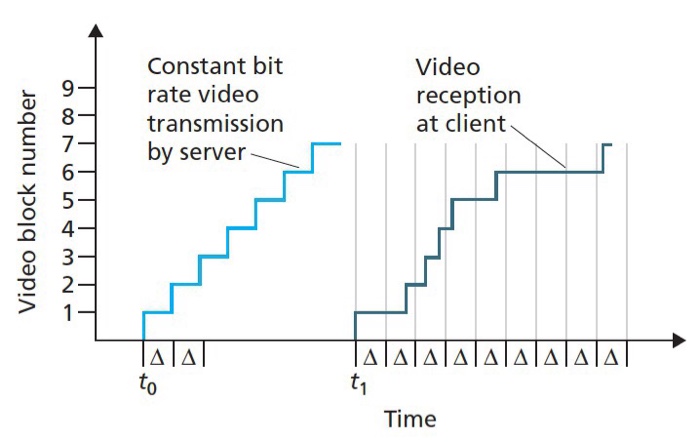
As the name suggests, constant bitrate is an encoding method in which the value of the bitrate remains unchanged throughout the file.

By setting a constant bit rate, you can quite accurately calculate how much video you will take on a disc.

For example: if the video bit rate is 6,000 kbps, then one minute of video at this bit rate will take 360,000 kbps (6,000 x 60 seconds), which in turn equals 351.5 megabits (360,000 divided by 1024) or 43.9 megabytes. (351.5 megabits divided by 8).

Next, you need to calculate how much space will be needed to store one minute of sound. For example: 192 kbps x 60 s. = 1.41 megabytes.

Therefore, the total volume of one minute of video and audio will occupy approximately 45 megabytes. By multiplying this value by the number of minutes, you get the size of your video file.

The above calculations are generally used for the reverse process, when you need to calculate the maximum allowable bitrate for your video.

Example: there is an hour and a half of video that must be burned onto a DVD disc. Do we need to calculate what bit rate the video should have to get the highest possible quality and still fit on a DVD disc?

You can calculate the maximum bit rate manually or, to avoid bothering with math calculations, use a special program, for example “Bit rate calculator”.

This program is free, requires no installation, and works on any Windows (I personally verified it on Windows 7 and Windows XP). Where to download the bitrate calculator, as well as how to configure and use the program, you can read the article “Bitrate calculator”.

Variable bit rate
Variable bit rate is an encoding method where the flow of information is not constant, but changes depending on how demanding the video is with the bit rate in a given section.

If you have read the article “Compress Video”, then you know that the less the new frame differs from the old one, the less is spent recording it. The conclusion follows from this: the more dynamic there is in the scene, the more is spent recording it, which means that the bitrate value for dynamic video should be higher.

Let’s take two videos as an example.

In the first video, a person sits at a desk in a room and gives an interview. The shooting is done with a tripod. In the frame, except for the movements of the person, nothing changes.

The second video shows a soccer game. There are several footballers in the frame at the same time, who are moving quite fast, + the ball, + in the context of a live mass of fans who are actively “getting sick”.

What do you think, for which video, the bit rate should be higher?

The answer is obvious. For the first video, an average bit rate, or even less, will suffice. For the second, it is desirable to give the maximum, unless, of course, you want a good image quality.

By understanding the above, you will agree that it is impossible to accurately predict the optimal amount of information that will be required to record high-quality video. Everything is further complicated by the fact that even in a football movie there can be scenes that are not very dynamic, for which a low bitrate is sufficient. And in general, in almost any movie, the dynamics change constantly and chaotically.

Naturally, the question arises: what to do? How to choose the optimal video bitrate?

Optimal bit rate
Well, first of all, the most rational thing is to use a variable bit rate, in which the program increases or decreases the data flow, depending on the dynamics of the scene and other factors.

Second, once you’ve set the bitrate value, you need to take one of the most dynamic scenes in the movie and render a small piece of it. After viewing this snippet, you need to visually assess the quality of the resulting video. If it suits her, she will do it in other scenes. If the quality of the scene is noticeably damaged, you should consider increasing the bit rate.

Average bit rate
Average bitrate is a type of variable bitrate that allows you to set a specific (average) bitrate value that the codec adheres to. In other words, it is a hybrid of constant and variable bitrate.

By using the average bit rate, you allow the program to vary the value of the bit rate at its discretion, but at the same time, its average value must correspond to the specified setting.

In most cases, the averaged bit rate is used, as this allows you to achieve optimal video quality, while calculating the final size

CBR VS VBR | What is the difference?

CBR VS VBR | What is the difference?

CBR VS VBR
CBR VS VBR
CBR VS VBR
CBR VS VBR


CBR vs VBR: A Detailed Comparison of Video Encoding

CBR (Constant Bit Rate) and VBR (Variable Bit Rate) are two popular video encoding methods used in digital multimedia applications. CBR, as the name suggests, maintains a consistent bit rate throughout the entire video, ensuring predictable file sizes but potentially sacrificing video quality in complex scenes. On the other hand, VBR adjusts the bit rate dynamically based on the complexity of each frame, resulting in higher quality in visually demanding scenes while optimizing file size during less complex parts. When deciding between CBR and VBR, content creators need to consider their specific needs and the trade-offs between consistent file sizes and varying video quality.

CBR vs VBR: The Impact on Video Quality and File Size

The CBR vs VBR debate often centers around video quality and file sizes. CBR ensures a stable bit rate, which can be beneficial for streaming applications where a consistent connection speed is required. However, this uniform bit rate might lead to over-allocating bits for simple frames, resulting in a lack of efficiency. On the other hand, VBR allocates more bits to visually complex scenes, leading to improved video quality and reduced file sizes in comparison to CBR. For applications where storage or bandwidth is a concern, VBR offers a compelling advantage, as it maximizes video quality while minimizing the overall file size. However, VBR’s dynamic nature can lead to challenges for real-time streaming or constrained network conditions, where a constant bit rate might be preferred for smoother playback.

CBR vs VBR: Choosing the Right Encoding Method for Your Video Content

When selecting between CBR and VBR, content creators must carefully assess their specific video content and its intended use. CBR is well-suited for scenarios where maintaining a constant bit rate is essential, such as video conferencing or live broadcasting, as it ensures consistent playback quality despite varying network conditions. On the other hand, VBR excels in applications where video quality and file size optimization are key considerations. This makes VBR an excellent choice for online streaming platforms, video distribution services, and media content with varying complexities. Ultimately, the decision between CBR and VBR will depend on the target audience, the platform of delivery, and the desired balance between consistent bit rates and varying video quality to deliver the best possible viewing experience.

Do you have a music CD and copy it to output in MP3, AAC, WMA, etc.? Or do you just need to convert one file format to another? In this case, we recommend reading this comparison between CBR and VBR first.

First we learn what exactly these abbreviations mean. It would also be useful to know their functionality, the significant difference between these file formats and encoding methods.

Important:

Please note that the terms CBR and VBR represent different aspects. For example, CBR for comic files saved on CDisplay and VBR for the volume boot record. However, you should know that none of these terms describe what we explain in this article comparison between CBR and VBR.

video encoder

Coding of the CBR file format

CBR is the abbreviation that describes the term “constant bit rate”. In fact, it is an encoding method that allows the file bit rate to be maintained without changes. In the event that audio data is encoded (this is done by the codec), the file uses a fixed value for its bit rate. For example, the bit rate would be approximately 128 Kbit / s, 256 Kbit / s or 320 Kbit / s.

The most notable advantage of the CBR file format is that it offers faster data processing. This means that when comparing CBR and VBR in terms of data processing speed, CBR wins. However, when it comes to Quality Score, CBR output files don’t offer a better optimization. Again, VBR is better if CBR is compared to VBR in terms of quality. In short, it’s basically about choosing quality instead of speed, or vice versa.

cbr vs vbr

If you need to stream multimedia files, CBR can be seen as a useful option. Suppose your connection supports only a certain bit rate (e.g. 320 kbit / s) for steam streaming. In this case, a constant bit rate (300 Kbit / s) or less makes sense. Compared to a format that constantly changes the bit rate during transmission, a format with a constant bit rate is better. If the bit rate exceeds the compatible bit rate value of the respective network, the transmission is interrupted. Therefore, it makes more sense to have a CBR file when it comes to activities like online streaming.

Encoding of the VBR file format

The abbreviation VBR refers to the term “variable bit rate”. Well, the term itself indicates its functionality. You just have to understand the difference between the terms “constant” and “variable”. In other words, the constant bit rate and the variable bit rate are concepts with exactly opposite meanings. VBR is an encoding method that increases or decreases the bit rate of audio files as needed. There is a target area when it comes to bit rates. For example, the range can be between 65 kbit / s and 320 kbit / s. VBR supports audio file formats such as MP3, WMA, OGG and many other formats.

VBR file formats have a special sound quality function compared to the file size ratio. In fact, this is the main advantage of VBR files over CBR. Because of this aspect, it is possible to get smaller files to match the quality of the video. For example, if the original sound quality of the file is low enough, VBR will resize the file. This way, low quality files are lightweight and high quality files do the opposite.

Under the VBR mechanism, the file bit rate for inaudible segments is significantly reduced. What about the more complex parts of the track (where there is a mix of frequencies)? Well, the bit rate of these segments automatically increases to a maximum of 320 kbps. Therefore, the sound quality is preserved in areas where this is absolutely necessary. Overall, this is a great way to get a relatively small file capacity while maintaining quality. All in all, you need less space to store VBR files than CBR.

The main disadvantage of VBR, however, is a compatibility problem. With floating bit rates in the encoding process, VBR is considered a more complex file format. As a result, this file format may not be compatible with some older devices. On the other hand, CBR files are compatible with practically all devices, including older ones.