ABR – Average Bit Rate


Free Download Mp4Gain
picture

ABR – Average Bit Rate

ABR

Average Bit Rate (ABR) is the average amount of data transferred per unit of time, usually measured per second, usually for digital video or music.

ABR

For example, an MP3 file with an average bit rate of 128 kbps transfers an average of 128,000 bits per second. It can have higher and lower bitrate portions, and the average bitrate for a particular time period is obtained by dividing the number of bits used during the time period by the number of seconds in the time period. Bitrate is unreliable as an independent measure of audio / video quality because more efficient compression methods use lower bit rates to encode material of similar quality. Average bitrate can also refer to a form of variable bit rate (VBR) encoding in which the encoder will try to reach the average bitrate or target file size, allowing the bitrate to vary between different parts of the audio or video. Since it is a kind of variable bit rate, it allows more complex parts of the material to use more bits and less complex areas to use fewer bits. However, the bit rate will not change as much as with variable bit rate encoding. At a given bit rate, VBR is usually higher quality than ABR, which is higher quality than CBR (constant bit rate). ABR encoding is desirable for users who want the general benefits of VBR (optimal frame-to-frame rate) encoding, but with a relatively predictable file size. Accurate ABR encoding generally requires two-pass encoding, as in the first pass, the encoder has no way of knowing which parts of the audio or video require the highest bit rate to encode.

VBR Variable bit rate

Average Bit Rate (ABR) is the average amount of data transferred per unit of time, usually measured per second, usually for digital video or music. For example, an MP3 file with an average bit rate of 128 kbps transfers an average of 128,000 bits per second. It can have higher and lower bitrate portions, and the average bitrate for a particular time period is obtained by dividing the number of bits used during the time period by the number of seconds in the time period. Bitrate is unreliable as an independent measure of audio / video quality because more efficient compression methods use lower bit rates to encode material of similar quality. Average bitrate can also refer to a form of variable bit rate (VBR) encoding in which the encoder will try to reach the average bitrate or target file size, allowing the bitrate to vary between different parts of the audio or video. Since it is a kind of variable bit rate, it allows more complex parts of the material to use more bits and less complex areas to use fewer bits. However, the bit rate will not change as much as with variable bit rate encoding. At a given bit rate, VBR is usually higher quality than ABR, which is higher quality than CBR (constant bit rate). ABR encoding is desirable for users who want the general benefits of VBR (optimal frame-to-frame rate) encoding, but with a relatively predictable file size. Accurate ABR encoding generally requires two-pass encoding, as in the first pass, the encoder has no way of knowing which parts of the audio or video require the highest bit rate to encode.

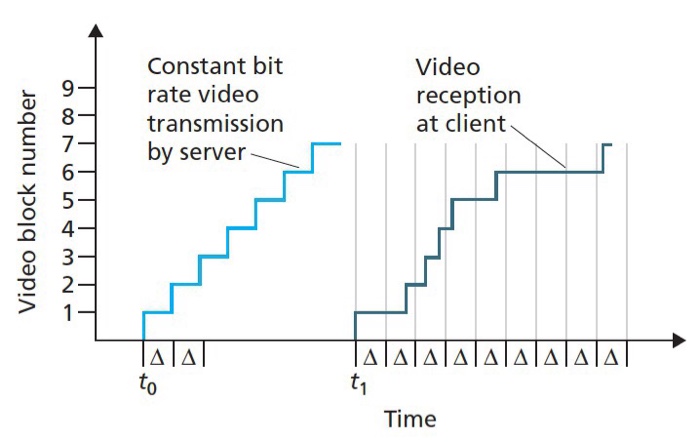
Advantages and disadvantages of VBR The advantages of VBR are that it offers a better quality / footprint ratio than a CBR file with the same data. The available bits are used more flexibly to encode audio or video data with greater precision, with fewer bits used in less demanding passages and more bits used in difficult-to-encode passages. The downsides are that encoding can take longer because the process is more complex and some hardware may not be compatible with VBR files. VBR can also create problems during transmission when the instantaneous data rate exceeds the data rate of the link. These problems can be avoided by limiting the instantaneous bit rate during encoding or (increasing latency) by increasing the playback buffer. In the past, many hardware and software players could not correctly decode VBR files, in part because the various VBR encoders in use were not well developed. This led to the common use of CBR instead of VBR for compatibility reasons.


Free Download Mp4Gain
picture


Mp4Gain Main Window
picture


Mp4Gain Features
picture


Free Download Mp4Gain
picture

What is CBR? (constant bit rate)

What is CBR? (constant bit rate)

CBR (Constant Bit Rate)

CBR is an encoder to convert (compress) an audio file to mp3 format. In CBR encoding, the bit rate is kept constant throughout the file: the same number of bits are allocated to encode every second of audio, and within frames of the audio data they occur at regular and predictable intervals, thus that the full file size for a given audio length is predictable.

CBR


Therefore, CBR is the “opposite” of VBR. However, in some formats there may be some variability in the number of bits that contain the actual audio information from frame to frame.

This concept manifests itself in the MP3 bit repository. In MP3 CBR, even if the frames are of a fixed size, the audio data is not necessarily sequentially distributed among them; the audio for a frame may use fewer bits than the frame has, so this frame “adds” spare bits to a “bucket” that can fill in the allocated bits for the next block.

So the effective bit rate may vary slightly in CBR MP3, although there is a fixed number of frames in all audio. The degree of variability in the entire MP3 file is not as great as that of the VBR, but it is not negligible; a CBR encoder using repository inefficiently is more likely to produce a lower quality file than a VBR. Unlike VBR, the perceived quality of decoded audio will vary depending on the CBR file.

This is because CBR encoding is similar to the ABR form of VBR encoding in that it is typically based solely on the target bit rate and analysis of the input audio; often no attempt is made to use the lowest possible bit rate that will maintain a certain level of output quality. Technically, CBR implementations always involve predicting product quality, but they rely on fixed algorithms, rather than trial and error verification of results, as is done in VBR. Who should use this encoder: CBR is useful for people interested in maintaining maximum compatibility, especially with some streaming applications and some hardware decoders that do not support VBR.

CBR is also useful for people who want to be able to get accurate estimates of the bit rate or approximate length of a decoded audio file without scanning and partially decoding the entire file. VBR advocates are very vocal against CBR and often say that no one should use CBR when given a choice. Some reasonably argue that the goal of using a compression algorithm, especially in a lossy codec like MP3, is to store as many bits as possible while maintaining a certain level of quality, so CBR tends to use more bits than necessary. on simple passages, and using too little for complex passages is wasteful and should lead to worse results (at least in complex comps) than VBR.

However, these arguments need to be carefully refined and it would be incorrect to conclude that there are quality differences between CBR and VBR. In general, for most types of compression, considering identical input, encoding techniques, and reasonable goals for VBR quality and bit rate limits, VBR will almost always produce results of equal perceived quality. or better than CBR for files of the same size. This has been shown in numerous hearing tests.

CBR may exceed the quality of VBR if the comparison is not limited to the average bit rate or if the VBR encoding method does not take into account the actual output quality. For example, a 256 kbps CBR MP3 containing moderately complex audio is likely to sound noticeably better than a similarly encoded VBR, which averages 128 kbps, although VBR can use up to 320 kbps in some frames.

And even when VBR measures the quality of the output signal, there is a margin of error, especially when using psychoacoustic models of perception, so the encoder (even the highly respected LAME) can accidentally compress some segments, depending on the characteristics. audio, placing restrictions on quality and bit rate. At high bitrates, the quality difference between typical CBR and VBR files is close to zero, so for some CBR users it is quite acceptable, especially if the maximum savings in accommodation or hard drive space is not important. At low average bit rates, the quality difference between CBR and VBR is more pronounced with the same input signal, so VBR is often more desirable. At high bit rates, the quality difference between typical CBR and VBR files is close to zero, so for some CBR users it is quite acceptable.