What is VBR MP3 Bitrate?


Free Download Mp4Gain
picture

What is VBR MP3 Bitrate?
VBR Bitrate
VBR Bitrate
VBR Bitrate
VBR Bitrate

The Basics of VBR MP3 Bitrate

When it comes to music and audio files, bitrate is an important factor to consider. Bitrate refers to the amount of data that is transmitted per second in a digital audio file. The higher the bitrate, the more data is transmitted and the better the audio quality.
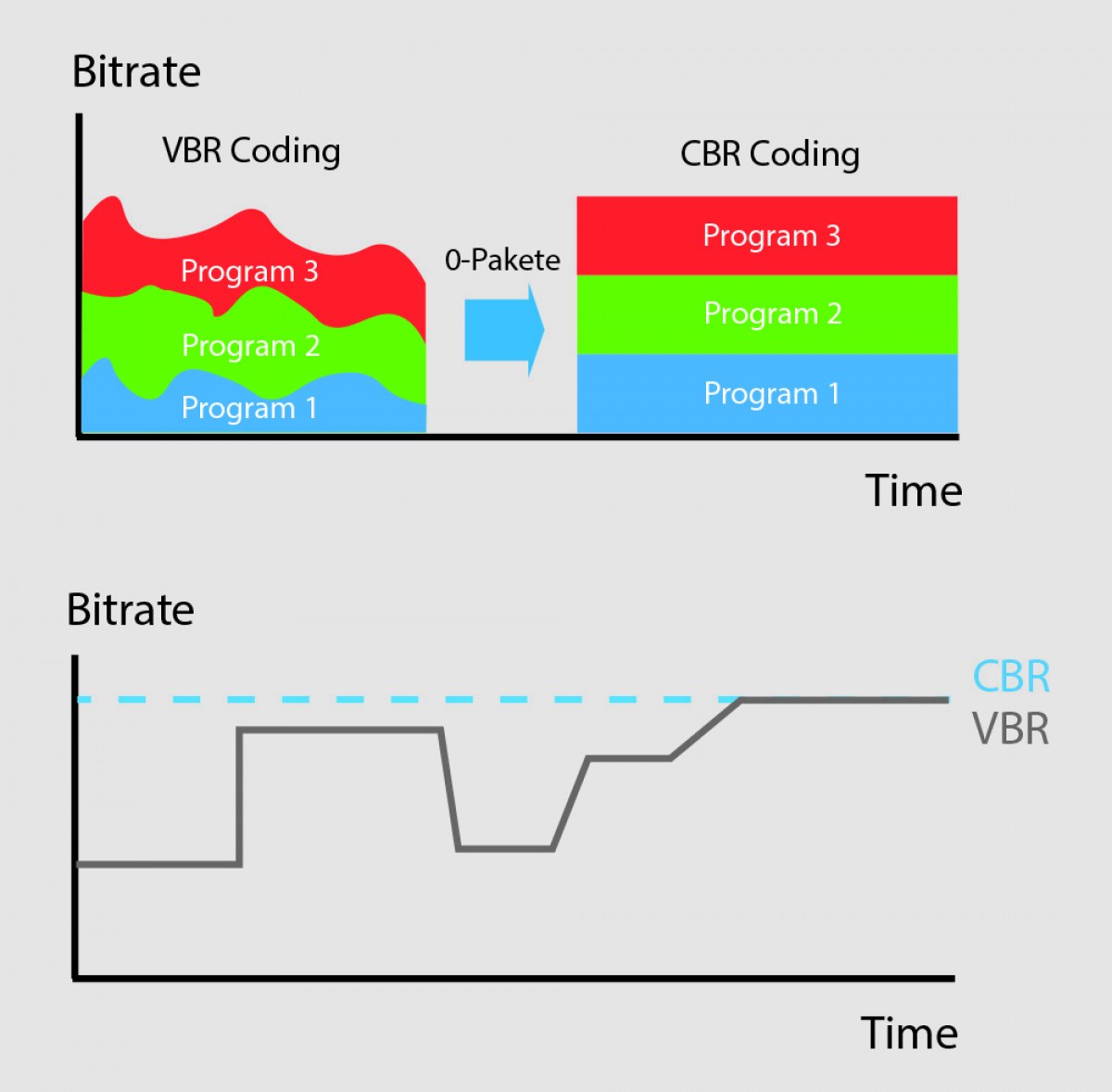
VBR, or variable bitrate, is a type of MP3 encoding that uses a variable bitrate rather than a constant bitrate. This means that the bitrate will vary depending on the complexity of the audio being encoded. For example, a simple audio passage with few instruments and no vocals may have a lower bitrate than a complex audio passage with many instruments and vocals.

VBR MP3 bitrate offers a number of advantages over constant bitrate encoding, including better audio quality, smaller file sizes, and more efficient use of storage space.

How to Choose the Right VBR MP3 Bitrate

When choosing the right VBR MP3 bitrate for your audio files, there are a number of factors to consider. These include the type of audio being encoded, the intended use of the audio, and the storage space available.
For example, if you are encoding audio for use on a mobile device with limited storage space, you may want to use a lower bitrate to minimize file size. On the other hand, if you are encoding audio for use in a high-quality home theater system, you may want to use a higher bitrate to ensure the best possible audio quality.

Ultimately, the right VBR MP3 bitrate will depend on your specific needs and preferences. Experimenting with different bitrates and listening to the resulting audio can help you determine the best option for your particular situation.

The Future of VBR MP3 Bitrate

As technology continues to advance and storage space becomes more abundant, VBR MP3 bitrate is likely to become even more popular in the future. With its ability to offer high-quality audio in a compact and efficient format, VBR MP3 encoding is sure to remain a popular choice for music lovers and audio enthusiasts alike.
In the words of music legend Bob Marley, “One good thing about music, when it hits you, you feel no pain.” With VBR MP3 bitrate, music lovers can experience high-quality audio that hits them right where it counts, without the pain of bloated file sizes or compromised sound quality.

Conclusion: The Benefits of VBR MP3 Bitrate

In conclusion, VBR MP3 bitrate is a powerful tool for encoding high-quality digital audio files. By using a variable bitrate that adapts to the complexity of the audio being encoded, VBR MP3 encoding offers superior sound quality, smaller file sizes, and more efficient use of storage space.
As technology continues to evolve and storage space becomes more abundant, VBR MP3 encoding is sure to become even more popular in the future. So the next time you’re encoding digital audio files, consider using VBR MP3 encoding to experience the benefits of variable bitrate technology for yourself.

In the words of writer Kurt Vonnegut, “The only proof he needed for the existence of God was music.” With VBR MP3 bitrate, the beauty of music can be captured in all its glory, providing an experience that is truly transcendent.


Free Download Mp4Gain
picture


Mp4Gain Main Window
picture


Mp4Gain Features
picture


Free Download Mp4Gain
picture

What is CBR? (constant bit rate)

What is CBR? (constant bit rate)

CBR (Constant Bit Rate)

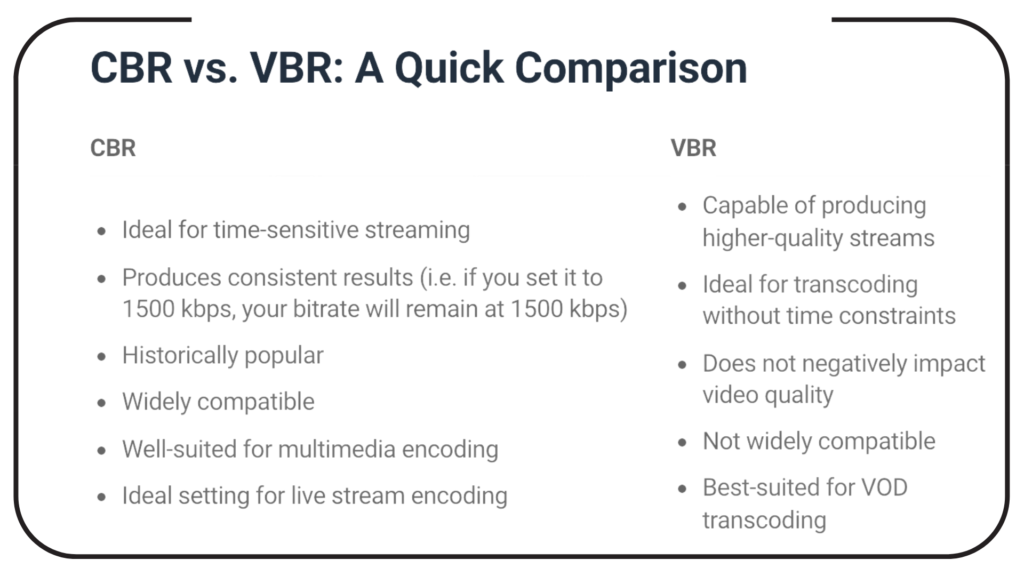
CBR is an encoder to convert (compress) an audio file to mp3 format. In CBR encoding, the bit rate is kept constant throughout the file: the same number of bits are allocated to encode every second of audio, and within frames of the audio data they occur at regular and predictable intervals, thus that the full file size for a given audio length is predictable.

CBR


Therefore, CBR is the “opposite” of VBR. However, in some formats there may be some variability in the number of bits that contain the actual audio information from frame to frame.

This concept manifests itself in the MP3 bit repository. In MP3 CBR, even if the frames are of a fixed size, the audio data is not necessarily sequentially distributed among them; the audio for a frame may use fewer bits than the frame has, so this frame “adds” spare bits to a “bucket” that can fill in the allocated bits for the next block.

So the effective bit rate may vary slightly in CBR MP3, although there is a fixed number of frames in all audio. The degree of variability in the entire MP3 file is not as great as that of the VBR, but it is not negligible; a CBR encoder using repository inefficiently is more likely to produce a lower quality file than a VBR. Unlike VBR, the perceived quality of decoded audio will vary depending on the CBR file.

This is because CBR encoding is similar to the ABR form of VBR encoding in that it is typically based solely on the target bit rate and analysis of the input audio; often no attempt is made to use the lowest possible bit rate that will maintain a certain level of output quality. Technically, CBR implementations always involve predicting product quality, but they rely on fixed algorithms, rather than trial and error verification of results, as is done in VBR. Who should use this encoder: CBR is useful for people interested in maintaining maximum compatibility, especially with some streaming applications and some hardware decoders that do not support VBR.

CBR is also useful for people who want to be able to get accurate estimates of the bit rate or approximate length of a decoded audio file without scanning and partially decoding the entire file. VBR advocates are very vocal against CBR and often say that no one should use CBR when given a choice. Some reasonably argue that the goal of using a compression algorithm, especially in a lossy codec like MP3, is to store as many bits as possible while maintaining a certain level of quality, so CBR tends to use more bits than necessary. on simple passages, and using too little for complex passages is wasteful and should lead to worse results (at least in complex comps) than VBR.

However, these arguments need to be carefully refined and it would be incorrect to conclude that there are quality differences between CBR and VBR. In general, for most types of compression, considering identical input, encoding techniques, and reasonable goals for VBR quality and bit rate limits, VBR will almost always produce results of equal perceived quality. or better than CBR for files of the same size. This has been shown in numerous hearing tests.

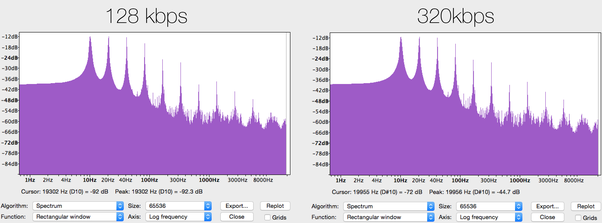
CBR may exceed the quality of VBR if the comparison is not limited to the average bit rate or if the VBR encoding method does not take into account the actual output quality. For example, a 256 kbps CBR MP3 containing moderately complex audio is likely to sound noticeably better than a similarly encoded VBR, which averages 128 kbps, although VBR can use up to 320 kbps in some frames.

And even when VBR measures the quality of the output signal, there is a margin of error, especially when using psychoacoustic models of perception, so the encoder (even the highly respected LAME) can accidentally compress some segments, depending on the characteristics. audio, placing restrictions on quality and bit rate. At high bitrates, the quality difference between typical CBR and VBR files is close to zero, so for some CBR users it is quite acceptable, especially if the maximum savings in accommodation or hard drive space is not important. At low average bit rates, the quality difference between CBR and VBR is more pronounced with the same input signal, so VBR is often more desirable. At high bit rates, the quality difference between typical CBR and VBR files is close to zero, so for some CBR users it is quite acceptable.

MP3 and knowledge of the effects of possible settings

The MP3 audio compression method (also called MPEG-1 Layer 3) uses the properties of the human ear to save storage space. Frequencies inaudible to humans are filtered out of musical pieces. Depending on the degree of compression (so-called bit rates), this leads to no or severe loss of quality.
Music CDs use a constant bit rate (consumption of storage space / unit of time) of 1.4 Mbit per second for a stereo audio signal.

mp3

In comparison, a data rate of 192 kBit / s is sufficient with MP3 for almost CD quality music. It follows that the memory requirement is also significantly lower. There is about 10MB per minute of music on a music CD, good quality MP3 files only occupy about one eighth of this memory; So you can put around 8 hours of music on an MP3 CD.

MT Podcast | Motor Transport

A distinction is made between:

VBR – variable bit rate (variable bit rate)

With VBR, the bitrate constantly adapts to the music. Fewer bits are used in more “quiet” places (for example, few instruments or quiet passages), so the bit rate is lowered, while in more complex places the bit rate is increased as much as is necessary for the specified quality level is maintained at all times. Therefore, the MP3 file created in this way requires less storage space than MP3 files of comparable quality. The size of the final file is of course unpredictable and can vary greatly depending on the song and its genre. (is better than ABR and CBR)

ABR: average bit rate

ABR makes it possible to use variable bit rates but still meet the given average bit rate very precisely. In this way, the encoder saves bits in quiet places, which are then available to more complex places. The quality of this mode is between CBR and VBR, since the disadvantages of the CBR mode are eliminated, but the advantages of VBR mode only partially come into play, since the higher bit rates are used less frequently so as not to exceed the specified average bit rate. (is better than CBR)

CBR – constant bit rate

In “old-fashioned” CBR mode, a certain bit rate is used, regardless of what bit rate is actually required. As a result, higher bit rates are not available for complex locations, which is at the expense of quality, while bits are wasted in quiet locations, which is at the expense of file size.

Conclusion: the best method is VBR.

The only exception is the CBR bit rate (320 kbit / s), but this no longer makes sense.
other technical terms:

Joint Stereo

Joint stereo, also known as MS stereo, is a lossless encoding of the two audio channels. The great similarity of the channels is exploited by creating two new channels. The sum of the left and right channels is stored in the middle channel (M); the difference between the original channels is encoded in the side channel (S). Therefore, the middle channel contains most of the information, while in the side channel there is only a small amount of information available. Both channels are quantized separately and relatively good compression is achieved.

However, this trick does not work for songs with strong channel separation, that is, if the left and right are almost not similar. Logically mid / side stereo is also not possible with mono.