Bit Depth: Understanding its Role in Audio Resolution


Free Download Mp4Gain
picture

Bit Depth: Understanding its Role in Audio Resolution
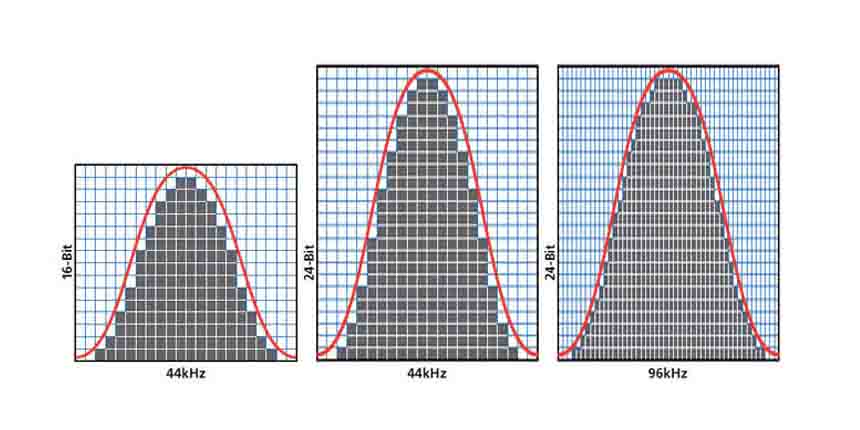
Bit Depth
Bit Depth
Bit Depth
Bit Depth

What is the importance of bit depth in audio resolution?

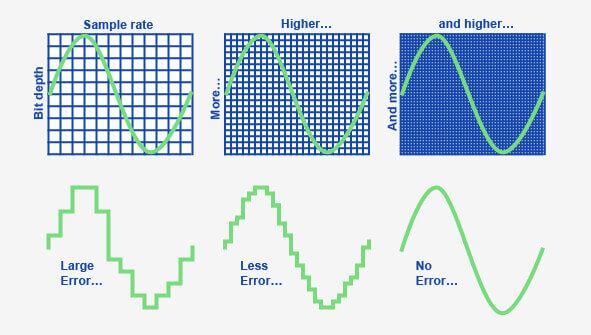
When it comes to audio resolution, bit depth plays a crucial role. Bit depth refers to the number of bits used to represent the amplitude of an audio signal. In simpler terms, it determines the level of detail and accuracy with which sound can be captured and reproduced. The higher the bit depth, the more precise the audio representation, resulting in greater dynamic range and fidelity.
Higher bit depths enable a wider range of possible values, allowing for more nuanced audio reproduction. In digital audio, the most common bit depths are 16-bit and 24-bit. A 16-bit audio signal can represent 65,536 discrete amplitude levels, while a 24-bit signal can represent a staggering 16,777,216 levels. This significant increase in resolution allows for more accurate representation of subtle audio nuances, resulting in a more realistic and immersive listening experience.

Moreover, higher bit depths help reduce quantization noise, which can degrade the audio quality. Quantization noise is the distortion introduced when the continuous analog audio signal is converted into a discrete digital representation. By increasing the number of bits used for quantization, the quantization noise can be pushed to lower levels, effectively minimizing its impact on the audio signal. This reduction in noise contributes to improved audio fidelity and a cleaner sound.

The impact of bit depth on audio recording

The choice of bit depth during audio recording has a significant impact on the quality and flexibility of the recorded material. When capturing audio, it is crucial to select an appropriate bit depth based on the desired outcome and the dynamic range of the source material.
For capturing music with a wide dynamic range or for critical recording applications, a higher bit depth, such as 24-bit, is preferred. This ensures that the delicate nuances and subtle variations in the performance are faithfully captured without losing detail. With a higher bit depth, there is ample headroom to accommodate sudden spikes in volume, preventing clipping and distortion.

On the other hand, for applications where the dynamic range is limited, such as voice recordings or podcasting, a lower bit depth, such as 16-bit, can be sufficient. Since these types of recordings typically have a smaller range between the softest and loudest sounds, the additional precision offered by higher bit depths may not be necessary. Using a lower bit depth can help conserve storage space and streamline the post-production process.

The benefits of higher bit depths in audio production

In audio production, working with higher bit depths offers several advantages that contribute to the overall quality of the final mix. Let’s explore some of these benefits:
1. Increased headroom: Higher bit depths provide more headroom, allowing audio engineers to work with greater flexibility during the mixing and mastering stages. This additional headroom ensures that any adjustments made to the audio levels or effects do not result in clipping or distortion.

2. Enhanced processing capabilities: Working with higher bit depths provides greater precision for applying audio processing effects, such as equalization, compression, and reverb. This precision allows for more accurate and transparent manipulation of the audio signal, resulting in a polished and professional sound.

The role of bit depth in audio playback

The bit depth of an audio file also impacts its playback quality. When playing back audio, it is important to ensure that the playback system supports the bit depth of the audio file. If the playback system is not capable of reproducing the full bit depth, the audio may be truncated or quantized, leading to a loss of detail and fidelity.
Furthermore, downsampling or converting high-resolution audio files with a higher bit depth to a lower bit depth can result in a loss of information and audio quality. It is essential to carefully consider the bit depth compatibility between the source material and the playback system to ensure an accurate and faithful reproduction of the audio.

Final Words

Bit depth plays a fundamental role in audio resolution, influencing the accuracy, fidelity, and dynamic range of the sound. Understanding the importance of bit depth in audio recording, production, and playback allows for informed decisions to be made regarding the selection and handling of audio files. By leveraging higher bit depths, audio professionals can achieve higher quality recordings and deliver an exceptional listening experience to their audiences.
Keywords (LSI): audio fidelity, dynamic range, quantization noise, recording quality, audio production, audio playback, higher resolution, audio nuances, digital representation, accurate reproduction, audio engineers, playback system, audio file compatibility.


Free Download Mp4Gain
picture


Mp4Gain Main Window
picture


Mp4Gain Features
picture


Free Download Mp4Gain
picture

What is the difference between bit depth and bitrate?

What is the difference between bit depth and bitrate?

Bit Depth
Bit Depth
Bit depth
Bit Depth

Understanding Bit Depth and Bitrate

When it comes to audio and video files, there are two terms that are often used interchangeably: bit depth and bitrate. However, they are not the same thing. Bit depth refers to the number of bits used to represent each sample in an audio or video file, while bitrate refers to the amount of data transmitted per second.
Bit depth determines the number of possible values for each sample in a digital audio or video file. For example, an 8-bit audio file can have 256 possible values per sample, while a 16-bit file can have 65,536. The higher the bit depth, the more accurate the representation of the original sound or image.

On the other hand, bitrate refers to the amount of data transmitted per second in a digital file. In other words, it’s the rate at which data is encoded in a file. Higher bitrates typically mean higher quality files with more information, but also larger file sizes.

Audio Bit Depth vs Bitrate

When it comes to audio files, the bit depth and bitrate are both important factors in determining the quality of the sound. A higher bit depth means a more accurate representation of the original sound, while a higher bitrate means more data is transmitted per second, resulting in a higher quality sound.
However, it’s important to note that a higher bitrate does not necessarily mean a higher quality sound. If the original recording is of poor quality, increasing the bitrate will not improve the sound. In fact, it can actually result in larger file sizes with no improvement in sound quality.

Video Bit Depth vs Bitrate

Video files also have bit depth and bitrate, but they work slightly differently than in audio files. Bit depth determines the number of colors that can be represented in a video file, while bitrate determines the amount of data transmitted per second.
A higher bit depth means a wider range of colors can be represented in the video, resulting in a more accurate and vibrant image. However, a higher bitrate is also important for video files, as it determines the amount of detail that can be captured in each frame.

It’s important to find the right balance between bit depth and bitrate for video files, as increasing one can have a negative impact on the other. For example, a high bit depth with a low bitrate can result in a choppy or pixelated image, while a low bit depth with a high bitrate can result in a washed-out or blurry image.

Final Words

In conclusion, bit depth and bitrate are both important factors to consider when working with audio and video files. While they may seem similar, they serve different purposes and have different effects on the quality of the final product. It’s important to find the right balance between the two to ensure the best possible sound or image quality.
Keywords: audio bit depth, video bit depth, bit depth vs bitrate, bitrate definition, bitrate vs quality, audio quality, video quality, digital audio, digital video, file size, data transmission, accuracy, color representation, image quality, sound quality, audio recording, video recording, data encoding, pixelation, file format, media production, sound engineering, video editing, multimedia, digital media, technology, mp4gain, audio normalization, audio conversion, equalizer, windows, digital signal processing, dynamic

Audio Bit Depth Explained

Audio Bit Depth Explained


Audio Bit Depth Explained

Bit Depth

Audio Bit Depth Explained

When it comes to producing or enjoying high-quality audio, understanding bit depth is essential. This technical aspect of digital audio determines the level of precision and accuracy with which sound is captured and reproduced. For sound engineers and audiophiles alike, a deep understanding of bit depth is a must-have skill for creating and experiencing truly exceptional sound.

What is Bit Depth?

Bit depth refers to the number of bits used to represent each sample in a digital audio file. Each sample represents the amplitude of the audio signal at a specific point in time. The bit depth determines the range of values that can be used to represent the amplitude of each sample. A higher bit depth provides a larger range of possible values, resulting in a more accurate representation of the audio signal. This, in turn, leads to a higher-quality audio recording.

Common bit depths used in audio recording and production include 16-bit, 24-bit, and 32-bit. The most common bit depth used in consumer audio devices is 16-bit, while 24-bit and 32-bit are more commonly used in professional audio production.

How Does Bit Depth Affect Audio Quality?

The bit depth of an audio recording has a significant impact on its overall quality. A higher bit depth provides a more accurate representation of the audio signal, resulting in a more natural and lifelike sound. With a higher bit depth, the audio signal can be recorded and processed with greater precision and accuracy, allowing for a wider dynamic range and more nuanced expression.

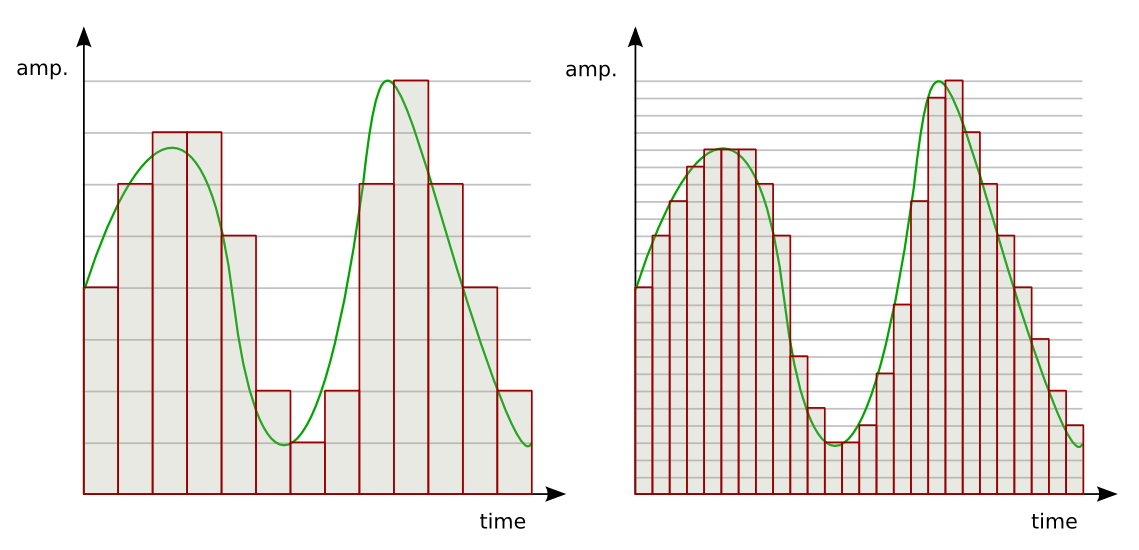
On the other hand, a lower bit depth can result in quantization errors, which can introduce distortion and noise into the audio signal. This can result in a loss of detail and clarity, particularly in quiet or complex passages of music.

Bit Depth and Dynamic Range

The dynamic range of an audio recording refers to the difference between the loudest and softest parts of the recording. A higher bit depth allows for a wider dynamic range, as the signal can be recorded with greater accuracy and precision. This means that even the softest parts of the recording can be captured with a higher level of detail and clarity, resulting in a more natural and lifelike sound.

For example, a recording of a classical music performance with a wide dynamic range may require a higher bit depth to capture the full range of dynamics and expression. Without a sufficient bit depth, the softer parts of the performance may be lost, resulting in a less engaging and less satisfying listening experience.

Conclusion

Understanding bit depth is crucial for anyone involved in the production or enjoyment of high-quality audio. By providing a more accurate representation of the audio signal, a higher bit depth can result in a more natural and lifelike sound, with a wider dynamic range and more nuanced expression. While a lower bit depth can result in quantization errors and a loss of detail and clarity, particularly in quiet or complex passages of music.

Overall, it is important to choose the appropriate bit depth for each recording or production, based on the dynamic range and complexity of the audio signal. By doing so, sound engineers and audiophiles can ensure that the audio they create or enjoy is of the highest quality possible.

As a final recommendation, we suggest using MP4Gain to adjust the volume and equalization of your digital audio files, ensuring that they are optimized for playback on a variety of devices and systems.

Understanding Audio Bit Depth: 8-bit vs. 16-bit vs. 24-bit

Understanding Audio Bit Depth: 8-bit vs. 16-bit vs. 24-bit

Bit Depth
Bit Depth

When it comes to digital audio, one of the most critical factors in determining the quality of a recording is the audio bit depth. In this article, we’ll delve into the technical details of audio bit depth and explore the differences between 8-bit, 16-bit, and 24-bit audio recordings.

Bit Depth
Bit Depth

What is Audio Bit Depth?

In digital audio, sound waves are converted into a series of numerical values that can be stored and manipulated by computers. Audio bit depth refers to the number of bits of information used to represent each sample in a digital audio recording. Each sample represents the amplitude of the sound wave at a specific point in time.

The bit depth determines the range of possible values for each sample. For example, an 8-bit audio recording has 256 possible values, while a 16-bit recording has 65,536 possible values, and a 24-bit recording has over 16 million possible values. This increase in possible values provides greater resolution and accuracy, resulting in improved sound quality.

Dynamic Range

Another critical aspect of audio bit depth is dynamic range, which refers to the difference between the quietest and loudest sounds that can be recorded. With an increase in bit depth, the dynamic range of a recording also increases. For example, a 16-bit audio recording has a dynamic range of 96 dB, whereas a 24-bit recording has a dynamic range of 144 dB. This difference in dynamic range is quite significant and is one of the reasons why 24-bit audio is preferred for professional applications.

Quantization Noise

Quantization noise is an inherent part of digital audio and is introduced during the process of converting an analog audio signal to a digital representation. Quantization noise is essentially the difference between the actual analog signal and the closest quantized digital value. The more bits used for quantization, the lower the level of quantization noise.

However, as the bit depth increases, the noise introduced becomes less of an issue. At 16 bits, quantization noise is typically not audible, but it can become noticeable when processing audio. At 24 bits, quantization noise is virtually non-existent, even when processing audio.

Conclusion

In conclusion, audio bit depth plays a crucial role in the quality of digital audio recordings. Increasing the bit depth of an audio recording provides greater resolution and accuracy, resulting in improved sound quality. Professionals in the music industry typically prefer 24-bit audio due to its higher dynamic range and lower quantization noise. However, for most consumer applications, 16-bit audio is perfectly adequate and results in high-quality sound.

It is also important to note that bit depth is just one aspect of digital audio quality. Other factors such as sample rate and compression algorithms also play a significant role in determining the overall quality of a digital audio recording. Nonetheless, understanding audio bit depth is a crucial step in the journey to becoming a proficient audio engineer or producer.

Bit rate

Bit rate

Bitrate

Bit rate refers to the number of bits (bit) transmitted per unit of time, in bps (bit per second).

bit rate

Bit rate is also known as “binary bit rate”, commonly known as “code rate”. Indicates the number of bits transmitted per unit of time. It is used to measure the transmission speed of digital information, often written as bit/sec. According to the number of bits occupied by each image storage frame and the transmission bit rate, the digital image information transmission speed can be calculated [1].
In modern digital communication, the transmission volume of digitized video and other information is large, so it is often measured in kilobits per second or megabits per second, which are written as kbit/sec (or kbps) and Mbit/sec. (or Mbps respectively). ). For example, the amount of information digitized from an ordinary color TV signal can reach 216 Mbit/sec. A good digital broadcast channel can transmit dozens of color TV programs, and its capacity can reach several gigabits or gigabits per second (written as Gbit/sec or Gbps) [1] .
Bitrate is often used to measure the quality of video files.
flexibility edit stream
Because each network is unique and each access line has different conditions (such as length, attenuation, crosstalk environment, etc.), access lines from different telephone companies must support different data rates. For ADSL and VDSL modems, it is best to set the data rate to one of many possible data rates. For example, DMT-based ADSL and VDSL can theoretically change the tariff at fine intervals, and CAP-based RADSL (Rate Adaptive ADSL) also provides some flexibility in tariff configuration [2].
However, telephone companies may want to limit xDSL service to a small set of rates sufficient to provide a variety of services. If a limited set of tariffs can be adapted to a wide range of services, then the management of the services in this case is simpler than in the case of variable tariffs. Telephone companies want the choice of modem speed to be under the control of the network, not the user [2] .
In this mode, the selection of the transmission rate set of the xDSL network must be prudent. In this case, there is a possibility that two adjacent systems receive traffic at very different rates and the system must be able to handle such a situation. The other model, the “best match” approach using adaptive rate ADSL (similar to a voiceband modem), is more beneficial to new network operators and Internet Service Providers (ISPs) [2] .
Transmission control method
Most bit rate control schemes consist of two parts. Part of the encoded bit stream output by the encoder is fed into a buffer. For a constant bitrate channel, the data in the buffer is fetched at a constant rate, and if the buffer is large enough, the bitrate variation caused by the MPEG picture type, etc. can be smoothed out. This is necessary for both constant bit rate transmission and variable bit rate transmission in general. However, in practice, the buffer size is always limited. The buffering process will bring a delay to the system, and this delay is proportional to the size of the buffer. Latency is often a serious issue for real-time image communication, so buffers should be kept as small as possible. That is, long-term fluctuations in bitrate due to changes in scene content or changes, etc. they cannot be softened in this way, so another part is needed. This is to send some measure of the output bitrate to the encoder to control the encoding process, thus changing the output bitrate [3] .

Quality (bit rate)

Quality (bit rate)

Bit Rate

In multimedia technology, quality is often used to judge the effect of audio, and quality here is actually bitrate.

Bit Rate

1. Introduction
2 sound control
3 encoding mode
Introductionedit transmission
The term quality is widely used.
In multimedia technology, quality is often used to judge the effect of audio, and quality here is actually bitrate.
On WINDOWS it is called “bit rate” and on some players it is described as ” bit rate “.
Quality refers to the bit rate at which digital sound is converted from analog to digital format. The higher the bitrate, the better the quality of the restored sound.
sound control edit stream
16 Kbps = phone quality
24 Kbps = increase phone quality, shortwave transmission, longwave transmission, European standard medium wave transmission
40 Kbps = American standard medium wave transmission
56Kbps=Voice
64 Kbps = boost voice (best bitrate setting for cell phone ringtones, best setting for cell phone mono MP3 players)
112 Kbps = FM stereo broadcast FM 128 Kbps = tape (best setting for mobile phone stereo MP3 player, best setting for low-end MP3 player)
160 Kbps = HIFI high fidelity (best setting for mid to high end MP3 players)
192Kbps=CD (best setting for high-end MP3 players)
256Kbps=Studio Music Studio (for music enthusiasts)
In fact, with the advancement of technology, the quality of music is also getting higher and higher, the highest quality of MP3 is 320Kbps, but some formats can achieve higher sound quality.
For example, the emerging APE audio format can provide real audiophile level lossless sound quality and smaller volume than WAV format, and its quality is usually 550kbps-950kbps.
encoding modeedit stream
VBR (Variable Bitrate) Dynamic Bitrate means there is no fixed bitrate. The compression software immediately determines which bitrate to use based on the audio data being compressed. This is a method that takes quality as a premise and takes file size into account The recommended encoding mode;
ABR Average Bit Rate (Average Bit Rate) is an interpolation parameter of VBR. LAME created this encoding mode in response to the low file volume ratio of CBR and the variable size of files generated by VBR. Within the specified file size, ABR takes every 50 frames (about 1 second for 30 frames) as a segment. High-frequency and insensitive frequencies use relatively low traffic, and low-frequency and large dynamic performance use high traffic, which can be used as VBR and CBR, a compromise option.
CBR (constant bitrate), constant bitrate means the file has one bitrate from start to finish. Compared to VBR and ABR, the compressed file size is very large and the sound quality will not improve significantly compared to VBR and ABR.

Bit rate, what is it?

Bit rate, what is it?

Bit Rate

as a feature of digital audio and video

Bit rate

Bitrate: literally, the information bit rate. It is common to use the bit rate when measuring the effective information transmission rate through the channel, that is, the “payload” transmission rate (in addition to that, the channel can transmit service information, for example, start and stop symbols for asynchronous transmission or control symbols for redundant coding). The baud rate, which takes into account the total bandwidth of the channel, is measured in baud.

Bit rate is the number of units of information required to store (transmit) one second of a stream of data (generally audio and video files). It is generally measured in ‘kbps’, kilobits per second.

The term bit rate is used in two basic meanings
: channel or device characteristic: the maximum number of bits that can be transmitted per unit of time.
– The size of the data stream transmitted in real time (the minimum size of the channel that can pass this stream without delay).
– A special case is the compressed video or audio bit rate.
Bitrate is expressed in bits per second (bit / s, bps), as well as values ​​derived with the prefixes kilo, mega, etc.

The term bit rate (in conjunction with subjective quality criteria) is often used as a characteristic to evaluate the performance of lossy compression algorithms.

Bitrate characterizes both the density of the information package and its quality. For example, out of two MP3 files compressed with different bit rates, a file with a higher bit rate will have higher sound quality (close to the original). At the same time, a file of a different format, with the same bit rate, can offer both better and worse sound quality.

On an audio CD, information is losslessly encoded at a constant 1407 kbps bit rate.

The MP3 format allows you to encode audio information with constant or variable bit rates from 32 to 320 kbps, that is, they provide five times the compression compared to CD.

Bit rate as a characteristic of digital video and audio

In streaming video and audio formats (such as MPEG and MP3) that use lossy compression, the bit rate parameter expresses the degree of compression of the stream and therefore determines the size of the channel for which it is compressed data transmission. Most of the time, the audio and video bit rate is measured in kilobits per second (kilobits per second in English – kbps), less often – in megabits per second (for video only).

There are three compression modes for data transmission:

– with a constant bit rate (constant bit rate in English – CBR)
– with a variable bit rate (variable bit rate in English – VBR)
– with an average bitrate (English Average Bitrate – ABR)

Variable and average bit rate

The codec chooses the required bit rate based on the parameters (the level of the desired quality) and, during the encoded chunk, the bit rate may change. When compressing audio, the desired bit rate is determined based on the psychoacoustic model. ABR is a variation of VBR in which the codec is compressed to a specified average value.

What is bitrate: a clear explanation for beginners

Bit Rate

Once a student was teaching a class and asked me to give him the clearest possible explanation of what bitrate meant.

Today I am going to share with you that explanation that although it does not refer to sound but an image in the background, it is the same and is very easy to understand.

bit rate

Imagine that you put me in front of a beautiful landscape full of rivers and trees, mountains and Valleys with some Villas with Fields full of flowers and animals.

There is a lot of information there if I had to make a detailed description.

Imagine that you ask me to give you a description in 4 words.

It would have to make a very general description that, being very brief, Nova contains details. Maybe I’ll say something like “a beautiful autumn landscape.”

if after that you tell me that now I will have 14 words to describe what I am seeing.
I’ll be able to give more information Although it will really continue to be very summary, but you could already give some details.
“a beautiful autumn landscape with fields and mountains that have houses, flowers and animals”

If they ask me for the following explanation and they already allow me to use 50 words, I will be able to give many more details.
Although of course I will still have to omit a lot of details.

How many words might I need to give a detailed, spoken portrait of what I am looking at?

Well, this example that I just gave of the four words at the beginning then 15 words later have maybe 500 words later is exactly what the bit rate is.

We are talking about what is the amount of information that our audio or video file can transmit per second and obviously The higher the information There will be more details and therefore a higher quality and on the contrary the lower the information the lower the details and therefore lower quality.

That’s why a bit rate of 320 thousand bits per second will have a much higher audio quality than one of 90,000 bits per second.

Because in music, images and video, the quality always depends on the amount of information.

And in the specific case of audio and video, the amount of information is measured by seconds.

This means how much information it can transmit per second, that is, how many bits it can transmit per second, which means How much information and therefore How much detail, which is synonymous with quality.

With this we will understand very easily that as well as the sampling frequency is also very important and we will explain it in another article.
The rate of bits that are transmitted per second is crucial in determining the quality that an audio or video will have.

Of course, it must be understood that the higher the bit rate per second, the larger the size of the audio file will be because the greater the amount of information stored will be, but this will result in higher quality and greater definition.

Because here the definition concept is crucial.
The higher the bit rate the higher the definition and therefore the higher the quality.

The definition would be the detail of our initial explanation, if they let me use 2000 words to describe a landscape, I will be able to give many details and define them with great clarity. And that will mention a lot of quality.

This As-is applies to audio or video files.

Surely with this explanation it has been much clearer what is the rate of bits per second and why it is important.