Bitrate Part 2


Free Download Mp4Gain
picture

Bitrate Part 2

bitrate

The amount of information transmitted through the channel per unit of time is called the bit rate, and the unit is bits per second (bit/s), called the bit rate.
BITRATE

Bitrate is often used in communications as a synonym for connection speed, transmission speed, channel capacity, peak throughput, and digital bandwidth capacity. The higher the bit rate, the higher the data transfer. Bit rate in video refers to the sampling rate at which an analog signal is converted to a digital signal [4] . Video file quality is often measured in terms of bitrate. [4] .
Distinction of conceptedit transmission
Baud rate is also known as waveform rate or modulation rate. The code for a data unit is represented by a finite combination of numbers, each of which is a symbol (or code point). In electrical communication, an electrical waveform is often used to represent one or more symbols. Waveforms with different characteristics may represent different symbol values ​​or symbol combination values, and the duration of the waveform corresponds to the duration of the symbol or symbol combination it represents. Obviously, the shorter the duration of an electrical waveform, the more waveforms are transmitted in a unit of time, or the more data is transmitted, that is, the higher the data rate. Therefore, we can define the baud rate as follows: In the process of data transmission, the number of waveforms transmitted per unit time on the line is the baud rate, and its unit is “baud” [5] .
“Bit rate” and “baud rate” are speed units defined in two different concepts, and it is often easy to confuse them when you are not careful. When binary waveform is used, baud rate and bit rate have the same value, but their meanings are different [5] .
Difference: Both bit rate and baud rate are units that measure the transmission rate of a modem. In data transmission, data information is represented by binary numbers “0” and “1”, and each binary number is called 1 bit. The number of bits transmitted through the channel per unit of time is called the bit rate, expressed in bits per second, usually abbreviated as bit/s. The number of symbols transmitted through the channel per unit of time is called the baud rate, also called the modulation rate. Bit rate and baud rate are consistent only when modulated with two values. For example, in quadrature modulation, every two bits of the data signal form a symbol, and there are 4 values: 00, 01, 10 and 11, which represent the phase changes of the 4 types of carrier signals respectively, for Therefore, send such a symbol. It is equivalent to transmitting two bits of data, and the baud rate is equivalent to half the bit rate. The usual transmission rates of 300, 600, 1200 and 9600, etc., refer to the baud rate, which indicates that the number of binary numbers transmitted per unit of time is 300, 600, 1200 and 9600 [6] .



Free Download Mp4Gain
picture


Mp4Gain Main Window
picture


Mp4Gain Features
picture


Free Download Mp4Gain
picture

Bit rate

Bit rate

Bitrate

Bit rate refers to the number of bits (bit) transmitted per unit of time, in bps (bit per second).

bit rate

Bit rate is also known as “binary bit rate”, commonly known as “code rate”. Indicates the number of bits transmitted per unit of time. It is used to measure the transmission speed of digital information, often written as bit/sec. According to the number of bits occupied by each image storage frame and the transmission bit rate, the digital image information transmission speed can be calculated [1].
In modern digital communication, the transmission volume of digitized video and other information is large, so it is often measured in kilobits per second or megabits per second, which are written as kbit/sec (or kbps) and Mbit/sec. (or Mbps respectively). ). For example, the amount of information digitized from an ordinary color TV signal can reach 216 Mbit/sec. A good digital broadcast channel can transmit dozens of color TV programs, and its capacity can reach several gigabits or gigabits per second (written as Gbit/sec or Gbps) [1] .
Bitrate is often used to measure the quality of video files.
flexibility edit stream
Because each network is unique and each access line has different conditions (such as length, attenuation, crosstalk environment, etc.), access lines from different telephone companies must support different data rates. For ADSL and VDSL modems, it is best to set the data rate to one of many possible data rates. For example, DMT-based ADSL and VDSL can theoretically change the tariff at fine intervals, and CAP-based RADSL (Rate Adaptive ADSL) also provides some flexibility in tariff configuration [2].
However, telephone companies may want to limit xDSL service to a small set of rates sufficient to provide a variety of services. If a limited set of tariffs can be adapted to a wide range of services, then the management of the services in this case is simpler than in the case of variable tariffs. Telephone companies want the choice of modem speed to be under the control of the network, not the user [2] .
In this mode, the selection of the transmission rate set of the xDSL network must be prudent. In this case, there is a possibility that two adjacent systems receive traffic at very different rates and the system must be able to handle such a situation. The other model, the “best match” approach using adaptive rate ADSL (similar to a voiceband modem), is more beneficial to new network operators and Internet Service Providers (ISPs) [2] .
Transmission control method
Most bit rate control schemes consist of two parts. Part of the encoded bit stream output by the encoder is fed into a buffer. For a constant bitrate channel, the data in the buffer is fetched at a constant rate, and if the buffer is large enough, the bitrate variation caused by the MPEG picture type, etc. can be smoothed out. This is necessary for both constant bit rate transmission and variable bit rate transmission in general. However, in practice, the buffer size is always limited. The buffering process will bring a delay to the system, and this delay is proportional to the size of the buffer. Latency is often a serious issue for real-time image communication, so buffers should be kept as small as possible. That is, long-term fluctuations in bitrate due to changes in scene content or changes, etc. they cannot be softened in this way, so another part is needed. This is to send some measure of the output bitrate to the encoder to control the encoding process, thus changing the output bitrate [3] .

Sample rate and bit rate of MP3 Part 2

Sample rate and bit rate of MP3 Part 2

BIT RATE

The number of digits in the sound is equivalent to the number of colors on the screen, indicating the amount of data per sample.

bit rate

Of course, the larger the amount of data, the more accurate the playback sound, so as not to confuse the sound. of the teapot with the train whistle. In the same way, it is more clear and precise for the image, so as not to confuse blood and ketchup. [However, limited by the function of human organs, 16-bit sound and 24-bit image are basically the limits of ordinary humans, and the higher digits can only be distinguished by instruments. For example, the phone has 7-bit sound sampled at 3 kHz and the CD has 16-bit sound sampled at 44.1 kHz, so the CD is clearer than the phone. ]

When you understand the above two concepts, bitrate is easy to understand. Take the phone as an example, 3000 samples per second, each sample is 7 bits, then the phone’s bit rate is 21000. And the CD is 44100 samples per second, two channels, each sample is 13 bit PCM encoded, so the CD bit rate is 44100*2*13=1146600, which means the CD data volume per second is about 144KB. the capacity of a CD is 74 minutes equal to 4440 seconds, which is 639360KB=640MB.

Sound is actually a type of energy wave, so it also has the characteristics of frequency and amplitude, with frequency corresponding to the time axis and amplitude corresponding to the level axis. The wave is infinitely smooth, and the string can be considered to be made up of innumerable points. Since the storage space is relatively limited, in the process of digital encoding, the points of the string must be sampled. The sampling process consists of extracting the frequency value of a certain point. Obviously, the more points that are extracted in one second, the richer the frequency information that can be obtained. To restore the waveform, there must be two sampling points in one vibration. The highest frequency that can be felt is 20kHz, so to meet the auditory requirements of the human ear, at least 40k samples per second, expressed at 40kHz, and this 40kHz is the sample rate. Our common CD has a sample rate of 44.1 kHz. It is not enough to have only frequency information, we must also obtain and quantify the energy value of this frequency to represent the strength of the signal. The number of quantization levels is an integer power of 2, and the sample size of our common CD bit is 16 bits, that is, 2 to the power of 16. Sample size is harder to understand than bit rate. sampling, because it makes it seem abstract. For a simple example: suppose a wave is sampled 8 times, and the energy values ​​corresponding to the sampling points are A1-A8, but we only use 2-bit sampling size, as a result we can only keep the 4 point values ​​in A1-A8 and discard the other 4. If we use the 3bit sample size, all 8 point information is recorded. The higher the sample rate and sample size values, the closer the recorded waveform is to the original signal.

MP3 sample rate and bit rate

MP3 sample rate and bit rate

Bit Rate

When we listen to mp3 and watch movies, we will notice two parameters.

BIT RATE

The most common ones are 44.1 KHz sample rate and 192 Kbps bit rate. So what is the sample rate and what is the bit rate? What is the relationship between them? Explain:

The process of converting an analog audio signal to a digital audio signal is called sampling. In a nutshell, how many data points does it take to record a 1 second long sound via waveform sampling. For example: the sound sample rate of 44.1 KHz is equivalent to spending 44,000 data points to describe the sound waveform for 1 second. In principle, the higher the sample rate, the better the sound quality; sampling frequency is generally divided into three levels: 22.05KHz, 44.1KHz and 48KHz; 22.05KHz can only achieve FM radio sound quality, and 44.1KHz is the theoretical limit of CD sound quality, 48KHz has reached DVD quality.

Sampling rate refers to the sampling frequency when converting sound (analog signal) to mp3 (digital signal), i.e. how many data points are sampled per unit of time. (The data for a sample point is 8 (or even more) bits long.)

Bit rate refers to the number of bits (bits) transmitted per second. The unit is bps (bit per second). The higher the bitrate, the more data transmitted and the better the sound quality.

It can be said that the sample rate and bit rate are like the horizontal and vertical coordinates on the coordinate axis. The sampling frequency on the abscissa represents the data points sampled per second. The bit rate on the ordinate represents the precision when quantizing analog quantities with digital quantities.

The sample rate is similar to the number of frames of moving images. For example, the sampling rate of movies is 24 Hz, the sampling rate of PAL format is 25 Hz, and the sampling rate of NTSC format is 30 Hz. When we play back the still images sampled at the same rate as the sampling frequency, we see a continuous image. In the same way, when a CD recorded at a sampling rate of 44.1 kHz is played back at the same rate, a continuous sound can be heard. Obviously, the higher the sample rate, the more coherent the sound will be heard and the picture will be seen. [Of course, the sampling rate that human auditory and visual organs can distinguish is limited, which is basically higher than sound sampled at 44.1kHZ, and most people haven’t noticed the difference. ]

Quality (bit rate)

Quality (bit rate)

Bit Rate

In multimedia technology, quality is often used to judge the effect of audio, and quality here is actually bitrate.

Bit Rate

1. Introduction
2 sound control
3 encoding mode
Introductionedit transmission
The term quality is widely used.
In multimedia technology, quality is often used to judge the effect of audio, and quality here is actually bitrate.
On WINDOWS it is called “bit rate” and on some players it is described as ” bit rate “.
Quality refers to the bit rate at which digital sound is converted from analog to digital format. The higher the bitrate, the better the quality of the restored sound.
sound control edit stream
16 Kbps = phone quality
24 Kbps = increase phone quality, shortwave transmission, longwave transmission, European standard medium wave transmission
40 Kbps = American standard medium wave transmission
56Kbps=Voice
64 Kbps = boost voice (best bitrate setting for cell phone ringtones, best setting for cell phone mono MP3 players)
112 Kbps = FM stereo broadcast FM 128 Kbps = tape (best setting for mobile phone stereo MP3 player, best setting for low-end MP3 player)
160 Kbps = HIFI high fidelity (best setting for mid to high end MP3 players)
192Kbps=CD (best setting for high-end MP3 players)
256Kbps=Studio Music Studio (for music enthusiasts)
In fact, with the advancement of technology, the quality of music is also getting higher and higher, the highest quality of MP3 is 320Kbps, but some formats can achieve higher sound quality.
For example, the emerging APE audio format can provide real audiophile level lossless sound quality and smaller volume than WAV format, and its quality is usually 550kbps-950kbps.
encoding modeedit stream
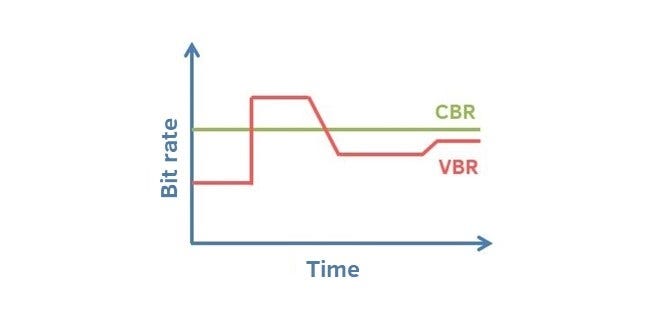
VBR (Variable Bitrate) Dynamic Bitrate means there is no fixed bitrate. The compression software immediately determines which bitrate to use based on the audio data being compressed. This is a method that takes quality as a premise and takes file size into account The recommended encoding mode;
ABR Average Bit Rate (Average Bit Rate) is an interpolation parameter of VBR. LAME created this encoding mode in response to the low file volume ratio of CBR and the variable size of files generated by VBR. Within the specified file size, ABR takes every 50 frames (about 1 second for 30 frames) as a segment. High-frequency and insensitive frequencies use relatively low traffic, and low-frequency and large dynamic performance use high traffic, which can be used as VBR and CBR, a compromise option.
CBR (constant bitrate), constant bitrate means the file has one bitrate from start to finish. Compared to VBR and ABR, the compressed file size is very large and the sound quality will not improve significantly compared to VBR and ABR.

What is the bit rate?

What is the bit rate?

Bit Rate
Bit rate is the amount of data per unit of time used to transmit an audio stream. For example, a bit rate of 128 kbps means 128 kilobits per second and means that 128 thousand bits are used to encode one second of audio (1 byte = 8 bits). If we translate this value into kilobytes, it turns out that one second of sound occupies about 16 KB.

Bitrate

Therefore, the higher the bit rate of the track, the more space it will take up on your computer. But at the same time, within the framework of a format, a higher bit rate allows you to record sound with higher quality. For example, if you convert audio-cd to mp3, then at 256 kbps bit rate, the sound will be much better than at 64 kbps bit rate.

Since now disk space has become quite cheap, we recommend converting to mp3 with a bitrate of at least 192 kbps.

Also distinguish between constant and variable bit rates.

Variable (VBR) constant bit rate difference (CBR)
With a constant bit rate, the same number of bits is used to encode all sections of the sound. But the structure of the sound is usually different and, for example, encoding silence requires significantly fewer bits than encoding rich sound. The variable bit rate, in contrast to the constant one, automatically adjusts the quality of the encoding, depending on the complexity of the sound at certain intervals. That is, for sections that are simple from the point of view of encoding, a lower bit rate will be used, and for complex ones, a higher value will be used. Using a variable bit rate allows you to achieve higher sound quality with a smaller file size.

What is the sample rate?
This concept arises when converting an analog signal into digital and means the number of samples (signal level measurements) per second that are carried out to convert the signal.

What is the number of responsible channels?
A channel for audio encoding is a separate audio stream. Mono: one stream, stereo: two streams. The abbreviation nm is often used to indicate the number of channels, where n is the number of full audio channels and m is the number of low-frequency channels (for example, 5.1).

What is bitrate?

What is bitrate?

You will surely have heard the word bitrate on many occasions when an expert talks about digital format videos. But, if you don’t know what bitrate is or what it is, we tell you in this article so that from now on you will be clear about what is being talked about when bitrate is mentioned.

Like the resolution and the final format of the digital video, another of the determining factors to obtain an excellent image quality is bitrate. Specifically, bitrate is the flow or data rate, that is, the amount of information when playing a video that reads our computer per second.

By resolution we mean the size, that is, the amount of information you have for each centimeter or for every inch (although they are not really technically measured in centimeters or inches, but we explain it this way to be clear). That is why a low quality video looks pixelated if we enlarge them, it is because it lacks information, it lacks greater quality of details.

For that reason, and in the same way that happens with the size of the image, the greater the data flow, the greater the quality of the material.

The bitrate can be even more decisive than the size of the image to define its quality. The reason? Although we have a large video, if the data flow is poor, the material will be of poor quality.

For example, a VCD of 352×288 resolution and 1150 kbits / s will be of higher quality than one of 720×576 and 300 kbits / s.

In this same example, if one of them has a larger screen size, its bandwidth is low, since this data stores the information related to the luminaire and the color of the video.

For that reason, when the data flow is poor, the computer must group a large number of pixels that contain the same information, generating a redundancy that affects the quality of the video.

Because, although the video is large, the computer only gets few data with which to “fill in” that large space. It has little detail again, because it has little information for the space it should detail.

Bitrate implies the amount of details or data that flows through each period of time. The more data we have, the more detail can be obtained and in greater detail, we will obtain a higher quality.

The equation is that simple: quality depends on detail. Just as in a camera the number of megapixels matters, in the same way a higher bitrate will give us more details per second and that will directly impact the quality of the video.

