Enhancing Audio Efficiency with Variable Bitrates


Free Download Mp4Gain
picture

Enhancing Audio Efficiency with Variable Bitrates
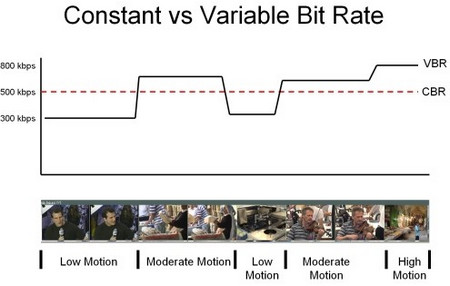
Variable Bitrates
Variable Bitrates
Variable Bitrates
Variable Bitrates

What are variable bitrates in audio compression?

When it comes to audio compression, variable bitrates (VBR) play a crucial role in optimizing file sizes without compromising audio quality. Unlike constant bitrates (CBR), where the bitrate remains consistent throughout the audio file, VBR adjusts the bitrate dynamically based on the complexity of the audio content.

With VBR, the audio encoder allocates a higher bitrate to more intricate and demanding parts of the audio, such as music or sound effects, and a lower bitrate to simpler sections, such as silence or quiet passages. This flexibility allows for efficient compression, reducing the overall file size while maintaining excellent audio quality.

By utilizing VBR, audio files can achieve significant compression ratios without perceptible loss in audio fidelity. This makes VBR an ideal choice for various applications, including streaming services, podcasts, music distribution, and more.

Optimizing audio quality with variable bitrates

To enhance audio efficiency and deliver optimal quality, utilizing variable bitrates is essential. Let’s explore how VBR contributes to audio optimization and its benefits in different contexts.

Streaming services: With the increasing popularity of music and video streaming platforms, efficient audio compression is crucial to provide seamless playback while conserving bandwidth. VBR ensures that audio files are compressed intelligently, allocating more bits to complex audio segments and fewer bits to simpler parts. This optimization results in high-quality audio streaming with minimal buffering and bandwidth consumption.

Podcasts and spoken-word content: Variable bitrates are particularly advantageous for podcasts and other spoken-word content. These formats often contain long stretches of silence or low-intensity speech, which can be compressed efficiently with lower bitrates. However, when music or sound effects are introduced, VBR allocates a higher bitrate to ensure the clarity and fidelity of those elements, enhancing the overall listening experience.

In summary, variable bitrates offer a versatile approach to audio compression, delivering excellent audio quality while optimizing file sizes. By dynamically allocating bitrates based on the complexity of the audio content, VBR ensures efficient compression for various applications, including streaming services and spoken-word content.

How do variable bitrates impact audio file sizes?

The use of variable bitrates (VBR) in audio compression significantly impacts the file sizes of audio recordings. Let’s explore how VBR affects file sizes and the factors to consider when using this technique.

When compared to constant bitrates (CBR), which maintain a consistent bitrate throughout the audio file, VBR can produce smaller file sizes without compromising audio quality. This is because VBR allocates higher bitrates to more complex parts of the audio and lower bitrates to simpler sections, resulting in a more efficient use of data.

The actual impact on file sizes depends on the nature of the audio content. For audio recordings with a lot of silence or low-intensity passages, VBR can significantly reduce the file size by allocating fewer bits to those sections. However, when the audio contains highly dynamic or complex elements, such as music or sound effects, VBR increases the bitrate to preserve the quality and detail of those components.

It’s important to note that the specific VBR settings chosen during the compression process can also affect file sizes. Higher VBR settings generally result in larger file sizes, as the encoder allocates more bits to maintain higher audio quality throughout the recording. Lower VBR settings, on the other hand, can lead to smaller file sizes but may sacrifice some audio fidelity in more complex sections.

When determining the appropriate VBR settings for a particular audio recording, it’s essential to consider the desired balance between file size and audio quality. For applications where file size is a significant concern, such as streaming services or limited storage environments, lower VBR settings may be preferred. However, for situations that prioritize audio fidelity, such as music production or high-quality audio distribution, higher VBR settings are recommended.

In conclusion, variable bitrates have a significant impact on audio file sizes. By dynamically adjusting the bitrate based on the complexity of the audio content, VBR allows for efficient compression, resulting in smaller file sizes while maintaining audio quality. The specific VBR settings chosen during compression should align with the intended purpose and priorities of the audio recording.

Optimizing audio file storage with variable bitrates

Efficient storage of audio files is essential for various applications, including music libraries, sound libraries, and multimedia production. Variable bitrates (VBR) offer an effective solution for optimizing audio file storage. Let’s explore some considerations and benefits of using VBR for storage optimization.

Smaller file sizes: VBR allows for more efficient compression of audio files by allocating fewer bits to simpler sections, resulting in smaller overall file sizes. This is particularly advantageous for applications with limited storage capacities or when transferring files over networks with limited bandwidth.

Preserving audio quality: Despite the reduction in file sizes, VBR maintains excellent audio quality by allocating higher bitrates to complex sections, such as music or sound effects. This ensures that the integrity and fidelity of the audio content are preserved, even in compressed formats.

Compatibility: VBR-encoded audio files are compatible with a wide range of devices and software players. Whether it’s music playback on mobile devices, media editing on computers, or streaming on various platforms, VBR-encoded files can be seamlessly utilized across different environments.

By utilizing VBR for audio file storage, organizations and individuals can optimize their storage capacities, reduce bandwidth requirements, and ensure high-quality audio playback. Whether it’s managing extensive music libraries or distributing sound effects, VBR offers a practical solution for efficient storage and retrieval of audio content.

LSI keywords: audio compression, audio optimization, file size reduction, bandwidth consumption, storage efficiency, streaming quality, music distribution, podcast production, multimedia storage, storage optimization.



Free Download Mp4Gain
picture


Mp4Gain Main Window
picture


Mp4Gain Features
picture


Free Download Mp4Gain
picture

Bit rate

Bit rate

Bitrate

Bit rate refers to the number of bits (bit) transmitted per unit of time, in bps (bit per second).

bit rate

Bit rate is also known as “binary bit rate”, commonly known as “code rate”. Indicates the number of bits transmitted per unit of time. It is used to measure the transmission speed of digital information, often written as bit/sec. According to the number of bits occupied by each image storage frame and the transmission bit rate, the digital image information transmission speed can be calculated [1].
In modern digital communication, the transmission volume of digitized video and other information is large, so it is often measured in kilobits per second or megabits per second, which are written as kbit/sec (or kbps) and Mbit/sec. (or Mbps respectively). ). For example, the amount of information digitized from an ordinary color TV signal can reach 216 Mbit/sec. A good digital broadcast channel can transmit dozens of color TV programs, and its capacity can reach several gigabits or gigabits per second (written as Gbit/sec or Gbps) [1] .
Bitrate is often used to measure the quality of video files.
flexibility edit stream
Because each network is unique and each access line has different conditions (such as length, attenuation, crosstalk environment, etc.), access lines from different telephone companies must support different data rates. For ADSL and VDSL modems, it is best to set the data rate to one of many possible data rates. For example, DMT-based ADSL and VDSL can theoretically change the tariff at fine intervals, and CAP-based RADSL (Rate Adaptive ADSL) also provides some flexibility in tariff configuration [2].
However, telephone companies may want to limit xDSL service to a small set of rates sufficient to provide a variety of services. If a limited set of tariffs can be adapted to a wide range of services, then the management of the services in this case is simpler than in the case of variable tariffs. Telephone companies want the choice of modem speed to be under the control of the network, not the user [2] .
In this mode, the selection of the transmission rate set of the xDSL network must be prudent. In this case, there is a possibility that two adjacent systems receive traffic at very different rates and the system must be able to handle such a situation. The other model, the “best match” approach using adaptive rate ADSL (similar to a voiceband modem), is more beneficial to new network operators and Internet Service Providers (ISPs) [2] .
Transmission control method
Most bit rate control schemes consist of two parts. Part of the encoded bit stream output by the encoder is fed into a buffer. For a constant bitrate channel, the data in the buffer is fetched at a constant rate, and if the buffer is large enough, the bitrate variation caused by the MPEG picture type, etc. can be smoothed out. This is necessary for both constant bit rate transmission and variable bit rate transmission in general. However, in practice, the buffer size is always limited. The buffering process will bring a delay to the system, and this delay is proportional to the size of the buffer. Latency is often a serious issue for real-time image communication, so buffers should be kept as small as possible. That is, long-term fluctuations in bitrate due to changes in scene content or changes, etc. they cannot be softened in this way, so another part is needed. This is to send some measure of the output bitrate to the encoder to control the encoding process, thus changing the output bitrate [3] .

Quality (bit rate)

Quality (bit rate)

Bit Rate

In multimedia technology, quality is often used to judge the effect of audio, and quality here is actually bitrate.

Bit Rate

1. Introduction
2 sound control
3 encoding mode
Introductionedit transmission
The term quality is widely used.
In multimedia technology, quality is often used to judge the effect of audio, and quality here is actually bitrate.
On WINDOWS it is called “bit rate” and on some players it is described as ” bit rate “.
Quality refers to the bit rate at which digital sound is converted from analog to digital format. The higher the bitrate, the better the quality of the restored sound.
sound control edit stream
16 Kbps = phone quality
24 Kbps = increase phone quality, shortwave transmission, longwave transmission, European standard medium wave transmission
40 Kbps = American standard medium wave transmission
56Kbps=Voice
64 Kbps = boost voice (best bitrate setting for cell phone ringtones, best setting for cell phone mono MP3 players)
112 Kbps = FM stereo broadcast FM 128 Kbps = tape (best setting for mobile phone stereo MP3 player, best setting for low-end MP3 player)
160 Kbps = HIFI high fidelity (best setting for mid to high end MP3 players)
192Kbps=CD (best setting for high-end MP3 players)
256Kbps=Studio Music Studio (for music enthusiasts)
In fact, with the advancement of technology, the quality of music is also getting higher and higher, the highest quality of MP3 is 320Kbps, but some formats can achieve higher sound quality.
For example, the emerging APE audio format can provide real audiophile level lossless sound quality and smaller volume than WAV format, and its quality is usually 550kbps-950kbps.
encoding modeedit stream
VBR (Variable Bitrate) Dynamic Bitrate means there is no fixed bitrate. The compression software immediately determines which bitrate to use based on the audio data being compressed. This is a method that takes quality as a premise and takes file size into account The recommended encoding mode;
ABR Average Bit Rate (Average Bit Rate) is an interpolation parameter of VBR. LAME created this encoding mode in response to the low file volume ratio of CBR and the variable size of files generated by VBR. Within the specified file size, ABR takes every 50 frames (about 1 second for 30 frames) as a segment. High-frequency and insensitive frequencies use relatively low traffic, and low-frequency and large dynamic performance use high traffic, which can be used as VBR and CBR, a compromise option.
CBR (constant bitrate), constant bitrate means the file has one bitrate from start to finish. Compared to VBR and ABR, the compressed file size is very large and the sound quality will not improve significantly compared to VBR and ABR.

VBR vs CBR

At the beginning of 2002 other compressed audio formats such as Windows Media Audio and Ogg Vorbis began to be massively included in programs, operating systems and autonomous players, which made it anticipate that the MP3 was gradually falling into disuse, in favor of other formats, such as those mentioned, of much better quality.

One of the factors that influences the decline of MP3 is that it has a patent. Technically it does not mean that its quality is inferior or superior, but it prevents the community from continuing to improve it and may force you to pay for the use of some codec, this is what happens with MP3 players.

New formats, such as OGG Vorbis, are not licensed, but are free SOFTWARE. That is why they can be used and improved without conditions. Even so, at the beginning of 2008, the mp3 format continues to be the most used and the one that enjoys the most success.


Mp3 – The psychoactive model and masking threshold

The psychoacoustic model and masking threshold

Compression is based on the reduction of irrelevant dynamic range, that is, on the inability of the auditory system to detect quantification errors under masking conditions.

The human ear has a perceptual masking threshold for its characteristics. If an airplane passes by us while we speak, the sound it produces is able to “cover” our voice. The same happens if a very strong DO note, on a trumpet, sounds at the same time as a pianisimo DO note on a violin: the DO of the trumpet, masks the DO of the violin, which is not heard.

This is due to the anatomy of the human auditory system: if two sounds of equal frequency are emitted, one with greater amplitude (volume) than the other, the sound of greater amplitude will mask that of amplitude (volume) than the other.

The psychoacoustic model is an average standard that divides the signal into approaching frequency bands, and then quantifies each subband based on the threshold of noise detection within that band. This model analyzes the audio signal and calculates the amount of noise that can be introduced based on the frequency, that is, calculates the “amount of masking” or
masking threshold as a function of frequency. Then, the encoder uses this information to decide the best way to spend the available bits.

Studies show that the distortion generated is imperceptible to the ear experienced in an optimal environment from 256 kbps and under normal conditions. For the non-experienced ear, or common, with 128 kbps or up to 96 kbps it is enough for it to be heard “well” (unless you have a high-quality audio equipment where the lack of bass is noticeably noticed and the sound is highlighted of “frying” in the treble).

In people who listen to a lot of music or who have experience in the auditory part, from 192 or 256 kbps it is enough to hear well. The music that circulates on the Internet is mostly encoded between 128 and 192 kbps.

MP3 – BItrate, CBR and VBR

CONSTANT AND VARIABLE BITRATE

CBR (constant bit rate)

It encodes the entire entire file with a single bit rate.

This method is the most common, and it becomes more predictable, always according to a file size and bandwidth. The file will be compressed to weigh a number of bits per second.

The bitrate is then measured in kbps (kilobites per second), the quality being better as much more bits per second weigh the file. In general, the most basic quality is
Around 128kbps, and the highest (for more educated ears) around 320kbps.

VBR (variable bit rate)

It encodes with a higher bit rate when the material is more complex, and a smaller amount of bits for simpler materials. By relying not only on the statistical references of the threshold of
average masking, but also of the source material, the .mp3 files compressed with VBR tend to be smaller than those compressed with the CBR method (they are the same quality) to have a more variable weight,

The quality is therefore no longer measured in kbps, but in levels (100 for the best quality – highest quality – and decreasing in the number for lower quality 10- lowest quality,)

What is the constant and variable bit rate in an MP3?

The FLAC format is more modern and with less loss of quality than MP3 but with a much larger file size, so MP3 remains one of the most widespread and used digital audio formats. With MP3 encoding at 320 kbps, excellent quality is achieved for most domestic digital audio players and for the human ear itself. But what is the difference between MP3 with a constant bit rate and a variable bit rate? Let’s clear the doubt.

Constant Bit Rate vs. variable bit rate

The variable bit rate coding method, known by the acronym VBR (Variable Bit Rate), is intended to achieve the highest audio quality evenly throughout the entire music track by performing an intelligent bit allocation during The coding process. That is, the Bit Rate varies to keep the audio quality as constant as possible throughout the file. In general, the MP3 encoding method with a variable bit rate produces a higher quality level than the constant bit rate coding for a similar Bitrate encoding.

Constant bit rate coding (CBR – Constant Bit Rate), meanwhile, is an encoding method that, instead of varying the bit rate, varies the audio quality to adjust to a fixed and constant bit rate at length of the MP3 file.

When to use a Constant Bit Rate?

If your priority is to get a certain MP3 file size, or at least a more or less predictable size, you should use a constant Bit Rate encoding.

When using a constant Bit Rate, the final file size is predictable although the quality of the MP3 audio will not be constant along the audio track.

When to use a Bit Rate Variable?

Bit Rate Variable encoding was developed for use when the main priority of MP3 encoding is a consistent quality throughout the track and the final file size is not the most important.

In an audio track some sections will be more difficult to code than others. Coding with Constant Bit Rate will encode the audio at the same Bit Rate set in advance, both in these more complex sections and in the easier sections. On the contrary, the coding with Bit Rate Variable will assign less bits in the easiest sections and will assign more bits when the section requires it because of its complexity. In this way, VBR encoding achieves a more uniform audio quality throughout the entire MP3 while the CBR achieves a constant Bit Rate.

In other words, if you use Constant Bit Rate the quality will be varied to reach the specified Bit Rate while using a Variable Bit Rate the Bit Rate is varied to achieve the highest possible and uniform quality.

All this does not mean that you don’t have to specify a Bit Rate for VBR encoding. Normally a fork will be specified, for example, 192-320 kbps, which means that a minimum of 192 kbps will be allocated for the easiest sections and up to a maximum of 320 kbps in the most complex sections of the music track.

The negative part is that MP3 encoding with Bit Rate Variable is not supported by some players. For me this disadvantage is part of the past and only if you try to play an MP3 in a really old player will not be able to read the file.
