What is a constant bit rate? CBR


Free Download Mp4Gain
picture

Constant bit rate is a tool used in digital telecommunication signals, for example, when transferring audio files from the Internet. A constant bit rate file is encoded to produce a file that plays at exactly the same bit rate throughout its duration. The biggest advantage of a constant file bit rate type is that it allows for constant playback of the media stream, as the bit rate will never fluctuate, reducing any delay and jitter from the end of the server stream. Although this file type is ideal in such circumstances, it is disadvantageous for storing more complex file types, as the constant bit rate can be overloaded or underused depending on file variations.

Constant bit rate (CBR)

A constant bit rate file is like a trickle of sand through an hourglass – it will always go exactly the same speed. Counter this with an opposite file type, the variable bit rate file. In a variable bit rate file, the “sand” is uncomfortable, resulting in sometimes small information flows and sometimes larger, more complex blocks.
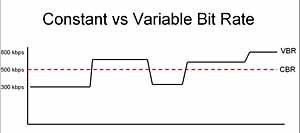
CBR and VBR

As mentioned, one of the best uses for a constant bit rate stream is when playing a media file. Compressing the entire content of the video or audio file into a single playback ensures consistency across the file, forcing images and tones to become substantially similar to each other. In a multimedia file encoded in a variable bit rate format, the quality of the file can change dramatically from one moment to the next as the bit rate peaks and slows like a roller coaster. Although a file using a constant bit rate does not always have the optimal image quality, as some images may have to be reduced in appearance to “adapt” the selected bit rate, at least the entire presentation will be smooth and fluid for the user.

It may seem that a file with a constant bit rate is always preferable, but this is not always the case. Some circumstances tend to favor the ability to model the bit rate within a specific range of values. Consider archiving a multimedia repository of popular paintings. While some paintings in the collection are hopelessly complex, requiring a high bitrate to capture their true essence, others are much simpler, requiring a much lower bitrate to keep the overall file size low. In cases like this, files that use a bit rate that remains constant would normally provide too much or too little storage space for each virtual drawing image.

Although a solution could be to increase the bit rate “ceiling”, allowing even the most complex paintings to be preserved with impunity, but this is not optimal from a programming point of view. Files with a higher bitrate require more storage space on the hard drive, as each item in the file has more room to “breathe” with the higher bitrate. The greater the space wasted by files whose complexity is not justified by the chosen high bit rate, the more inefficient the solution becomes.


Free Download Mp4Gain
picture


Mp4Gain Main Window
picture


Mp4Gain Features
picture


Free Download Mp4Gain
picture

What is the constant and variable bit rate in an MP3?

The FLAC format is more modern and with less loss of quality than MP3 but with a much larger file size, so MP3 remains one of the most widespread and used digital audio formats. With MP3 encoding at 320 kbps, excellent quality is achieved for most domestic digital audio players and for the human ear itself. But what is the difference between MP3 with a constant bit rate and a variable bit rate? Let’s clear the doubt.

Constant Bit Rate vs. variable bit rate

The variable bit rate coding method, known by the acronym VBR (Variable Bit Rate), is intended to achieve the highest audio quality evenly throughout the entire music track by performing an intelligent bit allocation during The coding process. That is, the Bit Rate varies to keep the audio quality as constant as possible throughout the file. In general, the MP3 encoding method with a variable bit rate produces a higher quality level than the constant bit rate coding for a similar Bitrate encoding.

Constant bit rate coding (CBR – Constant Bit Rate), meanwhile, is an encoding method that, instead of varying the bit rate, varies the audio quality to adjust to a fixed and constant bit rate at length of the MP3 file.

When to use a Constant Bit Rate?

If your priority is to get a certain MP3 file size, or at least a more or less predictable size, you should use a constant Bit Rate encoding.

When using a constant Bit Rate, the final file size is predictable although the quality of the MP3 audio will not be constant along the audio track.

When to use a Bit Rate Variable?

Bit Rate Variable encoding was developed for use when the main priority of MP3 encoding is a consistent quality throughout the track and the final file size is not the most important.

In an audio track some sections will be more difficult to code than others. Coding with Constant Bit Rate will encode the audio at the same Bit Rate set in advance, both in these more complex sections and in the easier sections. On the contrary, the coding with Bit Rate Variable will assign less bits in the easiest sections and will assign more bits when the section requires it because of its complexity. In this way, VBR encoding achieves a more uniform audio quality throughout the entire MP3 while the CBR achieves a constant Bit Rate.

In other words, if you use Constant Bit Rate the quality will be varied to reach the specified Bit Rate while using a Variable Bit Rate the Bit Rate is varied to achieve the highest possible and uniform quality.

All this does not mean that you don’t have to specify a Bit Rate for VBR encoding. Normally a fork will be specified, for example, 192-320 kbps, which means that a minimum of 192 kbps will be allocated for the easiest sections and up to a maximum of 320 kbps in the most complex sections of the music track.

The negative part is that MP3 encoding with Bit Rate Variable is not supported by some players. For me this disadvantage is part of the past and only if you try to play an MP3 in a really old player will not be able to read the file.