
Enhancing Audio Efficiency with Variable Bitrates
:max_bytes(150000):strip_icc()/CBR-vs-VBR-069b3b5e6d554d53841e7e525092d25b.jpg)
What are variable bitrates in audio compression?
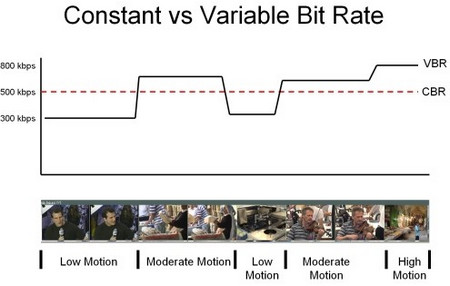
When it comes to audio compression, variable bitrates (VBR) play a crucial role in optimizing file sizes without compromising audio quality. Unlike constant bitrates (CBR), where the bitrate remains consistent throughout the audio file, VBR adjusts the bitrate dynamically based on the complexity of the audio content.
With VBR, the audio encoder allocates a higher bitrate to more intricate and demanding parts of the audio, such as music or sound effects, and a lower bitrate to simpler sections, such as silence or quiet passages. This flexibility allows for efficient compression, reducing the overall file size while maintaining excellent audio quality.
By utilizing VBR, audio files can achieve significant compression ratios without perceptible loss in audio fidelity. This makes VBR an ideal choice for various applications, including streaming services, podcasts, music distribution, and more.
Optimizing audio quality with variable bitrates
To enhance audio efficiency and deliver optimal quality, utilizing variable bitrates is essential. Let’s explore how VBR contributes to audio optimization and its benefits in different contexts.
Streaming services: With the increasing popularity of music and video streaming platforms, efficient audio compression is crucial to provide seamless playback while conserving bandwidth. VBR ensures that audio files are compressed intelligently, allocating more bits to complex audio segments and fewer bits to simpler parts. This optimization results in high-quality audio streaming with minimal buffering and bandwidth consumption.
Podcasts and spoken-word content: Variable bitrates are particularly advantageous for podcasts and other spoken-word content. These formats often contain long stretches of silence or low-intensity speech, which can be compressed efficiently with lower bitrates. However, when music or sound effects are introduced, VBR allocates a higher bitrate to ensure the clarity and fidelity of those elements, enhancing the overall listening experience.
In summary, variable bitrates offer a versatile approach to audio compression, delivering excellent audio quality while optimizing file sizes. By dynamically allocating bitrates based on the complexity of the audio content, VBR ensures efficient compression for various applications, including streaming services and spoken-word content.
How do variable bitrates impact audio file sizes?
The use of variable bitrates (VBR) in audio compression significantly impacts the file sizes of audio recordings. Let’s explore how VBR affects file sizes and the factors to consider when using this technique.
When compared to constant bitrates (CBR), which maintain a consistent bitrate throughout the audio file, VBR can produce smaller file sizes without compromising audio quality. This is because VBR allocates higher bitrates to more complex parts of the audio and lower bitrates to simpler sections, resulting in a more efficient use of data.
The actual impact on file sizes depends on the nature of the audio content. For audio recordings with a lot of silence or low-intensity passages, VBR can significantly reduce the file size by allocating fewer bits to those sections. However, when the audio contains highly dynamic or complex elements, such as music or sound effects, VBR increases the bitrate to preserve the quality and detail of those components.
It’s important to note that the specific VBR settings chosen during the compression process can also affect file sizes. Higher VBR settings generally result in larger file sizes, as the encoder allocates more bits to maintain higher audio quality throughout the recording. Lower VBR settings, on the other hand, can lead to smaller file sizes but may sacrifice some audio fidelity in more complex sections.
When determining the appropriate VBR settings for a particular audio recording, it’s essential to consider the desired balance between file size and audio quality. For applications where file size is a significant concern, such as streaming services or limited storage environments, lower VBR settings may be preferred. However, for situations that prioritize audio fidelity, such as music production or high-quality audio distribution, higher VBR settings are recommended.
In conclusion, variable bitrates have a significant impact on audio file sizes. By dynamically adjusting the bitrate based on the complexity of the audio content, VBR allows for efficient compression, resulting in smaller file sizes while maintaining audio quality. The specific VBR settings chosen during compression should align with the intended purpose and priorities of the audio recording.
Optimizing audio file storage with variable bitrates
Efficient storage of audio files is essential for various applications, including music libraries, sound libraries, and multimedia production. Variable bitrates (VBR) offer an effective solution for optimizing audio file storage. Let’s explore some considerations and benefits of using VBR for storage optimization.
Smaller file sizes: VBR allows for more efficient compression of audio files by allocating fewer bits to simpler sections, resulting in smaller overall file sizes. This is particularly advantageous for applications with limited storage capacities or when transferring files over networks with limited bandwidth.
Preserving audio quality: Despite the reduction in file sizes, VBR maintains excellent audio quality by allocating higher bitrates to complex sections, such as music or sound effects. This ensures that the integrity and fidelity of the audio content are preserved, even in compressed formats.
Compatibility: VBR-encoded audio files are compatible with a wide range of devices and software players. Whether it’s music playback on mobile devices, media editing on computers, or streaming on various platforms, VBR-encoded files can be seamlessly utilized across different environments.
By utilizing VBR for audio file storage, organizations and individuals can optimize their storage capacities, reduce bandwidth requirements, and ensure high-quality audio playback. Whether it’s managing extensive music libraries or distributing sound effects, VBR offers a practical solution for efficient storage and retrieval of audio content.
LSI keywords: audio compression, audio optimization, file size reduction, bandwidth consumption, storage efficiency, streaming quality, music distribution, podcast production, multimedia storage, storage optimization.


