
Variable Bitrate Encoding in M4A

Let’s Talk About Variable Bitrate Encoding in M4A
When it comes to audio quality and storage efficiency, variable bitrate (VBR) encoding in M4A is one of the smartest choices for creating digital music files that sound great and don’t take up much space. The idea is simple: instead of keeping the data rate constant, VBR adjusts to match the complexity of the audio. That way, simpler segments require less data while detailed sections use more. It’s like packing a suitcase—use only what you need to fit everything in! This article will dive into the hows and whys of VBR in M4A, exploring how it can improve listening experiences, make storage more efficient, and maintain high-quality sound without hogging memory.
Understanding Variable Bitrate (VBR) in M4A Format
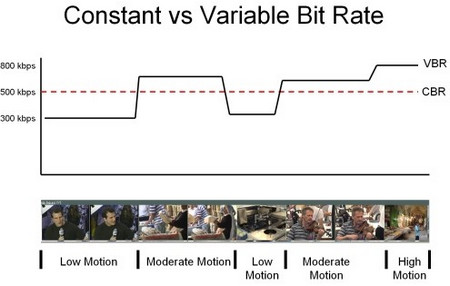
VBR encoding is different from constant bitrate (CBR) encoding because it lets the bitrate shift based on the needs of each part of the audio. For example, in a song with quiet and loud sections, CBR would use the same amount of data regardless of whether it’s a whisper or a blast of sound. VBR, on the other hand, adapts, giving more data to complex parts and less to simpler ones. M4A files, often used for iTunes and Apple Music, support VBR and are excellent for keeping audio files both compact and high-quality. This flexibility is especially helpful for streaming services or mobile devices where storage is a premium.
How VBR Works in Digital Audio
VBR encoding analyzes each segment of a track and determines how much data to allocate. Here’s how it usually breaks down:
-
Silence or low-complexity segments
These don’t need much data, so VBR saves space by using a lower bitrate.
-
High-complexity segments
Here, VBR allocates more data to capture intricate sounds like a symphony’s crescendo or a guitar solo.
-
Middle-complexity segments
In these, VBR finds a balance, applying just enough bitrate to keep the audio quality consistent without overloading it.
This approach makes VBR encoding ideal for M4A, especially when you want music that sounds as good as possible without taking up more space than necessary.
Advantages of Using VBR Encoding in M4A
VBR in M4A offers several key benefits:
-
High-quality sound with efficient file size
VBR ensures that sound quality remains consistent, especially in complex musical pieces, while keeping file sizes down.
-
Efficient storage
Since VBR allocates data based on necessity, you get an optimized file that doesn’t waste storage.
-
Better for streaming
VBR allows for smoother streaming, especially in low-bandwidth situations, because the file adapts dynamically.
For anyone looking to optimize their digital music library, VBR in M4A is a clear choice, offering more control over both quality and storage.
Comparing VBR and CBR Encoding in M4A
When deciding between VBR and CBR encoding for M4A files, there are some clear distinctions:
-
Constant Bitrate (CBR)
As the name implies, CBR keeps the same bitrate throughout, which is good for predictable file sizes but can result in wasted space on simple audio sections.
-
Variable Bitrate (VBR)
VBR adapts based on the complexity of each segment, making it more efficient for file size and quality.
For example, if you have a song with a lot of silent or quiet parts, CBR would use the same amount of data as it would for loud, complex parts. VBR only uses data as necessary, making it a better choice for quality and efficiency in most cases.
Choosing the Right Bitrate Settings for M4A VBR Encoding
Selecting the best bitrate settings can feel like balancing a scale. Too low, and you lose sound quality; too high, and file sizes increase without much benefit. Typically, 128 kbps to 192 kbps is optimal for M4A VBR, but for high-quality audio, 256 kbps might be worth it. Just like deciding how much memory to put in a computer, there’s a sweet spot where you get the best of both worlds.
Real-Life Scenarios: When to Use VBR in M4A
Some situations make VBR the perfect choice:
-
Music with mixed complexity
Songs that shift between quiet and intense parts benefit greatly from VBR, as the bitrate can adjust dynamically.
-
Audiobooks
Audiobooks, with long stretches of consistent speech, don’t need high bitrates constantly. VBR keeps file size low without sacrificing voice clarity.
-
Podcasts
Similar to audiobooks, podcasts have segments where the bitrate can drop during less complex sections.
In each case, VBR helps make the audio experience more efficient without losing the quality of important parts.
File Size and Storage Benefits of VBR in M4A
VBR in M4A files can save quite a bit of storage over time. While it varies depending on the complexity of each audio track, VBR encoding generally results in smaller file sizes than CBR encoding without compromising on sound quality. For anyone with a large audio library or limited storage on their devices, VBR encoding in M4A is a wise choice.
Optimizing VBR Encoding for Streaming
For streaming, VBR offers a unique advantage: it can adapt to bandwidth limitations, providing a smoother experience even with fluctuating internet speeds. Many streaming platforms now prefer VBR for its ability to offer consistent quality without sacrificing efficiency. For example, when listening to a song on a lower-speed connection, VBR encoding allows the quality to adjust rather than stalling playback. This adaptability makes it ideal for music streaming services that rely on efficient data transfer.
How M4A VBR Encoding Impacts Sound Quality
Sound quality in M4A files can benefit greatly from VBR encoding. Since VBR allocates bitrate based on the audio complexity, it can make music sound rich and full without using more data than necessary. This means that even on lower storage devices, you can enjoy a high-quality audio experience.
Latest Words on Variable Bitrate Encoding in M4A
Variable bitrate encoding in M4A is a powerful tool for managing audio quality and file size effectively. By adjusting to the complexity of the audio, VBR keeps storage needs low while delivering top-notch sound. Whether it’s for streaming, podcasts, or simply optimizing your music library, VBR in M4A strikes the right balance between quality and efficiency. When you’re ready to manage your audio files with the same balance of quality and file size, using a tool like Mp4Gain can help you set and fine-tune these settings to suit your needs.


:max_bytes(150000):strip_icc()/CBR-vs-VBR-069b3b5e6d554d53841e7e525092d25b.jpg)
Comments:
Never thought M4A could sound so good with variable bitrate. I’ve been using CBR forever and didn’t realize what I was missing out on.
This article breaks down bitrate so well. I’ve been trying to understand why my music files take so much space, and this explained it clearly!
VBR sounds like it could be a game-changer for my music collection. I’ve got limited storage on my phone, so every bit saved counts.
Great info here. Been wondering why some files are bigger than others even when they’re the same length. Now I know it’s the bitrate differences!
I need help setting up my audio files to use VBR. Anyone know how to change from CBR to VBR in existing M4A files?
This explained things better than other articles I read. I actually understand why VBR would save space now. Thanks!
So helpful! I never knew about VBR for podcasts—definitely going to try it out since I’m always tight on space.
Does VBR affect battery life when streaming music? I’ve heard mixed things.
My phone is always full of music files, so this might help me a lot. But how do I make sure VBR doesn’t hurt quality?
Wish I’d known about VBR sooner! Definitely switching to it for my playlists, especially for my workout mixes that are long but don’t need crazy high quality.
Was skeptical about VBR at first, but this really changed my mind. Thanks for explaining the pros and cons clearly!
Variable bitrate makes a lot of sense now. I’ll be converting my whole library to M4A VBR from now on.
For podcasts, this really does seem useful. Anyone tried it for audiobooks?
This info was super useful for someone like me who’s always on the road. Lower file sizes mean more songs on my phone.