Understanding Audio Bit Depth: 8-bit vs. 16-bit vs. 24-bit


Free Download Mp4Gain
picture

Understanding Audio Bit Depth: 8-bit vs. 16-bit vs. 24-bit
Bit Depth
Bit Depth

When it comes to digital audio, one of the most critical factors in determining the quality of a recording is the audio bit depth. In this article, we’ll delve into the technical details of audio bit depth and explore the differences between 8-bit, 16-bit, and 24-bit audio recordings.
Bit Depth
Bit Depth

What is Audio Bit Depth?

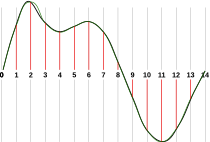
In digital audio, sound waves are converted into a series of numerical values that can be stored and manipulated by computers. Audio bit depth refers to the number of bits of information used to represent each sample in a digital audio recording. Each sample represents the amplitude of the sound wave at a specific point in time.

The bit depth determines the range of possible values for each sample. For example, an 8-bit audio recording has 256 possible values, while a 16-bit recording has 65,536 possible values, and a 24-bit recording has over 16 million possible values. This increase in possible values provides greater resolution and accuracy, resulting in improved sound quality.

Dynamic Range

Another critical aspect of audio bit depth is dynamic range, which refers to the difference between the quietest and loudest sounds that can be recorded. With an increase in bit depth, the dynamic range of a recording also increases. For example, a 16-bit audio recording has a dynamic range of 96 dB, whereas a 24-bit recording has a dynamic range of 144 dB. This difference in dynamic range is quite significant and is one of the reasons why 24-bit audio is preferred for professional applications.

Quantization Noise

Quantization noise is an inherent part of digital audio and is introduced during the process of converting an analog audio signal to a digital representation. Quantization noise is essentially the difference between the actual analog signal and the closest quantized digital value. The more bits used for quantization, the lower the level of quantization noise.

However, as the bit depth increases, the noise introduced becomes less of an issue. At 16 bits, quantization noise is typically not audible, but it can become noticeable when processing audio. At 24 bits, quantization noise is virtually non-existent, even when processing audio.

Conclusion

In conclusion, audio bit depth plays a crucial role in the quality of digital audio recordings. Increasing the bit depth of an audio recording provides greater resolution and accuracy, resulting in improved sound quality. Professionals in the music industry typically prefer 24-bit audio due to its higher dynamic range and lower quantization noise. However, for most consumer applications, 16-bit audio is perfectly adequate and results in high-quality sound.

It is also important to note that bit depth is just one aspect of digital audio quality. Other factors such as sample rate and compression algorithms also play a significant role in determining the overall quality of a digital audio recording. Nonetheless, understanding audio bit depth is a crucial step in the journey to becoming a proficient audio engineer or producer.



Free Download Mp4Gain
picture


Mp4Gain Main Window
picture


Mp4Gain Features
picture


Free Download Mp4Gain
picture

The Importance of Bitrate in Digital Audio and Video

The Importance of Bitrate in Digital Audio and Video

The Importance of Bitrate in Digital Audio and Video

Have you ever watched a video that was all glitchy and the sound was all messed up? Or listened to a song and it sounded like it was being played on a scratched record? Well, that’s because of something called the bitrate.

The Importance of Bitrate in Digital Audio and Video

What is Bitrate?

Bitrate is the number of bits of information that are processed in a certain amount of time. In digital audio and video, it determines the quality of the sound and video. The higher the bitrate, the better the quality, and the more information is processed.

Why is Bitrate Important?

When you watch a video or listen to a song, the bitrate helps to determine the quality of the sound and video. The higher the bitrate, the more information is processed, and the better the quality. If the bitrate is low, then the quality will be poor and you might miss out on important details.

For example, if you’re watching a video of a concert and the bitrate is low, then you might not be able to hear the singer’s voice clearly or see the instruments being played. This can be really frustrating and ruin the whole experience for you.

How Does Bitrate Affect Digital Audio and Video?

Bitrate affects digital audio and video in several ways. For one, it affects the file size. If the bitrate is high, then the file size will be large, and if the bitrate is low, then the file size will be small.

Another way that bitrate affects digital audio and video is by affecting the quality. If the bitrate is high, then the quality will be good, and if the bitrate is low, then the quality will be poor. This can be especially noticeable when you’re watching a video with a lot of movement, like a sports game or a music video.

Finally, bitrate can also affect how long it takes to download or upload a video or audio file. If the bitrate is high, then it will take longer to download or upload, and if the bitrate is low, then it will take less time.

How to Choose the Right Bitrate for Your Digital Audio and Video

When it comes to choosing the right bitrate for your digital audio and video, there are a few things to keep in mind. First, think about what you’re using the video or audio for. If it’s for personal use, then a lower bitrate might be okay, but if it’s for professional use, then a higher bitrate is probably better.

Another thing to consider is the quality of the video or audio. If you want the best quality possible, then a higher bitrate is the way to go. But if you don’t need the best quality and just want something that’s good enough, then a lower bitrate might be fine.

Finally, think about the file size. If you don’t have a lot of storage space, then a lower bitrate might be a good choice, but if you have plenty of storage space, then a higher bitrate might be the way to go.

Why can the difference in bitrate make it sound great (high, medium, low)?

Why can the difference in bitrate make it sound great (high, medium, low)?

Bit Depth vs. Bit Rate

Reply:
Just to make sure this is clear, let’s differentiate

BIT RATE BIT DEPTH

sample rate vs bit depth

as much as

Bit rate

how they relate to audio in the digital domain …

Sampling frequency:

The sample rate is specified as a frequency (samples per second), for example, 44.1 kHz for CD. Other common values ​​are 48, 88.2, 96, 176.4, and 196 kHz, although some formats (such as DSD) have sample rates greater than 2.8 MHz. The sample rate indicates

how often the audio signal is measured

While some people view lower readings as a tiered bar graph, I prefer to view them as a child bitmap. If you take the outline of a horse and simplify it to 20 points so the child can connect, it’s not so much that you end up with steps (using straight and curved lines to connect 20 correctly spaced points can lead to a decent figure), but there won’t be without subtlety. Whereas with 200 (or 2000) points, you could approximate the wavy strands along the horse’s mane.

In audio, a lower sample rate does not make the sound “bad” (eg, fuzzy, fuzzy, or distorted), but rather limits the maximum frequency (pitch) that can be recorded / played back as intended.

Nyquist theorem formula

, The 44.1 kHz sampling rate was chosen for CD because it can record and play back frequencies up to 20 kHz. To record a spoken word (such as a speech, a sermon, or an audiobook), it would be difficult to detect a much lower sample rate, as the human voice has less and less harmonic information above 10 kHz.

Depth bits:

Considering that the sampling frequency determines how

often

audio signal is measured, bit depth indicates

scale accuracy

Since we are talking about digital audio, we describe this measurement scale in bits, where each bit is 0 or 1, and we concatenate a certain number of them to represent the value. When we have 8 bits, there are 256 possible numerical values, including zero. With 16 bits, there are 65,536 possible values. A 24-bit register can use 16,777,216 values.

When we convert analog audio to digital representation (A-to-D) and vice versa (D-to-A), we find interesting mathematical relationships. Each bit (digital) doubles the number of possible values ​​… And doubling the amplitude (approximately 4 times the power) of the sound wave (analog) corresponds to + 6 dB of loudness. Therefore, we can estimate the maximum dynamic range * of a digital recording at 6 dB / bit. Therefore, 8-bit recording has ~ 48 dB of dynamic range, 16-bit recording (such as a CD) has ~ 96 dB, and 24-bit recording has ~ 144 dB.

* For those of you unfamiliar with this term, dynamic range basically describes the difference between the quietest and loudest sound waves that can be recorded / played back. The CD has a difference of approximately 96 dB, which can be used to represent the most subtle pause compared to the incredibly loud burst of the cannon at Tchaikovsky’s climax.

1812 Overture

,

Three quick notes for those interested in delving into the rhythm …

There is a formula for the actual dynamic range of a digital recording that may differ slightly from the previous estimate, but it is a fairly minimal deviation, so an estimate of 6 dB / bit is what you normally see in quotes.
The latest 32-bit floating point representations combine a 24-bit number and an 8-bit exponent to represent many more possible values ​​than 24-bit registers. The dynamic range estimate is getting a bit dubious, but suffice it to say it’s well above 144 dB.
Using a lower bit depth, while you might think in terms of warp plugins with names like “bit-grinder”, doesn’t have to sound “bad” (eg fuzzy, fuzzy, or distorted), but just represents a reduced dynamic range. But since a 16-bit recording with a dynamic range of 96 dB (65,536 numerical values) cannot be represented in 8 bits (48 dB and 256 numerical values), to reduce the bit depth of the already digitized audio, a mathematical correction of the numbers down. (for example, 65535 becomes 255) using a compressor or limiter, which can cause the quietest recording bits to be lost so that the difference between soft and loud parts is <48 dB. Without such scheme, the transformation will cause clipping (numerical values ​​above the maximum),
Bit rate:

In digital audio, the bit rate is a measure of

how many bits are transmitted / processed per second