
Bitrate Control Methods in MP4 Encoding

Let’s talk about bitrate control methods in MP4 encoding
When we talk about bitrate control methods in MP4 encoding, it’s crucial to understand that getting the right balance between quality and file size is key. You’ve probably noticed that when watching videos online or transferring files, you need good quality without large file sizes. Well, I’ve worked in this area for years, and I can tell you firsthand that bitrate control is the secret sauce to achieving this balance. Whether you’re encoding for streaming, playback, or storage, controlling the bitrate properly ensures that your video quality is high, while your file size remains manageable. And let me tell you, the wrong bitrate settings can ruin everything, like trying to fill a gallon jug with a firehose—chaos ensues. So, let’s dive into how bitrate control works, and how you can master it.
Understanding the role of bitrate in video quality
Bitrate essentially determines the quality of your video. It’s like comparing the resolution of an old TV to a modern 4K screen. The more data you allow (higher bitrate), the clearer and sharper your video will look. But with more data comes bigger file sizes. That’s why finding the right bitrate is so important. With too low a bitrate, the video will become pixelated, much like when you try to zoom in too far on a low-resolution image. On the other hand, too high a bitrate creates unnecessarily large files that don’t offer a proportional increase in quality. It’s a fine balance.
Constant Bitrate (CBR) vs. Variable Bitrate (VBR)
When deciding how to control bitrate, you’re typically faced with two options: Constant Bitrate (CBR) or Variable Bitrate (VBR). Both have their pros and cons.
Constant Bitrate (CBR)
With CBR, you’re essentially setting a fixed bitrate for the entire video. This is like setting the speed of a car and sticking with it, no matter whether you’re driving on a straight highway or navigating a twisty mountain road. It’s predictable and ensures compatibility, especially for streaming or broadcasting. However, the downside is that CBR doesn’t account for video complexity. A simple scene with little movement uses the same amount of data as a fast-paced action scene, which can lead to inefficiencies.
Variable Bitrate (VBR)
VBR is more like driving a car with adaptive cruise control. It changes depending on the complexity of the scene. If there’s a lot of action, it increases the bitrate to preserve quality. When the scene is simple, it decreases the bitrate to save space. VBR is generally more efficient than CBR because it adjusts to the content of the video. But it also requires more processing power and can sometimes cause playback issues on devices that expect a constant rate.
Two-pass encoding: The gold standard in VBR
If you really want to optimize your bitrate control, you’ll want to consider two-pass encoding. This method involves scanning the video once to analyze its complexity, then encoding it in the second pass to allocate the appropriate bitrate. Imagine you’re packing a suitcase—you take a look at everything you need to fit inside, then adjust the way you pack to make the most efficient use of space. The result is better quality with a smaller file size. From my experience, two-pass encoding is especially useful for longer videos, where the difference in file size really adds up.
Bitrate control in MP4 encoding: Real-life examples
In real-life applications, bitrate control is everywhere, from YouTube videos to Blu-ray discs. Take streaming services, for example. Ever notice how your video adjusts when your internet slows down? That’s bitrate control at work, using VBR to change the quality dynamically. I’ve had clients frustrated because their videos were buffering, and we had to tweak the bitrate to optimize for streaming. On the other hand, in cases like creating a video for a corporate event, where quality must be consistent, CBR might be your best option to ensure a smooth playback experience on all devices.
How to choose the best bitrate for MP4 encoding
So how do you choose the best bitrate? The answer depends on what you’re trying to achieve. When I work on projects for clients, I start by asking about their priorities. Are they looking for the best possible quality, or do they need to keep file sizes small for easy sharing? If it’s the former, I’ll push the bitrate as high as the medium allows. If it’s the latter, I find that VBR with two-pass encoding offers the best balance. However, if speed and compatibility are more important than anything else, I’ll recommend CBR.
Factors to consider when choosing a bitrate
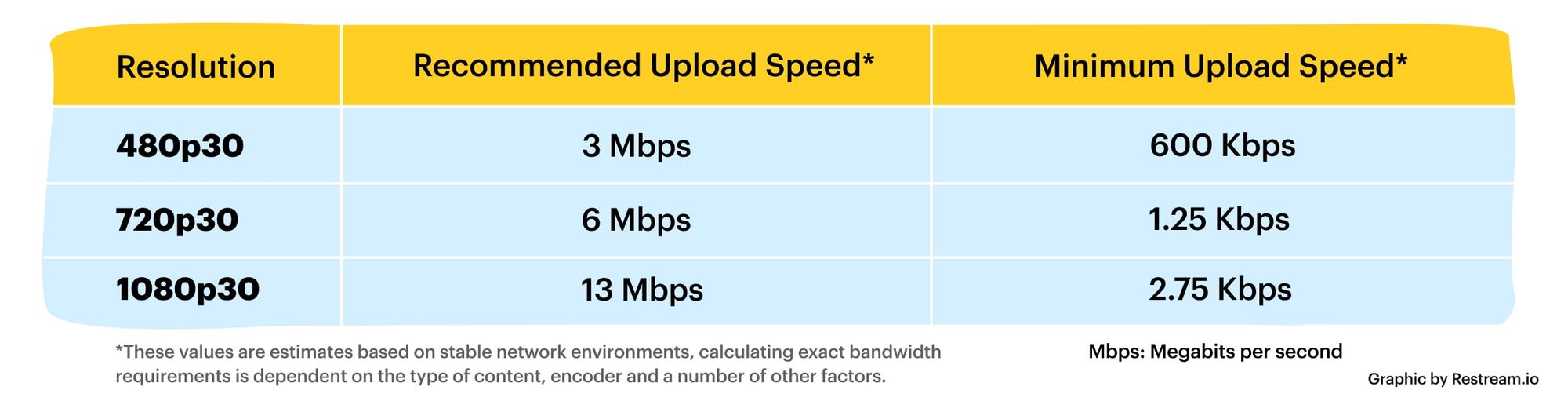
- Resolution: Higher resolution requires higher bitrate.
- Frame rate: More frames per second (FPS) mean more data per second.
- Device compatibility: Some devices handle high bitrates better than others.
- Streaming or download: Streaming requires a lower, more consistent bitrate.
- Storage capacity: Larger bitrates take up more space.
Advanced techniques in bitrate control
If you want to take things a step further, there are advanced techniques to fine-tune your bitrate control. One method I’ve seen growing in popularity is adaptive bitrate streaming (ABR). ABR is the technology behind services like Netflix and YouTube that automatically adjust the quality of your stream based on your internet speed. I remember working with a client who was launching a video platform, and ABR was a game-changer for them. It allowed users with slower internet connections to still enjoy smooth playback, while those with high-speed connections could experience full HD or even 4K quality.
Latest words on bitrate control methods in MP4 encoding
Bitrate control is a vital part of MP4 encoding, and understanding the different methods allows you to optimize both quality and file size. Whether you go for CBR, VBR, or advanced techniques like ABR, choosing the right method depends on your specific needs and the devices your audience will use. As someone who has worked on countless video projects, I’ve found that VBR with two-pass encoding offers the best balance between quality and file size for most cases. But remember, there’s no one-size-fits-all solution. Test different settings to find the right balance for your project. And when it comes to encoding your videos, Mp4Gain offers an excellent solution to help you control the bitrate with ease and efficiency.
Comments:
Related keywords: mp4 encoding, bitrate control methods, CBR vs VBR, video quality, video file size, two







Man, this article was exactly what I needed. I’ve been having trouble with my videos coming out too big even though the quality isn’t that good. I’m definitely going to try VBR with two-pass encoding now!
– VideoDude101
Great stuff! I do a lot of streaming and was wondering why my videos always end up buffering on slower connections. This article explained everything. Would love to see more about ABR though!
– StreamMaster69
This was really helpful, thanks! I’m still a little confused about choosing the right bitrate for 4K, though. Any advice?
– TechGeek42
I’ve been using CBR for everything and didn’t even know about VBR. I can’t wait to try it on my next project!
– FilmFanatic
This is the first time I’ve read about two-pass encoding explained so clearly. Really helped me understand why my files were so big for no reason.
– SarahTheEditor
Thanks for the article! I was looking for a more detailed explanation of bitrate control and this hit the spot. I’m doing some video work for a local business and file size has been a big issue for us.
– LocalMediaPro
Nice breakdown, but I think you could’ve gone a bit deeper into device compatibility. My videos play fine on my computer, but look terrible on my phone. Any tips?
– JohnVideoMan
I’ve been using Mp4Gain for my personal projects and I gotta say it really simplifies bitrate control. This article just reinforced why I use it!
– CodecKing
I didn’t even know bitrate control was this important. No wonder my last video looked so bad. I’m going to try out your suggestions for my next upload.
– FirstTimeEditor
Good article, but what about HDR videos? Do the same bitrate rules apply there?
– HDRNerd