Bit Reservoir Overflow in MP3


Free Download Mp4Gain
picture

Bit Reservoir Overflow in MP3
Bit Reservoir Overflow in MP3

Let’s talk about Bit Reservoir Overflow in MP3

When we talk about MP3 compression, there’s an intricate concept called the bit reservoir that’s crucial for audio quality. Picture the bit reservoir as a flexible “bit bank” that temporarily holds extra bits to manage complex sound sections efficiently. But like any bank, there’s a limit to how much it can store. If these limits are exceeded, we encounter what’s known as bit reservoir overflow. This overflow can significantly impact the sound quality, particularly in audio files that require consistent clarity. Today, I’ll be diving deep into what causes bit reservoir overflow, how it impacts audio quality, and how we can work to manage it.

Understanding the Bit Reservoir Concept in MP3

The bit reservoir, in simplest terms, is an intelligent way to manage bits dynamically across MP3 frames. In MP3 encoding, each frame typically holds a fixed number of bits, which may sometimes be insufficient for complex sound data. To address this, the bit reservoir borrows bits from simpler sections to store extra information for challenging segments, making it a highly efficient approach in maintaining quality across frames.

How Bit Reservoir Overflow Occurs

Bit reservoir overflow happens when there are simply too many bits to fit within the allocated “bank” capacity of an MP3. If the demand for bits in complex segments consistently exceeds the bit reservoir’s limit, overflow can occur, leading to a reduction in audio quality. Imagine trying to fit too much data into a storage space with rigid restrictions; the result can be audio artifacts or reduced clarity as the encoder struggles to keep up.

Impact of Bit Reservoir Overflow on Audio Quality

When the bit reservoir overflows, listeners may experience sudden dips in quality, unexpected noise artifacts, or a muddy sound profile. As an audio engineer, I can tell you that the difference in quality can be quite jarring, particularly in files with fluctuating sound demands. Bit reservoir overflow typically affects genres or segments with complex sounds, like classical music or tracks with high dynamic ranges.

Signs of Bit Reservoir Overflow in Your Audio Files

Identifying bit reservoir overflow is crucial, especially if you work with high-quality audio regularly. Here are some tell-tale signs:

  • Noticeable distortion in high-dynamic-range sections
  • Uneven sound quality across different segments of the track
  • Random noise artifacts or “clicks” that are hard to isolate

Why Bit Reservoir Overflow Happens in Low-Bitrate MP3 Files

Bit reservoir overflow is especially common in MP3 files with low bitrates, where each frame has fewer bits available. For instance, in a 128 kbps file, there is less flexibility for the bit reservoir to hold additional bits, increasing the likelihood of overflow. If you’re working with spoken word or simpler audio, you may not notice, but with music, especially intricate compositions, the overflow becomes apparent.

Techniques to Prevent Bit Reservoir Overflow

In my experience, preventing bit reservoir overflow requires balancing bitrate and audio complexity. Here are some effective methods:

  • Increase bitrate to give each frame more bits
  • Simplify the audio mix, especially in complex sections
  • Use a codec with better handling of bit reservoirs like AAC or Ogg

Optimizing MP3 Encoding to Avoid Overflow

One way to prevent overflow during encoding is to fine-tune the compression settings. Setting a higher bitrate or allowing for variable bitrate (VBR) encoding can help, as it gives each frame a bit more “breathing room.” This makes a notable difference, especially in detailed audio work where quality is essential.

Is Bit Reservoir Overflow Always Avoidable?

There’s no definitive way to avoid bit reservoir overflow altogether. However, choosing the right settings and understanding the limitations of MP3 encoding can go a long way. In cases where overflow is unavoidable, switching to a codec with greater flexibility may be a better solution for preserving audio quality.

Choosing the Right Codec: A Look Beyond MP3

If bit reservoir overflow becomes a persistent problem, it may be worth considering other formats like AAC, which handle bit allocation more efficiently. As an audio professional, I’ve seen how these formats allow for a better balance in managing bits across frames, reducing overflow risks.

Latest Words on Bit Reservoir Overflow in MP3

Bit reservoir overflow is an often-overlooked aspect of MP3 encoding, yet it plays a significant role in determining audio quality. Understanding the mechanics of the bit reservoir and learning to manage overflow can make all the difference in achieving a cleaner, more professional sound. If you’re looking for a tool to help manage your MP3 quality, Mp4Gain is designed to offer optimal audio adjustments to keep overflow issues at bay.


Bit Reservoir Overflow in MP3: Frequently Asked Questions

What is bit reservoir overflow in MP3 encoding?

Bit reservoir overflow in MP3 encoding occurs when there is insufficient space in the bit reservoir—a flexible buffer that helps store bits across audio frames for complex audio passages. Overflow happens when complex audio demands exceed this buffer’s capacity, causing audio artifacts or quality loss.

Why does bit reservoir overflow impact audio quality?

When overflow happens, the MP3 encoder lacks enough bits to faithfully reproduce complex sections of audio, leading to quality issues such as distortion, unwanted noise, or loss of detail. It’s especially noticeable in music with high dynamic ranges or intricate passages.

Can bit reservoir overflow be avoided in MP3 files?

Completely avoiding bit reservoir overflow can be challenging, especially in low-bitrate MP3 files. However, using higher bitrates or switching to codecs like AAC can significantly reduce overflow. For most complex audio, balancing bitrate and compression settings helps mitigate these issues.

Is bit reservoir overflow more common in low-bitrate MP3 files?

Yes, low-bitrate MP3 files are more susceptible to bit reservoir overflow since each frame has fewer bits available, making it harder for the bit reservoir to handle complex audio demands. This limitation often results in quality loss in intricate or high-dynamic audio.

What are some signs of bit reservoir overflow in MP3 audio?

Signs of bit reservoir overflow include unexpected distortion, clicks, or “muddy” sound quality in sections with complex audio. These artifacts often appear in files with high compression, especially if intricate audio segments exceed the bit reservoir’s limits.

How can I prevent bit reservoir overflow when encoding MP3 files?

To prevent overflow, adjust encoding settings by increasing the bitrate or opting for variable bitrate (VBR) encoding, which allocates bits dynamically. Additionally, simplifying audio complexity or switching to a more flexible codec, like AAC, can help manage overflow more effectively.

Should I consider alternative formats to avoid bit reservoir overflow?

Yes, using alternative formats like AAC or Ogg may be beneficial. These formats handle bit allocation differently, reducing the risk of overflow while often providing better audio quality at comparable bitrates.

Comments:

Had no idea bit reservoir overflow was even a thing! This article explains so much, especially for anyone working with MP3 quality issues. Appreciate the deep dive here.

Been struggling with strange noises in my MP3s and finally understand why. Wish I’d known this sooner, but now I know what to adjust. Thanks!

Honestly, I had no clue about this technical stuff with MP3s, but it totally makes sense. Interesting to learn how MP3s handle complexity with the bit reservoir, and the overflow explanation really helped!

Great article. You really nailed the tech details without it feeling overwhelming. I’d love to see even more examples of what files are most affected by overflow.

Not sure I completely get how to prevent overflow, but the article is very clear. Learned more here than from most guides.

Been using MP3 for years, but never realized how much went on behind the scenes with audio quality. This really clarifies things—thanks!

Fascinating read! So bit reservoir overflow happens with low bitrate files? Always thought it was just a generic quality drop. Very insightful!

Read a lot about audio compression, but this is the first I’m hearing about bit reservoir overflow. Makes sense, though, and now I know how to handle it. Thanks!

This breakdown was super helpful. Been curious about bit reservoir limits for a while now, and this cleared up a lot. Thumbs up for the deep insights!

Well explained. I’m a beginner, but this article was easy to follow. Could do with a few more examples, though.


Free Download Mp4Gain
picture


Mp4Gain Main Window
picture


Mp4Gain Features
picture


Free Download Mp4Gain
picture

Understanding Lossy Audio Compression

Understanding Lossy Audio Compression

Lossy Audio Compression

Audio compression is a critical component of modern audio production. It allows for the reduction of file sizes while maintaining an acceptable level of sound quality. Lossy audio compression is a popular method that achieves this by removing non-essential information from an audio file. In this article, we will dive deep into the technical details of lossy audio compression and explore its advantages and disadvantages, as well as the impact it has on audio quality.

Lossy Audio Compression

The Technical Basics of Lossy Audio Compression

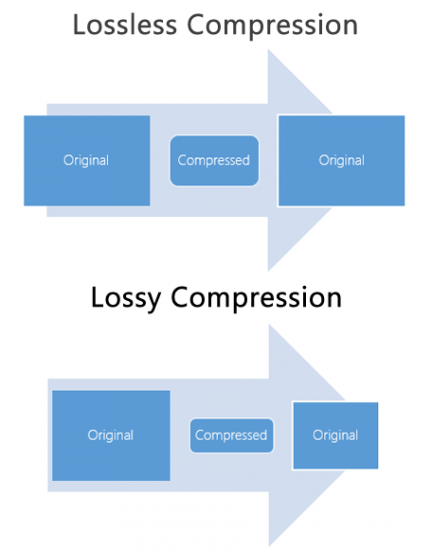
Lossy audio compression works by removing information that is deemed non-essential to the human ear. This information is often in the form of high-frequency sounds or sounds that are below the threshold of human hearing. Lossy compression achieves this by analyzing the audio file and creating a model of the sounds that the human ear can and cannot hear. This model is then used to remove the non-essential information from the audio file.

There are several popular lossy audio compression formats and codecs, including MP3, AAC, and Ogg Vorbis. Each of these formats has its own strengths and weaknesses, and choosing the right one depends on the specific needs of the user.

The Trade-offs of Lossy Audio Compression

While lossy compression is an effective way to reduce file sizes, it does come with some trade-offs. The most significant trade-off is the loss of audio quality. As non-essential information is removed from the audio file, it can result in a loss of dynamic range and a decrease in overall sound quality. However, the degree of quality loss is often subjective and depends on the specific requirements of the user.

When comparing lossy and lossless compression formats, file size is often a significant factor. Lossy compression generally results in much smaller file sizes than lossless compression, but at the cost of some audio quality loss. However, the size difference between the two formats can be significant, making lossy compression a practical solution for many users.

Advanced Techniques for Lossy Audio Compression

Advanced techniques are available for lossy audio compression that can help to improve audio quality while still achieving significant file size reduction. Perceptual coding is one such technique that uses psychoacoustic models to analyze the audio and remove non-essential information in a way that minimizes the impact on sound quality. Another technique involves the use of metadata, which can help to provide additional information about the audio file that can be used to improve compression.

Best Practices for Lossy Audio Compression

There are several best practices that can be followed to achieve the best results when compressing audio files using a lossy format. Some of these practices include choosing the right codec for the specific needs of the user, ensuring that the encoding settings are appropriate for the file being compressed, and avoiding the use of excessive compression, which can result in a loss of sound quality. Additionally, it is important to avoid common mistakes when compressing audio files, such as encoding at too low of a bit rate or not checking the final output for artifacts or distortion.

Psychoacoustic Models
Psychoacoustic models are mathematical models that simulate the way that the human ear processes sound. They are used in perceptual coding to identify which audio signals can be safely removed without causing a noticeable loss in audio quality.

Psychoacoustic models take into account factors such as frequency masking, temporal masking, and the sensitivity of the human ear to different types of audio signals. They can also take into account more complex factors such as the interaction between different audio signals.

Metadata
Metadata is data that is embedded in an audio file and provides additional information about the audio content. In the context of lossy audio compression, metadata can be used to improve the compression process by providing additional information about the audio content.

One common use of metadata in lossy audio compression is to provide information about the target device or playback environment. For example, metadata can provide information about the type of headphones or speakers that the audio file is intended to be played through. This information can be used by perceptual coders to optimize the compression process for the target device or playback environment.

Another common use of metadata in lossy audio compression is to provide information about the audio content itself. For example, metadata can provide information about the genre, tempo, and key of a song. This information can be used to optimize the compression process for the specific characteristics of the audio content.

Best Practices for Lossy Audio Compression
To achieve the best results in lossy audio compression, there are several best practices that should be followed. These include:

  • Use the highest quality compression settings available
  • Use a well-supported and widely-used compression format
  • Use a lossless format for archiving and backup purposes
  • Avoid excessive compression, as this can lead to noticeable audio artifacts
  • Take into account the intended playback environment when compressing audio files
  • Include appropriate metadata to provide additional information about the audio content

Common Mistakes to Avoid
When compressing audio files, there are several common mistakes that should be avoided. These include:

  • Using excessively low compression settings, as this can lead to a noticeable loss in audio quality
  • Using an unsupported or proprietary compression format, as this can lead to compatibility issues
  • Not taking into account the intended playback environment, which can lead to suboptimal compression settings
  • Not including appropriate metadata, which can make it difficult to organize and manage large collections of audio files
  • Using excessive compression, as this can lead to noticeable audio artifacts
    1. Explanation of Audio Compression and Lossy Audio Compression

Audio compression is the process of reducing the size of an audio file without significantly degrading the quality of the sound. Compression is necessary in the world of digital audio because it allows for more efficient storage and transmission of audio files. Without compression, audio files would be prohibitively large, making it difficult to store and share them over the internet.

Lossy audio compression is a specific type of audio compression that achieves a high degree of compression by discarding some of the audio data. This means that when you compress an audio file using a lossy compression algorithm, some of the data is permanently lost, and the resulting file is of lower quality than the original. Lossy compression is used widely because it allows for much higher compression ratios than lossless compression, making it more practical for everyday use.

    1. Importance of Audio Compression in Modern Audio Production

Audio compression is an essential tool in modern audio production. The ability to compress audio files allows for more efficient use of storage space and bandwidth, which are essential resources in the world of digital media. Audio compression also makes it possible to stream high-quality audio over the internet, which has revolutionized the way we consume music and other audio content.

However, it’s important to remember that audio compression is not without its downsides. Lossy compression, in particular, can have a significant impact on the quality of the audio, and it’s essential to understand the trade-offs involved when choosing a compression format and level of compression.

    1. The Technical Basics of Lossy Audio Compression

At its most basic level, lossy audio compression works by analyzing the audio file and discarding information that is deemed unnecessary for human perception. This information can include sounds that are too quiet to hear, or frequencies that are outside the range of human hearing. By discarding this information, the compression algorithm can significantly reduce the size of the audio file while still retaining much of the original sound quality.

The specific techniques used in lossy audio compression can vary, but most algorithms use some combination of frequency masking, quantization, and other mathematical techniques to achieve compression. The result is a smaller file size that can be easily stored or transmitted, but with some loss of audio quality.

    1. The Most Commonly Used Lossy Audio Compression Formats and Codecs

There are many different lossy audio compression formats and codecs available, each with its own strengths and weaknesses. Some of the most commonly used formats and codecs include:

    • MP3 – one of the most widely used audio compression formats, with a high degree of compatibility and a good balance between file size and sound quality
    • AAC – a newer format that is widely used for streaming audio and has a better sound quality than MP3 at the same bitrate
    • OGG – an open-source format that is popular for internet radio and streaming
    • WMA – a format developed by Microsoft that is commonly used for streaming and downloading audio files from the internet
    • FLAC – a lossless audio compression format that is capable of compressing audio files without any loss of quality, but with larger file sizes than lossy formats

The Fascinating History of Lossy Compression

Lossy compression is a method of data compression that reduces the size of a file by discarding information that is deemed to be unnecessary. This technique has been used for decades in various fields, including image, audio, and video processing, to make files smaller and easier to share or store.

The first significant work on lossy image compression was done in the early 1970s by a group of researchers at the University of Southern California. They developed the first image compression algorithm, called the discrete cosine transform (DCT), which is still used today in the popular JPEG image format.

In the 1980s, the Moving Pictures Experts Group (MPEG) was established to develop standards for digital video compression. They introduced the MPEG-1 and MPEG-2 video formats, which became widely adopted in the industry. The success of these formats led to the creation of newer standards, such as MPEG-4 and H.264, which are still used in modern video streaming services.

Lossy compression has also been essential for audio processing. In the late 1980s, the MP3 format was developed by the Fraunhofer Society in Germany, which used a perceptual coding algorithm to remove information that the human ear cannot detect. MP3 quickly became the standard for digital music distribution, leading to the creation of newer formats such as AAC and OGG Vorbis.

However, lossy compression is not without its drawbacks. Because it removes data, it can lead to a loss of quality, especially if the compression is too aggressive. This can result in artifacts or distortions in the processed image, audio, or video.

Despite these limitations, lossy compression remains an important tool in the modern digital world. It allows for more efficient storage and sharing of multimedia content and has revolutionized industries such as music, film, and photography. As technology continues to evolve, it’s likely that new and more efficient lossy compression techniques will be developed, further enhancing the way we share and consume digital content.