Conversion of analog sound to digital sound


Free Download Mp4Gain
picture


Digital sounds and analog sound

With the advance of science and technology, both the transmission and recording of analog sounds and images have undergone major changes in recent years. The introduction of digital techniques allows you to do many more things, with greater advantages and more versatility than with analog technology.

Many of the devices that we know today as digital, first receive or capture the signals in analogue form and then convert them into digital signals. This is the case, for example, of CD and DVD players, the modem used by computers for the reception / transmission of data, digital cameras and video cameras, mobile or cell phones, etc.

To perform the conversion, these devices use, as an intermediate element, a device called analog-digital converter or ADC (Analogic to Digital Converter), which first receives the electrical signals in the form of an analog sine wave (such as the one provided by the microphone) and It then converts them into digital signals, encoded in binary numerical values, that is, in “zeros” and “ones” (0 – 1).
1. Sound or acoustic wave (voice, music, effects, etc.). 2. Microphone 3. Analog sine wave that is <obtained after the microphone converts the sounds into audio-frequency electrical signals. 4. ADC (Analogic to Digital Converter – Digital Analog Converter). 5. Digital signal formed by zeros and <ones (0 – 1), obtained after the analog signal is processed by the ADC. 6. Output of the <digitized audio signal, ready to be recorded.

In digital cameras and video cameras, as well as in scanners, there is a sensor called CCD (Charge Coupled Device) or, failing that, a CMOS sensor (Complementary Metal Oxide Semiconductor – Semiconductor complementary metal oxide ), which are responsible for converting the images they receive into analog electrical signals.

In that case, as with the microphone, an ADC is responsible for converting those analog signals into digital image signals, so that they can be stored as such in a videotape, on the device’s memory card, or in any other Digital storage device, for later viewing.

The reverse conversion, from digital to analog, is strictly necessary, because the analog sound is the only audible, that is, the only one that recognizes our sense of hearing. Similarly, the analog electrical impulses are the only ones capable of moving the cone of a loudspeaker or loudspeaker to reproduce the original sounds again, which cannot be done by the electrical impulses of “1” and “0” of the binary or digital code. Therefore, to make the coding of the digital sounds audible by the loudspeaker (s), it is necessary to convert them back into analog electrical signals, with their corresponding variations in voltages or voltages.


Free Download Mp4Gain
picture


Mp4Gain Main Window
picture


Mp4Gain Features
picture


Free Download Mp4Gain
picture

The video formats for internet

The videos that we play on the Internet either locally on the computer or on any other device, can be encoded in different ways. Each method of coding implies some advantages and disadvantages, and there are better formats than others depending on the use we want to give the video. Thus, we have formats such as AVI, MP4, MKV, 3GP, Google WebM, etc …

When playing video on the Web, using a browser, the most widespread and best supported format by browsers, both mobile and desktop, is the MP4 format, and to be more exact, the MP4 / H format .264, which corresponds to files that normally have the extension .mp4. But:

Are all the .mp4 files the same?

The MP4 format – Parts, containers and extensions
When we talk about an .mp4 file or the MP4 format in general, what we are talking about is what is technically known as MPEG-4 Part 14. It is a standard format (ISO / IEC 14496-14) and is a container format of multimedia tracks. That is, this format defines how audio and video tracks (called data streams) in various formats can be contained in the file, and can even contain subtitles as well.

Within this container format, within the .mp4 file, the audio and video tracks may be encoded in various formats, as appropriate for the application to be given. Although in theory it supports many different formats (almost any) for these audio and video tracks, in practice the players of this format support only some specific types, the most frequent being:

Audio: AAC (Advanced Audio Codec, which when they are loose are files with extensions .m4a or .3gp), or the MP3 format.
Video: the different variants of the MPEG format.
MPEG or Moving Picture Experts Group is a group of “authorities” and manufacturers in the field of audio and video that came together at the request of ISO in the late 1980s to create file encoding standards for this type of multimedia information, and thus guarantee compatibility between media to be reproduced and reproductive devices. The first version of the standard, MPEG-1 came out in 1993, and since then there have been many new versions, and within these what they call “Parts”, which are specific aspects of the standard and also extensions to the specification for specific things, or improvements to the base format that they modify.

The most widespread version of this MPEG format is 4, or MPEG-4, which appeared at the end of 1998, and is what we know as MP4, due to the extension of its files. This version is divided into several sub-standards or “Parts” that describe certain issues of the format (for example, the 14 container, as I said at the beginning) and certain extensions.

Within the parts of the standard, part 10 describes an advanced coding format that is what we also know as H.264, but which is actually also called MPEG-4 Part 10 and what Blue-Ray discs used , for example. That is why in many Internet sites they talk about H.264 and MPEG-4 being the same. And it is true, but not quite, since in MPEG-4 parts 2, 12 or 14 also describe other compression formats that are MPEG-4, and the container format may also contain MPEG in earlier versions of lower quality such as MPEG -1 or MPEG-2.

What is bitrate? Bitrate video, audio, internet and more

HomeAudio Y VideoWhat is Bitrate? Bitrate video, audio, internet and more …
What is bitrate? Bitrate video, audio, internet and more …

Surely we have heard the word bitrate countless times when an expert user refers to a video or audio in digital format, and we have come to know that it is the element that defines the flow of data. But what exactly is bitrate? The question arises because not only in these fields is this parameter used.

Like the resolution and the final format of the digital video or audio, another determining factor to obtain excellent quality in an image or sound is, without a doubt, bitrate, a parameter that perhaps is not always taken into account and that not only applies to the field of audio or video. That is why in this article we will find a lot of information to perfectly understand what bitrate is.

Bitrate: Why it is so important in our digital life

Electronic devices have reached unthinkable operating speeds just a few years ago, and that is why today we hope that our device, be it a smartphone or a tablet, a computer or a hard disk, will respond to us at the moment and without hesitation. In this they have to see many and varied factors, but one of the most important is the bit rate at which it can exchange or process information.

The term bit rate, used in computing and telecommunications systems, basically refers to the amount of bits that can be transmitted in a given unit of time through a transmission system or between two digital devices. Depending on the context in which the term is used, the bit rate, or bitrate in English, is measured in Kbit / s or Mbps, kilobits per second or megabits per second, respectively.

Regardless of the unit of measurement for defining bitrate, higher numbers always mean better and higher quality values, although we must not forget that low bit rate values ​​can also mean less signal processing by the hardware, very convenient in equipment such as smartphones, tablets or netbooks.

Bit rate on the Internet

In the case of the bit rate applicable to the Internet, the higher bit rate is better, since the content we receive from the network arrives faster. In other words, the higher the bitrate we get from our ISP, the better the connection and we can work much more comfortably.

A higher bitrate in an Internet connection means streaming movies and video in high definition, playing online with no delay and downloading really large files without problems and in a few seconds.

In the event that we want to know exactly what the bitrate of our connection is, we can do so easily and comfortably by accessing with our browser a site that is responsible for performing this test. One of the best in the market is speedtest.net.

Bit rate in audio and video

If we talk about audio and video, the meaning of the term bit rate differs a bit from what we use for the Internet. In this context, the bit rate refers to the amount of data stored for every second of data that they reproduce. To take an example, an MP3 file of a 320 kbps song offers a much higher quality than the same 128 kbps encoded file, obviously as long as both files have been created from the same source.

But we must always remember that if the source from which we obtained the files was of poor quality, then the copy will also be of poor quality, it has been encoded at 128 kbps or 320 kbps.

This also happens with videos, a much higher bit rate will offer a much better viewing quality than a video with the same resolution but at a lower bit rate.

The bit rate could be expected to increase each time the resolution grows as a larger amount of data is being processed. This means that while high bitrate rates can offer excellent display quality, they also require much more effort to process part of the hardware, forcing it, especially in modest and older hardware, to produce pauses and cuts.

Another aspect that we must also take into account since it is very important, is that video file formats use different sets of compression algorithms, which could also offer high quality with a more discrete bit rate. However, the extra process load for these types of videos can also complicate the processor and the systems involved in decoding.

Digital audio


Digital audio is the representation of sound signals through a set of binary data. A complete digital audio system usually begins with a transceiver (microphone) that converts the pressure wave that represents the sound to an analog electrical signal.

This analog signal goes through an analog signal processing system, in which limitations in frequency, equalization, amplification and other processes such as compaction can be performed. The equalization aims to counteract the particular frequency response of the transceiver used so that the analog signal closely resembles the original audio signal.

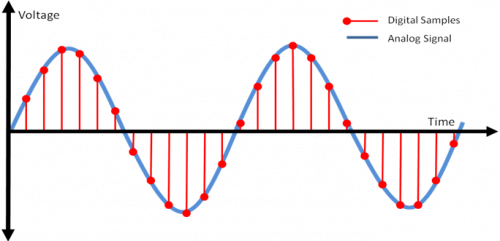
After analog processing the signal is sampled, quantified and encoded. Sampling takes a discrete number of analog signal values ​​per second (sampling rate) and quantification assigns discrete analog values ​​to those samples, which means a loss of information (the signal is no longer the same as the original). The coding assigns a sequence of bits to each discrete analog value. The length of the bit sequence is a function of the number of analog levels used in the quantization. The sampling rate and the number of bits per sample are two of the fundamental parameters to choose when you want to digitally process a certain audio signal.

The digital audio formats try to represent that set of digital samples (or a modification) of them efficiently, so that it is optimized depending on the application, either the volume of the data to be stored or the processing capacity necessary to obtain the starting samples. In this sense there is a very widespread audio format that is not considered digital audio: the MIDI format. MIDI does not start from digital samples of sound, but stores the musical description of the sound, being a representation of the score of the same.

The digital audio system usually ends the reverse process to that described. The set of samples they represent are obtained from the stored digital representation. These samples go through a digital-analog conversion process providing an analog signal that after a processing (filtering, amplification, equalization, etc.) affects the output transceiver (speaker) that converts the electrical signal to a pressure wave that represents Sound.

Digital audio quality

The quality of the digital audio depends strongly on the parameters with which that sound signal has been acquired, but they are not the only important parameters for determining the quality.

One way to estimate the quality of digital sound is to analyze the signal difference between the original sound and the sound reproduced from its digital representation. According to this strategy we can talk about a specific signal to noise ratio. For audio systems that perform lossless digital compressions, this measure will be determined by the number of bits per sample and the sampling rate.

The number of bits per sample determines a number of quantification levels and these a signal-to-noise ratio of carrier peak that depends quadratically on the number of bits per sample in the case of uniform quantification. The sampling rate establishes a higher level for the spectral components that can be represented, and linear distortion may appear in the output signal and aliasing (or spectral overlap) if the signal filtering is not adequate.

For digital systems with another type of compression, the signal to noise ratio can indicate very small values ​​even if the signals are identical to the human ear.

The reason is that the signal to noise ratio is not a good parameter of sound quality measurement because the quality perceived by the listener is determined by the response of the human ear to the sound waves, which does not perceive many of the possible differences Logically, if the signals are very similar, the ear cannot differentiate them, but they can also be very different and can be perceived as the original signal. Therefore, the evaluation of the quality of a digital system through sensitivity parameters of the human ear and specific tests with specialized listeners seems more appropriate.

It is in this sense that the quality of digital audio systems is evaluated today. Both MPEG and Dolby Digital (AC-3), which establish perceptual compressions, perform test benches to estimate the quality of the encodings.

The truth about audio formats and their quality

As you well know, there are three digital ways to play a song. From the original recording, through a copy with lossless compression (what we usually find when we buy a CD) or through a copy with lossy compression (which we usually download legally from the G.G internet).

The three files differ basically in the same property, which is none other than bitrate, that is, the information it contains per second. As more bitrate, more weight, so an audio file of a song without compression can quietly occupy 200mbs. In the second case (lossless understanding), the weight is reduced a lot (over 40, 50mbs), and is obtained by reducing the bitrate in those parts with silence, or with a wave oscillation in a single spectrum. To understand each other, the healthy young ear recognizes between 20Hz and 20KHz. A file with lossless compression (usually .flac files or those found on a CD) maintains this spectrum, reducing it when it is not necessary (silences). And finally there are the files with compression and loss (.mp3, .mp4, .flv, …) files that reduce this spectrum to the one that most ears recognize, leaving it around between 15Hz and 15KHz, obtaining a weight per file of song around 4mb, 5mb.
The latter has always been questioned, especially in musical circles, which assured that compression with loss greatly diminished the quality of what was reproduced, not allowing to admire the most serious or the most acute, thus losing all the completeness of the work.
As if that were not enough, mp3 files have different encodings (64, 128, 192 or 320 Kbps), with a greater or worse loss, and even constant (CBR) or variable bitrate (VBR) that is usually optimal when compressing with various bitrates Different moments of the songs.

Loud speaker and sound wave

Well, it has been more than 50 years before a good music lover programmer named Jeff Atwood decided to see if there really is a substantial change for the human ear between the different formats. In his blog, after several entries and several weeks of study in what would be called The Great Experiment of bitrate in MP3, we have finally obtained an empirical version of this eternal question.

But let’s make a brief summary of what we have in hand.
To test his hypothesis, Atwood decided to hang five audio files from his website, one of them being the original (without any digital treatment that modifies the bitrate), and another four tablets at various bitrates between 128 and 320 Kbps. The objective was that the user entered, listened to the five, and chose which one seemed to him to have higher or lower quality. Best of all, he obtained a not insignificant opinion of 3,500 visitors, hanging the results weeks later.

And from his observations you can get some gold reefs:
No doubt people knew how to differentiate the worst of all, such as the mp3 encoded with the worst bitrate 128 Kbps CBR.

The variable bit rate coding proved to be higher than the constant.
The most positive audio obtained was that of 160Kbps VBR, even higher than 320 Kbps CBR, and paradoxically also superior to the original audio of the CD.

From all this follows a corollary:
People are unable to ensure that it has more quality above 160Kbps, so it sends lossless formats to the horn that occupy one more scumbag, and that in practice, our ear cannot discern.
So you know. That’s over 15, 20 songs for a CD. There is no excuse.

MP3 vs FLAC vs AAC vs OGG: what differences does each audio format have?


Although streaming platforms such as Spotify are more fashionable than ever thanks to their great musical variety, reduced price and convenience of not having to manually download the files, many users still prefer to have music stored locally, for which there are formats like MP3, FLAC, AAC and OGG.

These formats are currently the most widespread for music on our devices, being able to pass files between PC and mobile without relying on the Internet and without being afraid of depleting our data rate. Most of the formats that we are going to deal with are formats that compress information, and therefore have quality losses. About the compression of images and files we talked a while ago.

 Why does a compressed file occupy less?

Audio formats with losses: MP3, AAC and OGG

The first of the formats that we are going to try is MP3. This format, whose acronym stands for MPEG Audio Layer III, is the most commonly used format with loss of quality. It is not the one that offers the best quality or best compression, but its great compatibility has made the standard format for music for decades.

Another widely used format for sound in recent years is AAC. It is very similar in MP3 performance, but has the advantage that it is able to offer the same quality in a smaller size. This is the reason why platforms like Apple’s iTunes use it, and the fact that Apple uses it has made its compatibility as great as MP3’s today. AAC is also used to compress stereo sound in movies of 1 or 2 GB in size that we find in various torrent portals, direct download or streaming.

The next most used format is OGG, or OGG Vorbis, it is a free alternative to AAC and MP3 (although the MP3 patent ended last May). Its size is similar to that of MP3, but its compression is smaller, keeping a higher audio quality than MP3, especially at high frequencies, which destroys the MP3 the lower the bitrate. In addition, while MP3 reaches 320 Kbps, OGG reaches up to 500 Kbps.

Lossless audio formats: FLAC, ALAC and WAV

On the other hand, we have FLAC. This lossless format is free, as indicated by its name (Free Lossless Audio Codec). The size of your files is between 5 and 10 times larger than MP3, but it has no losses, although the audio is “compressed.” Thus, it occupies much less than uncompressed formats such as WAV or AIFF, and maintaining the same sound quality.

The equivalent of FLAC in Apple is ALAC. Although it is not as efficient as FLAC (its files occupy more), ALAC owns Apple, and is the only alternative that can be used in iTunes, since the platform does not read FLAC.

In short, the best format to use is always FLAC if you can afford its large size, followed by AAC and OGG. If you have no choice, MP3, although it is the least desirable option, is the most widespread today, and what you will be forced to use for a lot of music on the network.

What audio formats exist? All you need to know


FLAC, WAV, AIFF, DSD … these are just some of the acronyms you can find when looking for a digital format. They are also accompanied by technical data such as sample rates and bit depth. So many terms can leave you more misplaced than a chicken in a dance. And unless you are an expert in digital sound, the process to choose the audio format that best suits your needs can be a mess. But if they explain it to you, the subject is relatively simple. That is why in Culturasonora we have prepared a complete guide on the different audio formats used. This will prevent any acronym from taking you on the dark side, dear Padawan.

Sample Rate and Bit Depth.
MP3s vs WAVs vs AIFF.
OGG vs FLAC vs ALAC.
What is the DSD format?
How to listen to the DSD?
MQA audio Hi-Res.
What is Bit Depth and Sample Rate?

These two concepts are basic. To understand how audio formats work, you need to know what Bit Depth and Sample Rate are. They are two measures that indicate the quality of a digital audio file. We will try to summarize it so that you stay with the general idea

When you read the specifications of the audio formats you find a couple of figures. For example: 32-bit / 192kHz or 24-bit / 96kHz. These numbers indicate the bit depth and the sample rate. These references tell us how much information the different formats transmit and the sound quality. For example, the audio we hear on a normal CD, or on a Spotify stream, is 16bit / 44.1kHz. Samples are always measured in Hertz (or hertz) and bit depth in Bits.
Softwares or hardwares do not usually work with a continuous flow of information but often use pieces, samples or samples to effectively manage the data that is transmitted. The sample rate is the number of samples per second that are obtained from a recording. The higher the number of times a device plays the samples, the higher the sound quality. Each of these extracts or samples has a certain amount of information, which is the bit depth, or bit depth.
To understand it better, we are going to make a slightly beast analogy, which is not entirely true, but which will help you to make sense of all this. What interests us. If you control a bit of photography and image you will get it right away: the sample rate would be something similar to the frames or frames per second of a video, and the bit rate would be similar to the pixels of a photograph. The higher the bit depth number, the more information each sample will have. The more pixels an image has, the more resolution each frame of a video will have. The more frames per second a movie has, the greater the definition. In short: the higher the number of the Bit Depth and the Sample Rate, the higher the quality of the audio file.

Audio formats: MP3 vs WAV vs AIFF

What is the MP3 format?
If you are interested in getting some audio fidelity and decent sound from your files, you will want to avoid this format. Why? Because basically an MP3 is a file that sacrifices audio quality to minimize size. They weigh very little for any device to read. The negative? The compression of these files provides a poor, almost lifeless sound. Nowadays almost nobody uses that format seriously. Even its creators recently finished the license declaring her dead. But surely every now and then you find a zombie file with this format.
What is the WAV format?
WAV (Waveform Audio File Format) are equally common but better for anyone who wants a decent audio format. They are higher resolution files than MP3s. A WAV is an audio piece that is encoded with something known as Pulse Code Modulation (PCM), a medium that encodes analog audio parts and converts them into digital so that they can have the Sample rates and the Bit Depth of the that we have talked about before.
What is the AIFF format?
The audio format AIFF (Audio Interchange File Format) is very similar to WAV, since it also uses the PCM to encode analog audio pieces and present them in digital format. This format was born as an answer from Apple to the Microsoft WAV, and at the beginning it could only work on MAC computers. Currently, the AIFF and WAV are more or less interchangeable.
In summary…
To close this topic we will tell you that if you have a file in WAV or AIFF audio formats you will hear a piece of good quality sound. Normally these formats are used in files that we play through our services, such as the iTunes music library. We will not see them in online streaming services, which tend to use special types of files. Now we will review that point

Do you differentiate between an mp3 encoded at 128 and one at 320 kbp?


Surely more than once you starred in or attended a dispute between people who say that you notice a lot of difference between an MP3 encoded with one or another level of compression, or between a CD and an MP3. However, there are very few people able to distinguish these nuances. That’s why at mp3ornot.com we propose this challenge:

Are you able to differentiate between an mp3 encoded at 128 kbps from another at 320 kbps? If you think you have your ear developed enough to capture that difference, I challenge you to take the test … and then tell me.

Data:

The Mp3 (MPEG-1/2 Audio Layer 3) was one of the first types of audio compression with almost imperceptible losses to the human ear. Its compression rate is measured in kbps (kilobits per second), with 128 kbps being the standard quality, in which the file size reduction is about 90%, that is, a ratio of 10: 1. That compression rate can currently reach up to 320 kbps, the maximum quality, in which the file size reduction is about 25%, that is, a ratio of 4: 1, going before 192 kbps, 256 kbps, that is, the maximum quality that can be removed in Mp3.

The lossy compression method used in the compression of the Mp3 consists in removing from the audio everything that the human ear would normally not be able to perceive, due to phenomena of masking sounds and limitations of human hearing (although people with absolute hearing can perceive such losses).

How to compress an MP3 file

Knowing that the MP3 audio format has become the most standardized and used worldwide in recent years, we have thought it pertinent to talk about the different parameters that make an MP3 file respond to one quality or another.

The first thing we have to know is the meaning of MP3, and it is nothing more than a compressed digital audio format that although by nature suffers a loss of information in the conversion process, it is not audible by the human ear, which It implies an assumable loss since we will not be able to perceive it in broad strokes.

Generally, an MP3 file is capable of reducing the size of an original audio file without altering quality. What this means is that in the conversion process for example of an audio file with CD quality, the result of the MP3 file would be practically identical to the original, leaving as standard ratio 1 minute = 1 MB.

That said, we can begin to clarify some parameters that will determine the quality of an MP3 file, which in its vast majority, depends on the bitrate or Bitrate.

Impact of Bitrate in MP3 quality
The MP3 file format allows you to select the compression ratio of the source file. The margins at the domestic level are between 8 Kbps and 340 Kbps, with 128 Kbps being the transfer rate equivalent to CD quality.

Bitrate is the unit of measure for the rate of data transfer read from an MP3 file. The higher bitrate an MP3 file has, the greater the amount of data that a player can obtain in the unit of time (Second).

The more instrumental content or quality an MP3 audio file contains (sound effects, recorded audio tracks, high frequencies, low frequencies, etc.), the higher the transfer rate it will require to fully reproduce the information, and at this point, it is where it is defined The quality of the MP3 file, since if we compress that file, we reduce that bandwidth, we will be sacrificing some of that data, resulting in loss of information that will influence the final result of the MP3 conversion.

In summary:

If the file lasts 5 minutes and weighs 3 MB, we would be talking about a low quality MP3 file.

If the file lasts 5 minutes and weighs 9 MB, we would be talking about a high quality MP3 file.

The great experiment on MP3 quality: no, there really isn’t that much difference with CDs


This article was originally published in Cooking Ideas, a Vodafone blog where we collaborate weekly with the goal of creating stories that “feed the mind of ideas.”

volume booster

A programmer named Jeff Atwood said some time and several entries from his blog, the always recommended Coding Horror, to a healthy entertainment he called The Great Experiment of bitrate in MP3. Its objective: to verify empirically if for ordinary people there are really qualitative differences when listening to music in various MP3 formats compared to traditional ones.

The contestants were the traditional formats called “no loss of quality”, basically CD (Compact Disc) and FLAC versus compression formats with loss of quality: MP3 with different bitrates. The bit rate, better known by its name in English, is a key feature because it basically determines how much information is transmitted per unit of time: in this case it is the waves that define the music and become human voices and instrument notes . In the world of MP3 encodings of 64, 128, 192 or 320 Kbps (kilobits per second) are usually used.


Like everything in life, music coding is a compromise between quality and quantity: a song stored in the best possible format – for almost all experts, that is the CD – can occupy about 50 MB (megabytes), maybe 40 or 35 only using some of the lossless compressors that save some space without loss of quality (FLAC, Apple Lossless, etc.). That same song in MP3 can vary between 4, 8 and 12 MB depending on the bitrate (64, 128 and 192 Kbps). To further complicate the matter, you can also choose between a constant (CBR) or variable (VBR) bitrate that is usually optimal when compressing different moments of the songs with various bitrates.

For many users, being able to store between 5 and 10 times more music in the same space is an important saving, easy to translate if one takes into account the price of hard drives, flash memories or storage on iPods, tablets and the like. But there have always been two schools confronted: that of audiophiles who believe that nothing can equal the maximum quality of the CD and that of those who, with a more practical sense, consider the differences between an MP3 and CD ridiculous, if at all there are.

Atwood’s experimental study sought precisely to shed some light on these theories based on the basics: listening to music, quantifying its “quality” and deciding which is the best format based on the various variables. For this, he prepared five different audio files: one of them uncompressed and another four tablets at different bitrates between 128 and 320 Kbps. He put them on his server so that people could listen to them and vote (with a quality “note” of 1 to 5) without knowing which was which. And in total he got more than 3,500 people to contribute to the results – hundreds more than for many of the “quality studies” mentioned in the TV commercials.

The results were analyzed with a spreadsheet and various statistical tools, which showed trends and conclusions quite clearly:

The only sample that could really be considered very different from the rest was the MP3 at 128 Kbps CBR, the worst quality. That quality is not enough to compare with the rest. The best simply ignore it.

The MP3 at 160 Kbps VBR is the highest quality sample, even better than the MP3 at 320 Kbps CBR. This indicates that the coding with a variable bit rate is higher than the fixed one even at those values, and that 160 Kbps VBR up is impossible to improve qualitatively.
Ironically, this would indicate that there are MP3s that are heard “better” than audio CDs. Several things can happen here: that the “artifacts” created by compression seem to improve the audio or that when testing people “imagine things,” which could also happen. The truth is that the data serves to feed the theory that from 160 Kbps people no longer distinguish one quality from another, as it is deduced from the data.

The conclusion of the study confirms the hypothesis that an MP3 at 192 Kbps VBR has such quality that not even the ultrasensitive and powerful ear of a dog would notice the difference with an audio CD. Wow!
In conclusion, we already know at what rate to code and compress if we want a good saving in storage without losing quality: a MP3 of 192 Kbps VBR, the winning format of the test.

What are the differences between mp3 and mp4?


When we want to listen to our favorite songs, we don’t skimp on tastes or ways of listening to those pieces of the moment. Although there is no doubt that when we have two good devices through which we can listen to them we look for the advantages of some compared to the others to select the best one.

The differences between an mp3 and an mp4 are varied, everything will be judged by the qualities that make them more attractive to us according to a value judgment based on their characteristics.

When we make a comparison of differences between an mp3 and an mp4 we observe that the first only supports audio formats while the second allows all types of audio and even video and images with the possibility of having greater storage capacity since it allows compressing much more the formats in order to have many more songs, videos and images in it.

Both are equally functional as they offer a possibility to listen to our favorite songs from the device. Another notable difference between an mp3 and an mp4 is the possibility of storage so it is very regular to check how many files we can save in one or the other.

Likewise, the mp3 due to its MPEG-1 Audio Layer 3 condition decreases the size of the original file, which generates losses when listening to the songs that we store in it, since they are compressed and undermine their quality. The mp4 player for its part, was designed years later so it is seen that it supports the video and image format but in turn does not cause the sound quality to be lost both in the songs and in the videos although it also Compress without altering your audio levels.

In their design there is no notable difference because they have similar models only changes is the name of the device. The two big differences are that the mp4 is multimedia while the mp3 only allows you to play sounds. And its compression causes the audio quality to be lost in the mp3 while the mp4 is an improved device that compresses the format without losing its quality and efficiency.