Audio Basics Explained PART 2


Free Download Mp4Gain
picture

Audio Basics Explained PART 2
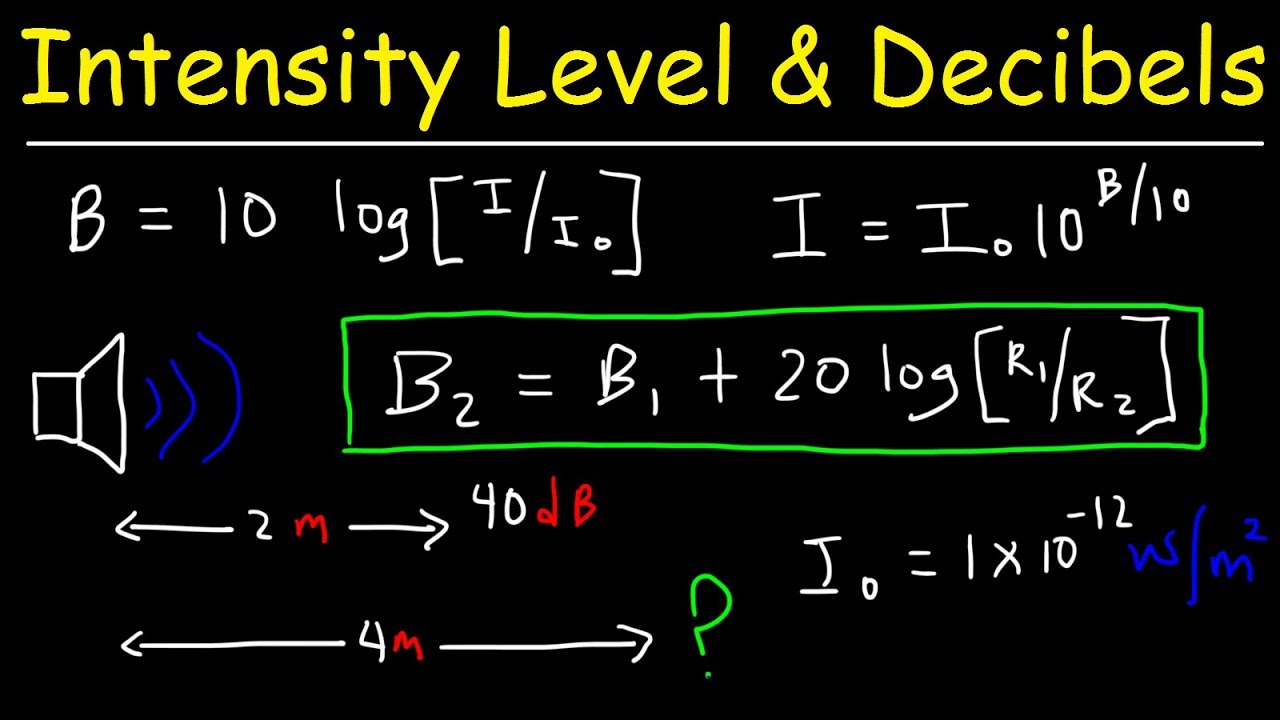
Decibels

Sample Bits (sample bits, aka sample precision, quantization level, sample size, quantized data bits): The range of data that each sample point can represent.

Decibels

The number of sampling bits is usually 8 or 16. The larger the number of sampling bits, the more delicate the change of sound that can be recorded, and the larger the corresponding amount of data. 8 bit word length quantization (low quality) and 16 bit word length quantization (high quality), 16 bits is the most common sampling precision.

“Sample rate” and “sample bits” are the two most basic elements of sound digitization, which are equivalent to screen size
(for example, 800*600) and the color resolution (for example, 24 bits) in the video.

Number of channels (or number of channels): The number of channels refers to the number of speakers that support different sounds, it is one of the important indicators to measure audio equipment.

The number of channels for mono is 1 channel; the number of channels for channels
dual is 2 channels; the number of channels for
stereo channels is 2 channels by default; the number of channels for
stereo channels (4 channels) for 4 channels.

Frame (Frame): A frame records a sound unit whose duration is the product of the sample duration (number of samples) and the number of channels.

Period (Period Size): The number of frames required for an audio device to process at one time. Data access and audio data storage of the audio device are based on this unit. The hardware buffered transfer unit, which completes the transfer of so many sample frames, will return an interrupt.

insert image description here
Periods: How many hardware transfer interrupts it takes for the transfer to complete one application buffer.

Buffer Bytes: The number of bytes in an application buffer, the size of the DMA buffer.

Because the buffer size is set by the application, it can be large or small. If it is too large, the transmission delay will be too large, so it is fragmented and the concept of a period is proposed. Overflow, when recording, the data is full and the application does not have time to grab it; underflow, you need data to play and the application does not have time to write the data

Interleaved Mode: The way digital audio signals are stored. The data is stored in consecutive frames, that is, the left channel and right channel samples of frame 1 are recorded first, and then the recording of frame 2 is started…

Non-interlaced mode: The left channel samples of all frames in a cycle are recorded first, then all the right channel samples are recorded.

Quantization: The process of representing the amplitude of the discrete signal after sampling with binary numbers is called quantization. (Quantification in daily life is to set a range or interval, and then look at the acquired data collected within this condition.)

PCM: PCM (Pulse Code Modulation), that is, pulse code modulation, sound sampling and quantization without any encoding and compression processing.

PCM data is the most primitive lossless audio data, so although PCM data has excellent sound quality, it is bulky.
To solve this problem, a series of audio formats have been successively born. These audio formats use different methods to
compress audio data Compression (ALAC, APE, FLAC) and lossy compression (MP3, AAC, OGG, WMA) are available.

Encoding: The sampled and quantized signal is not yet a digital signal, it must be converted into a digitally encoded pulse, a process called encoding. The digital audio signal is the binary sequence formed after sampling, quantizing, and encoding the analog audio.

Bit rate: (also known as bit rate, bit rate) refers to the amount of information that can pass through a data stream per second, which represents the quality of compression. For example, common MP3 bit rates are 128 kbit/s, 160 kbit/s, 320 kbit/s, etc. The higher the rate, the better the sound quality. Data in MP3 consists of ID3 and audio data. ID3 is used to store common information such as song title, singer, album and track.


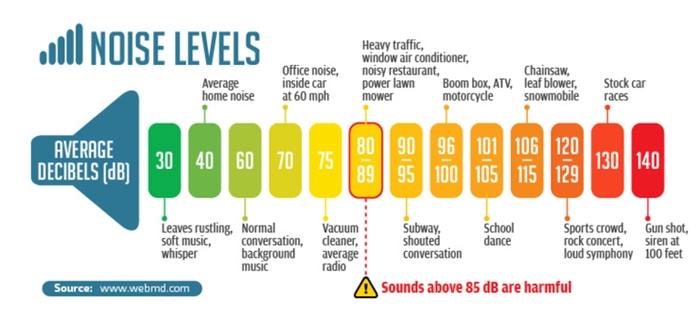
Free Download Mp4Gain
picture


Mp4Gain Main Window
picture


Mp4Gain Features
picture


Free Download Mp4Gain
picture

Audio Basics Explained

Audio Basics Explained

Decibels (dB)

Audio and video basics

Decibel

1. Introduction
In real life, the sounds we hear are continuous in time, and we call this type of signal . Analog signals must be digitized before they can be used in a computer.

At present, we need to rely on audio files for audio playback on the computer. The process of generating audio files is the process of combining sound information and generated digital signals. The sound that the human ear can hear has the lowest frequency of 20Hz to the highest frequency of 20KHZ, so the maximum bandwidth of the audio file format is 20KHZ. . According to the theory, only when the sampling frequency is greater than twice the highest frequency of the sound signal, the sound represented by the digital signal can be restored to the original sound, so the sampling frequency of the file audio is generally 40~50KHZ. , such as the most common CD quality sampling rate 44.1KHZ.

2. Audio Basics
Sampling: the wave is infinitely smooth. The sampling process consists of extracting the frequency value from some points of the wave, which consists of digitizing the analog signal. Like shown in the next figure:
insert image description here
blue represents the analog audio signal and red represents the quantized value obtained by sampling

Sample Rate: The number of times the analog signal is sampled per unit of time, expressed in Hertz (Hz). The higher the sample rate, the more realistic and natural the sound restoration will be, and of course, the larger the amount of data. The sampling frequency is generally divided into three levels: 22.05 KHz, 44.1 KHz, and 48 KHz. 8 KHz: the sampling frequency used by phones, is enough for human speech, 22.05 KHz can only achieve the sound quality of FM radio (suitable for medium quality voice and music), 44.1 KHz is the most common sampling rate standard, theoretically quality limit CD sound, 48KHz is more accurate (for the sampling rate above 48KHz, the human ear cannot distinguish it, so it has little use value in the computer).

Quick tip: one
5 kHz sampling rate is as good as people’s speech.
A sample rate of 11 kHz is the minimum standard for reproducing small pieces of sound, a quarter of CD quality.
The 22 kHz sample rate can achieve half the quality of a CD, and most websites now use this sample rate.
44kHz sampling rate is standard CD quality, which can achieve good listening effect.

Resampling: It is mainly divided into upsampling and downsampling. In the sampling process, it is necessary to pay attention to the sampling rate problem. It is not possible to change the size of the sample rate at will. According to the sampling theorem: in the analog/digital signal process During the conversion process, when the sampling frequency is greater than 2 times the highest frequency of the signal, the digital signal after sampling completely retains the information of the original signal. , in practical applications, the sampling frequency is guaranteed to be 5 to 10 times the highest frequency of the signal. The sampling theorem is also known as the Nyquist theorem.

Upsampling: In the sampling process, it is generally divided into upsampling and downsampling, and the basis for the distinction is the comparison of the new sampling rate and the original sampling rate when resampling, if it is greater than the original signal, becomes a Oversampling, if smaller than the original signal, is called undersampling. The essence of upsampling is interpolation or interpolation.
Downsampling: The size of the new sample rate is smaller than the size of the original sample rate.
Methods: When resampling, there are mainly three methods: the nearest neighbor method, the bilinear interpolation method, and the cubic convolution interpolation method. There are also deconvolutions, subpixel convolutions, etc. in convolutional networks.

Mp3Gain Windows 10

Mp3Gain Windows 10

MP3Gain Windows 10

People are still wondering if there was a version of Mp3Gain for windows 10 and now there is Mp4Gain.

MP3 Gain Windows 10

This new software offers the same functionality as Mp3Gain, but it is not limited to mps but normalizes the volume of the most popular audio formats.

Mp3Gain Windows 10 for video?

Mp4Gain is capable of normalizing the loudness of the most used video formats.

Of course you can use the Replay Gain if you wish, although Mp4Gain offers other methods that are more up-to-date and in accordance with THE DEVICES IN WHICH TODAY BOTH MUSIC AND VIDEO ARE REPRODUCED.

It can also extract the audio from a video by converting it to any audio format. That way if you have a video clip and you only want to have an mp3, flac, ogg, aac, etc. it is perfectly possible.

And of course it is perfectly compatible with Windows 10 and Windows 11 and with previous versions, especially Windows 7.

Volume Boost in audio and video formats with Mp4Gain

Volume Boost in audio and video formats with Mp4Gain

Normalize

The best way to get all the volume levels of your digital music files (flac, oog, m4a, aac, ac3, etc) or video (mp4, flv, 3gp, avi, mpeg, etc) have a level of consistent volume, both for the entire duration of the saw or the song, as compared to other audio or video is Mp4Gain.

The audio normalizers are not new, but if a normalizer can normalizert so many audio formats and can, something nobody else can do, normalizer video files … Mp4Gain only.

Also offers other functions Mp4Gain much needed and sought after as change the pitch without affecting the speed of the song, or vice versa, change the speed of the song without affecting the pitch absoiluto. With these options you can achieve interesting results.

Also can you equalize your files thus improving sound quality and even giving them a bass booster when deemed necessary, it is as simple as handling an equalizer bands in your car or at home. And the results are maginificos.

Mp4Gain is the result of evolution that has emerged in the last five years compared to d audio and video formats and sound quality and volume necessary to fully enjoy them.

Mp4Gain is in this 2013 software ahead of its era, far away from other standards bodies. Download you and corroborelo tiral version.

Mp4Gain is the essential tool for anyone with tens or hundreds of digital files of music or video in almost any format.

Audio Booster – Video Normalizer – Mp3 NORMALIZER

Audio Booster – Video Normalizer – Mp3 NORMALIZER


Until very recently it was only possible to normalize mp3 files. Even the method of normalization used to be very rudimentary: in many cases simply were detected volume peaks of each mp3, were compared against the maximum possible and after that, all the mp3 was amplified by this factor.

That is, if it was observed that the maximum peak of an mp3 bear an increase of 10% before reaching the pñunto of distortion, was amplified throughout the mp3 for that 10 percent.

Very rudimentary? Yes, also gave very poor results.

Gradually it began to use the ingenuity (and mathematics) to try to improve and equalize the volume levels, the problem is that mediate the song as a whole and the factor applied global era: a single factor for the entire song.

Mp4Gain is 44 thousand times per second (each frame) and each of those frames taken every frequency (about 40 different frequencies), applies a different factor, thus resulting with a simply fantastic and very adequate. Perhaps one often has to give it a boost, while another frequency ue must attenuate slightly. Perhaps an instrument need to stand out more and other needs dimmed slightly …. is really a very detailed analysis, analyzing every word, every sound and every instrument to achieve a real effect of normalization efficient and modern, suitable to 2013.

In addition, is able to normalize Mp4Gain a large number of audio formats (the most popular) and a large number of video formats (the most popular), which no other normalizer dream of being able to perform and less, of doing so good.

These are the formats:

Video Formats:
mp4, flv, avi
mpeg, mpg
3gp, wmv

Audio Formats:
mp3, mp2, flac
ogg, m4a, aac
wav, ac3


Volume Normalizer for FLV, AVI, MP4 and other formats

Volume Normalizer for FLV, AVI, MP4 and other formats


For a long time already asked us we developed a great audio normalizer (Mp3Gain PRO) if we had plans to develop one that would serve to Mp4.
And the truth is that if it is something that we had in our development roadmap in a while. It was a project that took quite some time and hours and hours of effort to keep adding formats, so that not only did the audio normnalize Mp4 format, but to other popular formats like flv, avi, mpeg, 3gp, etc..

In fact, the response has been excellent, the community really needed something, to finally normalize video, not just mp3s.

Basically we put the same features to boast our most powerful audio normalizer, such as modifying the pitch without affecting the speed and vice versa, but obviously this was more complicated that it was not only MP3 format, but we dive to normalize audio from various video formats.

Thank God, it’s something we’ve done with success and will continue to refine and develop, but the success has been tremendous and we are very grateful for that. Thank you.

Mp4Gain, best volume normalizer

After several months of being launched, fortunately, we keep coming emails Mp4Gain satisfied customers.
B Mucvhos uscado had waiting for a long time to find any program that could normalize the volume of the main video formats, such as FLV, Mp4, Avi, Mpeg, etc., and so many audio formats.


Video Formats:
mp4, flv, avi
mpeg, mpg
3gp, wmv

Audio Formats:
mp3, mp2, flac
ogg, m4a, aac
wav, ac3

And satisfied customers tell us that there is no other program that does the same and unless he does so effectively a: normalize audio from many video formats and audio is BBOM now that ghente is dedicated to collecting videos and audio and facing the problem that most have differences in the volume that are very noticeable.

Mp4Gain is a step forward, a huge step in the treatment of niovel audio volume on songs or videos. Make volume booster, do volume leveling, volume enhence and music videos is something no other software is able to do and does it very well Mp4Gain.

FLV Volume Normalizer – Volume Booster

FLV Volume Normalizer – Volume Booster

Mp4Gain, as its name clearly indicates, normalizes volume Mp4 video files, but also normalizes many other audio and video.

These include the FLV, which is the default format that ultiliza Youtube and used a lot in recent times.
Many times are videos taken with personal cameras or even with modern phones, so many times the volume is not perfectly clear, crisp and must be corrected to normalize the volume and make it clearer.

FVL-Flash Video

The FLV video format is a variation of other formats, all frequently used for a progressive download via HTTP. This means that even if the video was not downloaded completely can be watching playback on Flash.

This has a drawback: they are usually used to reduce the quality settings to make downloading faster, sound is one of the things that I lose quality and therefore treat it with Mp4Gain to normalize the volume and step to improve the quality of using the equalizer and even give a bass boost, it is a good idea.

There is no other way to normalize the volume of flv to mp4 and using the new Mp4Gain, which becomes the ideal software for this time audiovisual we lived.
Mp4Gain can normalize a range of audio and video formats, including:

Video Formats:
mp4, flv, avi
mpeg, mpg
3gp, wmv

Audio Formats:
mp3, mp2, flac
ogg, m4a, aac
wav, ac3

Mp4 Video Volume Amplifier – Mp4 Volume Booster

Mp4 Video Volume Amplifier – Mp4 Volume Booster

The ability to normalize the audio of the videos is something absolutely new, even the need for it is very recent.
Until recently no one had thought to normalize the audio from a video, but there was not technically possible to do so.
Mp4Gain arises why it’s all a step forward in terms of the possibility of normalizing audio for a large number of audio formats (the best known, the most modern and the most popular) and a lot of video formats (the best known, the most popular and the most modern).
Mp4Gain means a huge advance in the field of audio normalization.

You can even simultaneously normalize audio files of various formats and video files of various formats, all in a batch normalize.

Mp4Gain is a very advanced program in addition to the main function normalize audio, also allows you to equalize the audio, making bass booster, include Replay Gain some arcivos that support it, copy the tags to files that support it, change the pitch mde a song or a video and change the speed of the audio of a song or a video.

Mp4Gain is the ultimate in audio normalization and therefore offers a very high quality standardization for formats including audio and of course also for the audio from the videos.

Mp4Gain offers the option to download the trial version and enjoy once you try the software and how well made is your audio normalization, purchase the software to continue using it.

Supported formats are Mp4Gain:

Video Formats:
mp4, flv, avi
mpeg, mpg
3gp, wmv
Audio Formats:
mp3, mp2, flac
ogg, m4a, aac
wav, ac3

And, as mentioned, can normalizr elloos a mixture, you can simultaneously charge a m4a, mp3 player, Flac, a ogg, video avi a flv and put them all to standardize and standardization will be successful and of great quality.

Mp4Gain has a design that, despite the enormous capacity of the program, the user makes it look easy to use and in a few minutes can be normalizing audio and video.


Audio Normalizer : Mp4Gain

Audio Normalizer : Mp4Gain

Audio Normalization

In short, the launch of Mp4Gain has caused quite a stir in the world of audio and video.
We are talking about a great advance in the field of standardization in its main audio and video audio formats in its main formats.

Audio Normalization

These are the formats supported by the software to normalize the volume:

Video formats:

mp4, flv, avi
mpg
3gp, wmv

Audio formats:

mp3, mp2, flac
ogg, m4a, ac
wav ac3

Until now, it had only been possible to normalize mp3 files and the occasional failed experiment with one or two more formats, but not a solution as perfect as the one offered by Mp4Gain that would be capable of normalizing audio from digital audio and video files.

The results are of very high quality, the audio normalization step is perfect and you have the option to adjust the quality of the audio with an equalizer, among other functions that Mp4Gain offers.

In this way the volumes and quality are normalized and if you have hundreds or thousands of songs or videos, finally you will be able to enjoy having them all at the same level of loudness, even within the same song or video that will not have noisy sound passages and other little audible, the normalization of loudness is complete and very efficient.

Mp4Gain is a very intuitive software, which means that you can use it virtually without having to “learn” how to use it, because it is very simple and almost all the functions can be understood practically by looking at the interface.

However we have an area on this site dedicated to instructing the use of each of Mp4Gain’s features.

The question that many of us are asking ourselves is if Mp4Gain is a replacement for MP3Gain and the answer is that it is a quite different approach and adds the ability to normalize the volume of many other audio and video formats.

That is to say, the Mp4Gain concept is somewhat different, also because they are different times with different needs.

Today, for example, it is quite normal and common for people to want to normalize the volume and loudness of mp4 or m4a files, for example. Thing that was not common at the time of Mp3Gain.

Mp4Gain has a state-of-the-art computer algorithm that manages to analyze each frame of each song or each video, we are talking about thousands of frames per minute, which gives great quality to your audio normalization.

So you can normalize audio from flac, ogg, flv, avi, mp4, m4a, etc. even normalize everything in a batch.

Because Mp4Gain can normalize one file at a time, if you want, or normalize in batches, which is normalizing hundreds or thousands of files in a batch.

In short, Mp4Gain is the best audio and video loudness normalizer, it’s amazing and will make you enjoy your audios and videos much more… Download it and try it out!!

Volume booster.


The function of being able to normalize the volume level or loudness of an audio, whether it is an mp3 or any other popular format or even videos, is very powerful and offers the possibility of listening to songs or watching videos in a pleasant way without having to manipulate the volume control or have parts that don’t sound right. Mp4Gain is like having a normalizer, a compressor and a whole range of tools that allow you to improve the experience of listening to audio or watching videos.

Mp3Gain,mp3 louder,boost sound,increase mp3 volume,volume increaser,volume booster,normalize audio,mp3 volume increaser,mp3 volumne booster,volume equalizer,Volume Booster -Sound Booster,loudness equalizer,boost audio,make mp3 louder,boost mp3 volume,mp4 volume booster,mp3 audio booster,raise mp3 volume,loudness normalization,mp3 louder,mp3 volume booster,youtube normalize audio,mp3 volume increaser,increase mp3 volume,volume enhancer,normalize video audio,volume equalizer,mp3 louder,increase mp3 volume,video audio normalizer,

picture