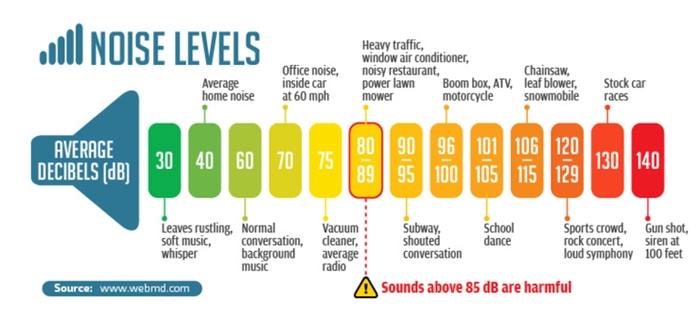
Mp3Gain (2022)


Free Download Mp4Gain
picture

Mp3Gain (2022) – Mp3Gain Windows 10 – 11

Mp3Gain

Mp3Gain Windows 11

Mp3Gain

Decades ago there was the so-called peak normalization, which in a simple way, measured the volume peaks of a recording and calculated how much they could be amplified before reaching distortion.

Then I used that “factor” of possible amplification and amplified the entire recording / song to increase the peaks. That is, all the songs had the peaks at the maximum possible level without distortion.

Mp4Gain, in addition to normalizing audio and video files, is a functional option today as we will see later.

Mp3Gain, based on a new method.

Later an algorithm emerged that calculated the perception
and not the spikes. This was used in Mp3Gain.
How did he achieve it? For example, based on the masking effect that says that two sounds that are close in time, if they have similar frequencies, it will happen that the first one masks the second, that is to say, this second one is redundant and is not heard by the human ear.

Mp3Gain, based on Replay Gain

All this set of theories and measurements are called “human perception” and then a file is measured in what perception it produces and it is calculated what modification a second or third file needs to sound with a similar perception.

This is saved in a tag in the file and so, when it is run, the music player program knows what amplification it should automatically give to make them sound at very similar levels.

Of course, we are giving a very simplified explanation, so that it is easily understood.

Today the different devices that play music read and follow the Replay Gain? Nope.

That is why it is no longer viable to use it as a normalization method.

Mp3Gain is no longer the ideal solution.

Mp4Gain is an alternative to Mp3Gain

Mp4Gain offers today the best normalization algorithm for audio and video.


Free Download Mp4Gain
picture


Mp4Gain Main Window
picture


Mp4Gain Features
picture


Free Download Mp4Gain
picture

Audio Basics Explained PART 2
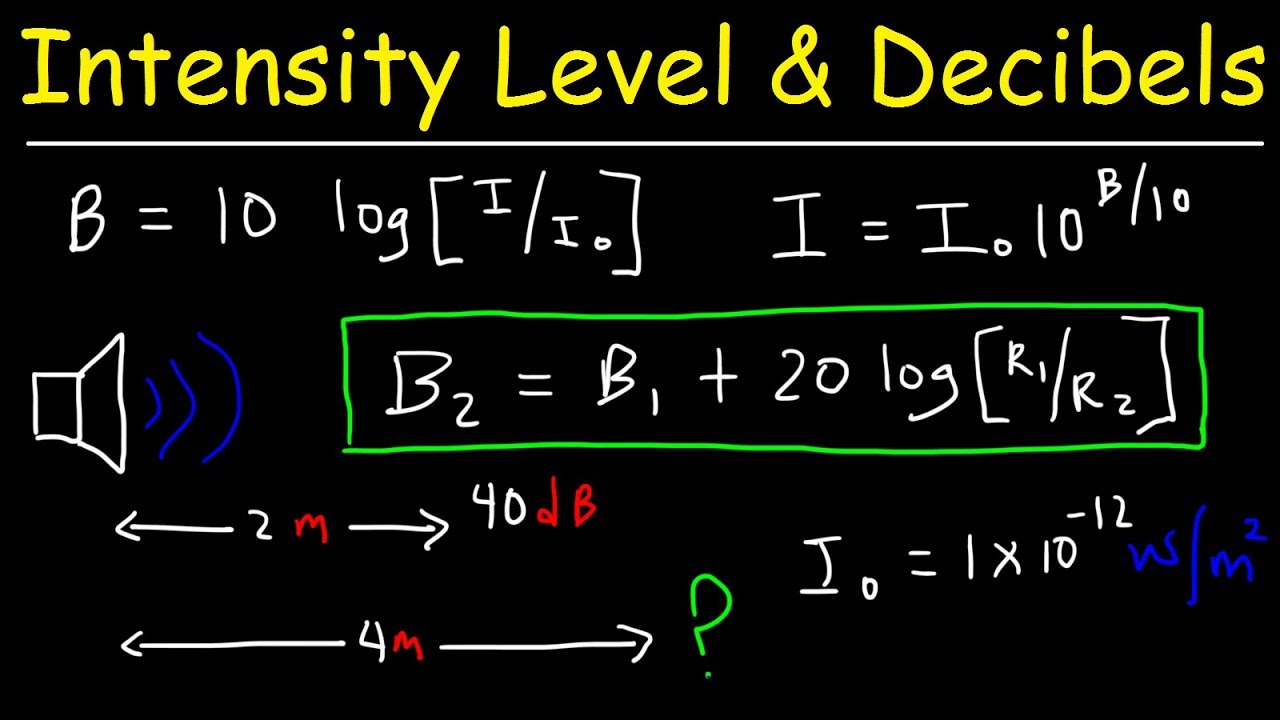
Audio Basics Explained PART 2

Decibels

Sample Bits (sample bits, aka sample precision, quantization level, sample size, quantized data bits): The range of data that each sample point can represent.

Decibels

The number of sampling bits is usually 8 or 16. The larger the number of sampling bits, the more delicate the change of sound that can be recorded, and the larger the corresponding amount of data. 8 bit word length quantization (low quality) and 16 bit word length quantization (high quality), 16 bits is the most common sampling precision.

“Sample rate” and “sample bits” are the two most basic elements of sound digitization, which are equivalent to screen size
(for example, 800*600) and the color resolution (for example, 24 bits) in the video.

Number of channels (or number of channels): The number of channels refers to the number of speakers that support different sounds, it is one of the important indicators to measure audio equipment.

The number of channels for mono is 1 channel; the number of channels for channels
dual is 2 channels; the number of channels for
stereo channels is 2 channels by default; the number of channels for
stereo channels (4 channels) for 4 channels.

Frame (Frame): A frame records a sound unit whose duration is the product of the sample duration (number of samples) and the number of channels.

Period (Period Size): The number of frames required for an audio device to process at one time. Data access and audio data storage of the audio device are based on this unit. The hardware buffered transfer unit, which completes the transfer of so many sample frames, will return an interrupt.

insert image description here
Periods: How many hardware transfer interrupts it takes for the transfer to complete one application buffer.

Buffer Bytes: The number of bytes in an application buffer, the size of the DMA buffer.

Because the buffer size is set by the application, it can be large or small. If it is too large, the transmission delay will be too large, so it is fragmented and the concept of a period is proposed. Overflow, when recording, the data is full and the application does not have time to grab it; underflow, you need data to play and the application does not have time to write the data

Interleaved Mode: The way digital audio signals are stored. The data is stored in consecutive frames, that is, the left channel and right channel samples of frame 1 are recorded first, and then the recording of frame 2 is started…

Non-interlaced mode: The left channel samples of all frames in a cycle are recorded first, then all the right channel samples are recorded.

Quantization: The process of representing the amplitude of the discrete signal after sampling with binary numbers is called quantization. (Quantification in daily life is to set a range or interval, and then look at the acquired data collected within this condition.)

PCM: PCM (Pulse Code Modulation), that is, pulse code modulation, sound sampling and quantization without any encoding and compression processing.

PCM data is the most primitive lossless audio data, so although PCM data has excellent sound quality, it is bulky.
To solve this problem, a series of audio formats have been successively born. These audio formats use different methods to
compress audio data Compression (ALAC, APE, FLAC) and lossy compression (MP3, AAC, OGG, WMA) are available.

Encoding: The sampled and quantized signal is not yet a digital signal, it must be converted into a digitally encoded pulse, a process called encoding. The digital audio signal is the binary sequence formed after sampling, quantizing, and encoding the analog audio.

Bit rate: (also known as bit rate, bit rate) refers to the amount of information that can pass through a data stream per second, which represents the quality of compression. For example, common MP3 bit rates are 128 kbit/s, 160 kbit/s, 320 kbit/s, etc. The higher the rate, the better the sound quality. Data in MP3 consists of ID3 and audio data. ID3 is used to store common information such as song title, singer, album and track.

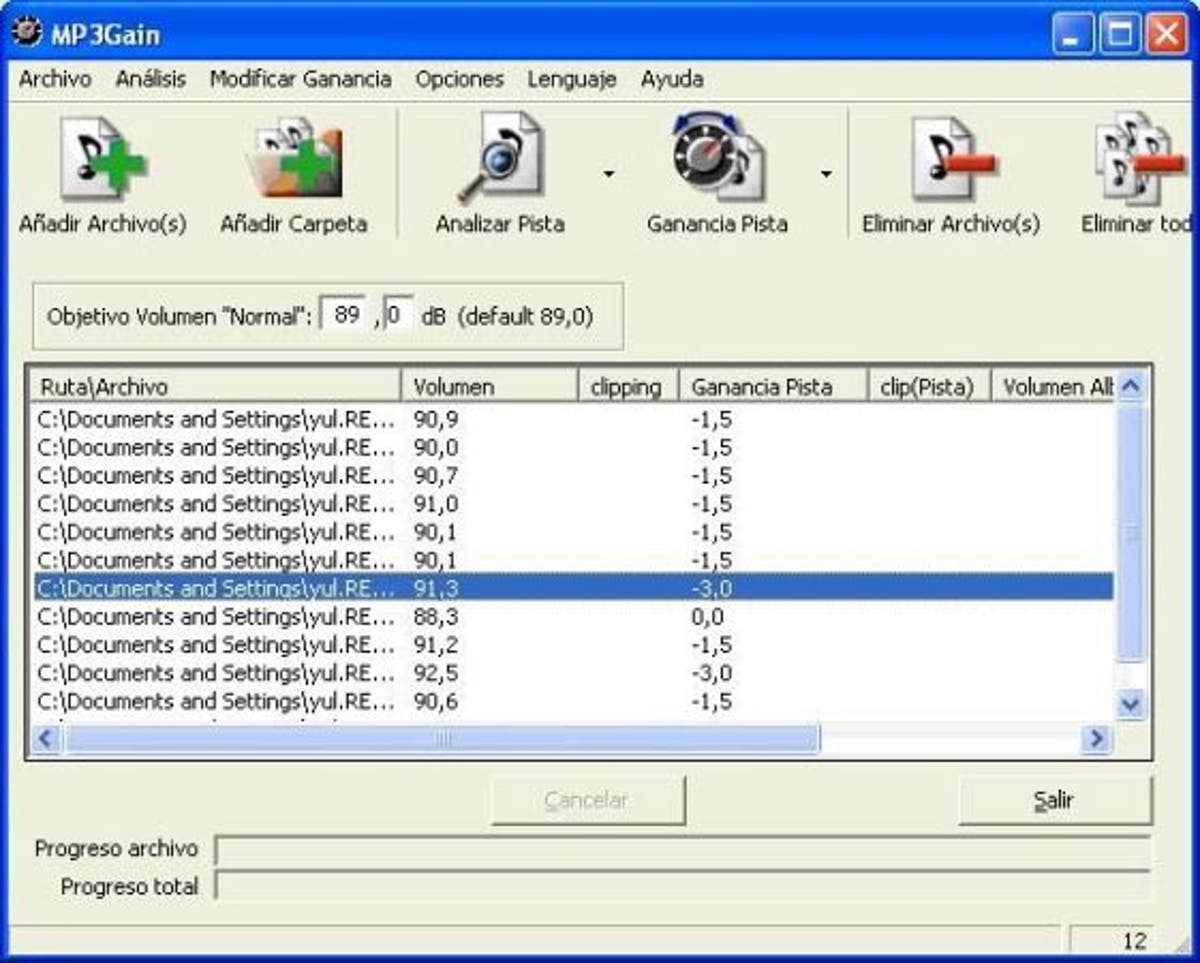
Audio Basics Explained

Audio Basics Explained

Decibels (dB)

Audio and video basics

Decibel

1. Introduction
In real life, the sounds we hear are continuous in time, and we call this type of signal . Analog signals must be digitized before they can be used in a computer.

At present, we need to rely on audio files for audio playback on the computer. The process of generating audio files is the process of combining sound information and generated digital signals. The sound that the human ear can hear has the lowest frequency of 20Hz to the highest frequency of 20KHZ, so the maximum bandwidth of the audio file format is 20KHZ. . According to the theory, only when the sampling frequency is greater than twice the highest frequency of the sound signal, the sound represented by the digital signal can be restored to the original sound, so the sampling frequency of the file audio is generally 40~50KHZ. , such as the most common CD quality sampling rate 44.1KHZ.

2. Audio Basics
Sampling: the wave is infinitely smooth. The sampling process consists of extracting the frequency value from some points of the wave, which consists of digitizing the analog signal. Like shown in the next figure:
insert image description here
blue represents the analog audio signal and red represents the quantized value obtained by sampling

Sample Rate: The number of times the analog signal is sampled per unit of time, expressed in Hertz (Hz). The higher the sample rate, the more realistic and natural the sound restoration will be, and of course, the larger the amount of data. The sampling frequency is generally divided into three levels: 22.05 KHz, 44.1 KHz, and 48 KHz. 8 KHz: the sampling frequency used by phones, is enough for human speech, 22.05 KHz can only achieve the sound quality of FM radio (suitable for medium quality voice and music), 44.1 KHz is the most common sampling rate standard, theoretically quality limit CD sound, 48KHz is more accurate (for the sampling rate above 48KHz, the human ear cannot distinguish it, so it has little use value in the computer).

Quick tip: one
5 kHz sampling rate is as good as people’s speech.
A sample rate of 11 kHz is the minimum standard for reproducing small pieces of sound, a quarter of CD quality.
The 22 kHz sample rate can achieve half the quality of a CD, and most websites now use this sample rate.
44kHz sampling rate is standard CD quality, which can achieve good listening effect.

Resampling: It is mainly divided into upsampling and downsampling. In the sampling process, it is necessary to pay attention to the sampling rate problem. It is not possible to change the size of the sample rate at will. According to the sampling theorem: in the analog/digital signal process During the conversion process, when the sampling frequency is greater than 2 times the highest frequency of the signal, the digital signal after sampling completely retains the information of the original signal. , in practical applications, the sampling frequency is guaranteed to be 5 to 10 times the highest frequency of the signal. The sampling theorem is also known as the Nyquist theorem.

Upsampling: In the sampling process, it is generally divided into upsampling and downsampling, and the basis for the distinction is the comparison of the new sampling rate and the original sampling rate when resampling, if it is greater than the original signal, becomes a Oversampling, if smaller than the original signal, is called undersampling. The essence of upsampling is interpolation or interpolation.
Downsampling: The size of the new sample rate is smaller than the size of the original sample rate.
Methods: When resampling, there are mainly three methods: the nearest neighbor method, the bilinear interpolation method, and the cubic convolution interpolation method. There are also deconvolutions, subpixel convolutions, etc. in convolutional networks.

Mp3Gain Windows 10

Mp3Gain Windows 10

MP3Gain Windows 10

People are still wondering if there was a version of Mp3Gain for windows 10 and now there is Mp4Gain.

MP3 Gain Windows 10

This new software offers the same functionality as Mp3Gain, but it is not limited to mps but normalizes the volume of the most popular audio formats.

Mp3Gain Windows 10 for video?

Mp4Gain is capable of normalizing the loudness of the most used video formats.

Of course you can use the Replay Gain if you wish, although Mp4Gain offers other methods that are more up-to-date and in accordance with THE DEVICES IN WHICH TODAY BOTH MUSIC AND VIDEO ARE REPRODUCED.

It can also extract the audio from a video by converting it to any audio format. That way if you have a video clip and you only want to have an mp3, flac, ogg, aac, etc. it is perfectly possible.

And of course it is perfectly compatible with Windows 10 and Windows 11 and with previous versions, especially Windows 7.