Mp3Gain (2022)


Free Download Mp4Gain
picture

Mp3Gain (2022) – Mp3Gain Windows 10 – 11

Mp3Gain

Mp3Gain Windows 11

Mp3Gain

Decades ago there was the so-called peak normalization, which in a simple way, measured the volume peaks of a recording and calculated how much they could be amplified before reaching distortion.

Then I used that “factor” of possible amplification and amplified the entire recording / song to increase the peaks. That is, all the songs had the peaks at the maximum possible level without distortion.

Mp4Gain, in addition to normalizing audio and video files, is a functional option today as we will see later.

Mp3Gain, based on a new method.

Later an algorithm emerged that calculated the perception
and not the spikes. This was used in Mp3Gain.
How did he achieve it? For example, based on the masking effect that says that two sounds that are close in time, if they have similar frequencies, it will happen that the first one masks the second, that is to say, this second one is redundant and is not heard by the human ear.

Mp3Gain, based on Replay Gain

All this set of theories and measurements are called “human perception” and then a file is measured in what perception it produces and it is calculated what modification a second or third file needs to sound with a similar perception.

This is saved in a tag in the file and so, when it is run, the music player program knows what amplification it should automatically give to make them sound at very similar levels.

Of course, we are giving a very simplified explanation, so that it is easily understood.

Today the different devices that play music read and follow the Replay Gain? Nope.

That is why it is no longer viable to use it as a normalization method.

Mp3Gain is no longer the ideal solution.

Mp4Gain is an alternative to Mp3Gain

Mp4Gain offers today the best normalization algorithm for audio and video.


Free Download Mp4Gain
picture


Mp4Gain Main Window
picture


Mp4Gain Features
picture


Free Download Mp4Gain
picture

Audio Basics Explained PART 2

Audio Basics Explained PART 2

Decibels

Sample Bits (sample bits, aka sample precision, quantization level, sample size, quantized data bits): The range of data that each sample point can represent.

Decibels

The number of sampling bits is usually 8 or 16. The larger the number of sampling bits, the more delicate the change of sound that can be recorded, and the larger the corresponding amount of data. 8 bit word length quantization (low quality) and 16 bit word length quantization (high quality), 16 bits is the most common sampling precision.

“Sample rate” and “sample bits” are the two most basic elements of sound digitization, which are equivalent to screen size
(for example, 800*600) and the color resolution (for example, 24 bits) in the video.

Number of channels (or number of channels): The number of channels refers to the number of speakers that support different sounds, it is one of the important indicators to measure audio equipment.

The number of channels for mono is 1 channel; the number of channels for channels
dual is 2 channels; the number of channels for
stereo channels is 2 channels by default; the number of channels for
stereo channels (4 channels) for 4 channels.

Frame (Frame): A frame records a sound unit whose duration is the product of the sample duration (number of samples) and the number of channels.

Period (Period Size): The number of frames required for an audio device to process at one time. Data access and audio data storage of the audio device are based on this unit. The hardware buffered transfer unit, which completes the transfer of so many sample frames, will return an interrupt.

insert image description here
Periods: How many hardware transfer interrupts it takes for the transfer to complete one application buffer.

Buffer Bytes: The number of bytes in an application buffer, the size of the DMA buffer.

Because the buffer size is set by the application, it can be large or small. If it is too large, the transmission delay will be too large, so it is fragmented and the concept of a period is proposed. Overflow, when recording, the data is full and the application does not have time to grab it; underflow, you need data to play and the application does not have time to write the data

Interleaved Mode: The way digital audio signals are stored. The data is stored in consecutive frames, that is, the left channel and right channel samples of frame 1 are recorded first, and then the recording of frame 2 is started…

Non-interlaced mode: The left channel samples of all frames in a cycle are recorded first, then all the right channel samples are recorded.

Quantization: The process of representing the amplitude of the discrete signal after sampling with binary numbers is called quantization. (Quantification in daily life is to set a range or interval, and then look at the acquired data collected within this condition.)

PCM: PCM (Pulse Code Modulation), that is, pulse code modulation, sound sampling and quantization without any encoding and compression processing.

PCM data is the most primitive lossless audio data, so although PCM data has excellent sound quality, it is bulky.
To solve this problem, a series of audio formats have been successively born. These audio formats use different methods to
compress audio data Compression (ALAC, APE, FLAC) and lossy compression (MP3, AAC, OGG, WMA) are available.

Encoding: The sampled and quantized signal is not yet a digital signal, it must be converted into a digitally encoded pulse, a process called encoding. The digital audio signal is the binary sequence formed after sampling, quantizing, and encoding the analog audio.

Bit rate: (also known as bit rate, bit rate) refers to the amount of information that can pass through a data stream per second, which represents the quality of compression. For example, common MP3 bit rates are 128 kbit/s, 160 kbit/s, 320 kbit/s, etc. The higher the rate, the better the sound quality. Data in MP3 consists of ID3 and audio data. ID3 is used to store common information such as song title, singer, album and track.

Audio Basics Explained

Audio Basics Explained

Decibels (dB)

Audio and video basics

Decibel

1. Introduction
In real life, the sounds we hear are continuous in time, and we call this type of signal . Analog signals must be digitized before they can be used in a computer.

At present, we need to rely on audio files for audio playback on the computer. The process of generating audio files is the process of combining sound information and generated digital signals. The sound that the human ear can hear has the lowest frequency of 20Hz to the highest frequency of 20KHZ, so the maximum bandwidth of the audio file format is 20KHZ. . According to the theory, only when the sampling frequency is greater than twice the highest frequency of the sound signal, the sound represented by the digital signal can be restored to the original sound, so the sampling frequency of the file audio is generally 40~50KHZ. , such as the most common CD quality sampling rate 44.1KHZ.

2. Audio Basics
Sampling: the wave is infinitely smooth. The sampling process consists of extracting the frequency value from some points of the wave, which consists of digitizing the analog signal. Like shown in the next figure:
insert image description here
blue represents the analog audio signal and red represents the quantized value obtained by sampling

Sample Rate: The number of times the analog signal is sampled per unit of time, expressed in Hertz (Hz). The higher the sample rate, the more realistic and natural the sound restoration will be, and of course, the larger the amount of data. The sampling frequency is generally divided into three levels: 22.05 KHz, 44.1 KHz, and 48 KHz. 8 KHz: the sampling frequency used by phones, is enough for human speech, 22.05 KHz can only achieve the sound quality of FM radio (suitable for medium quality voice and music), 44.1 KHz is the most common sampling rate standard, theoretically quality limit CD sound, 48KHz is more accurate (for the sampling rate above 48KHz, the human ear cannot distinguish it, so it has little use value in the computer).

Quick tip: one
5 kHz sampling rate is as good as people’s speech.
A sample rate of 11 kHz is the minimum standard for reproducing small pieces of sound, a quarter of CD quality.
The 22 kHz sample rate can achieve half the quality of a CD, and most websites now use this sample rate.
44kHz sampling rate is standard CD quality, which can achieve good listening effect.

Resampling: It is mainly divided into upsampling and downsampling. In the sampling process, it is necessary to pay attention to the sampling rate problem. It is not possible to change the size of the sample rate at will. According to the sampling theorem: in the analog/digital signal process During the conversion process, when the sampling frequency is greater than 2 times the highest frequency of the signal, the digital signal after sampling completely retains the information of the original signal. , in practical applications, the sampling frequency is guaranteed to be 5 to 10 times the highest frequency of the signal. The sampling theorem is also known as the Nyquist theorem.

Upsampling: In the sampling process, it is generally divided into upsampling and downsampling, and the basis for the distinction is the comparison of the new sampling rate and the original sampling rate when resampling, if it is greater than the original signal, becomes a Oversampling, if smaller than the original signal, is called undersampling. The essence of upsampling is interpolation or interpolation.
Downsampling: The size of the new sample rate is smaller than the size of the original sample rate.
Methods: When resampling, there are mainly three methods: the nearest neighbor method, the bilinear interpolation method, and the cubic convolution interpolation method. There are also deconvolutions, subpixel convolutions, etc. in convolutional networks.

Mp3Gain Windows 10

Mp3Gain Windows 10

MP3Gain Windows 10

People are still wondering if there was a version of Mp3Gain for windows 10 and now there is Mp4Gain.

MP3 Gain Windows 10

This new software offers the same functionality as Mp3Gain, but it is not limited to mps but normalizes the volume of the most popular audio formats.

Mp3Gain Windows 10 for video?

Mp4Gain is capable of normalizing the loudness of the most used video formats.

Of course you can use the Replay Gain if you wish, although Mp4Gain offers other methods that are more up-to-date and in accordance with THE DEVICES IN WHICH TODAY BOTH MUSIC AND VIDEO ARE REPRODUCED.

It can also extract the audio from a video by converting it to any audio format. That way if you have a video clip and you only want to have an mp3, flac, ogg, aac, etc. it is perfectly possible.

And of course it is perfectly compatible with Windows 10 and Windows 11 and with previous versions, especially Windows 7.

Does bitrate influence? A 320 kbps Mp3 sounds better than a 128 kbps one?

Much has been speculated about the bitrate. Most people do not understand clearly what it is. A few understand, but almost nobody knows if a file with 320 kbps really sounds different or better than the same file but with 128 kbps.

The easiest way is to test:

The first is at 128 kbps

Now let’s hear the 320 kbps option

Notice the difference? In case the note is because it was encoded using the Mp4Gain.
Normally it is almost impercentible, but using a good encoder you get to notice some subtle difference.

It should be taken into account that at higher kbps, if there is a higher quality – although it is not always noticeable – and will always use more disk space.

Therefore it is not the best option to say “all my mp3s will be 320 kbps”, unless the space does not mean any problem at all.

Audio quality: Bitrate in MP3 files

In many cases, the term Bitrate is used, which is the bit rate per second that a multimedia file (Audio or Video) has. Currently the MP3 music format is one of the most widespread (Although there are currently other more current formats such as OGG Vorbis, AAC, Flac, Monkey Audio, …) however the audio quality is variable, this is due to the characteristics with which the MP3 in question has been compressed, including:

Mode: It can be of two types mainly:

Mono: With a single channel (The right and left channel go together, not separated which gives worse audio quality).

Stereo: Two channels (Right and Left, improve audio quality).

Sampling frequency:

Audio CDs use 44,100 Hz (22,050 Hz per channel), although there are higher frequencies such as 48,000 Hz used in DVDs and lower, the higher the frequency, the higher the quality.
Bits: Audio CDs have 16 Bits (Although MP3 can be compressed at a lower quality such as 8 Bits).
Bitrate (Bit Rate per second): Audio CDs have about 1,400 Kbps (44100 Hz * 16 Bits * 2 channels), meaning that an Audio CD would have a bitrate of 1,400 Kbps (In MP3 format the maximum Bitrate is 320 Kbps, however, it is assumed that an MP3 with a 128 Kbps Bitrate has a quality similar to CD, although in many cases to achieve a quality similar to CD it is necessary to use a Bitrate of 192 Kbps, and to obtain CD quality it is necessary use 256 Kbps or 320 Kbps).

Some of the most common Bitrates are:

8 Kbps Mono: Telephone Sound.
16 Kbps Mono: Better quality than shortwave.
32 Kbps Mono: Better quality than AM.
64 Kbps Stereo: Better quality than FM.
112 – 128 Kbps: Quality close to CD.
160 Kbps: Quality closer to CD.
192 Kbps: Virtually CD quality.
256 Kbps: Quality CD practically undisputed from an original CD.
320 Kbps: CD quality.

Coding method: It can be of two types:

VBR (Variable Bit Rate, Bit Rate Variable): Encodes the file in MP3 with a variable Bitrate.
CBR (Constant Bit Rate, Constant Bit Rate): Encodes the MP3 file with a fixed Bitrate.

In addition, another factor that influences the encoding of the MP3 file is the CODEC (Encoder-Decoder) used, one of the most common and the best result is LAME (Lame Ain’t an MP3 Encoder) which is also free.

One point to keep in mind is that if we recompress an MP3 file that originally has a 128 Kbps bitrate and convert them to 192 Kbps for example, audio quality is not really gained because the MP3 format has some quality loss (MP3 is a loss algorithm, also called lossy). which has occurred when converting the original file (Ex: CD Audio or a 320 Kbps MP3 to a 128 Kbps MP3) so this recompression does not make much sense since we will not gain in audio quality (As they say where there is no one can not get) and the only thing we will achieve in any case is to increase the initial size of the file.

The opposite case (Recompress a 320 Kbps MP3 file for example at 192 Kbps) if it makes some sense because in this case although we lose some audio quality we reduce the weight (Kilobytes or Megabytes) of each MP3 file somewhat.


In conclusion, it can be said that if we need to encode / compress an MP3 file with good quality, the “ideal” would be to do so:

To be able to start from an Audio CD, although an MP3 at 320 or 256 Kbps could also be valid for a recompression of the file.
In stereo mode (With two channels, right and left).
With at least 44100 Khz sampling rate and 16 Bits.
With a minimum bitrate of 192 Kbps or at most 256 Kbps (Using 320 Kbps would give higher quality but also increase the file size considerably).
Use the LAME Codec (Lame Ain’t an MP3 Encoder).

Audio normalization

Audio normalization

audio normalization

The normalization of the audio level is something that is achieved by applying a constant and maintained amount of gain, in volume, to an audio recording to bring the average peak amplitude to a desired level that has been previously defined. To which the same amount of gain is applied to the entire range, the signal-to-noise ratio generally does not change. Normalization differs from dynamic range compression, which applies different levels of gain to a recording so that the amplitude is within a minimum and maximum range. Standardization is one of the most common functions provided by a digital audio workstation.

Peak normalization

One type of normalization is peak normalization, in which the gain is changed to bring the highest PCM value or the highest peak of an analog signal to a given level.1

Since it only searches for the highest level, it does not take into account the apparent volume of the content. As such, peak normalization is generally used to change the volume in such a way as to ensure optimum use of the distribution medium in the mastering stage of a recording. loudness normalization.

Normalization of loudness

Another type of normalization is based on a loudness measure, in which the gain is changed to bring the average amplitude to an objective level. This average may be a simple measurement of average power, such as the RMS value, or it may be a measure of the loudness perceived by humans, such as that offered by ReplayGain.

Depending on the dynamic range of the content and the target level, the normalization of the loudness can lead to peaks that exceed the limits of the recording medium. Some software has the option of using dynamic range compression to avoid saturation when this happens. In this situation, the signal-to-noise ratio is altered.

volume booster

Modern Audio Normalization

Currently Mp4Gain uses an audio normalizationn that is more similar to that used in modern recording studios or live music group recitals.

It is a normalization of volume focused from a new perspective.

Under this new paradigm, not only does it achieve that all songs have the gain of loudness at the best possible level, but it also achieves that each instrument and / or voice obtains a level of gain that makes it audible. Achieve an optimized level of volume gain normalization.

There is no other normalizer in the market that obtains this level of result. People with training in hearing listening can easily notice the difference., very similar to that obtained with expensive hardware in radio stations or in recording studios or in recital consoles, combining limiters, modern compressors and other processors.
All these results that offer expensive hardware equipment, Mp4Gain does for a few dollars.

In fact, the opposite result is achieved than that achieved with masking, because with masking, which is a method used to compress music, you can no longer perceive some sounds that are behind a more audible sound, that is what is called masking, which leads to the loss of audio quality.

Mp4Gain manages to highlight hidden instruments and sounds, performing an audio normalization by frequency bands to achieve this.

That is why we say that Mp4Gain achieves the same results as those obtained through a series of hardware equipment (limiters, compressors, normalizers, etc.) that are very expensive, while Mp4Gain costs only a few dollars.

Digital Audio – Beginners guide

The Cost of a High Sampling Rate

Although it is true that high sampling rates produce better sound quality … that comes at a price.

That price translates into:

Higher processing load.
Less number of tracks.
Heavier audio files.
So you always give something in return. Professional studies can support higher sampling rates because they use better equipment.

But for most home studios, people often find that the standard 48 kHz configuration is the best.

Following…

4. Bit Depth

In order to understand what bit depth is, we first have to know what bits are.

A bit (or binary digit) is a single unit of binary code, with a value of 1 or 0.

The more bits, the more possible combinations. For example…

As you can see in the diagram below, 4 bits allow a total of 16 combinations.

4 bits

When used to encode information, each of these numbers is assigned a specific value.
As the number of bits increases, the possible values ​​grow exponentially.

4 Bits = 16 possible values
8 Bits = 256 possible values
16 Bits = 16,536 possible values
24 Bits = 16,777,215 possible values
With the bit depth in the digital audio, each value is assigned a specific amplitude of the waveform.

The greater the bit depth, the greater the volume increase between high and low … and a greater dynamic range in the recording.

A good rule of thumb is: for every extra bit, the dynamic range increases by 6dB.

For example:

4 Bits = 24 dB
8 Bits = 48 dB
16 Bits = 96 dB
24 Bits = 144 dB
In the end, what this means is that… the greater the bit depth, the less noise.

Because by adding more processing margin (or headroom), the useful signal (at the high end of the spectrum) can be recorded higher above the background noise (at the low end of the spectrum).

small vs large bit depths

Following…

5. Quantization Noise

Impressive that a 24-bit recording can result in almost 17 million possible values, right?

However, that remains much less than the infinite number of possible values ​​that exist in an analog signal.

Therefore, in almost all samples, the actual value is somewhere between two possible values. The solution of the converter is simply to round it or “quantify” it to the nearest value.

The resulting distortion, known as quantization noise, takes place in 2 phases of the recording process:

at the beginning, during the A / D conversion, and
at the end, during mastering
With mastering, the sampling frequency / bit depth of the final track is usually reduced by converting to the final digital format (CD, mp3, etc.).

When that happens, some of the information is erased and “re-quantized”, generating more distortion in the sound.

The most frequent solution to deal with this problem is …

6. Dither

When reducing a 24-bit file to 16 bits, the screen is used to mask much of the resulting distortion …

Adding a low level of “random noise” to the audio signal.

As it can be difficult to visualize the concept in audio, to explain it, we usually turn to the popular analogy of the screen plot.
Is that how it works:

When a color photo is converted to black and white, a mathematical estimate is made to determine if each color pixel should be “quantized” in a black pixel, or a white one …

As is the case when digital audio samples are quantized.

As you can see in this picture, the “before” photo is pretty bad, right?

dither

But with the plot …

a small number of white pixels are randomly distributed in black parts, and …
a small number of black pixels are randomly distributed in white parts …
By adding that “random noise” to the image, the “after” photo looks much better. Well, the screen in the audio works very similarly.

Following…

7. Latency

The GREAT PROBLEM of current digital studies is the amount of latency that accumulates in the signal chain, especially with DAWs.

With all the calculations that are processed, the audio signal takes time to leave the system between a few milliseconds and a few DOCENAS of milliseconds.
Between 0-11 ms of latency – it is short enough, so a normal person does not notice it.
Between 11-22 ms – an annoying delay is heard which it is difficult to get used to.
More than 22 ms – there is so much delay that it is impossible to play or sing at tempo with the track.
In a normal digital signal chain there are usually 4 phases that contribute to the total latency:

A / D conversion
DAW Buffer
Delay of the Plugins
A / D conversion
The A / D and D / A conversion are the least harmful, contributing to total latency with less than 5 ms.

But nevertheless…

The DAW buffer and certain plugins (including compressors and virtual instruments) can add up to 20, 30 or 40 ms or

Beginner’s Guide to Digital Audio for Recording Music

62c-digital audio When recording at home began to become popular …

It happened for a simple reason:

The analog equipment of the past decades was being slowly but inexorably replaced …

For a new generation of audio interfaces and other digital equipment that was cheaper and easier to use.

And that trend has continued since then.

Today … digital audio is the standard in almost all studios, both professional and amateur.

However, surprisingly, there are few people who really understand what it is about.

So let’s see what it is about:

1. The Rise of the Digital Age

binary code Although digital audio is the standard in today’s music …

It has not always been that way.

Originally, music information only existed as sound waves in the air.

Then, as technology progressed, people discovered new ways to convert that information to other formats, including:

notes on a page
electrical signals inside a cable
radio waves in the atmosphere
relief on vinyl records
But in the end, with the rise of computers, digital audio ended up being the dominant format in the music production industry, since it allowed copying and transporting songs in a simple and free way.

And the device that made all that possible was … the digital converter.

Let’s see how they work …

2. Digital Converters

In recording studios there are 2 types of digital converters:

Those that are an independent device, which are normally seen in more advanced studies, or …
Those that are integrated into the audio interfaces, which are usually seen in home studios.
To convert the audio to binary code, they take tens of thousands of samples (samples) per second to make an “approximate” image of the analog waveform.

The image is not accurate because in the intervals between samples, the converter basically has to guess what is happening.

Digital waveform

As you can see in the diagram, in which:

the red line is the analog signal, and …
the black line is the conversion …
The results are not perfect, but they are good enough to generate excellent sound quality.

How excellent? That depends largely on …

3. Sample Rate

Check out this image:

sample rate diagram

As you can see…

When taking more samples per second, the highest sampling rate:

Collect more real information,
Go less to the estimate, and
It generates a much more accurate image of the analog signal.
Logically, the end result is … better sound quality.

Let’s talk about specific data:

Normal sampling frequencies in professional audio range around:

44.1 kHz (audio CD)
48 kHz
88.2 kHz
96 kHz
192 kHz
The minimum of 44.1kHz is due to a mathematical principle known as …

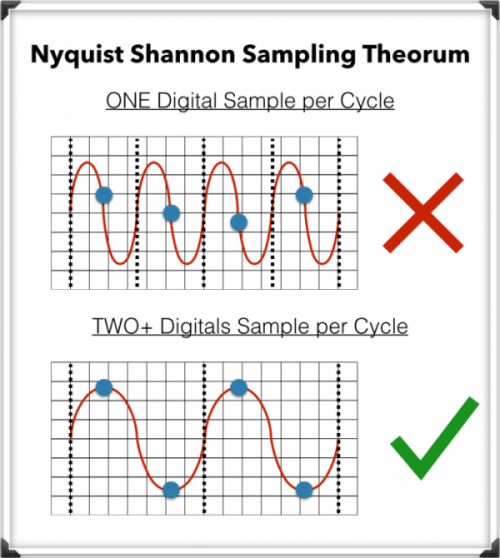
The Nyquist-Shannon Sampling Theorem

To record digital audio accurately, converters have to capture the entire human listening spectrum, which is between 20Hz – 20kHz.

According to the Nyquist-Shannon Sampling Theorem …

To capture a specific frequency, at least 2 samples are needed for each cycle … to measure both the upper and lower points of the sound wave.

That means that recording frequencies of up to 20kHz require a sampling rate of 40kHz or more, which explains why the audio CDs are just above that minimum, at 44.1kHz.

What is an audio compressor.

In the field of professional sound, a compressor is an electronic sound processor designed to reduce the dynamic range of the signal without noticing its presence too much. This task is done by reducing the system gain, when the signal exceeds a certain threshold.

Traditionally, compressors have been electronic equipment with one or two rack units, but software versions of them have appeared for some years.

A compressor acts in such a way that it attenuates the electrical signal by a certain amount (normally measured in decibels) and from a certain input level. The objective is to ensure that the resulting dynamic excursion is lower than the original, to protect certain equipment against possible signal peaks or, if it is a saturated sound, to try to hide the error.

Reasons to compress a signal

-Control the energy of the signal: The human ear is very sensitive, so the compression must be smooth and subtle so as not to capture it. This type of compression is used when there is a signal in which the intensity varies, so it is compressed to achieve a more constant signal within the values ​​assigned to it.

-Control the peak level of the signal: Often the equipment is limited, so the amplifiers can saturate and therefore be damaged. In this case the compression is used to control the signal and thus protect the equipment.

-Reduce the dynamic range of the signal: By attenuating the peaks of a signal, we reduce its dynamic range. Many devices are limited by the peaks, and this allows the RMS level of the signal to be raised.

Compressor Uses

In the field of music, its use ranges from applications for musical recordings to live sound. For example, it is often used to add more glued to the sound, an effect that is achieved by compressing the signal to subsequently apply a gain to the output of the device, which usually conceals possible interpretation failures by the artist, at least as Dynamic control refers. A compressor is highly recommended (and with certain musical styles, indispensable) for when using an electric bass. The slapping effect (hitting the strings with the finger) produces extremely high output peaks (20 dB or 10 times more than normal), which at low output levels generate distortion, and at high volumes (as in recitals) they can cause serious damage to the amplifier, and even the speaker (an excess of “excursion” can cause the speaker to tear from its suspension). Even in the (theoretical) case of a musical system with an infinite dynamic range, the difference, auditory speaking, using or not the compressor is imperceptible. Its use is also very frequent in voices, since not all singers use the appropriate technique so the signal level varies constantly.

-It is widely used in broadcasting, to improve the speaker’s diction.
-Compress during mastering improves the sound definition of the final mix.
-To protect the equipment (speakers).