Exploring Audio Bitrates: Technical Deep Dive


Free Download Mp4Gain
picture

Exploring Audio Bitrates: Technical Deep Dive
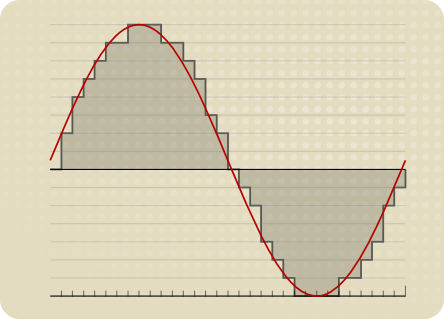
Audio Bitrates
Audio Bitrates
Audio Bitrates
Audio Bitrates

In this article, we will explore the technical aspects of audio bitrates. We will discuss what a bitrate is, how it affects audio quality, and how to choose the right bitrate for your needs.

What is a bitrate?

A bitrate is the number of bits per second that are used to encode an audio file. The higher the bitrate, the more data is used to encode the file, and the higher the quality of the audio will be. However, higher bitrates also result in larger file sizes.

How does bitrate affect audio quality?

Bitrate affects audio quality by determining how much data is used to represent the original sound waves. Higher bitrates allow for more data to be used, which results in more accurate representations of the original sound waves. This results in better audio quality, such as increased clarity and reduced noise.

How to choose the right bitrate

The right bitrate for you will depend on a number of factors, including:

  • The type of audio you are listening to. For example, music and speech have different requirements.
  • The quality of your audio equipment. Higher-quality equipment can reproduce higher bitrates without introducing any noticeable distortion.
  • Your personal preferences. Some people may prefer the sound of higher bitrates, while others may not notice a difference.

General bitrate recommendations

Here are some general bitrate recommendations for different types of audio:

  • Speech: 32 kbps to 96 kbps
  • Music: 128 kbps to 320 kbps
  • High-quality audio: 256 kbps to 512 kbps or higher

It is important to note that these are just general recommendations. The best way to determine the right bitrate for you is to experiment and see what sounds best to your ears.

Final words about audio bitrates

Audio bitrate is an important factor to consider when choosing an audio file format or when setting up an audio streaming service. By understanding how bitrate affects audio quality, you can choose the right bitrate for your needs and get the best possible listening experience.


Mp4Gain

Mp4Gain


Free Download Mp4Gain
picture


Mp4Gain Main Window
picture


Mp4Gain Features
picture


Free Download Mp4Gain
picture

The Differences Between 128 kbps, 256 kbps, and 320 kbps MP3s

The Differences Between 128 kbps, 256 kbps, and 320 kbps MP3s

mp3 kbps
mp3 kbps

When it comes to MP3s, bitrate is one of the most important factors to consider. Bitrate is the number of bits that are processed per second and is typically measured in kilobits per second (kbps). Common bitrates for MP3s include 128 kbps, 256 kbps, and 320 kbps, but what exactly do these numbers mean, and how do they affect the overall quality of the audio?

mp3 kbps
mp3 kbps

128 kbps

128 kbps is a standard bitrate for MP3s and is considered to be a good balance between file size and sound quality. At this bitrate, a four-minute song will take up approximately 4 megabytes of space. Audio encoded at 128 kbps will sound decent on most devices, but it may not be suitable for those who are particularly picky about sound quality. It is often used in streaming services and online platforms because of the small file size which allows for faster streaming and less data consumption.

256 kbps

Compared to 128 kbps, 256 kbps offers a significant improvement in sound quality. The increased bitrate means that more data is used to represent the audio, resulting in a more accurate representation of the original recording. A four-minute song at 256 kbps will take up approximately 8 megabytes of space. This bitrate is recommended for music enthusiasts who want to enjoy a higher quality sound without having to sacrifice too much storage space.

320 kbps

320 kbps is considered the highest quality bitrate for MP3s and offers the best representation of the original audio. The increased bitrate means that even more data is used to represent the audio, resulting in a near-perfect representation of the original recording. A four-minute song at 320 kbps will take up approximately 10 megabytes of space. This bitrate is recommended for audiophiles or professional musicians who want to ensure that their music sounds as close to the original recording as possible. However, due to the large file size, it may not be practical for streaming or online platforms.

Compression

When converting audio to an MP3, the file is compressed to make it smaller in size. However, this process can cause a loss of audio quality, especially at lower bitrates. The higher the bitrate, the less compression is applied and the better the audio quality will be. For example, a 128 kbps MP3 will have more compression than a 256 kbps MP3, resulting in a lower quality sound.

Conclusion

In conclusion, the bitrate of an MP3 can have a big impact on the overall sound quality. 128 kbps is a good balance between file size and sound quality, while 256 kbps offers a significant improvement in sound quality. 320 kbps offers the best representation of the original audio, but the large file size may not be practical for streaming or online platforms. To optimize the sound quality of your MP3s, one of the best solutions is MP4Gain, that optimizes the audio of your files, making them sound better than ever before.