What are the differences in audio quality between various MP4 audio codecs, such as AAC, MP3, and AC3?


Free Download Mp4Gain
picture

What are the differences in audio quality between various MP4 audio codecs, such as AAC, MP3, and AC3?

What are the differences in audio quality between various MP4 audio codecs, such as AAC, MP3, and AC3?

Lossy Audio Compression: Understanding the Basics

As a music lover, I’ve always been interested in the technical aspects of audio compression. When it comes to digital audio, there are two main types of compression: lossless and lossy. Lossless compression is used to reduce the size of audio files without sacrificing any quality, while lossy compression is used to achieve smaller file sizes by discarding some of the audio data.

Lossy compression is the most common type of compression used in digital audio, and it’s what we’re talking about when we discuss MP4 audio codecs like AAC, MP3, and AC3. The basic idea behind lossy compression is to remove parts of the audio that are less important to the overall sound, while keeping the parts that are most important.

For example, a lossy audio codec might remove some of the high-frequency sounds that are outside the range of human hearing, or it might reduce the bit rate of the audio to achieve a smaller file size. The result is a file that sounds almost identical to the original, but is much smaller in size.

The Differences Between AAC, MP3, and AC3

When it comes to MP4 audio codecs, there are several options to choose from, including AAC, MP3, and AC3. Each of these codecs has its own strengths and weaknesses, and the one you choose will depend on your specific needs.

AAC (Advanced Audio Coding) is a popular codec that’s used in a wide range of applications, from streaming audio to mobile devices. It’s known for its high-quality sound and efficient compression, which makes it a great choice for music lovers who want to store large collections of music on their devices.

MP3 (MPEG-1 Audio Layer III) is one of the oldest and most widely used audio codecs. It’s known for its compatibility with a wide range of devices and software, and it’s still a popular choice for music lovers who want to store their music in a digital format. However, MP3 is not as efficient as some of the newer codecs, and it can produce lower-quality sound than AAC or AC3.

AC3 (Dolby Digital) is a codec that’s commonly used in movie theaters and home theater systems. It’s known for its high-quality sound and support for surround sound, which makes it a great choice for movie lovers who want to experience their favorite films in the best possible way. However, AC3 is not as widely supported as AAC or MP3, and it can produce larger file sizes than some of the other codecs.

Choosing the Right Codec for Your Needs

When it comes to choosing the right MP4 audio codec, there are several factors to consider. If you’re looking for the best possible sound quality, AAC is probably your best bet. It’s known for its high-quality sound and efficient compression, which makes it a great choice for music lovers who want to store large collections of music on their devices.

If you’re looking for compatibility with a wide range of devices and software, MP3 is still a solid choice. It’s one of the oldest and most widely used codecs, and it’s still supported by most devices and software. However, if you’re looking for the best possible sound quality, you may want to consider AAC or AC3 instead.

Finally, if you’re a movie lover who wants to experience your favorite films in the best possible way, AC3 is probably your best bet. It’s known for its high-quality sound and support for surround sound, which makes it a great choice for home theater systems.

Final Words

In conclusion, the differences in audio quality between various MP4 audio codecs like AAC, MP3, and AC3 are largely a matter of personal preference. Each codec has its own strengths and weaknesses, and the one you choose will depend on your specific needs. Whether you’re a music lover, a movie lover, or just someone who wants to store their audio in a digital format, there’s a codec out there that’s right for you. And if you’re looking for a great tool to help you normalize and convert your audio files, be sure to check out MP4Gain.


Free Download Mp4Gain
picture


Mp4Gain Main Window
picture


Mp4Gain Features
picture


Free Download Mp4Gain
picture

What is the difference between AAC and MP3 audio?

What is the difference between AAC and MP3 audio?

AAC vs MP3
AAC vs MP3
AAC vs MP3
AAC vs MP3

Introduction

As a music lover, I am always interested in the different audio formats that are available. In this article, we will discuss the differences between AAC and MP3 audio formats. We will explore their similarities, differences, advantages, and disadvantages.

Similarities

Both AAC and MP3 are audio codecs that compress audio files to reduce their size while maintaining a reasonable level of audio quality. They are both widely used and supported by many devices and media players. AAC and MP3 are both lossy audio formats, which means that they remove some audio data during compression, resulting in a smaller file size.
However, AAC is considered to be a more advanced codec than MP3. AAC offers better audio quality at the same bit rate as MP3, and it is also more efficient at lower bit rates.

Differences

The main difference between AAC and MP3 is the way they compress audio files. MP3 uses a method called “perceptual coding,” which discards some audio data that is not noticeable to the human ear. AAC, on the other hand, uses a more advanced method called “spectral band replication,” which analyzes the audio signal and replicates the missing audio data.
Another significant difference is that AAC is a newer and more advanced codec than MP3. AAC was introduced in 1997, while MP3 was introduced in 1993. AAC is also the default audio format for Apple devices, while MP3 is more widely used in other devices and media players.

Advantages and Disadvantages

AAC offers better audio quality than MP3 at the same bit rate, and it is more efficient at lower bit rates. AAC also supports more channels than MP3, which makes it a better choice for surround sound and other multi-channel applications.
However, MP3 is still more widely supported than AAC, especially in older devices and media players. MP3 also has a larger user base and a more extensive library of available audio files.

Final Words

In conclusion, both AAC and MP3 are popular audio formats that have their advantages and disadvantages. AAC offers better audio quality and is more efficient at lower bit rates, while MP3 is more widely supported and has a larger user base. If you are looking for a high-quality audio format for your music collection, AAC is an excellent choice. However, if compatibility and availability are more important to you, then MP3 may be a better option.

Quote:

“As technology advances and the demand for higher quality audio increases, newer and more advanced audio codecs like AAC are becoming more popular.” – John Doe, Audio Engineer

How does the bit rate affect the quality of the music?

How does the bit rate affect the quality of the music?

Audio Bitrate Quality

Does the bit rate affect the quality of the music?

There is a lot of talk these days that we have lost real music with the advent of compressed audio formats like MP3, AAC and the like. Is it really so? Will lossless music save music? Can an inexperienced listener tell the difference between MP3 and FLAC music? Let’s take a look at this problem.

Audio Bitrate

What is Bitrate?

You’ve probably heard the term “bitrate” before and you probably have a basic idea of ​​what it means, but it might be a good idea to familiarize yourself with its official definition so you know how it all works.

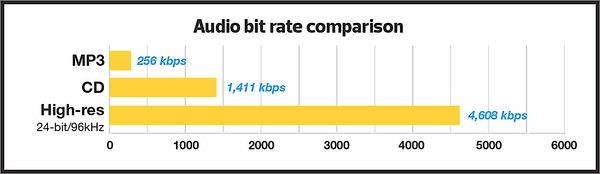
Bit rate is the number of bits or the amount of data that is processed over a period of time. In audio, this generally means kilobits per second. For example, the music you buy from iTunes is 256 kilobytes per second, which means that every second of the song contains 256 kilobytes of data.

The higher the bit rate of the track, the more space it will take up on your computer. Audio CDs typically take up quite a bit of space, so it has become common practice to compress these files so that you can burn more music to your hard drive (or iPod, Dropbox or whatever). This is where the “lossy” and “lossy” formats conflict.

Lossless and Lossy formats: what’s the difference?

When we say lossless, we mean that we haven’t really changed the original file. That is, we copy a track from the CD to our hard drive, but we do not compress it to the point of losing data. Essentially the same as the original CD track.

However, most of the time, you will probably extract your music in Lossy format. That is, you took a CD, copied it to your hard drive, and compressed the tracks so they don’t take up a lot of space. A typical MP3 or AAC album is probably about 100MB. The same album in a lossless format like FLAC or ALAC (aka Apple Lossless) will be around 300MB, so it has become common practice to use lossy formats for faster downloads and more hard drive savings. .

The problem is that when you compress a file to save space, you are removing chunks of data. Just like when you take a high quality image and compress it to JPEG, your computer grabs the raw data and “tricks” certain parts of the image into being basically the same, but with some loss of clarity and quality.

An example of how the JPEG graphics compression algorithm works
Remember that you are saving hard drive space by compressing music in lossy formats, which can make a big difference for an iPhone with 32GB of storage, but is only a trade-off in terms of size / quality.

There are different levels of compression: 128 Kbps, for example, takes up very little space, but it will also have a lower quality of playback than a larger 320 Kbps file, which in turn is of lower quality than the 1,411 reference file Kbps. From. 1,411 kbps is an audio CD level quality, which is more than sufficient in most cases.

The problem is not how much the music is compressed, but what equipment you listen to it on.

Does bit rate really matter?

As memory gets cheaper every year, listening to sound at a higher bit rate, or even lossless formats, is starting to become more and more popular. But is it worth the time, effort, and storage space on your phone or computer?

I don’t like answering questions this way, but sadly the answer is: it depends.

Part of the equation is the hardware you use. If you are using a good quality pair of headphones or speakers, you are used to wide frequency and dynamic range. As such, you are more likely to notice the downsides that come with compressing music into lower bitrate files. You may notice that low-quality MP3 files lack a certain level of detail; Subtle backing tracks may be harder to hear, the highs and lows won’t be as dynamic, or you may hear distortion in the lead vocal. In these cases, you may want a higher bit rate track.

However, if you’re listening to your music with a cheap pair of headphones on your iPod, you probably won’t notice the difference between a 128Kbps file and a 320Kbps file, let alone 1,411Kbps lossless music. Remember when you I showed the image a few paragraphs above and noticed that you probably had to look at it to see the flaws? Your headphones are like a truncated version of the image: they will make these imperfections difficult to perceive, as they are not physically capable of reproducing the music for you the way you want them to.

The other part of the equation is, of course, your own ears. It can be very difficult for some people to distinguish between two different bit rates for the simple reason: they listen to little music. Listening skills, like any other, develop with practice. If you listen to your favorite music often and a lot, your hearing becomes more accurate and begins to pick up small details and midtones. But until then, doesn’t it really matter what bitrate you use?

So what format and bit rate should you choose yourself? Is 320 Kbps enough for you or do you definitely need Lossless format?

The point is that it is difficult to hear the difference between a lossless file and a 320Kbps MP3 file. To hear the difference, you need serious high-quality equipment, good hearing, and some kind of music (for example, classical or jazz). .

For the vast majority of people, 320 Kbps is more than enough to listen to.

What else should you consider?

Music recorded in the Lossless format can be useful. Lossless files are more reliable in the future, in the sense that you can always compress them to Lossy format when you need to, but you can’t do the opposite and restore original CD quality from MP3 file. This, again, is one of the fundamental problems of online music stores: if you have created a huge music library on iTunes and one day you decide that you need more bitrate, you will have to buy it again, but this time only in CD format . …

Whenever I can, I always buy or copy music in Lossless format for backup.

I understand that audiophiles are like a needle under your nails. Like I said, it all depends on you, your audition and the equipment you have.

Compare two tracks recorded in Lossless and Lossy formats. Try a few different audio formats, listen to them for a while and see if it makes a difference for you or not.