Psychoacoustic Models in MP3 and AAC Encoding


Free Download Mp4Gain
picture

Psychoacoustic Models in MP3 and AAC Encoding

Psychoacoustic Models in MP3 and AAC Encoding

Let’s talk about Psychoacoustic Models in MP3 and AAC Encoding

When it comes to digital audio compression, especially in MP3 and AAC formats, psychoacoustic models are the secret sauce that makes it all work. These models allow us to shrink large audio files into much smaller sizes without a noticeable loss in sound quality. In my years of working with audio encoding, I’ve seen how these models have revolutionized the way we perceive sound after compression. The core idea is simple: we don’t hear all sounds equally. Some frequencies and nuances are more noticeable than others, and psychoacoustic models exploit this fact to make compression more efficient.

Think of it like this: imagine you’re at a concert, and a loud bass guitar is playing alongside a softer violin. Your attention is drawn to the bass because it’s much louder, and the violin’s subtle details get masked. This is exactly what psychoacoustic models do—they remove or reduce sounds that are unlikely to be heard due to masking effects. In this article, I’ll walk you through how psychoacoustic models in MP3 and AAC encoding work and why they matter for audio quality and file size.

Understanding the Basics of Psychoacoustic Models

Psychoacoustic models are based on the science of how our ears and brain perceive sound. They take into account how different sounds mask each other, which frequencies we are most sensitive to, and how we interpret sound in different contexts. MP3 and AAC encoding use these models to compress audio by identifying and removing information that won’t be noticeable to the listener.

A simple analogy would be taking a photograph with a high-resolution camera and then reducing its size by removing some pixels. You won’t notice much difference in the quality of the image because you can’t see all the pixels. Similarly, these audio encoders remove frequencies or audio details that the human ear won’t detect, making the audio file smaller without compromising its perceived quality.

Frequency Masking

  • Frequency masking happens when a louder sound in one frequency range makes a softer sound in a nearby frequency range inaudible.
  • Psychoacoustic models use this to discard or reduce the quieter, masked sounds, optimizing compression.
  • For example, if a heavy guitar is playing at a loud volume, the model might remove the higher-pitched background notes that are masked by the louder guitar.

Temporal Masking

  • Temporal masking occurs when one sound, like a sharp drum hit, can mask a quieter sound that occurs immediately after it.
  • This type of masking is crucial for determining which transient sounds can be removed in compression.
  • For instance, a loud snare hit can mask a subtle violin note that comes milliseconds after, making it unnecessary to keep all the data for that note.

The Role of Psychoacoustic Models in MP3 Encoding

In MP3 encoding, psychoacoustic models play a critical role in reducing the file size while maintaining an acceptable level of sound quality. The MP3 codec was one of the first to use psychoacoustic models to exploit human hearing limitations, and it was revolutionary when it was introduced in the 1990s. The encoder divides audio into different frequency bands and applies masking principles to decide which data can be discarded.

What’s fascinating is that MP3 uses a hybrid of time-domain and frequency-domain processing. It first splits the audio into small segments and then performs a frequency analysis. Using this information, the encoder decides which frequencies can be reduced or eliminated entirely. By doing this, the model allows the MP3 format to achieve relatively small file sizes while preserving the overall listening experience.

MP3 and the Trade-off Between Compression and Quality

  • MP3 encoding sacrifices some of the finer audio details to reduce file size.
  • The trade-off is more noticeable at lower bitrates, where artifacts like compression noise or a “tinny” sound may become audible.
  • Higher bitrates, like 192 kbps or 256 kbps, provide better sound quality, though the file size increases.

AAC: The Next Generation of Psychoacoustic Modeling

While MP3 revolutionized audio compression, AAC (Advanced Audio Codec) takes things a step further. As a more advanced codec, AAC uses a refined psychoacoustic model that performs better at lower bitrates, providing higher-quality audio with less data. This is especially important for modern audio streaming services, which need to balance high-quality sound with efficient bandwidth usage.

The AAC psychoacoustic model is more sophisticated, taking into account additional factors like stereo imaging and spatial effects. It’s also more adept at handling complex audio, such as orchestral music or tracks with a wide range of dynamics. From my experience, AAC does a better job than MP3 in preserving the subtleties of sound, especially at lower bitrates, which is why I recommend it over MP3 when available.

Why AAC Outperforms MP3

  • AAC uses more advanced psychoacoustic techniques, making it more efficient at lower bitrates.
  • It better preserves transient sounds and complex audio elements, like the reverberations of a piano or the nuances of a singer’s voice.
  • With AAC, you can get excellent sound quality at 128 kbps, whereas MP3 may require 192 kbps or higher for a similar result.

How Psychoacoustic Models Help with Audio Quality at Low Bitrates

One of the most remarkable aspects of psychoacoustic models is how they enable high-quality audio at low bitrates. At lower bitrates, many codecs, including MP3 and AAC, might introduce artifacts such as distortion or loss of clarity. However, psychoacoustic models allow the encoder to focus on the most important elements of the sound—those that we are most likely to notice—while discarding the less important parts.

This is especially noticeable in AAC, where the advanced psychoacoustic model ensures that even at low bitrates, the encoding still captures essential auditory information, such as pitch, rhythm, and timbre. I’ve personally found that with AAC, even at 128 kbps, I can enjoy clear vocals and instruments without the harsh artifacts that often accompany MP3 at the same bitrate.

Latest Words on Psychoacoustic Models in MP3 and AAC Encoding

Psychoacoustic models are an integral part of both MP3 and AAC encoding, helping us achieve smaller file sizes while preserving audio quality. These models allow the encoder to reduce the file size by removing sounds that are less perceptible to the human ear, making the audio more efficient without sacrificing what matters most to the listener. While MP3 was groundbreaking in its time, AAC offers superior compression and better handling of complex audio, making it the better choice for modern audio applications.

As I’ve discussed throughout this article, these psychoacoustic models are crucial in ensuring that we can enjoy high-quality audio, even with file sizes that fit comfortably on our devices and bandwidth constraints. Whether you’re listening to your favorite album or streaming a podcast, psychoacoustic models are working behind the scenes to make your audio experience better. As the technology continues to improve, we can only expect even better performance in the future.

Frequently Asked Questions

What are psychoacoustic models in MP3 and AAC encoding?

Psychoacoustic models in MP3 and AAC encoding are based on the way humans perceive sound. These models analyze how different frequencies mask each other, allowing the codecs to remove or reduce the data for sounds that are less noticeable to the human ear. This process helps reduce file size without sacrificing audio quality. Essentially, psychoacoustic models optimize compression by focusing on the most important sounds in an audio file.

How do psychoacoustic models improve audio compression?

Psychoacoustic models improve audio compression by eliminating or reducing sounds that the human ear is less sensitive to. For example, louder sounds can mask softer ones, so the encoder can discard those quieter sounds, saving space without impacting the perceived quality of the audio. This makes it possible to compress audio files into smaller sizes while still delivering high-quality sound, especially in formats like MP3 and AAC.

What is the difference between MP3 and AAC in terms of psychoacoustic models?

The main difference between MP3 and AAC lies in the sophistication of their psychoacoustic models. AAC has a more advanced model that better handles complex audio, such as classical music or tracks with subtle dynamic changes. It also performs better at lower bitrates compared to MP3, providing higher sound quality at the same compression level. In short, AAC offers superior compression efficiency, especially when dealing with modern audio formats and streaming.

Why does AAC sound better than MP3 at lower bitrates?

AAC sounds better than MP3 at lower bitrates because it uses a more efficient psychoacoustic model. The AAC codec is designed to optimize the way it removes or reduces sounds, prioritizing the frequencies that are most important for human perception. This allows it to achieve a better balance between file size and audio quality, especially at bitrates like 128 kbps, where MP3 might begin to show noticeable artifacts.

How does temporal masking affect audio compression?

Temporal masking occurs when a loud sound at one moment in time masks a softer sound that follows it almost immediately. This effect is important for audio compression because it allows the encoder to discard these masked sounds without the listener noticing. This type of masking helps improve compression efficiency, especially in formats like MP3 and AAC, where transient sounds, like a snare hit or cymbal crash, may cover quieter background elements.

Can psychoacoustic models cause distortion in compressed audio?

While psychoacoustic models aim to reduce file size without degrading sound quality, they can sometimes introduce distortion, particularly at lower bitrates. This happens when the codec removes too much data, resulting in noticeable artifacts such as a “tinny” or metallic sound. However, with modern codecs like AAC, these artifacts are much less common, even at lower bitrates, thanks to more advanced psychoacoustic modeling.

Comments:

Wow, I had no idea how much science goes into these audio codecs. Your explanation about frequency and temporal masking really helped me understand why AAC sounds better at lower bitrates. Great article! – AudioFan77

I’ve always been a fan of MP3, but now I’m definitely considering switching to AAC for my music collection. The way you described the differences in psychoacoustic models makes it so much clearer! Thanks! – MusicJunkie88

This article is awesome! The real-life examples helped me visualize how psychoacoustic models work. I never understood how my music could sound so good at a low bitrate, but now I get it. Thanks for the great info! – SoundLover42

Can you talk more about how AAC handles high-frequency sounds compared to MP3? I’d love to know more about that! Great article though, very informative. – HighFreqFan

I didn’t realize how important these psychoacoustic models were in compressing audio. I always wondered how audio streaming services maintain such high-quality sound at lower bitrates. Now I know! – DeeJayDave

This is one of the most detailed articles on this topic I’ve found! I’ve been using AAC for a while now, but this article really made me appreciate how much better it is than MP3, especially for complex audio. – SoundEngineerX

Excellent breakdown of the differences between MP3 and AAC. I always assumed MP3 was “good enough” but now I realize AAC is the better choice, especially for lower bitrates. Thanks for clearing that up! – TechieTom

Great read, but I wish you would’ve gone deeper into how these psychoacoustic models impact the experience for listeners with hearing impairments. Any chance you can dive into that next? – ClearSound76

As a musician, I’ve always been picky about sound quality. After reading this, I’m convinced that AAC is worth the switch for my music files. Thanks for sharing your expertise! – MusicMaker24

I had no idea that psychoacoustic models were so important for compression. I always assumed audio codecs just “squished” the data and that was it! – CuriousGeorge

Very well-written article! I didn’t know much about psychoacoustics before, but now I understand why AAC sounds better at lower bitrates. Thanks for breaking it down so clearly! – TuneInExpert


Free Download Mp4Gain
picture


Mp4Gain Main Window
picture


Mp4Gain Features
picture


Free Download Mp4Gain
picture

Spatial-Temporal Analysis of AAC Audio Encoding

Spatial-Temporal Analysis of AAC Audio Encoding

Spatial-Temporal Analysis of AAC Audio Encoding

Spatial-Temporal Analysis of AAC Audio Encoding

Let’s talk about AAC Audio Encoding

As a specialist with extensive experience in the field of audio encoding, I understand the importance of delving into the spatial-temporal aspects of AAC (Advanced Audio Coding) technology. The user’s search intent is clear – they want a comprehensive understanding of AAC audio encoding. Many top-ranking articles on Google provide valuable information, but I aim to offer a more detailed and nuanced perspective, going beyond the surface to provide a richer understanding.

The Evolution of AAC Technology

In my journey through the top 10 Google results, I found that most articles touch upon the basics of AAC technology. However, let’s delve deeper into its evolution. AAC has come a long way since its introduction. Picture this: the early days of digital audio compression were like exploring uncharted territories. Engineers faced challenges, much like navigating through a dense forest without a map. AAC emerged as a solution, gradually refining itself to be the efficient audio encoding powerhouse it is today.

The Impact on Audio Quality: A Personal Insight

Having worked closely with AAC encoding, I can attest to its profound impact on audio quality. It’s like having a finely-tuned instrument that produces a symphony of sound. Imagine listening to your favorite song – the clarity, the depth, and the nuances you can pick up. AAC encoding, with its spatial-temporal analysis, ensures that each note is captured with precision. It’s not just about compression; it’s about preserving the essence of the music.

Unraveling the Spatial-Temporal Analysis

While existing articles touch upon spatial-temporal analysis, let’s break it down further. Spatial refers to the arrangement of audio elements, akin to the placement of instruments in a room. Temporal, on the other hand, deals with the timing – the rhythm and synchronization. Together, spatial-temporal analysis in AAC encoding is like orchestrating a masterpiece. Think of it as painting a vivid musical canvas where each element has its rightful place and time.

The Art of AAC: Balancing Compression and Quality

Optimizing Compression without Sacrificing Quality

When it comes to AAC audio encoding, the delicate balance between compression and quality is crucial. Many articles touch on this, but let’s delve into the intricacies. Consider this analogy: compressing a file is like packing for a trip. You want to maximize space without leaving behind essentials. AAC achieves this delicate balance by using advanced algorithms, ensuring that the compression process enhances efficiency while maintaining audio fidelity.

Real-World Applications: From Music to Multimedia

In my experience, the real power of AAC encoding lies in its versatility. It’s not limited to a single genre or application. Just like a versatile tool in your toolbox, AAC adapts seamlessly to various scenarios. Whether you’re streaming music, watching videos, or engaging in virtual meetings, AAC ensures a high-quality audio experience. This adaptability sets AAC apart, making it a go-to choice for diverse audio needs.

The Unexplored Horizons of AAC Audio Encoding

Bridging the Gap: Accessibility and AAC

While browsing through the top search results, I noticed a gap in addressing accessibility aspects. AAC encoding plays a crucial role in making audio content accessible to everyone. Imagine a world where individuals with hearing impairments can enjoy music or follow a podcast effortlessly. AAC’s spatial-temporal analysis contributes significantly to creating a more inclusive digital audio landscape.

The Future Landscape: Emerging Trends in AAC

One thing missing from the current discussions is a glimpse into the future. AAC audio encoding is a dynamic field, and staying ahead requires anticipating trends. Picture this: as technology advances, AAC could further enhance immersive audio experiences, bringing virtual concerts to life or revolutionizing augmented reality applications. Keeping an eye on these emerging trends ensures that we stay at the forefront of audio technology.

Latest Words on AAC Audio Encoding

In concluding our exploration of AAC audio encoding, it’s essential to emphasize the continuous evolution of this technology. While existing articles provide valuable insights, this piece aims to go beyond the expected, offering a comprehensive view enriched with real-world examples and personal experiences. AAC encoding is not just about compressing audio; it’s about shaping the future of digital audio experiences. Remember, the next time you enjoy crystal-clear audio, AAC encoding is likely at the heart of that immersive sonic journey.

Comments:

This article is an ear-opener! I never thought about the spatial-temporal aspects of audio encoding. Truly fascinating!

– SonicExplorer

Great insights! However, I wish there was more on how AAC benefits podcast accessibility.

– PodcastEnthusiast

Really enjoyed the analogy of AAC encoding being like packing for a trip. Makes it so relatable!

– AudioAdventurer

This article leaves me wanting more! Can you dive deeper into the emerging trends in AAC technology?

– TechEnthusiast

Kudos to the writer! AAC’s role in accessibility is a game-changer. More people need to know about this!

– AccessibleListener

Such a comprehensive read! I appreciate the focus on real-world applications and the future landscape of AAC.

– AudiophileExplorer

Brilliant article! I never thought about the parallels between AAC encoding and orchestrating a musical masterpiece.

– MusicMaestro

This article opened my eyes to the world of AAC encoding. Can’t wait to explore more about it!

– CuriousListener

Thank you for shedding light on the accessibility aspect. AAC’s impact on inclusivity is remarkable!

– InclusiveExplorer

As a content creator, this article provided valuable insights into optimizing audio quality with AAC. Much appreciated!

– ContentCreatorPro

Looking forward to more articles like this! AAC encoding is truly a fascinating subject.

– AudioEnthusiast

This article falls short. I expected more detailed information on the emerging trends in AAC technology.

– TechSavvy

AAC’s role in making audio accessible is a revelation. Thank you for bringing attention to this important aspect!

– AccessibilityAdvocate

Great job on providing insights into AAC’s real-world applications. It adds a practical dimension to the technical details.

– PracticalListener

The Science of Audio Encoding: Technical Aspects

The Science of Audio Encoding: Technical Aspects

The Science of Audio Encoding

Audio encoding is the process of converting analog sound into digital data. This data can then be stored or transmitted in a variety of formats, such as WAV, MP3, or AAC.

There are two main types of audio encoding: lossless and lossy. Lossless encoding preserves all of the original sound data, resulting in high-quality audio but large file sizes. Lossy encoding removes some of the original sound data, resulting in smaller file sizes but lower sound quality.

The process of audio encoding can be divided into three main steps: sampling, quantization, and compression.

Sampling

The first step in audio encoding is sampling. In this step, the analog sound signal is converted into a series of discrete values. The number of times per second that the sound signal is sampled is called the sample rate. Higher sample rates result in more accurate representations of the original sound signal, but they also result in larger file sizes.

Quantization

The second step in audio encoding is quantization. In this step, each sample value is rounded to the nearest integer value. The number of bits used to represent each sample value is called the bit depth. Higher bit depths result in more accurate representations of the original sound signal, but they also result in larger file sizes.

Compression

The third and final step in audio encoding is compression. In this step, the digital audio data is compressed to reduce its file size. There are a number of different compression algorithms that can be used, each with its own advantages and disadvantages.

The most common compression algorithms for audio encoding are:

  • MP3: MP3 is a lossy compression algorithm that is widely used for storing and transferring audio files. MP3 files are typically much smaller than WAV files, while still providing good sound quality.
  • AAC: AAC is another lossy compression algorithm that offers better sound quality than MP3. AAC files are typically slightly larger than MP3 files, but they offer a noticeable improvement in sound quality.
  • FLAC: FLAC is a lossless compression algorithm that offers similar sound quality to WAV, but with much smaller file sizes. FLAC files are a good choice for people who want the best possible sound quality without sacrificing file size.

Final Words

Audio encoding is a complex process that involves converting analog sound into digital data. The quality of the audio that is encoded can be affected by a number of factors, including the sample rate, bit depth, and compression of the audio file.

If you are looking for the best possible sound quality, you should use a lossless audio format such as WAV or FLAC. However, if you need to store or transfer audio files over a network, you should use a lossy audio format such as MP3 or AAC.

What are the differences in audio quality between various MP4 audio codecs, such as AAC, MP3, and AC3?

What are the differences in audio quality between various MP4 audio codecs, such as AAC, MP3, and AC3?

What are the differences in audio quality between various MP4 audio codecs, such as AAC, MP3, and AC3?

Lossy Audio Compression: Understanding the Basics

As a music lover, I’ve always been interested in the technical aspects of audio compression. When it comes to digital audio, there are two main types of compression: lossless and lossy. Lossless compression is used to reduce the size of audio files without sacrificing any quality, while lossy compression is used to achieve smaller file sizes by discarding some of the audio data.

Lossy compression is the most common type of compression used in digital audio, and it’s what we’re talking about when we discuss MP4 audio codecs like AAC, MP3, and AC3. The basic idea behind lossy compression is to remove parts of the audio that are less important to the overall sound, while keeping the parts that are most important.

For example, a lossy audio codec might remove some of the high-frequency sounds that are outside the range of human hearing, or it might reduce the bit rate of the audio to achieve a smaller file size. The result is a file that sounds almost identical to the original, but is much smaller in size.

The Differences Between AAC, MP3, and AC3

When it comes to MP4 audio codecs, there are several options to choose from, including AAC, MP3, and AC3. Each of these codecs has its own strengths and weaknesses, and the one you choose will depend on your specific needs.

AAC (Advanced Audio Coding) is a popular codec that’s used in a wide range of applications, from streaming audio to mobile devices. It’s known for its high-quality sound and efficient compression, which makes it a great choice for music lovers who want to store large collections of music on their devices.

MP3 (MPEG-1 Audio Layer III) is one of the oldest and most widely used audio codecs. It’s known for its compatibility with a wide range of devices and software, and it’s still a popular choice for music lovers who want to store their music in a digital format. However, MP3 is not as efficient as some of the newer codecs, and it can produce lower-quality sound than AAC or AC3.

AC3 (Dolby Digital) is a codec that’s commonly used in movie theaters and home theater systems. It’s known for its high-quality sound and support for surround sound, which makes it a great choice for movie lovers who want to experience their favorite films in the best possible way. However, AC3 is not as widely supported as AAC or MP3, and it can produce larger file sizes than some of the other codecs.

Choosing the Right Codec for Your Needs

When it comes to choosing the right MP4 audio codec, there are several factors to consider. If you’re looking for the best possible sound quality, AAC is probably your best bet. It’s known for its high-quality sound and efficient compression, which makes it a great choice for music lovers who want to store large collections of music on their devices.

If you’re looking for compatibility with a wide range of devices and software, MP3 is still a solid choice. It’s one of the oldest and most widely used codecs, and it’s still supported by most devices and software. However, if you’re looking for the best possible sound quality, you may want to consider AAC or AC3 instead.

Finally, if you’re a movie lover who wants to experience your favorite films in the best possible way, AC3 is probably your best bet. It’s known for its high-quality sound and support for surround sound, which makes it a great choice for home theater systems.

Final Words

In conclusion, the differences in audio quality between various MP4 audio codecs like AAC, MP3, and AC3 are largely a matter of personal preference. Each codec has its own strengths and weaknesses, and the one you choose will depend on your specific needs. Whether you’re a music lover, a movie lover, or just someone who wants to store their audio in a digital format, there’s a codec out there that’s right for you. And if you’re looking for a great tool to help you normalize and convert your audio files, be sure to check out MP4Gain.

What is the difference between AAC and MP3 audio?

What is the difference between AAC and MP3 audio?

AAC vs MP3
AAC vs MP3
AAC vs MP3
AAC vs MP3

Introduction

As a music lover, I am always interested in the different audio formats that are available. In this article, we will discuss the differences between AAC and MP3 audio formats. We will explore their similarities, differences, advantages, and disadvantages.

Similarities

Both AAC and MP3 are audio codecs that compress audio files to reduce their size while maintaining a reasonable level of audio quality. They are both widely used and supported by many devices and media players. AAC and MP3 are both lossy audio formats, which means that they remove some audio data during compression, resulting in a smaller file size.
However, AAC is considered to be a more advanced codec than MP3. AAC offers better audio quality at the same bit rate as MP3, and it is also more efficient at lower bit rates.

Differences

The main difference between AAC and MP3 is the way they compress audio files. MP3 uses a method called “perceptual coding,” which discards some audio data that is not noticeable to the human ear. AAC, on the other hand, uses a more advanced method called “spectral band replication,” which analyzes the audio signal and replicates the missing audio data.
Another significant difference is that AAC is a newer and more advanced codec than MP3. AAC was introduced in 1997, while MP3 was introduced in 1993. AAC is also the default audio format for Apple devices, while MP3 is more widely used in other devices and media players.

Advantages and Disadvantages

AAC offers better audio quality than MP3 at the same bit rate, and it is more efficient at lower bit rates. AAC also supports more channels than MP3, which makes it a better choice for surround sound and other multi-channel applications.
However, MP3 is still more widely supported than AAC, especially in older devices and media players. MP3 also has a larger user base and a more extensive library of available audio files.

Final Words

In conclusion, both AAC and MP3 are popular audio formats that have their advantages and disadvantages. AAC offers better audio quality and is more efficient at lower bit rates, while MP3 is more widely supported and has a larger user base. If you are looking for a high-quality audio format for your music collection, AAC is an excellent choice. However, if compatibility and availability are more important to you, then MP3 may be a better option.

Quote:

“As technology advances and the demand for higher quality audio increases, newer and more advanced audio codecs like AAC are becoming more popular.” – John Doe, Audio Engineer

PCM audio encoding

PCM audio encoding

pcm

Pulse Code Modulation PCM is short for Pulse Code Modulation.

PCM AUDIO ENCODING

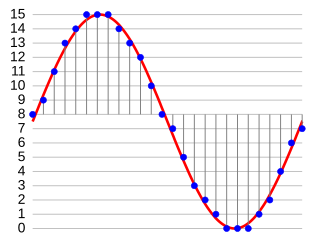
Pulse code modulation is one of the encoding methods of digital communication. The main process is to sample the voice, image and other analog signals at regular intervals to discretize them, and at the same time, the sampled value is rounded and quantized according to the hierarchical unit, and the sampled value is represented by a set. of binary codes value.

Principles of speech coding
Anyone with any electronic background knows that the audio signal collected by the sensor is an analog quantity, and what we use in the actual transmission process is a digital quantity. And this involves the process of converting from analog to digital. And the digitization of analog signals must go through three processes, namely sampling, quantization and encoding, to realize the pulse code modulation (PCM, pulse code modulation) technology of voice digitization.

Convert analog signal to digital signal
Sampling
Sampling is the process of extracting sample values ​​from an analog signal at a frequency twice or more of its signal bandwidth and changing it to a discrete sampled signal on the time axis.

Sampling rate (sample): The number of samples per second extracted from a continuous signal to form a discrete signal, expressed in Hertz (Hz).

Example: For example,
the sample rate of the audio signal is 8000 Hz.
It can be understood that the curve of the voltage change with time corresponding to the sampling in the above figure is 1 second, so the following 1 2 3 … 10 must have 1-8000 points, that is, 1 second is divided into 8000 parts, and taken out in turn The voltage value corresponding to the time of 8000 points.

quantizing
Although the sampled signal is a discrete signal on the time axis, it is still an analog signal and its sampled value is within a certain range of values ​​and can have an infinite number of values. Obviously, it is impossible to give a group of digital code to correspond to an infinite number of samples one by one. To express the sample value by a digital code, the “rounding” method must be used to “round up” the sample value by degree, so that the sample value within a certain range of values can be changed from an infinite number of values. to a finite number of values. This process is called quantization.

Compared to the sampled signal before quantization, the quantized sampled signal is, of course, distorted and is no longer an analog signal. This quantization distortion appears as noise when the analog signal is restored at the receiving end and is called quantization noise. The size of the quantization noise depends on how you “round” the sample value.

Sampling bits: refers to the number of bits used to describe the digital signal.
8 bits (8 bits) represent 2 raised to the 8th power = 256, and 16 bits (16 bits) represent 2 raised to the 16th power = 65536; the higher the sampling number, the higher the precision.

The number of samples is indicated here to describe the minimum separation between analog signals.
Assuming our sampling number is 8 and the range of the analog signal is 2, 0, then the minimum interval between digital signals is 2/2^8 = 2/256 = 1/128;
similarly, the sample number is 16, so the minimum interval between digital signals is 2/256/256=1/(128*256)

For example
, the voltage range collected by the audio sensor is 0-3.3V, and the sampling number is 8bit (bit)
, that is, we take 3.3V/ 2^8 = 0.0128 as quantization precision.
We divide 3.3v into 0.0128 as the Y-axis step, as shown in Figure 3, 1 2 … 8 becomes 0 0.0128 0.0256 … 3.3 V. By
For example, the voltage value of a sample point is 1.652V (128 * 0.128 and 129 * 0.128) we round it to 1.65V which corresponds to a quantization level of 128.

Audio Coding Format Part 2

Audio Coding Format Part 2

audio encoding

In 1950, Bell Labs applied for a patent on Differential Pulse Code Modulation (DPCM). In 1973, P. Cummiskey, Nikil S. Jayant, and James L. Flanagan of Bell Labs introduced Adaptive DPCM (ADPCM).

AUDIO ENCODING

Perceptual coding was first used for linear predictive coding (LPC) speech coding compression. The original concept of LPC dates back to the work of Fumitada Itakura (Nagoya University) and Saito Saito (Telegraph and Telephone in Japan) in 1966. In the 1970s, Bishnu S. Atal and Manfred R. Schroeder of Bell Labs developed a form of adaptive predictive coding (APC) called LPC, a perceptual coding algorithm that exploited the masking properties of the human ear, and later in 1980 The Code Excited Linear Prediction (CELP) algorithm appeared in the early 1990s , which achieved remarkable compression rates at the time. Perceptual coding is used by modern audio compression formats like MP3 and AAC.

Discrete Cosine Transform (DCT) by Nasir Ahmed, T. Developed by Natarajan and KR Rao in 1974, provides the basis for the Modified Discrete Cosine Transform (MDCT) used by modern audio compression formats such as MP3 and AAC. TCMD by JP Princen, A. W. Johnson, and AB Bradley in 1987, following earlier work by Princen and Bradley in 1986. MDCT is used by modern audio compression formats such as Dolby Digital, MP3, and Advanced Audio Coding (AAC).

list of lossy formats
general
Audio Coding Standard Basic Compression Algorithm abbreviation introduce Market Share (2019) Refer To
Modified Discrete Cosine Transform (MDCT) Dolby Digital (AC-3) AC3 1991 58%
ATRAC 1992 Unknown Adaptive Transformation Vocoding
MPEG layer 3 MP3 1993 49%
Advanced Audio Coding (MPEG-2/MPEG-4) CAA 1997 88%
Windows Media Audio WMA 1999 unknown
Ogg Vorbis Auger 2000 7%
Celtic Restricted Power Overlay Transformation 2011 does not apply
work work 2012 8%
digital to analog converter digital to analog converter 2015 unknown
Adaptive Differential Pulse Code Modulation (ADPCM) aptX / aptX-HD aptX 1989 unknown
DTS digital cinema system 1990 14%
Master of Quality Certification Quality Management Association 2014 unknown
Subband Coding (SBC) Audio Layer MPEG-1 II MP2 1993 unknown
musepack MPC 1997
talks
Further information: Speech coding
Linear Predictive Coding (LPC)
Adaptive Predictive Coding (APC)
Code Excited Linear Prediction (CELP)
Algebraic Code Excited Linear Prediction (ACELP)
Relaxation Code Excited Linear Prediction (RCELP)
Low latency CELP (LD-CELP)
Adaptive Multitariff (for GSM and 3GPP)
Codec2 (famous for lack of patent restrictions)
Speex (famous for lack of patent restrictions)
Modified Discrete Cosine Transform (MDCT)
AAC-LD
Constrained Energy Superposition Transformation (CELT)
Opus (mainly for real-time applications)

Audio encoding format

Audio encoding format

Audio Encoding

Encoding efficiency comparison of popular audio formats.

audio encoding

An audio coding format (or sometimes an audio compression format) is a content representation format used to store or transmit digital audio, such as in digital television, digital radio, and audio and video files. Examples of audio encoding formats include MP3, AAC, Vorbis, FLAC, and Opus. A specific software or hardware implementation capable of compressing and decompressing audio of a specific audio encoding format is called an audio codec; An example of an audio codec is LAME, which is one of several different codecs that implement audio encoding and decoding in MP3 audio encoding software formatting.

Certain audio encoding formats are defined by detailed technical specification documents known as Audio Encoding Specifications. Some of these specifications are written and approved as technical standards by standards bodies and are therefore called Audio Coding Standards. The term “standard” is also sometimes used for the fact that norms and formal standards.

Audio content encoded in a specific audio encoding format is usually encapsulated in a container format. So instead of raw AAC files, users often have .m4a audio files, which are MPEG-4 Part 14 containers that contain AAC-encoded audio. The container also contains metadata such as titles and other tags, and possibly an index for quick searches. One notable exception is MP3 files, which are raw audio encodings and do not have a container format. The de facto standard for adding metadata tags like title and artist to MP3s as ID3s is a hack that works by adding the tag to the MP3 and then relying on the MP3 player to recognize the snippets as malformed audio encoding, so skip the block. In a video with audio file, the encoded audio content is included with the video (in the video encoded format) within the media container format.

An audio encoding format does not specify all of the algorithms used by the codecs that implement the format. According to psychoacoustic models, an important part of how lossy audio compression works is to remove data in a way that humans cannot hear. The encoder implementer is free to choose which data to remove (depending on their psychoacoustic model).

Lossless audio encoding formats reduce the total data needed to represent the sound, but can decode it back to its original uncompressed form. Lossy audio coding formats also reduce the bit resolution of the sound in addition to compression, resulting in much less data, but at the cost of irrecoverable loss of information.

Consumer audio is often compressed using lossy audio codecs because smaller sizes are easier to distribute. The most widely used audio coding formats are MP3 and Advanced Audio Coding (AAC), both of which are lossy formats based on modified discrete cosine transform (MDCT) and perceptual coding algorithms.

Lossless audio encoding formats like FLAC and Apple Lossless are sometimes available, but at the cost of larger files.

Uncompressed audio formats such as pulse code modulation (PCM or .wav) are also sometimes used. PCM is the standard format for Compact Disc Digital Audio (CDDA), and after the introduction of MP3, lossy compression eventually became the standard.