The Science of Audio Encoding: Technical Aspects


Free Download Mp4Gain
picture

The Science of Audio Encoding: Technical Aspects

The Science of Audio Encoding

Audio encoding is the process of converting analog sound into digital data. This data can then be stored or transmitted in a variety of formats, such as WAV, MP3, or AAC.

There are two main types of audio encoding: lossless and lossy. Lossless encoding preserves all of the original sound data, resulting in high-quality audio but large file sizes. Lossy encoding removes some of the original sound data, resulting in smaller file sizes but lower sound quality.

The process of audio encoding can be divided into three main steps: sampling, quantization, and compression.

Sampling

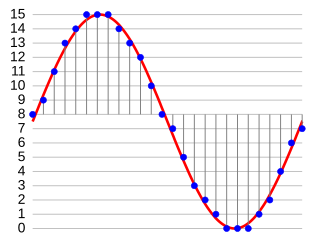
The first step in audio encoding is sampling. In this step, the analog sound signal is converted into a series of discrete values. The number of times per second that the sound signal is sampled is called the sample rate. Higher sample rates result in more accurate representations of the original sound signal, but they also result in larger file sizes.

Quantization

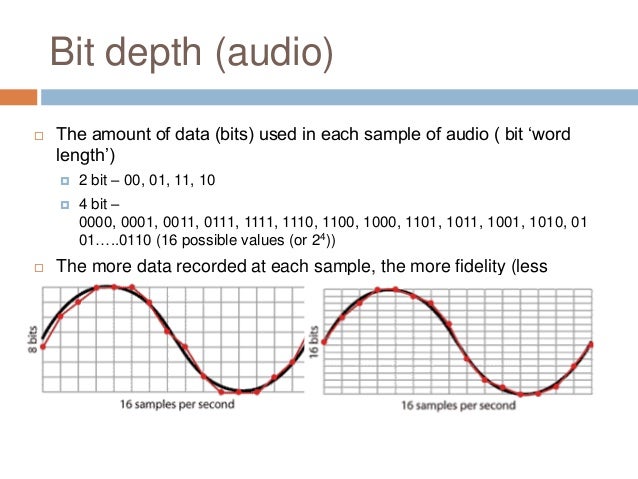
The second step in audio encoding is quantization. In this step, each sample value is rounded to the nearest integer value. The number of bits used to represent each sample value is called the bit depth. Higher bit depths result in more accurate representations of the original sound signal, but they also result in larger file sizes.

Compression

The third and final step in audio encoding is compression. In this step, the digital audio data is compressed to reduce its file size. There are a number of different compression algorithms that can be used, each with its own advantages and disadvantages.

The most common compression algorithms for audio encoding are:

  • MP3: MP3 is a lossy compression algorithm that is widely used for storing and transferring audio files. MP3 files are typically much smaller than WAV files, while still providing good sound quality.
  • AAC: AAC is another lossy compression algorithm that offers better sound quality than MP3. AAC files are typically slightly larger than MP3 files, but they offer a noticeable improvement in sound quality.
  • FLAC: FLAC is a lossless compression algorithm that offers similar sound quality to WAV, but with much smaller file sizes. FLAC files are a good choice for people who want the best possible sound quality without sacrificing file size.

Final Words

Audio encoding is a complex process that involves converting analog sound into digital data. The quality of the audio that is encoded can be affected by a number of factors, including the sample rate, bit depth, and compression of the audio file.

If you are looking for the best possible sound quality, you should use a lossless audio format such as WAV or FLAC. However, if you need to store or transfer audio files over a network, you should use a lossy audio format such as MP3 or AAC.


Free Download Mp4Gain
picture


Mp4Gain Main Window
picture


Mp4Gain Features
picture


Free Download Mp4Gain
picture

PCM audio encoding

PCM audio encoding

pcm

Pulse Code Modulation PCM is short for Pulse Code Modulation.

PCM AUDIO ENCODING

Pulse code modulation is one of the encoding methods of digital communication. The main process is to sample the voice, image and other analog signals at regular intervals to discretize them, and at the same time, the sampled value is rounded and quantized according to the hierarchical unit, and the sampled value is represented by a set. of binary codes value.

Principles of speech coding
Anyone with any electronic background knows that the audio signal collected by the sensor is an analog quantity, and what we use in the actual transmission process is a digital quantity. And this involves the process of converting from analog to digital. And the digitization of analog signals must go through three processes, namely sampling, quantization and encoding, to realize the pulse code modulation (PCM, pulse code modulation) technology of voice digitization.

Convert analog signal to digital signal
Sampling
Sampling is the process of extracting sample values ​​from an analog signal at a frequency twice or more of its signal bandwidth and changing it to a discrete sampled signal on the time axis.

Sampling rate (sample): The number of samples per second extracted from a continuous signal to form a discrete signal, expressed in Hertz (Hz).

Example: For example,
the sample rate of the audio signal is 8000 Hz.
It can be understood that the curve of the voltage change with time corresponding to the sampling in the above figure is 1 second, so the following 1 2 3 … 10 must have 1-8000 points, that is, 1 second is divided into 8000 parts, and taken out in turn The voltage value corresponding to the time of 8000 points.

quantizing
Although the sampled signal is a discrete signal on the time axis, it is still an analog signal and its sampled value is within a certain range of values ​​and can have an infinite number of values. Obviously, it is impossible to give a group of digital code to correspond to an infinite number of samples one by one. To express the sample value by a digital code, the “rounding” method must be used to “round up” the sample value by degree, so that the sample value within a certain range of values can be changed from an infinite number of values. to a finite number of values. This process is called quantization.

Compared to the sampled signal before quantization, the quantized sampled signal is, of course, distorted and is no longer an analog signal. This quantization distortion appears as noise when the analog signal is restored at the receiving end and is called quantization noise. The size of the quantization noise depends on how you “round” the sample value.

Sampling bits: refers to the number of bits used to describe the digital signal.
8 bits (8 bits) represent 2 raised to the 8th power = 256, and 16 bits (16 bits) represent 2 raised to the 16th power = 65536; the higher the sampling number, the higher the precision.

The number of samples is indicated here to describe the minimum separation between analog signals.
Assuming our sampling number is 8 and the range of the analog signal is 2, 0, then the minimum interval between digital signals is 2/2^8 = 2/256 = 1/128;
similarly, the sample number is 16, so the minimum interval between digital signals is 2/256/256=1/(128*256)

For example
, the voltage range collected by the audio sensor is 0-3.3V, and the sampling number is 8bit (bit)
, that is, we take 3.3V/ 2^8 = 0.0128 as quantization precision.
We divide 3.3v into 0.0128 as the Y-axis step, as shown in Figure 3, 1 2 … 8 becomes 0 0.0128 0.0256 … 3.3 V. By
For example, the voltage value of a sample point is 1.652V (128 * 0.128 and 129 * 0.128) we round it to 1.65V which corresponds to a quantization level of 128.

Audio Coding Format Part 2

Audio Coding Format Part 2

audio encoding

In 1950, Bell Labs applied for a patent on Differential Pulse Code Modulation (DPCM). In 1973, P. Cummiskey, Nikil S. Jayant, and James L. Flanagan of Bell Labs introduced Adaptive DPCM (ADPCM).

AUDIO ENCODING

Perceptual coding was first used for linear predictive coding (LPC) speech coding compression. The original concept of LPC dates back to the work of Fumitada Itakura (Nagoya University) and Saito Saito (Telegraph and Telephone in Japan) in 1966. In the 1970s, Bishnu S. Atal and Manfred R. Schroeder of Bell Labs developed a form of adaptive predictive coding (APC) called LPC, a perceptual coding algorithm that exploited the masking properties of the human ear, and later in 1980 The Code Excited Linear Prediction (CELP) algorithm appeared in the early 1990s , which achieved remarkable compression rates at the time. Perceptual coding is used by modern audio compression formats like MP3 and AAC.

Discrete Cosine Transform (DCT) by Nasir Ahmed, T. Developed by Natarajan and KR Rao in 1974, provides the basis for the Modified Discrete Cosine Transform (MDCT) used by modern audio compression formats such as MP3 and AAC. TCMD by JP Princen, A. W. Johnson, and AB Bradley in 1987, following earlier work by Princen and Bradley in 1986. MDCT is used by modern audio compression formats such as Dolby Digital, MP3, and Advanced Audio Coding (AAC).

list of lossy formats
general
Audio Coding Standard Basic Compression Algorithm abbreviation introduce Market Share (2019) Refer To
Modified Discrete Cosine Transform (MDCT) Dolby Digital (AC-3) AC3 1991 58%
ATRAC 1992 Unknown Adaptive Transformation Vocoding
MPEG layer 3 MP3 1993 49%
Advanced Audio Coding (MPEG-2/MPEG-4) CAA 1997 88%
Windows Media Audio WMA 1999 unknown
Ogg Vorbis Auger 2000 7%
Celtic Restricted Power Overlay Transformation 2011 does not apply
work work 2012 8%
digital to analog converter digital to analog converter 2015 unknown
Adaptive Differential Pulse Code Modulation (ADPCM) aptX / aptX-HD aptX 1989 unknown
DTS digital cinema system 1990 14%
Master of Quality Certification Quality Management Association 2014 unknown
Subband Coding (SBC) Audio Layer MPEG-1 II MP2 1993 unknown
musepack MPC 1997
talks
Further information: Speech coding
Linear Predictive Coding (LPC)
Adaptive Predictive Coding (APC)
Code Excited Linear Prediction (CELP)
Algebraic Code Excited Linear Prediction (ACELP)
Relaxation Code Excited Linear Prediction (RCELP)
Low latency CELP (LD-CELP)
Adaptive Multitariff (for GSM and 3GPP)
Codec2 (famous for lack of patent restrictions)
Speex (famous for lack of patent restrictions)
Modified Discrete Cosine Transform (MDCT)
AAC-LD
Constrained Energy Superposition Transformation (CELT)
Opus (mainly for real-time applications)

Audio encoding format

Audio encoding format

Audio Encoding

Encoding efficiency comparison of popular audio formats.

audio encoding

An audio coding format (or sometimes an audio compression format) is a content representation format used to store or transmit digital audio, such as in digital television, digital radio, and audio and video files. Examples of audio encoding formats include MP3, AAC, Vorbis, FLAC, and Opus. A specific software or hardware implementation capable of compressing and decompressing audio of a specific audio encoding format is called an audio codec; An example of an audio codec is LAME, which is one of several different codecs that implement audio encoding and decoding in MP3 audio encoding software formatting.

Certain audio encoding formats are defined by detailed technical specification documents known as Audio Encoding Specifications. Some of these specifications are written and approved as technical standards by standards bodies and are therefore called Audio Coding Standards. The term “standard” is also sometimes used for the fact that norms and formal standards.

Audio content encoded in a specific audio encoding format is usually encapsulated in a container format. So instead of raw AAC files, users often have .m4a audio files, which are MPEG-4 Part 14 containers that contain AAC-encoded audio. The container also contains metadata such as titles and other tags, and possibly an index for quick searches. One notable exception is MP3 files, which are raw audio encodings and do not have a container format. The de facto standard for adding metadata tags like title and artist to MP3s as ID3s is a hack that works by adding the tag to the MP3 and then relying on the MP3 player to recognize the snippets as malformed audio encoding, so skip the block. In a video with audio file, the encoded audio content is included with the video (in the video encoded format) within the media container format.

An audio encoding format does not specify all of the algorithms used by the codecs that implement the format. According to psychoacoustic models, an important part of how lossy audio compression works is to remove data in a way that humans cannot hear. The encoder implementer is free to choose which data to remove (depending on their psychoacoustic model).

Lossless audio encoding formats reduce the total data needed to represent the sound, but can decode it back to its original uncompressed form. Lossy audio coding formats also reduce the bit resolution of the sound in addition to compression, resulting in much less data, but at the cost of irrecoverable loss of information.

Consumer audio is often compressed using lossy audio codecs because smaller sizes are easier to distribute. The most widely used audio coding formats are MP3 and Advanced Audio Coding (AAC), both of which are lossy formats based on modified discrete cosine transform (MDCT) and perceptual coding algorithms.

Lossless audio encoding formats like FLAC and Apple Lossless are sometimes available, but at the cost of larger files.

Uncompressed audio formats such as pulse code modulation (PCM or .wav) are also sometimes used. PCM is the standard format for Compact Disc Digital Audio (CDDA), and after the introduction of MP3, lossy compression eventually became the standard.

MP3 finally goes into the public domain

MP3 finally goes into the public domain

mp3

Open Source

Mp3 Public Domain

Perhaps many did not think so, but the mp3 standard so well known to all had problems with the purity of patents. On April 23, 2017, the last patents expired and the format was finally free. Technicolor has officially stopped collecting royalties from manufacturers of software and embedded solutions.

License

Although hardware mp3 decoding is built into all other coffee machines, until recently its use in commercial projects required royalties from the developer: Fraunhofer Society. In 2005 alone, the amount paid was one hundred million euros. Most of the patents became invalid in the European Union in 2012. However, some of them continued to operate in the United States due to peculiarities of local law. What does this news bring to the community? At least now it will be possible to compile Gentoo and listen to music at the same time immediately on the base distribution. Many distributions will be able to provide support for the standard to the main repository. Now, for example, Ubuntu itself requires the installation of non-free components from a separate Ubuntu Restricted Extras meta-package to support mp3.

Bourbon vanilla vs vanillin

How does this standard, which has been the main standard in this area for 24 years, despite many more advanced free options? mp3 is in many ways similar in principle to its cousin in the photo world: JPEG. Due to the imperfection of our hearing aid and the peculiarities of psychoacoustics, it is possible to “discard” those parts of the audio spectrum that do not make a significant contribution to the musical pattern. In particular, in the illustration above, you can see how the amount of information encoded in the high-frequency region increases.

High frequencies are often sacrificed for the sake of preserving detail in the lower region – vocals, most instruments (thanks for the comment, KorDen32). Standard values ​​of cutoff frequencies for the lame encoder:

CBR 096 kbps: 14000 – 15000 Hz;
CBR 112 kbps: 15000-15600 Hz;
CBR 128 kbps: 16000 – 16500 Hz;
CBR 160 kbps: 16500-17500 Hz;
CBR 192 kbps: 18000-18700 Hz;
CBR 224 kbps: 19000-19400 Hz;
CBR 256 kbps: 19500-19700 Hz;
CBR 320 kbps: 20,000 – 21,000 Hz.

The method can be compared to the creativity of flavor chemists. You’ve probably noticed that strawberry gum is very conventionally strawberry, and there isn’t enough lemon in synthetic lemon tea. Any natural flavoring composition contains dozens and even hundreds of chemical compounds. But the main core generally creates only a very limited amount. So, for example, vanillin defines most of the aroma of natural vanilla, and if you don’t appreciate the subtle nuances too much, the remaining components can be neglected. mp3 uses the same principles, removing insignificant portions of the spectrum. Most people cannot tell the lossless formats by ear from the normally encoded 320kbps mp3s, which saves a lot of space when storing your media library.

Audio Coding: Secrets Revealed Part 2

Audio Coding: Secrets Revealed Part 2

Bit Depth

Bit depth

audio encoding

Along with the sample rate, there is the bit depth or depth of the sound. Bit depth is the number of bits of digital information to encode each sample. Simply put, the bit depth determines the “accuracy” of the input signal measurement. The larger the digit capacity, the smaller the error will be for each individual conversion from the magnitude of an electrical signal to a number and vice versa. With the smallest possible bit depth, there are only two options for measuring sound accuracy: 0 for full silence and 1 for full sound. If the bit width is 8 (16), then by measuring the input signal, 2 8 = 256 (2 16 = 65,536) different values ​​can be obtained.

Bit depth is fixed in the PCM codec, but for codecs that assume compression (eg MP3 and AAC), this parameter is calculated during encoding and may vary from sample to sample.

Bitrate
Bit rate is an indicator of the amount of information that one second of sound encodes. The higher it is, the less distortion and the closer the encoded composition is to the original. For linear PCM, the bit rate is very easy to calculate.

bitrate = sample rate × bit depth × channels

For systems like the Epiphan Pearl Mini that encode 16-bit (16-bit) linear PCM, this calculation can be used to determine how much additional bandwidth the PCM audio might require. For example, for stereo (two channels), the signal is digitized at 44.1 kHz at 16 bits and the bit rate is calculated as follows:

44.1 kHz × 16 bit × 2 = 1411.2 kbps

Meanwhile, audio compression algorithms like AAC and MP3 have fewer bits to transmit the signal (that’s their purpose), so they use low bit rates. Typically, the values ​​are in the range of 96 kbps to 320 kbps. For these codecs, the higher the bit rate you choose, the more audio bits you get per sample and the better the sound quality.

Sample rate, bit depth and bit rates in real life.
Audio CDs, one of the most popular early inventions for the general public for storing digital audio, used 44.1 kHz (20 Hz – 20 kHz, human ear range) and 16 bits. These values ​​were chosen to be able to save as much audio as possible to disk with good sound quality.

When video was added to audio and DVD and then Blu-ray discs came along, a new standard was created. DVD and Blu-Ray recordings typically use 48 kHz (stereo) or 96 kHz (5.1 surround) linear PCM format and 24-bit depth. These settings have been selected as ideal for keeping audio in sync with video while obtaining the best possible quality using the additional available disk space.

Our recommendations
CDs, DVDs, and Blu-Ray discs all have one goal: to provide the consumer with a high-quality playback engine. The goal of all developments was to provide high-quality audio and video without worrying about file size (if only it could fit on disk). Such quality could be provided by linear PCM.

In contrast, mobile media and streaming media have a completely different goal: to use the lowest bit rate, as low as possible, while still being sufficient to maintain acceptable quality for the listener. Compression algorithms are best suited for this task. You can follow the same principles for your records.

When recording audio from a video …
In case the record is used for the next on-ra-ki-bot, choose the 48 kHz PCM codec and the maximum bit depth (16 or 24) to provide the best audio quality. We recommend these parameters for Epiphan Pearl Mini.

When streaming audio from video …
With streaming or recording for later translation, good sound can be obtained with less bandwidth, using MP3 or AAC codecs with a frequency of 44.1 kHz and a bit rate of 128 kbit / s or higher. These parameters ensure that the sound is good enough without affecting the quality of the transmission.

Audio encoding: secrets revealed

Audio encoding: secrets revealed

Audio Encoding

Audio settings for video capture and transmission.

audio and video encoding

As people directly related to the AV sphere, we constantly talk about audio coding and audio codecs, but what is it? An audio codec is essentially a device or algorithm that can encode and decode a digital audio signal.

In practice, the audio waves that travel through the air are continuous analog signals. The signals are converted to digital form by a device called an analog-to-digital converter (ADC), and the reverse converter is called a digital-to-analog converter (DAC). The codec lies between these two functions and it is he who allows you to adjust some important parameters for the successful capture, recording and transmission of an audio signal: the codec algorithm, the sampling frequency, the bit width and the speed of the audio signal. data.

The three most popular audio codecs are Pulse-Code Modulation (PCM), MP3, and Advanced Audio Coding (AAC). The choice of codec determines the compression rate and the recording quality. PCM is a codec used by computers, CDs, digital phones, and sometimes SACD. The PCM signal source is sampled at regular intervals, and each sample is the digital amplitude of the analog signal. PCM is the simplest option for digitizing an analog signal.

With the correct parameters, this digitized signal can be completely converted back to analog without any loss. But this codec, which provides an almost complete identity with the original audio, is unfortunately not very cheap, which translates into very large file sizes, and such files are not suitable for streaming. We recommend using PCM to record digital images for your sources or when doing audio post-processing.

Fortunately, we always have the option of choosing a different codec that can compress digital data (rather than PCM) based on some helpful observations on the behavior of sound waves. But in this case, you have to make a compromise: all alternative algorithms are associated with “losses”, since it is impossible to completely restore the original signal, but nevertheless the result is still so good that most users will not be able to to catch the difference.

MP3 is an audio encoding format that uses a digital data compression algorithm that allows you to save the audio signal in smaller files. The MP3 codec is the most used by users to record and store music files. We recommend using MP3 to stream audio content as it requires less network bandwidth.

AAC is a newer audio encoding algorithm that is the successor to MP3. AAC has become the standard for MPEG-2 and MPEG-4 formats. In fact, this is also a digital data compression codec, but with less quality loss than MP3 when encoded with the same bit rate. We recommend using this codec for online streaming.

Sampling frequency (kHz, kHz)
Sample rate (or sample rate): the frequency with which the signal is digitized, stored, processed, or converted from analog to digital. Time sampling means that the signal is represented by several of its samples (samples) taken at regular intervals.

Measured in hertz (Hz, Hz) or kilohertz (kHz, kHz,) 1 kHz equals 1000 Hz. For example, 44,100 samples per second can be labeled 44,100 Hz or 44.1 kHz. The selected sample rate will determine the maximum playback frequency and, as follows from Kotelnikov’s theorem, to fully restore the original signal, the sample rate must be twice the highest frequency in the signal spectrum.

As you know, the human ear is capable of picking up frequencies between 20 Hz and 20 kHz. Given these parameters and the values ​​shown in the table below, you can understand why 44.1 kHz was chosen as the sampling frequency for CD and is still considered a very good frequency for recording.

There are several reasons for choosing a higher sample rate, although it may seem like a waste of time and effort to reproduce sound outside the range of human hearing. At the same time, 44.1 – 48 kHz will suffice for the average listener for a high-quality solution to most problems.