MP3 Bitrate Comparison: 128 kbps vs 320 kbps


Free Download Mp4Gain
picture

MP3 Bitrate Comparison: 128 kbps vs 320 kbps

MP3 Bitrate Comparison: 128 kbps vs 320 kbps

Let’s talk about MP3 bitrate comparison: 128 kbps vs 320 kbps

In the world of MP3, the battle between 128 kbps and 320 kbps bitrates is a big topic. As a specialist, I get asked all the time about which bitrate delivers the best balance between quality and file size. For someone seeking a rich listening experience, knowing the difference between these bitrates is essential. Let’s dig deeper into each bitrate’s strengths, drawbacks, and when one might work better than the other.

Understanding Bitrate in MP3 Files

Bitrate is a major player in audio quality. In simple terms, bitrate represents the amount of data processed over a specific time frame. For MP3 files, it’s measured in kilobits per second (kbps). Think of it like a water pipe: the higher the bitrate, the wider the pipe, letting more “data” flow through, meaning you get more audio detail and quality. But with all that comes larger file sizes, which may not be ideal for everyone.

The Benefits and Drawbacks of 128 kbps

128 kbps has long been a standard for MP3 files, especially in the early days of digital music when storage was limited. But does it still hold up?

Advantages of 128 kbps

  • Smaller File Size – Great for portable devices or limited storage space.
  • Faster Downloads – Quick download times on slower internet connections.
  • Good for Speech – Sufficient for audiobooks or podcasts where music quality isn’t crucial.

Drawbacks of 128 kbps

  • Loss of Audio Detail – Some subtle sounds get lost due to compression.
  • Noticeable Artifacts – More likely to have audio “glitches” or “artifacts” in complex songs.
  • Limited Range – Highs and lows in sound may feel “clipped” or flat.

What 320 kbps Offers for Audio Enthusiasts

On the flip side, 320 kbps is the go-to for anyone wanting a “full” listening experience. It’s like getting a high-definition version of a video – everything sounds sharper, fuller, and richer. But that improvement comes with its own set of considerations.

Advantages of 320 kbps

  • Superior Sound Quality – Preserves more audio details and nuances.
  • Better for Music – Ideal for complex tracks, with a better balance between lows, mids, and highs.
  • High Dynamic Range – Provides a broader range of sounds, from quiet tones to powerful beats.

Drawbacks of 320 kbps

  • Large File Size – Not ideal if storage space is an issue.
  • Longer Download Times – Requires faster internet to avoid long waits.
  • Overkill for Casual Listening – The quality may go unnoticed on basic speakers or headphones.

Sound Quality Comparison: 128 kbps vs 320 kbps

When we get down to the nitty-gritty, 128 kbps and 320 kbps provide vastly different experiences. At 128 kbps, audio quality is functional but compressed. Imagine watching a movie in standard definition versus high definition – that’s the kind of difference we’re talking about. At 320 kbps, you get more detail, clarity, and richness, especially in the mid to high ranges where a lot of music “lives.”

Impact on Storage and File Sizes

For many people, file size is just as important as sound quality. The difference between 128 kbps and 320 kbps is significant: a song at 128 kbps might take up about 3 MB, while the same track at 320 kbps could use up to 10 MB. This means fewer songs on a smaller device at the higher bitrate, but if quality matters more than quantity, 320 kbps wins.

Choosing the Right Bitrate for Different Scenarios

The right bitrate often depends on what you’re using it for. If you’re setting up a playlist for a road trip with limited data, 128 kbps might be perfect. But if you’re crafting a high-quality playlist for your home sound system, 320 kbps is likely worth the extra space.

Compatibility and Playback Differences

Most modern devices can handle both 128 kbps and 320 kbps, but there are situations where compatibility matters. Some older devices might struggle with larger 320 kbps files, and streaming services often compress tracks to reduce buffering. Knowing your device’s limits can help guide your choice.

Popular Use Cases for 128 kbps vs 320 kbps

When 128 kbps is Ideal

  • For Portable Listening – Smaller files allow for a bigger music library.
  • When Data Usage is a Concern – Limited internet data can make lower bitrates appealing.
  • For Voice-Only Content – Audiobooks, podcasts, and news broadcasts don’t require high-quality audio.

When 320 kbps is Worth It

  • For High-Quality Music – Perfect for critical listening on good speakers or headphones.
  • When Storage is Not an Issue – Allows for top audio quality without worrying about space.
  • For Professional Audio Needs – Ideal for DJs, music producers, or any scenario needing pristine sound.

Final Thoughts on MP3 Bitrate Choices

Deciding between 128 kbps and 320 kbps can feel tricky, but it boils down to balancing quality and convenience. In my experience, I’ve found that higher bitrates give you more life-like sound, especially when using quality playback devices. Yet, 128 kbps remains a practical choice for everyday use, especially on portable devices with limited storage. Ultimately, the best bitrate for you depends on your priorities and listening habits.

Latest Words on MP3 bitrate comparison: 128 kbps vs 320 kbps

Both 128 kbps and 320 kbps have their place in the MP3 world, but each serves a different need. If you value sound clarity, 320 kbps is worth the extra space. On the other hand, if convenience and file size take priority, 128 kbps still provides a reliable listening experience. For anyone serious about audio quality, Mp4Gain provides solutions that can enhance and normalize MP3 playback, ensuring your music always sounds its best.

MP3 Bitrate Comparison: 128 kbps vs 320 kbps – Frequently Asked Questions

What is the difference between 128 kbps and 320 kbps in MP3 files?

The main difference between 128 kbps and 320 kbps MP3 files is the audio quality and file size. At 128 kbps, the file is more compressed, resulting in lower quality and smaller file sizes, ideal for casual listening and saving space. At 320 kbps, the audio is less compressed, preserving more detail for high-quality sound, but with larger file sizes. Higher bitrates, like 320 kbps, offer richer sound with clearer highs and lows, making it better for those prioritizing audio quality.

Is 128 kbps good enough for listening to music?

Yes, 128 kbps is suitable for everyday listening, especially on standard speakers or headphones where subtle details may not be noticeable. It’s particularly useful for casual listeners and mobile devices with limited storage, as it saves space. However, if you’re looking for a fuller sound experience, especially on high-end equipment, 320 kbps may be a better choice.

Does 320 kbps MP3 quality sound better than 128 kbps?

Yes, 320 kbps MP3 files generally sound better than 128 kbps due to the higher bitrate, which preserves more audio detail. This results in clearer, richer sound, especially noticeable in complex music tracks with varied instruments and frequencies. For audiophiles and music enthusiasts, the difference is significant, although casual listeners may not notice as much difference on standard audio devices.

How much storage space does a 128 kbps MP3 use compared to a 320 kbps MP3?

A 128 kbps MP3 file typically takes up around 1 MB per minute of audio, while a 320 kbps file can use up to 2.5 MB per minute. This means 320 kbps files are more than twice the size of 128 kbps files, which can impact storage significantly if you have a large music library. For people with storage limitations, 128 kbps offers a better balance between quality and space efficiency.

When should I choose 128 kbps instead of 320 kbps?

Choosing 128 kbps is ideal when you need to save space, have limited data, or are listening on basic audio equipment where fine details in sound may not be noticeable. This bitrate is also suitable for podcasts, audiobooks, and other spoken content where audio fidelity is less critical. However, for music, especially with complex sound, 320 kbps can enhance the listening experience.

Does 320 kbps MP3 quality make a difference on all devices?

The improvement in audio quality with 320 kbps MP3 is most noticeable on high-quality audio equipment. Standard headphones or speakers may not showcase the difference as clearly, but on quality headphones or sound systems, the enhanced depth and clarity of 320 kbps is significant. For portable devices or casual listening, 128 kbps may be sufficient, while 320 kbps excels on setups designed for high-quality audio playback.

Is there a downside to using 320 kbps MP3 files?

The main downside of 320 kbps MP3 files is their larger size, which can fill up storage space quickly, especially on devices with limited capacity. Additionally, they require more bandwidth for streaming and take longer to download compared to 128 kbps files. For users who prioritize storage and speed, 128 kbps may be more practical, while 320 kbps is better for users focused on quality.

Can I convert 128 kbps MP3 to 320 kbps to improve quality?

No, converting a 128 kbps MP3 to 320 kbps will not improve its quality. Once audio data is compressed at 128 kbps, the lost details cannot be recovered by converting it to a higher bitrate. This process only increases the file size without any enhancement in quality. For the best sound quality, always start with a high-bitrate file or the original source.

Comments:

DaveT: I used to think 128 kbps was fine until I got a new set of headphones! Now I can really hear the difference. Great breakdown, this article really helped clarify why 320 kbps is worth the extra space for me.

MusicFan88: Interesting stuff! I didn’t realize how much I was missing with 128 kbps. I might start switching my files to 320 kbps for better quality.

JoeyB: My internet is slow, so I still use 128 kbps files for streaming. Honestly, this article explains why it’s a good compromise even if I lose a bit of quality.

Sophie91: Wow, this article is really thorough! I’ve been torn between saving space and getting good sound quality. This breakdown makes it easy to decide when 320 kbps is worth it.

LisaC: As a podcast junkie, 128 kbps works fine for me, but I can definitely tell the difference with music. Nice article explaining all this so clearly!

TomAudio: Finally, someone explains this in a way that makes sense. I’ve been struggling to decide, but now I think I’ll go with 320 kbps for my main playlist. Thanks for this!

Redman: This explains why my music sounds flat at 128 kbps. Going to try out 320 kbps for my favorite tracks, thanks for the insights!

AliceG: Great article! I always thought 128 kbps was good enough, but now I’m really curious to hear the difference with 320 kbps.

AudioSnob: Can’t listen to 128 kbps anymore, once you go 320 kbps you never go back. Glad someone’s explaining it so clearly for everyone else.

RyanK: Awesome breakdown, this actually made me realize why my speakers sound weird sometimes. Going to check out Mp4Gain too, sounds like a good option!

MelMusic: I’m a DJ, so 320 kbps is a must. Never realized how much of a difference it made until I upgraded my system. Thanks for this comprehensive guide!

JohnnyD: I’ve never been able to hear much difference but this article makes me think I need better headphones! Maybe I’ll upgrade to 320 kbps soon.

BigBen: Just what I needed to read! 320 kbps seems like a no-brainer now for my playlists. Thanks for laying it out so well!

SaraM: Finally understand why my friend keeps pushing me to switch to 320 kbps. Great explanation, easy to follow!


Free Download Mp4Gain
picture


Mp4Gain Main Window
picture


Mp4Gain Features
picture


Free Download Mp4Gain
picture

Low-Pass Filtering in MP3 Compression

Low-Pass Filtering in MP3 Compression

Low-Pass Filtering in MP3 Compression

Let’s talk about low-pass filtering in MP3 compression

Low-pass filtering is an essential part of MP3 compression, letting us reduce file sizes without sacrificing too much sound quality. It works by cutting off high frequencies that aren’t as noticeable to our ears, which keeps the sound clearer while making the data much lighter. From my experience, low-pass filtering in MP3s is like removing extra details from a painting. If you look from far away, you wouldn’t notice the tiny strokes missing; instead, you still see the full picture. This article will explain how low-pass filtering works, why it’s so effective, and how it impacts what we hear.

Understanding Low-Pass Filtering

Low-pass filtering removes the high-frequency sounds that the human ear often can’t detect well, especially in a noisy environment or at lower volume. In MP3s, this helps cut down on file sizes since we’re only encoding the sound details that matter most. Imagine you’re listening to music in a crowded place – you’re likely focusing on the bass or vocals rather than tiny, high-pitched sounds in the background. MP3 compression replicates this effect, removing unimportant details so the file is efficient.

How Low-Pass Filtering Works in MP3 Compression

Low-pass filtering works by setting a specific cutoff frequency, often around 16 kHz or lower in MP3 compression, and removing sounds above it. These frequencies aren’t vital for a song’s core experience, so cutting them out helps compress the audio without major quality loss. Think of it like simplifying a picture by using fewer colors or shades; the main parts of the image are still clear, but with less detail. This process saves storage and allows faster streaming, which is especially handy on mobile devices.

The Role of Psychoacoustics in Low-Pass Filtering

Psychoacoustics is the science of how we perceive sound, and it’s central to MP3 compression. Certain sounds are masked by others, and higher frequencies can be covered by more dominant tones. By using psychoacoustic principles, MP3 compression focuses on frequencies that listeners pay the most attention to, allowing high-frequency sounds to be removed without a noticeable impact. This technique makes MP3s much more efficient because it only keeps the parts of sound that our brain cares about.

Benefits of Low-Pass Filtering in MP3 Compression

Low-pass filtering offers multiple benefits that help make MP3s one of the most popular audio formats. These advantages include smaller file sizes, faster downloads, and better streaming quality. For example:

  • Reduced File Size: By cutting high frequencies, MP3 files become smaller and easier to store.
  • Faster Streaming: Lower data requirements mean songs load and play quicker online.
  • Enhanced Compatibility: Smaller files are easier for various devices to play, making MP3s widely accessible.

Impact on Audio Quality

Some people might worry that low-pass filtering removes too much sound, but most listeners won’t notice the missing high frequencies. High-quality headphones or audio systems may reveal a difference, but for everyday use, the effect is minimal. In my experience, casual listeners rarely detect the filtering, especially if the bitrate is high. However, if you’re an audiophile or using high-end equipment, you may notice a slight reduction in brightness or clarity.

Low-Pass Filtering Frequency Choices

The cutoff frequency in MP3 compression is typically adjustable, letting engineers decide how much detail to keep. Lower bitrates often use lower cutoffs to save more space, while higher bitrates may retain frequencies up to 20 kHz. This flexibility is one reason why MP3s can range from decent to near-CD quality, depending on the chosen compression settings. Adjusting the cutoff can make a big difference – at a lower cutoff, you save more space, but at the expense of some audio clarity.

Differences Between Low-Pass Filtering and Other Filters

Unlike high-pass or band-pass filters, low-pass filters are specifically used to remove high frequencies. High-pass filters do the opposite, cutting off lower frequencies to focus on treble sounds. Band-pass filters allow a specific range of frequencies through while blocking everything outside it. Low-pass filtering is the best option for MP3 compression because high frequencies are less crucial for sound recognition and perception.

Challenges of Using Low-Pass Filtering in MP3s

While low-pass filtering is effective, it comes with its challenges. One downside is that high-end detail can be lost, especially at low bitrates. In my experience, some listeners may feel that certain musical instruments, like cymbals or flutes, lack their “crispness” after compression. Managing these trade-offs is essential in achieving a balance between file size and quality.

Why Low-Pass Filtering Works Well with MP3’s Lossy Compression

Low-pass filtering aligns well with MP3’s lossy compression because both approaches aim to reduce file size while preserving key audio details. Lossy compression works by discarding sounds our ears are unlikely to miss, so low-pass filtering is a natural match. It allows MP3s to achieve high levels of compression without making the audio sound hollow or incomplete.

Examples of Low-Pass Filtering in Everyday Life

Low-pass filtering isn’t just for MP3s; it’s used in various fields, from radio transmission to photography. For instance, walkie-talkies often use low-pass filtering to eliminate background noise, making conversations clearer. Similarly, some digital cameras use filters to remove excessive color details that could affect image quality. These examples show how filtering focuses on essential information, leaving out unnecessary noise or detail.

Optimizing Low-Pass Filtering for Different Bitrates

The efficiency of low-pass filtering depends on bitrate. Higher bitrates preserve more high frequencies, which can enhance sound quality, especially on detailed audio systems. Lower bitrates prioritize data savings, which may result in a lower cutoff frequency. When I’m optimizing for quality, I often choose a higher bitrate to preserve more detail, but for mobile or streaming, a lower bitrate works fine.

Comparing Low-Pass Filtering in MP3 and Other Audio Formats

Different audio formats handle frequencies in various ways. For example, AAC and OGG Vorbis use advanced psychoacoustic models, which sometimes retain higher frequencies better than MP3s. However, MP3 remains the most universal format due to its balance of compatibility, size, and acceptable quality. Comparing MP3 to lossless formats like FLAC shows the limits of lossy compression, but for casual listening, MP3 with low-pass filtering is usually enough.

Latest words on low-pass filtering in MP3 compression

Low-pass filtering is a powerful tool in MP3 compression, keeping files light without cutting down on the most important sounds. It effectively reduces unnecessary data, making MP3s smaller and more accessible while keeping music enjoyable. From my perspective, low-pass filtering is the reason why MP3s continue to be relevant today. While other formats offer higher quality, the balance of size, compatibility, and efficiency keeps MP3 in the mainstream. For anyone looking to make their music files more manageable, tools like Mp4Gain can provide a simple solution to adjust quality and compression settings, ensuring the best listening experience.

Comments:

Awesome article! I never understood how MP3 compression worked until now. The whole concept of low-pass filtering is so cool. Thanks for breaking it down!

Wait, so does this mean high frequencies are basically “cut out” to save space? That’s insane. I always wondered why some MP3s sounded flat compared to CDs. Great explanation!

Nice read! I’m not super tech-savvy, but this helped me understand why MP3s are so popular despite the newer formats. It’s like a tiny miracle how they can compress so much.

Interesting stuff! But does this mean that higher bitrates don’t need low-pass filtering? Would love to read more about that!

This is super helpful! I’ve been compressing my audio files, but didn’t realize how important low-pass filtering is for file size. Thanks!

I love music production and this made so much sense! Low-pass filtering for compression is like mixing where you cut out unneeded frequencies. Really good stuff here.

Good explanation, but I’d like a bit more info on how low-pass compares in different audio formats. Maybe a follow-up?

I get it now! It’s like simplifying an image by removing colors you wouldn’t even see from far away. Such a helpful analogy!

Didn’t know that MP3 files cut out high frequencies! This might explain why some of my music doesn’t sound as “bright” as CDs. Great article!

I think I finally understand the tech behind MP3s. It’s really amazing what can be done to reduce file size without losing too much quality

. Very clear explanation.

Thanks for the breakdown! It’s amazing how far compression has come. I’m always looking for ways to make my files smaller, and this definitely helps.

This is gold! I’m studying audio engineering and low-pass filtering was a bit of a mystery. Thanks for making it easy to understand.

Interesting article. I wonder how this affects streaming quality. Might have to do more reading about it. Thanks for the intro!

Recognize high quality audio files.

How can we distinguish real quality audio files from poor quality files?

It will have happened to everyone at least once to hear a song and to notice that it was “of low quality”, even if it was quite “difficult”! The size of an audio file is not always a sign of quality, but why? Before we understand it, a premise is needed that we put into practice to see if the files we have are really qualitative without trusting our ears too much.

high quality audio

Audio files

Maybe not everyone knows that every ‘file’ we have on our PC is nothing more than a list of bytes or bits that are no more than 0 and 1. To get a picture, imagine a 10MB file (MegaByte exactly), which can be a song, a fairly large picture, 10 seconds of HD video, it is about 80,000. 000 bits (1 byte = 8 bits and 1 bit = 0 or 1) or 80 million 0 and 1, almost the population Italian.

high quality formats

However, audio files that should simply contain “sound waves” are not always “pure”. That said, there are algorithms that can drastically reduce and compress the size of the audio file. However, it is obvious that there is more information about sound waves. The higher the definition of the audio, the larger the file that contains this information.

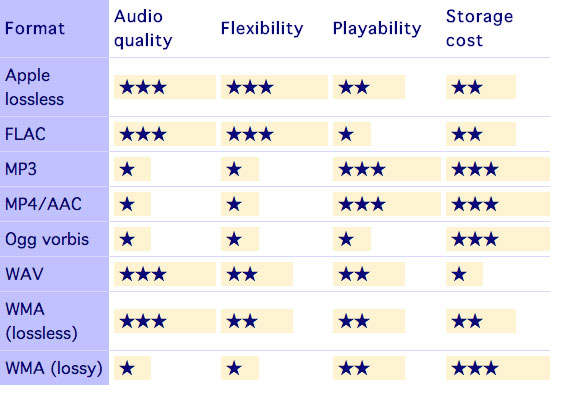
In view of this and depending on the “compression” we use, we have different files and qualities. There are algorithms that can store as much information as possible, and others that instead lose a lot of information and free up space. The former generally produce very large files and are also called “lossless” or “less lossless” precisely because they maintain the highest possible quality. 4 minutes of a song can also take 40 MB to 100 MB depending on the algorithm that compresses the files.

The best known and most commonly used are algorithms that allow you to store so much information, and others that instead lose a lot of information and gain space at the same time. The former generally generate very large files and are also referred to as “lossless” or “less lossy”. Precisely because they maintain the highest possible quality, 4 minutes of a song can also take between 40 MB and 100 MB depending on the algorithm that compresses it. The best known and most commonly used are

.wav / .wave WAVEform audio file format
.flac Free Lossless Audio Codec
.m4a Apple Lossless variant
.wma Windows Media Audio LossLess variant
The others, on the other hand, are perhaps the most common and allow you 4 minutes at around 10 MB if they are and are of high quality

.mp3 MPEG-1/2 Audio Layer III
.m4a Advanced Audio Coding Variant (AAC)
.wma Windows Media Audio variant

Which compression should I choose?

Now it is clear that we have to find a compression algorithm that allows us to maintain multiple frequencies. With a reduced size, our devices would be full immediately if each song occupied 30 MB!

After analyzing numerous songs with different extensions and looking around the internet a little, I came to the conclusion that the best encoding algorithm is undoubtedly the variable bit rate AAC compression with the .m4a extension, the best algorithm that you can use keep most frequencies higher in very small dimensions. Let us see together how the ghosts try to play the previous song in Apple Lossless (4 minutes and 23 seconds) first in MP3 with 320 kbps and fixed bit rate, then always with 320 kbps in variable bit rate (maximum quality) and finally in AAC to convert with variable bit rate (maximum quality), including the file size and the maximum frequency