How can we distinguish real quality audio files from poor quality files?
It will have happened to everyone at least once to hear a song and to notice that it was “of low quality”, even if it was quite “difficult”! The size of an audio file is not always a sign of quality, but why? Before we understand it, a premise is needed that we put into practice to see if the files we have are really qualitative without trusting our ears too much.
Audio files
Maybe not everyone knows that every ‘file’ we have on our PC is nothing more than a list of bytes or bits that are no more than 0 and 1. To get a picture, imagine a 10MB file (MegaByte exactly), which can be a song, a fairly large picture, 10 seconds of HD video, it is about 80,000. 000 bits (1 byte = 8 bits and 1 bit = 0 or 1) or 80 million 0 and 1, almost the population Italian.
However, audio files that should simply contain “sound waves” are not always “pure”. That said, there are algorithms that can drastically reduce and compress the size of the audio file. However, it is obvious that there is more information about sound waves. The higher the definition of the audio, the larger the file that contains this information.
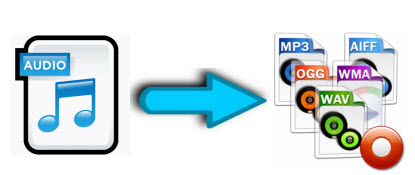
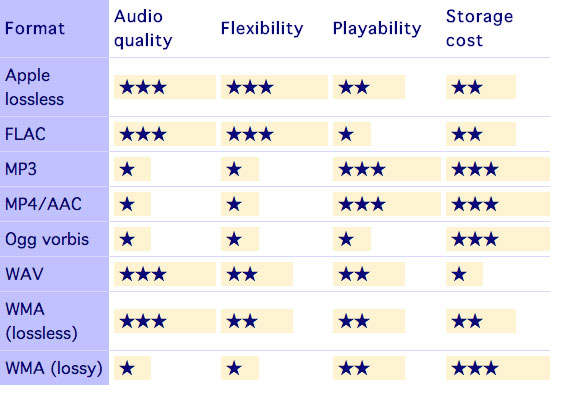
In view of this and depending on the “compression” we use, we have different files and qualities. There are algorithms that can store as much information as possible, and others that instead lose a lot of information and free up space. The former generally produce very large files and are also called “lossless” or “less lossless” precisely because they maintain the highest possible quality. 4 minutes of a song can also take 40 MB to 100 MB depending on the algorithm that compresses the files.
The best known and most commonly used are algorithms that allow you to store so much information, and others that instead lose a lot of information and gain space at the same time. The former generally generate very large files and are also referred to as “lossless” or “less lossy”. Precisely because they maintain the highest possible quality, 4 minutes of a song can also take between 40 MB and 100 MB depending on the algorithm that compresses it. The best known and most commonly used are
.wav / .wave WAVEform audio file format
.flac Free Lossless Audio Codec
.m4a Apple Lossless variant
.wma Windows Media Audio LossLess variant
The others, on the other hand, are perhaps the most common and allow you 4 minutes at around 10 MB if they are and are of high quality
.mp3 MPEG-1/2 Audio Layer III
.m4a Advanced Audio Coding Variant (AAC)
.wma Windows Media Audio variant
Which compression should I choose?
Now it is clear that we have to find a compression algorithm that allows us to maintain multiple frequencies. With a reduced size, our devices would be full immediately if each song occupied 30 MB!
After analyzing numerous songs with different extensions and looking around the internet a little, I came to the conclusion that the best encoding algorithm is undoubtedly the variable bit rate AAC compression with the .m4a extension, the best algorithm that you can use keep most frequencies higher in very small dimensions. Let us see together how the ghosts try to play the previous song in Apple Lossless (4 minutes and 23 seconds) first in MP3 with 320 kbps and fixed bit rate, then always with 320 kbps in variable bit rate (maximum quality) and finally in AAC to convert with variable bit rate (maximum quality), including the file size and the maximum frequency