The Ultimate Guide to High-Quality Audio and Video: Benefits and Technical Insights

Introduction

High-quality audio and video are becoming increasingly important in today’s world, especially for professionals and geeks who appreciate a premium experience. In this guide, we will explore the benefits of high-quality audio and video and delve into the technical aspects that make it possible. From bitrate and samplerate to resolution and codecs, we’ll cover everything you need to know to get the most out of your audio and video content.
Audio Quality
Definition of Audio Quality
Audio quality refers to the fidelity of sound reproduction. It is affected by various factors, such as the bitrate, samplerate, and audio format. Higher-quality audio has a higher bitrate, which means more data is transmitted per second. A higher samplerate means that more samples of the audio signal are captured per second, resulting in a more accurate representation of the original sound.
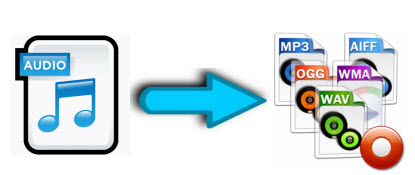
Lossy vs. Lossless Audio Formats
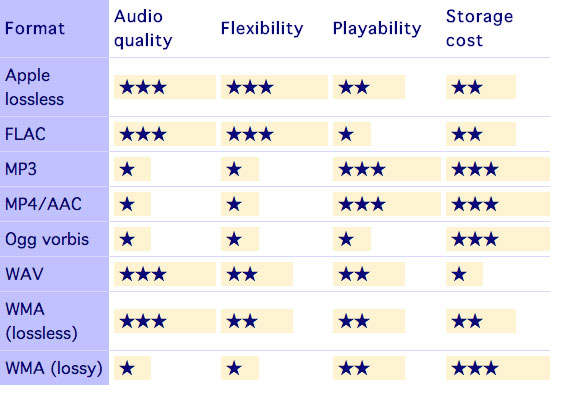
Lossy audio formats, such as MP3, compress the audio signal to reduce file size. This compression results in some loss of audio quality. Lossless audio formats, such as FLAC, retain all the original audio data, resulting in better sound quality. However, lossless audio files are larger in size than lossy files.
Optimizing Audio Quality
Optimizing audio quality depends on the purpose of the content. For music production, a higher-quality audio format is recommended, such as WAV or AIFF. For video production, a high-quality compressed audio format, such as AAC, is suitable. Streaming services usually use lossy audio formats, such as MP3 or AAC, to reduce bandwidth usage. However, lossless formats are recommended for critical listening applications, such as audiophile music playback.
Examples of High-Quality Audio and Their Benefits
Some examples of high-quality audio include studio master recordings, high-resolution audio files, and audiophile-grade equipment. High-quality audio provides better sound clarity, dynamics, and realism, resulting in a more immersive listening experience.
Video Quality
Definition of Video Quality
Video quality refers to the resolution, framerate, codec, and other technical factors that affect the visual fidelity of a video. Higher-quality video has a higher resolution, which means more pixels are displayed on the screen. A higher framerate means that more frames are displayed per second, resulting in smoother motion. A better codec means that the video signal is compressed more efficiently, resulting in a smaller file size without loss of quality.
Compressed vs. Uncompressed Video Formats
Compressed video formats, such as H.264 or HEVC, use a codec to reduce the size of the video file. Uncompressed video formats, such as RAW, retain all the original video data, resulting in better visual quality. However, uncompressed video files are larger in size than compressed files.
Optimizing Video Quality
Optimizing video quality depends on the intended use of the content. For streaming services, a compressed video format, such as H.264 or VP9, is recommended to reduce bandwidth usage. For video editing and post-production, an uncompressed or lightly compressed format, such as ProRes or DNxHR, is suitable. High-resolution video is recommended for critical viewing applications, such as film production or gaming.
Examples of High-Quality Video and Their Benefits
Some examples of high-quality video include 4K Ultra HD, HDR (High Dynamic Range), and high frame rate (HFR) video. High-quality video provides better visual clarity, color accuracy, and motion detail, resulting in a more immersive viewing experience.
Benefits of High-Quality Audio and Video
Improved User Experience
High-quality audio and video provide a more immersive and engaging experience for the user. The higher fidelity and realism result in a more enjoyable and satisfying experience.
Increased Brand Value
High-quality audio and video can increase the perceived value of a brand. Companies that prioritize high-quality content demonstrate a commitment to excellence and attention to detail, which can enhance their reputation and brand loyalty.
Better Communication
Clear and high-quality audio and video are essential for effective communication. High-quality video conferencing, for example, can improve the productivity and effectiveness of remote meetings, allowing participants to communicate more clearly and efficiently.
Technical Insights
Understanding the technical aspects of high-quality audio and video can help professionals and enthusiasts optimize their content and equipment. Knowing the optimal bitrate, samplerate, resolution, and codec for different applications can result in better quality and efficiency.
Conclusion
High-quality audio and video are essential components of modern content creation and consumption. Understanding the technical aspects of audio and video quality can help professionals and enthusiasts optimize their content and equipment, resulting in better quality and efficiency. Whether for music production, video editing, or critical listening and viewing, high-quality audio and video provide numerous benefits and enhance the user experience.