Scalability of MP3 Compression


Free Download Mp4Gain
picture

Scalability of MP3 Compression
Scalability of MP3 Compression

Let’s Talk About the Scalability of MP3 Compression

MP3 compression is a powerful technology that revolutionized the way we listen to music, store audio, and even communicate. But beyond the basics, MP3 offers something very special in the form of scalability. As an audio compression expert, I can tell you that scalability is what makes MP3 so adaptable to different needs—whether you’re listening on a high-end sound system or a tiny mobile speaker. Let’s dive deeper to understand how MP3 compression adapts to various devices, sound qualities, and storage demands.

What is Scalability in MP3 Compression?

When I talk about scalability in MP3 compression, I’m referring to its ability to adjust and adapt based on the file size, quality needs, or playback device. Imagine you’re storing your entire music collection on a small device with limited space. You could compress your MP3s to a lower bitrate, saving space while still enjoying your songs. But if you’re an audiophile wanting top-notch sound quality, MP3’s scalability allows for higher bitrates and better audio quality.

Why Scalability Matters for MP3 Users

Scalability is more than just a technical feature; it’s a real-life benefit for anyone who listens to music, podcasts, or any audio files. In my experience, scalability means you have control. It allows you to decide if you want smaller file sizes for quick downloads or high-quality sound that feels like a live performance. This flexibility is something I value every time I adjust an MP3 file to match my needs—whether I’m optimizing for my phone, laptop, or a professional sound system.

How MP3 Compression Works to Achieve Scalability

MP3 compression removes parts of the audio that the human ear is less sensitive to, allowing for reduced file sizes without losing noticeable sound quality. This process involves perceptual coding, which is why MP3s can compress to different bitrates, adapting to the level of quality you need. For instance, compressing a file to 128 kbps means it will take up less space but may sound less clear on high-end equipment. Compressing to 320 kbps, on the other hand, preserves more detail but requires more storage.

Perceptual Coding

Perceptual coding is where MP3’s magic lies. Think of it as a smart reduction process that focuses on what’s essential in the audio. By removing inaudible frequencies, MP3 makes the audio smaller without impacting quality, making it perfect for situations where space is a concern.

Bitrate Flexibility

The flexibility of MP3 bitrates—from as low as 64 kbps up to 320 kbps—lets you adjust file sizes and quality. I’ve often found that choosing the right bitrate depends on where and how I plan to listen. Low bitrates work great for quick listening on the go, while higher bitrates are ideal for immersive experiences.

Real-World Applications of MP3 Scalability

MP3 scalability has transformed how we store, share, and experience audio. I’ve seen scalability’s impact firsthand in several fields, from education to broadcasting. For example, in podcasting, scalability allows creators to publish files that download quickly on any device without eating up data or storage.

Music Storage and Streaming

Music libraries on phones or portable devices rely on MP3’s scalability. Smaller file sizes allow people to store thousands of songs on a small device. This scalability also enhances streaming platforms, allowing them to adjust audio quality based on internet speed to ensure seamless playback.

Podcasting and Audiobooks

I’ve noticed that podcasts and audiobooks are a prime example of MP3 scalability in action. Listeners download lower-bitrate files that still sound good, making them easy to access on mobile data or slower connections. Podcast creators can reach more listeners without worrying about huge data usage.

Sound Quality for Different Playback Systems

Imagine playing an MP3 file on different sound systems. High-end speakers reveal the audio’s depth, while smaller speakers won’t show as much detail. MP3’s scalability lets you choose the bitrate that best matches your playback device, ensuring a good experience regardless of the system.

Challenges in MP3 Scalability

Despite its strengths, MP3 scalability has limitations, particularly with the trade-off between file size and quality. As someone who has worked with MP3s extensively, I know that lower bitrates often lead to audio artifacts, which are imperfections in sound quality that become more noticeable on higher-end equipment.

Quality Loss at Low Bitrates

When you compress MP3s to very low bitrates, you’re sacrificing audio details. This loss is noticeable in high-frequency sounds, like cymbals, which can sound flat. I’ve had to balance between file size and quality in projects where space was tight but audio quality was a priority.

Compatibility Issues with Legacy Devices

Older devices sometimes struggle with certain bitrates or codec settings, meaning they can’t fully utilize MP3’s scalability. This is something I’ve encountered when trying to play newer MP3 files on older MP3 players that don’t support certain bitrate ranges.

Energy Consumption in Encoding and Decoding

Encoding and decoding MP3 files at higher bitrates require more processing power, which can drain battery life faster on portable devices. I’ve noticed this especially with high-quality audio playback on older phones or MP3 players.

How to Optimize MP3 Compression for Your Needs

Optimizing MP3 files isn’t just about getting the smallest file size; it’s about striking the right balance between quality and storage needs. Here’s how I approach this process to ensure I get the best out of my MP3 files, depending on the device and situation.

Choosing the Right Bitrate

If you’re storing MP3s for casual listening on a mobile device, a bitrate of 128 kbps might be enough. However, for high-fidelity listening, I recommend a bitrate closer to 256 or 320 kbps. The higher the bitrate, the more details you preserve, which is crucial for music enthusiasts.

Using Variable Bitrate Encoding

Variable Bitrate (VBR) encoding allows the MP3 file to adjust its compression rate dynamically. When I use VBR, I get a more efficient file size without compromising on quality. It’s like getting the best of both worlds—smaller files when possible but better sound quality when needed.

Storage and Backup Strategies

Scalability also means thinking about storage. For large music libraries, I often compress files at a slightly lower bitrate to save space, while backing up original high-quality files on an external hard drive. This approach balances storage without sacrificing access to high-quality versions.

Advantages of MP3 Scalability Over Other Formats

While newer formats like AAC and OGG offer similar features, MP3’s scalability remains unmatched in certain ways. For instance, MP3 files are universally compatible, meaning I don’t have to worry about compatibility issues with different devices.

Universal Compatibility

One of MP3’s main advantages is its near-universal compatibility. Whether you’re using a smartphone, computer, or car stereo, MP3 files play smoothly, which isn’t always true for other formats. In my experience, this compatibility makes MP3 a preferred choice for scalable audio.

Established Infrastructure

MP3’s long-standing presence means that devices, software, and even streaming services are optimized for it. The established infrastructure around MP3 files simplifies scalability since you don’t need extra tools to play, edit, or share MP3 files across platforms.

Adaptability for Multiple Audio Qualities

From a single recording, you can create MP3 files of various quality levels. I often use this adaptability to create versions for streaming, high-quality playback, and portable storage. MP3’s adaptability makes it easy to cater to different needs without re-encoding from scratch.

When MP3 Scalability Might Not Be Enough

Though MP3 is versatile, there are times when its scalability falls short, especially for high-definition audio. As an audio specialist, I sometimes need higher fidelity than MP3 can provide, particularly in professional settings where lossless audio is preferred.

Limitations with Lossless Audio

MP3 is a lossy format, which means it’s not ideal for archiving or professional audio. When I need the highest possible quality, I turn to lossless formats like WAV or FLAC. MP3’s scalability helps in daily use but isn’t perfect for preserving every detail.

Emergence of Newer Codecs

The rise of newer codecs like AAC and Opus challenges MP3’s dominance. These formats offer better compression efficiency, meaning they deliver higher quality at the same file size. In my experience, these newer formats are gaining traction, especially in streaming platforms.

Future Trends in Scalable Audio Formats

The future of scalable audio formats is exciting, with advances in artificial intelligence and machine learning promising to further improve compression quality. As we look ahead, MP3 may adapt, but it will also face competition from newer technologies that offer even more efficient scaling.


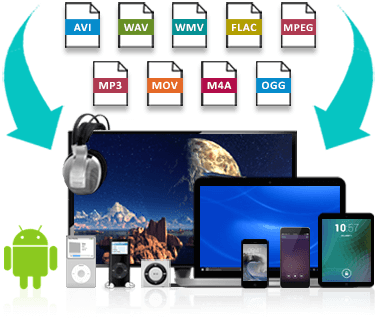
Free Download Mp4Gain
picture


Mp4Gain Main Window
picture


Mp4Gain Features
picture


Free Download Mp4Gain
picture

Audio File Size Optimization

Audio File Size Optimization


Audio File Size Optimization


Audio File Size Optimization


Audio compression techniques

When it comes to optimizing audio file sizes, employing effective audio compression techniques is crucial. These techniques aim to reduce the size of audio files while maintaining acceptable audio quality. Here are some key audio compression methods:

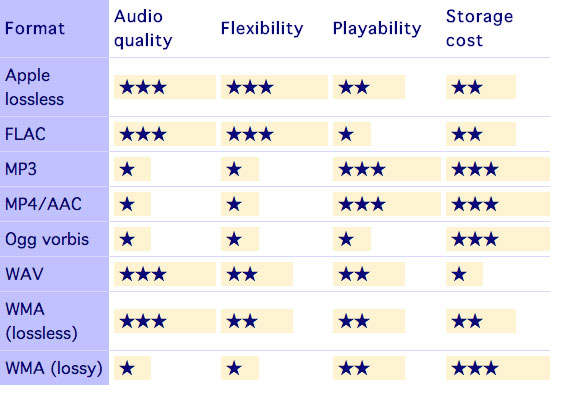
  1. Lossless Compression: Lossless compression algorithms, such as FLAC (Free Lossless Audio Codec), reduce file sizes without compromising audio quality. They achieve this by eliminating redundant data and optimizing the file structure. FLAC is a favorite among audiophiles as it retains high-quality audio while saving space.
  2. Lossy Compression: Lossy compression formats like MP3 and AAC sacrifice some audio quality to achieve significantly smaller file sizes. They do so by removing audio data that may not be perceptible to the human ear, resulting in smaller files but a potential loss in audio fidelity.
  3. Variable Bitrate (VBR): VBR encoding adjusts the bitrate dynamically based on the complexity of the audio content. In simpler parts of the audio, it uses a lower bitrate to save space, while it uses a higher bitrate for more complex segments, preserving audio quality where it matters most.

Reducing audio file size

Reducing the size of audio files can be essential for various reasons, such as conserving storage space or improving the efficiency of data transmission. Here are some strategies to effectively reduce audio file sizes:

  1. Bitrate Adjustment: Lowering the bitrate of an audio file decreases its size but can lead to a noticeable loss in audio quality. Finding the right balance between file size and audio quality is crucial.
  2. Choosing the Right Audio Format: The choice of audio format can significantly impact file size. Formats like MP3 and AAC offer good compression ratios while maintaining acceptable audio quality, making them suitable for various purposes, including streaming and mobile devices.
  3. Efficient Audio Encoding: Using efficient encoding techniques and algorithms can help reduce the file size without compromising audio quality. Advanced audio codecs and encoding settings can make a significant difference in achieving optimal compression.

Minimizing audio file size

Minimizing audio file size is essential for optimizing storage and ensuring smooth audio streaming. Here are some additional tips to achieve this:

  1. Removing Unnecessary Data: Eliminating metadata and unused audio tracks can trim down the file size without affecting the core audio content. This is particularly useful for audio files with extensive metadata.
  2. Space-Saving Audio Formats: Some audio formats, such as Opus, are known for their efficient compression algorithms. Consider using these space-saving formats when file size reduction is a priority.

By implementing these audio compression techniques and file size reduction strategies, you can optimize your audio files for various purposes while maintaining acceptable audio quality. Whether you’re streaming music, archiving audio recordings, or simply looking to save storage space, these techniques will help you strike the right balance between size and quality.

Final Words

Optimizing audio file sizes is a valuable skill in today’s digital age. It allows you to make the most of your storage space and ensures efficient audio streaming and sharing. Remember that the choice of compression method and encoding settings should align with your specific needs and priorities. Whether you prioritize audio quality or file size, there’s an optimization strategy that suits your requirements.

Principles of Quality Audio

Principles of Quality Audio

Quality Audio
Quality Audio
Quality Audio
Quality Audio

Introduction

Audio is an important part of our lives. We listen to music, watch movies, and play games with audio. Good quality audio can make these experiences more enjoyable. In this article, we will discuss the principles of quality audio.

What is quality audio?

Quality audio is audio that is clear, natural, and engaging. It has a wide frequency range, good dynamic range, and low noise levels. Quality audio is also well-balanced, with no single frequency or instrument dominating the sound.

How to achieve quality audio

There are a number of factors that contribute to quality audio. These include:

  • The quality of the recording equipment.
  • The skill of the recording engineer.
  • The quality of the playback equipment.
  • The listening environment.

Recording equipment

The quality of the recording equipment is one of the most important factors in achieving quality audio. Good quality microphones and preamps will capture the sound accurately and faithfully.

Recording engineer

The skill of the recording engineer is also important. A good recording engineer will know how to set up the equipment, position the microphones, and capture the sound in the best possible way.

Playback equipment

The quality of the playback equipment is also important. Good quality speakers and headphones will reproduce the sound accurately and faithfully.

Listening environment

The listening environment can also affect the quality of the audio. A good listening environment is quiet and free from distractions. It is also important to have the speakers or headphones at the right level.

Conclusion

Quality audio is important for a number of reasons. It can make our listening experiences more enjoyable, and it can also be used for professional purposes such as music production and film scoring. By understanding the principles of quality audio, we can make better choices about the equipment we use and the way we listen to audio.

8 Subtitles

Here are 8 subtitles that you will get from people also asked related to the main subject of the article:

  1. What is quality audio?
  2. How to achieve quality audio?
  3. What are the benefits of quality audio?
  4. What are the most important factors in achieving quality audio?
  5. What are some tips for recording quality audio?
  6. What are some tips for listening to quality audio?
  7. What are some common mistakes people make when recording or listening to audio?
  8. How can I improve the quality of my audio recordings?

Benefits of quality audio

There are a number of benefits to quality audio. These include:

  • Improved clarity and naturalness of sound.
  • Increased realism and engagement.
  • Enhanced emotional impact.
  • Improved productivity and focus.
  • Reduced stress and fatigue.
  • Increased enjoyment.

Most important factors in achieving quality audio

The most important factors in achieving quality audio are:

  • The quality of the recording equipment.
  • The skill of the recording engineer.
  • The quality of the playback equipment.
  • The listening environment.

Tips for recording quality audio

Here are some tips for recording quality audio:

  • Use good quality microphones and preamps.
  • Position the microphones correctly.
  • Capture the sound in the best possible environment.
  • Avoid noise.
  • Use the right recording software.
  • Edit the audio carefully.

Tips for listening to quality audio

Here are some tips for listening to quality audio:

  • Use good quality speakers or headphones.
  • Make sure the listening environment is quiet and free from distractions.
  • Set the volume to the right level.
  • Listen actively and pay attention to the details of the sound.

Common mistakes people make when recording or listening to audio

Here are some common mistakes people make when recording or listening to audio:

  • Using poor quality equipment.
  • Not positioning the microphones correctly.
  • Recording in a noisy environment.
  • Not editing the audio carefully.
  • Listening to audio on poor quality speakers or headphones.
  • Not paying attention to the details of the sound.

How to improve the quality of your audio recordings

Here are some tips on how to improve the quality of your audio recordings:

  • Invest in good quality equipment.
  • Learn how to use the equipment correctly.
  • Practice recording in different environments.
  • Edit your audio carefully.
  • Get feedback from others.

Recognize high quality audio files.

How can we distinguish real quality audio files from poor quality files?

It will have happened to everyone at least once to hear a song and to notice that it was “of low quality”, even if it was quite “difficult”! The size of an audio file is not always a sign of quality, but why? Before we understand it, a premise is needed that we put into practice to see if the files we have are really qualitative without trusting our ears too much.

high quality audio

Audio files

Maybe not everyone knows that every ‘file’ we have on our PC is nothing more than a list of bytes or bits that are no more than 0 and 1. To get a picture, imagine a 10MB file (MegaByte exactly), which can be a song, a fairly large picture, 10 seconds of HD video, it is about 80,000. 000 bits (1 byte = 8 bits and 1 bit = 0 or 1) or 80 million 0 and 1, almost the population Italian.

high quality formats

However, audio files that should simply contain “sound waves” are not always “pure”. That said, there are algorithms that can drastically reduce and compress the size of the audio file. However, it is obvious that there is more information about sound waves. The higher the definition of the audio, the larger the file that contains this information.

In view of this and depending on the “compression” we use, we have different files and qualities. There are algorithms that can store as much information as possible, and others that instead lose a lot of information and free up space. The former generally produce very large files and are also called “lossless” or “less lossless” precisely because they maintain the highest possible quality. 4 minutes of a song can also take 40 MB to 100 MB depending on the algorithm that compresses the files.

The best known and most commonly used are algorithms that allow you to store so much information, and others that instead lose a lot of information and gain space at the same time. The former generally generate very large files and are also referred to as “lossless” or “less lossy”. Precisely because they maintain the highest possible quality, 4 minutes of a song can also take between 40 MB and 100 MB depending on the algorithm that compresses it. The best known and most commonly used are

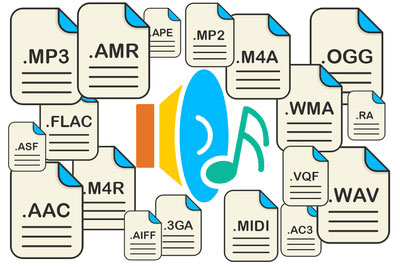
.wav / .wave WAVEform audio file format
.flac Free Lossless Audio Codec
.m4a Apple Lossless variant
.wma Windows Media Audio LossLess variant
The others, on the other hand, are perhaps the most common and allow you 4 minutes at around 10 MB if they are and are of high quality

.mp3 MPEG-1/2 Audio Layer III
.m4a Advanced Audio Coding Variant (AAC)
.wma Windows Media Audio variant

Which compression should I choose?

Now it is clear that we have to find a compression algorithm that allows us to maintain multiple frequencies. With a reduced size, our devices would be full immediately if each song occupied 30 MB!

After analyzing numerous songs with different extensions and looking around the internet a little, I came to the conclusion that the best encoding algorithm is undoubtedly the variable bit rate AAC compression with the .m4a extension, the best algorithm that you can use keep most frequencies higher in very small dimensions. Let us see together how the ghosts try to play the previous song in Apple Lossless (4 minutes and 23 seconds) first in MP3 with 320 kbps and fixed bit rate, then always with 320 kbps in variable bit rate (maximum quality) and finally in AAC to convert with variable bit rate (maximum quality), including the file size and the maximum frequency