Discover the main parameters to guarantee the audio quality of your digital product
Do you know the differences between the formats? Do you understand how the compression ratio works?
Audio settings for recorders or sound interfaces can be very confusing. But, if you are going to work with videos or podcasts, it will be useful to know how to interpret the parameters when recording and exporting files, either in Audacity (free), Reaper, Adobe Audition or in video editors.
Here we are going to talk about the differences between sample rates, bit depth, file compression rates, and format variations. Thus, you will be more sure of the options you have in relation to the audio quality and you can guarantee good results.
In short, you will understand why we recommend recording in uncompressed format (WAV, for example) in 24 bits and 48 kHz. In addition, you will also know the reason why, in most cases, we do not need more than a 192 kbps MP3 to export excellent quality audio.
We will also talk about the possibility of compressing more podcast files, which can be generated in 64 kbps MP3, mono, to facilitate online consumption.
Formats, extensions and codecs: what do they mean?
When it comes to audio files, we can talk about formats, extensions and codecs. In summary, we can say that the format refers to the type of file, identified by its extension (* .mp3, * .wav, * .ogg, * .wma etc), which often tells us how it has been encoded or which one is your codec.
For example, a file in the MP3 format has an * .mp3 extension and an MPEG-1 Audio Layer III codec.
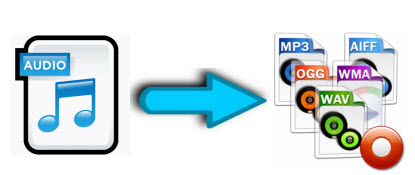
Examples of audio file extensions
Normally those endings are mixed. But what is important to know is that, as in videos, files with the same type of extension do not always have the same codec and vice versa.
This information is valid so that you do not feel lost in case you do not understand the reason why a software, which normally plays your * .m4a files, does not play another with the same extension, for example.
Such a situation could indicate that the codecs used are different. In that case, the solution would be to use other software to read the file or to convert it (new encoding). This can be done even in video editors.
The variations of formats and codecs depend on the options of the companies that develop the softwares that execute the files. In these cases, there are many things at stake, such as technical specifications and relations with patents.
On the other hand, files are usually divided into two types: uncompressed or compressed.
Uncompressed files
Audio recording equipment usually offers us options to record files without losing any information. These uncompressed files can be generated in various formats and extensions, such as WAV, AIFF, FLAC and ALAC. For those who are familiar with photography, they are equivalent to RAW or DNG.
As they are usually very heavy, using lossless formats in the final product is only recommended in some cases, such as:
when the final product can be processed by the consumer (files destined for sound banks, for example);
when there will be recording on physical media (CD, DVD and Blue-Ray);
or for the audiophile market (for a matter of perceived value and guarantee of high quality).
But, even if you don’t want to end the process with a WAV (one of the most common), lossless formats can be very useful at the editing stage. Because they contain a lot of information, they withstand more extreme alterations without harming the audio quality.
With plugins, conversions and processing, they can be manipulated more freely, guaranteeing excellent quality, even if a compressed file is subsequently generated.
Compressed files
Most of the equipment available on the market (cameras, cell phones and even audio recorders) usually deliver already compressed files. This type of file is more practical, easier to process, requires less storage space and is very small (in bytes).
Some examples of these formats are: 3GP, AAC, M4A, OGG, WMA and MP3, which is, without a doubt, the best known. Files are like JPEG or GIF in the images field.
Through a complex algorithm, these files are generated seeking to keep only relevant information for our ears. Depending on the compression mode, we can generate an MP3 from a WAV and have a file 10 times smaller, without perceptible alterations in audio quality.
MP3 and Wave size comparison
Speaking of MP3, despite its great popularity, it is currently considered an obsolete format, since others, such as ACC (extension .acc or .m4a), make it possible to obtain smaller files and with higher quality.
Even so, MP3 is still widely used, since a large part of the softwares and equipment were developed for this format. So, to talk about compression rates, we will use it as an example.
Compression rate: what is its relationship to audio quality?
Now that you understand that a file can be compressed and maintain sufficient quality for our ears, you should know that the level of compression can vary greatly.
And it is by the value of the compression rate (or bitrate) that we manage to control the file size and, therefore, the audio quality.
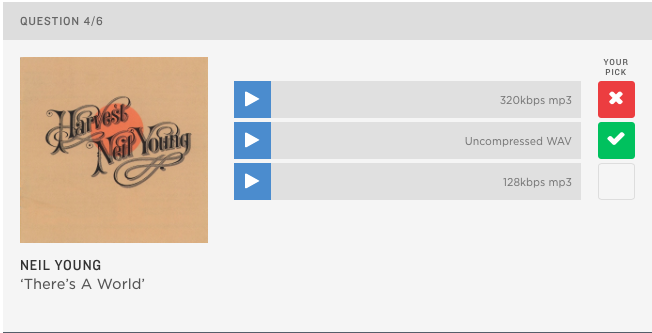
For example, a 320 kbps (kilobits per second) MP3 may sound as good as uncompressed audio from a CD or DVD. As the bitrate value decreases, the file size decreases, but the sound losses become noticeable, depending on the audio.
To get a feel for how this rate affects sound quality, take a look at the following references:
320 kbps – audio that doesn’t differ from the quality of a CD;
192 kbps – no significant loss for most people;
128 kbps – slightly noticeable losses;
96 kbps – quality similar to FM radio;
32 kbps – similar to AM radio;
16 kbps – similar to short-wave radio (“walkie-talkie”).
We remind you that the values and descriptions above are only an approximation, since the compression of the file behaves differently in each type of audio. The more perceptible information (or the more complex the audio in question), the more room there will be for compression to affect quality.
That is why for a podcast without a soundtrack it may not be a problem to generate a file of just 64 kbps, mono, with a single audio signal, playing simultaneously on the left (L) and right (R) channels. .
However, a well-produced studio song, played with several different instruments, can suffer noticeable losses, even if the compressed file is 128 kpbs, stereo, with a different signal for each box, right and left.
Here we are talking about fixed compression rates (CBR – constant bitrate), but there is also the possibility of generating files with variable rates, such as the calls VBR (variable bitrate) or ABR (average bitrate).
In VBR, the algorithm analyzes the audio and decides where it can compress the audio more aggressively and where it should collect less information. The ABR acts in a similar way, but remains at the average of the previously stipulated rate. These two methods, despite being smarter, can cause incompatibility with some sound players.
When we talk about compression vs. audio quality, remember that there are no rules: each case is different and it is necessary to evaluate them individually to know to what extent the losses are acceptable, or when it is worth giving up on quality in favor of ease of use (faster download or less storage impact, for example).
Remember that some websites and services recode the audio after uploading it. Since we cannot control this process, it may be a good idea to send files with a little more quality than necessary, to have a margin of safety in case of new conversions.
Amplitude resolution: 16 bit or 24 bit?
If you are going to use a sound card / interface or a recorder, you will be presented with options of bit depth values. This is related to the PCM digital audio pattern and does not apply to compressed files.
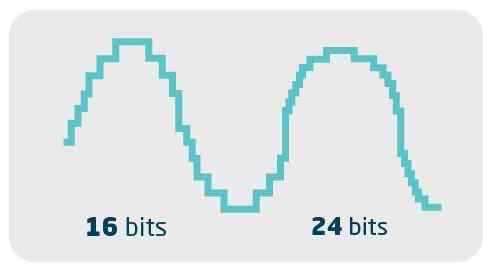
The values refer to the signal-to-noise ratio. In other words, it has to do with the dynamics or volume levels that the file manages to record with quality.
It is as if it were a resolution of the amplitude of the sound. Thus, in theory, a 16-bit audio manages to represent 65,536 volume levels between the lowest and highest value on the scale. While in 24 bits, there are 16.7 million gradations.
Despite the large numerical difference, in practice, it is not a noticeable variation to our ears. But, there is a technical difference that can, in some cases, give the 24-bit file an advantage when fetching and editing.
We know that we must be careful with the input level when recording, so that the audio does not “explode” (generating clipping). This is what happens when we let the graphic meter go up a lot, going beyond 0 dB (maximum value before there is digital saturation / distortion). For this reason, a certain margin of safety, called “headroom”, must be respected.
In 16 bits, in addition to being careful, we also recommend paying attention so that the input level is not kept too low.
The reason for that is that, since there is not enough resolution to accurately record extremely weak signals, sounds can appear digitally distorted or be full of noise, through a process called dithering, which attempts to disguise quantization faults.
In this way, since the 16-bit file registers fewer gradations of volume (48 dB less compared to the 24-bit), theoretically you run the risk that, when you increase the volume in the software, you come across a higher dose of “shrieking”. In 24-bit, technically, there is no such risk.