High quality audio, what is it?


Free Download Mp4Gain
picture

High quality audio, what is it?

High Quality Audio

When it comes to high definition audio played from a Blu-ray player on a computer, many tend to think that having an HDMI interface on the motherboard or video card automatically allows high definition audio formats like Dolby to be played on TV and Home Theater.

High Quality Audio

Digital Plus, High Resolution DTS-HD, Dolby TrueHD and DTS-HD Master Audio. However, with the exception of some interesting possibilities, in most cases this is not the case at all. Even relatively new high-end HDMI-equipped motherboards, video cards, and sound cards may not be able to handle such large audio streams on their own. Ultimately it all comes down to what kind of input signal they can receive and what kind of signal they can output.

In this review, we’ll take a look at all HD audio formats, their bitrate (streaming), and delivery requirements to the playback medium. In Part 2, we will continue to explore how digital audio streams can (or cannot) be handled in typical PC components. After reading both articles, you will need to understand in depth why so many home theater users use a variety of analog cables (three for 5.1 channels and four for 7.1) instead of HDMI to carry multi-channel audio wherever you need to go. … We will also talk about some of the workarounds associated with converting a digital to analog signal on a computer, rather than a receiver or preamplifier, often this option is the most affordable option for HD sound quality optimal. And finally, perhaps you understand why it is worth waiting a little longer to buy a Blu-ray player for your home theater system; This will allow you to take advantage of some of the new benefits that should appear before the end of 2008, but are not ready yet (at least they are not ready at the time of writing this article).

The bitrate (or stream) associated with each format, as well as the number of channels, sample rates, and bit depths used to encode the formats.
Whether the SPDIF connector can provide the required stream for each format and what types of HDMI interfaces each format works with.
In Part Two, we’ll look at PC software codecs to find out what formats they work with, as well as the types of interfaces that HDMI-equipped motherboards, video cards, and sound cards can support. And since new chipsets and interfaces are recently available (or will be available relatively soon), we’ll also explain how new and future hardware can provide simpler solutions for currently messed-up PC HD audio.

Introduction

High Definition Audio Formats (HD Audio)
Blu-ray discs can contain movie soundtracks in one of the following formats.

PCM (linear PCM or LPCM);
Dolby Digital;
DTS;
Dolby Digital Plus;
High resolution DTS-HD;
Dolby TrueHD;
DTS-HD master audio.
Before moving on to a detailed consideration of the above formats, we note that Dolby technologies originated from Dolby Laboratories, a recognized provider of professional, semi-professional, and consumer multi-channel surround sound technology and noise cancellation. DTS (also called Digital Theater Systems) is derived from DTS, Inc. is also a well-known provider of digital audio technology that competes with Dolby Labs.

PCM (linear PCM or LPCM)
PCM stands for Pulse Code Modulation and provides a digital representation of an analog signal that is sampled (digitized) at regular intervals (with a specified frequency in Hertz) and represented in binary form (with a specified precision – bit width). In addition to using PCM for computer digital audio and audio CDs, it is also used in some digital phone systems and in various digital video formats. In PCM format, audio amplitude values ​​are represented using different numbers of bits (length); the soundtrack is usually digitized in 12 to 24 bit, but most of the time 16 bit is used in PCM studio encoding for Blu-ray discs.

A PCM audio track can be an exact copy of a studio original encoded on an uncompressed disc if its bit depth is the same as the original. If the bit depth is reduced (as is often the case to save space allocated for storing audio on disk), this can cause a downgrade – for example, using 16-bit instead of 24-bit. From a technical point of view, downsampling is not the same as compression, although the precision of the resulting sound is decreased.


Free Download Mp4Gain
picture


Mp4Gain Main Window
picture


Mp4Gain Features
picture


Free Download Mp4Gain
picture

Are you sure you listen to music well?

It is frequent to listen to low quality music without realizing it. But how can you tell if an audio file is of good quality? Do you know what you hear

How can you tell if an audio file is of good quality?

Today we listen to music from different devices and continuously. It often happens unintentionally – in stores, banks, supermarkets, advertisements, and many other situations, even without being brought to our iPod (if still in use). But when we decide to listen to music voluntarily, are we sure we listen to it well?

Audio quality

Be careful, reading this article can make sound fetishists so hostile to your company of friends. If you continue reading, you deserve this anecdote.

I was in the car with friends, when suddenly I heard one of my favorite songs come out of the speakers. Although I turned the volume knob on the ball, the sound was still very muffled. Blame the speakers? Maybe, but not in that case. To my quick question (demanding that you heard the “noise of the Titanic”), I received a very simple answer: “I downloaded it from a YouTube video.”

Best Audio Quality

Now, I am absolutely not here to moralize anyone, because for better or for worse we have downloaded all the songs from YouTube, however there is one important factor to consider: how can you understand if an audio file is of good quality?

Let’s start with this assumption: Buying the records and / or buying the songs in the digital stores will surely feel great if played on certain systems. That said, the two macrocategories for listening to music are:

The type of the audio file.

The type of sound emitting system / device
Lossless discs and files are the best to listen to. By avoiding delving into complex technicalities by converting files to .mp3 there is compression that reduces digital size at the expense of quality. The unit of measure for quality is kbps (kilo bits per second) and the best value of all is 320 kbps (we tend to scale 256, 192, 128, 96, and 64 kbps). Pseudo-decent performance occurs (but with high data loss) at 128 kbps. It is better to always be on top.

While this doesn’t make sense to nerds, many people ignore these factors because they don’t know they are listening to songs about which 30% of the instruments may not fully perceive. Please note that Spotify allows you to choose the type of audio quality only in the Premium version and the lowest or “Normal” function is at 96 kbps. Also, if you ever download songs illegally from YouTube, many unofficial videos already have poor startup audio, let alone convert them to low-quality .mp3.

Now let’s say we have a song with the best possible quality on our mobile. The problem is to listen to it from a medium that has decent characteristics. To assess this, you must rely on the frequency response or how closely the audible frequencies are reproduced to the human ear by the speakers / headphones or the vehicle in question. We hear from 20 Hertz to 20,000 Hertz (also called 20kHz), this range varies with age and trauma (eg disk). It is correct to possibly check the frequency response of your vehicle: if you buy 5 euros headphones in a store, it will not have a great result, no matter how much the brain comes to us trying to hypothetically recreate incomplete or missing frequencies. It should be remembered that there are other, much more complex factors for optimal hearing, which can be easily explored on the web or in sound theory books.

Going back to the initial anecdote, we were in a Panda ten years ago, with the original Fiat speakers and we listened to a low-quality song downloaded from an unofficial YouTube video. Worse than that, one could not ask, therefore, on second thought, could not have said anything, while that opaque discontent would have been covered by my discontents and for those there are no remedies.

The best formats for listening to audio quality

We recently explained to you the difference between analog and digital audio, and how the latter has become ubiquitous thanks to the advent of modern audio production and reproduction technologies.

But what constitutes the quality of a digital archive? Which format is most suitable? What is it for? How do I choose?

audio quality

To better understand and enable you to choose the most optimized format for your use, find out here what defines the quality of a digital audio file, the various audio file formats, and the current listening options (streaming or download) that is linked to modes of connection (wireless or wired) to your audio system.

What are the parameters for creating a digital audio file?
There are 3 main parameters: sampling (expressed in Hz), bit depth (expressed in bits) and the number of channels.

Sampling (expressed in Hz)

A sound is characterized by an amplitude that varies as a function of time. To represent a sound digitally, the amplitude of the signal is recorded at regular time intervals, in which a digital value is assigned to each recording.

The value of each sample is stored in a file. The greater the number of copies recorded per. Second, the greater the accurate and faithful acoustic signal.

For a better understanding, the sampling rate of a digital file can go up to 192 kHz, corresponding to 192,000 samples taken per second. Second, or one sample taken every 0.0003 second.

For an audio signal it is necessary to have a sampling frequency greater than or equal to 44 100 Hz, this value is considered the current standard.

Digital Audio Basics: Sample Rate and Bit Depth

Bit depth (in bits):

Bit depth marks the accuracy of the sample values. For example, we can code 8, 16, 24 or 32 bits. The higher the bit depth, the greater the number of values ​​per Sample, and the more accurate the sample and sound reproduction will be of quality.

The number of possible values ​​is expressed in exponential 2 (2 n), where n is the number of binary digits encoded to restore the accuracy of the signal.

For your convenience, an 8-bit encoded file has 8 or 256 possible values ​​per. Sample. For a 32-bit file, there will be 2 32 = 4,294,967,296 possible values ​​per. Sample. The most common sample value for a digital file or CD is 16 bits or 65,536 values ​​per. Sample.

Note that this value depends on the initial recording of the music. It is not useful to convert a song recorded by a musician to 24 bits if it was originally recorded in 16 bits, for example.

HEARING TEST: DIFFERENT FROM DIFFERENT AUDIO FORMATS?

We find this published by NPR that challenges the ears as sharp as they are aware. There are many who do not distinguish between compressed mp3 audio files of the highest quality. But are you one of them? We suggest you test your knowledge. Be careful, the level is quite high.

If MP3 (MPEG Audio Layer-3) became known to everyone, it is not the only one available. This compressed format, though it has become the definitive standard, is not without its loss. They may not tell you anything, but the new title version of YouTube’s The XX that was converted to your phone lost a lot of feathers along the way. The weight of the file is reduced thanks to removing frequencies that the naked ear cannot hear (but necessary for good quality). No doubt what your cat hears when he jumps for no apparent reason. Fraud.

Neil Young Details 'Songs for Judy,' New 1976 Live Album - Rolling ...

To make things a little more complicated, there are two types of mp3. The difference is made to the extent of suppression of frequencies. All frequencies above 16 kHz are removed for MP3 128 Kbps (which you will find on pirate download sites, we saw you hanging out in The Pirate Bay), while frequencies from 18 kHz to 22 kHz are aggravated by mp3 320 Kbps (which is available at premium streaming platforms and legal buying platforms: yes, always pay, somehow). On YouTube, the most widely used way to listen to music is the quality of around 192 Kbps (though it is not an mp3 format but a derivative called AAC). When not compressed, a digital song is in WAV format, a high definition format that maintains all frequencies. The only lossless compression is FLAC (Free Lossless Audio Codec) … But these two will weigh too heavily on their tired processor. End of class.

A study by the University of Hong Kong recently showed that listening to music in a poor digital format can negatively impact our emotions and our condition. We know that listening to Celine Dion is depressing, but in fact there are varying degrees of exposure to depression. The study, which compares and listens to compressed music and better quality music, points to an amplification of negative reactions accompanied by a weakening of positive feelings for compressed music. So Céline Dion at 128 Kbps, is execution guaranteed? Yes, frequency scheduling adds a mysterious, scary or even sad look to songs because they lose their spaciousness. That shattered. The study was published in the Journal of the Audio Engineering Library and offers an explanation for this phenomenon: the parasitic background noise added to the low-quality song would amplify negative emotions. A bit like cracking of the Canal + encrypted, but more discreet.

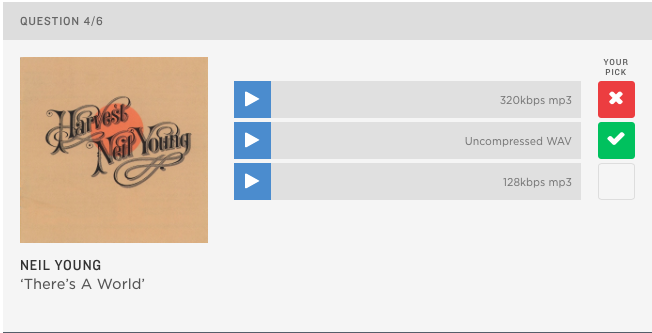
If you are curious, the NPR exam is the perfect way to challenge your hearing. Now that you have all the explanations in mind, we suggest that you test your knowledge of the records of Neil Young, Jay-Z, Katy Perry, Coldplay or Suzanne Vega. Just listen to all three excerpts and then select the track you think is the best quality. Show us that you are ready for the task.

This is the image of the test:

Click to do the test

Test

MP3 audio files, how to recognize the true quality of a piece of music

MP3 audio files… how to recognize the true quality of a piece of music

Thanks to the MP3 format and Internet connections, the distribution and use of music has changed several times. Thanks to its compression, the MP3 file has made it possible to distribute music with a few megabytes of storage space, a song of about 3/4 minutes to occupy a little more than 7/8 megabytes, this has the great spread of music all over World favors, today also thanks to the introduction of broadband, downloading music from the network is almost instantaneous, but as usual, c ‘is always the side of the coin, not everyone knows that MP3 files are very compressed, only with little space in them To claim megabytes. However, compression significantly affects the audio quality of the track. This is definitely affected. In this article you will learn how the compression of MP3 files works and which features distinguish a high-quality MP3 file.

What are MP3 audio files?

To understand how a good MP3 file is recognized, you need to start over and therefore understand what an MP3 file is and how it is created.

Before going into details, it must be stated that MP3 is of course not the same as audio quality among the many digital audio formats that exist today, the best audio format so far that guarantees listening. The same as a CD is the WAV format, which takes up much more megabytes in terms of storage space than MP3, since it does not compress the track and therefore guarantees optimal audio performance.

mp3 quality

If we have this necessary requirement, it is easy to understand that when downloading music in MP3 format we will never have a high quality audio track like a vinyl or the good old CD.

The MP3 file in jargon is called the lossy format. This means that transforming an audio track into this type of audio format will lose a lot of information from the audio track that we cannot restore in any way, even if we extracted the file ourselves.

MP3 audio file, how do you know the actual quality of the title?

But what information does an MP3 file cut within an audio track?

When we convert an audio file to MP3, compression reduces the frequencies in kHz of the track. This results in a less efficient audio quality than the original track. Obviously, this lost audio quality can vary by type. For example, if we listen to music we hear when we hear a tenor’s MP3 audio track, the audio quality can affect the singer’s treble and vocalizations, which may not be perfect if we did one instead A trace of listening to house music, the bass could suffer if you use it well in this music genre.

mp3 quality

Even between the same MP3 files, there are different categories of files that are characterized by audio quality. The feature that comes with the files is KBPS, which (kilobytes per second) indicates how much memory is used per second of the track audio, let’s see what the different MP3 file formats are today:

• 64 kbps
• 96 kbps
• 128 kbps
• 192 kbps
• 256 kbps
• 320 kbps

Among the various formats we’ve seen so far, the file that guarantees better audio performance is the 320 Kbit / s compressed file, which in practice takes up much more space than the others and therefore less compression from the original track .

To complete the information, we also provide the various MP3 formats with the relative maximum frequency with which they work:

• WAV 22 kHz track (maximum audio quality)
• MP3 track 320 kbps 20 kHz
• MP3 track 192 kbps 18/19 kHz
• MP3 track 128 kbps 16 kHz

Audio quality – how to fully understand audio quality

Discover the main parameters to guarantee the audio quality of your digital product

Do you know the differences between the formats? Do you understand how the compression ratio works?

Audio settings for recorders or sound interfaces can be very confusing. But, if you are going to work with videos or podcasts, it will be useful to know how to interpret the parameters when recording and exporting files, either in Audacity (free), Reaper, Adobe Audition or in video editors.

Here we are going to talk about the differences between sample rates, bit depth, file compression rates, and format variations. Thus, you will be more sure of the options you have in relation to the audio quality and you can guarantee good results.

In short, you will understand why we recommend recording in uncompressed format (WAV, for example) in 24 bits and 48 kHz. In addition, you will also know the reason why, in most cases, we do not need more than a 192 kbps MP3 to export excellent quality audio.

We will also talk about the possibility of compressing more podcast files, which can be generated in 64 kbps MP3, mono, to facilitate online consumption.

Formats, extensions and codecs: what do they mean?
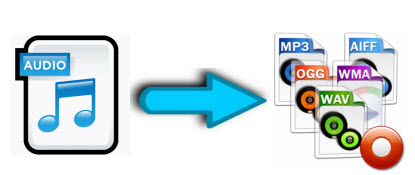
When it comes to audio files, we can talk about formats, extensions and codecs. In summary, we can say that the format refers to the type of file, identified by its extension (* .mp3, * .wav, * .ogg, * .wma etc), which often tells us how it has been encoded or which one is your codec.

For example, a file in the MP3 format has an * .mp3 extension and an MPEG-1 Audio Layer III codec.

Examples of audio file extensions

Normally those endings are mixed. But what is important to know is that, as in videos, files with the same type of extension do not always have the same codec and vice versa.

This information is valid so that you do not feel lost in case you do not understand the reason why a software, which normally plays your * .m4a files, does not play another with the same extension, for example.

Such a situation could indicate that the codecs used are different. In that case, the solution would be to use other software to read the file or to convert it (new encoding). This can be done even in video editors.

The variations of formats and codecs depend on the options of the companies that develop the softwares that execute the files. In these cases, there are many things at stake, such as technical specifications and relations with patents.

On the other hand, files are usually divided into two types: uncompressed or compressed.

Uncompressed files

Audio recording equipment usually offers us options to record files without losing any information. These uncompressed files can be generated in various formats and extensions, such as WAV, AIFF, FLAC and ALAC. For those who are familiar with photography, they are equivalent to RAW or DNG.

As they are usually very heavy, using lossless formats in the final product is only recommended in some cases, such as:

when the final product can be processed by the consumer (files destined for sound banks, for example);
when there will be recording on physical media (CD, DVD and Blue-Ray);
or for the audiophile market (for a matter of perceived value and guarantee of high quality).
But, even if you don’t want to end the process with a WAV (one of the most common), lossless formats can be very useful at the editing stage. Because they contain a lot of information, they withstand more extreme alterations without harming the audio quality.

With plugins, conversions and processing, they can be manipulated more freely, guaranteeing excellent quality, even if a compressed file is subsequently generated.

Compressed files

Most of the equipment available on the market (cameras, cell phones and even audio recorders) usually deliver already compressed files. This type of file is more practical, easier to process, requires less storage space and is very small (in bytes).

Some examples of these formats are: 3GP, AAC, M4A, OGG, WMA and MP3, which is, without a doubt, the best known. Files are like JPEG or GIF in the images field.

Through a complex algorithm, these files are generated seeking to keep only relevant information for our ears. Depending on the compression mode, we can generate an MP3 from a WAV and have a file 10 times smaller, without perceptible alterations in audio quality.

MP3 and Wave size comparison

Speaking of MP3, despite its great popularity, it is currently considered an obsolete format, since others, such as ACC (extension .acc or .m4a), make it possible to obtain smaller files and with higher quality.

Even so, MP3 is still widely used, since a large part of the softwares and equipment were developed for this format. So, to talk about compression rates, we will use it as an example.

Compression rate: what is its relationship to audio quality?
Now that you understand that a file can be compressed and maintain sufficient quality for our ears, you should know that the level of compression can vary greatly.

And it is by the value of the compression rate (or bitrate) that we manage to control the file size and, therefore, the audio quality.

For example, a 320 kbps (kilobits per second) MP3 may sound as good as uncompressed audio from a CD or DVD. As the bitrate value decreases, the file size decreases, but the sound losses become noticeable, depending on the audio.

To get a feel for how this rate affects sound quality, take a look at the following references:

320 kbps – audio that doesn’t differ from the quality of a CD;
192 kbps – no significant loss for most people;
128 kbps – slightly noticeable losses;
96 kbps – quality similar to FM radio;
32 kbps – similar to AM radio;
16 kbps – similar to short-wave radio (“walkie-talkie”).
We remind you that the values ​​and descriptions above are only an approximation, since the compression of the file behaves differently in each type of audio. The more perceptible information (or the more complex the audio in question), the more room there will be for compression to affect quality.

That is why for a podcast without a soundtrack it may not be a problem to generate a file of just 64 kbps, mono, with a single audio signal, playing simultaneously on the left (L) and right (R) channels. .

However, a well-produced studio song, played with several different instruments, can suffer noticeable losses, even if the compressed file is 128 kpbs, stereo, with a different signal for each box, right and left.

Here we are talking about fixed compression rates (CBR – constant bitrate), but there is also the possibility of generating files with variable rates, such as the calls VBR (variable bitrate) or ABR (average bitrate).

In VBR, the algorithm analyzes the audio and decides where it can compress the audio more aggressively and where it should collect less information. The ABR acts in a similar way, but remains at the average of the previously stipulated rate. These two methods, despite being smarter, can cause incompatibility with some sound players.

When we talk about compression vs. audio quality, remember that there are no rules: each case is different and it is necessary to evaluate them individually to know to what extent the losses are acceptable, or when it is worth giving up on quality in favor of ease of use (faster download or less storage impact, for example).

Remember that some websites and services recode the audio after uploading it. Since we cannot control this process, it may be a good idea to send files with a little more quality than necessary, to have a margin of safety in case of new conversions.

Amplitude resolution: 16 bit or 24 bit?

If you are going to use a sound card / interface or a recorder, you will be presented with options of bit depth values. This is related to the PCM digital audio pattern and does not apply to compressed files.
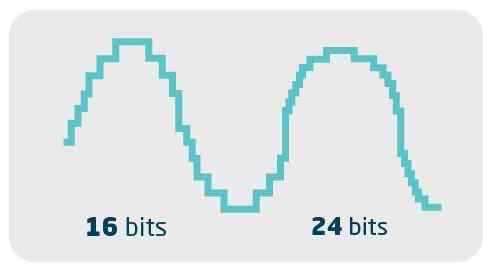

The values ​​refer to the signal-to-noise ratio. In other words, it has to do with the dynamics or volume levels that the file manages to record with quality.

It is as if it were a resolution of the amplitude of the sound. Thus, in theory, a 16-bit audio manages to represent 65,536 volume levels between the lowest and highest value on the scale. While in 24 bits, there are 16.7 million gradations.

Despite the large numerical difference, in practice, it is not a noticeable variation to our ears. But, there is a technical difference that can, in some cases, give the 24-bit file an advantage when fetching and editing.

We know that we must be careful with the input level when recording, so that the audio does not “explode” (generating clipping). This is what happens when we let the graphic meter go up a lot, going beyond 0 dB (maximum value before there is digital saturation / distortion). For this reason, a certain margin of safety, called “headroom”, must be respected.

In 16 bits, in addition to being careful, we also recommend paying attention so that the input level is not kept too low.

The reason for that is that, since there is not enough resolution to accurately record extremely weak signals, sounds can appear digitally distorted or be full of noise, through a process called dithering, which attempts to disguise quantization faults.

In this way, since the 16-bit file registers fewer gradations of volume (48 dB less compared to the 24-bit), theoretically you run the risk that, when you increase the volume in the software, you come across a higher dose of “shrieking”. In 24-bit, technically, there is no such risk.