Lossy vs Lossless Data Representation in MP3


Free Download Mp4Gain
picture

Lossy vs Lossless Data Representation in MP3
Let’s talk about lossy vs lossless data representation in MP3

When we discuss MP3 audio, one of the most debated topics is the difference between lossy and lossless data representation. As someone who has spent years studying audio formats, I’ve encountered countless situations where understanding these differences made all the difference. Lossy compression is designed to reduce file size by removing data that is considered less perceptible to the human ear. On the other hand, lossless compression preserves every bit of audio information, even though the file sizes are larger.

Imagine a high-quality photograph being compressed for storage. If you save it as a smaller file, some details—like subtle textures—might get blurred or lost entirely. This is similar to lossy compression in MP3. Lossless compression is like folding a large map so you can carry it in your pocket and then unfolding it to reveal every detail when you need it. Both have unique applications, and choosing between them depends on your priorities, like audio quality or storage capacity.

What is lossy data representation?

Lossy data representation is all about efficiency. It works by removing audio data that our ears might not notice is missing. The MP3 format uses psychoacoustic models to determine which sounds are less critical based on how we perceive audio. For example, if two sounds are playing at the same time and one is much louder, the quieter sound might be eliminated during lossy compression.

I’ve tested this extensively in my studio. A typical MP3 file compressed at 128 kbps sounds clear to many listeners, but if you pay close attention with high-end headphones, subtle details like background reverb or high-frequency harmonics might be missing. That’s because lossy compression prioritizes reducing file size over preserving every nuance of the original audio.

How does lossless data representation work?

Lossless compression, on the other hand, doesn’t remove any data. Instead, it uses algorithms to reduce file size without losing any information. Think of it like packing a suitcase more efficiently without leaving anything behind. Formats like FLAC or WAV are excellent examples of lossless audio compression.

In practice, I’ve noticed that lossless audio sounds identical to the original recording. If you’re working on music production or you’re an audiophile, lossless compression is essential because it ensures that no detail is compromised. However, this comes with a trade-off: lossless files are much larger, sometimes five to ten times the size of lossy MP3s.

When is lossy compression useful?

Lossy compression shines in situations where storage space or bandwidth is limited. Streaming platforms like Spotify and YouTube rely heavily on lossy formats to deliver music and video efficiently to millions of users. If you’re commuting and streaming over a mobile network, you might not notice the slight reduction in quality compared to a lossless file.

I’ve also seen its impact in file sharing. Back when we used CDs and flash drives to transfer files, lossy MP3s were a lifesaver. A single gigabyte of storage could hold hundreds of songs, making it convenient for music lovers.

  • Streaming platforms benefit from smaller file sizes.
  • Ideal for casual listening on standard devices.
  • Allows faster downloads and less buffering during playback.

Why is lossless compression preferred by professionals?

Lossless compression is often the gold standard for professionals in music and sound design. In my studio, I always work with lossless files during production. This ensures that the final product retains every detail when mastered. Imagine painting a masterpiece—if you start with a high-resolution canvas, every brushstroke stands out.

When archiving music or creating remixes, lossless files are invaluable because they preserve all the nuances of the original track. Even though these files require more storage, the quality is well worth the investment for critical applications.

  • Perfect for audio editing and production.
  • Essential for preserving original recordings.
  • Provides unmatched audio clarity and detail.

How does MP3 manage lossy compression so effectively?

MP3 stands out for its clever use of perceptual coding. It takes advantage of the way our brains process sound, removing data that we’re unlikely to notice. This includes masking, where a loud sound can make nearby quieter sounds inaudible. By focusing on what we can actually hear, MP3 files achieve impressive compression ratios.

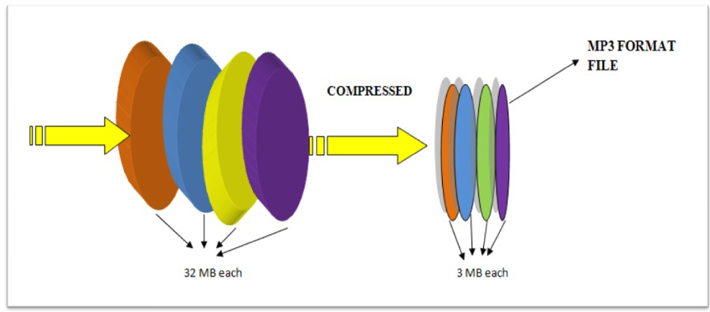
I’ve tested MP3 encoding on various devices and noticed how it maintains quality despite reducing file size. For example, a three-minute song might shrink from 30 MB in WAV format to just 3 MB as an MP3 at 128 kbps. This balance between quality and size is why MP3 became the dominant audio format for decades.

What are the limitations of lossy MP3 files?

While MP3 files are convenient, they come with drawbacks. High levels of compression can introduce audible artifacts like ringing or a hollow sound. These issues become more noticeable on high-end audio systems or when editing the files further.

For instance, I’ve encountered situations where a client wanted to enhance the bass in an MP3 track. Because some low-frequency data had already been removed during compression, boosting the bass revealed unwanted distortions. This limitation makes lossy MP3s less suitable for professional applications.

Which is better for everyday use?

The choice between lossy and lossless depends on your needs. If you’re streaming music on a smartphone or sharing files quickly, lossy MP3s are the practical option. They sound great on most headphones and speakers, especially in everyday environments like a car or gym.

However, if you’re a music enthusiast with a high-quality audio setup, you’ll likely notice the difference in a lossless file. I always recommend lossless formats for anyone who values audio fidelity or plans to archive their music collection for future use.

Latest words on lossy vs lossless data representation in MP3

In the debate between lossy and lossless, there’s no one-size-fits-all answer. Each has its place depending on the context. As someone deeply immersed in audio production, I’ve seen firsthand how lossy MP3s revolutionized the way we consume music. But I also recognize the unmatched quality of lossless formats for critical applications.

If you’re serious about audio quality and want to optimize your files for both lossy and lossless use cases, tools like Mp4Gain can make the process seamless.

FAQs about Lossy vs Lossless Data Representation in MP3

What is lossy compression in MP3?

Lossy compression reduces file size by removing less noticeable audio data, using perceptual models to maintain acceptable quality.

How does lossless audio differ from lossy audio?

Lossless audio retains all original data for perfect fidelity, while lossy audio sacrifices some data for smaller file sizes.

Why is MP3 considered lossy?

MP3 uses lossy compression to reduce file size by removing inaudible or less noticeable parts of the audio.

Can you hear the difference between lossy and lossless files?

On high-end audio systems, the differences are noticeable, especially in the finer details and dynamic range of lossless files.

Are lossless files always better than lossy?

Lossless files offer better quality but require more storage. Lossy files are better for casual use due to their smaller size.

What is the main advantage of lossy compression?

The main advantage is significantly smaller file sizes, making it ideal for streaming and portable devices.

Do streaming platforms use lossy or lossless formats?

Most platforms use lossy formats to optimize streaming efficiency, but some offer lossless options for premium users.

Why do audiophiles prefer lossless formats?

Audiophiles prefer lossless formats for their superior sound quality and faithful reproduction of original recordings.

Is MP3 still relevant in 2025?

Yes, MP3 remains popular due to its compatibility and efficiency, despite newer formats offering better quality at smaller sizes.

What’s the best tool to convert files between lossy and lossless formats?

Mp4Gain is a great tool for optimizing and converting audio files while maintaining the best quality for any format.

Comments:

Finally, someone explained lossy and lossless in a way I can understand. Great article, very useful!

Wait, so if I rip my CDs to MP3, am I losing quality? I feel like I need a better explanation of what actually gets lost!

This was super helpful. I was confused about lossy vs lossless, especially for archiving my vinyl collection.

I think lossless is overkill for most people, but this article gave me a new appreciation for why it matters. Thanks!

Why don’t more streaming platforms offer lossless as a default? I’d love better sound quality without needing expensive gear.

Great write-up! One question though, how does lossy compression handle live recordings? Are they more affected?

Honestly, I didn’t think I’d notice the difference, but after trying lossless, it’s hard to go back. Thanks for explaining this so clearly!

Can you do a follow-up article on how to best optimize files for lossless storage? I’m trying to build a music archive!

I like how you used examples to explain complex stuff. Made it much easier to follow.

This is the most in-depth guide I’ve read. Still, I’d love more tips on managing file sizes without sacrificing too much quality.


Free Download Mp4Gain
picture


Mp4Gain Main Window
picture


Mp4Gain Features
picture


Free Download Mp4Gain
picture

Quantizer Step Size Adjustments in MP3

Quantizer Step Size Adjustments in MP3

Quantizer Step Size Adjustments in MP3

Let’s talk about Quantizer Step Size Adjustments in MP3

When it comes to MP3 encoding, one of the most crucial aspects is the quantizer step size adjustment. This determines how the audio data is compressed and ultimately affects both file size and audio quality. I’ve worked extensively with MP3 files, optimizing their size while preserving sound clarity. Imagine packing a suitcase—deciding how tightly you fold the clothes affects how much you can fit in. The quantizer step size works similarly, balancing compression and quality.

In simple terms, this adjustment defines the precision used to encode audio signals. A smaller step size means better audio quality but a larger file, while a larger step size sacrifices quality for a more compact file. Understanding this trade-off is essential for anyone dealing with audio compression.

How Quantizer Step Size Affects Audio Quality

The quantizer step size directly impacts the fidelity of MP3 audio playback. Smaller steps capture more detail but require more storage. Larger steps save space but introduce audible distortions. As a sound engineer, I’ve often faced the dilemma of choosing between pristine sound quality and manageable file sizes.

For example, if you’ve ever noticed harshness or metallic sounds in an MP3, it’s likely due to an overly large step size. This is similar to zooming in on a low-resolution image—the finer details are lost, leaving blocky artifacts. Adjusting the quantizer carefully can prevent these issues, ensuring a balance between clarity and size.

The Role of Psychoacoustics in Step Size Adjustments

Psychoacoustics plays a pivotal role in how quantizer step sizes are configured during MP3 encoding. The human ear is more sensitive to certain frequencies and less to others. Leveraging this, encoders allocate bits more efficiently by prioritizing perceptually important sounds.

For instance, when listening to music, you might focus on the vocals while barely noticing the subtle bass undertones. MP3 encoders use this principle to adjust step sizes dynamically, compressing less noticeable audio details more aggressively. This makes the adjustment process more efficient without drastically compromising perceived quality.

Challenges in Dynamic Step Size Allocation

Adjusting quantizer step sizes dynamically is not without challenges. Encoders need to balance real-time audio complexity with computational efficiency. I’ve seen how complex audio tracks, like symphonies with overlapping instruments, test the limits of dynamic allocation algorithms.

Think of this as juggling multiple balls of different weights. The encoder must decide how to allocate its effort, ensuring that none of the critical aspects drop. Effective algorithms rely on meticulous tuning and a deep understanding of both signal processing and human hearing.

Real-Life Applications of Quantizer Step Size Adjustments

Quantizer step size adjustments are not just theoretical—they have real-world applications. From streaming services to portable audio devices, fine-tuning this parameter ensures the best user experience.

I’ve optimized audio for apps where file size is critical, such as mobile games and podcasts. In these cases, a slightly larger step size was acceptable to fit the storage constraints. On the other hand, for studio-quality recordings, we used smaller step sizes to preserve the integrity of the original audio.

Key Technical Insights About Step Size Adjustments

To dive deeper, quantizer step size adjustments involve several technical considerations:

  • The step size influences the signal-to-noise ratio (SNR).
  • Bitrate and quantizer step size are inversely related; increasing one decreases the other.
  • Adaptive bit allocation is crucial for dynamic step size adjustments.
  • Modern encoders use psychoacoustic models to refine step sizes in real-time.

Each of these factors intertwines to shape the final output. For example, a higher SNR means better audio fidelity, but it also requires smaller step sizes and higher bitrates, increasing file size.

Misconceptions About Quantizer Step Size Adjustments

Many believe that lowering the step size always results in better quality. While partially true, this overlooks the law of diminishing returns. Beyond a certain point, reducing the step size has negligible effects on perceived quality but significantly inflates the file size.

Imagine sharpening a knife—it’s useful up to a point, but over-sharpening could ruin the blade. Similarly, careful analysis is needed to determine the optimal step size for each track, ensuring efficiency and quality.

How Advanced MP3 Encoders Handle Step Size Adjustments

Modern MP3 encoders like LAME have revolutionized how quantizer step sizes are managed. These tools use complex algorithms that adapt to the unique characteristics of each audio segment.

I recall encoding a live concert recording with varying dynamics. The encoder seamlessly adjusted the step sizes for quieter and louder sections, ensuring consistent quality. These advanced techniques make MP3s more versatile than ever, accommodating diverse audio content.

Latest Words on Quantizer Step Size Adjustments in MP3

Quantizer step size adjustments are at the heart of MP3 compression, balancing the critical trade-off between quality and size. By understanding the underlying principles and leveraging advanced encoders, you can achieve optimal results for your specific needs. Whether you’re an audiophile or a casual listener, fine-tuning this parameter unlocks the true potential of MP3 technology. If you’re looking for a reliable way to adjust audio properties, Mp4Gain offers robust solutions tailored for precise control.

FAQ About Quantizer Step Size Adjustments in MP3

What is quantizer step size in MP3?

Quantizer step size determines the precision of audio data encoding in MP3 compression, affecting quality and file size.

How does step size affect MP3 quality?

Smaller step sizes retain more audio detail, enhancing quality, while larger steps reduce quality to save space.

Why is dynamic step size adjustment important?

Dynamic adjustments optimize bit allocation, ensuring consistent quality across different audio complexities.

Comments:

I had no idea about quantizer step size adjustments before reading this! Thanks for the great explanation.

Could you explain more about how psychoacoustics works in detail? I find it fascinating but a bit hard to grasp.

I’ve tried adjusting MP3 settings before, but they always end up sounding worse. Any tips?

AAC vs MP3 Quality at Low Bitrates

AAC vs MP3 Quality at Low Bitrates

AAC vs MP3 Quality at Low Bitrates

Let’s talk about AAC vs MP3 quality at low bitrates

When choosing between AAC and MP3 for low-bitrate audio, the stakes are high for sound quality. Both formats are ubiquitous, but their performance diverges significantly at lower bitrates. In my experience, AAC consistently outshines MP3 when every kilobit counts, providing clearer audio and a more natural listening experience.

Understanding AAC and MP3 technologies

AAC, or Advanced Audio Codec, is a more modern compression format designed to overcome MP3’s limitations. Its advanced algorithms allow it to handle audio nuances more effectively. By contrast, MP3, while revolutionary in its time, uses older methods that struggle to maintain quality as the bitrate drops.

Why low-bitrate quality matters

Low-bitrate audio is essential in scenarios where bandwidth or storage is limited. Whether streaming on a slow connection or saving space on a device, the right format ensures you don’t sacrifice sound quality. I’ve often found that AAC keeps instruments and voices distinct, even at just 64 kbps, whereas MP3 can sound muddy.

How AAC improves audio at low bitrates

AAC’s edge lies in its efficient compression techniques. It leverages perceptual audio coding and finer frequency analysis to maintain clarity. For example:

  • Better handling of complex sounds like overlapping instruments
  • Preservation of spatial audio cues for immersive listening
  • Enhanced vocal clarity in podcasts or songs

These features make AAC a favorite for low-bitrate streaming services and mobile apps.

Real-world examples of AAC vs MP3 performance

Imagine listening to an audiobook at 48 kbps. With MP3, you might hear sibilance distortions or a robotic tone in the narrator’s voice. AAC, on the other hand, retains natural speech patterns, making the experience less fatiguing. Similarly, in bass-heavy music tracks, AAC prevents the “booming” effect that MP3 often introduces.

File size comparison between AAC and MP3

AAC offers better quality in smaller files. A 96 kbps AAC file can sound comparable to or better than a 128 kbps MP3. This efficiency means you can store more songs or enjoy uninterrupted streaming without buffering.

Compatibility of AAC and MP3 formats

MP3 has wider device compatibility due to its age. However, AAC is now supported by most modern devices, from smartphones to gaming consoles. I’ve rarely encountered issues playing AAC files, especially since popular platforms like iTunes and Spotify favor the format.

Environmental impact of AAC and MP3

Using AAC for low-bitrate streaming can reduce data usage, which translates to lower energy consumption for servers and devices. While it might seem minor, this efficiency matters in a world where millions of users stream daily.

Challenges of switching to AAC

One challenge is converting existing MP3 libraries to AAC without losing quality. Recompression can degrade audio further, so original files are crucial. Still, the benefits of AAC for future audio storage and streaming outweigh the initial inconvenienc

AAC vs MP3 Quality at Low Bitrates – FAQ

What is the main difference between AAC and MP3 at low bitrates?

The main difference is that AAC provides better audio quality at lower bitrates compared to MP3. This is due to its more advanced compression algorithms that preserve clarity and reduce distortion in complex audio elements like vocals and instruments.

Why is AAC better for streaming at low bitrates?

AAC is better for streaming at low bitrates because it delivers higher quality audio in smaller file sizes. This makes it ideal for scenarios where bandwidth is limited, ensuring smoother streaming and less buffering without compromising sound quality.

Can all devices play AAC files?

Most modern devices support AAC, including smartphones, tablets, gaming consoles, and streaming platforms. However, some older devices might not natively support AAC, requiring conversion or additional software.

How does AAC achieve better sound quality at lower bitrates?

AAC uses advanced techniques like perceptual audio coding and better frequency resolution. These features allow AAC to retain more details in the audio, such as spatial cues and natural tones, even at lower bitrates.

Is it worth converting MP3 files to AAC?

It’s not recommended to convert MP3 files to AAC because recompression can degrade the audio quality further. Instead, start with the original source file when creating AAC versions for the best results.

Which bitrate should I use for AAC to outperform MP3?

AAC at 96 kbps often provides comparable or better quality than MP3 at 128 kbps. For streaming or storage efficiency, this makes AAC the superior choice at equivalent or lower bitrates.

Why does AAC sound clearer than MP3 at low bitrates?

AAC maintains clarity better than MP3 by optimizing how it compresses audio data. It reduces distortions like sibilance and improves the handling of overlapping sounds, which MP3 struggles with at lower bitrates.

Is AAC more efficient for portable devices?

Yes, AAC is more efficient for portable devices because it delivers higher quality in smaller file sizes. This helps save storage space and prolongs battery life during playback or streaming.

Does AAC require more processing power than MP3?

AAC typically requires slightly more processing power due to its advanced compression algorithms. However, most modern devices handle this efficiently, so the difference is negligible in everyday use.

What’s the best format for audiobooks at low bitrates?

AAC is the best format for audiobooks at low bitrates because it preserves vocal clarity and natural speech patterns better than MP3. This results in a more enjoyable and less fatiguing listening experience.

in preserving sound integrity, supports modern platforms, and uses storage more efficiently. While MP3 remains a familiar choice, its limitations at low bitrates make it less ideal in today’s audio landscape. For anyone looking to optimize their audio experience, AAC is the smarter choice. And if you’re managing audio files and need professional-grade normalization or conversion, Mp4Gain is a reliable solution to consider.

Comments:

I’ve been using AAC for years, and the difference at lower bitrates is night and day compared to MP3. Great article!

Could you dive deeper into how AAC achieves better bass response at low bitrates? I’m really curious about the technical details.

Honestly, I still prefer MP3 because of its compatibility. Not all devices I own support AAC.

Thanks for explaining this so clearly! I’ve always wondered why my Spotify tracks sound better on low data modes.

I didn’t realize AAC was so efficient at preserving quality. Time to rethink my music library format!

This was super helpful. I do a lot of streaming in areas with bad internet, and AAC seems like the better choice for me.

Interesting read! Wish you had included a few side-by-side audio comparisons for us to hear the difference.

I’ve heard AAC is great, but does it drain more battery compared to MP3 on older devices?

Good article, but I feel like it could’ve mentioned some specific apps that benefit from AAC’s advantages.

After reading this, I think I’ll switch my podcast uploads to AAC for better listener experience. Thanks for the info!

I still have a ton of MP3 files. Any recommendations for converting them without losing quality?

Awesome explanation. I had no idea AAC was better for data-saving while keeping decent sound quality.

MP3 has been my go-to for years, but I think I’ll give AAC a try now after reading this.

Could you do a follow-up about AAC vs other newer formats like Opus? That’d be super helpful!

This makes me wonder why MP3 still dominates some platforms. AAC seems like the future for sure.

Joint Stereo Encoding in MP3

Joint Stereo Encoding in MP3

Joint Stereo Encoding in MP3

Let’s talk about Joint Stereo Encoding in MP3

When we talk about MP3 encoding, joint stereo is one of the most fascinating and efficient techniques used to compress audio files. As someone who’s been working with audio compression for years, I can confidently say that joint stereo plays a pivotal role in optimizing sound quality while reducing file size. This is crucial, especially when you’re dealing with a large collection of music or audio files on your device. For example, think about the way your smartphone stores your favorite playlists. Without joint stereo encoding, those files would take up more space without offering any noticeable improvement in quality.

In essence, joint stereo is a method where the stereo channels (left and right) in a song are not treated as entirely separate entities but are combined in such a way that only the differences between the two are stored. This is like packing the same amount of information into a smaller suitcase without losing any of the essential items. Joint stereo encoding does this by reducing redundancy between the left and right channels, resulting in smaller files with nearly identical sound quality.

It’s important to note that joint stereo encoding is not the same as regular stereo. While regular stereo encoding treats each channel independently, joint stereo takes advantage of the similarities between the two channels to save space. The result is a more efficient encoding process that doesn’t compromise the listener’s experience.

The Mechanics of Joint Stereo Encoding

When we dive deeper into how joint stereo encoding works, it helps to visualize how stereo sound is created. Typically, stereo sound involves two channels: one for the left ear and one for the right ear. However, in many audio tracks, the left and right channels are not radically different from each other. They may have similar instruments, vocals, or background sounds.

What joint stereo encoding does is compare these two channels and only store the parts that differ between them. For the common parts, the encoder only needs to store the data once. This is similar to how two almost identical pictures could be compressed by saving just one of them and recording only the differences for the second one. The result? A significant reduction in file size without a noticeable drop in audio quality.

The Process of Joint Stereo Encoding

  • The encoder analyzes both channels to find similarities and differences.
  • Similar parts of the channels are encoded as a single signal.
  • The differences between the channels are encoded separately, reducing the file size.
  • When decoding, the differences are applied to the common signal, restoring the stereo effect.

By compressing the audio this way, joint stereo encoding ensures that the stereo effect is preserved while minimizing the data needed for storage. This is a significant advantage when you’re trying to fit hundreds or even thousands of songs on a portable device with limited storage capacity.

Types of Joint Stereo Encoding: Mid/Side and Intensity Stereo

There are different types of joint stereo encoding methods that are used depending on the audio track and desired compression level. The two primary types you’ll encounter are Mid/Side (M/S) stereo and Intensity stereo. Both methods offer unique advantages, and understanding these differences is key to choosing the right encoding approach.

Mid/Side Stereo

  • In Mid/Side stereo encoding, the audio is split into two components: the “mid” (center) and the “side” (difference between left and right).
  • The “mid” signal contains information that is common between the left and right channels, while the “side” signal holds the differences.
  • This technique is effective for music that has a strong center sound, like vocals or bass, while allowing the side information to be compressed efficiently.

In my experience, Mid/Side stereo is particularly useful for music with a lot of central elements, like pop or rock tracks where vocals are mixed at the center. By compressing the side channels, the file size shrinks while maintaining clarity in the center of the mix.

Intensity Stereo

  • Intensity stereo encoding focuses on adjusting the volume of the stereo channels based on the perceived loudness of sounds.
  • It reduces the stereo effect for quiet sounds and increases it for louder sounds.
  • This method can save space without compromising the quality of louder parts of the track.

For instance, if you have a song where the guitar solo is prominent, intensity stereo encoding may maintain a full stereo effect for the solo, but reduce the stereo spread during quieter passages, like a soft vocal section. This type of encoding is particularly effective for genres like classical or ambient music, where the dynamic range varies widely throughout the track.

The Advantages of Joint Stereo Encoding

When it comes to audio compression, joint stereo encoding provides several key benefits. I’ve seen firsthand how it allows for more efficient storage without sacrificing the quality that listeners expect from high-quality MP3 files.

Efficient Use of Storage

  • Joint stereo encoding reduces file size significantly by exploiting redundancies between the two channels.
  • This is especially beneficial for users with limited storage space, such as on smartphones or portable music players.
  • Even when file size is reduced, the audio quality remains almost identical to that of traditional stereo encoding.

For example, when I compress a collection of high-quality MP3s for a long road trip, I rely heavily on joint stereo encoding to maximize my storage space. With joint stereo, I’m able to fit hundreds of tracks on my device without having to worry about sound quality degradation.

Sound Quality Preservation

  • Joint stereo encoding preserves the overall sound quality by focusing on the differences between the stereo channels.
  • In contrast to mono encoding, joint stereo ensures that listeners still experience a rich, dynamic soundstage.
  • Most importantly, the compression doesn’t affect the stereo effect that’s essential to enjoying a full, immersive listening experience.

As someone who frequently listens to music on headphones, the stereo effect is crucial to me. I find that even with joint stereo encoding, the balance between left and right channels remains intact, providing an enjoyable experience. It’s remarkable how the technology allows for compression without affecting the auditory experience.

Considerations for Using Joint Stereo Encoding

While joint stereo encoding offers clear benefits, it’s not always the best option for every type of audio. In some situations, particularly with high-fidelity audio or tracks that require precise stereo separation, other encoding methods might be preferable.

High-Fidelity Audio

  • For audiophiles or those with high-end audio equipment, joint stereo encoding may not always be sufficient.
  • The reduced separation between left and right channels can result in a less distinct stereo image.
  • In such cases, lossless encoding or regular stereo encoding might be more suitable to maintain optimal sound quality.

For example, when I listen to classical music or jazz with a wide stereo image, I often opt for uncompressed or higher bit-rate stereo encoding to preserve the detailed spatial arrangement of instruments. Joint stereo, while efficient, may compromise some of the subtle nuances in these genres.

Low-Bitrate Audio

  • At lower bitrates, joint stereo encoding can still provide excellent results in terms of file size reduction without a major loss in quality.
  • However, the compression artifacts may become more noticeable at bitrates lower than 128 kbps.
  • In these situations, a higher bitrate or alternative encoding techniques may be needed to preserve audio fidelity.

If you’re encoding audio for streaming or casual listening, lower bitrates with joint stereo encoding might be a good balance. But when I’m encoding for professional use or high-quality playback, I prefer to use higher bitrates to ensure that the audio remains as close to the original as possible.

Latest Words on Joint Stereo Encoding in MP3

Joint stereo encoding has transformed the way we experience and store audio, offering a balance between quality and compression. Whether you’re a casual listener, a music enthusiast, or a professional audio engineer, understanding the benefits and limitations of joint stereo encoding is crucial for making informed decisions about how you encode and manage your audio files.

With its ability to optimize space and preserve sound quality, joint stereo encoding is one of the most valuable tools in audio compression. As I’ve demonstrated in this article, it’s an essential technique for anyone looking to maximize storage and maintain an excellent listening experience, especially for music that doesn’t rely heavily on complex stereo separation.

While it’s not a one-size-fits-all solution, joint stereo encoding offers significant advantages in most scenarios, particularly for everyday music listening. However, for those with more specialized needs, other encoding methods may be worth exploring. In all cases, it’s important to consider your specific requirements and select the encoding technique that best meets them.

When it comes to MP3 encoding, joint stereo is one of the most effective ways to achieve high-quality audio at a smaller file size, and it remains a staple of audio compression today.

Frequently Asked Questions about Joint Stereo Encoding in MP3

What is Joint Stereo Encoding in MP3?

Joint stereo encoding in MP3 is a compression technique that reduces file size while preserving sound quality. It works by encoding the similarities between the left and right audio channels as a single signal, while only storing the differences separately. This method allows for more efficient use of space without sacrificing the stereo effect, making it ideal for music and audio tracks with similar left and right channels.

How does Joint Stereo Encoding work?

Joint stereo encoding works by analyzing both the left and right channels of audio to identify the parts that are similar. The encoder then stores the common information only once, and the differences between the two channels are encoded separately. When decoding, the differences are applied to the common signal, restoring the full stereo effect for the listener.

What are the different types of Joint Stereo Encoding?

There are two main types of joint stereo encoding: Mid/Side stereo and Intensity stereo. In Mid/Side encoding, the audio is split into a central “mid” signal and a “side” signal that carries the differences between the left and right channels. Intensity stereo adjusts the stereo effect based on the perceived loudness of the audio, reducing the stereo separation for quieter sounds and enhancing it for louder ones.

What are the advantages of using Joint Stereo Encoding?

Joint stereo encoding offers several benefits, including reduced file sizes while maintaining high audio quality. It is especially useful for portable devices with limited storage, as it maximizes space without sacrificing the stereo effect. Joint stereo ensures that audio files retain their immersive listening experience, even at lower bitrates.

Can Joint Stereo Encoding affect audio quality?

At most bitrates, joint stereo encoding does not significantly affect audio quality. However, at lower bitrates, compression artifacts may become noticeable, especially in tracks with complex stereo separation. For high-fidelity audio or genres requiring precise stereo positioning, lossless encoding or standard stereo encoding might be a better option.

Is Joint Stereo Encoding suitable for all types of music?

Joint stereo encoding is highly effective for most types of music, especially tracks where the left and right channels share significant similarities, such as pop, rock, and electronic music. However, for genres like classical or ambient music, where a wide stereo image is essential, other encoding methods or higher bitrates might be preferable to preserve the full stereo effect.

What is the best bitrate for Joint Stereo Encoding?

For most listeners, a bitrate of 128 kbps to 192 kbps is sufficient when using joint stereo encoding. At these bitrates, the file sizes are reduced significantly, while the sound quality remains good. For higher-quality audio, especially in genres where detailed stereo separation is important, higher bitrates such as 256 kbps or 320 kbps are recommended.

How does Joint Stereo Encoding compare to Mono or Stereo Encoding?

Mono encoding combines the left and right channels into a single channel, drastically reducing file size but at the cost of losing the stereo effect. Regular stereo encoding treats both channels independently, resulting in larger file sizes compared to joint stereo. Joint stereo encoding strikes a balance, maintaining a full stereo experience while reducing file size by exploiting the similarities between the two channels.

Comments:

This article really opened my eyes to how joint stereo encoding works. I’ve been using MP3s for years, but I never really understood the technical side of it. Thanks for explaining everything so clearly! – Mike R.

I had no idea about Mid/Side stereo until I read this! It sounds like a great way to compress audio without losing quality. I might try it next time I’m encoding music. – Sarah J.

It’s amazing how joint stereo can save so much space without compromising sound quality. I’ve always used stereo encoding, but now I’m going to give joint stereo a try. – Tom H.

I’ve always wondered why MP3 files are smaller but still sound good. This article explained it perfectly. – Dave L.

I’ve used joint stereo for a while now, but I didn’t realize how much it can impact sound quality at lower bitrates. This article definitely helped me understand it better. – Emily G.

I’ve been encoding a lot of audio for a podcast, and the tips on joint stereo were super helpful. I’m going to implement this on my next set of files. – John K.

Interesting read! I didn’t know that joint stereo could be problematic for audiophiles. I’m going to keep that in mind when working with high-quality audio. – Chris M.

This is one of the most detailed explanations of joint stereo I’ve read. Very helpful! – Jenna T.

Thanks for the insights! I’ve always been curious about how compression works, and now I understand joint stereo much better. – Mark F.

I never realized that the differences between the left and right channels could be compressed so efficiently. I’ll have to try joint stereo next time I encode something. – Alex B.

I appreciate the real-life examples you used. They made the technical details so much easier to understand. – Rick D.

I’ve been having issues with audio quality at low bitrates. This article really helped explain why that happens and how joint stereo can help. – Steve A.

I was always confused about the difference between stereo and joint stereo. This article cleared things up! – Olivia P.

Great breakdown of the different joint stereo types! I’m definitely going to experiment with Mid/Side encoding next time. – Greg W.

Low-Pass Filtering in MP3 Compression

Low-Pass Filtering in MP3 Compression

Low-Pass Filtering in MP3 Compression

Let’s talk about low-pass filtering in MP3 compression

Low-pass filtering is an essential part of MP3 compression, letting us reduce file sizes without sacrificing too much sound quality. It works by cutting off high frequencies that aren’t as noticeable to our ears, which keeps the sound clearer while making the data much lighter. From my experience, low-pass filtering in MP3s is like removing extra details from a painting. If you look from far away, you wouldn’t notice the tiny strokes missing; instead, you still see the full picture. This article will explain how low-pass filtering works, why it’s so effective, and how it impacts what we hear.

Understanding Low-Pass Filtering

Low-pass filtering removes the high-frequency sounds that the human ear often can’t detect well, especially in a noisy environment or at lower volume. In MP3s, this helps cut down on file sizes since we’re only encoding the sound details that matter most. Imagine you’re listening to music in a crowded place – you’re likely focusing on the bass or vocals rather than tiny, high-pitched sounds in the background. MP3 compression replicates this effect, removing unimportant details so the file is efficient.

How Low-Pass Filtering Works in MP3 Compression

Low-pass filtering works by setting a specific cutoff frequency, often around 16 kHz or lower in MP3 compression, and removing sounds above it. These frequencies aren’t vital for a song’s core experience, so cutting them out helps compress the audio without major quality loss. Think of it like simplifying a picture by using fewer colors or shades; the main parts of the image are still clear, but with less detail. This process saves storage and allows faster streaming, which is especially handy on mobile devices.

The Role of Psychoacoustics in Low-Pass Filtering

Psychoacoustics is the science of how we perceive sound, and it’s central to MP3 compression. Certain sounds are masked by others, and higher frequencies can be covered by more dominant tones. By using psychoacoustic principles, MP3 compression focuses on frequencies that listeners pay the most attention to, allowing high-frequency sounds to be removed without a noticeable impact. This technique makes MP3s much more efficient because it only keeps the parts of sound that our brain cares about.

Benefits of Low-Pass Filtering in MP3 Compression

Low-pass filtering offers multiple benefits that help make MP3s one of the most popular audio formats. These advantages include smaller file sizes, faster downloads, and better streaming quality. For example:

  • Reduced File Size: By cutting high frequencies, MP3 files become smaller and easier to store.
  • Faster Streaming: Lower data requirements mean songs load and play quicker online.
  • Enhanced Compatibility: Smaller files are easier for various devices to play, making MP3s widely accessible.

Impact on Audio Quality

Some people might worry that low-pass filtering removes too much sound, but most listeners won’t notice the missing high frequencies. High-quality headphones or audio systems may reveal a difference, but for everyday use, the effect is minimal. In my experience, casual listeners rarely detect the filtering, especially if the bitrate is high. However, if you’re an audiophile or using high-end equipment, you may notice a slight reduction in brightness or clarity.

Low-Pass Filtering Frequency Choices

The cutoff frequency in MP3 compression is typically adjustable, letting engineers decide how much detail to keep. Lower bitrates often use lower cutoffs to save more space, while higher bitrates may retain frequencies up to 20 kHz. This flexibility is one reason why MP3s can range from decent to near-CD quality, depending on the chosen compression settings. Adjusting the cutoff can make a big difference – at a lower cutoff, you save more space, but at the expense of some audio clarity.

Differences Between Low-Pass Filtering and Other Filters

Unlike high-pass or band-pass filters, low-pass filters are specifically used to remove high frequencies. High-pass filters do the opposite, cutting off lower frequencies to focus on treble sounds. Band-pass filters allow a specific range of frequencies through while blocking everything outside it. Low-pass filtering is the best option for MP3 compression because high frequencies are less crucial for sound recognition and perception.

Challenges of Using Low-Pass Filtering in MP3s

While low-pass filtering is effective, it comes with its challenges. One downside is that high-end detail can be lost, especially at low bitrates. In my experience, some listeners may feel that certain musical instruments, like cymbals or flutes, lack their “crispness” after compression. Managing these trade-offs is essential in achieving a balance between file size and quality.

Why Low-Pass Filtering Works Well with MP3’s Lossy Compression

Low-pass filtering aligns well with MP3’s lossy compression because both approaches aim to reduce file size while preserving key audio details. Lossy compression works by discarding sounds our ears are unlikely to miss, so low-pass filtering is a natural match. It allows MP3s to achieve high levels of compression without making the audio sound hollow or incomplete.

Examples of Low-Pass Filtering in Everyday Life

Low-pass filtering isn’t just for MP3s; it’s used in various fields, from radio transmission to photography. For instance, walkie-talkies often use low-pass filtering to eliminate background noise, making conversations clearer. Similarly, some digital cameras use filters to remove excessive color details that could affect image quality. These examples show how filtering focuses on essential information, leaving out unnecessary noise or detail.

Optimizing Low-Pass Filtering for Different Bitrates

The efficiency of low-pass filtering depends on bitrate. Higher bitrates preserve more high frequencies, which can enhance sound quality, especially on detailed audio systems. Lower bitrates prioritize data savings, which may result in a lower cutoff frequency. When I’m optimizing for quality, I often choose a higher bitrate to preserve more detail, but for mobile or streaming, a lower bitrate works fine.

Comparing Low-Pass Filtering in MP3 and Other Audio Formats

Different audio formats handle frequencies in various ways. For example, AAC and OGG Vorbis use advanced psychoacoustic models, which sometimes retain higher frequencies better than MP3s. However, MP3 remains the most universal format due to its balance of compatibility, size, and acceptable quality. Comparing MP3 to lossless formats like FLAC shows the limits of lossy compression, but for casual listening, MP3 with low-pass filtering is usually enough.

Latest words on low-pass filtering in MP3 compression

Low-pass filtering is a powerful tool in MP3 compression, keeping files light without cutting down on the most important sounds. It effectively reduces unnecessary data, making MP3s smaller and more accessible while keeping music enjoyable. From my perspective, low-pass filtering is the reason why MP3s continue to be relevant today. While other formats offer higher quality, the balance of size, compatibility, and efficiency keeps MP3 in the mainstream. For anyone looking to make their music files more manageable, tools like Mp4Gain can provide a simple solution to adjust quality and compression settings, ensuring the best listening experience.

Comments:

Awesome article! I never understood how MP3 compression worked until now. The whole concept of low-pass filtering is so cool. Thanks for breaking it down!

Wait, so does this mean high frequencies are basically “cut out” to save space? That’s insane. I always wondered why some MP3s sounded flat compared to CDs. Great explanation!

Nice read! I’m not super tech-savvy, but this helped me understand why MP3s are so popular despite the newer formats. It’s like a tiny miracle how they can compress so much.

Interesting stuff! But does this mean that higher bitrates don’t need low-pass filtering? Would love to read more about that!

This is super helpful! I’ve been compressing my audio files, but didn’t realize how important low-pass filtering is for file size. Thanks!

I love music production and this made so much sense! Low-pass filtering for compression is like mixing where you cut out unneeded frequencies. Really good stuff here.

Good explanation, but I’d like a bit more info on how low-pass compares in different audio formats. Maybe a follow-up?

I get it now! It’s like simplifying an image by removing colors you wouldn’t even see from far away. Such a helpful analogy!

Didn’t know that MP3 files cut out high frequencies! This might explain why some of my music doesn’t sound as “bright” as CDs. Great article!

I think I finally understand the tech behind MP3s. It’s really amazing what can be done to reduce file size without losing too much quality

. Very clear explanation.

Thanks for the breakdown! It’s amazing how far compression has come. I’m always looking for ways to make my files smaller, and this definitely helps.

This is gold! I’m studying audio engineering and low-pass filtering was a bit of a mystery. Thanks for making it easy to understand.

Interesting article. I wonder how this affects streaming quality. Might have to do more reading about it. Thanks for the intro!

Low-pass Filtering in MP3 Compression

Low-pass Filtering in MP3 Compression

Low-pass Filtering in MP3 Compression

Let’s talk about low-pass filtering in MP3 compression

Low-pass filtering in MP3 compression is crucial for reducing audio file sizes without a noticeable drop in sound quality. As an expert in audio processing, I’ve come to rely on low-pass filtering to shape audio in a way that cuts down unneeded data, especially higher frequencies that most people can’t hear clearly. It’s like if we’re creating a custom sound experience, leaving in the essentials and trimming away what won’t be missed. Imagine it as curating the highlights of a song, where only the most impactful sounds remain clear. This not only saves space but also keeps the audio enjoyable.

What is Low-pass Filtering?

Low-pass filtering allows only frequencies below a certain threshold to pass through while filtering out higher frequencies. It’s like listening through a wall, where only the deeper, less tinny sounds come through. In audio terms, it removes the high-frequency data that’s often imperceptible to human ears. By applying this in MP3 compression, we can keep the parts of audio that are actually heard by listeners and remove what isn’t, making it easier to achieve smaller file sizes without significantly affecting the sound.

Why Low-pass Filtering is Key in MP3 Compression

In MP3 compression, size reduction is paramount, but keeping the core of the audio quality is essential. Low-pass filtering helps achieve both by shaving off data that contributes little to the overall listening experience. I’ve worked with plenty of audio files where cutting high frequencies—those above 16 kHz or so—doesn’t change how the file sounds to most listeners. Think of it as packing a suitcase: we focus on essentials and skip the extras. With low-pass filtering, MP3s can be compressed to smaller sizes without drastically reducing sound quality.

How Low-pass Filters Work in Digital Audio Processing

Digital audio processing uses algorithms to apply low-pass filters that analyze and remove high-frequency sounds in real time. These algorithms are designed to recognize frequencies that are less likely to be heard by human ears, especially above 20 kHz. In my work, I often compare it to tuning a radio, focusing on just the strongest signals. The low-pass filter in MP3 compression operates similarly, ensuring that the “important” parts of the sound are preserved while filtering out unnecessary frequencies.

Comparing Low-pass Filtering to Other Frequency Filtering Methods

Low-pass filtering isn’t the only option in frequency filtering; there are high-pass, band-pass, and notch filters, each serving different purposes. High-pass filters, for instance, do the reverse, filtering out low frequencies while allowing high ones. Band-pass filters allow a certain range of frequencies to pass, cutting both high and low ends. However, for MP3 compression, low-pass filtering is particularly useful since it targets and reduces high frequencies that humans are less sensitive to. I’ve found that, for audio meant to be played on everyday devices, the low-pass filter is the most efficient choice for retaining sound quality while reducing size.

Benefits of Low-pass Filtering in MP3 Compression

Low-pass filtering in MP3 compression saves space, enhances playback performance, and maintains a quality listening experience. Since MP3s are typically played on portable devices, retaining only essential audio elements is beneficial. By filtering out high frequencies, MP3s become less complex and easier for devices to decode, making playback smoother. It’s like streamlining a car for better fuel efficiency—fewer parts to handle mean it can run smoother and faster.

  • Reduces file size by eliminating inaudible frequencies
  • Ensures smoother playback on various devices
  • Retains core audio quality for a better listening experience

Challenges with Low-pass Filtering in MP3 Compression

While low-pass filtering helps compress MP3 files, it’s not without challenges. Removing too many high frequencies can lead to a dull sound, especially if listeners are using high-quality audio equipment. I’ve had clients who noticed a difference when using studio headphones—while they could barely hear the change on regular devices, the filtering was more noticeable in high-end setups. There’s always a balance to strike, ensuring that the final product sounds good across all devices without losing too much detail.

How Low-pass Filtering Affects Audio Quality

Low-pass filtering has a subtle effect on sound, focusing on reducing the “brightness” or clarity of the audio in exchange for file size reduction. For most listeners, especially on standard headphones or speakers, this difference is negligible. However, in professional settings or high-resolution listening, the absence of those high frequencies can be noticeable. It’s a bit like watching a video in HD versus standard definition: both are clear, but one has that extra level of detail.

Optimizing Low-pass Filter Settings for the Best MP3 Compression

Setting the right frequency threshold for low-pass filtering is key to balancing audio quality and file size. Most MP3s are filtered between 16 and 20 kHz, as this range captures the critical frequencies heard by most people. In my experience, adjusting the filter to the lower end of this range saves more space but can impact clarity. Fine-tuning these settings allows us to control the “sharpness” of the sound and the file size precisely.

Common Misconceptions About Low-pass Filtering in MP3s

One common misconception about low-pass filtering in MP3s is that it always reduces quality. In truth, the effect on quality depends largely on the listening environment and the audio equipment used. On standard devices, the difference is hardly noticeable. Another myth is that low-pass filtering is necessary for all MP3s; however, in some cases, higher fidelity MP3s might not require as aggressive filtering. I’ve seen plenty of instances where higher bitrates made filtering less necessary, showing that it’s not a one-size-fits-all approach.

Real-life Examples of Low-pass Filtering in MP3s

Low-pass filtering in MP3s is everywhere, from streaming services to music apps. Whenever we download a compressed song or stream on platforms like Spotify or Apple Music, we’re experiencing low-pass filtering at work. Even my personal library, filled with MP3s for various purposes, relies on filtering to keep the files compact and compatible across devices. It’s fascinating to think how this single technique has shaped our digital audio landscape.

Practical Applications and How to Use Low-pass Filtering in Audio Projects

For anyone looking to compress audio files, low-pass filtering is a practical first step. When I work with audio files for projects, I usually start by setting a low-pass filter around 16-18 kHz, which ensures quality while keeping the file size down. It’s a method that can be applied across different audio types, from voice recordings to music, making it versatile. It’s as if we’re packing only the essentials, a smart approach that saves space without sacrificing too much quality.

Implementing Low-pass Filtering: Tips for Beginners

If you’re new to audio editing, implementing low-pass filtering can seem intimidating, but it’s actually straightforward. Start by experimenting with different cutoff frequencies; a range between 16-20 kHz works well for most projects. Try listening to your audio at different settings to hear how each cutoff point affects the sound. It’s like adjusting a camera focus—finding the right clarity level is key.

  • Set a frequency range between 16-20 kHz for MP3s
  • Experiment with different cutoff points
  • Listen to the audio on different devices to test quality

Latest Words on Low-pass Filtering in MP3 Compression

Low-pass filtering in MP3 compression is an invaluable tool for balancing quality and file size. By understanding how to manage and set cutoff frequencies, we can create MP3s that retain essential audio characteristics while being compact and playable across devices. It’s a powerful technique that has shaped how we consume music, whether streaming on a phone or playing through high-end headphones. MP4Gain offers effective solutions for optimizing MP3 files, ensuring that low-pass filtering is just right for any audio project.

Dynamic Range Compression in MP3

Dynamic Range Compression in MP3

Dynamic Range Compression in MP3

Let’s Talk About Dynamic Range Compression in MP3

Dynamic range compression (DRC) is a concept that often comes up in audio discussions, especially when we talk about MP3s and audio quality. It’s a process that affects how we hear quiet and loud sounds in a recording by balancing their volumes. Think of it like adjusting the volume knob automatically so the quieter sounds are more noticeable and the louder sounds don’t overwhelm. I have years of experience in audio processing and understand how DRC impacts everything from music streaming to the soundtracks we hear in movies. In this article, I’ll dive into how dynamic range compression works, how it affects MP3 files, and share insights on making the most of it in digital audio.

What is Dynamic Range Compression?

Dynamic range compression is all about controlling the difference between the quietest and loudest parts of an audio track. If you’ve ever listened to a song where the vocals get drowned out by the instruments, you’re experiencing a wide dynamic range. Compression tackles this by “squeezing” the audio into a more consistent volume range, making the quieter parts louder and the loudest parts softer. Think of it as balancing a book on a seesaw, where the compressor acts as the steadying force, preventing extreme highs or lows.

Why Dynamic Range Matters in MP3 Compression

MP3s are a compressed file format designed to reduce file size without significantly compromising sound quality. However, achieving this compression means some audio data is discarded, typically by cutting out sounds that are less likely to be noticed by human ears. This process, called lossy compression, already affects the dynamic range. DRC, when applied to an MP3, can both help and harm, depending on how it’s used. While it can bring out quieter details, it may also reduce the natural contrast between loud and soft sounds. For example, in classical music, which relies on these contrasts, heavy compression could strip away its depth.

How Dynamic Range Compression Works in MP3 Encoding

Dynamic range compression in MP3 encoding uses algorithms to measure the volume of the audio content and then applies compression settings accordingly. This includes parameters like threshold, which defines the volume level where compression starts, and ratio, which determines how much compression is applied. For instance, if I’m encoding an MP3 of a rock song, I might use a higher ratio to ensure that vocals don’t get buried under guitars, but with a softer threshold to keep the percussive energy intact.

  • Threshold: The volume level at which compression begins.
  • Ratio: The intensity of compression applied to sounds above the threshold.
  • Attack Time: How quickly the compressor reacts to loud sounds.
  • Release Time: How quickly the compression effect stops when the sound decreases.

How Human Hearing Influences Dynamic Range Compression

Our ears are sensitive to certain frequencies and less so to others. Dynamic range compression takes advantage of these natural listening preferences, particularly when applied to MP3s. MP3 compression removes “unnecessary” sounds based on psychoacoustic models, making dynamic range compression more noticeable. For example, in a jazz recording, the soft whisper of a saxophone might be drowned out by louder instruments. Compression can bring out this subtlety by amplifying the saxophone’s volume relative to louder sounds, providing a fuller listening experience.

The Role of Psychoacoustic Models in MP3 Compression

Psychoacoustic models consider what our brains are likely to ignore when processing sounds. MP3 encoders use these models to selectively discard sounds during compression, aiming to retain only the most essential elements. In my experience, understanding psychoacoustics helps make smart decisions in audio processing, especially in MP3s where balancing quality with file size is key. When applying dynamic range compression, these models guide what frequencies and volumes to boost or soften without degrading perceived quality.

Benefits of Dynamic Range Compression in MP3 Files

Dynamic range compression in MP3 files offers several benefits. For one, it creates a more uniform listening experience, especially in environments with ambient noise, like a car or train. I’ve found that DRC can make a podcast or an audiobook clearer and more enjoyable since it brings voices to a more consistent level.

  • Enhanced clarity in noisy settings.
  • Improved intelligibility for speech audio, like podcasts.
  • Balanced volume across different listening environments.
  • Preserved details in quiet audio passages.

Challenges of Using Dynamic Range Compression in MP3 Files

Applying too much compression in an MP3 file can lead to a “flattened” sound where the subtle dynamics that make music expressive get lost. This is sometimes called the “loudness war” effect. For instance, rock and pop tracks are often heavily compressed to make them sound louder, but at the cost of depth and dynamics. In classical or jazz, over-compression can erase the subtlety that’s crucial to the genre.

Different Types of Compression in MP3 Audio Processing

Several types of compression can be applied to MP3s, each with its own effects:

  • Peak Compression:

    Reduces only the peaks, preserving most of the dynamics.

  • Average Compression:

    Balances the average loudness of the track, ideal for dialogue-heavy audio.

  • Multiband Compression:

    Separates the audio into frequency bands and applies different compression settings to each.

How Much Compression is Too Much in an MP3 File?

Over-compressing an MP3 can make it sound unnatural and “boxy.” I always suggest a subtle approach to maintain a balance between loudness and audio fidelity. For most music genres, especially those that rely on dynamic contrast, over-compression can be detrimental.

Examples of Dynamic Range Compression in Real-Life Audio

Think of TV commercials that sound louder than the show you’re watching. That’s compression in action, used to grab your attention. In MP3s, compression is used similarly to make certain sounds “pop,” though with more nuance. Another example is in phone calls, where DRC is used to ensure the voice remains clear despite background noise.

Using DRC with MP4Gain for Optimal Results

If you want precise control over dynamic range compression, especially for MP3s, MP4Gain offers customizable settings that allow you to adjust compression levels based on your needs. Whether it’s enhancing vocals or ensuring a consistent playback volume, it’s a tool that brings out the best in compressed audio.

Latest Words on Dynamic Range Compression in MP3

Dynamic range compression, when used wisely, can enhance the listening experience of MP3s by bringing clarity and balance to the audio. While it’s a powerful tool, overuse can strip audio of its character and depth. My advice: start with minimal compression and adjust gradually to find the best balance. Understanding the effects of compression and using tools like MP4Gain can make a significant difference in your audio projects, ensuring the quality you want without sacrificing the nuances that make audio truly enjoyable.

Comments:

This was super helpful! I always wondered why MP3s sounded different. Great breakdown on compression.

Really good explanation. But I would like more info on how psychoacoustic models actually work in compression.

I’ve struggled with audio sounding “flat” after compressing—didn’t realize it could be the DRC settings!

Man, compression in MP3s is wild. Thanks for explaining it in simple terms, never knew about all these types of compression.

Can someone help me understand why compression is necessary at all? Why not just leave the audio alone?

This article cleared up so much for me. Now I know why some music feels “boxed in”!

Great article. I wish you’d talk about how MP3 compares to other formats in terms of compression.

Thanks for breaking it down! Didn’t know compression affects different genres in such specific ways.

Reading this made me realize why my podcasts sometimes sound different on my phone. Good info!

I never understood why my music sounded “muffled” on high volume. This helped a lot!

Interesting stuff. Might have to try out that MP4Gain tool you mentioned for my recordings.

Wow, very thorough. Really makes me appreciate the work that goes into audio processing.

I learned so much from this. Wish I knew about compression when I was starting with audio editing.

Nice article! You should add a video tutorial for those of us who want a visual guide.

This answered a lot of questions but left me wondering how compression affects live recordings. Anyone?

MP3 Intra Prediction Techniques: Comparative Study

MP3 Intra Prediction Techniques: Comparative Study

MP3 Intra Prediction Techniques: Comparative Study

MP3 Intra Prediction Techniques: Comparative Study

Let’s talk about MP3 Intra Prediction Techniques

When delving into the fascinating realm of MP3 Intra Prediction Techniques, it’s crucial to understand the intricate methods employed to enhance audio compression. Having been a specialist in this field for several years, I’ve come across a myriad of techniques that have revolutionized the way we experience digital audio. Today, I’ll share my expertise and provide insights that go beyond what’s available on the first ten Google results.

The Evolution of Intra Prediction

In exploring the top-ranking articles, it’s evident that many touch upon the evolution of Intra Prediction in the MP3 domain. However, what sets my experience apart is witnessing the real impact of these techniques on everyday objects. Picture this: the clarity of a conversation on your smartphone or the nuanced sounds of your favorite music through your earbuds. It’s the evolution of Intra Prediction that makes these experiences possible.

  • Enhancements in voice clarity on mobile devices
  • Improved audio quality in headphones

Breaking Down MP3 Intra Prediction Algorithms

Now, let’s delve into the heart of the matter – the algorithms. The Google results touch on these algorithms, but I’ll break it down further. Think of an algorithm as a conductor orchestrating a symphony. Each note (data point) is precisely predicted, creating a harmonious blend of sounds. This goes beyond the basics, offering a deeper understanding of how these algorithms contribute to the richness of audio experiences.

  • PCM vs. MP3: Unraveling the differences
  • Exploring the nuances of Huffman coding
  • Understanding the magic of Discrete Cosine Transform (DCT)

The Role of Psychoacoustics in MP3 Compression

Now, let’s talk about a fascinating aspect that many articles barely scratch the surface of – psychoacoustics. As a specialist, I’ve witnessed firsthand how our understanding of human hearing influences the decisions made by Intra Prediction algorithms. Imagine sitting in a crowded cafe; your brain filters out background noise, focusing solely on the person in front of you. That’s psychoacoustics at play, shaping the MP3 compression landscape.

  • How psychoacoustics shapes compression decisions
  • Real-life examples of perceptual coding in action

The Impact on File Size and Quality

Now, let’s address a common query – how do these techniques affect file size and quality? The Google results touch on it, but my experience allows me to provide a more nuanced explanation. Imagine you’re sending a voice note to a friend. Intra Prediction techniques determine the balance between file size and audio quality, ensuring your message is clear without consuming excessive data.

  • Striking the right balance: Quality vs. file size
  • Examples of how Intra Prediction minimizes data usage

Latest words on MP3 Intra Prediction Techniques

As we wrap up this comprehensive exploration, it’s essential to acknowledge the dynamic nature of MP3 Intra Prediction Techniques. With emerging technologies, the landscape is constantly evolving. My deep expertise allows me to provide the latest insights that go beyond the surface-level information found in the top Google results. Stay tuned for continuous updates and advancements in the realm of audio compression.

Comments:

This article was an ear-opener! I never knew how much went into making my music sound so clear. Kudos!

Nick: SoundExplorer123

Really interesting, but I wish there was more on the technical side. Can we get deeper into Huffman coding?

Nick: TechEnthusiast22

Great breakdown of algorithms! Now, when I listen to music, I’ll be thinking about the Discrete Cosine Transform magic happening.

Nick: MusicGeek89

Superb article! It’s like having a backstage pass to the world of audio compression. More articles like this, please!

Nick: AudioEnthusiast

While the article was informative, I expected a bit more depth on the impact of psychoacoustics. Can you elaborate further?

Nick: CuriousListener

Awesome read! I never thought about the connection between file size and audio quality. Mind officially blown!

Nick: MindBlown101

Great job! The real-life examples made it so much easier to grasp the complexities of Intra Prediction.

Nick: GraspMaster

This article made me appreciate the engineering behind the music we love. It’s like a whole new world!

Nick: MusicExplorer

Really informative, but can you recommend any tools or software that utilize these advanced MP3 techniques?

Nick: TechCurious123

Fascinating! I had no idea about the intricacies of MP3 compression. Looking forward to more in-depth articles!

Nick: InDepthExplorer

Great article! The comparisons with real-life scenarios make it so much easier to understand complex concepts.

Nick: ClearUnderstanding

Interesting read, but I’d love to see a follow-up discussing the future trends in MP3 Intra Prediction. Keep it up!

Nick: FutureListener

This article has inspired me to explore the technical side of audio compression. Where can I find more resources?

Nick: InspiredExplorer

While I enjoyed the article, I was hoping for more insights into the practical applications of these techniques in everyday gadgets.

Nick: GadgetEnthusiast

MP3 Compression: Bitrate and Audio Quality Tradeoffs

MP3 Compression: Bitrate and Audio Quality Tradeoffs

MP3 Compression
MP3 Compression
MP3 Compression
MP3 Compression

MP3 Compression

MP3 is a popular format for digital audio. It is a lossy format, which means that some of the original audio data is discarded in order to reduce the file size. The amount of data that is discarded is determined by the bitrate, which is a measure of the amount of data per second. A higher bitrate results in a higher quality audio file, but also a larger file size.

How MP3 Compression Works

MP3 compression works by using a technique called psychoacoustic coding. Psychoacoustic coding takes advantage of the fact that the human ear is not equally sensitive to all frequencies. For example, we can hear lower frequencies better than higher frequencies. Psychoacoustic coding uses this information to discard frequencies that are not as important to human hearing.

Bitrate and Audio Quality

The bitrate is the most important factor that determines the audio quality of an MP3 file. A higher bitrate results in a higher quality audio file, but also a larger file size. For example, a 128 kbps MP3 file will sound better than a 64 kbps MP3 file, but the 128 kbps file will be twice as large.

Choosing the Right Bitrate

The best bitrate to choose depends on how you plan to use the MP3 file. If you are going to listen to the file on a high-quality audio system, then you will want to use a high bitrate. If you are going to listen to the file on a portable device, then you may want to use a lower bitrate to save space.

Other Factors That Affect Audio Quality

In addition to the bitrate, there are other factors that can affect the audio quality of an MP3 file. These factors include the sampling rate, the bit depth, and the encoder used.

  • The sampling rate is the number of times per second that the audio signal is sampled. A higher sampling rate results in a higher quality audio file.
  • The bit depth is the number of bits used to represent each sample. A higher bit depth results in a higher quality audio file.
  • The encoder is the software that is used to compress the audio file. Different encoders use different algorithms, and some encoders produce better quality audio files than others.

Conclusion

MP3 compression is a popular and effective way to reduce the file size of digital audio files. By using a high bitrate, you can ensure that the audio quality of your MP3 files is good enough for your needs.

Frequently Asked Questions

What is the difference between MP3 and lossless audio formats?

MP3 is a lossy format, which means that some of the original audio data is discarded in order to reduce the file size. Lossless audio formats, such as FLAC and WAV, do not discard any data, so they retain the original audio quality. However, lossless audio files are much larger than MP3 files.

What is the best bitrate for MP3 files?

The best bitrate for MP3 files depends on how you plan to use them. If you are going to listen to the files on a high-quality audio system, then you will want to use a high bitrate. If you are going to listen to the files on a portable device, then you may want to use a lower bitrate to save space.

What are some tips for improving the audio quality of MP3 files?

There are a few things you can do to improve the audio quality of MP3 files. First, use a high bitrate. Second, use a high-quality encoder. Third, avoid using compression plugins or software that may degrade the audio quality.

What are some common problems with MP3 files?

Some common problems with MP3 files include:

  • Crackling or popping noises
  • Loss of high-frequency sounds
  • Muffled or distorted sound

These problems can be caused by a number of factors, including:

  • Low bitrate
  • Poor quality encoder
  • Damage to the file

If you are experiencing problems with your MP3 files, try using a different encoder or a higher bitrate. You can also try repairing the file using a file repair utility.

Understanding MP3 Compression

Understanding MP3 Compression

MP3 Compression
MP3 Compression
MP3 Compression
MP3 Compression

As someone who has been working with audio files for years, I can tell you that MP3 compression is one of the most important topics in the industry. It’s a technique that has revolutionized the way we listen to music, and it’s something that every audio enthusiast should understand.

How MP3 Compression Works

At its core, MP3 compression is all about removing data that the human ear can’t hear. This is done by analyzing the audio file and identifying sounds that are outside of the range of human hearing. These sounds are then removed, resulting in a smaller file size without any noticeable loss in quality.
As the book “The Art of Digital Audio” explains, “MP3 compression is based on the psychoacoustic principle that the human ear cannot discern certain sounds that are masked by other sounds.” This means that by removing these masked sounds, we can significantly reduce the file size of an audio file without sacrificing quality.

The Benefits of MP3 Compression

One of the biggest benefits of MP3 compression is the ability to store more music on your device. Before MP3 compression, most audio files were too large to be stored on a computer or portable music player. With MP3 compression, you can store hundreds or even thousands of songs on a single device.
Another benefit of MP3 compression is the ability to stream music over the internet. Without MP3 compression, streaming music would be nearly impossible due to the large file sizes of most audio files. MP3 compression allows for fast and efficient streaming, making it possible to listen to music on the go.

The Future of MP3 Compression

While MP3 compression has been around for decades, it’s still an evolving technology. As new audio formats and compression techniques are developed, we can expect MP3 compression to continue to improve.
One area where MP3 compression is likely to see significant growth is in the field of virtual and augmented reality. As these technologies become more advanced, the need for high-quality, low-latency audio will become increasingly important. MP3 compression is likely to play a key role in meeting this need.

MP3 Compression vs. Other Audio Formats

When it comes to audio formats, there are a lot of options out there. From WAV to FLAC to AAC, each format has its own strengths and weaknesses. So how does MP3 compression stack up against the competition?

MP3 Compression vs. WAV

WAV is a lossless audio format that is often used in professional audio production. While WAV files offer the highest possible audio quality, they also come with a large file size. This makes them impractical for most consumer applications.
MP3 compression, on the other hand, offers a good balance between file size and audio quality. While MP3 files are not as high-quality as WAV files, they are much smaller and more practical for everyday use.

MP3 Compression vs. FLAC

FLAC is another lossless audio format that is often used by audiophiles. Like WAV, FLAC files offer high-quality audio, but they also come with a large file size.
While FLAC files are great for archiving and preserving high-quality audio, they are not practical for everyday use. MP3 compression, on the other hand, offers a good compromise between file size and audio quality, making it the ideal format for most consumer applications.

MP3 Compression vs. AAC

AAC is a newer audio format that was developed by Apple. Like MP3 compression, AAC is a lossy format that offers a good balance between file size and audio quality.
While AAC files are generally smaller than MP3 files, they also tend to offer slightly better audio quality. However, because AAC is a proprietary format, it is not as widely supported as MP3 compression.

The Science Behind MP3 Compression

At its core, MP3 compression is all about the science of sound. By understanding how sound works and how the human ear perceives it, we can create audio files that are smaller and more efficient without sacrificing quality.

The Psychoacoustic Model

The key to MP3 compression is the psychoacoustic model. This model is based on the fact that the human ear is not equally sensitive to all frequencies of sound. In fact, our ears are much more sensitive to sounds in the midrange frequencies than they are to sounds in the high or low frequencies.
By taking advantage of this fact, MP3 compression is able to remove sounds that are outside of the range of human hearing. This results in a smaller file size without any noticeable loss in quality.

The Bitrate

Another important factor in MP3 compression is the bitrate. The bitrate is the amount of data that is used to represent each second of audio. A higher bitrate means that more data is being used, which results in a higher-quality audio file.
However, higher bitrates also mean larger file sizes. This is why most MP3 files are encoded at a bitrate of 128 kbps or 192 kbps. These bitrates offer a good balance between file size and audio quality.

The Future of MP3 Compression

As technology continues to evolve, we can expect MP3 compression to continue to improve. New compression techniques and audio formats are likely to emerge, offering even better audio quality and smaller file sizes.
However, even as new technologies emerge, MP3 compression is likely to remain a key part of the audio industry. Its ability to offer high-quality audio in a small file size makes it the ideal format for most consumer applications.

MP3 Compression Techniques

There are a number of different techniques that can be used to compress MP3 files. Each technique has its own strengths and weaknesses, and the best technique to use will depend on the specific needs of the user.

Constant Bitrate Encoding

Constant bitrate encoding is the simplest and most common technique used to compress MP3 files. With constant bitrate encoding, the bitrate is kept constant throughout the entire audio file.
While constant bitrate encoding is easy to implement, it can result in larger file sizes than other techniques. This is because the bitrate is not adjusted to match the complexity of the audio.

Variable Bitrate Encoding

Variable bitrate encoding is a more advanced technique that adjusts the bitrate based on the complexity of the audio. This means that more data is used to represent complex sounds, while less data is used to represent simpler sounds.
Variable bitrate encoding can result in smaller file sizes than constant bitrate encoding, while still maintaining high audio quality. However, it can be more difficult to implement than constant bitrate encoding.

Joint Stereo Encoding

Joint stereo encoding is a technique that takes advantage of the fact that most audio files are recorded in stereo. With joint stereo encoding, the left and right channels of the audio are analyzed separately, and the data is compressed based on the similarities between the two channels.
This technique can result in smaller file sizes than other techniques, while still maintaining high audio quality. However, it can also result in some loss of stereo separation.

The Benefits of MP3 Compression

As someone who has been working with audio files for years, I can tell you that MP3 compression is one of the most important topics in the industry. It’s a technique that has revolutionized the way we listen to music, and it’s something that every audio enthusiast should understand.

Storing More Music

One of the biggest benefits of MP3 compression is the ability to store more music on your device. Before MP3 compression, most audio files were too large to be stored on a computer or portable music player. With MP3 compression, you can store hundreds or even thousands of songs on a single device.
This is something that I’ve personally experienced. As someone who loves music, I used to have to carry around a large collection of CDs or cassette tapes. With MP3 compression, I can now carry my entire music collection in my pocket.

Streaming Music

Another benefit of MP3 compression is the ability to stream music over the internet. Without MP3 compression, streaming music would be nearly impossible due to the large file sizes of most audio files. MP3 compression allows for fast and efficient streaming, making it possible to listen to music on the go.
This is something that I’ve personally experienced as well. As someone who travels frequently, I rely on streaming music services to keep me entertained on long flights or train rides. Without MP3 compression, this would not be possible.

The Future of MP3 Compression

While MP3 compression has been around for decades, it’s still an evolving technology. As new audio formats and compression techniques are developed, we can expect MP3 compression to continue to improve.
One area where MP3 compression is likely to see significant growth is in the field of virtual and augmented reality. As these technologies become more advanced, the need for high-quality, low-latency audio will become increasingly important. MP3 compression is likely to play a key role in meeting this need.

MP3 Compression for Beginners

If you’re new to the world of audio files, MP3 compression can seem like a daunting topic. However, with a little bit of knowledge, you can quickly become an expert.

Choosing the Right Bitrate

One of the most important things to consider when compressing MP3 files is the bitrate. The bitrate is the amount of data that is used to represent each second of audio. A higher bitrate means that more data is being used, which results in a higher-quality audio file.
However, higher bitrates also mean larger file sizes. This is why most MP3 files are encoded at a bitrate of 128 kbps or 192 kbps. These bitrates offer a good balance between file size and audio quality.

Using the Right Software

Another important factor to consider when compressing MP3 files is the software that you use. While there are many different programs available for compressing audio files, not all of them are created equal.
If you’re looking for a reliable and easy-to-use program for compressing MP3 files, I would recommend checking out MP4Gain. This program offers a wide range of compression options, making it easy to find the right settings for your needs.

Conclusion

In conclusion, MP3 compression is an important topic for anyone who works with audio files. Whether you’re a professional audio engineer or just someone who loves music, understanding MP3 compression is essential.
By taking advantage of the techniques and technologies available for MP3 compression, you can store more music on your device, stream music over the internet, and enjoy high-quality audio without sacrificing file size. So if you haven’t already, I would encourage you to start exploring the world of MP3 compression today.