Lossy vs Lossless Data Representation in MP3


Free Download Mp4Gain
picture

Lossy vs Lossless Data Representation in MP3
Let’s talk about lossy vs lossless data representation in MP3

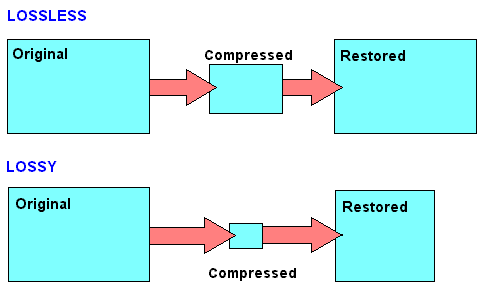
When we discuss MP3 audio, one of the most debated topics is the difference between lossy and lossless data representation. As someone who has spent years studying audio formats, I’ve encountered countless situations where understanding these differences made all the difference. Lossy compression is designed to reduce file size by removing data that is considered less perceptible to the human ear. On the other hand, lossless compression preserves every bit of audio information, even though the file sizes are larger.

Imagine a high-quality photograph being compressed for storage. If you save it as a smaller file, some details—like subtle textures—might get blurred or lost entirely. This is similar to lossy compression in MP3. Lossless compression is like folding a large map so you can carry it in your pocket and then unfolding it to reveal every detail when you need it. Both have unique applications, and choosing between them depends on your priorities, like audio quality or storage capacity.

What is lossy data representation?

Lossy data representation is all about efficiency. It works by removing audio data that our ears might not notice is missing. The MP3 format uses psychoacoustic models to determine which sounds are less critical based on how we perceive audio. For example, if two sounds are playing at the same time and one is much louder, the quieter sound might be eliminated during lossy compression.

I’ve tested this extensively in my studio. A typical MP3 file compressed at 128 kbps sounds clear to many listeners, but if you pay close attention with high-end headphones, subtle details like background reverb or high-frequency harmonics might be missing. That’s because lossy compression prioritizes reducing file size over preserving every nuance of the original audio.

How does lossless data representation work?

Lossless compression, on the other hand, doesn’t remove any data. Instead, it uses algorithms to reduce file size without losing any information. Think of it like packing a suitcase more efficiently without leaving anything behind. Formats like FLAC or WAV are excellent examples of lossless audio compression.

In practice, I’ve noticed that lossless audio sounds identical to the original recording. If you’re working on music production or you’re an audiophile, lossless compression is essential because it ensures that no detail is compromised. However, this comes with a trade-off: lossless files are much larger, sometimes five to ten times the size of lossy MP3s.

When is lossy compression useful?

Lossy compression shines in situations where storage space or bandwidth is limited. Streaming platforms like Spotify and YouTube rely heavily on lossy formats to deliver music and video efficiently to millions of users. If you’re commuting and streaming over a mobile network, you might not notice the slight reduction in quality compared to a lossless file.

I’ve also seen its impact in file sharing. Back when we used CDs and flash drives to transfer files, lossy MP3s were a lifesaver. A single gigabyte of storage could hold hundreds of songs, making it convenient for music lovers.

  • Streaming platforms benefit from smaller file sizes.
  • Ideal for casual listening on standard devices.
  • Allows faster downloads and less buffering during playback.

Why is lossless compression preferred by professionals?

Lossless compression is often the gold standard for professionals in music and sound design. In my studio, I always work with lossless files during production. This ensures that the final product retains every detail when mastered. Imagine painting a masterpiece—if you start with a high-resolution canvas, every brushstroke stands out.

When archiving music or creating remixes, lossless files are invaluable because they preserve all the nuances of the original track. Even though these files require more storage, the quality is well worth the investment for critical applications.

  • Perfect for audio editing and production.
  • Essential for preserving original recordings.
  • Provides unmatched audio clarity and detail.

How does MP3 manage lossy compression so effectively?

MP3 stands out for its clever use of perceptual coding. It takes advantage of the way our brains process sound, removing data that we’re unlikely to notice. This includes masking, where a loud sound can make nearby quieter sounds inaudible. By focusing on what we can actually hear, MP3 files achieve impressive compression ratios.

I’ve tested MP3 encoding on various devices and noticed how it maintains quality despite reducing file size. For example, a three-minute song might shrink from 30 MB in WAV format to just 3 MB as an MP3 at 128 kbps. This balance between quality and size is why MP3 became the dominant audio format for decades.

What are the limitations of lossy MP3 files?

While MP3 files are convenient, they come with drawbacks. High levels of compression can introduce audible artifacts like ringing or a hollow sound. These issues become more noticeable on high-end audio systems or when editing the files further.

For instance, I’ve encountered situations where a client wanted to enhance the bass in an MP3 track. Because some low-frequency data had already been removed during compression, boosting the bass revealed unwanted distortions. This limitation makes lossy MP3s less suitable for professional applications.

Which is better for everyday use?

The choice between lossy and lossless depends on your needs. If you’re streaming music on a smartphone or sharing files quickly, lossy MP3s are the practical option. They sound great on most headphones and speakers, especially in everyday environments like a car or gym.

However, if you’re a music enthusiast with a high-quality audio setup, you’ll likely notice the difference in a lossless file. I always recommend lossless formats for anyone who values audio fidelity or plans to archive their music collection for future use.

Latest words on lossy vs lossless data representation in MP3

In the debate between lossy and lossless, there’s no one-size-fits-all answer. Each has its place depending on the context. As someone deeply immersed in audio production, I’ve seen firsthand how lossy MP3s revolutionized the way we consume music. But I also recognize the unmatched quality of lossless formats for critical applications.

If you’re serious about audio quality and want to optimize your files for both lossy and lossless use cases, tools like Mp4Gain can make the process seamless.

FAQs about Lossy vs Lossless Data Representation in MP3

What is lossy compression in MP3?

Lossy compression reduces file size by removing less noticeable audio data, using perceptual models to maintain acceptable quality.

How does lossless audio differ from lossy audio?

Lossless audio retains all original data for perfect fidelity, while lossy audio sacrifices some data for smaller file sizes.

Why is MP3 considered lossy?

MP3 uses lossy compression to reduce file size by removing inaudible or less noticeable parts of the audio.

Can you hear the difference between lossy and lossless files?

On high-end audio systems, the differences are noticeable, especially in the finer details and dynamic range of lossless files.

Are lossless files always better than lossy?

Lossless files offer better quality but require more storage. Lossy files are better for casual use due to their smaller size.

What is the main advantage of lossy compression?

The main advantage is significantly smaller file sizes, making it ideal for streaming and portable devices.

Do streaming platforms use lossy or lossless formats?

Most platforms use lossy formats to optimize streaming efficiency, but some offer lossless options for premium users.

Why do audiophiles prefer lossless formats?

Audiophiles prefer lossless formats for their superior sound quality and faithful reproduction of original recordings.

Is MP3 still relevant in 2025?

Yes, MP3 remains popular due to its compatibility and efficiency, despite newer formats offering better quality at smaller sizes.

What’s the best tool to convert files between lossy and lossless formats?

Mp4Gain is a great tool for optimizing and converting audio files while maintaining the best quality for any format.

Comments:

Finally, someone explained lossy and lossless in a way I can understand. Great article, very useful!

Wait, so if I rip my CDs to MP3, am I losing quality? I feel like I need a better explanation of what actually gets lost!

This was super helpful. I was confused about lossy vs lossless, especially for archiving my vinyl collection.

I think lossless is overkill for most people, but this article gave me a new appreciation for why it matters. Thanks!

Why don’t more streaming platforms offer lossless as a default? I’d love better sound quality without needing expensive gear.

Great write-up! One question though, how does lossy compression handle live recordings? Are they more affected?

Honestly, I didn’t think I’d notice the difference, but after trying lossless, it’s hard to go back. Thanks for explaining this so clearly!

Can you do a follow-up article on how to best optimize files for lossless storage? I’m trying to build a music archive!

I like how you used examples to explain complex stuff. Made it much easier to follow.

This is the most in-depth guide I’ve read. Still, I’d love more tips on managing file sizes without sacrificing too much quality.


Free Download Mp4Gain
picture


Mp4Gain Main Window
picture


Mp4Gain Features
picture


Free Download Mp4Gain
picture

lossless music

lossless music

Lossless Music

Lossless music is a kind of music file playback format, which is divided into two types: lossy compression and lossless compression.

Lossless Music

However, due to data loss in the audio digitizing process, it is actually impossible to achieve true lossless.
chinese nameintact musicexplainMusic file playback formatApplication fieldmusicClassificationLossy and lossless compressionaudio compression codeFLAC
content

type of sound
Commonly seen MP3, WMA, and OGG are called lossy compression. As the name implies, lossy compression reduces the audio sample rate and bitrate, and the output audio file will be smaller than the original file. . Another audio compression is called lossless compression, which can compress the volume of the audio file to a smaller size on the premise of saving 100% of all the data in the original file. Same size, same bitrate. Lossless compression formats include APE, FLAC, WavPack, LPAC, WMALossless, AppleLossless, TTA, Tak, TAC, La, OptimFROG, Shorten, and common and conventional lossless compression formats include APE, FLAC, TTA, TAK.
General WAV CD can capture this music format. However, due to the high volume and uncompressed original audio, it can usually be compressed and converted to FLAC or APE at a lower volume. Note: wav is still a lossless format, and the last two are lossless compression formats
encoding format
BOW
APE is one of the popular digital music file formats. APE is a lossless audio compression technology, that is, after compressing the audio data file read from the audio CD in APE format, you can restore the file in APE format, and the restored audio file is the same as the original. compressed audio file. Exactly the same as before, nothing to lose. [one]
FLAC
FLAC is short for Free Lossless Audio Codec [2] , which can be interpreted as Chinese lossless audio compression coding. FLAC is a well-known free audio compression codec, which is characterized by lossless compression. Unlike other lossy compression codes such as MP3 and AAC, it does not destroy any original audio information, so it can restore the sound quality of music discs. It has been supported by many software and hardware audio products since 2012.
FLAC is similar to MP3, but it has lossless compression, which means that the audio is compressed in FLAC without losing any information. This compression is similar to Zip, but FLAC will give you a higher compression ratio, because FLAC is a compression method specially designed for the characteristics of audio, and you can use the player to play FLAC compressed files like you normally play MP3 files (many Car players and home audio devices already support FLAC, and you can find links to the manufacturers of these devices on the FLAC website).
FLAC is free and is supported by most operating systems, including Windows, “unix” (Linux, BSD, Solaris, OSX, IRIX), BeOS, OS/2, and Amiga. And FLAC provides a build system in autotools, MSVC, Watcom C and ProjectBuilder development tools.
WAV

The WAV format is a sound file format developed by Microsoft, also known as a wave sound file. It is the first digital audio format and is widely supported by the Windows platform and its applications. The WAV format supports many compression algorithms, supports a variety of audio bits, sample rates, and channels. It adopts a sampling frequency of 44.1 kHz and a quantization number of 16 bits. Therefore, the sound quality of WAV is almost the same as that of CD, but WAV format requires too much storage space, it is very inconvenient to communicate and broadcast.
WAV’s full name is Wave Audio Files, and WAV is derived from sampling analog waveforms of sound. Sampling the analog waveform of sound with different sampling rates can obtain a series of discrete sample points, convert the values ​​of these sample points into binary numbers with different quantization bits (8 bits or 16 bits), and then store them in the disc, this produces a WAV file of the sound, a wave file . Microsoft Sound System Sound Finder software can convert AIF , SND and VOD files to WAV format.
This format records the waveform of the sound, so as long as the sample rate sample rate

Lossless audio compression

Lossless audio compression

Lossless Audio compression

FLAC is perhaps the most popular lossless audio format and encoding codec. Music lovers are gradually switching to this format. WavPack competes with it, but it is not that popular. It’s the same story with Apple Lossless, which reduces the size to 60%.

Lossy file compression

The story here is: quality is better and size is bigger.

Skeptics say that it is almost impossible to distinguish MP3 (320 kbps) from Losless by ear. “And if there is no difference, why pay more?” In fact, on ordinary equipment, it is quite difficult to feel the difference in audio formats, even for music lovers. But there are those who immediately feel this difference (they personally attended the experiment). But when listening to a good device, the difference is huge. The problem is that not everyone can afford a good device.

In what format and with what quality is music heard on the radio?
In fact, we can say that there are currently two main audio formats: lossy (compressed) and lossless (uncompressed). They are classified into many types.

Lossy takes up less disk space, but degrades the quality of the audio track. When compressed using the MPEG protocol (hence the name mp3 – mp4 for files containing video sequences), the hues and transition tones, which are barely noticeable to the ear, are cut off. This makes the file clearer, but it also degrades it. The last place is occupied by the bit rate of that file: the degree of compression of each second of the audio track. The lower the bitrate, the less space the file will occupy and the worse the quality. Thus, a composition of three minutes in mp3 with a bit rate of 320 kilobits per second will occupy up to 3 megabytes on disk; a similar composition with a 96 kilobit bit rate will occupy about 400 kilobytes.

Lossless is as close to the original analog sound * as possible, making it much loved by sound engineers. Lossless formats take up much more disk space even compared to mp3-320. Among these formats, the most common are WAV (standard), FLAC (economic), AIFF (Apple). The former is used most often.

Professional sound recording is done only in uncompressed format. Only with him do the sound engineers work.

On the radio, the situation is somewhat more complicated. This is due to the peculiarities of the work of the media, namely efficiency and commercial profitability. The use of high-capacity servers is expensive and therefore most radio stations encode audio tracks in mp3 format at a bit rate of 256 kilobits per second. However, this is typical mainly of national stations. Equipment purchased from abroad has standard configurations that assume WAV encoding.

Why are software developers focusing on WAV? Because the radio signal cannot propagate without interference. Therefore, the listener still receives a small and sometimes significantly distorted signal. Therefore, broadcasters are faced with a reasonable question: what quality of sound will the listener perceive best: distorted ideal or distorted distortion? For this reason, in Europe and the United States, the WAV standard (AIFF, if the station operates with Apple equipment) is adopted, in Russia – mp3 with a bit rate of 256 kilobits per second.

Lossless audio compression explained

Lossless audio compression explained

LossLess Audio compression

FLAC is perhaps the most popular lossless audio format and encoding codec.

lossless audio compression

Music lovers are gradually switching to this format. WavPack competes with it, but it is not that popular. It’s the same story with Apple Lossless, which reduces the size to 60%.

Here the story is exactly the opposite: the quality is better and the size is greater.

Skeptics say that it is almost impossible to distinguish MP3 (320 kbps) from Losless by ear. “And if there is no difference, why pay more?” In fact, on ordinary equipment, it is quite difficult to feel the difference in audio formats, even for music lovers. But there are those who immediately feel this difference (they personally attended the experiment). But when listening to a good device, the difference is huge. The problem is that not everyone can afford a good device.

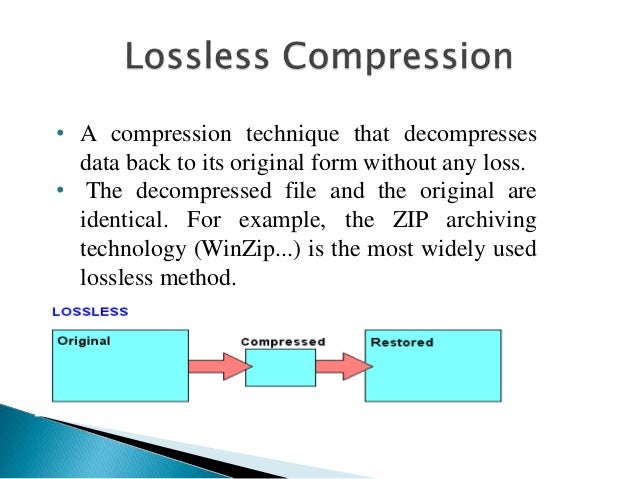
Compressed using special lossless audio codecs, it can be restored with absolute precision if desired.

If you take a normal audio CD disc with analog sound, record it in WAV format for uncompressed sound, then compress WAV using lossless codec, then decompress the resulting sound file into WAV and burn the result to a blank CD , you can get two completely identical audio files COMPACT DISCS.

The advantage of lossless for storing an audio collection is that the quality of the recordings is much higher than that of lossy codecs and they take up less space than uncompressed audio. It is true that lossy files are smaller than lossless music files. Most modern playback programs understand the lossless format. Programs that cannot play it can easily learn it using the lossless plugin. What are lossless audio formats?

Lossless audio formats
A true music lover is unlikely to be satisfied with the sound of music recorded in Ogg Vorbis or MP3 compression formats. Of course, if you listen to audio recordings on home audio equipment, sound defects cannot be heard with your ear, but if you try to play a compressed file on high-quality Hi-Fi equipment, you will immediately find the sound defects. . Of course, creating a collection of quality music on CD or vinyl is not easy. There is a reasonable alternative to this path for lovers of high-quality sound: lossless music. It can be stored on your PC in a way that allows you to keep the original music settings unchanged, even if compression is applied. In this way it simultaneously solves the problems of high-quality music and its compact storage, since audio equipment for listening (headphones, speakers, amplifiers) is quite affordable.

Uncompressed lossless audio formats:

CDDA is an audio CD standard;
WAV: Microsoft Wave;
IFF-8SVX;
IFF-16SV;
AIFF;
Compressed formats:

FLAC;
APE – Monkey’s Audio;
M4A – Apple Lossless – Apple’s high-quality music format;
WV – WavPack;
WMA: Windows Media Audio 9;
TTA – True Audio.
LPAC;
OFR – OptimFROG;
RKA-RKAU;
SHN – Shorten.
FLAC format
The most common format is the. It differs from lossy audio codecs in that no data is removed from the audio stream when it is used. This makes it possible to use it successfully to play music on Hi-Fi and Hi-End equipment, as well as to create an archive from a collection of audio recordings.

The great advantage of the format is its free distribution. This is important for musicians who record music on their own. The format has grown in popularity lately, thanks to which its support is included in the vast majority of multimedia players.

APE format
Unlike FLAC, for the APE format there are only codecs and plugins for the Windows platform. For other platforms, there are expensive third-party software solutions. The algorithm is capable of achieving lossless compression of the audio information between 1.5 and 2 times. It includes three main stages of encoding, of which only one is based on the use of inherent properties of sound for compression. The rest are similar to conventional filing cabinets. Despite the fact that the compression algorithm is distributed free of charge, the licensing restrictions are such that it is practically inaccessible for amateur musicians.

Apple Lossless Format
You can listen to high-quality lossless music using the audio compression codec without sacrificing Apple quality. This format was developed by Apple for use on its own devices. The format is compatible with iPods with special dock connectors and the latest firmware.