Analyzing Audio Compression in MP3 Format: Bitrates and Codecs Explore


Free Download Mp4Gain
picture

Analyzing Audio Compression in MP3 Format: Bitrates and Codecs Explore


Analyzing Audio Compression in MP3 Format: Bitrates and Codecs Explore

What is Audio Compression in MP3 Format?

Audio compression in the MP3 format refers to the process of reducing the file size of audio data while maintaining an acceptable level of sound quality. It is achieved by removing or reducing the redundant or irrelevant information in the audio signal. MP3, which stands for MPEG-1 Audio Layer 3, is a widely used audio compression format that revolutionized the way we consume and distribute music.

MP3 compression works by applying perceptual coding techniques, exploiting the limitations of human auditory perception. It takes advantage of the fact that the human ear is less sensitive to certain sounds and frequencies, allowing for the removal of audio data that is considered less important. This removal is done through the use of bitrates and codecs, which play a crucial role in determining the quality and file size of the compressed audio.

Understanding Bitrates in MP3 Compression

Bitrate is a fundamental aspect of audio compression in the MP3 format. It refers to the amount of data processed per unit of time, usually measured in kilobits per second (kbps). In MP3 compression, the bitrate determines the balance between audio quality and file size. Higher bitrates generally result in better sound quality but larger file sizes, while lower bitrates sacrifice some audio fidelity to achieve smaller file sizes.

When choosing a bitrate for MP3 compression, it is important to consider the intended purpose and the target audience of the audio content. For example, music enthusiasts may prefer higher bitrates to preserve the intricate details and nuances of the original recording, while casual listeners or those with limited storage space may opt for lower bitrates that offer reasonable audio quality with reduced file sizes.

Exploring Codecs in MP3 Compression

Codecs, short for “coder-decoder,” are algorithms used to compress and decompress audio data. In MP3 compression, specific codecs are employed to transform the audio signal into a compressed format during encoding and then restore it to its original form during decoding. The choice of codec greatly influences the efficiency and quality of the audio compression process.

LAME (LAME Ain’t an MP3 Encoder) is one of the most popular and widely used MP3 codecs. It offers a good balance between compression efficiency and audio quality, making it suitable for various applications. Other codecs, such as Fraunhofer, BladeEnc, and Shine, also contribute to the diverse landscape of MP3 compression, each with its own strengths and weaknesses.

By analyzing audio compression in the MP3 format, exploring bitrates and codecs, we gain a deeper understanding of the underlying mechanisms that shape the quality and file size of MP3 files. Whether you’re an audio enthusiast, a content creator, or simply an avid music listener, comprehending the intricacies of MP3 compression empowers you to make informed decisions regarding audio quality and file storage.

Why is Bitrate Selection Important in MP3 Compression?

Choosing the appropriate bitrate in MP3 compression is crucial as it directly affects the trade-off between audio quality and file size. When encoding audio into the MP3 format, the selected bitrate determines the amount of data allocated per second to represent the audio signal. Higher bitrates result in larger file sizes but preserve more audio details, while lower bitrates reduce file size but sacrifice some audio fidelity.

Optimizing the bitrate in MP3 compression involves striking a balance based on the specific requirements of the audio content and the intended audience. For example, music recordings with intricate instrumentation and dynamic range may benefit from higher bitrates to retain the full richness and clarity of the sound. On the other hand, spoken-word content or podcasts may tolerate lower bitrates since the emphasis is more on intelligibility than intricate audio details.

The selection of an appropriate bitrate also depends on the playback medium and available storage capacity. Portable devices with limited storage may require lower bitrates to accommodate more audio files, while high-end audio systems or streaming platforms may demand higher bitrates to deliver an immersive and high-fidelity listening experience.

What Role Do Codecs Play in MP3 Compression?

Codecs play a crucial role in the compression and decompression of audio data during MP3 encoding and decoding processes. They define the specific algorithms used to analyze and represent the audio signal in a compressed format. Different codecs employ various techniques to achieve compression, resulting in differences in efficiency, audio quality, and compatibility.

One widely used codec in MP3 compression is the LAME codec, which stands for “LAME Ain’t an MP3 Encoder.” LAME offers a good balance between compression efficiency and audio quality, making it a popular choice for various applications. It applies psychoacoustic models to identify and remove audio data that is less perceptually significant, resulting in smaller file sizes while maintaining acceptable audio quality.

Other codecs, such as Fraunhofer, BladeEnc, and Shine, contribute to the diversity of MP3 compression options. Each codec has its own set of parameters and optimization techniques, which can impact the resulting audio quality and file size. Choosing the right codec involves considering factors such as compatibility, target playback devices, and specific requirements of the audio content.

    • Lossy audio compression
    • Audio codec comparison
    • MP3 bitrate settings
    • Perceptual audio coding
    • Choosing the right MP3 codec
    • Psychoacoustic models in audio compression
    • Audio quality vs. file size trade-off
    • Optimizing MP3 compression
    • Portable device storage optimization
    • High-fidelity audio streaming
Free Download Mp4Gain
picture


Mp4Gain Main Window
picture


Mp4Gain Features
picture


Free Download Mp4Gain
picture

The Advantages of Lossless Audio Formats: FLAC and ALAC

The Advantages of Lossless Audio Formats: FLAC and ALAC

FLAC and ALAC
FLAC and ALAC
FLAC and ALAC
FLAC and ALAC

As an expert in audio optimization, I am always on the lookout for formats that deliver exceptional sound quality without compromising on file size. In this article, I will delve into the world of lossless audio formats, with a specific focus on two popular options: FLAC and ALAC. These formats have gained significant popularity among audiophiles and music enthusiasts for their ability to preserve the original audio quality while offering efficient compression. Join me as we explore the advantages of these lossless audio formats and why they should be your top choice.

Superior Sound Quality

When it comes to lossless audio formats, the primary concern is maintaining the utmost sound quality. FLAC and ALAC excel in this regard, as they employ compression algorithms that preserve every detail of the original audio recording. Whether it’s the rich harmonies of a symphony orchestra or the subtle nuances in a vocalist’s performance, these formats ensure an immersive and authentic listening experience. With FLAC and ALAC, you can indulge in music the way it was intended to be heard, without any compromise on audio fidelity.

Efficient Compression

Efficient compression is another remarkable advantage of lossless audio formats like FLAC and ALAC. These formats utilize sophisticated compression techniques that significantly reduce file sizes while retaining all the audio data. This means you can store more music on your devices without sacrificing quality or resorting to lower-bitrate alternatives. Whether you have a vast music library or limited storage space, FLAC and ALAC offer a practical solution to keep your favorite tracks accessible at all times.

Wide Compatibility

One of the key considerations when choosing an audio format is its compatibility with different devices and platforms. FLAC and ALAC have gained widespread support across various software and hardware ecosystems. Many popular media players, portable devices, and operating systems are compatible with these formats, ensuring seamless playback without the need for additional conversions or transcoding. Whether you’re using a Mac, Windows, or mobile device, FLAC and ALAC guarantee a hassle-free listening experience.

Versatility and Metadata Support

Versatility is an essential aspect of lossless audio formats, and FLAC and ALAC don’t disappoint. Apart from delivering exceptional audio quality, these formats also support a range of metadata. You can embed album art, track information, lyrics, and other relevant details within the audio files themselves. This ensures that your music collection remains organized and easily searchable across different platforms and media players. With FLAC and ALAC, it’s not just about the audio; it’s about creating a comprehensive and immersive musical experience.

Archival and Future-Proofing

For audiophiles and music collectors, archival is a crucial consideration. FLAC and ALAC are ideal for archiving purposes as they provide a reliable and future-proof solution. By choosing these formats, you can preserve your music collection in its original quality for years to come, ensuring that your favorite albums and tracks withstand the test of time. Moreover, since FLAC and ALAC have gained widespread acceptance, it’s highly likely that they will continue to be supported by future audio systems and technologies.

Smooth Integration with Existing Libraries

If you already have an extensive collection of audio files in other formats, the transition to FLAC or ALAC can be seamless. Both formats support transcoding, allowing you to convert your existing audio files into lossless formats without any loss of quality. This ensures that you can integrate FLAC and ALAC files seamlessly with your existing music library, avoiding any disruptions in your listening experience. With their wide compatibility and transcoding capabilities, FLAC and ALAC offer a convenient pathway to upgrade your audio collection.

Community and Support

FLAC and ALAC have garnered a passionate and dedicated community of supporters, comprising audio enthusiasts, music professionals, and developers. This active community ensures ongoing support, updates, and development for the formats, assuring users that they are investing in a long-term and reliable audio solution. Whether you seek advice, troubleshooting, or simply want to connect with like-minded individuals, the FLAC and ALAC community is always there to assist and share their expertise.

Streaming and Online Distribution

With the rise of music streaming platforms and online distribution, the demand for lossless audio formats has also increased. Many streaming services and online stores now offer FLAC as a preferred option for audiophiles, ensuring that you can enjoy your favorite music in its original quality, streamed directly to your devices. This development not only reinforces the advantages of lossless formats but also opens up new avenues for artists, allowing them to deliver their music to fans with uncompromised fidelity.

Preservation of Music History

Lossless audio formats like FLAC and ALAC play a crucial role in the preservation of music history. They allow us to digitize and archive classic recordings, ensuring that future generations can enjoy the same musical experiences as previous ones. By opting for FLAC and ALAC, you contribute to the preservation of cultural heritage and ensure that the legacy of iconic musicians and compositions lives on.

Audiophile-Grade Experience

Lastly, but certainly not least, FLAC and ALAC offer an unparalleled audiophile-grade experience. These formats cater to the discerning ears of audiophiles who crave the utmost audio quality. Whether you’re using high-end headphones, a dedicated audio setup, or a premium sound system, FLAC and ALAC provide the fidelity and richness necessary to truly appreciate the intricacies of the music. With their lossless nature and superior sound reproduction, these formats elevate your listening experience to new heights.

In conclusion, FLAC and ALAC stand out as the go-to choices for anyone seeking lossless audio formats. With their superior sound quality, efficient compression, wide compatibility, and versatile features, they offer an unmatched audio experience. Whether you’re an audiophile, music collector, or simply someone who values exceptional sound, FLAC and ALAC provide the perfect combination of fidelity and convenience. Embrace the advantages of lossless audio formats and let your music shine in its full glory.

Pros & Cons of Audio Compression

Pros & Cons of Audio Compression

Audio Compression
Audio Compression
Audio Compression
Audio Compression

Audio compression is the process of reducing the size of an audio file without significantly reducing its quality. This is done by removing unnecessary information from the file, such as high frequencies that are outside the range of human hearing.

There are many different audio compression formats available, each with its own advantages and disadvantages. Some of the most popular formats include MP3, AAC, and FLAC.

Pros of Audio Compression

  • Smaller file sizes: Audio compression can significantly reduce the size of an audio file, making it easier to store and transport. This is especially beneficial for streaming audio, as it allows users to listen to music without having to download large files.
  • Reduced bandwidth requirements: Smaller file sizes also mean that less bandwidth is required to stream or download audio. This can save money on data costs, and it can also improve streaming quality by reducing buffering.
  • Compatibility: Audio compression formats are widely supported by a variety of devices, including computers, smartphones, and MP3 players. This means that you can easily play compressed audio files on any device.

Cons of Audio Compression

  • Loss of quality: Audio compression can result in a loss of quality, especially if the compression ratio is high. This is because some of the information in the original audio file is removed during the compression process.
  • Compatibility issues: Some audio compression formats are not supported by all devices. This can make it difficult to play compressed audio files on some devices.
  • Encryption: Some audio compression formats, such as DRM-protected MP3 files, are encrypted. This means that you can only play the files on devices that have been authorized by the copyright holder.

Conclusion

Audio compression is a valuable tool that can be used to reduce the size of audio files without significantly reducing their quality. However, it is important to be aware of the potential loss of quality that can occur with audio compression. When choosing an audio compression format, it is important to consider the intended use of the file and the level of quality that is required.

Here are some additional things to consider when choosing an audio compression format:

  • Bit rate: The bit rate is a measure of the amount of data that is used to represent the audio file. Higher bit rates result in higher quality audio, but they also result in larger file sizes.
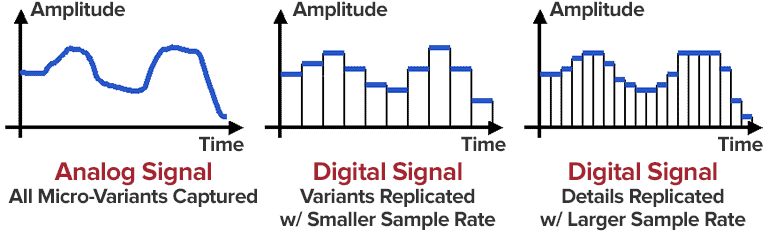
  • Sampling rate: The sampling rate is the number of times per second that the audio signal is sampled. Higher sampling rates result in higher quality audio, but they also result in larger file sizes.
  • Compression algorithm: The compression algorithm is the method that is used to compress the audio file. Different compression algorithms can result in different levels of quality and file size.

Here are some examples of different audio compression formats:

  • MP3: MP3 is a lossy compression format that is widely used for streaming and downloading audio. It offers a good balance between quality and file size.
  • AAC: AAC is another lossy compression format that is similar to MP3. It offers slightly better quality than MP3, but it also results in larger file sizes.
  • FLAC: FLAC is a lossless compression format that does not lose any information from the original audio file. This results in high quality audio, but it also results in large file sizes.

Audio Compression Formats

Audio Compression Formats Overview

Audio Compression Formats

Introduction

Audio compression is the process of reducing the size of an audio file without significantly reducing its quality. This is done by removing redundant data from the file. Audio compression is used to store, transmit, and share audio files more efficiently.

Types of Audio Compression

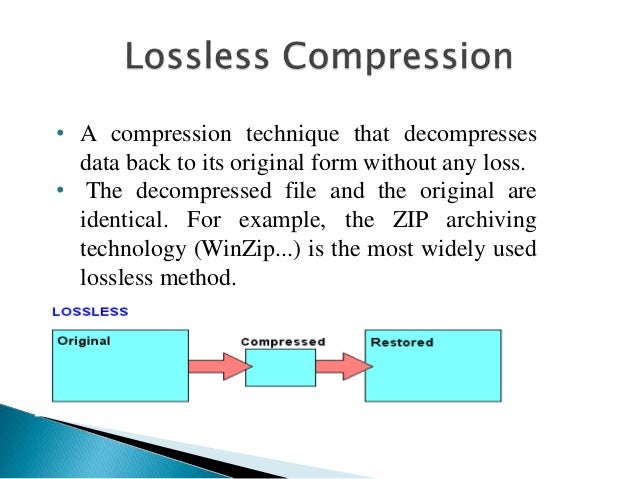
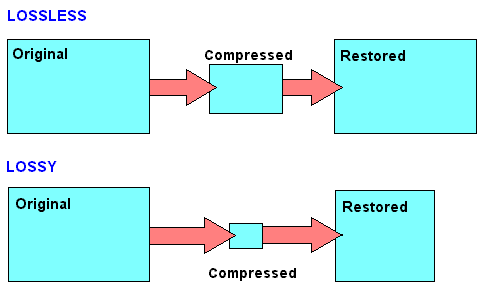
There are two main types of audio compression: lossless and lossy. Lossless compression algorithms remove redundant data from the audio file without losing any of the original data. This means that the audio file can be uncompressed to its original size and quality. Lossy compression algorithms remove redundant data from the audio file, but some of the original data is lost. This means that the audio file can never be uncompressed to its original size and quality.

Lossless Audio Compression Formats

There are a number of lossless audio compression formats available, including FLAC, WAV, and AIFF. FLAC is the most popular lossless audio compression format. It offers high compression ratios with minimal loss of quality. WAV is the uncompressed audio format. It is the most commonly used audio format for professional audio. AIFF is the uncompressed audio format used by Apple products.

Lossy Audio Compression Formats

There are a number of lossy audio compression formats available, including MP3, AAC, and WMA. MP3 is the most popular lossy audio compression format. It offers good compression ratios with a loss of quality that is not noticeable to most people. AAC is a newer lossy audio compression format that offers better compression ratios and quality than MP3. WMA is a lossy audio compression format developed by Microsoft. It offers similar compression ratios and quality to MP3.

Which Audio Compression Format Should I Use?

The best audio compression format to use depends on your needs. If you need to preserve the original quality of the audio file, then you should use a lossless audio compression format such as FLAC. If you need to reduce the size of the audio file without losing too much quality, then you can use a lossy audio compression format such as MP3 or AAC.

Conclusion

Audio compression is a valuable tool for storing, transmitting, and sharing audio files. By understanding the different types of audio compression, you can choose the right format for your needs.

8 Subtitles

Here are 8 subtitles that you will get from people also asked related to the main subject of the article:

  1. What is audio compression?
  2. What are the different types of audio compression?
  3. What are the benefits of audio compression?
  4. What are the drawbacks of audio compression?
  5. Which audio compression format should I use?
  6. How do I compress an audio file?
  7. How do I decompress an audio file?
  8. What are some common problems with audio compression?

Benefits of Audio Compression

There are a number of benefits to audio compression. These include:

  • Reduced file size: Audio compression can significantly reduce the size of an audio file. This makes it easier to store, transmit, and share audio files.
  • Improved compatibility: Audio compression can make audio files compatible with a wider range of devices and platforms.
  • Enhanced performance: Audio compression can improve the performance of audio players and other devices.

Drawbacks of Audio Compression

There are a number of drawbacks to audio compression. These include:

  • Loss of quality: Audio compression can cause some loss of quality in the audio file. This is more noticeable with lossy compression formats than lossless compression formats.
  • Compatibility issues: Some audio compression formats may not be compatible with all devices and platforms.
  • Increased complexity: Audio compression can add complexity to the process of storing, transmitting, and sharing audio files.

Which Audio Compression Format Should I Use?

The best audio compression format to use depends on your needs. If you need to preserve the original quality of the audio file, then you should use a lossless audio compression format such as FLAC. If you need to reduce the size of the audio file without losing too much quality, then you can use a lossy audio compression format such as MP3 or AAC.

How to Compress an Audio File

To compress an audio file, you can use a variety of software programs. Some popular programs include:

  • FLAC: A free and open-source lossless audio compression program.
  • WAV: A free and open-source uncompressed audio compression program.
  • AIFF: A free and open-source uncompressed audio compression program.

How to Decompress an Audio File

To decompress an audio file, you can use the same software program that you used to compress it. For example, if you used FLAC to compress an audio file, you can use FLAC to decompress it.

The Benefits of Lossless Audio Compression

The Benefits of Lossless Audio Compression

Lossless Audio Compression

Introduction

Lossless Audio Compression

The digital representation of audio is based on a series of binary digits (bits) that capture the amplitude of the sound wave at regular intervals. These bits are usually stored in a file format such as WAV, AIFF or FLAC. Despite being represented as a series of zeros and ones, digital audio has revolutionized the music industry and changed the way we consume and produce music.

Digital Audio Compression

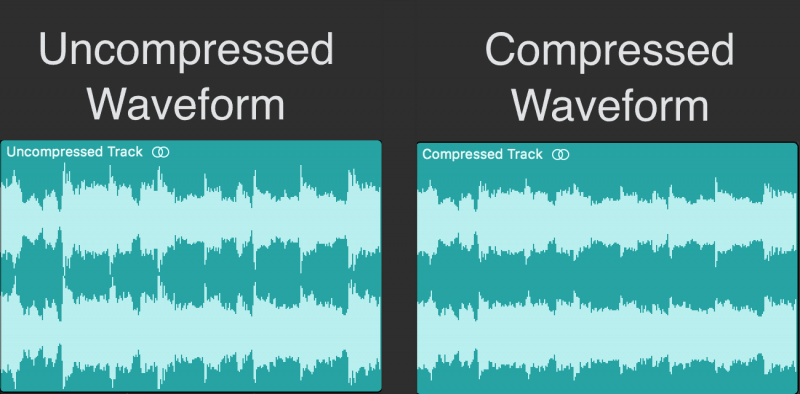
One of the most significant advantages of digital audio is the ability to compress audio files without compromising quality. Compression reduces the amount of data required to represent an audio file by discarding some of the redundant or less important information. There are two types of audio compression: lossless and lossy.

Lossless Audio Compression

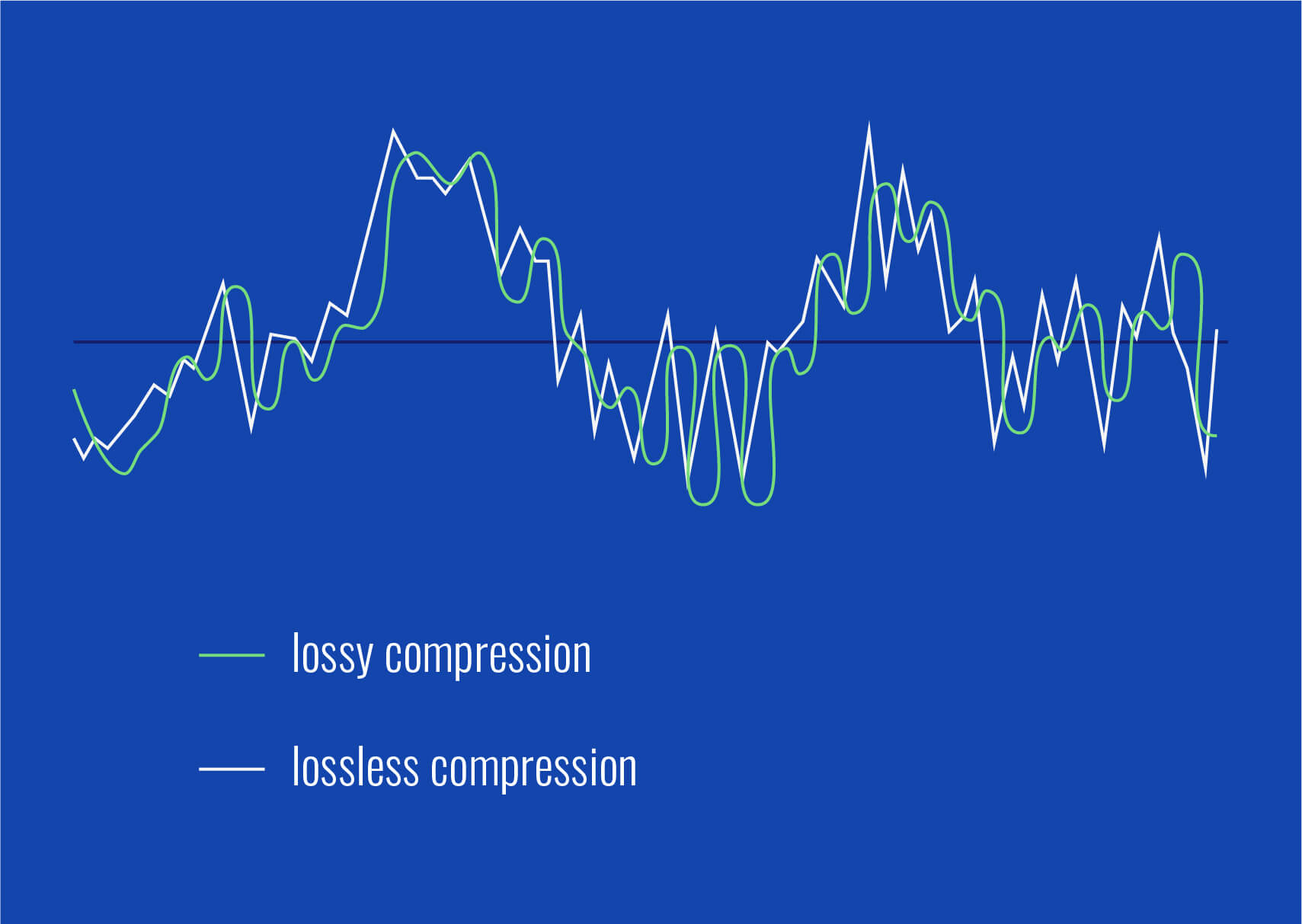
Lossless compression algorithms reduce the size of an audio file without losing any of the original data. These algorithms work by identifying and eliminating redundant information while preserving the remaining data. The most common lossless audio compression formats are FLAC, ALAC, and WAVPACK. These formats are preferred by audiophiles and music professionals because they offer the same audio quality as the original uncompressed file.

Lossy Audio Compression

Lossy compression algorithms, on the other hand, permanently discard some of the data in the original audio file to achieve a smaller file size. The most popular lossy audio formats are MP3, AAC, and OGG. Although lossy formats achieve significantly smaller file sizes than lossless formats, they sacrifice some of the audio quality. The extent of the audio quality loss depends on the compression settings and the original file’s quality.

The Impact of Compression on Audio Quality

The impact of compression on audio quality depends on the compression algorithm and the original audio file’s quality. Lossless compression algorithms have no impact on audio quality because they preserve all the original data. Lossy compression algorithms, on the other hand, can significantly affect audio quality, particularly at low bitrates or with complex audio signals.

In general, higher bitrates and less aggressive compression settings result in better audio quality, while lower bitrates and aggressive compression settings result in lower quality audio.

The Evolution of Digital Audio Technology

The quality of digital audio has improved significantly over the past few decades due to advancements in technology. In the early 1990s, computers had limited processing power, and audio quality was limited by the hardware’s capabilities. Today, modern devices such as laptops, tablets, and smartphones are capable of playing high-quality audio files with ease.

Streaming services such as Spotify and Apple Music have also contributed to the evolution of digital audio technology. These services use lossy compression algorithms such as OGG to optimize the transmission of audio files over the internet while minimizing data usage. Despite the compression, the audio quality is still high enough to satisfy most listeners.

Conclusion

Digital audio compression has revolutionized the music industry by enabling the storage and transmission of high-quality audio files while minimizing file sizes. Lossless compression algorithms such as FLAC and ALAC offer the same audio quality as the original uncompressed file, while lossy algorithms such as MP3 and AAC achieve significantly smaller file sizes but sacrifice some audio quality. The evolution of digital audio technology has improved audio quality and made it possible to enjoy high-quality audio on a wide range of devices.

About Lossy

About Lossy

Lossy

We all love good music. More recently, the audio CD was good digital music. This is 44100 Hz, stereo, 16 bits (linear) per channel, not compressed in any way, which means, according to Wikipedia, 1411.2 kbps.

Lossy

But at the end of the 20th century, in the era of the birth of multimedia, when music began to be played not only on players, but also on computers, it turned out that the audio CD (that is, naked PCM) is even better. . compress. There was, for example, Microsoft ADPCM, which compressed this case a bit, without losing quality, in WAV files. But generally speaking, the original 44 kHz stereo would still require a lot of space this way. Hence, the quality dropped to 22 kHz mono. One of the first multimedia albums of that time: “Immersion” from the group “Nautilus Pompilius”, is still around, and I did.

So MP3 won. To store and distribute compressed music. At 128 kbps “CD Quality”.

MP3 came up strangely. Technically, this is MPEG-1 Audio Layer 3. A layer for compressing audio data into a modern, progressive standard for storing video data on Video CDs. Just packed in its own .mp3 file format. The video CD is no longer interesting to anyone. The following MPEG-2 standard is used in DVD and digital television broadcasts (not HD). And the next MPEG-4 standard is now used for HD video and continues to evolve.

MP3 was revolutionary. It was (almost) the first lossy compression format. When we don’t try to preserve everything that was in the original signal, but, based on some psychoacoustic model, we cut out what a person is not going to hear anyway, and compress the rest. Like JPEG.

Then I tried digitizing the accumulated audio collection. Compact cassettes (just “cassettes”, but more correctly “compact cassettes”) turned out to be complete shit. The frequency range is such that it makes no sense to sample with more than 22 kHz. There were no reel-to-reel recorders in the house. But vinyl records shook the sound quality. With good equipment, you can draw better quality than a CD. You just need to get rid of the clicks.

And then I realized that MP3 is shit too. At these same 128 kbps, the sound quality suffers greatly. And the scariest thing is that vile metallic hues appear where they shouldn’t be. My ears need at least 192 kbps, and the more the better.

Let’s take a hint from a famous punk rock band in the past. Like FLAC. It is such a modern lossless compression standard that it has successfully replaced WAV. Because it is free.

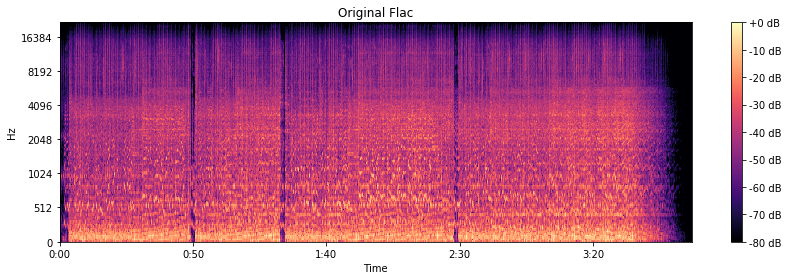
The original is CD quality, so frequencies up to 22 kHz are present as expected.

Original flac

We are going to harvest with FFmpeg, or rather with LAME.

At 320 kbps and 256 kbps, the spectrogram looks almost like the original.

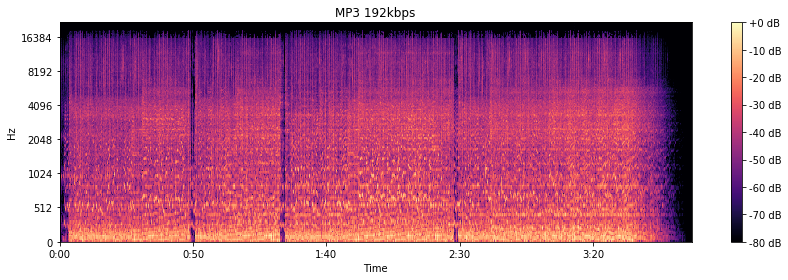
At 192 kbps, there are signs of a 16 kHz cutoff. The spectrogram “darkens”, apparently, the psychoacoustic model has cut something out. By ear, the higher frequency “bursts” really disappeared.

MP3 192 kbps

At the notorious 128 kbit / s, everything is already specifically cut off at 16 kHz. Background sounds are “fuzzy” and begin to bubble. Nothing to do with the original in terms of enjoying the musical details.

MP3 128 kbps

But you can do 64 kbps in MP3. The stereo is gone. Everything gurgles terribly and irritates with completely strange sounds.

In what format and with what quality is music heard on the radio?

In what format and with what quality is music heard on the radio?

Radio most used audio file formats

In fact, we can say that there are currently two main audio formats: lossy (compressed) and lossless (uncompressed). They are classified into many types.

Radio audio file formats

Lossy takes up less disk space, but degrades the quality of the audio track. When compressed using the MPEG protocol (hence the name mp3 – mp4 for files containing video sequences), the hues and transition tones, which are barely noticeable to the ear, are cut off. This makes the file clearer, but it also degrades it. The last place is occupied by the bit rate of that file: the degree of compression of each second of the audio track. The lower the bitrate, the less space the file will occupy and the worse the quality. Thus, a composition of three minutes in mp3 with a bit rate of 320 kilobits per second will occupy up to 3 megabytes on disk; a similar composition with a 96 kilobit bit rate will occupy about 400 kilobytes.

Lossless is as close to the original analog sound as possible *, making it much loved by sound engineers. Lossless formats take up much more disk space even compared to mp3-320. Among these formats, the most common are WAV (standard), FLAC (economic), AIFF (Apple). The former is used most often.

Professional sound recording is done only in uncompressed format. Only with him do sound engineers work.

On the radio, the situation is somewhat more complicated. This is due to the peculiarities of the work of the media, namely, efficiency and commercial profitability. The use of high-capacity servers is expensive and therefore most radio stations encode audio tracks in mp3 format at a bit rate of 256 kilobits per second. However, this is typical mainly of national stations. Equipment purchased from abroad has standard configurations that assume WAV encoding.

Why are software developers focusing on WAV? Because the radio signal cannot propagate without interference. Therefore, the listener still receives a small and sometimes significantly distorted signal. Therefore, broadcasters are faced with a reasonable question: what quality of sound will the listener perceive best: distorted ideal or distorted distortion? For this reason, in Europe and the United States, the WAV standard (AIFF, if the station operates with Apple equipment) is adopted, in Russia – mp3 with a bit rate of 256 kilobits per second.

Analog data transmission is based on the physical properties of sound. The record-playback mechanism is based on the principles of human auditory perception. That is, the sound wave vibrates the membrane (by analogy with the tympanic membrane of the ear) and is fixed with a needle in the carrier in the form in which it was obtained. Reproduced, therefore, also without deviations and changes associated with digital conversion.

The Audio Files category includes compressed and uncompressed audio formats that contain a data signal and can be played by audio programs. This category also includes MIDI files, music scores, and audio project files, which generally do not contain audio data.

The most common extensions are .WAV, .AIF, .MP3, and .MID.

Lossy audio compression

Lossy audio compression

MP3: Lossy compression

I’ll start with the well-known and widely used (though not always loved) MP3 format.

Lossy audio format

This audio format is actively used everywhere and everywhere, where it is needed and where it is not needed. But this does not mean that it is not worthy of the place it occupies in its niche. Very worthy. Although he has been “sitting” in his niche for about two decades, no one has “kicked” him out of there yet. And there were many who wanted to say it. And the main favorite of them is WMA (Windows Media Audio), which was conceived by Microsoft as an alternative to MP3. As a result, it is an alternative and it is, despite the best efforts of the developers. The next character is OGG. Despite the broader possibilities than MP3, for example, it never received widespread acceptance. Although it is compatible with many operating systems. Perhaps, it is worth mentioning the AAC audio format, which was supposed to replace MP3 in the relay. Encoding quality has been improved and compression loss reduced. But Ay.

The main advantage of these formats is their small size. The downside is the loss of quality.

Different formats
In today’s world, you can find a large number of different sound extensions. Let’s remember at a glance:

MP3 (Well where without it?)
WMA
OGG
CAA
And many others
Of course, each of these formats is good, especially MP3, which is probably the most popular format. But today we are not talking about popularity. MP3 and other similar formats, no matter how good they sound, are compressed originals. And even if you set the maximum quality to 320 btrate, it still won’t be of the highest quality. It was compressed, reduced, so there will be certain losses.

Lossless audio compression

Lossless audio compression

Lossless Audio compression

FLAC is perhaps the most popular lossless audio format and encoding codec. Music lovers are gradually switching to this format. WavPack competes with it, but it is not that popular. It’s the same story with Apple Lossless, which reduces the size to 60%.

Lossy file compression

The story here is: quality is better and size is bigger.

Skeptics say that it is almost impossible to distinguish MP3 (320 kbps) from Losless by ear. “And if there is no difference, why pay more?” In fact, on ordinary equipment, it is quite difficult to feel the difference in audio formats, even for music lovers. But there are those who immediately feel this difference (they personally attended the experiment). But when listening to a good device, the difference is huge. The problem is that not everyone can afford a good device.

In what format and with what quality is music heard on the radio?
In fact, we can say that there are currently two main audio formats: lossy (compressed) and lossless (uncompressed). They are classified into many types.

Lossy takes up less disk space, but degrades the quality of the audio track. When compressed using the MPEG protocol (hence the name mp3 – mp4 for files containing video sequences), the hues and transition tones, which are barely noticeable to the ear, are cut off. This makes the file clearer, but it also degrades it. The last place is occupied by the bit rate of that file: the degree of compression of each second of the audio track. The lower the bitrate, the less space the file will occupy and the worse the quality. Thus, a composition of three minutes in mp3 with a bit rate of 320 kilobits per second will occupy up to 3 megabytes on disk; a similar composition with a 96 kilobit bit rate will occupy about 400 kilobytes.

Lossless is as close to the original analog sound * as possible, making it much loved by sound engineers. Lossless formats take up much more disk space even compared to mp3-320. Among these formats, the most common are WAV (standard), FLAC (economic), AIFF (Apple). The former is used most often.

Professional sound recording is done only in uncompressed format. Only with him do the sound engineers work.

On the radio, the situation is somewhat more complicated. This is due to the peculiarities of the work of the media, namely efficiency and commercial profitability. The use of high-capacity servers is expensive and therefore most radio stations encode audio tracks in mp3 format at a bit rate of 256 kilobits per second. However, this is typical mainly of national stations. Equipment purchased from abroad has standard configurations that assume WAV encoding.

Why are software developers focusing on WAV? Because the radio signal cannot propagate without interference. Therefore, the listener still receives a small and sometimes significantly distorted signal. Therefore, broadcasters are faced with a reasonable question: what quality of sound will the listener perceive best: distorted ideal or distorted distortion? For this reason, in Europe and the United States, the WAV standard (AIFF, if the station operates with Apple equipment) is adopted, in Russia – mp3 with a bit rate of 256 kilobits per second.

Lossless audio compression explained

Lossless audio compression explained

LossLess Audio compression

FLAC is perhaps the most popular lossless audio format and encoding codec.

lossless audio compression

Music lovers are gradually switching to this format. WavPack competes with it, but it is not that popular. It’s the same story with Apple Lossless, which reduces the size to 60%.

Here the story is exactly the opposite: the quality is better and the size is greater.

Skeptics say that it is almost impossible to distinguish MP3 (320 kbps) from Losless by ear. “And if there is no difference, why pay more?” In fact, on ordinary equipment, it is quite difficult to feel the difference in audio formats, even for music lovers. But there are those who immediately feel this difference (they personally attended the experiment). But when listening to a good device, the difference is huge. The problem is that not everyone can afford a good device.

Compressed using special lossless audio codecs, it can be restored with absolute precision if desired.

If you take a normal audio CD disc with analog sound, record it in WAV format for uncompressed sound, then compress WAV using lossless codec, then decompress the resulting sound file into WAV and burn the result to a blank CD , you can get two completely identical audio files COMPACT DISCS.

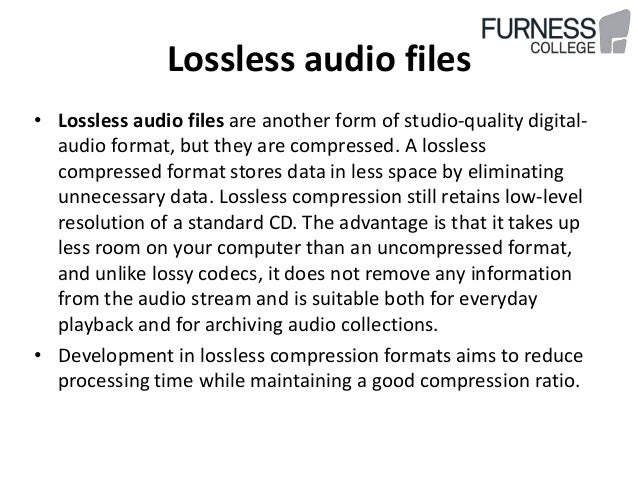
The advantage of lossless for storing an audio collection is that the quality of the recordings is much higher than that of lossy codecs and they take up less space than uncompressed audio. It is true that lossy files are smaller than lossless music files. Most modern playback programs understand the lossless format. Programs that cannot play it can easily learn it using the lossless plugin. What are lossless audio formats?

Lossless audio formats
A true music lover is unlikely to be satisfied with the sound of music recorded in Ogg Vorbis or MP3 compression formats. Of course, if you listen to audio recordings on home audio equipment, sound defects cannot be heard with your ear, but if you try to play a compressed file on high-quality Hi-Fi equipment, you will immediately find the sound defects. . Of course, creating a collection of quality music on CD or vinyl is not easy. There is a reasonable alternative to this path for lovers of high-quality sound: lossless music. It can be stored on your PC in a way that allows you to keep the original music settings unchanged, even if compression is applied. In this way it simultaneously solves the problems of high-quality music and its compact storage, since audio equipment for listening (headphones, speakers, amplifiers) is quite affordable.

Uncompressed lossless audio formats:

CDDA is an audio CD standard;
WAV: Microsoft Wave;
IFF-8SVX;
IFF-16SV;
AIFF;
Compressed formats:

FLAC;
APE – Monkey’s Audio;
M4A – Apple Lossless – Apple’s high-quality music format;
WV – WavPack;
WMA: Windows Media Audio 9;
TTA – True Audio.
LPAC;
OFR – OptimFROG;
RKA-RKAU;
SHN – Shorten.
FLAC format
The most common format is the. It differs from lossy audio codecs in that no data is removed from the audio stream when it is used. This makes it possible to use it successfully to play music on Hi-Fi and Hi-End equipment, as well as to create an archive from a collection of audio recordings.

The great advantage of the format is its free distribution. This is important for musicians who record music on their own. The format has grown in popularity lately, thanks to which its support is included in the vast majority of multimedia players.

APE format
Unlike FLAC, for the APE format there are only codecs and plugins for the Windows platform. For other platforms, there are expensive third-party software solutions. The algorithm is capable of achieving lossless compression of the audio information between 1.5 and 2 times. It includes three main stages of encoding, of which only one is based on the use of inherent properties of sound for compression. The rest are similar to conventional filing cabinets. Despite the fact that the compression algorithm is distributed free of charge, the licensing restrictions are such that it is practically inaccessible for amateur musicians.

Apple Lossless Format
You can listen to high-quality lossless music using the audio compression codec without sacrificing Apple quality. This format was developed by Apple for use on its own devices. The format is compatible with iPods with special dock connectors and the latest firmware.