The Advantages of Lossless Audio Formats: FLAC and ALAC


Free Download Mp4Gain
picture

The Advantages of Lossless Audio Formats: FLAC and ALAC

FLAC and ALAC
FLAC and ALAC
FLAC and ALAC
FLAC and ALAC

As an expert in audio optimization, I am always on the lookout for formats that deliver exceptional sound quality without compromising on file size. In this article, I will delve into the world of lossless audio formats, with a specific focus on two popular options: FLAC and ALAC. These formats have gained significant popularity among audiophiles and music enthusiasts for their ability to preserve the original audio quality while offering efficient compression. Join me as we explore the advantages of these lossless audio formats and why they should be your top choice.

Superior Sound Quality

When it comes to lossless audio formats, the primary concern is maintaining the utmost sound quality. FLAC and ALAC excel in this regard, as they employ compression algorithms that preserve every detail of the original audio recording. Whether it’s the rich harmonies of a symphony orchestra or the subtle nuances in a vocalist’s performance, these formats ensure an immersive and authentic listening experience. With FLAC and ALAC, you can indulge in music the way it was intended to be heard, without any compromise on audio fidelity.

Efficient Compression

Efficient compression is another remarkable advantage of lossless audio formats like FLAC and ALAC. These formats utilize sophisticated compression techniques that significantly reduce file sizes while retaining all the audio data. This means you can store more music on your devices without sacrificing quality or resorting to lower-bitrate alternatives. Whether you have a vast music library or limited storage space, FLAC and ALAC offer a practical solution to keep your favorite tracks accessible at all times.

Wide Compatibility

One of the key considerations when choosing an audio format is its compatibility with different devices and platforms. FLAC and ALAC have gained widespread support across various software and hardware ecosystems. Many popular media players, portable devices, and operating systems are compatible with these formats, ensuring seamless playback without the need for additional conversions or transcoding. Whether you’re using a Mac, Windows, or mobile device, FLAC and ALAC guarantee a hassle-free listening experience.

Versatility and Metadata Support

Versatility is an essential aspect of lossless audio formats, and FLAC and ALAC don’t disappoint. Apart from delivering exceptional audio quality, these formats also support a range of metadata. You can embed album art, track information, lyrics, and other relevant details within the audio files themselves. This ensures that your music collection remains organized and easily searchable across different platforms and media players. With FLAC and ALAC, it’s not just about the audio; it’s about creating a comprehensive and immersive musical experience.

Archival and Future-Proofing

For audiophiles and music collectors, archival is a crucial consideration. FLAC and ALAC are ideal for archiving purposes as they provide a reliable and future-proof solution. By choosing these formats, you can preserve your music collection in its original quality for years to come, ensuring that your favorite albums and tracks withstand the test of time. Moreover, since FLAC and ALAC have gained widespread acceptance, it’s highly likely that they will continue to be supported by future audio systems and technologies.

Smooth Integration with Existing Libraries

If you already have an extensive collection of audio files in other formats, the transition to FLAC or ALAC can be seamless. Both formats support transcoding, allowing you to convert your existing audio files into lossless formats without any loss of quality. This ensures that you can integrate FLAC and ALAC files seamlessly with your existing music library, avoiding any disruptions in your listening experience. With their wide compatibility and transcoding capabilities, FLAC and ALAC offer a convenient pathway to upgrade your audio collection.

Community and Support

FLAC and ALAC have garnered a passionate and dedicated community of supporters, comprising audio enthusiasts, music professionals, and developers. This active community ensures ongoing support, updates, and development for the formats, assuring users that they are investing in a long-term and reliable audio solution. Whether you seek advice, troubleshooting, or simply want to connect with like-minded individuals, the FLAC and ALAC community is always there to assist and share their expertise.

Streaming and Online Distribution

With the rise of music streaming platforms and online distribution, the demand for lossless audio formats has also increased. Many streaming services and online stores now offer FLAC as a preferred option for audiophiles, ensuring that you can enjoy your favorite music in its original quality, streamed directly to your devices. This development not only reinforces the advantages of lossless formats but also opens up new avenues for artists, allowing them to deliver their music to fans with uncompromised fidelity.

Preservation of Music History

Lossless audio formats like FLAC and ALAC play a crucial role in the preservation of music history. They allow us to digitize and archive classic recordings, ensuring that future generations can enjoy the same musical experiences as previous ones. By opting for FLAC and ALAC, you contribute to the preservation of cultural heritage and ensure that the legacy of iconic musicians and compositions lives on.

Audiophile-Grade Experience

Lastly, but certainly not least, FLAC and ALAC offer an unparalleled audiophile-grade experience. These formats cater to the discerning ears of audiophiles who crave the utmost audio quality. Whether you’re using high-end headphones, a dedicated audio setup, or a premium sound system, FLAC and ALAC provide the fidelity and richness necessary to truly appreciate the intricacies of the music. With their lossless nature and superior sound reproduction, these formats elevate your listening experience to new heights.

In conclusion, FLAC and ALAC stand out as the go-to choices for anyone seeking lossless audio formats. With their superior sound quality, efficient compression, wide compatibility, and versatile features, they offer an unmatched audio experience. Whether you’re an audiophile, music collector, or simply someone who values exceptional sound, FLAC and ALAC provide the perfect combination of fidelity and convenience. Embrace the advantages of lossless audio formats and let your music shine in its full glory.


Free Download Mp4Gain
picture


Mp4Gain Main Window
picture


Mp4Gain Features
picture


Free Download Mp4Gain
picture

How to make an mp3 sound great? Part 2

How to make an mp3 sound great? Part 2

mp3 quality
mp3 quality

If you want to know how an mp3 works, this article is for you.

mp3 quality
mp3 quality

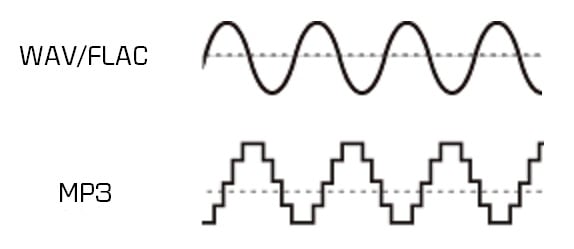
As we pointed out in the previous article, talking about a digital audio file refers to the ability to take 44,100 samples per second and thus be able to draw as precisely as possible the wave, with its curvature, that describes the sound.

or that the sound is produced by the fluctuating pressure that produces a movement in the air. Like the string of a guitar or a piano that vibrates X times per second, depending on the pitch, and these vibrations produce waves in the air similar to those produced in water if an object falls.

Then those waves propagate, reach our ears and produce a wave with a certain curvature.

Digitizing this implies, as we have already said, taking 44100 (or more) samples per second and capturing its position in order to later be able to reproduce that wave as close as possible to the original.

But this implies an enormous flow of information, which must be compressed and, if possible, even discarded, to reduce its size to a point that today, with this technology, is manageable.

This is based on these principles:

– There are certain sounds that the human ear cannot hear.
– There are certain sounds that the human ear hears better than others.
– If there are two sounds playing at the same time, we can hear the one that is higher, and not the lower one.

These principles of human hearing allow us to discard sounds without a considerable loss of quality.

How to make an mp3 sound great?

How to make an mp3 sound great?

MP3 QUALITY
MP3 QUALITY

If you want to know how an mp3 works, this article is for you.

MP3 QUALITY
MP3 QUALITY

An mp3 stores information digitally. The music is captured 44100 times per second, each of these parts has a size of 16 or 24 bits. The usual is 16 bits.

The sound has a curved shape, what is sought is that each frame captures an instant of that curve or bell.

If 16 bits are used, we have a little more than 65 points that form a kind of grid where each point will be located to form the curvature. It is enough information to achieve a very good definition. In 24 buts we have several million possible points on the grid to place each point on the curve.

To understand the size of a file, the following formula will be useful:

frames*bits*channels= x bits per second

In a good quality mp3 we speak of 44100 multiplied by 16 bits multiplied by 2 channels (stereo) which gives us 1,411,200 bits per second, that is, 176,000 bytes per second.

If the song lasts an average of 3 minutes, each one will occupy 32 million bytes.

Using Mp3 that 32 million bit song can be compressed to about 3 million bits.

We will need to be able to transmit 16,666 per second to be able to transmit the 3 million bits of the total song.

We will see that the more information it contains, the more transmission capacity per second we will need.

Mp4Gain is the ideal program to get these mp3s that have a sound practically identical to a CD.

What do lossy and lossless mean and which is better? Part 2

What do lossy and lossless mean and which is better? Part 2

Lossy vs Lossless audio

How are audio files encrypted?

Lossy vs Lossless audio

In the first part of this article we saw why it was necessary to compress the audio files, since the original formats like WAV or AIFF were unmanageable if you think about sending them by mp3 and storing many on the hard drives that existed at the beginning.

In fact, even today, despite the fact that internet transmission and storage capacity have improved, wab bi el aiff is not used for this purpose, for the same reason: they take up too much space both in transmission and in storage. .

So he had to find ways to compress these files without this meaning a very notorious loss of quality.

The mp3 emerged and revolutionized the world and is still the most important format.

On the one hand, it obviously used some compression, but since it was not efficient enough, it must have begun to understand how human hearing works, in order to eliminate frequencies and sounds that are inaudible to humans and that, however, were stored, occupying space in WAV and AIFF formats.

Over time, better compression methods were developed and then formats emerged that could greatly reduce the size of the file, without losing or discarding any information. This is what is known as lossless, that is, without loss of information.

It is said that the FLAC will end up taking over the market, because it compresses the file and does not need to discard information, achieving that when decompressing the FLAC file we have an original WAV file without having deleted anything.

Mp4Gain can convert mp3 to flac and also normalize its volume or it can just normalize an mp3 or flac, without converting it. You can even extract from a video, just the audio, and record it as any popular audio format like mp3, m4a, flac, ogg, etc.

What do lossy and lossless mean and which is better?

What do lossy and lossless mean and which is better?

Lossy vs Lossless
Lossy vs Lossless

How are audio files encrypted?

Lossy vs Lossless
Lossy vs Lossless

Initially, audio was recorded on a computer in WAV or AIFF format and these took up too much space.
They took up so much space that few audio files could fit on the first hard drives, because they had only a few megabytes of available space.

This still happens today in portable devices in general.

Nobody would think that a service like spotify could transmit and store wavs or files without compression.

It could not have the transmission speed, it would spend too much bandwidth and occupy the disk or storage space right away.

If we talk about videos, the same would happen with Youtube or Ntflix.

So, initially almost desperately, they looked for ways to save space, even if this had some impact on quality.

Over time, the Internet’s transmission capacity improved and different compression methods made significant progress.

Lossy

Initially, the hearing capacity of the human being was used to, in addition to compressing the files, also discard non-audible information.

Many people wonder why 44100 was chosen as the samplerate for CD discs and the first more or less obvious answer is that if the human ear is capable of hearing sounds between 20hz and 20khz then more or less twice as much was needed to be able to manage and store audio with good quality.

What determines the quality of an mp3?

What determines the quality of an mp3?

mp3 quality
mp3 quality

How do you get a high quality mp3?

mp3 quality
mp3 quality

This question could have two different approaches:

1.- An existing mp3 has a certain quality and one could wonder what determined that quality

2.- We are going to encode an mp3 from a video from which we will extract the audio and how will we get that new mp3 to have the highest possible audio quality?

In this case we will focus on option 2, how to create a video from original audio and make it have good audio quality.

The first step, inevitably, comes from getting original audio that is of high quality. If we do not start from that point, we will no longer achieve our goal.

The quality of the audio is very difficult to “restore” if you do not have as a starting point an original audio that will have a high quality.

But even if you do have that high quality original source, it’s important against using advanced software like Mp4Gain and taking the right steps to make sure you don’t lose that quality by making a bad decision when extracting and encoding the audio a long time ago. mp3, a flac, etc.

In order to convert or extract an audio from a video, it is important to understand what points are decisive:

-Bit rate. No, to save space, we will use a bitrate lower than 192 and if possible we will use 320.

Nor does it mean that if we have a 128 mp3 and convert it to 320 we will be able to restore its quality.

What it means is that if we originally convert to a 320 mp3, we will discard very little information and thus we will get a very high quality mp3. Virtually indistinguishable from a CD.

-The following will be to use a samplerate of 48000 or at least 44100, not a smaller one.

In order to capture the full range audible by the human ear, it is necessary to use at least 44100.

Mp4Gain is the right normalizer/converter for the job and to give you a high quality output.

How to make an mp3 sound as good as possible?

How to make an mp3 sound as good as possible?

Mp3 Quality
Mp3 Quality

Achieve the best quality in an mp3

Mp3 Quality
Mp3 Quality

Everything we talk about mp3 in this article actually applies to other formats like FLACC, ogg, etc.

But how do you make it sound as good as possible?

In the first place we start from a source file, which is the one that you have obtained. The more quality it has, the better.

And besto wants to say that it must have a good birate and a good samplerate, that it be stereo and that it sound as good as possible.

If we start from that, we will be able to normalize the volume and give a consistent quality with Mp4Gain.

Because we will be able to use a high quality bitrate, an adequate samplerate, make the “color” of the audio clear, bright, but with powerful and defined bass, etc.

Mp4Gain can extract audio tracks from videos. Nowadays it is one of the best options since it is relatively easy to obtain good audio with the music we are looking for and Mp4Gain can extract the audio and convert it into an mp3, a FLAC, etc.

Mp4Gain is the best prepared normalizer for these times where every time we have devices with better hardware for music and video playback quality.

Because we are living in a time where devices and computers are rapidly improving their capacity for audio and video and only Mp4Gain is prepared for it.

Today, with Mp4Gain you have the perfect tool to get your audio and video with the best quality and volume.

Which is better, an mp3 or a lossless music file like FLAC?

Which is better, an mp3 or a lossless music file like FLAC?

lossless maudio quality mp3 flac

Lossless vs lossy

lossless maudio quality mp3 flac

The evolution of devices or equipment that reproduce audio, as well as that of headphones or speakers, have made people wonder more and more if the time has come to resort to lossless music, for example FLAC.

Before, a few years ago, it was a bit absurd to talk about lossless formats when we used equipment that had low audio capabilities on a daily basis.

But now, as many phones and computers contain DACS that have high capacity, one can already think about it without it being nonsense.

And it is not so obvious nor is the question trivial.

For one, there is a lot of bloof in this area. Where many people repeat slogans that take for granted the automatic superiority of lossless. On the other hand, we are entering a stage where true high audio quality is being achieved, including the audio that accompanies videos.

Mp4Gain, it should be noted, is perfectly compatible with this world of high quality audio and video (including video audio).

And Mp4Gain can not only normalize the volume of audio and videos perfectly, but can easily convert to lossless formats with great ease and great results.

It may be worthwhile to try and convert some files to formats such as FLAC and, incidentally, normalizing the volume and listening to them on our computer or device.

Undoubtedly sooner rather than later we will find ourselves fully in the world of high fidelity audio, if not you are already there. It is quite possible that your phone or your computer can already handle this high level of audio perfectly.

The perfect partner is Mp4Gain.

The difference between lossy and lossless Part 2

The difference between lossy and lossless Part 2

lossy and lossless
lossy and lossless

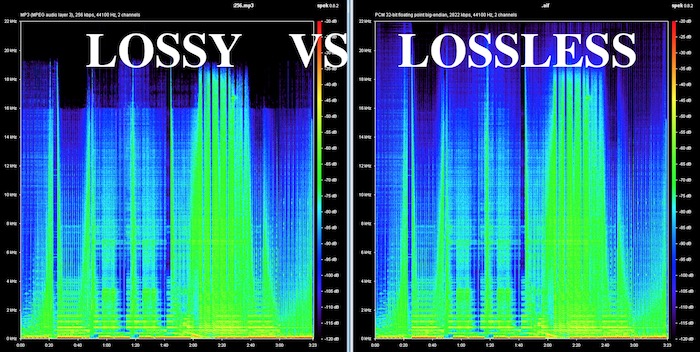
What is the difference between lossless and lossy music? Spectral comparison of lossy and lossless compression

Lossless and Lossy
Lossless and Lossy

Let’s not talk about the difference between the two music formats, let’s talk about the intuitive feel. For example, when you are in KTV, you always click various kinds of music to sing. What is the difference between lossless music and lossy music? Lossy Compression and Lossy Music Spectral Comparison of Lossless Compression

Is WAV a lossy or lossless format? – to understand

Is WAV a lossy or lossless format? 159***1368 WAV is a lossless format, with a maximum bitrate of 1.4M at 44100Hz. I hope to take likes and comments to report that Chocopa is good and WAV love is bad.

What is the difference between lossless and lossy compressed music?

At present, what online home music can really achieve lossless? What is the difference between lossless and lossless listening to online music platforms? Can ordinary people perceive that there is no loss…

What is the difference between lossy compression and lossless compression?

Differences: 1. Lossless compression can be fully restored, lossy compression cannot be the same as the original file after restoration, and there is a certain loss. 2. The compression ratio of lossless compression is generally from “2:1” to “5:1”, while the compression ratio of lossy compression

Know: Lossless and Lossy

It is said that the difference between lossy limit and lossless is obvious when listening to a classic or big weave… But unfortunately… I listen to less classic, don’t be intimidated… Then mention the tears of the times in my mind wma format …now

According to the difference between the images before and after compression, they can be divided into: lossless encoding and lossy encoding.

According to the difference between the images before and after compression, they can be divided into: lossless encoding and lossy encoding. A. Huffman coding B. Run-length coding C. Arithmetic coding D. Predictive coding Popular test College entrance exam First-tier constructor

Does anyone have a rigorous comparison between lossy and lossless image quality? -α|Sony/KM/M SLR/DSLM

Most of the difference between lossy and lossless is not seen in the static images, but in the latitude of the post adjustment. The difference between RAW and jpeg is like the difference between a book and a piece of paper. Lossy compression is sometimes just

The main difference between lossless predictive coding system and lossy predictive coding system is ( ). – Go to school

The main difference between lossless predictive coding system and lossy predictive coding system is ( ). A. The lossless predictive coding system has more quantizer parts than the lossy predictive coding system B. The lossy predictive coding system has more quantizer parts than the lossless predictive coding system

Difference Between Lossless and Lossy Music

1. Lossless music WMP can only play WAVE, if it is APE, please convert it to WAVE first. Qianqianjing can listen to any music format, recommended~~~ 2. The difference between lossless music and lossy music is hard to tell. Because there is also loss

[Double Blind Test] Can you hear the difference between lossy and lossless?

As an academic HiFier, I want to know how big is the difference between lossy and lossless. Feel free to follow the vote. Now I don’t know if the loss is A or B. I named it after a friend of mine to pass the double blind test.

Comparison of lossless and lossy image compression

Lossy Compression vs. Lossless Compression A Closer Look at Various Image Formats In general, there are two different types of image formats: lossy compression and lossless compression. 1. Lossy Compression Lossy compression can reduce images in memory and on disk

What is the difference between lossy and lossless music in game music?

Many friends will ask, some lossy and lossless music sounds no different to me. This is because human hearing is limited, generally 20 Hz to 20 kHz, and the sampling rate of game music production will use 44.1 KHz or 48 KHz.


The difference between lossy and lossless

The difference between lossy and lossless

LOSSY VS LOSSLESS
LOSSY VS LOSSLESS

What is the difference between lossy and lossless?

LOSSY VS LOSSLESS
LOSSY VS LOSSLESS

What is the difference between lossy and lossless?:1 Contents Introduction Lossy and lossless sampling frequency and rate PCM encoding MP3 encoding MPC encoding WMA format APE format 4 Characteristics of MP3MPCmp3PRO APE5 sound format?

Briefly describe the difference between lossy compression and lossless compression. _Examination information network

Briefly describe the difference between lossy compression and lossless compression. Click to see the answers and enter the question bank to practice questions that may interest you. Questions that may interest you. 1 Briefly describe the reasons for image compression. Click to see the answer to enter the question bank Exercise 2 illustrates the bitmap and

Sound is also divided into unique recognition of the advantages and disadvantages of various lossy and lossless audio formats.

Features: The sound quality is average, the compression rate is relatively high, it is compatible with a large number of software and hardware, and it is widely used. It is definitely the current mainstream. OGG encoding Ogg is an advanced lossy audio compression technology, the official name is OggVorbis, it is

What is the difference between lossy and lossless headlight modification?_Ant Car Accessories

The so-called non-destructive installation is to install the lens directly on the original car headlight bulb interface without destroying the original lamp container, and tighten the lens to fix the lens with screws. The so-called lossy installation consists of drilling holes in the original lamp pot and comparing the four screw holes in the lens.

Difference between lossless compression and lossy compression?

Lossless compression is the first step without the above. Therefore, lossless compression can restore data equivalent to what it was before compression, while lossy compression cannot. The scale of “loss” in lossy compression is controllable and algorithms are used to extract information before removing it.

Can you hear the difference between lossy and lossless audio at different sample rates?

Although it is said that the human ear can only hear the sound up to 20 kHz, the 48 kHz sampling rate and the 44.1 kHz sampling rate are actually different. . . It is recommended to use the highest quality to view this video to ensure the bitrate is high enough to reduce suppression.

What is the difference between lossy compression and lossless compression?

Differences: 1. Lossless compression can be fully restored, lossy compression cannot be the same as the original file after restoration, and there is a certain loss. 2. The compression ratio of lossless compression is generally from “2:1” to “5:1”, while the compression ratio of lossy compression