Streaming Audio Quality


Free Download Mp4Gain
picture

Streaming Audio Quality

Streaming Audio Quality

Introduction on Audio Streaming

Streaming audio quality is an essential aspect of modern music streaming services. The quality of streaming audio can determine the overall listening experience of the listener. As an expert in the field, I will guide you through everything you need to know about streaming audio quality, including its significance, factors that affect it, and how to improve it.

The Significance of Streaming Audio Quality

Streaming audio quality is critical to the overall listening experience. The quality of the audio can determine how enjoyable the music is to listen to, how clear the sound is, and how much detail is present. Low-quality audio can result in distortion, background noise, and lack of clarity. On the other hand, high-quality audio can offer a rich and detailed sound, allowing listeners to appreciate the music to its fullest.

Factors Affecting Streaming Audio Quality

The quality of streaming audio can be affected by several factors, including:

  • Internet connection speed: A slow internet connection can result in buffering, low-quality audio, and even disconnection.
  • Device quality: The quality of the device used to stream the music can impact the overall quality of the audio.
  • Compression: The compression used during the streaming process can affect the quality of the audio.
  • Format: The format used for the audio can also affect the quality.
  • Speaker quality: The quality of the speakers or headphones used to listen to the music can also impact the overall quality of the audio.

How to Improve Streaming Audio Quality

Improving streaming audio quality can be done by taking the following steps:

  1. Use a high-quality device: Using a high-quality device can improve the overall quality of the audio.
  2. Upgrade your internet connection: Upgrading your internet connection speed can significantly improve the quality of the audio.
  3. Choose the right format: Choosing the right audio format can also improve the overall quality of the audio.
  4. Use high-quality speakers: Using high-quality speakers or headphones can further enhance the audio experience.

FAQ

Q1. What is the recommended internet speed for high-quality audio streaming?

The recommended internet speed for high-quality audio streaming is at least 320 kbps. This bitrate ensures that the audio is clear, detailed, and free from distortion. However, higher internet speeds are always better as they can reduce buffering and improve overall audio quality.

Q2. Does the audio format affect streaming audio quality?

Yes, the audio format can significantly impact the streaming audio quality. Lossless audio formats like FLAC and WAV offer the highest audio quality as they preserve all the details of the original recording. However, these formats are often larger in size and require more bandwidth to stream. Compressed audio formats like MP3 and AAC are smaller in size, making them easier to stream, but they often result in a loss of audio quality.

Q3. Does using high-quality headphones improve streaming audio quality?

Yes, using high-quality headphones or speakers can enhance the streaming audio quality. High-quality headphones can offer better sound isolation, resulting in clearer and more detailed audio.

Q4. Can streaming audio quality be affected by the music streaming service?

Yes, the music streaming service can affect the streaming audio quality. Some music streaming services use higher quality audio codecs than others, resulting in better audio quality. Additionally, some services offer higher quality audio as part of a premium subscription, while others only offer lower quality audio in their free service.

Q5. Can adjusting the audio settings on the streaming service improve audio quality?

Yes, adjusting the audio settings on the streaming service can improve audio quality. Some services offer audio quality settings that allow users to adjust the bitrate or audio codec used for streaming. Adjusting these settings can result in higher quality audio.

Q6. Can background noise affect streaming audio quality?

Yes, background noise can affect streaming audio quality, particularly in low-quality audio streams. Background noise can result in distortion, making it difficult to hear the details of the music. Using high-quality headphones or speakers with noise isolation features can help reduce the impact of background noise.

Q7. Does the quality of the recording impact streaming audio quality?

Yes, the quality of the original recording can impact streaming audio quality. A higher quality recording with more detail and clarity will result in better audio quality when streamed. However, even lower quality recordings can be improved with proper compression and audio codec selection.

Q8. Can streaming audio quality be affected by the device used to stream the music?

Yes, the device used to stream the music can affect streaming audio quality. Higher quality devices with better audio hardware and software will generally result in better audio quality. Additionally, using outdated or malfunctioning devices can result in audio quality issues.

Q9. Is it better to use a wired or wireless connection for streaming audio?

A wired connection is generally better for streaming audio as it offers more stable and reliable data transfer, resulting in fewer buffering issues and better audio quality. However, a high-quality wireless connection can also offer good audio quality, particularly if the internet speed is sufficient.

Q10. Can using a virtual private network (VPN) affect streaming audio quality?

Yes, using a VPN can affect streaming audio quality, particularly if the VPN connection is slow or unstable. A VPN can also add additional latency, resulting in audio synchronization issues. However, a high-quality VPN connection can offer good audio quality and added privacy and security.

Q11. What should I do if I experience poor streaming audio quality?

If you experience poor streaming audio quality, you can try the following steps:

  1. Check your internet connection speed and upgrade if necessary.
  2. Try using a different device or audio player to stream the music.
  3. Adjust the audio quality settings on the streaming service if available.
  4. Use high-quality headphones or speakers with noise isolation features.

Q12. Can streaming audio quality improve in the future?

Yes, streaming audio quality can improve in the future as technology advances. Higher internet speeds and more efficient audio codecs can result in higher quality audio streams. Additionally, music streaming services may offer higher quality audio as part of their standard service, rather than only in premium subscriptions.

Conclusion

Streaming audio quality is a crucial aspect of modern music streaming services. The quality of the audio can significantly impact the overall listening experience. Factors such as internet connection speed, device quality, compression, and format can affect streaming audio quality. However, by using high-quality devices, upgrading internet connections, choosing the right audio format, and using high quality headphones or speakers, users can improve their streaming audio experience. It is also important to note that music streaming services can offer different audio codecs and quality settings, which can impact the overall audio quality. As technology advances, streaming audio quality is likely to continue to improve, offering even better listening experiences.

FAQ

What is the best audio format for streaming?

The best audio format for streaming depends on a variety of factors, including the device used for streaming, internet connection speed, and personal preference. However, commonly used audio formats for streaming include AAC, MP3, and Ogg Vorbis.

Can streaming audio quality be affected by the location of the user?

Yes, the location of the user can affect streaming audio quality. Users in areas with poor internet connectivity or high internet traffic may experience buffering issues and reduced audio quality.

Can using a high-quality audio cable improve streaming audio quality?

Using a high-quality audio cable can improve streaming audio quality, particularly for wired connections. A higher quality cable can offer better shielding, resulting in reduced noise and distortion.

What is the recommended internet connection speed for streaming high-quality audio?

The recommended internet connection speed for streaming high-quality audio varies depending on the quality of the audio stream. However, a minimum internet speed of 1.5 Mbps is recommended for streaming low-quality audio, while 5-10 Mbps is recommended for streaming high-quality audio.

Can streaming audio quality be affected by the browser used for streaming?

Yes, the browser used for streaming can affect streaming audio quality, particularly if the browser has compatibility issues with the streaming service. Using a browser recommended by the streaming service can help ensure optimal streaming audio quality.

Does streaming audio quality impact data usage?

Yes, streaming audio quality can impact data usage. Higher quality audio streams use more data than lower quality streams, which can result in increased data usage. Users can adjust the audio quality settings on the streaming service to reduce data usage if necessary.

Can using a streaming service from a different country affect audio quality?

Using a streaming service from a different country can affect audio quality, particularly if the streaming service uses different audio codecs or quality settings than those used in the user’s country. However, this is not always the case and may depend on the specific streaming service used.

What should I do if I experience audio syncing issues while streaming?

If you experience audio syncing issues while streaming, you can try the following steps:

  1. Pause and restart the audio stream.
  2. Adjust the audio quality settings on the streaming service if available.
  3. Ensure that your internet connection is stable and fast enough for the audio stream.
  4. Use a wired connection rather than a wireless connection if possible.

Can the type of device used for streaming affect audio quality?

Yes, the type of device used for streaming can affect audio quality. Different devices may have different audio hardware and software, which can impact the quality of the audio output. Additionally, using headphones or speakers that are not designed for high-quality audio can also impact the overall audio quality.

What is the difference between lossy and lossless audio compression?

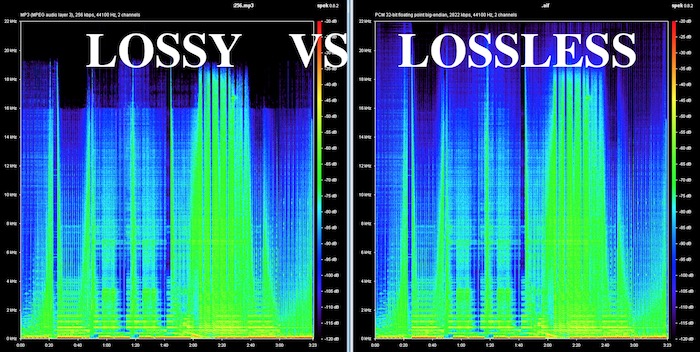
Lossy audio compression reduces the size of audio files by permanently discarding some of the original data. This can result in a loss of audio quality, particularly with higher levels of compression. Lossless audio compression, on the other hand, reduces the size of audio files without permanently discarding any data, resulting in no loss of audio quality.

Can streaming audio quality be affected by the number of users on the streaming service?

Yes, streaming audio quality can be affected by the number of users on the streaming service, particularly if the service is experiencing high levels of traffic. This can result in buffering issues and reduced audio quality.

What is the difference between streaming audio and downloading audio?

Streaming audio involves listening to audio files in real-time over an internet connection, while downloading audio involves downloading audio files to a device for later listening. Streaming audio does not require the user to store the audio files on their device, but may require a stable and fast internet connection for optimal audio quality.

Can the audio quality of a streaming service vary between different songs or albums?

Yes, the audio quality of a streaming service can vary between different songs or albums, particularly if the songs or albums were uploaded to the service at different times. Additionally, different songs or albums may have been mastered differently, resulting in differences in audio quality.

What is the impact of audio quality on music production and mastering?

Audio quality is a crucial aspect of music production and mastering, as it can impact the overall sound of the final product. High-quality audio recording and mastering techniques can result in a clearer, more detailed sound, while poor recording and mastering can result in a muddled or distorted sound.

Can the audio quality of a streaming service be improved with a software or hardware upgrade?

In some cases, the audio quality of a streaming service can be improved with a software or hardware upgrade. Upgrading to a higher quality audio playback software or using a dital-to-gianalog converter (DAC) can improve the overall audio quality of the streaming service. However, it is important to note that the quality of the original audio files also plays a significant role in the overall audio quality.

What is the impact of streaming audio quality on live streaming events?

Streaming audio quality can have a significant impact on the overall experience of live streaming events, particularly for events that involve music or other types of audio. Poor audio quality can detract from the overall experience and make it difficult for viewers to fully engage with the content.

Can streaming audio quality impact the user’s perception of a streaming service?

Yes, streaming audio quality can impact the user’s perception of a streaming service. Poor audio quality can lead to frustration and dissatisfaction with the service, while high-quality audio can enhance the overall user experience and increase satisfaction.

What is the future of streaming audio quality?

As technology continues to advance, it is likely that streaming audio quality will continue to improve. This may involve the use of new audio codecs, improved internet connectivity, and advancements in audio hardware and software. Ultimately, the future of streaming audio quality will depend on a variety of factors, including technological advancements, user demand, and the overall direction of the streaming industry



Free Download Mp4Gain
picture


Mp4Gain Main Window
picture


Mp4Gain Features
picture


Free Download Mp4Gain
picture

How to make an mp3 sound great? Part 2

How to make an mp3 sound great? Part 2

mp3 quality
mp3 quality

If you want to know how an mp3 works, this article is for you.

mp3 quality
mp3 quality

As we pointed out in the previous article, talking about a digital audio file refers to the ability to take 44,100 samples per second and thus be able to draw as precisely as possible the wave, with its curvature, that describes the sound.

or that the sound is produced by the fluctuating pressure that produces a movement in the air. Like the string of a guitar or a piano that vibrates X times per second, depending on the pitch, and these vibrations produce waves in the air similar to those produced in water if an object falls.

Then those waves propagate, reach our ears and produce a wave with a certain curvature.

Digitizing this implies, as we have already said, taking 44100 (or more) samples per second and capturing its position in order to later be able to reproduce that wave as close as possible to the original.

But this implies an enormous flow of information, which must be compressed and, if possible, even discarded, to reduce its size to a point that today, with this technology, is manageable.

This is based on these principles:

– There are certain sounds that the human ear cannot hear.
– There are certain sounds that the human ear hears better than others.
– If there are two sounds playing at the same time, we can hear the one that is higher, and not the lower one.

These principles of human hearing allow us to discard sounds without a considerable loss of quality.

How to make an mp3 sound great?

How to make an mp3 sound great?

MP3 QUALITY
MP3 QUALITY

If you want to know how an mp3 works, this article is for you.

MP3 QUALITY
MP3 QUALITY

An mp3 stores information digitally. The music is captured 44100 times per second, each of these parts has a size of 16 or 24 bits. The usual is 16 bits.

The sound has a curved shape, what is sought is that each frame captures an instant of that curve or bell.

If 16 bits are used, we have a little more than 65 points that form a kind of grid where each point will be located to form the curvature. It is enough information to achieve a very good definition. In 24 buts we have several million possible points on the grid to place each point on the curve.

To understand the size of a file, the following formula will be useful:

frames*bits*channels= x bits per second

In a good quality mp3 we speak of 44100 multiplied by 16 bits multiplied by 2 channels (stereo) which gives us 1,411,200 bits per second, that is, 176,000 bytes per second.

If the song lasts an average of 3 minutes, each one will occupy 32 million bytes.

Using Mp3 that 32 million bit song can be compressed to about 3 million bits.

We will need to be able to transmit 16,666 per second to be able to transmit the 3 million bits of the total song.

We will see that the more information it contains, the more transmission capacity per second we will need.

Mp4Gain is the ideal program to get these mp3s that have a sound practically identical to a CD.

What do lossy and lossless mean and which is better? Part 2

What do lossy and lossless mean and which is better? Part 2

Lossy vs Lossless audio

How are audio files encrypted?

Lossy vs Lossless audio

In the first part of this article we saw why it was necessary to compress the audio files, since the original formats like WAV or AIFF were unmanageable if you think about sending them by mp3 and storing many on the hard drives that existed at the beginning.

In fact, even today, despite the fact that internet transmission and storage capacity have improved, wab bi el aiff is not used for this purpose, for the same reason: they take up too much space both in transmission and in storage. .

So he had to find ways to compress these files without this meaning a very notorious loss of quality.

The mp3 emerged and revolutionized the world and is still the most important format.

On the one hand, it obviously used some compression, but since it was not efficient enough, it must have begun to understand how human hearing works, in order to eliminate frequencies and sounds that are inaudible to humans and that, however, were stored, occupying space in WAV and AIFF formats.

Over time, better compression methods were developed and then formats emerged that could greatly reduce the size of the file, without losing or discarding any information. This is what is known as lossless, that is, without loss of information.

It is said that the FLAC will end up taking over the market, because it compresses the file and does not need to discard information, achieving that when decompressing the FLAC file we have an original WAV file without having deleted anything.

Mp4Gain can convert mp3 to flac and also normalize its volume or it can just normalize an mp3 or flac, without converting it. You can even extract from a video, just the audio, and record it as any popular audio format like mp3, m4a, flac, ogg, etc.

What do lossy and lossless mean and which is better?

What do lossy and lossless mean and which is better?

Lossy vs Lossless
Lossy vs Lossless

How are audio files encrypted?

Lossy vs Lossless
Lossy vs Lossless

Initially, audio was recorded on a computer in WAV or AIFF format and these took up too much space.
They took up so much space that few audio files could fit on the first hard drives, because they had only a few megabytes of available space.

This still happens today in portable devices in general.

Nobody would think that a service like spotify could transmit and store wavs or files without compression.

It could not have the transmission speed, it would spend too much bandwidth and occupy the disk or storage space right away.

If we talk about videos, the same would happen with Youtube or Ntflix.

So, initially almost desperately, they looked for ways to save space, even if this had some impact on quality.

Over time, the Internet’s transmission capacity improved and different compression methods made significant progress.

Lossy

Initially, the hearing capacity of the human being was used to, in addition to compressing the files, also discard non-audible information.

Many people wonder why 44100 was chosen as the samplerate for CD discs and the first more or less obvious answer is that if the human ear is capable of hearing sounds between 20hz and 20khz then more or less twice as much was needed to be able to manage and store audio with good quality.

What determines the quality of an mp3?

What determines the quality of an mp3?

mp3 quality
mp3 quality

How do you get a high quality mp3?

mp3 quality
mp3 quality

This question could have two different approaches:

1.- An existing mp3 has a certain quality and one could wonder what determined that quality

2.- We are going to encode an mp3 from a video from which we will extract the audio and how will we get that new mp3 to have the highest possible audio quality?

In this case we will focus on option 2, how to create a video from original audio and make it have good audio quality.

The first step, inevitably, comes from getting original audio that is of high quality. If we do not start from that point, we will no longer achieve our goal.

The quality of the audio is very difficult to “restore” if you do not have as a starting point an original audio that will have a high quality.

But even if you do have that high quality original source, it’s important against using advanced software like Mp4Gain and taking the right steps to make sure you don’t lose that quality by making a bad decision when extracting and encoding the audio a long time ago. mp3, a flac, etc.

In order to convert or extract an audio from a video, it is important to understand what points are decisive:

-Bit rate. No, to save space, we will use a bitrate lower than 192 and if possible we will use 320.

Nor does it mean that if we have a 128 mp3 and convert it to 320 we will be able to restore its quality.

What it means is that if we originally convert to a 320 mp3, we will discard very little information and thus we will get a very high quality mp3. Virtually indistinguishable from a CD.

-The following will be to use a samplerate of 48000 or at least 44100, not a smaller one.

In order to capture the full range audible by the human ear, it is necessary to use at least 44100.

Mp4Gain is the right normalizer/converter for the job and to give you a high quality output.

How to make an mp3 sound as good as possible?

How to make an mp3 sound as good as possible?

Mp3 Quality
Mp3 Quality

Achieve the best quality in an mp3

Mp3 Quality
Mp3 Quality

Everything we talk about mp3 in this article actually applies to other formats like FLACC, ogg, etc.

But how do you make it sound as good as possible?

In the first place we start from a source file, which is the one that you have obtained. The more quality it has, the better.

And besto wants to say that it must have a good birate and a good samplerate, that it be stereo and that it sound as good as possible.

If we start from that, we will be able to normalize the volume and give a consistent quality with Mp4Gain.

Because we will be able to use a high quality bitrate, an adequate samplerate, make the “color” of the audio clear, bright, but with powerful and defined bass, etc.

Mp4Gain can extract audio tracks from videos. Nowadays it is one of the best options since it is relatively easy to obtain good audio with the music we are looking for and Mp4Gain can extract the audio and convert it into an mp3, a FLAC, etc.

Mp4Gain is the best prepared normalizer for these times where every time we have devices with better hardware for music and video playback quality.

Because we are living in a time where devices and computers are rapidly improving their capacity for audio and video and only Mp4Gain is prepared for it.

Today, with Mp4Gain you have the perfect tool to get your audio and video with the best quality and volume.

Which is better, an mp3 or a lossless music file like FLAC?

Which is better, an mp3 or a lossless music file like FLAC?

lossless maudio quality mp3 flac

Lossless vs lossy

lossless maudio quality mp3 flac

The evolution of devices or equipment that reproduce audio, as well as that of headphones or speakers, have made people wonder more and more if the time has come to resort to lossless music, for example FLAC.

Before, a few years ago, it was a bit absurd to talk about lossless formats when we used equipment that had low audio capabilities on a daily basis.

But now, as many phones and computers contain DACS that have high capacity, one can already think about it without it being nonsense.

And it is not so obvious nor is the question trivial.

For one, there is a lot of bloof in this area. Where many people repeat slogans that take for granted the automatic superiority of lossless. On the other hand, we are entering a stage where true high audio quality is being achieved, including the audio that accompanies videos.

Mp4Gain, it should be noted, is perfectly compatible with this world of high quality audio and video (including video audio).

And Mp4Gain can not only normalize the volume of audio and videos perfectly, but can easily convert to lossless formats with great ease and great results.

It may be worthwhile to try and convert some files to formats such as FLAC and, incidentally, normalizing the volume and listening to them on our computer or device.

Undoubtedly sooner rather than later we will find ourselves fully in the world of high fidelity audio, if not you are already there. It is quite possible that your phone or your computer can already handle this high level of audio perfectly.

The perfect partner is Mp4Gain.

What makes an audio format lossless?

What makes an audio format lossless?

Lossless Audio

The best audio formats for your music library

Apple Music lossless

You might think of the word “lossless” as being used for audio formats that don’t use any kind of compression. However, even lossless audio formats use compression to reduce file sizes to reasonable levels.

Lossless formats use compression algorithms to save audio data so that the audio is exactly the same as the original source. This contrasts sharply with lossy audio formats like AAC, MP3, and WMA, which use algorithms that discard data to compress the audio. Audio files consist of sounds and silences. Lossless formats can compress silence to almost zero space while preserving all sound data, making them smaller than uncompressed files.

What lossless format is commonly used for digital music?
Popular lossless formats for storing music include:

FLAC
WAV
A THE C
lossless WMA
The effect of lossless formats on music quality
If you are downloading lossless music tracks from an HD music service, you would expect the sound quality to be really high. On the other hand, if you digitize a low-quality music box using a lossless audio format, the audio quality will not improve.

Is it possible to convert lossy songs to lossless?
Going from lossy to lossless is never a good idea. This is because a song that has been compressed using a lossy format always does. If you convert it to a lossless format, all you do is waste storage space on your hard drive or mobile device. There is no way to improve the quality of lossy songs using this method.

Advantages of using lossless audio formats for your music library
Using a lossy format like MP3 is still the most common method people use to store their music collection. However, there are clear advantages when it comes to building a lossless music library.

Perfect Music CD Backup: Lossless Copy to Audio Files gives you an exact bit-level copy of the original music CD. This means that no matter what audio format comes out in the future, you’ll know you have a perfect copy of the original.
Recover from lost or damaged: After playing music in lossless format, you can recover a damaged original CD or any CD that has been lost to a blank CD.
Convert to any format: Since your music is in a lossless format, you can convert it to any format and achieve the highest quality the format supports.
Disadvantages of Storing Music in a Lossless Format
Incompatible – Unlike formats like MP3, hardware devices like smartphones and tablets do not support lossless formats.
Requires more storage space: Lossless audio files generally require more storage space than lossy encoded files.