The Advantages of Lossless Audio Formats: FLAC and ALAC


Free Download Mp4Gain
picture

The Advantages of Lossless Audio Formats: FLAC and ALAC


FLAC and ALAC
FLAC and ALAC
FLAC and ALAC
FLAC and ALAC

As an expert in audio optimization, I am always on the lookout for formats that deliver exceptional sound quality without compromising on file size. In this article, I will delve into the world of lossless audio formats, with a specific focus on two popular options: FLAC and ALAC. These formats have gained significant popularity among audiophiles and music enthusiasts for their ability to preserve the original audio quality while offering efficient compression. Join me as we explore the advantages of these lossless audio formats and why they should be your top choice.

Superior Sound Quality

When it comes to lossless audio formats, the primary concern is maintaining the utmost sound quality. FLAC and ALAC excel in this regard, as they employ compression algorithms that preserve every detail of the original audio recording. Whether it’s the rich harmonies of a symphony orchestra or the subtle nuances in a vocalist’s performance, these formats ensure an immersive and authentic listening experience. With FLAC and ALAC, you can indulge in music the way it was intended to be heard, without any compromise on audio fidelity.

Efficient Compression

Efficient compression is another remarkable advantage of lossless audio formats like FLAC and ALAC. These formats utilize sophisticated compression techniques that significantly reduce file sizes while retaining all the audio data. This means you can store more music on your devices without sacrificing quality or resorting to lower-bitrate alternatives. Whether you have a vast music library or limited storage space, FLAC and ALAC offer a practical solution to keep your favorite tracks accessible at all times.

Wide Compatibility

One of the key considerations when choosing an audio format is its compatibility with different devices and platforms. FLAC and ALAC have gained widespread support across various software and hardware ecosystems. Many popular media players, portable devices, and operating systems are compatible with these formats, ensuring seamless playback without the need for additional conversions or transcoding. Whether you’re using a Mac, Windows, or mobile device, FLAC and ALAC guarantee a hassle-free listening experience.

Versatility and Metadata Support

Versatility is an essential aspect of lossless audio formats, and FLAC and ALAC don’t disappoint. Apart from delivering exceptional audio quality, these formats also support a range of metadata. You can embed album art, track information, lyrics, and other relevant details within the audio files themselves. This ensures that your music collection remains organized and easily searchable across different platforms and media players. With FLAC and ALAC, it’s not just about the audio; it’s about creating a comprehensive and immersive musical experience.

Archival and Future-Proofing

For audiophiles and music collectors, archival is a crucial consideration. FLAC and ALAC are ideal for archiving purposes as they provide a reliable and future-proof solution. By choosing these formats, you can preserve your music collection in its original quality for years to come, ensuring that your favorite albums and tracks withstand the test of time. Moreover, since FLAC and ALAC have gained widespread acceptance, it’s highly likely that they will continue to be supported by future audio systems and technologies.

Smooth Integration with Existing Libraries

If you already have an extensive collection of audio files in other formats, the transition to FLAC or ALAC can be seamless. Both formats support transcoding, allowing you to convert your existing audio files into lossless formats without any loss of quality. This ensures that you can integrate FLAC and ALAC files seamlessly with your existing music library, avoiding any disruptions in your listening experience. With their wide compatibility and transcoding capabilities, FLAC and ALAC offer a convenient pathway to upgrade your audio collection.

Community and Support

FLAC and ALAC have garnered a passionate and dedicated community of supporters, comprising audio enthusiasts, music professionals, and developers. This active community ensures ongoing support, updates, and development for the formats, assuring users that they are investing in a long-term and reliable audio solution. Whether you seek advice, troubleshooting, or simply want to connect with like-minded individuals, the FLAC and ALAC community is always there to assist and share their expertise.

Streaming and Online Distribution

With the rise of music streaming platforms and online distribution, the demand for lossless audio formats has also increased. Many streaming services and online stores now offer FLAC as a preferred option for audiophiles, ensuring that you can enjoy your favorite music in its original quality, streamed directly to your devices. This development not only reinforces the advantages of lossless formats but also opens up new avenues for artists, allowing them to deliver their music to fans with uncompromised fidelity.

Preservation of Music History

Lossless audio formats like FLAC and ALAC play a crucial role in the preservation of music history. They allow us to digitize and archive classic recordings, ensuring that future generations can enjoy the same musical experiences as previous ones. By opting for FLAC and ALAC, you contribute to the preservation of cultural heritage and ensure that the legacy of iconic musicians and compositions lives on.

Audiophile-Grade Experience

Lastly, but certainly not least, FLAC and ALAC offer an unparalleled audiophile-grade experience. These formats cater to the discerning ears of audiophiles who crave the utmost audio quality. Whether you’re using high-end headphones, a dedicated audio setup, or a premium sound system, FLAC and ALAC provide the fidelity and richness necessary to truly appreciate the intricacies of the music. With their lossless nature and superior sound reproduction, these formats elevate your listening experience to new heights.

In conclusion, FLAC and ALAC stand out as the go-to choices for anyone seeking lossless audio formats. With their superior sound quality, efficient compression, wide compatibility, and versatile features, they offer an unmatched audio experience. Whether you’re an audiophile, music collector, or simply someone who values exceptional sound, FLAC and ALAC provide the perfect combination of fidelity and convenience. Embrace the advantages of lossless audio formats and let your music shine in its full glory.


Free Download Mp4Gain
picture


Mp4Gain Main Window
picture


Mp4Gain Features
picture


Free Download Mp4Gain
picture

Lossless audio.

Lossless audio.

Lossless Audio

If an ordinary person suddenly “brings” what are considered experts in high-quality sound to the forum, they will find that 80 percent of audiophiles are talking about the bit rate problem. “If a true music lover can distinguish a recording with a good bitrate from a file ‘lossi’ or not”, the arguments on this subject with arguments for and against have not diminished in a long time. This proves that it is difficult or almost impossible to force people to abandon their beliefs, to step over their “ego”, even if the facts testify against their delusions. In this article, we will give you a little information about bit rate and how it relates to your practical experience of listening to music.

Lossless Audio

What is the bit rate?

If you love listening to music, you’ve probably heard the term “bitrate” before, so you probably have a general idea of ​​what it means, but we’ll try to jog your memory and give you the “official” definition here. So the bitrate (from the bitrate in English) is in fact a stream: the information bit rate, that is, the amount of data processed over a period of time. In audio, it is generally measured in kilobits per second. For example, the music you listen to on iTunes is 256 kilobits per second.

The higher the bit rate of a track, the more space it will need on your computer. Hence, it has become common practice to compress audio CDs so that you can put more music on a hard drive (well, or in a “cloud” like Dropbox or whatever). This is where the legs of a long-standing dispute over the quality of music from lossy and lossless files “grow”.

What is the difference between lossy and lossless?

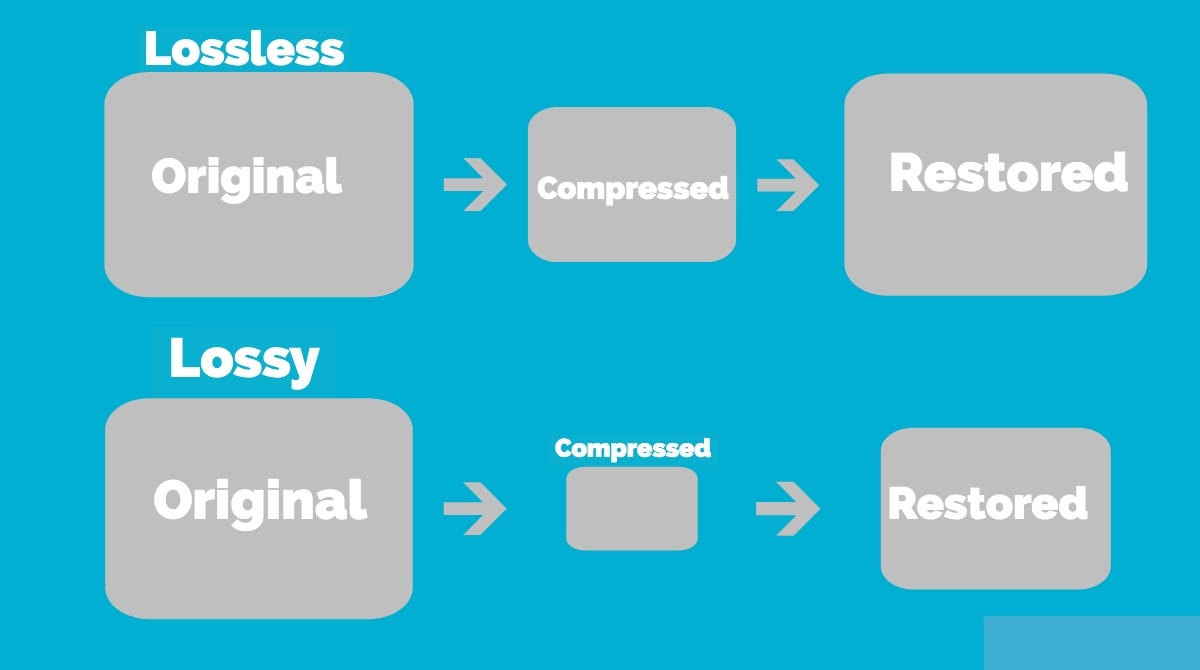
When we say “lossless”, we mean that we did not change the original file when rewriting, and it sounds like the track from the original CD. However, most of the time we save music with “losses”. A typical lossy album (MP3 or AAC) is probably about 100MB. The same album in a “lossless” format like FLAC or ALAC (also known as Apple Lossless) would take about 300MB. For this reason, “lossy” recording is common for fast downloads and to save more disk space.

The problem is that when you compress the file to save space, you are removing blocks of data. For example, when you take a PNG screenshot of a computer screen and save it in JPEG format, you get a “flaw” in certain parts of the image, making it almost the same, but with some loss of clarity and quality. . Consider the image below as an example: on the right, it was compressed in JPG format, and its quality deteriorated as a result (when looking at the car’s color, details, and background). The same is true of music files that are “compressed” to MP3, if the comparison is correct. Loss of quality visible to the human ear or eye is called compression artifacts.

Lossy files are understandably a tradeoff, but a very significant one when it comes to hard drive space, which can make a huge difference on a 32GB iPhone. But there are also different levels of loss: 128 kbps, for example, takes up very little space, but it will be of lower quality than a 320 kbps file, which, in turn, has a lower quality than a 1411 kbps file. (which is considered true without loss). However, there are many arguments that most people may not even hear the difference between the two bit rates.

Is the bit rate that important?

As file storage becomes easier and cheaper, high bit rate music becomes more popular. But is it always worth your time, effort, and disk space?

The answer to this question is not simple, and so far, audiophiles are breaking spears in battles, trying to solve an equation with two unknowns. The first part of the equation depends on the technical implementation. If you use expensive headphones or good quality speakers, you can listen to music in a wide range of sounds. And this is where the low bit rate becomes noticeable and you can determine that low quality MP3 files lack a certain level of detail, subtle background tracks may be inaudible, highs and lows will not be as dynamic, or it may just listen to other significant sound distortions. In these cases, the lossless format is justified.

But if you listen to your favorite music through a cheap and generally bad pair of headphones on your iPod, you won’t notice the difference between a 128 kb file and a 320 kb file, let alone a 320 kb file versus one without. losses. file at 1411 kbps.

Lossless audio formats

Lossless audio formats

Lossless


Although downloadable music files and music streaming have made music CDs less popular than before, they still exist and provide an excellent means of backing up your music collection. If you don’t back up your music, you could lose it if your hard drive fails. Even if all your music is on CDs, you should make copies of them because CDs can get scratched.

Lossless vs Lossy

You want perfect copies of all your originals in the event of a disaster, so stay away from lossy formats like MP3, which can affect the quality of your recordings. Use lossless audio formats when burning your digital music library to CD.

Lossless audio formats encode and compress audio losslessly, ensuring your music is perfectly preserved digitally.

FLAC (Free Lossless Audio Codec)
Free Lossless Audio Codec (FLAC) is the most popular lossless encoding format. It is increasingly compatible with hardware devices such as MP3 players, smartphones, tablets, and home entertainment systems. FLAC is a brainchild of the non-profit Xiph.Org foundation and is also open source. Music stored in this format is generally reduced by 30-50% of its original size with no loss of quality.

Common ways to rip audio CDs to FLAC include software media players like Winamp for Windows or special utilities like Max for Mac computers.

All major operating systems are supported by FLAC, including Windows 10, macOS High Sierra and above, Android 3.1 and above, iOS 11 and above, and most Linux distributions.

ALAC (Apple Lossless Audio Codec)
Apple originally developed its ALAC format as a proprietary project, but made it open source in 2011. Audio is encoded using a lossless algorithm that is stored in the MP4 container. By the way, ALAC files have the same .m4a extension as AAC, the naming convention can be confusing.

ALAC is not as popular as FLAC, but it may be the best option if iTunes is your preferred software media player and you are using Apple hardware such as an iPhone, iPod, or iPad.

There is no loss of quality when ripping ALAC music CDs, so this is a good option if you want to keep the original audio CDs. If at any time you need to switch from ALAC to another format, there will also be no loss of quality.

WMA Lossless (Windows Media Audio Lossless)
The WMA Lossless format, developed by Microsoft, is a proprietary format that can be used to rip original music CDs without losing sound quality. A typical audio CD is compressed between 206MB and 411MB, depending on several factors. The resulting file, which is created with confusion, has a WMA extension, which is identical to files in the standard (lossy) WMA format.

WMA Lossless is probably the least supported of the formats on this list, but it may still be the one you choose, especially if you use Windows Media Player and have a hardware device that supports it.

Mono audio
The Monkey audio format is not as compatible as competing lossless systems like FLAC and ALAC, but it does provide better compression on average, resulting in smaller file sizes. This is not an open source project, but it is free to use. Files encoded in Monkey audio format have the funny APE extension.

Methods used to copy CDs to APE files include downloading a Windows program from Monkey’s Audio’s official website or using standalone CD ripping software that generates data in this format.

While most software media players don’t have built-in support for playing files in the Monkey audio format, there is a good selection of plugins available for Windows Media Player, Foobar2000, Winamp, Media Player Classic, and more.

WAV (WAVeform audio format)
WAV format is not considered the ideal choice when choosing a digital audio system to store your audio CDs, but it is a lossless option. The downside to this approach is that files created in WAV format are larger than other lossless formats, since no compression is used.

If storage space is not an issue, then the WAV format has a number of distinct advantages: it is widely compatible with both hardware and software. Converting to other formats requires significantly less CPU processing time because WAV files are already unzipped and don’t need to be unzipped before converting. You can also directly manipulate WAV files with your audio editing software without having to wait for decompression and recompression cycles to update your changes.

FLAC, WAV, MP3, DSD, ALAC … What audio format should I use?

You probably know the famous MP3 audio format. There’s even a good chance that you only use it on a daily basis. But did you know that it is possible to take your music to the next level thanks to other audio formats? If the terms FLAC, DSD, sample rate, or even lossless don’t mean anything to you, then you’ve come to the right place. Designed specifically for newbies, this guide tells you everything you need to know about the basics of digital audio.

soundwave

FLAC, DSD, ALAC … Listening to a debate between audiophiles can seem difficult when you do not know this universe and the many acronyms that refer to it. But if you try the adventure, you will not regret it. Say goodbye to your boring and lifeless MP3s and hello to quality music. Trust us, your ears will thank you!

Sample Rate and Bit Depth: The Basics of Digital Music

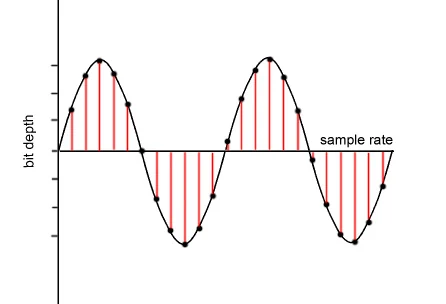
Before knocking you out (we promise we won’t hit too hard) with barbaric acronyms in every way, let’s first focus on two essential notions of modern audio, namely sampling rate and bit depth. These two elements give an idea of ​​the recording precision of a song.

but depth

As you know, computers run on bits, which are sets of 0 and 1. During a passage in the studio, music produced by an artist must be digitized, therefore transformed into 0 and 1 in order to be recorded on CD or transmitted to through transmission services. This is where the sampling rate and bit depth come into play.

Take the example of a CD. Our beloved empanadas are recorded in 16-bit / 44.1 kHz. The 44.1 kHz sampling rate means that the music produced by our musician is analyzed 44,100 times per second by studio recording devices. As for the bit depth, it gives an indication of the number of information recorded during this same period. The greater the depth, the more information will be encoded at the end.

However, CD quality is not the best in the world, even if it far exceeds MP3. Thus, we find 24-bit / 192 kHz recordings. The DSD goes even further with a frequency that rises to several MHz. But for simplicity, just remember that the higher the values ​​described above, the more accurate the recording will be in your sound reproduction.

Lossy formats: MP3, AAC, OGG

In general, there are two types of formats in the audio world: lossy, lossy in English, and lossy, or lossless. If you want the best audio quality, stay away from compressed formats.

The best known of all is MP3. True dinosaur in the audio world, this type of file was developed at a time when the capacities of our hard drives were determined in MB and not in TB. Therefore, we had to compress the recordings as much as possible, even if that meant putting quality aside.

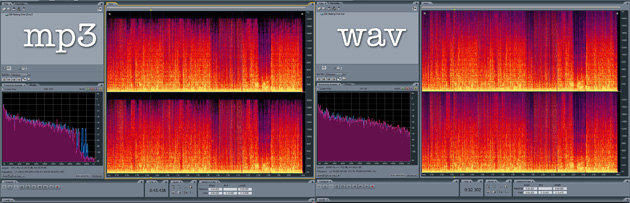
It is true that MP3 encoded music weighs only a few megabytes. But the applied algorithm is very aggressive, it simply cuts the frequencies considered inaudible by the human ear. In fact, MP3 loses many audible parts. To get an idea, click the link below, you will hear these famous truncated parts. The pieces seem flat, devoid of life. Listening can even become unpleasant after several tens of minutes. Suffice it to say that, apart from its small size, MP3 is no longer really interesting in our time if we are looking for quality music.

To make things better, Apple, meanwhile, released another audio format, AAC, for advanced audio encoding. This is also a lossy format which therefore loses details during data compression. However, the algorithm used is more efficient, cutting fewer important frequencies, at least on paper. In absolute terms, the difference from MP3 is not necessarily stark and the debate has been raging for years in the audiophile environment to find out if the AAC format is really better than MP3.

Finally, there is also the OGG Vorbis, another lossy compressed format. Like AAC, it is supposed to work better than MP3. This is the type of file Spotify uses. Her interest is to enable efficient transmission while reducing quality. However, the songs encoded in this format are not fabulous. The ideal is really to become lossless.

Some of the most popular digital audio formats.

Main audio formats without loss of quality.


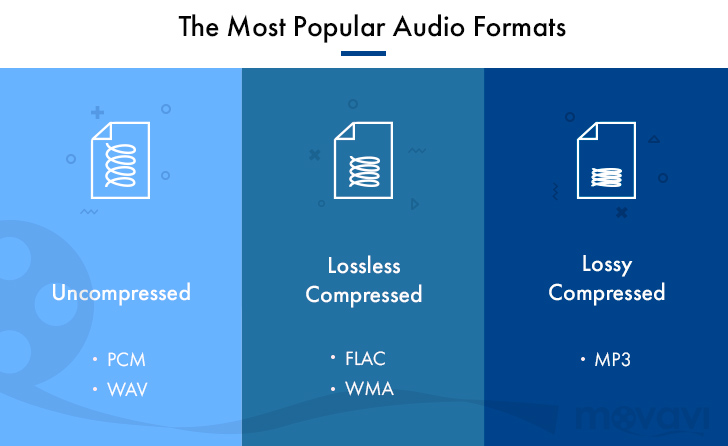
WAVE (.wav) – This is the most common uncompressed audio file format. When you rip audio from a music CD on your computer, this will be the format you get. It takes up a lot of space (1411 KB of information per second on 4400 Hz / 16 bits of stereo music), but reproduces the sounds in a quiet way. In terms of quality and amount of information, it resembles the AIFF (.aif) format, which is mainly part of the Mac world. Suitable for audio files and those that record music.

FLAC (.flac) – Free Lossless Audio Codec: It is an open source codec that is often used to store music CDs on the computer without loss of quality. While .wav offers uncompressed audio, .flacs are called “lossless c compressed”. However, compression is minimal and the vast majority of people do not notice differences between a Wave file and a FLAC file. However, they take up less space than WAV files. This is possible because they use a variable amount of compression as needed. This means that, in the case of very complex and rich music parts, it uses encodings that are equal to WAV files (1411 Kb / s data). However, in the case of the “simpler” parts, the number of bits used to represent them will be smaller. It is suitable for demanding ears who also want to save some space on their hard drives.

APE Monkey’s Audio is one of the most powerful and popular lossless multimedia compression algorithms for audio files.
The lossless format, that is without data loss, ensures that the original sound quality is maintained in smaller files than compressed sample formats (such as WAV).
The format used is “.ape”, Monkey’s Audio allows compression of a WAVin mono source and also the opposite procedure, ie mono decoding for other formats such as WAV or MP3

ALAC Apple Lossless Audio Codec: Similar to FLAC, which always uses maximum compression. The quality is good on average, but the format is not as effective as FLAC in terms of weight. Not all players support it, so if your life is not exclusively dedicated to Apple and its products, it’s not a recommended format. Other important but less popular lossless audio formats are Monkey’s Audio (.ape) and OptimFROG (.ofr).

AIFF Audio Interchange File Format is a standard file format used to store audio recordings on a personal computer. The format was developed by the Apple computer based on Electronic Arts electronic exchange format and is often used on Apple Macintosh systems, which is why it is also called Apple Interchange File Format.
The audio data in the AIFF file is not compressed, so the file tends to be much larger than other formats, both lost and lost, such as ALE or MP3. One minute sound records approx. 10 MB of data, this is because it is a format created for sharing, although it is also used for editing.
However, there are compressed formats, called AIFFC (AIFF compressed), that can reduce the file size by a third (AIFF3) or a sixth (AIFF6), but this results in a great loss of quality, so there is virtually no use.

The most important sound quality formats in loss quality.

MP3 (.mp3) or MPEG-1 or MPEG-2 Audio Layer III – is the best known compressed audio standard. It was the forerunner of the category (it was published as an international standard in 1998) and is still the most widely used. Minifying a WAV file to MP3 makes it up to 90% easier for MB. The quality varies depending on the bit rate, ranging from 32 to 320 Kbit information for every second of music. The default is 128 Kb / s. At 320 the performance is pretty good.

AAC (.aac) – Advanced audio coding. It’s an Apple standard that iTunes uses by default when importing music. It works like MP3, and with the same bit rate, it takes the same space. The difference is in the way compression is handled. In simple words, “music” sums up another way. According to many people it sounds better than MP3. Especially suitable for those who use iPhone and iPod to listen to music.

WMA (.wma) – This is a proprietary format from Microsoft and is considered Redmund’s response to MP3. Its incompatibility with the iPod makes it very uncomfortable. Incidentally, although most players support MP3, WMA does not. Basically, unless your music world starts and ends with Windows Media Player, it’s a generally discouraged format. It is not compatible with Mac and iTunes.


OGG VORBIS: It is an open source or free format, which means that it does not require any license to be implemented in an audio player (the details are irrelevant for us users). The quality is comparable to MP3, perhaps a little higher. A noble and well-made creation, but not widespread enough to justify its massive use. In light of all this, therefore, recording music in WAV and broadcasting it in MP3 or AAC is the most reasonable option. In this way, you will have quality when you need it and the guarantee of usability of music wherever you are.

Audio formats

Audio formats

Compression

Compressions are systems for reducing the file size by using different types of algorithms and / or encodings.

compressed audio

There are two types of compression: lossless (compression), which compresses the file without deleting information. Decompression can therefore exactly return the original and lossy (lossy) compression, eliminating redundant parts that are considered irrelevant or irrelevant and the decompression does not return to the original.
It is clear that the first system preserves the integrity of the original, but less compressed, while the second implies a loss of quality, but compresses much more, in proportion to the degree of loss one is willing to accept. Let’s look at a few examples.

Lossless compression

Lossless compression is based on reducing the redundancy typical of human production.

human perception
For example, in a book dedicated to experimental music, the phrase “experimental music” is repeated many times with 19 characters. At this point, simply replace it with a symbol that is normally not included in the text, e.g. ‘# 1 #’ to reduce a term from 19 characters to one of 3 and store 16 characters for each occurrence. Actually we have to say “for every occurrence after the first”, because in order to unpack the text, we also have to create an index of the substitutions in which it is written in this case
# 1 # = “experimental music”.
Obviously, many other words or phrases are repeated several times in the book, and each of them can be replaced by a symbol such as # 2 #, # 3 #, …, # n #, where n is a progressive number, which ultimately makes significant savings.
The Lempel-Ziv (LZ) algorithm uses a similar system, the derivatives of which underlie many modern lossless compression programs, including the well-known ZIP.
In fact, the ancestor of many lossless encoders is the so-called Huffman coding. It is a redundancy elimination system that was developed in 1952 by the researcher of the same name, then an MIT student. His algorithm solves the problem of encoding a series of strings (string = any character set) as compactly as possible, taking into account the frequency with which strings occur: the most common is assigned the shortest symbol in to maximize compression. Here is a good example dealing with Huffman coding issues.

Another type of lossless compression, which is always based on reducing redundancy, is the so-called Run Length Encoding (RLE), which works in a very simple way. Suppose we have the following string of 20 characters
ABBBBBBBBBCDEEEEFGGG

By applying the RLE it will
A 9BCD * * * 4EF 3G

for a total of 13 characters with a saving of 35%.
In practice, a code consisting of the character and the number of repetitions was inserted instead of the repeated characters. The asterisk indicates that the following is the number of repetitions and is not part of the chain (this is of course the basic principle; the details of the coding may vary).
Of course, this system is not productive with text, but it is the case with images where long stripes of the same color are fairly common.

Lossy compression

Lossy compression is based on the elimination of the information components that are considered to be more or less irrelevant depending on the compression level required. At low compression levels, only the really irrelevant details are removed, while at higher levels, the sensitive details are also removed.
An example that is not audio is the encoding of JPEG images, in which nuances are eliminated by assigning neighboring pixel groups the same color if their difference is less than a value that is proportional to the degree of compression. On this page you can see the effect of the size reduction and the corresponding loss of quality when increasing the compression levels.

Further information on compression on Wikipedia (free, community-created encyclopedia) can be found here in English. Wikipedia also exists in Italian, but the content is smaller.
First class compressed audio formats
Lossless (lossless)
These formats work similarly to zip. You compress the content without removing anything. At the time of listening, it is necessary to perform a decompression and to return to the original in one of the linear formats already shown.
Since it is lossless compression, the comparison between these codecs is not made in

Digital Music: A Quick Guide to Having the Best Lossless Files

Digital Music: A Quick Guide to Having the Best Lossless Files

Digital Music

Surely changing our music from one side to the other, from an analog format to a digital one or even music already stored in digital format on a compact disc towards one for use on mobile devices, would result in a loss of sound quality that would exceed convenience and comfort.

This has been the main vision of people who care about sound quality, since the concept of digital music files was born. A reference generated by the common use of highly compressed lossy formats such as MP3.

wHowever, it is an opinion that simply “cannot take any more water.” Yes, popular formats like MP3 and AAC sacrifice some quality to keep file sizes small, but the emergence of lossless digital audio formats that are capable of preserving every piece of information from a CD recording means that a ripped file It may sound indistinguishable from the original.

You may still be wondering why you should spend precious time ripping up your CD collection. It’s all about convenience: a lossless digital music collection saves shelf space, is easy to move and to back up; for larger collections, it also makes locating individual songs and albums much easier and faster. You can also access a digital music library from multiple sources simultaneously, for example, from multiple network music players located in different rooms in your home.

Additionally, thanks to higher quality file acquisitions with popular streaming and download sites like B&W Society of Sound, higher quality music files can now be accessed as part of a subscription-based model without taking up space valuable on shelves – or even the attic – with physical means.

On the hardware side, storage devices like NAS and external hard drives offer huge amounts of space at ever lower prices. And with increasingly better and less expensive, widely available high-quality DACs, computers now offer excellent reproduction and can be easily connected to your existing hi-fi system, either wired or wireless.

When streaming or ripping discs, the file format option may seem complicated by too many options. This is what we think of the main formats that can be the salvation of true audio enthusiasts:

FLAC

Free Lossless Audio Codec is a popular choice for many audiophiles. Like MP3 and AAC, FLAC is compressed to keep file sizes relatively small, but unlike those formats, it is lossless and therefore – in theory – indistinguishable from the quality of a CD. In theory. Audio from CD converted to FLAC will typically shrink about 50 percent from its original size; a typical three-minute song on a CD will take up 30-40MB of space, while a ripped FLAC version of that song results in 15-20MB.

FLAC supports metadata (artist and song information can be embedded in the file and artwork can be referenced by the file) and will be played on a wide variety of software and hardware. Crucially for many, it is currently not compatible with Apple products like iTunes or the iPhone.

However, there are downsides to FLAC from an audiophile perspective and a lot of that comes during encoding and decompressing the file for playback. Because FLAC is unzipped on the fly, the sound quality is highly dependent on the software you are using to do that. Therefore, although it is theoretically lossless, there are still barriers to overcome when listening to the music contained in FLAC.

Apple Lossless

As you might guess from the name, Apple Lossless Audio Codec (or ALAC) was developed by Apple and works with company products like iTunes, iPod and iPhone (as well as supported by a number of other computers and players on software); If you are an avid user of the Apple team, it will be very attractive to you. However, like FLAC, this format is compressed, and files ripped from a CD are typically around 40-60 percent of their original size. Furthermore, ALAC suffers from the same decoding problems as FLAC.

AIFF

AIFF is a lossless format, but also without compression. While this means that it takes up as much space as the source file when ripping from a CD, it also avoids any compression issues, making it the ideal file for people who are concerned about sound quality.

Lossless audio formats

Lossless audio formats

We will show you the formats that maintain all the quality of the audio files, compressing just enough. Lossless formats tend to maintain the original quality almost totally, suffering a minimum loss of quality. In summary, they are slightly compressed so that the audio remains intact and the size on disk is smaller.

Among the Lossless formats we have:

FLAC, is a format whose algorithm is similar to ZIP or GZip, but specially designed for audio compression. While ZIP would compress a CD quality audio file from 10% to 20% of its original size, FLAC would compress it from 30% to 50% while maintaining the full quality of the source.

Monkey’s Audio (APE), like FLAC allows lossless compression, but the greatness of Monkey’s is that it compresses bit by bit, reaching data rates of up to 700kbps without any loss of quality.

Apple Lossless (ALAC) uses an MP4 container (with a .M4A extension) for its files just like the MPEG-4 AAC and is specially created for use on the iPod.

Shorten is another Lossless format with characteristics similar to Monkey’s Audio or FLAC, but using the .SHN extension and requires fewer resources for its reproduction.

WavPack uses a hybrid mode, unlike the other Lossless formats, since it uses a Lossy file, which creates a relatively small file at high quality, and a corrector file that recovers the remaining quality of the original file, resulting in an audio file at averages between Lossless and Lossy, but with the same quality as a compressed file with any other Lossless algorithm.

TTA (True Audio) is a free and free LossLess format that reduces by 30% the original size of the source audio file and uses compression / decompression in real time.

What are the advantages of listening to music in FLAC format?

The FLAC format allows us to save audio without loss of quality. This codec encodes the file with the same information that the original CD would have (which would be the WAV file).

Flac

It is an open source format (Free Lossless Audio Codec) that could be improved, thanks to its registration as an open source license.

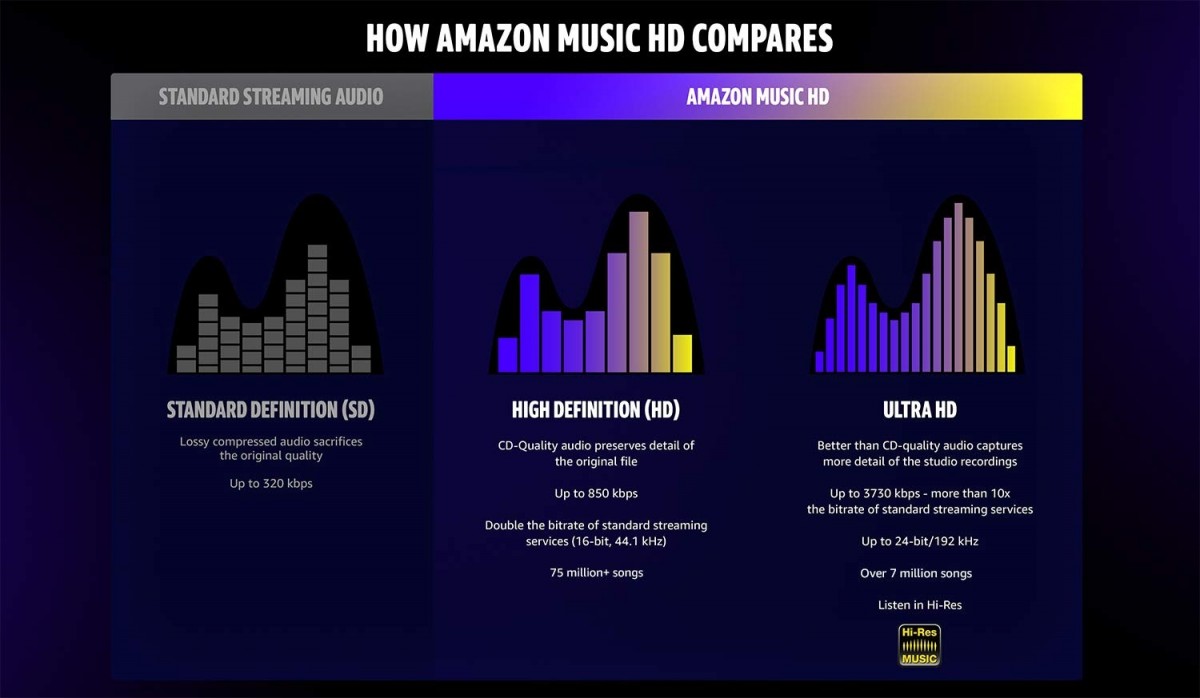
Higher quality, especially for HiFi equipment: this format allows us to enjoy a bitrate between 900 and 1100 kbps that does not delete information as it does in the MP3, even if it is of high quality. You will notice a warmer, fuller and cleaner sound.
The information is continuous between tracks: just like on the original CD, you can listen to music without interruptions between tracks.
The music is not altered: and that is the main reason why FLAC is ideal. Well, the file you use is the same one that you would download from the CD.
The FLAC format supports unlimited sampling rates – a FLAC can reproduce frequencies of 192,000 Hz without problem.
However, all that it reduces is not gold. There are also some problems with FLACs that you should be aware of, although they are not serious at all.

Disadvantages of listening to music in FLAC format

They take up more: as a FLAC file usually takes up a little more than half of the original CD file. It is easy for an album to go to 300 MB.
Many players do not support FLAC – this is changing in a beastly way. But the industry has fought for the MP3 to the last breath and many players, radios, etc. do not yet support this standard.
That is, the disadvantages are or rather were. In the future we will have a new cleaner format, which will surely take up less space and be an evolution of FLAC. Currently, however, it is the format par excellence and the one that we should all use, although I am not sure that a new, closed format will not come out, that can cope with it before it reaches its peak.