Lossless audio.


Free Download Mp4Gain
picture

Lossless audio.

Lossless Audio

If an ordinary person suddenly “brings” what are considered experts in high-quality sound to the forum, they will find that 80 percent of audiophiles are talking about the bit rate problem. “If a true music lover can distinguish a recording with a good bitrate from a file ‘lossi’ or not”, the arguments on this subject with arguments for and against have not diminished in a long time. This proves that it is difficult or almost impossible to force people to abandon their beliefs, to step over their “ego”, even if the facts testify against their delusions. In this article, we will give you a little information about bit rate and how it relates to your practical experience of listening to music.

Lossless Audio

What is the bit rate?

If you love listening to music, you’ve probably heard the term “bitrate” before, so you probably have a general idea of ​​what it means, but we’ll try to jog your memory and give you the “official” definition here. So the bitrate (from the bitrate in English) is in fact a stream: the information bit rate, that is, the amount of data processed over a period of time. In audio, it is generally measured in kilobits per second. For example, the music you listen to on iTunes is 256 kilobits per second.

The higher the bit rate of a track, the more space it will need on your computer. Hence, it has become common practice to compress audio CDs so that you can put more music on a hard drive (well, or in a “cloud” like Dropbox or whatever). This is where the legs of a long-standing dispute over the quality of music from lossy and lossless files “grow”.

What is the difference between lossy and lossless?

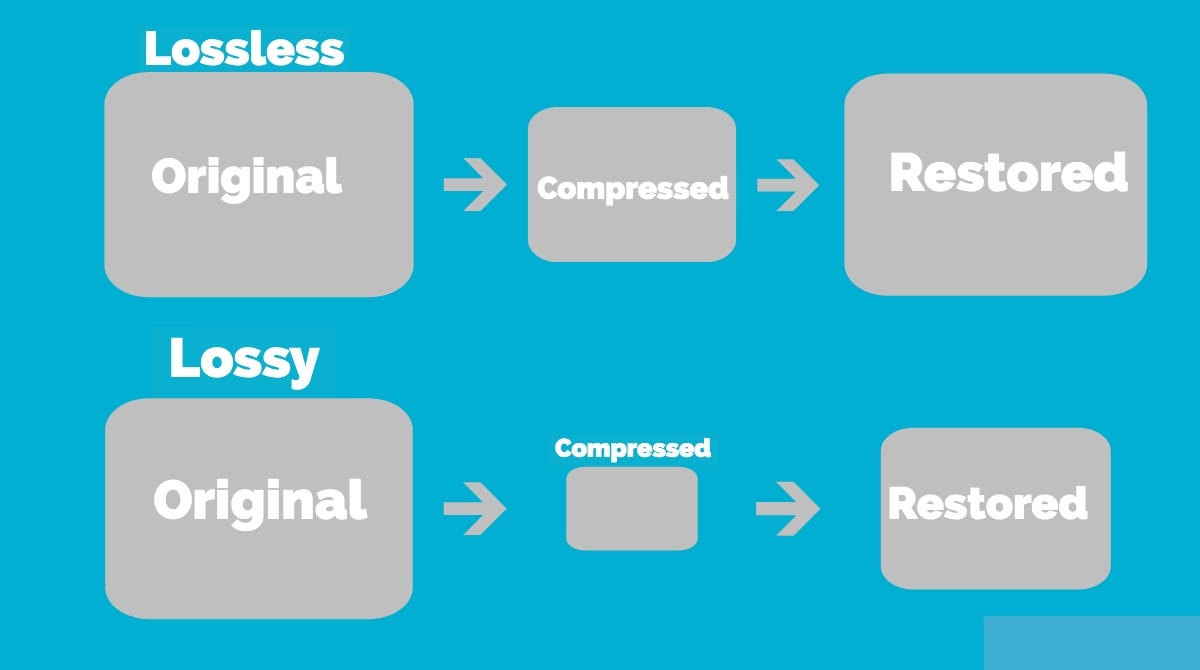
When we say “lossless”, we mean that we did not change the original file when rewriting, and it sounds like the track from the original CD. However, most of the time we save music with “losses”. A typical lossy album (MP3 or AAC) is probably about 100MB. The same album in a “lossless” format like FLAC or ALAC (also known as Apple Lossless) would take about 300MB. For this reason, “lossy” recording is common for fast downloads and to save more disk space.

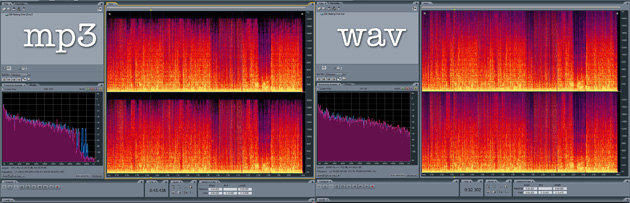
The problem is that when you compress the file to save space, you are removing blocks of data. For example, when you take a PNG screenshot of a computer screen and save it in JPEG format, you get a “flaw” in certain parts of the image, making it almost the same, but with some loss of clarity and quality. . Consider the image below as an example: on the right, it was compressed in JPG format, and its quality deteriorated as a result (when looking at the car’s color, details, and background). The same is true of music files that are “compressed” to MP3, if the comparison is correct. Loss of quality visible to the human ear or eye is called compression artifacts.

Lossy files are understandably a tradeoff, but a very significant one when it comes to hard drive space, which can make a huge difference on a 32GB iPhone. But there are also different levels of loss: 128 kbps, for example, takes up very little space, but it will be of lower quality than a 320 kbps file, which, in turn, has a lower quality than a 1411 kbps file. (which is considered true without loss). However, there are many arguments that most people may not even hear the difference between the two bit rates.

Is the bit rate that important?

As file storage becomes easier and cheaper, high bit rate music becomes more popular. But is it always worth your time, effort, and disk space?

The answer to this question is not simple, and so far, audiophiles are breaking spears in battles, trying to solve an equation with two unknowns. The first part of the equation depends on the technical implementation. If you use expensive headphones or good quality speakers, you can listen to music in a wide range of sounds. And this is where the low bit rate becomes noticeable and you can determine that low quality MP3 files lack a certain level of detail, subtle background tracks may be inaudible, highs and lows will not be as dynamic, or it may just listen to other significant sound distortions. In these cases, the lossless format is justified.

But if you listen to your favorite music through a cheap and generally bad pair of headphones on your iPod, you won’t notice the difference between a 128 kb file and a 320 kb file, let alone a 320 kb file versus one without. losses. file at 1411 kbps.


Free Download Mp4Gain
picture


Mp4Gain Main Window
picture


Mp4Gain Features
picture


Free Download Mp4Gain
picture

What is lossless audio compression?

What is lossless audio compression?

Lossless audio compression

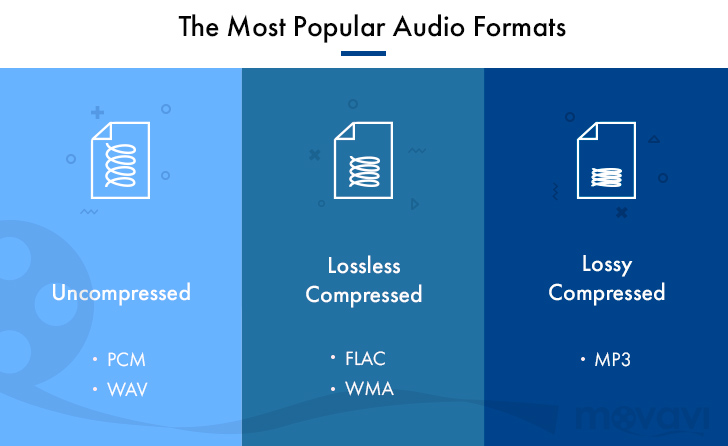
You might think that the word “lossless” is used for audio formats that do not use any type of compression. However, even lossless audio formats use compression to keep file sizes at an acceptable level.

Lossless audio compression

Lossless formats use compression algorithms that preserve the audio data, so the sound is exactly the same as the original source. This is in contrast to lossy audio formats like AAC, MP3, and WMA, which compress sound, using algorithms that discard data.

Audio files are made up of sounds and silence. Lossless formats are capable of compressing the pause to almost zero while retaining all the audio data.

What lossless formats are used for digital music?
Examples of popular lossless formats used to store music:

FLAC
Wav
A THE C
Lossless WMA

Lossless formats and musical quality
If you download a lossless music track from the HD music service, expect high-quality audio. On the other hand, if you convert low-quality music tapes by digitizing to lossless audio formats, the sound quality will not improve.

Can you convert from Lossy to Lossless?
It is never a good idea to go from one loss to another. A song that has already been compressed into a lossy format will always be like this. If you convert it to lossless format, you will only get wasted space on your hard drive or mobile device. You cannot improve the quality of a lossy song using this method.

Benefits of using lossless audio format
Using a lossy format like MP3 is still the most common way to store music collections. However, there are clear benefits to building a lossless music library.

Perfect Music CD Backup
Lossless copy of audio files gives you a bit-accurate copy of the original music CD. This means that no matter what audio formats appear in the future, you will always have a perfect copy of the original.

Lossless audio formats

Lossless audio formats

Lossless


Although downloadable music files and music streaming have made music CDs less popular than before, they still exist and provide an excellent means of backing up your music collection. If you don’t back up your music, you could lose it if your hard drive fails. Even if all your music is on CDs, you should make copies of them because CDs can get scratched.

Lossless vs Lossy

You want perfect copies of all your originals in the event of a disaster, so stay away from lossy formats like MP3, which can affect the quality of your recordings. Use lossless audio formats when burning your digital music library to CD.

Lossless audio formats encode and compress audio losslessly, ensuring your music is perfectly preserved digitally.

FLAC (Free Lossless Audio Codec)
Free Lossless Audio Codec (FLAC) is the most popular lossless encoding format. It is increasingly compatible with hardware devices such as MP3 players, smartphones, tablets, and home entertainment systems. FLAC is a brainchild of the non-profit Xiph.Org foundation and is also open source. Music stored in this format is generally reduced by 30-50% of its original size with no loss of quality.

Common ways to rip audio CDs to FLAC include software media players like Winamp for Windows or special utilities like Max for Mac computers.

All major operating systems are supported by FLAC, including Windows 10, macOS High Sierra and above, Android 3.1 and above, iOS 11 and above, and most Linux distributions.

ALAC (Apple Lossless Audio Codec)
Apple originally developed its ALAC format as a proprietary project, but made it open source in 2011. Audio is encoded using a lossless algorithm that is stored in the MP4 container. By the way, ALAC files have the same .m4a extension as AAC, the naming convention can be confusing.

ALAC is not as popular as FLAC, but it may be the best option if iTunes is your preferred software media player and you are using Apple hardware such as an iPhone, iPod, or iPad.

There is no loss of quality when ripping ALAC music CDs, so this is a good option if you want to keep the original audio CDs. If at any time you need to switch from ALAC to another format, there will also be no loss of quality.

WMA Lossless (Windows Media Audio Lossless)
The WMA Lossless format, developed by Microsoft, is a proprietary format that can be used to rip original music CDs without losing sound quality. A typical audio CD is compressed between 206MB and 411MB, depending on several factors. The resulting file, which is created with confusion, has a WMA extension, which is identical to files in the standard (lossy) WMA format.

WMA Lossless is probably the least supported of the formats on this list, but it may still be the one you choose, especially if you use Windows Media Player and have a hardware device that supports it.

Mono audio
The Monkey audio format is not as compatible as competing lossless systems like FLAC and ALAC, but it does provide better compression on average, resulting in smaller file sizes. This is not an open source project, but it is free to use. Files encoded in Monkey audio format have the funny APE extension.

Methods used to copy CDs to APE files include downloading a Windows program from Monkey’s Audio’s official website or using standalone CD ripping software that generates data in this format.

While most software media players don’t have built-in support for playing files in the Monkey audio format, there is a good selection of plugins available for Windows Media Player, Foobar2000, Winamp, Media Player Classic, and more.

WAV (WAVeform audio format)
WAV format is not considered the ideal choice when choosing a digital audio system to store your audio CDs, but it is a lossless option. The downside to this approach is that files created in WAV format are larger than other lossless formats, since no compression is used.

If storage space is not an issue, then the WAV format has a number of distinct advantages: it is widely compatible with both hardware and software. Converting to other formats requires significantly less CPU processing time because WAV files are already unzipped and don’t need to be unzipped before converting. You can also directly manipulate WAV files with your audio editing software without having to wait for decompression and recompression cycles to update your changes.