What are lossy and lossless audio formats, and what are common audio formats? Part 2


Free Download Mp4Gain
picture

What are lossy and lossless audio formats, and what are common audio formats? Part 2

lossy and lossless audio formats

Audio Formats:

lossy and lossless audio formats

2. WAVE is a sound file format developed by Microsoft, it is used to save the audio information resources of the WINDOWS platform, and is compatible with the WINDOWS platform and its applications.

3. AIFF format (Audio Interchange File Format) and AU format, AIFF is the English abbreviation for Audio Interchange File Format. It is an audio file format developed by APPLE and supported by the MACINTOSH platform and its applications. Many compression techniques are supported.

4.MPEG is the English abbreviation for Motion Picture Experts Group Currently, MP3 is the most common music format on the Internet. Although it is lossy compression, its biggest advantage is a higher compression ratio in exchange for very little sound distortion.

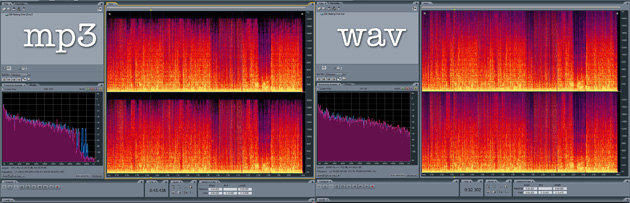
5. MP3 MPEG audio file compression is lossy compression. MPEG3 audio encoding has a high compression ratio of 10:1~12:1, while basically keeping the low audio part undistorted, but at the expense of the high 12KHz to 16KHz. in the sound file. The quality of the audio part is changed by the size of the file. Music files of the same length are stored in *.mp3 format, usually only 1/10 of *.wav file, so the sound quality is lower than CD or WAV format.


6. MPEG-4 Adopts object-based compression coding technology. Before encoding, the video stream is first analyzed, and each video object is segmented from the original image, and then the shape information, motion information, texture information is encoded separately, and temporal redundancy between consecutive frames is eliminated thanks to better motion prediction and compensation than MPEG-2. Its core is content-based scalability, which can assign priorities to each object in the image, express the most important objects with high spatial and temporal resolution, and express the less important objects (such as surveillance systems, background) are rendered. with a lower resolution. or even not displayed. Therefore, it has the ability to adaptively allocate resources and can perform low-speed, high-quality video transmission and image communications. It occupies less resources, has great flexibility, good network performance, and has a wider range of applications.

7. The MIDI (Musical Instrument Digital Interface) format is used by people who often play music, MIDI allows digital synthesizers and other devices to exchange data.

8. WMA (Windows Media Audio) format is a heavyweight player from Microsoft. The background is harsh, the sound quality is stronger than MP3 format, and it is much better than RA format. It is the same as the VQF format. developed by the Japanese company YAMAHA. However, the method to maintain sound quality can achieve higher compression ratio than MP3. The compression ratio of WMA can generally reach around 1:18. Another advantage of WMA is that content providers can use DRM (Digital Rights Management) like Windows Media. Rights Manager 7 adds copy protection.


Free Download Mp4Gain
picture


Mp4Gain Main Window
picture


Mp4Gain Features
picture


Free Download Mp4Gain
picture

What are lossy and lossless audio formats, and what are common audio formats?

What are lossy and lossless audio formats, and what are common audio formats?

lossy and lossless audio formats

We often hear some terms like MP3, lossless, CD sound quality, and even come into contact with them. So what are lossy and lossless audio formats? What are their differences? Apart from the ones I heard above, what other common audio formats exist? Next, I will share with you the relevant knowledge of audio formats and answer your questions.

lossy and lossless audio formats


First, let’s briefly popularize the audio format:

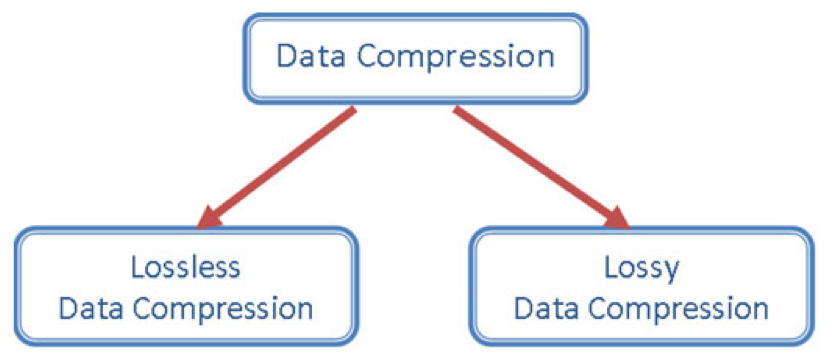
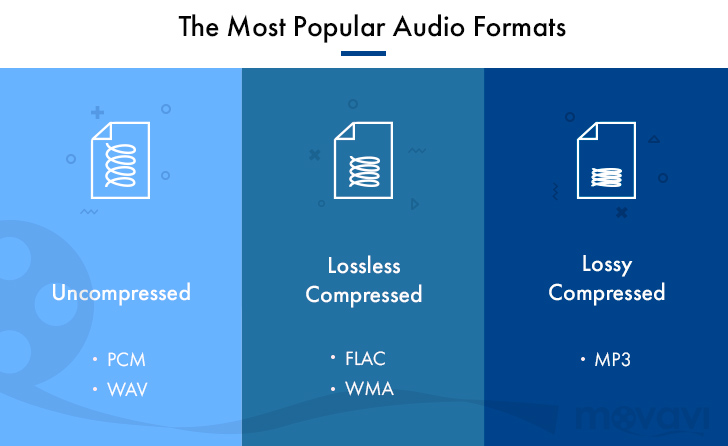
The audio format is the music format. Audio format refers to the process of digital and analog conversion of audio files for playback or processing on a computer. At present, music file playback formats are divided into two types: lossy compression and lossless compression. When using different music file formats, there is a big difference in sound quality performance.

Difference Between Lossy and Lossless Compression:

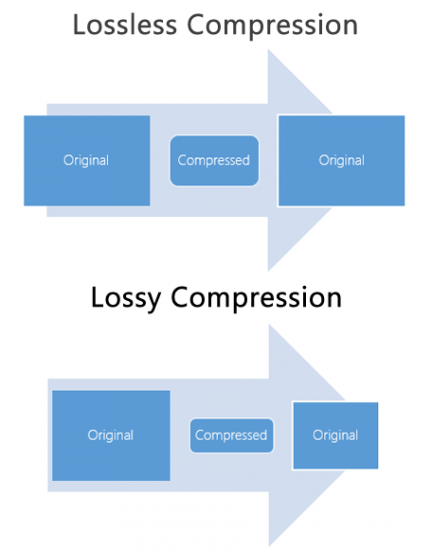
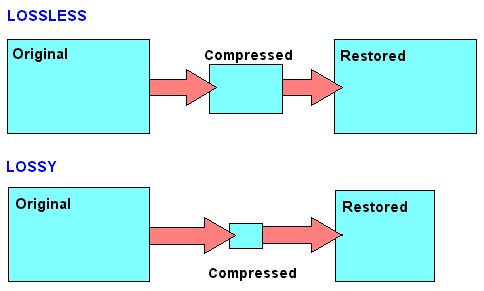
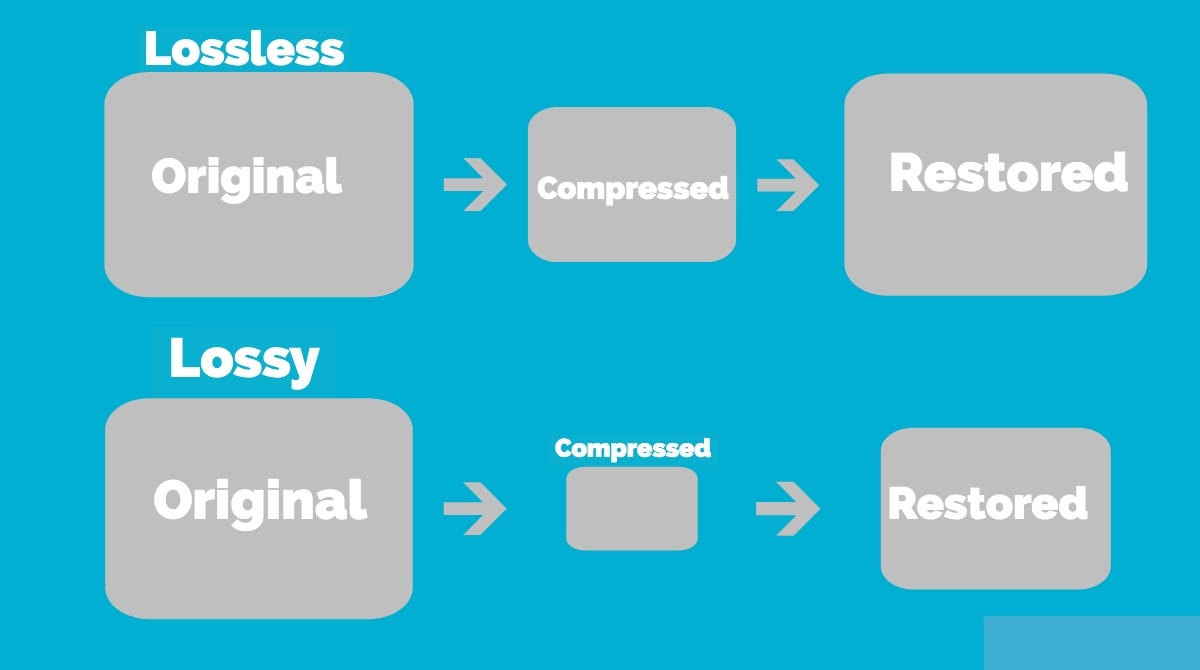
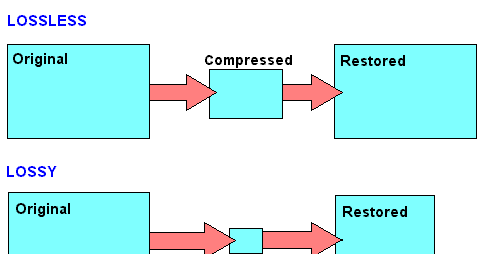
Lossy compression is to reduce the audio sample rate and bit rate, and the output audio file will be smaller than the original file. Lossless compression, on the premise of saving 100% of all the data in the original file, can compress the audio file to a smaller size, and after restoring the compressed audio file, it can achieve the same size and code. than the source file. Speed.

Here are the common audio formats:

1. CD The standard CD format is the sampling frequency of 44.1K, the rate is 1411K/second, and the quantization number is 16 bits. Since the CD track can be said to be approximately lossless, its sound is basically faithful to the original sound.

Lossy vs Lossless, Audio Quality

Lossy vs Lossless, Audio Quality

Lossy vs Lossless
Lossy vs Lossless

Much is said and has been said about the difference between the formats that generate a loss of information (lossy) versus those that do not generate any loss (lossless).

Lossy vs Lossless
Lossy vs Lossless

What is Lossy?

To compress a file, so that it occupies less space on the disk, we must necessarily use two techniques, the first is pure compression, which does not lose quality and which we will explain later PLUS compression by discarding information.

It is omitting information that we know, after studies, that the human ear will hardly perceive. At least the average human ear.
Younger people listen to more frequencies than from the age of 30, when we listen to fewer frequencies.

But not only does age count, but other phenomena also enter, for example what is called masking and which could be summarized by saying that if two frequencies occur with similar frequencies, and one occurs an instant before the other, in general the second that masked… that is, it is not audible to the human ear, so we could discard it and save space.

There are also all the frequencies that the human ear does not perceive, there we have more information that we can discard without damaging the quality or at least maintaining a very similar quality of perception.

LossLess

There are other formats that do not lose quality because they only use mathematical methods to save space. Imagine the following line:

1111111000001110000000

This consumes a space, but this information could be summarized, for example as follows:

1(7)0(5)1(3)0(7)

This second way of storing information takes up much less space WITHOUT discarding anything. It simply explains that from the number 1 there are 7, followed by 5 zero numbers, then 3 from the number 1 and finally 7 zeros.

It’s the same, we just tried to save space by finding a compressed way to write it, but we didn’t rule anything out.

This is exactly how the zip and lossless music methods work.

Is there a difference in the human ear when listening to one and the other?
We will answer that in another article.

About Lossy

About Lossy

Lossy

We all love good music. More recently, the audio CD was good digital music. This is 44100 Hz, stereo, 16 bits (linear) per channel, not compressed in any way, which means, according to Wikipedia, 1411.2 kbps.

Lossy

But at the end of the 20th century, in the era of the birth of multimedia, when music began to be played not only on players, but also on computers, it turned out that the audio CD (that is, naked PCM) is even better. . compress. There was, for example, Microsoft ADPCM, which compressed this case a bit, without losing quality, in WAV files. But generally speaking, the original 44 kHz stereo would still require a lot of space this way. Hence, the quality dropped to 22 kHz mono. One of the first multimedia albums of that time: “Immersion” from the group “Nautilus Pompilius”, is still around, and I did.

So MP3 won. To store and distribute compressed music. At 128 kbps “CD Quality”.

MP3 came up strangely. Technically, this is MPEG-1 Audio Layer 3. A layer for compressing audio data into a modern, progressive standard for storing video data on Video CDs. Just packed in its own .mp3 file format. The video CD is no longer interesting to anyone. The following MPEG-2 standard is used in DVD and digital television broadcasts (not HD). And the next MPEG-4 standard is now used for HD video and continues to evolve.

MP3 was revolutionary. It was (almost) the first lossy compression format. When we don’t try to preserve everything that was in the original signal, but, based on some psychoacoustic model, we cut out what a person is not going to hear anyway, and compress the rest. Like JPEG.

Then I tried digitizing the accumulated audio collection. Compact cassettes (just “cassettes”, but more correctly “compact cassettes”) turned out to be complete shit. The frequency range is such that it makes no sense to sample with more than 22 kHz. There were no reel-to-reel recorders in the house. But vinyl records shook the sound quality. With good equipment, you can draw better quality than a CD. You just need to get rid of the clicks.

And then I realized that MP3 is shit too. At these same 128 kbps, the sound quality suffers greatly. And the scariest thing is that vile metallic hues appear where they shouldn’t be. My ears need at least 192 kbps, and the more the better.

Let’s take a hint from a famous punk rock band in the past. Like FLAC. It is such a modern lossless compression standard that it has successfully replaced WAV. Because it is free.

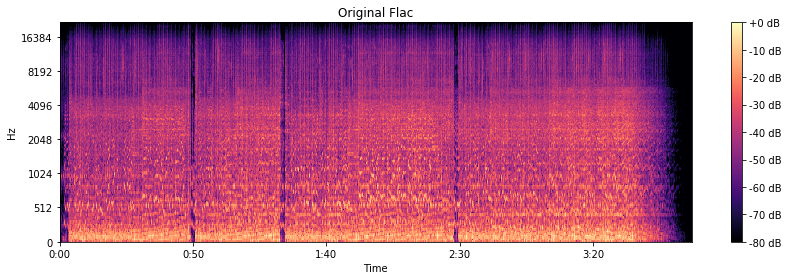
The original is CD quality, so frequencies up to 22 kHz are present as expected.

Original flac

We are going to harvest with FFmpeg, or rather with LAME.

At 320 kbps and 256 kbps, the spectrogram looks almost like the original.

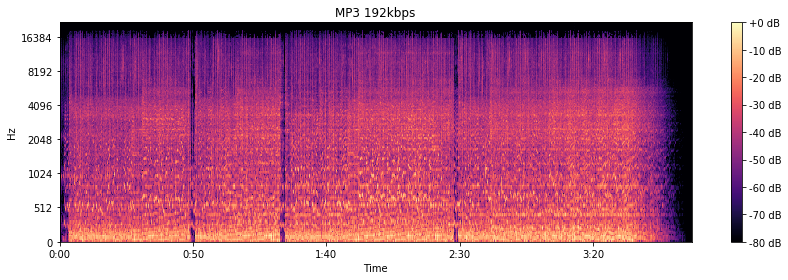
At 192 kbps, there are signs of a 16 kHz cutoff. The spectrogram “darkens”, apparently, the psychoacoustic model has cut something out. By ear, the higher frequency “bursts” really disappeared.

MP3 192 kbps

At the notorious 128 kbit / s, everything is already specifically cut off at 16 kHz. Background sounds are “fuzzy” and begin to bubble. Nothing to do with the original in terms of enjoying the musical details.

MP3 128 kbps

But you can do 64 kbps in MP3. The stereo is gone. Everything gurgles terribly and irritates with completely strange sounds.

Lossless audio.

Lossless audio.

Lossless Audio

If an ordinary person suddenly “brings” what are considered experts in high-quality sound to the forum, they will find that 80 percent of audiophiles are talking about the bit rate problem. “If a true music lover can distinguish a recording with a good bitrate from a file ‘lossi’ or not”, the arguments on this subject with arguments for and against have not diminished in a long time. This proves that it is difficult or almost impossible to force people to abandon their beliefs, to step over their “ego”, even if the facts testify against their delusions. In this article, we will give you a little information about bit rate and how it relates to your practical experience of listening to music.

Lossless Audio

What is the bit rate?

If you love listening to music, you’ve probably heard the term “bitrate” before, so you probably have a general idea of ​​what it means, but we’ll try to jog your memory and give you the “official” definition here. So the bitrate (from the bitrate in English) is in fact a stream: the information bit rate, that is, the amount of data processed over a period of time. In audio, it is generally measured in kilobits per second. For example, the music you listen to on iTunes is 256 kilobits per second.

The higher the bit rate of a track, the more space it will need on your computer. Hence, it has become common practice to compress audio CDs so that you can put more music on a hard drive (well, or in a “cloud” like Dropbox or whatever). This is where the legs of a long-standing dispute over the quality of music from lossy and lossless files “grow”.

What is the difference between lossy and lossless?

When we say “lossless”, we mean that we did not change the original file when rewriting, and it sounds like the track from the original CD. However, most of the time we save music with “losses”. A typical lossy album (MP3 or AAC) is probably about 100MB. The same album in a “lossless” format like FLAC or ALAC (also known as Apple Lossless) would take about 300MB. For this reason, “lossy” recording is common for fast downloads and to save more disk space.

The problem is that when you compress the file to save space, you are removing blocks of data. For example, when you take a PNG screenshot of a computer screen and save it in JPEG format, you get a “flaw” in certain parts of the image, making it almost the same, but with some loss of clarity and quality. . Consider the image below as an example: on the right, it was compressed in JPG format, and its quality deteriorated as a result (when looking at the car’s color, details, and background). The same is true of music files that are “compressed” to MP3, if the comparison is correct. Loss of quality visible to the human ear or eye is called compression artifacts.

Lossy files are understandably a tradeoff, but a very significant one when it comes to hard drive space, which can make a huge difference on a 32GB iPhone. But there are also different levels of loss: 128 kbps, for example, takes up very little space, but it will be of lower quality than a 320 kbps file, which, in turn, has a lower quality than a 1411 kbps file. (which is considered true without loss). However, there are many arguments that most people may not even hear the difference between the two bit rates.

Is the bit rate that important?

As file storage becomes easier and cheaper, high bit rate music becomes more popular. But is it always worth your time, effort, and disk space?

The answer to this question is not simple, and so far, audiophiles are breaking spears in battles, trying to solve an equation with two unknowns. The first part of the equation depends on the technical implementation. If you use expensive headphones or good quality speakers, you can listen to music in a wide range of sounds. And this is where the low bit rate becomes noticeable and you can determine that low quality MP3 files lack a certain level of detail, subtle background tracks may be inaudible, highs and lows will not be as dynamic, or it may just listen to other significant sound distortions. In these cases, the lossless format is justified.

But if you listen to your favorite music through a cheap and generally bad pair of headphones on your iPod, you won’t notice the difference between a 128 kb file and a 320 kb file, let alone a 320 kb file versus one without. losses. file at 1411 kbps.

What is lossless audio compression?

What is lossless audio compression?

Lossless audio compression

You might think that the word “lossless” is used for audio formats that do not use any type of compression. However, even lossless audio formats use compression to keep file sizes at an acceptable level.

Lossless audio compression

Lossless formats use compression algorithms that preserve the audio data, so the sound is exactly the same as the original source. This is in contrast to lossy audio formats like AAC, MP3, and WMA, which compress sound, using algorithms that discard data.

Audio files are made up of sounds and silence. Lossless formats are capable of compressing the pause to almost zero while retaining all the audio data.

What lossless formats are used for digital music?
Examples of popular lossless formats used to store music:

FLAC
Wav
A THE C
Lossless WMA

Lossless formats and musical quality
If you download a lossless music track from the HD music service, expect high-quality audio. On the other hand, if you convert low-quality music tapes by digitizing to lossless audio formats, the sound quality will not improve.

Can you convert from Lossy to Lossless?
It is never a good idea to go from one loss to another. A song that has already been compressed into a lossy format will always be like this. If you convert it to lossless format, you will only get wasted space on your hard drive or mobile device. You cannot improve the quality of a lossy song using this method.

Benefits of using lossless audio format
Using a lossy format like MP3 is still the most common way to store music collections. However, there are clear benefits to building a lossless music library.

Perfect Music CD Backup
Lossless copy of audio files gives you a bit-accurate copy of the original music CD. This means that no matter what audio formats appear in the future, you will always have a perfect copy of the original.

Lossless audio formats

Lossless audio formats

Lossless


Although downloadable music files and music streaming have made music CDs less popular than before, they still exist and provide an excellent means of backing up your music collection. If you don’t back up your music, you could lose it if your hard drive fails. Even if all your music is on CDs, you should make copies of them because CDs can get scratched.

Lossless vs Lossy

You want perfect copies of all your originals in the event of a disaster, so stay away from lossy formats like MP3, which can affect the quality of your recordings. Use lossless audio formats when burning your digital music library to CD.

Lossless audio formats encode and compress audio losslessly, ensuring your music is perfectly preserved digitally.

FLAC (Free Lossless Audio Codec)
Free Lossless Audio Codec (FLAC) is the most popular lossless encoding format. It is increasingly compatible with hardware devices such as MP3 players, smartphones, tablets, and home entertainment systems. FLAC is a brainchild of the non-profit Xiph.Org foundation and is also open source. Music stored in this format is generally reduced by 30-50% of its original size with no loss of quality.

Common ways to rip audio CDs to FLAC include software media players like Winamp for Windows or special utilities like Max for Mac computers.

All major operating systems are supported by FLAC, including Windows 10, macOS High Sierra and above, Android 3.1 and above, iOS 11 and above, and most Linux distributions.

ALAC (Apple Lossless Audio Codec)
Apple originally developed its ALAC format as a proprietary project, but made it open source in 2011. Audio is encoded using a lossless algorithm that is stored in the MP4 container. By the way, ALAC files have the same .m4a extension as AAC, the naming convention can be confusing.

ALAC is not as popular as FLAC, but it may be the best option if iTunes is your preferred software media player and you are using Apple hardware such as an iPhone, iPod, or iPad.

There is no loss of quality when ripping ALAC music CDs, so this is a good option if you want to keep the original audio CDs. If at any time you need to switch from ALAC to another format, there will also be no loss of quality.

WMA Lossless (Windows Media Audio Lossless)
The WMA Lossless format, developed by Microsoft, is a proprietary format that can be used to rip original music CDs without losing sound quality. A typical audio CD is compressed between 206MB and 411MB, depending on several factors. The resulting file, which is created with confusion, has a WMA extension, which is identical to files in the standard (lossy) WMA format.

WMA Lossless is probably the least supported of the formats on this list, but it may still be the one you choose, especially if you use Windows Media Player and have a hardware device that supports it.

Mono audio
The Monkey audio format is not as compatible as competing lossless systems like FLAC and ALAC, but it does provide better compression on average, resulting in smaller file sizes. This is not an open source project, but it is free to use. Files encoded in Monkey audio format have the funny APE extension.

Methods used to copy CDs to APE files include downloading a Windows program from Monkey’s Audio’s official website or using standalone CD ripping software that generates data in this format.

While most software media players don’t have built-in support for playing files in the Monkey audio format, there is a good selection of plugins available for Windows Media Player, Foobar2000, Winamp, Media Player Classic, and more.

WAV (WAVeform audio format)
WAV format is not considered the ideal choice when choosing a digital audio system to store your audio CDs, but it is a lossless option. The downside to this approach is that files created in WAV format are larger than other lossless formats, since no compression is used.

If storage space is not an issue, then the WAV format has a number of distinct advantages: it is widely compatible with both hardware and software. Converting to other formats requires significantly less CPU processing time because WAV files are already unzipped and don’t need to be unzipped before converting. You can also directly manipulate WAV files with your audio editing software without having to wait for decompression and recompression cycles to update your changes.

Lossy audio encoding. What is what?

Lossy audio encoding. What is what?

LOSSY AUDIO
.

The Evolution of Audio Coding

lossy compression

It’s 2020, it’s been years since the first MP3 encoder appeared. But just because most of us still calmly listen to MP3 music does not mean that progress has marked time all this time. And this applies not only to the development of the MP3 encoding algorithm, but also to the evolution of lossy audio encoding in general, in the form of newer and more advanced codecs that actually allow you to get better quality in a smaller size. . Formats like OGG Vorbis, AAC, WMA, Musepack have left behind outdated MP3 with its many limitations and flaws.

In parallel, lossless encoding is gaining momentum. But due to the large amount of data, today it is still not suitable for large-scale use, especially for portable devices with limited memory, for streaming on the network and only for quickly sharing music on the Internet (I must admit that not all 100 megabit internet access isn’t always at hand).

And so MP3 is out of date and definitely ready to be replaced. But what about the uninitiated user, but who wants to achieve the highest quality sound with the least amount of memory? After all, there are quite a few alternative codecs (at least 3 of them are really worthy of attention): Apple is promoting the AAC (Advanced Audio Coding, positioned as the successor to MP3) format through its iTunes Store, Microsoft, its own WMA (Windows Media Audio) license, moreover, OGG Vorbis is becoming more and more famous, and specially illustrated people even use a format like Musepack. Which of these codecs should I choose?

There is no definitive answer to this question, and that is why I am writing this article.

How to decide?

The choice of one or the other codec depends on the specific task. Namely:

1. From the equipment and software with which the sound will be reproduced. Those. on the availability of support for one or another audio format, as well as the quality of reproduction (it is advisable to be guided by it when choosing a bit rate).

2. Of the amount of memory that will be allocated to the final material. Accordingly, a higher or lower target quality / bit rate is selected.

And of course, in addition to the format and bit rate, you need to choose the optimal encoder and encoding parameters. It should be understood that different formats / encoders are displayed in different ways in different bit rate ranges.

Therefore, the algorithm is approximately the following:

1) Find out what formats the target device supports.
2) Determine how much space you can allocate for the audio material, as well as determine the total length of the audio intended for encoding.
3) Calculate the required bitrate using the formula: bitrate = disk_space (in kilobits) / total_time (in seconds).
4) According to the bitrate, choose the optimal one of the supported formats (more on this later).
5) Choose the best encoder and parameters for it.

More about our heroes

CAA

image

The development of psychoacoustics and data compression methods gradually led to the fact that the MP3 standard became “strict” for the implementation of new ideas in audio coding. As a result, in 1997, Fraunhofer IIS, which created MP3 in the early 1990s, as well as Dolby, AT&T, Sony, and Nokia, developed a new audio compression method: Advanced Audio Coding (AAC), which became a standard. . MPEG-2 and MPEG-4. The main differences from the MP3 standard are:
support for a wider range of audio formats (up to 48 channels) and sample rates (8 kHz to 96 kHz);
More efficient and simple filter bank: The hybrid MP3 filter bank has been replaced by the conventional MDCT (Modified Discrete Cosine Transform);
wider ranges of variation of the time-frequency resolution in the filter bank – eight times (in MP3 – three times) – led to an improvement in the encoding of transients (transients) and stationary sections of the audio signal;
better coding of frequencies above 16 kHz;
more flexible stereo encoding mode, allowing to switch to M / S (“joint stereo”) mode independently in different frequency bands;
Additional features of the standard that increase compression efficiency: time domain noise shaping technology (TNS), prediction of MDCT coefficients over time (long-term prediction), parametric stereo coding mode, synthesis of noise (perceptual noise replacement), high frequencies (SBR).

Thanks to these features, the AAC standard can achieve more flexible and efficient audio coding and therefore better quality. As a result of the widespread use of the MP3 format, the AAC standard has not yet acquired a popularity comparable to MP3. However, AAC is the main format on the popular iTunes Store, iPods, iTunes, iPhone, PlayStation 3, Nintendo Wii, and DAB + / DRM digital streams.
OGG Vorbis

image

Ogg Vorbis is a relatively new universal audio compression format that was officially released in the summer of 2002. It belongs to the same type of format as MP3, AAC, VQF and WMA, that is, lossy compression formats. The psychoacoustic model used in Ogg Vorbis is similar in principle to MP3 and similar ones, but only that the mathematical processing and practical implementation of this model are fundamentally different, allowing the authors to declare its format completely independent of all predecessors.
The main undeniable advantage of the Ogg Vorbis format is its total openness and freedom. In addition, it uses the latest and highest quality psychoacoustic model, so the bitrate / quality ratio is significantly lower than other formats. As a result, the sound quality is better, but the file size is smaller.
The format has many advantages. For example, the Ogg Vorbis format does not restrict the user to only two channels of audio (stereo: left and right). Supports up to 225 individual channels at a sample rate of up to 192 kHz and up to 32 bits (which no lossy compression format does), making Ogg Vorbis ideal for encoding 6-channel DVD-Audio. Additionally, the OGG Vorbis format has sample accuracy. This ensures that the audio data before encoding and after decoding will not have offsets or extra / missing samples to each other. This is easy to appreciate when you are encoding music endlessly (where one track gradually fades into another); in the end, the integrity of the sound will be preserved.
Streaming capacity is nowhere to be found, but this format has built it from the ground up. This gives the format a rather useful side effect: multiple songs can be stored in one file with their own tags. When loading such a file into the player, all songs should be displayed as having been loaded from several different files.
We should also mention a fairly flexible labeling system. The tag header can easily be expanded to include lyrics of any length and complexity (eg song lyrics) interspersed with images (eg album cover photo). Text labels are stored in UTF-8, allowing you to type in all languages ​​at the same time and eliminating potential problems with encodings. This is much more convenient than various tricks like id3 tags.
Ogg Vorbis uses a variable bitrate by default, while the latter is not limited to hard values ​​and can vary even by 1 kbps. It should be noted that the format does not strictly limit the maximum bit rate and with the maximum encoding setting it can range from 400 kbps to 700 kbps. The sample rate has the same flexibility: users can choose between 2000 Hz and 192000 Hz.
Ogg Vorbis was developed by the Xiphophorus community to replace all paid proprietary audio formats. Even though this is the youngest format of all MP3 competitors, Ogg Vorbis has full support on all known platforms (Windows, PocketPC, Symbian, DOS, Linux, MacOS, FreeBSD, BeOS, etc.), as well as a large number of hardware implementations. … The current popularity far exceeds all alternative solutions.
It is worth noting that Ogg Vorbis is only a small part of the Ogg Squish multimedia project, which also includes free encoders: Speex – for voice compression; FLAC: for lossless audio compression; Theora: for video compression.
Musepack

image
MusePack (mpp, mp +, mpc, MPEG +) is an unlicensed file format for storing audio information, distributed under the GNU General Public License.
The quality of MPC encoding at high bit rates (160 Kbps and above) is notably (if not significantly) higher than the quality provided by MP3.
Main advantages:
The format doesn’t do a second dct conversion, it doesn’t actually suffer from pre-echo artifacts, unlike formats like MP3, Vorbis, AAC, and WMA.
More efficient variable bit rate algorithms. If you track how the bit rate changes during MPC track playback, you will notice that for simpler sections the encoder assigns a lower bit rate, and for complex ones a much higher one, sometimes above 400 ( !) Kbps. An interesting fact is also worth mentioning: the MP3 encoder in VBR mode for silence assigns a bit rate of 32 kbps (at a sampling rate of 44100 Hz), AAC and OGG Vorbis – 2 kbps, Musepack encodes silence with minimal costs, <1 kbps / s (for example, one minute of silence will occupy about 514 bytes). All of this speaks to the extreme “frugality” of this encoder.
Powerful and flexible psychoacoustic model. Here we can mention, for example, a frame-based dynamic low-pass filter (in other encoders, a fixed bandwidth is set for each quality preset).
More advanced compression based on optimized Huffman tables (the same MP3 LAME wastes about 20% of the bit rate, only due to imperfect mathematical compression)

WMA

image

Windows Media Audio is a licensed file format developed by Microsoft for storing and transmitting audio information.

WMA was initially marketed as an alternative to MP3, but Microsoft now opposes AAC. Nominally, the WMA format is characterized by good compressibility, allowing it to “bypass” the MP3 format and compete on parameters with the Ogg Vorbis and AAC formats. But as independent tests, as well as subjective evaluation, showed, the quality of the formats is not yet exclusively equivalent, and the advantage even over MP3 is unequivocal, as Microsoft claims.

Format, encoder and parameter selection

Now straight to the heart of the matter.

To make your choice easier, I would like to share my experience gained in the course of numerous comparisons, auditions, as well as based on the analysis of the results of open hearing tests.

And so, next I will talk about the most suitable encoders for each case, as well as the correct choice of parameters. For the conversion, I recommend using foobar2000 (the converter settings are described in detail here), the parameters themselves are specified just for it. Additionally, foobar2000 has a host of useful DSPs that can be useful for audio pre-processing.

For those who are going to convert through the console or another program: the variable% s must be replaced with the name of the source file (or a similar variable) and% d with the name of the output file.

Note that for each bit rate range, the possible format options are indicated: the first is the highest priority. If your player doesn’t support the first option, please pay attention to the next one, etc. As I already wrote, in fact today only three codecs deserve attention: these are AAC, OGG Vorbis and Musepack. WMA, on the other hand, due to its closed nature, does not differ in special quality, but still, in most cases, it is better than MP3. Since some of the alternatives are only compatible with WMA, I will make recommendations for each of the four formats.

About bit rates: It should be understood that the optimal encoding mode is called. True VBR, ie target quality mode, not bit rate. Ideally, the result is a track with variable bit rate, but constant quality (don’t equate the two, more complex parts of a track need more bits to maintain quality). Therefore, the output bit rate is difficult to predict. Therefore, the bitrate values ​​below are indicated only as approximate, if possible, as an average for a large number of compositions of varying complexity.

Mentioned in this article, as well as some other encoders, with Russian descriptions of the main parameters and recommendations can be found here.

Ultra-low bit rates (~ 25-40 kbps)

This range is ideal for encoding audiobooks. And here there can only be one option: AAC, or rather, Nero AAC. The parameters are as follows:

-lc -q 0.35 -ignorelength -if – -of% d

In this case, the material must be pre-converted to mono and resampled at 22050 Hz (preferably using a SoX resampler). At the output, we get the usual low complexity AAC with a bit rate of about 25 kbps.

There are also options for music in this range:

1) Nero AAC. No conversions are needed here:

-q 0.15 -ignorelength -if – -of% d

On the output – High efficiency AAC v2 (with parametric stereo and HF synthesis), ~ 35 kbps. A great option for internet radio. Only here we must not forget that the decoder in the player must be compatible with HE-AACv2, otherwise you will get a complete absence of HF and monophony.

2) OGG Vorbis AoTuV – This modification of libvorbis includes improvements to the low bitrate encoding algorithm and even without SBR technology it is not much inferior to HE-AACv2. Command line:

-s% r -Q -q-2 – -o% d

Resulting files must be fully compatible with standard OGG Vorbis decoders. Bit rate – similar – around 35 kbps.

3) WMA 10 Pro. For such cases Microsoft also has something like SBR (high frequency synthesis), it doesn’t sound as bad as it could. It is true that the bit rate is slightly off limits: 48 kbps.

-silent -a_codec WMA9PRO -a_mode 3 -a_setting 48_44_2_16 -input% s -output% d

Note that older decoders (especially “hardware”) do not support WMA 10. In this case, you can use WMA 9.2 (the same encoder), however, its quality at low bit rates is much worse.

-silent -a_codec WMA9STD -a_mode 3 -a_setting 48_44_2 -input% s -output% d

Low bit rate, ~ 64 kbps

Initially, I thought about going straight to higher speeds. But since hydrogenaudio.org recently ran an encoder comparison at this bitrate, it’s a sin to lose it.

1) QuickTime AAC is the winner (except for the newly created Opus / CELT) of the same test. The following are the QAAC encoder settings:

-s -v 64 –he -q 2 –ignorelength – -o% d

The output is HE-AAC (with SBR, but not parametric stereo), which should be compatible with various iPods and the like.

2) OGG Vorbis AoTuV – although it turned out to be quite far from QAAC, but still:

-s% r -Q -q0 – -o% d

3) And just in case WMA 10 Pro:

-silent -a_codec WMA9PRO -a_mode 3 -a_setting 64_44_2_16 -input% s -output% d

For older decoders – WMA 9 standard:

-silent -a_codec WMA9STD -a_mode 3 -a_setting 64_44_2 -input% s -output% d

Slightly higher, ~ 80-100 kbps

And I already consider this bitrate due to Vorbis.

1) As tests have shown, the OGG Vorbis AoTuV encoder is best suited to it:

-s% r -Q -q1 – -o% d

2) Nero AAC: a very good result. In places where the highs are not as pronounced, it can sound even better than Vorbis (in the highs it loses due to synthesis).
30 -ignorelength -if – -of% d The

profile used is HE-AAC.

De facto standard, 128 kbps

Interesting fact: many people argue that for MP3 128 kbps – “edge bit rate”, which starts the quality indistinguishable from the original. Maybe this is so … for plastic Chinese speakers with blatnyak. Actually, this threshold is around 200 kbps, and newer formats provide more stable quality at this bit rate.

Modern encoders managed to cut this level from 128 kbps to almost half (again, according to the developers). But nevertheless, if you have more or less decent acoustics (or headphones), the difference can be captured in complex snippets even at 128 kbps.

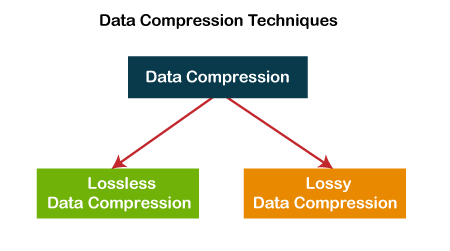
Music quality of files (lossless and lossy)

Music files can be the product of the perfect extraction of the music contained in CDs, called bit by bit. With this phrase we immediately clear the field of feeding unjustified prejudices towards the archives. The files are not of the same quality as CDs when using lossy formats: MP3, AAC, M4A. Besides these, there are formats that do not use any type of compression: WAV and AIF, which are the exact copy of the songs stored on CDs or even the original master recording format used to create CDs. Or there are formats that even using compression are “lossless”, called lossless: the most widespread of them is the FLAC format, not surprisingly adopted as a standard in the distribution of content in CD quality or higher. The FLAC format uses a type of compression that does not remove the original data. When unzipped, FLAC files have exactly the same bits that were present before compression.

Lossy - Lossless

Before there are misunderstandings about the relationship between lossy and lossless files, we specified that if you have an MP3 file and convert it to FLAC, the data removed from MP3 transformation will not magically appear again. No conversion can regenerate the lost data into a lossy file. You can convert FLAC files to WAV or AIF because the compression used was lossless.

Lossy and lOOSLESS

The FLAC format also has advantages over WAV and AIF, the applied compression reduces its size and saves storage space and data bandwidth in reception / transmission when transmitting over the network. Besides this function, FLAC has another advantage over WAV, the information describing the tracks and the cover image can be inserted into the files. The information inserted in the files is called TAGs, the FLAC format provides for the insertion of this information that software applications and APPs read to recognize the content of the audio tracks. This simplifies the management of music collections, which without TAGs would present indistinguishable lists of audio files. Unfortunately, the standard WAV format does not allow the inclusion of TAGS in files.

Let’s continue the discussion on the playback chain of a portable Hi-Fi system. The technical quality of the content to be reproduced affects the final quality of the reproduction.

After adopting quality headphones, it would be wise to switch to lossless audio formats, to at least benefit from the original quality found on CDs.

Lossless music

Most of the sites that sell music online offer it in lossy formats, so the problem is how to get music without loss. Anyone with a CD can start by ripping them. Ripping is the term used to describe the transformation of the tracks contained in a CD into files. Anyone who wants to delve into the subject can read the writings dedicated to Ripping and the creation and management of music collections: What software for ripping and Creation and management of music files luquida.

In addition to CD ripping, there are websites that sell lossless music online in CD quality and Master Quality (Hi-Res), the latter is superior to CD and in many cases coincides with the original recording made in the Recording Studio.

High Resolution Music (HRA) has higher technical specifications than expected for CDs. Resolution ranges from 16 bit to 20/24 bit and sampling from 44.1 kHz to 48 / 88.2 / 96 / 176.4 / 192 kHz. For a description of the processes and characteristics of digitization, read the following text: The digitization of sound. With respect to these specifications we believe that the determining factor is the 24-bit resolution combined with sampling performed at least at 48 kHz.

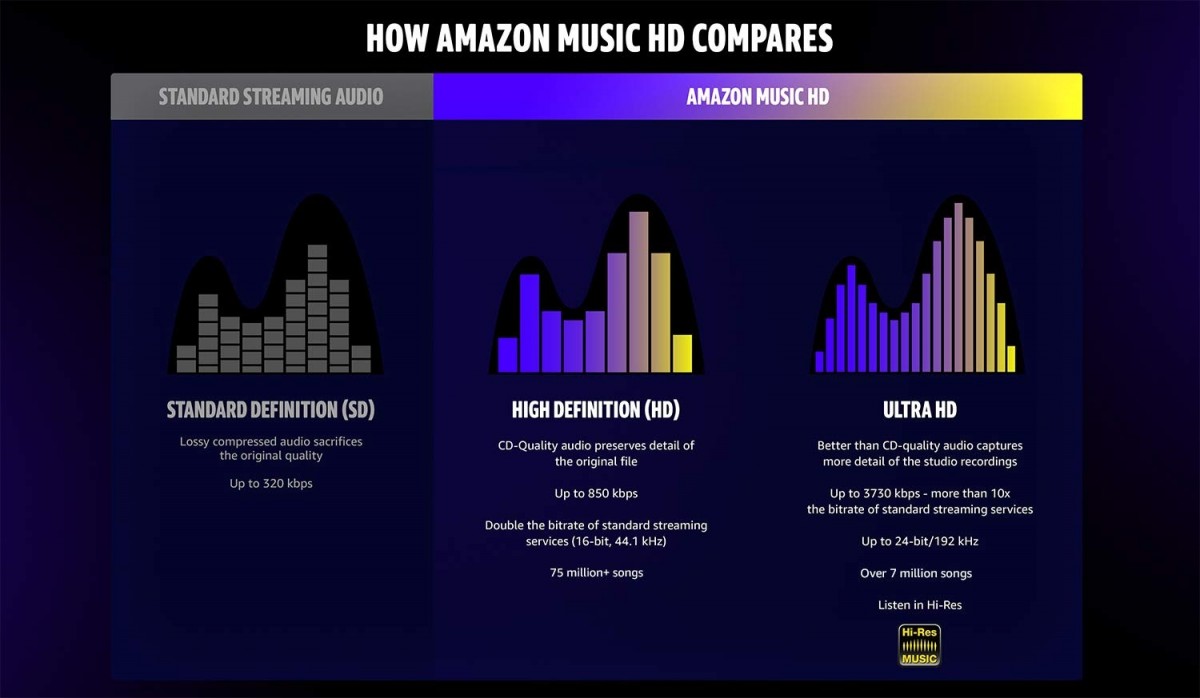
Speaking of MP3 files, we usually refer to the bit rate, which with this format does not exceed 320 Kbps. The bit rate indicates the bits per second transmitted in a music stream. It is quite evident that a music stream consisting of more bits will contain more audio data. To orient yourself between these parameters, it is good to bear in mind that an uncompressed CD quality audio stream (16 bit 44.1 kHz) is 1,411 Kbps, converted to FLAC the stream will decrease between 30 and 50% of the format’s bit rate. uncompressed. Therefore, the CD quality stream generated by a FLAC will vary approximately between 705 and 988 Kbps. Obviously for high resolution formats the data stream will be proportionally higher depending on the specifications offered by the individual files.

The technical quality of the content to be reproduced as well as the reproduction devices are essential complements to obtain the best sound result.