Lossless Audio Archiving


Free Download Mp4Gain
picture

Lossless Audio Archiving: Preserving Sound Fidelity for the Ages

Lossless Audio
Lossless Audio
Lossless Audio
Lossless Audio

The Importance of Lossless Audio Archiving

As a passionate audiophile and expert in preserving audio fidelity, I firmly believe in the significance of lossless audio archiving. It is a meticulous process that ensures the long-term preservation of audio recordings without compromising their original quality. In this article, I will delve into the essence of lossless audio archiving and highlight its importance in safeguarding the integrity and richness of sound for future generations.

Understanding Lossless Audio Compression

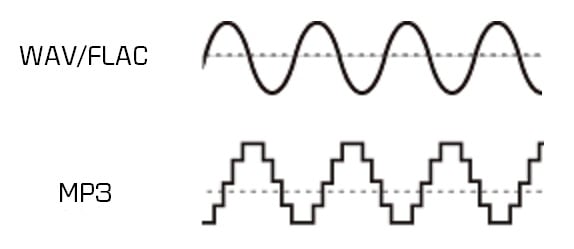
Lossless audio compression is a technique that reduces the file size of audio recordings without sacrificing any audio data. Unlike lossy compression, which discards certain audio information, lossless compression algorithms retain all the original data, allowing for perfect reconstruction of the audio signal. This preservation of every nuance and detail is crucial for archiving purposes, as it guarantees an exact replica of the original recording.

The Process of Lossless Audio Archiving

When embarking on the journey of lossless audio archiving, several key steps must be followed to ensure the highest quality preservation:

Selection of Suitable File Formats

Choosing the right file format is paramount in lossless audio archiving. Formats such as FLAC (Free Lossless Audio Codec) and ALAC (Apple Lossless Audio Codec) are widely recognized as ideal choices for maintaining audio fidelity. These formats employ sophisticated algorithms that compress audio data while preserving every bit of information, resulting in files that are significantly smaller in size without any loss of quality.

Digitization of Analog Audio Sources

For analog audio sources, such as vinyl records or cassette tapes, a meticulous digitization process is necessary to convert them into digital formats. High-quality analog-to-digital converters (ADCs) are utilized to capture the analog audio signal with utmost precision and accuracy, ensuring a faithful representation of the original recording.

Metadata Organization and Tagging

Proper metadata organization and tagging play a crucial role in lossless audio archiving. Metadata includes information such as artist names, album titles, track numbers, and other relevant details. Organizing this information accurately not only helps in cataloging the audio collection but also facilitates easy retrieval and navigation.

Redundant Storage and Backup

Preserving audio fidelity necessitates redundancy in storage and backup. Multiple copies of the archived files should be maintained across different storage mediums, including external hard drives, network-attached storage (NAS) systems, and cloud storage services. Regular backups are essential to guard against any potential data loss or hardware failure.

Long-Term Preservation Strategies

Lossless audio archiving is not a one-time endeavor but an ongoing commitment. Implementing long-term preservation strategies ensures that the archived audio remains accessible and usable for years to come. Regular data integrity checks, format migration when necessary, and periodic re-evaluation of storage solutions are vital components of a comprehensive preservation strategy.

Preserving the Future of Audio Fidelity

In conclusion, lossless audio archiving is an essential practice for audiophiles, professionals, and institutions seeking to preserve the highest quality sound recordings. By understanding the significance of lossless compression, following a meticulous archiving process, and implementing long-term preservation strategies, we can safeguard the integrity and richness of audio for future generations to enjoy. Let us continue to cherish and protect the legacy of exceptional sound quality.



Free Download Mp4Gain
picture


Mp4Gain Main Window
picture


Mp4Gain Features
picture


Free Download Mp4Gain
picture

The Advantages of Lossless Audio Formats: FLAC and ALAC

The Advantages of Lossless Audio Formats: FLAC and ALAC

FLAC and ALAC
FLAC and ALAC
FLAC and ALAC
FLAC and ALAC

As an expert in audio optimization, I am always on the lookout for formats that deliver exceptional sound quality without compromising on file size. In this article, I will delve into the world of lossless audio formats, with a specific focus on two popular options: FLAC and ALAC. These formats have gained significant popularity among audiophiles and music enthusiasts for their ability to preserve the original audio quality while offering efficient compression. Join me as we explore the advantages of these lossless audio formats and why they should be your top choice.

Superior Sound Quality

When it comes to lossless audio formats, the primary concern is maintaining the utmost sound quality. FLAC and ALAC excel in this regard, as they employ compression algorithms that preserve every detail of the original audio recording. Whether it’s the rich harmonies of a symphony orchestra or the subtle nuances in a vocalist’s performance, these formats ensure an immersive and authentic listening experience. With FLAC and ALAC, you can indulge in music the way it was intended to be heard, without any compromise on audio fidelity.

Efficient Compression

Efficient compression is another remarkable advantage of lossless audio formats like FLAC and ALAC. These formats utilize sophisticated compression techniques that significantly reduce file sizes while retaining all the audio data. This means you can store more music on your devices without sacrificing quality or resorting to lower-bitrate alternatives. Whether you have a vast music library or limited storage space, FLAC and ALAC offer a practical solution to keep your favorite tracks accessible at all times.

Wide Compatibility

One of the key considerations when choosing an audio format is its compatibility with different devices and platforms. FLAC and ALAC have gained widespread support across various software and hardware ecosystems. Many popular media players, portable devices, and operating systems are compatible with these formats, ensuring seamless playback without the need for additional conversions or transcoding. Whether you’re using a Mac, Windows, or mobile device, FLAC and ALAC guarantee a hassle-free listening experience.

Versatility and Metadata Support

Versatility is an essential aspect of lossless audio formats, and FLAC and ALAC don’t disappoint. Apart from delivering exceptional audio quality, these formats also support a range of metadata. You can embed album art, track information, lyrics, and other relevant details within the audio files themselves. This ensures that your music collection remains organized and easily searchable across different platforms and media players. With FLAC and ALAC, it’s not just about the audio; it’s about creating a comprehensive and immersive musical experience.

Archival and Future-Proofing

For audiophiles and music collectors, archival is a crucial consideration. FLAC and ALAC are ideal for archiving purposes as they provide a reliable and future-proof solution. By choosing these formats, you can preserve your music collection in its original quality for years to come, ensuring that your favorite albums and tracks withstand the test of time. Moreover, since FLAC and ALAC have gained widespread acceptance, it’s highly likely that they will continue to be supported by future audio systems and technologies.

Smooth Integration with Existing Libraries

If you already have an extensive collection of audio files in other formats, the transition to FLAC or ALAC can be seamless. Both formats support transcoding, allowing you to convert your existing audio files into lossless formats without any loss of quality. This ensures that you can integrate FLAC and ALAC files seamlessly with your existing music library, avoiding any disruptions in your listening experience. With their wide compatibility and transcoding capabilities, FLAC and ALAC offer a convenient pathway to upgrade your audio collection.

Community and Support

FLAC and ALAC have garnered a passionate and dedicated community of supporters, comprising audio enthusiasts, music professionals, and developers. This active community ensures ongoing support, updates, and development for the formats, assuring users that they are investing in a long-term and reliable audio solution. Whether you seek advice, troubleshooting, or simply want to connect with like-minded individuals, the FLAC and ALAC community is always there to assist and share their expertise.

Streaming and Online Distribution

With the rise of music streaming platforms and online distribution, the demand for lossless audio formats has also increased. Many streaming services and online stores now offer FLAC as a preferred option for audiophiles, ensuring that you can enjoy your favorite music in its original quality, streamed directly to your devices. This development not only reinforces the advantages of lossless formats but also opens up new avenues for artists, allowing them to deliver their music to fans with uncompromised fidelity.

Preservation of Music History

Lossless audio formats like FLAC and ALAC play a crucial role in the preservation of music history. They allow us to digitize and archive classic recordings, ensuring that future generations can enjoy the same musical experiences as previous ones. By opting for FLAC and ALAC, you contribute to the preservation of cultural heritage and ensure that the legacy of iconic musicians and compositions lives on.

Audiophile-Grade Experience

Lastly, but certainly not least, FLAC and ALAC offer an unparalleled audiophile-grade experience. These formats cater to the discerning ears of audiophiles who crave the utmost audio quality. Whether you’re using high-end headphones, a dedicated audio setup, or a premium sound system, FLAC and ALAC provide the fidelity and richness necessary to truly appreciate the intricacies of the music. With their lossless nature and superior sound reproduction, these formats elevate your listening experience to new heights.

In conclusion, FLAC and ALAC stand out as the go-to choices for anyone seeking lossless audio formats. With their superior sound quality, efficient compression, wide compatibility, and versatile features, they offer an unmatched audio experience. Whether you’re an audiophile, music collector, or simply someone who values exceptional sound, FLAC and ALAC provide the perfect combination of fidelity and convenience. Embrace the advantages of lossless audio formats and let your music shine in its full glory.

The Benefits of Lossless Audio Formats

The Benefits of Lossless Audio Formats

Lossless Audio Formats

Lossless Audio Formats Explained

As an audiophile, I always strive to achieve the highest possible quality of sound. Lossless audio formats such as FLAC, ALAC, and WAV are my go-to choices when it comes to digital music. These formats use audio compression algorithms that preserve all the original audio data while reducing the file size. This means that the music you listen to sounds exactly as the artist intended it, without any loss of quality.
When I first discovered lossless audio formats, I was blown away by the difference in sound quality compared to lossy formats like MP3. The music was clearer, more detailed, and had a wider dynamic range. The benefits of lossless audio formats are not just limited to the listening experience, they also have practical benefits. Lossless files take up less storage space on your device than uncompressed audio files like WAV, and can be easily streamed over the internet without compromising quality.

As the famous musician David Byrne once said, “Lossless audio formats offer an uncompromising listening experience that allows you to hear every nuance of a recording. It’s like hearing the music for the first time.”

The Advantages of FLAC and ALAC

FLAC and ALAC are two of the most popular lossless audio formats. They are both open-source and free to use, which means they have a wide range of support across different devices and software. FLAC has become the de facto standard for lossless audio on the internet, while ALAC is the preferred format for Apple devices.
One of the biggest advantages of FLAC and ALAC is their ability to handle high-resolution audio. These formats can handle audio at up to 24-bit/192kHz, which is significantly higher than the 16-bit/44.1kHz standard of CD-quality audio. This means that you can listen to your favorite music with even greater detail and clarity.

In addition, FLAC and ALAC both have robust error correction capabilities. This means that if a file is corrupted during download or transfer, the audio data can still be recovered without any loss of quality. This is a major advantage over lossy formats like MP3, which cannot recover from data errors.

The Benefits of WAV

WAV is a lossless audio format that has been around since the early days of digital audio. It is the standard format for audio CDs, and is widely used in professional audio production. One of the main benefits of WAV is its compatibility with a wide range of hardware and software.
WAV files are uncompressed, which means that they retain all the original audio data. This makes them ideal for situations where maximum audio quality is required, such as mastering and archiving. In addition, WAV files can be edited without any loss of quality, making them the preferred format for audio engineers and producers.

As the great music producer Rick Rubin once said, “WAV files are the gold standard for audio quality. They offer the most accurate representation of the original recording, and are essential for anyone serious about music production.”

Final Words

In conclusion, lossless audio formats offer a superior listening experience compared to lossy formats like MP3. Whether you choose FLAC, ALAC, or WAV, you can be sure that you are getting the best possible sound quality. As an audiophile, I highly recommend using lossless audio formats for your music collection. And if you’re looking for a reliable and efficient way to normalize and convert your audio files, MP4Gain is the perfect solution.

lossless sound quality

lossless sound quality

lossless sound quality

The principle of these audio compression methods is to keep as much as possible the parts that are easy to hear for the human ear.

lossless sound quality


In the main constant bit rate (CBR) mode, audible data in the audio is removed and it is easier for the human ear to hear. The more information that is retained for the part, the less information that is retained for the less audible part. As sound complexity increases, the degree of sound quality degradation becomes more apparent. For example, when listening to pure human music voice performances and performances combined with background music, pure The degree of degradation of the compressed music of the human voice is less obvious than that of the original file.

As for the lossless sound quality provided by today’s streaming platform, there are many formats, but strictly speaking, these formats, including flac and ALAC, belong to lossless compression (non-destructive data compression) rather than quality. lossless sound in a narrow sense, but due to its performance it is almost the same as WAVE, but the file is small, the decoding speed is fast, and it can be used in streaming services, so it is also a representative format of lossless sound quality that has entered the era without CD support, and it is also the current music streaming service.

Also, MQA like Tidal is a more controversial format, because although MQA is lossless audio compression in a broad sense, it focuses on driving high-quality music files that are above CD quality at a size similar to those of CD quality flac files. , but it can also be restored to the original high-quality audio format, but the controversial point is whether the higher compression ratio can maintain the same real auditory sense as the original high-quality audio has always been controversial. At the same time, MQA requires a specific device to perform hardware decoding. Yes, many devices can only decode MQA through software.

â–²Currently called Hi-Res Audio generally refers to sound quality higher than that of a CD, but to be certified, the device must support the processing capability of the 24-bit 96kHz format.

However, since MP3 and AAC are previously planned destructive music compression formats, their purpose is to compress CD-level sound quality into smaller files, so most encoding specifications are presented in one presentation. CD-level 16-bit 44.1 kHz or 16-bit 48 kHz; but MQA is a format with a small file size that locks in high sound quality requirements. Basically, the MQA format will be music equivalent to 24-bit PCM or higher.

lossless sound quality

lossless sound quality

lossless sound quality

Although lossless sound quality and high-quality streaming services have appeared on the market for a while

lossless sound quality

Like Apple isn’t the first to make true wireless earbuds, but it has ridden the wave of the market, with Apple’s launch of so-called hi-fi. compressed sound quality in Apple Music. In fact, after the lossless compression commonly known in the audio industry, lossless sound quality and high sound quality have instantly become a hot topic for many people to discuss, but whether the benefits of quality Lossless sound systems are really Obviously, the author will devote some space from theoretical concepts to practical levels. The difference is a simple overview, but the following arguments focus on easy understanding, so some of the descriptions are not entirely accurate.

What is lossless sound quality? What is the sound quality of the music we usually listen to?
The photo mentions * Introduction to KKBOX sound quality (including format), release year, sound quality, including numbers, KKBox, streaming media, Hi-Res Audio and Hi-Fi

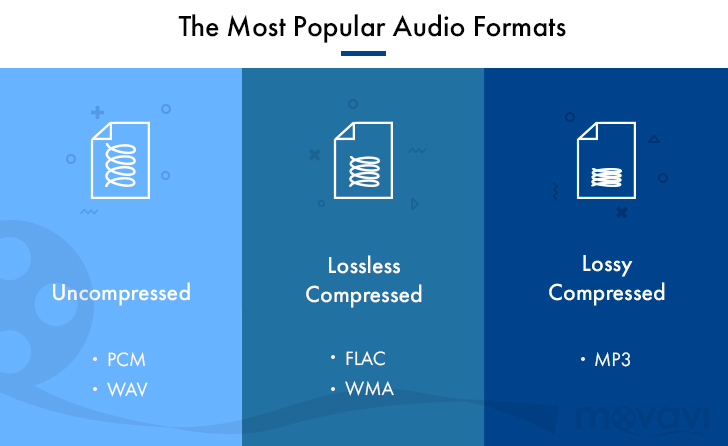
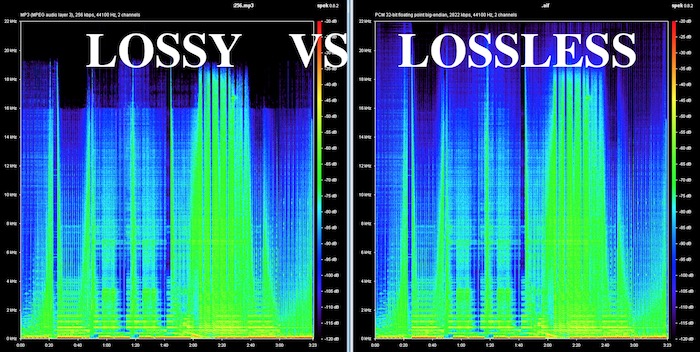
â–² Both AAC and MP3 are destructive compression, while FLAC and ALAC are lossless compression

Before we get into the details, let’s talk about what is called lossless sound quality; From the author’s concept and cognition, the so-called lossless sound quality is a relative word rather than an absolute word. The main source is the relative word born due to the appearance of the MP3 music compression format; after the music industry went digital, digital music files were generally recorded via PCM encoding, and WAVE files were generally used on CDs. The time and space situation that MP3 was born into was because hard drive capacity was generally small at the time. To store a large amount of music data in storage space, you probably need to compress the files.

The reason why MP3 cannot be called a lossless format is because it essentially compresses the original WAVE in a way that limits the bitrate by combining concepts like the psychology of sound. The bitrate compression mode, compared to the bitrate of the original WAVE file, compresses at least in a range of 1:4 to 12:1. The higher the bitrate, the greater the amount of retained information. For example, AAC format also adopts similar audio psychology for compression, but the efficiency is better than MP3. Therefore, most of the lossless sound quality of most streaming platforms currently uses AAC as the mainstream.

How to make an mp3 sound great? Part 2

How to make an mp3 sound great? Part 2

mp3 quality
mp3 quality

If you want to know how an mp3 works, this article is for you.

mp3 quality
mp3 quality

As we pointed out in the previous article, talking about a digital audio file refers to the ability to take 44,100 samples per second and thus be able to draw as precisely as possible the wave, with its curvature, that describes the sound.

or that the sound is produced by the fluctuating pressure that produces a movement in the air. Like the string of a guitar or a piano that vibrates X times per second, depending on the pitch, and these vibrations produce waves in the air similar to those produced in water if an object falls.

Then those waves propagate, reach our ears and produce a wave with a certain curvature.

Digitizing this implies, as we have already said, taking 44100 (or more) samples per second and capturing its position in order to later be able to reproduce that wave as close as possible to the original.

But this implies an enormous flow of information, which must be compressed and, if possible, even discarded, to reduce its size to a point that today, with this technology, is manageable.

This is based on these principles:

– There are certain sounds that the human ear cannot hear.
– There are certain sounds that the human ear hears better than others.
– If there are two sounds playing at the same time, we can hear the one that is higher, and not the lower one.

These principles of human hearing allow us to discard sounds without a considerable loss of quality.

How to make an mp3 sound great?

How to make an mp3 sound great?

MP3 QUALITY
MP3 QUALITY

If you want to know how an mp3 works, this article is for you.

MP3 QUALITY
MP3 QUALITY

An mp3 stores information digitally. The music is captured 44100 times per second, each of these parts has a size of 16 or 24 bits. The usual is 16 bits.

The sound has a curved shape, what is sought is that each frame captures an instant of that curve or bell.

If 16 bits are used, we have a little more than 65 points that form a kind of grid where each point will be located to form the curvature. It is enough information to achieve a very good definition. In 24 buts we have several million possible points on the grid to place each point on the curve.

To understand the size of a file, the following formula will be useful:

frames*bits*channels= x bits per second

In a good quality mp3 we speak of 44100 multiplied by 16 bits multiplied by 2 channels (stereo) which gives us 1,411,200 bits per second, that is, 176,000 bytes per second.

If the song lasts an average of 3 minutes, each one will occupy 32 million bytes.

Using Mp3 that 32 million bit song can be compressed to about 3 million bits.

We will need to be able to transmit 16,666 per second to be able to transmit the 3 million bits of the total song.

We will see that the more information it contains, the more transmission capacity per second we will need.

Mp4Gain is the ideal program to get these mp3s that have a sound practically identical to a CD.

What do lossy and lossless mean and which is better? Part 2

What do lossy and lossless mean and which is better? Part 2

Lossy vs Lossless audio

How are audio files encrypted?

Lossy vs Lossless audio

In the first part of this article we saw why it was necessary to compress the audio files, since the original formats like WAV or AIFF were unmanageable if you think about sending them by mp3 and storing many on the hard drives that existed at the beginning.

In fact, even today, despite the fact that internet transmission and storage capacity have improved, wab bi el aiff is not used for this purpose, for the same reason: they take up too much space both in transmission and in storage. .

So he had to find ways to compress these files without this meaning a very notorious loss of quality.

The mp3 emerged and revolutionized the world and is still the most important format.

On the one hand, it obviously used some compression, but since it was not efficient enough, it must have begun to understand how human hearing works, in order to eliminate frequencies and sounds that are inaudible to humans and that, however, were stored, occupying space in WAV and AIFF formats.

Over time, better compression methods were developed and then formats emerged that could greatly reduce the size of the file, without losing or discarding any information. This is what is known as lossless, that is, without loss of information.

It is said that the FLAC will end up taking over the market, because it compresses the file and does not need to discard information, achieving that when decompressing the FLAC file we have an original WAV file without having deleted anything.

Mp4Gain can convert mp3 to flac and also normalize its volume or it can just normalize an mp3 or flac, without converting it. You can even extract from a video, just the audio, and record it as any popular audio format like mp3, m4a, flac, ogg, etc.

What do lossy and lossless mean and which is better?

What do lossy and lossless mean and which is better?

Lossy vs Lossless
Lossy vs Lossless

How are audio files encrypted?

Lossy vs Lossless
Lossy vs Lossless

Initially, audio was recorded on a computer in WAV or AIFF format and these took up too much space.
They took up so much space that few audio files could fit on the first hard drives, because they had only a few megabytes of available space.

This still happens today in portable devices in general.

Nobody would think that a service like spotify could transmit and store wavs or files without compression.

It could not have the transmission speed, it would spend too much bandwidth and occupy the disk or storage space right away.

If we talk about videos, the same would happen with Youtube or Ntflix.

So, initially almost desperately, they looked for ways to save space, even if this had some impact on quality.

Over time, the Internet’s transmission capacity improved and different compression methods made significant progress.

Lossy

Initially, the hearing capacity of the human being was used to, in addition to compressing the files, also discard non-audible information.

Many people wonder why 44100 was chosen as the samplerate for CD discs and the first more or less obvious answer is that if the human ear is capable of hearing sounds between 20hz and 20khz then more or less twice as much was needed to be able to manage and store audio with good quality.

What determines the quality of an mp3?

What determines the quality of an mp3?

mp3 quality
mp3 quality

How do you get a high quality mp3?

mp3 quality
mp3 quality

This question could have two different approaches:

1.- An existing mp3 has a certain quality and one could wonder what determined that quality

2.- We are going to encode an mp3 from a video from which we will extract the audio and how will we get that new mp3 to have the highest possible audio quality?

In this case we will focus on option 2, how to create a video from original audio and make it have good audio quality.

The first step, inevitably, comes from getting original audio that is of high quality. If we do not start from that point, we will no longer achieve our goal.

The quality of the audio is very difficult to “restore” if you do not have as a starting point an original audio that will have a high quality.

But even if you do have that high quality original source, it’s important against using advanced software like Mp4Gain and taking the right steps to make sure you don’t lose that quality by making a bad decision when extracting and encoding the audio a long time ago. mp3, a flac, etc.

In order to convert or extract an audio from a video, it is important to understand what points are decisive:

-Bit rate. No, to save space, we will use a bitrate lower than 192 and if possible we will use 320.

Nor does it mean that if we have a 128 mp3 and convert it to 320 we will be able to restore its quality.

What it means is that if we originally convert to a 320 mp3, we will discard very little information and thus we will get a very high quality mp3. Virtually indistinguishable from a CD.

-The following will be to use a samplerate of 48000 or at least 44100, not a smaller one.

In order to capture the full range audible by the human ear, it is necessary to use at least 44100.

Mp4Gain is the right normalizer/converter for the job and to give you a high quality output.