Lossy compression: Compress audio and video


Free Download Mp4Gain
picture

Lossy compression: Compress audio and video

Lossy cmpression

High-quality digitized audio requires a large amount of disk space. Attempts to reduce file size using standard file cabinets do not yield significant gains due to the specificity of the audio data. However, it is possible to achieve a fairly significant level of compression of the audio information using special methods based on the analysis of the data structure and subsequent compression with some loss.
Lossy Compression

The real possibility of sound processing comparable in quality to existing analog examples did not appear until the late 1980s. In 1988, the International Organization for Standardization (ISO) formed the MPEG (Moving Image Experts Group) committee. , whose main task is to develop standards for the encoding of moving images, sound and their combination. During the ten years of its existence, the committee has developed a series of norms on this subject. As a result, summarizing the extensive research in this area, several specific formats were recommended for storing data, which are excellent in quality of results and data flow.

Currently, the three most common video storage standards are MPEG-1, MPEG-2, and MPEG-4. Within the first two formats, there are also formats for storing audio information: Layer-1, Layer-2 and Layer-3. These three audio formats are defined for MPEG-1 and minor extensions are used in MPEG-2. The three formats are similar to each other, but use different levels of compromise between compression and complexity. Layer-1 is the simplest level, it does not require significant compression costs, but it also provides a negligible compression ratio. Layer-3 level: the most time consuming and provides the best compression. Recently, this format has gained immense popularity. It is often called MP3. This name is associated with the extension of the audio files stored in this format.

Founded idea, in which all audio signal loss compression methods – ignore the subtle details of the original sound, which are outside of what the human ear perceives. Here several points can be highlighted.

Noise level. Sound compression is based on a simple fact: if a person is near a loud siren, they are unlikely to hear the conversation of the people who are nearby. Also, this happens not because a person pays close attention to a loud sound, but to a greater extent because the human ear actually misses out sounds that are in the same frequency range as a louder sound. This effect is called masking, it changes with the difference in volume and frequency of the sound.

The second point is the division of the audio frequency band into subbands, each of which is further processed separately. The encoding program extracts the loudest sounds in each band and uses this information to determine an acceptable noise level for that band. The best encoding programs also take into account the influence of adjacent bands. A very loud sound in one band can affect the masking effect and nearby bands.

Another point of the codification is the use of a psychoacoustic model based on the peculiarities of the human perception of sound. Compression The use of this model is based on removing obviously inaudible frequencies with more careful preservation of sounds that are clearly distinguishable by the human ear. Unfortunately, there can be no exact mathematical formulas here. The human perception of sound is a complex process, not fully understood, so the choice of compression methods is based on analyzing listening and comparing compressed sounds differently by teams of experts. But here there are practically limitless possibilities in the field of improving psychoacoustic models. Most of the existing algorithms to encode the human voice are based on the high predictability of said signal; Universal MPEG compression algorithms have tried to apply this technique with variable success.

Another compression technique is the use of so-called joint stereo. It is known that the human hearing aid can only determine the direction of the mid frequencies, the high and low sound, so to speak, separately from the source. This means that these background frequencies can be encoded into a mono signal. In addition to all this, compression uses the difference in the complexity of the flows in the channels. For example, if there is total silence on the right channel for some time, this “reserved” place is used to improve the quality of the left channel.


Free Download Mp4Gain
picture


Mp4Gain Main Window
picture


Mp4Gain Features
picture


Free Download Mp4Gain
picture

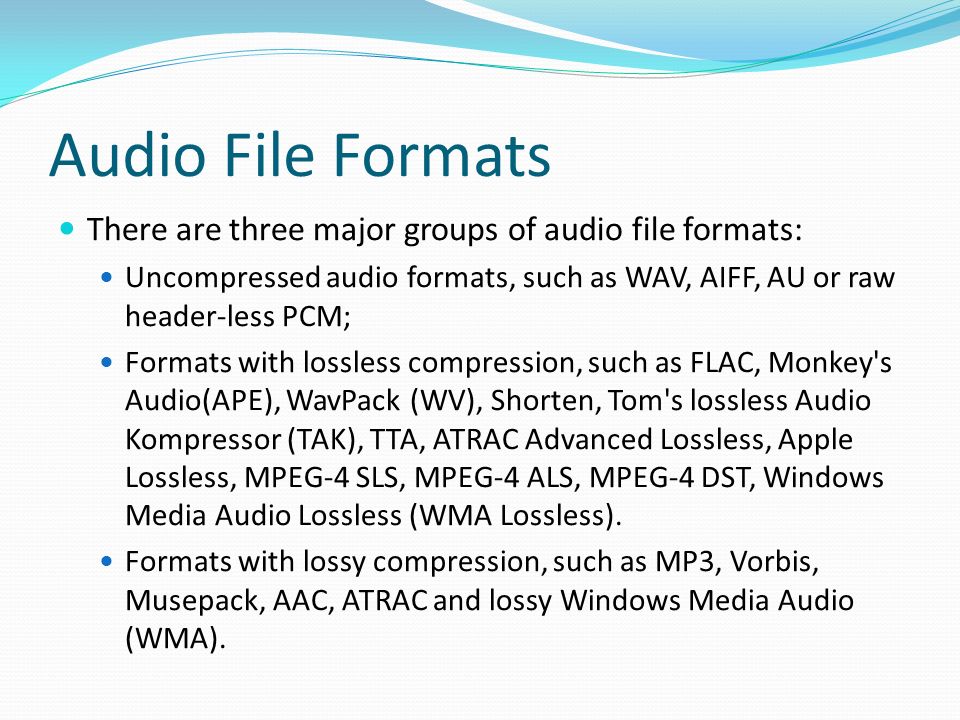
Music quality of files (lossless and lossy)

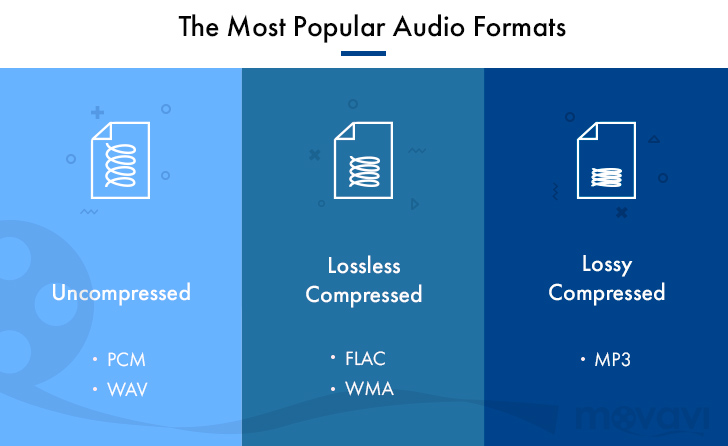
Music files can be the product of the perfect extraction of the music contained in CDs, called bit by bit. With this phrase we immediately clear the field of feeding unjustified prejudices towards the archives. The files are not of the same quality as CDs when using lossy formats: MP3, AAC, M4A. Besides these, there are formats that do not use any type of compression: WAV and AIF, which are the exact copy of the songs stored on CDs or even the original master recording format used to create CDs. Or there are formats that even using compression are “lossless”, called lossless: the most widespread of them is the FLAC format, not surprisingly adopted as a standard in the distribution of content in CD quality or higher. The FLAC format uses a type of compression that does not remove the original data. When unzipped, FLAC files have exactly the same bits that were present before compression.

Lossy - Lossless

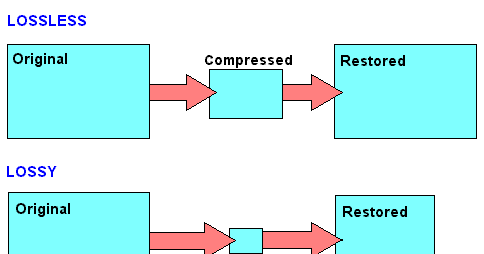
Before there are misunderstandings about the relationship between lossy and lossless files, we specified that if you have an MP3 file and convert it to FLAC, the data removed from MP3 transformation will not magically appear again. No conversion can regenerate the lost data into a lossy file. You can convert FLAC files to WAV or AIF because the compression used was lossless.

Lossy and lOOSLESS

The FLAC format also has advantages over WAV and AIF, the applied compression reduces its size and saves storage space and data bandwidth in reception / transmission when transmitting over the network. Besides this function, FLAC has another advantage over WAV, the information describing the tracks and the cover image can be inserted into the files. The information inserted in the files is called TAGs, the FLAC format provides for the insertion of this information that software applications and APPs read to recognize the content of the audio tracks. This simplifies the management of music collections, which without TAGs would present indistinguishable lists of audio files. Unfortunately, the standard WAV format does not allow the inclusion of TAGS in files.

Let’s continue the discussion on the playback chain of a portable Hi-Fi system. The technical quality of the content to be reproduced affects the final quality of the reproduction.

After adopting quality headphones, it would be wise to switch to lossless audio formats, to at least benefit from the original quality found on CDs.

Lossless music

Most of the sites that sell music online offer it in lossy formats, so the problem is how to get music without loss. Anyone with a CD can start by ripping them. Ripping is the term used to describe the transformation of the tracks contained in a CD into files. Anyone who wants to delve into the subject can read the writings dedicated to Ripping and the creation and management of music collections: What software for ripping and Creation and management of music files luquida.

In addition to CD ripping, there are websites that sell lossless music online in CD quality and Master Quality (Hi-Res), the latter is superior to CD and in many cases coincides with the original recording made in the Recording Studio.

High Resolution Music (HRA) has higher technical specifications than expected for CDs. Resolution ranges from 16 bit to 20/24 bit and sampling from 44.1 kHz to 48 / 88.2 / 96 / 176.4 / 192 kHz. For a description of the processes and characteristics of digitization, read the following text: The digitization of sound. With respect to these specifications we believe that the determining factor is the 24-bit resolution combined with sampling performed at least at 48 kHz.

Speaking of MP3 files, we usually refer to the bit rate, which with this format does not exceed 320 Kbps. The bit rate indicates the bits per second transmitted in a music stream. It is quite evident that a music stream consisting of more bits will contain more audio data. To orient yourself between these parameters, it is good to bear in mind that an uncompressed CD quality audio stream (16 bit 44.1 kHz) is 1,411 Kbps, converted to FLAC the stream will decrease between 30 and 50% of the format’s bit rate. uncompressed. Therefore, the CD quality stream generated by a FLAC will vary approximately between 705 and 988 Kbps. Obviously for high resolution formats the data stream will be proportionally higher depending on the specifications offered by the individual files.

The technical quality of the content to be reproduced as well as the reproduction devices are essential complements to obtain the best sound result.

MP3 audio files and lossless files, which one is the best?

For your music collection, is an mp3 audio file or a lossless file better? Let’s see together the differences and which format to choose

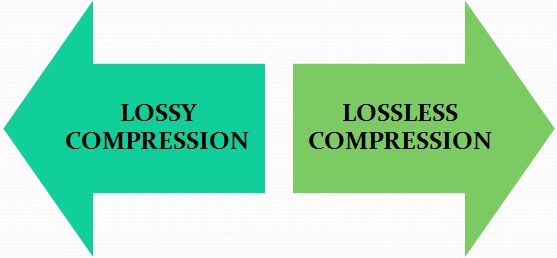
Lossy Compression vs Lossless Compression

In the transition from analog music (vinyl records, cassette tapes and other similar media) to digital music (audio CDs, mp3 audio files, etc.) a few decades ago, compression algorithms have played a fundamental role. to say the least. To avoid taking up too much space on the data storage media (when the transition was launched, every available byte of space was worth as much as gold) it was necessary to develop algorithms that would help compress the size of the files without affecting the quality of the file too much. Audio .

Lossless vs Lossy compression

It was during these years that names like mp3 audio files, WMA files, WaV files, and OGG files began to circulate quite frequently in musical (and non-musical) circles around the world.

Losseless vs Lossy

Over the years, the panorama of audio formats expanded dramatically and we witness the curious formation of two opposing blocks. On one side, in fact, so-called lossless files were ‘stacked’ (literally lossless), while on the other side of the musical ‘iron curtain’ were lossy files (literally lossy). As the names suggest, the distinction between one format and another is given by the possible loss of musical information.

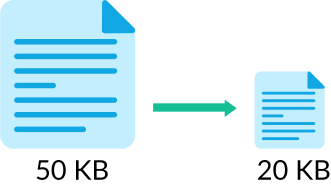
Lossless files guarantee (and guarantee) the same depth of sound and quality of an audio CD, while lossy files (like mp3 audio files) allow you to reduce the size of a music track in the order of 10 times in partial detriment of audio quality. For example, if a lossless file takes up 40 megabytes of space, an mp3 audio file of the same song will take up just over 4 megabytes.

The bitrate

What makes the difference between the two audio file formats is the bit rate used in the analog-to-digital conversion process. When we speak of bit rate (sometimes also written bit rate) we refer to the number of bits that we can process in the unit of time. In music, the bit rate measures the amount of data contained in each second of the audio track: the higher the value of the bit rate, the better the quality of the music.

For an mp3 audio file, this value can range from 32 kbps (kilobits per second) to 320 kbps. In a lossless file, however, there is no compression, and with a bit rate of around 1,411 kbps, the audio quality is comparable to that of an audio CD. According to the numbers, therefore, lossless files are better than mp3 audio files, ensuring deeper sound that is true to the original. However, as experience teaches us, numbers are not always everything.

Diluted differences

The reality of the events seems to be quite different. The human ear, in fact, would not be so sensitive as to be able to notice differences between an mp3 audio file of excellent quality (with a 320 kbps bit rate) and a lossless file.

To understand this, simply run one or more ABX tests. One such test consists of cross-comparing two known files (named A and B) and two unknown files (X and Y, which are the same as A and B but with different bit rates). At the end of the test, two pairs of files should be formed, matching the originals with their modified files. If you use an mp3 audio file with a high bit rate (320 kbps or slightly lower), even the most musically trained ear will not be able to tell the difference.

Despite this, a music file made up of lossless files still guarantees a substantial advantage over a file made up of mp3 audio files. The first, in fact, can be converted to other audio formats without losing quality; Any conversion of a lossy file, on the other hand, will cause further loss of music information and deterioration in audio quality.