About Lossy


Free Download Mp4Gain
picture

About Lossy

Lossy

We all love good music. More recently, the audio CD was good digital music. This is 44100 Hz, stereo, 16 bits (linear) per channel, not compressed in any way, which means, according to Wikipedia, 1411.2 kbps.
Lossy

But at the end of the 20th century, in the era of the birth of multimedia, when music began to be played not only on players, but also on computers, it turned out that the audio CD (that is, naked PCM) is even better. . compress. There was, for example, Microsoft ADPCM, which compressed this case a bit, without losing quality, in WAV files. But generally speaking, the original 44 kHz stereo would still require a lot of space this way. Hence, the quality dropped to 22 kHz mono. One of the first multimedia albums of that time: “Immersion” from the group “Nautilus Pompilius”, is still around, and I did.

So MP3 won. To store and distribute compressed music. At 128 kbps “CD Quality”.

MP3 came up strangely. Technically, this is MPEG-1 Audio Layer 3. A layer for compressing audio data into a modern, progressive standard for storing video data on Video CDs. Just packed in its own .mp3 file format. The video CD is no longer interesting to anyone. The following MPEG-2 standard is used in DVD and digital television broadcasts (not HD). And the next MPEG-4 standard is now used for HD video and continues to evolve.

MP3 was revolutionary. It was (almost) the first lossy compression format. When we don’t try to preserve everything that was in the original signal, but, based on some psychoacoustic model, we cut out what a person is not going to hear anyway, and compress the rest. Like JPEG.

Then I tried digitizing the accumulated audio collection. Compact cassettes (just “cassettes”, but more correctly “compact cassettes”) turned out to be complete shit. The frequency range is such that it makes no sense to sample with more than 22 kHz. There were no reel-to-reel recorders in the house. But vinyl records shook the sound quality. With good equipment, you can draw better quality than a CD. You just need to get rid of the clicks.

And then I realized that MP3 is shit too. At these same 128 kbps, the sound quality suffers greatly. And the scariest thing is that vile metallic hues appear where they shouldn’t be. My ears need at least 192 kbps, and the more the better.

Let’s take a hint from a famous punk rock band in the past. Like FLAC. It is such a modern lossless compression standard that it has successfully replaced WAV. Because it is free.

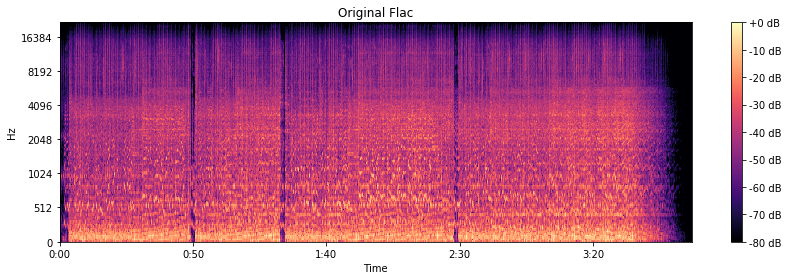
The original is CD quality, so frequencies up to 22 kHz are present as expected.

Original flac

We are going to harvest with FFmpeg, or rather with LAME.

At 320 kbps and 256 kbps, the spectrogram looks almost like the original.

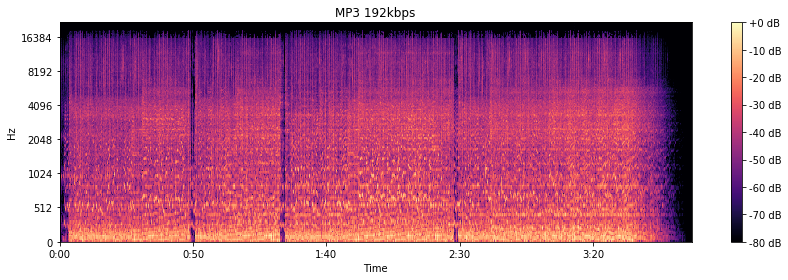
At 192 kbps, there are signs of a 16 kHz cutoff. The spectrogram “darkens”, apparently, the psychoacoustic model has cut something out. By ear, the higher frequency “bursts” really disappeared.

MP3 192 kbps

At the notorious 128 kbit / s, everything is already specifically cut off at 16 kHz. Background sounds are “fuzzy” and begin to bubble. Nothing to do with the original in terms of enjoying the musical details.

MP3 128 kbps

But you can do 64 kbps in MP3. The stereo is gone. Everything gurgles terribly and irritates with completely strange sounds.


Free Download Mp4Gain
picture


Mp4Gain Main Window
picture


Mp4Gain Features
picture


Free Download Mp4Gain
picture

Data compression: lossless or lossy

To be able to store large amounts of data, a huge amount of storage space is required. When the space is at some point full, a new storage space is usually made available. Mainly in the form of new hard drives, server systems or the like. But there is another way to store more data: data compression.

Lossless vs Lossy

Data compression works like a pillow you squeeze
Figuratively speaking, data compression works the same way as when you squeeze a pillow. Not all air is required between the pillowcase and the feathers. By squeezing the pillow, you compress it by removing the air (as much as you can); the pillow becomes smaller, that is, more compressed than before.

It is similar with data compression. Here also items that are not absolutely necessary, in this case data, are removed and the storage space still required by the remaining data is reduced.

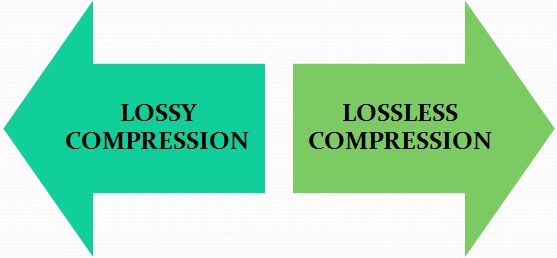
Lossy vs Lossless Compression

Different lossless compression encoding methods.

When it comes to data compression, a distinction is made between lossless compression and lossy compression, so it can be further subdivided into different types of compression.
Lossless compression is generally only done with text files. If the text is saved as a character string and not as an image or the like, the storage space can be saved using the dictionary method, for example. Recurring parts of the string are simply replaced by abbreviations.

Text: Hello world. Hello user
Encoding: world X5. X5 users.

With the help of Run Length Encoding (RLE), identical text components that are placed one after the other are only saved once. This can also save storage space.

Text: Today was beautiful, beautiful, beautiful and tomorrow will be more beautiful.
Coding: Today was / 3 / beautiful, / and tomorrow will be more beautiful.

In entropy encoding, as is the case with Huffman code or arithmetic encoding, for example, text elements are sorted in binary and encoded according to their frequency, and the most frequently occurring element is given the binary number smaller.

With these numbers, the text elements are stored in a separate dictionary.

Text: IF YOU FLY BACK, FLY, FLY, FLY, FLY AFTER.
Coding: 10100 1 1 1101 1 1 1 11

Difference between lossless and lossy compression

The benefit of lossless encoding is clear: it ensures that all “compressed” data in the compressed data packet can be accessed and restored.

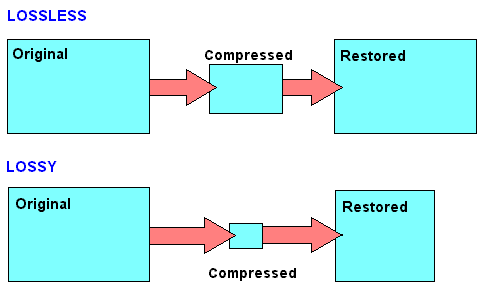
In addition to lossless compression, there is also lossy compression. Irrelevant information is not encoded here, but is directly removed. Therefore, we speak of a reduction in irrelevance.

Lossy compression: the MP3 format

Of course, this procedure can lead to extremely high compression rates. However, this irrelevant information is irrevocably deleted. This means that the original state cannot be restored after compression.

Lossy compressions are often used for image, audio, and video files, as they often have to handle large volumes. The MP3 format is a classic example in this context. Here, frequency patterns are removed from an audio file that are almost inaudible to the human ear. This saves storage space.

If you compress data packets, you can use your own data storage capacity better than uncompressed data packets. However, you should always consider the type of compression you are using. Because lossy compression is not always desirable.

Uncompressed and compressed formats

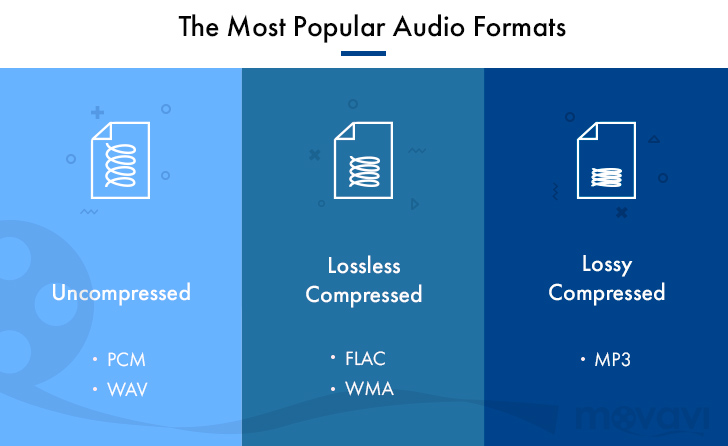
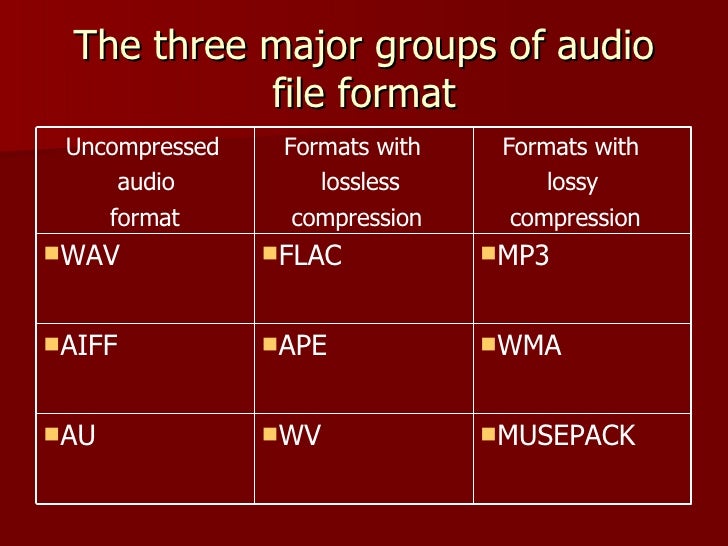
Popular audio formats

Uncompressed formats

There are audio formats that do not have compression and are the best in terms of sound quality. On the other hand, they take up much more memory space and a lower transmission speed than compressed formats. With professional software such as Pro Tools, SuperCollider or Max, you generally work with files of this type. The two main formats are:

WAV (wave). Audio format developed by Microsoft and IBM for compatible IBM PCs. In this format, musical instruments feel the same regardless of the PC on which the file is played (with the same acoustic quality of the hardware components, of course).

AIFF (Audio Interchange File Format). The format developed by Apple is also called the Apple Interchange File Format.

Audio formats

Lossy compression

It allows for more compression, but at the expense of sound quality. Lossy compression methods generally tend to discard information considered useless, keeping only the essential ones and arise from the idea that not all frequencies contained in a sound spectrum are perceived by the human ear. Then the high frequencies are cut off, which are believed to be the least distinct in our hearing. Obviously, the more frequencies you cut, the more the space occupied by the audio track decreases and with this also the quality of the result as a reconversion process. It does not allow the complete restoration of the cut-off frequencies. Let’s see what are the main audio formats of this type:

MP3 (MPEG-1/2 Audio Layer 3). Audio compression algorithm capable of drastically reducing the amount of data required to reproduce a sound, compromising obtaining an almost faithful reproduction of the original uncompressed file. The best codec for compression is Lame. maximum achievable bit rate 320 Kbps.

WMA (Windows Media Audio). Audio file standard invented by Microsoft. Audio compression format very similar to an MP3.

OGG (Vorbis). It is an open source algorithm and with the same perceived quality, it allows greater compression than the MP3 format, obtained through advanced psychoacoustic research.

AAC (advanced audio coding). It is an audio compression format officially included in MPEG-4. Provides superior audio quality to MP3 format with more compact encoding. Currently it is used mainly by Apple, which in the variant that manages copyright has a compression of 128 Kbps (the standard of the iTunes Store) and corresponds to that of an MP3 at 192 Kbps at constant bitrate. Conversion times are a bit slower than other formats.

AC3 (Dolby Digital). Dolby Digital is a multi-channel audio coding system developed by Dolby Laboratories Inc and used in film, digital TV, laser discs, DVDs, and other digital audio streaming or playback media. It works from a minimum of 96 kbps to a maximum of 640 kbps. In cinema, Dolby Digital is used with only 320 kbps of bandwidth, as it prints in the limited space available between the slide holes of the films. Generally, in DVD it is used with a bit rate of 192 kbps to encode stereo signals (2.0, 2.1) or stereo surrounds, and with a bit rate between 384 and 448 kbps for 5.1 signals.

Lossless compression

These compression methods try to reduce the space occupied by the track without going to touch the sound. The compression rate is much lower than with lossy methods, but there is no loss of quality and the sound is identical to the original when converting. Let’s see what are the main audio formats of this type:

FLAC (Free Lossless Audio Codec). The widespread open source audio codec is currently well supported by various audio software. Unlike most lossless compression algorithms (like ZIP and gzip, for example) that only achieve 10-20% compression, it achieves significant compressions, on the order of 30-50%.

APE (Monkey’s Audio). No lossy format that allows us to reduce the space our music occupies by approximately 50% (in some cases even more). Currently it is no longer developed.

ALAC (AApple Lossless Audio Codec). The format developed by Apple stores data in an MPEG-4 container with the extension .m4a. It does not have Digital Rights Management (DRM) and is now deprecated.