Lossy Audio File Types: How It Is Different From Lossless


Free Download Mp4Gain
picture

Lossy Audio File Types: How It Is Different From Lossless
Lossy Compression vs Lossless Compression

Lossy is a word used in digital audio to describe the type of compression used to store audio data. The algorithm used in the lossy audio format compresses the audio data in such a way that it discards certain information. This loss of signal means that the encoded sound is not identical to the original.

lossy vs lossless

Lossy audio produces lower quality audio and has a smaller file size.

Lossy compression is also called irreversible compression because data that has been deleted is impossible to recover.

What is the difference between Lossy and Lossless?
When you create MP3 files by ripping one of your music CDs, some details of the original recording are lost, making it a lossy format. This type of compression isn’t just limited to audio; for example, JPEG image files are also lossy compressed.

Sheets of colored paper compressed into a ball

This method is the opposite of lossless audio compression used for formats like FLAC, ALAC, and others. In this case, the audio is compressed in such a way that the data is not deleted. The sound is identical to the original source.

Lossy archives take priority when it comes to compatibility. While lossless files are only supported by some devices and apps, a lossy audio format like MP3 will work on almost any device.

How Lossy Audio Compression Works
Lossy compression makes certain assumptions about frequencies that the human ear is unlikely to detect.

When a song is converted to a lossy audio format such as AAC, the algorithm analyzes all frequencies and then discards the frequencies that the ear should not be able to detect. These low frequencies are filtered or converted into mono signals that take up less disk space.

Another technique eliminates very quiet sounds that the listener is unlikely to notice, especially in the loudest part of the song. This approach reduces the size of the audio file while maintaining the highest possible audio quality.

What happens to the audio when it is compressed?
Lossy compression introduces artifacts. These artifacts are unwanted sounds that are not in the original recording but are a by-product of compression. This noise degrades sound quality and is noticeable when music files are converted using low bit rates.

Various types of artifacts affect the quality of the recording. Distortion is one of the most common artifacts. For example, distortion makes the drums feel weak, without any real beat. Song voices can also be affected, resulting in harsh vocals and lack of detail.

In many cases, casual listeners can’t tell the difference between lossy and lossless encoding, although some audiophiles using very expensive equipment claim to hear the difference. The difference in quality is only noticeable when very low data rates or aggressive compression algorithms come into play.

Why compress audio files?
Most digital audio formats use some form of compression to efficiently store sound. Without compression, the file sizes would be very large.

For example, a typical 3-minute song stored as an MP3 file is between 4MB and 5MB. Using the WAV format to store the same song, but without compression, results in a file size of approximately 30MB, at least six times that size. Fewer songs fit on your smartphone or hard drive when you choose uncompressed audio formats


Free Download Mp4Gain
picture


Mp4Gain Main Window
picture


Mp4Gain Features
picture


Free Download Mp4Gain
picture

Uncompressed and compressed formats

Popular audio formats

Uncompressed formats

There are audio formats that do not have compression and are the best in terms of sound quality. On the other hand, they take up much more memory space and a lower transmission speed than compressed formats. With professional software such as Pro Tools, SuperCollider or Max, you generally work with files of this type. The two main formats are:

WAV (wave). Audio format developed by Microsoft and IBM for compatible IBM PCs. In this format, musical instruments feel the same regardless of the PC on which the file is played (with the same acoustic quality of the hardware components, of course).

AIFF (Audio Interchange File Format). The format developed by Apple is also called the Apple Interchange File Format.

Audio formats

Lossy compression

It allows for more compression, but at the expense of sound quality. Lossy compression methods generally tend to discard information considered useless, keeping only the essential ones and arise from the idea that not all frequencies contained in a sound spectrum are perceived by the human ear. Then the high frequencies are cut off, which are believed to be the least distinct in our hearing. Obviously, the more frequencies you cut, the more the space occupied by the audio track decreases and with this also the quality of the result as a reconversion process. It does not allow the complete restoration of the cut-off frequencies. Let’s see what are the main audio formats of this type:

MP3 (MPEG-1/2 Audio Layer 3). Audio compression algorithm capable of drastically reducing the amount of data required to reproduce a sound, compromising obtaining an almost faithful reproduction of the original uncompressed file. The best codec for compression is Lame. maximum achievable bit rate 320 Kbps.

WMA (Windows Media Audio). Audio file standard invented by Microsoft. Audio compression format very similar to an MP3.

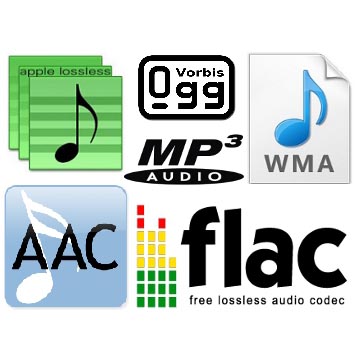
OGG (Vorbis). It is an open source algorithm and with the same perceived quality, it allows greater compression than the MP3 format, obtained through advanced psychoacoustic research.

AAC (advanced audio coding). It is an audio compression format officially included in MPEG-4. Provides superior audio quality to MP3 format with more compact encoding. Currently it is used mainly by Apple, which in the variant that manages copyright has a compression of 128 Kbps (the standard of the iTunes Store) and corresponds to that of an MP3 at 192 Kbps at constant bitrate. Conversion times are a bit slower than other formats.

AC3 (Dolby Digital). Dolby Digital is a multi-channel audio coding system developed by Dolby Laboratories Inc and used in film, digital TV, laser discs, DVDs, and other digital audio streaming or playback media. It works from a minimum of 96 kbps to a maximum of 640 kbps. In cinema, Dolby Digital is used with only 320 kbps of bandwidth, as it prints in the limited space available between the slide holes of the films. Generally, in DVD it is used with a bit rate of 192 kbps to encode stereo signals (2.0, 2.1) or stereo surrounds, and with a bit rate between 384 and 448 kbps for 5.1 signals.

Lossless compression

These compression methods try to reduce the space occupied by the track without going to touch the sound. The compression rate is much lower than with lossy methods, but there is no loss of quality and the sound is identical to the original when converting. Let’s see what are the main audio formats of this type:

FLAC (Free Lossless Audio Codec). The widespread open source audio codec is currently well supported by various audio software. Unlike most lossless compression algorithms (like ZIP and gzip, for example) that only achieve 10-20% compression, it achieves significant compressions, on the order of 30-50%.

APE (Monkey’s Audio). No lossy format that allows us to reduce the space our music occupies by approximately 50% (in some cases even more). Currently it is no longer developed.

ALAC (AApple Lossless Audio Codec). The format developed by Apple stores data in an MPEG-4 container with the extension .m4a. It does not have Digital Rights Management (DRM) and is now deprecated.

Files without compression, lossless and lossy formats

Files without compression, with compression but without loss and with compression and with loss … what does that mean?

There is currently a huge confusion in most people about audio formats and that is why we are going to give an explanation that is as simple and clear as possible so that most of the people who read can understand enough to be able to make decisions about it. .

We will not try to get into technicalities or knowledge What are for specialists or connoisseurs or programmers, such as those who developed the mp4gain, but rather we will talk about general concepts at the beginner level but that can allow a correct understanding of the matter.

So the first thing we must understand is that the quality of an audio file depends on the amount of details it contains and for it to contain many details, it takes up a lot of space on the hard disk.

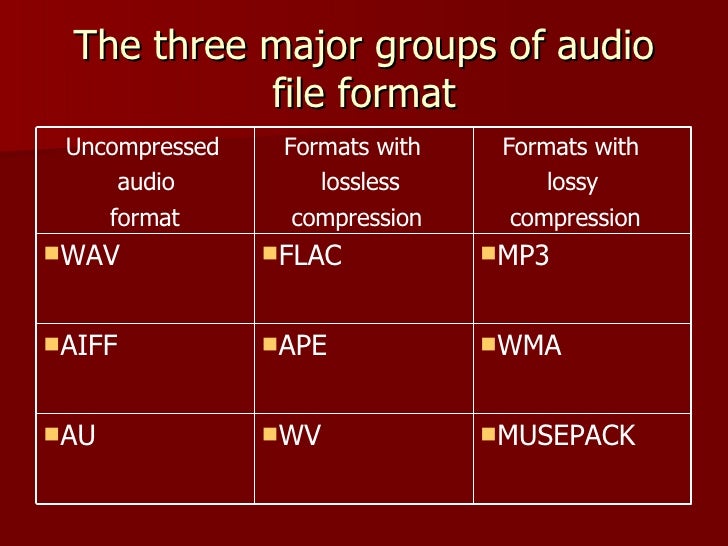
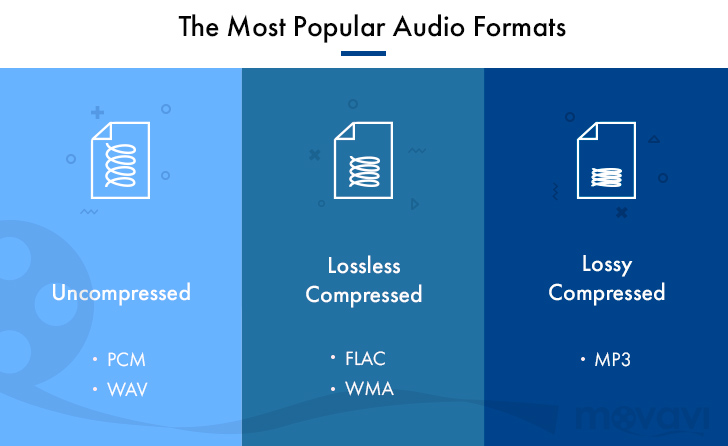
We could say that there are three groups of audio file formats:

– audio formats that do not have compression such as WAV, AIFF, etc.

– formats that compress audio but do not have a loss of information. FLAC, MPEG-4 SSL, WAV PACK, etc.

– There are also the formats that the audio compresses but that do have a loss of information, for example MP3, Ogg, HERE, ETCÉTERA

Now let’s clarify what it means that some formats do have compression but do not have loss of information while others also have compression but do have loss of information.

The formats that are compressed but have no loss of information what they do is something very similar to zip the file. In other words, they simply compress.

The original information but they do not discard anything, therefore when unzipping the file the original file is obtained again that had all the details and therefore is of very high quality.

On the other hand there are files such as MP3 that are compressed but also to achieve greater compression what they do is that they get rid of some part of the information. For example, those frequencies that are not audible to the human ear also get rid of that information that is redundant and they also use the method called masking which part of the idea that a sound that is very loud and is very forward It will be able to mask other sounds and the human brain will not perceive those other sounds. Therefore, according to this theory, they can get rid of these sounds that have been masked and the file will sound more or less the same to the human ear.

This concept of sound masking was one of the great milestones that made MP3 become so popular because it could compress files a lot, at a time when disk space was not superfluous, and yet they sounded pretty good to that ear. era and those people.

Also the programs that made the normalization of the audio volume, achieved results that at that time sounded good, but at this time the listening ear as a has become much more demanding and sophisticated. And so we need much more modern normalizers with much more algorithms. more powerful like mp4gain.

Guide to fully understand lossless formats

They end with a period followed by three or four letters. It is what happens with absolutely all the files of a computer or a smartphone. These last letters represent the format in which said file is. Today we are going to focus on one type of format, the lossless format.

loseless formats

What is a lossless format?

Any element in a computer has to have some kind of format, or so to speak, some kind of structure that is known by that computer so that it can work with the file. In a parallel with the world of physical objects, the format would be something like the material with which the object is constructed.

Just as there are different materials with different properties, there are also different formats with different characteristics. Most of the files we use today have a compressed format, so they take up less space on our computer and are easier to send via the Internet, or upload to a social network. However, these formats are not the highest quality, since this position would be occupied by lossless formats. These formats retain the original quality of the file, and are the ones that offer the best results.

If we talk about images, the lossless formats are RAW, BMP and PNG, among others. Meanwhile, the compressed formats are JPG and GIF. However, there are certain differences with some of them. RAW, for example, stores all the light data captured by the camera’s sensor. It is a perfect format for photographers. But it would not even be for photographers who want to share a particular photograph on a social network. A RAW photo can easily occupy 25 MB, depending on the resolution of the camera. A high quality JPG photo would be a photograph that would occupy two or three megabytes, although it would have less quality.

loseless codecs

If we talk about audio, there are three main formats without loss: WAV, FLAC and ALAC. The latter is the one used by Apple in iTunes. They are formats that do not lose any quality with respect to the original audio. Yes we would be losing quality with MP3 and OGG.

And if we talk about video, there are few lossless formats that we can talk about. In fact, there is a problem, and storing videos without loss would be an impossible task for anyone who did not have a storage server nearby. That is why we usually opt for the MKV, WMV, and H.264 formats. Of course, the latter is much better, because the compression process is much more intelligent.

Compression, how does it work?

Now, what is this about compressed formats? As the name implies, we are talking about formats that reduce files, and we can rely on it to perfectly understand how these formats work. Surely we have all seen ourselves in the situation of having to pack a suitcase with just the right space, finish choosing all the clothes we are going to take on a trip, and finally have to decide what we can do without being able to close the suitcase, because we had too many clothes. For that is the compression of each of the formats. They remove items from that file, and thus make them weigh or occupy less.

Why are there different formats? Returning to the case of the suitcase, each person will make different decisions regarding those things that he can do without for his trip. It will vary from one person to another. The same goes for formats. The developers of these reduce the space occupied by a file, but each of the formats deletes data in a different way, so that a file compressed to JPG, can be different from one GIF, even if the two are compressed. Each of them has followed a different procedure to delete the data, and that the song, image, or video, continue to play almost the same as the original version.

When to convert from compression to lossless?

The question that heads this paragraph is especially important for all those who at some point have converted a file from a compressed format to a lossless format. And, in fact, it goes with a trap, because you should never convert a file from a compressed format to a file without loss. In reality, nothing happens if we do, but we will not improve the quality of that file, although it will now be available in a format in which the files are not compressed.

Of course, it is also not a good idea to convert a file into a compressed format, to a different compressed format. Let’s keep in mind that each compression process is different depending on the format chosen. That is, each format eliminates the data it deems appropriate to maintain image quality. If we have a file in a compressed format, that will mean that it no longer retains all data.