FLAC vs. ALAC: Which Lossless Audio Format Should You Use?
Introduction

When it comes to lossless audio formats, two options stand out: FLAC (Free Lossless Audio Codec) and ALAC (Apple Lossless Audio Codec). Both formats offer high-quality audio with no loss in data, making them ideal for audiophiles, music producers, and anyone who wants the best possible sound. But which format should you use? In this article, we’ll compare FLAC and ALAC in-depth to help you make an informed decision.
Technical Comparison of FLAC and ALAC
Encoding and Decoding Algorithms
FLAC and ALAC use different encoding and decoding algorithms. FLAC uses a linear predictive coding (LPC) algorithm to compress audio data, while ALAC uses a modified discrete cosine transform (MDCT) algorithm. Both algorithms are capable of lossless compression, but they achieve it in slightly different ways.
Compression Ratios and Resulting File Sizes
One of the most significant differences between FLAC and ALAC is the compression ratio and resulting file size. FLAC is known for its high compression ratio, which means it can significantly reduce the size of audio files without sacrificing quality. ALAC, on the other hand, has a lower compression ratio, which results in larger file sizes.
Bitrate and Frequency Support
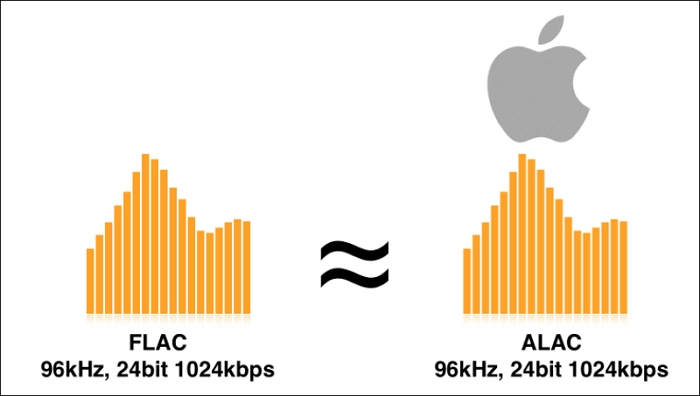
FLAC and ALAC support different bitrate and frequency options. FLAC supports a wider range of bitrates and frequencies, up to 655,350 kbps and 655,350 Hz, respectively. ALAC, on the other hand, supports a maximum bitrate of 24 bits and a maximum frequency of 96 kHz.
Compatibility with Different Platforms and Devices
FLAC is an open-source format that is widely supported by different platforms and devices, including Windows, Mac OS, iOS, Android, and Linux. ALAC, on the other hand, is a proprietary format developed by Apple and is primarily designed to work with Apple devices and software.
Sound Quality Comparison
Objective Measurements of Sound Quality
Objective measurements of sound quality show that FLAC and ALAC are both capable of producing high-quality audio with no loss in data. However, FLAC is known for its slightly better performance in terms of audio quality and fidelity.
Listening Tests and Subjective Evaluations of Sound Quality
Subjective evaluations of sound quality are more difficult to measure but are still essential in comparing FLAC and ALAC. Listening tests show that there is no significant difference between the two formats in terms of sound quality, and the differences that do exist are often imperceptible to the human ear.
Potential Differences in Sound Quality Based on Specific Use Cases
There may be differences in sound quality based on specific use cases. For example, FLAC may be a better option for music producers who need the highest possible sound quality for their recordings. ALAC may be a better option for Apple users who want to take advantage of Apple’s ecosystem.
Metadata and Tagging Support
Comparison of Metadata and Tagging Features
FLAC and ALAC both support metadata and tagging features, such as artist, album, track title, and album art. However, there may be differences in how they handle metadata and tagging, depending on the music player or database used.
FLAC vs. ALAC: Technical Comparison
Let’s dive into a technical comparison of FLAC and ALAC to better understand the differences between these two lossless audio formats.
Compression Ratio: FLAC has a better compression ratio than ALAC. This means that FLAC files are smaller than ALAC files, while still retaining the same audio quality. FLAC typically compresses audio files by 50-70%, while ALAC compresses files by 30-50%. This makes FLAC a more efficient format for storage and distribution.
Decompression Speed: ALAC has a faster decompression speed than FLAC. This means that ALAC files will play more quickly than FLAC files on devices with limited processing power. However, this difference is negligible on modern devices with powerful processors.
Metadata Support: Both FLAC and ALAC support metadata, such as artist, album, track number, and cover art. However, FLAC has more extensive metadata support than ALAC, including the ability to embed arbitrary data in the file header.
Hardware and Software Compatibility: ALAC has better compatibility with Apple devices, as it is the default lossless audio format for iTunes and Apple Music. However, FLAC is more widely supported across various hardware and software platforms, including Android devices, Windows, and Linux.
Performance: Both FLAC and ALAC offer excellent audio quality, with no loss of audio data during compression. However, the performance of these formats can vary depending on the hardware and software used for playback. In general, FLAC offers slightly better audio quality than ALAC, but the difference is generally negligible.
Conclusion: Which Lossless Audio Format Should You Use?
Ultimately, the choice between FLAC and ALAC depends on your specific needs and preferences. If you primarily use Apple devices and software, ALAC may be the better choice due to its better compatibility with those devices. However, if you need a more efficient format for storage and distribution, or if you use a variety of hardware and software platforms, FLAC may be the better choice.
Regardless of which format you choose, both FLAC and ALAC offer excellent audio quality and are suitable for professional and high-fidelity audio applications.