Lossy Audio File Types: How It Is Different From Lossless


Free Download Mp4Gain
picture

Lossy Audio File Types: How It Is Different From Lossless
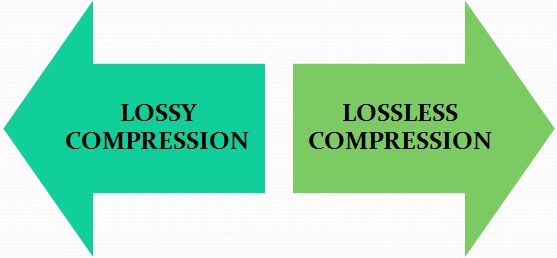
Lossy Compression vs Lossless Compression

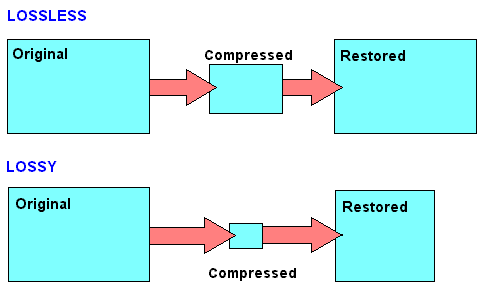
Lossy is a word used in digital audio to describe the type of compression used to store audio data. The algorithm used in the lossy audio format compresses the audio data in such a way that it discards certain information. This loss of signal means that the encoded sound is not identical to the original.

lossy vs lossless

Lossy audio produces lower quality audio and has a smaller file size.

Lossy compression is also called irreversible compression because data that has been deleted is impossible to recover.

What is the difference between Lossy and Lossless?
When you create MP3 files by ripping one of your music CDs, some details of the original recording are lost, making it a lossy format. This type of compression isn’t just limited to audio; for example, JPEG image files are also lossy compressed.

Sheets of colored paper compressed into a ball

This method is the opposite of lossless audio compression used for formats like FLAC, ALAC, and others. In this case, the audio is compressed in such a way that the data is not deleted. The sound is identical to the original source.

Lossy archives take priority when it comes to compatibility. While lossless files are only supported by some devices and apps, a lossy audio format like MP3 will work on almost any device.

How Lossy Audio Compression Works
Lossy compression makes certain assumptions about frequencies that the human ear is unlikely to detect.

When a song is converted to a lossy audio format such as AAC, the algorithm analyzes all frequencies and then discards the frequencies that the ear should not be able to detect. These low frequencies are filtered or converted into mono signals that take up less disk space.

Another technique eliminates very quiet sounds that the listener is unlikely to notice, especially in the loudest part of the song. This approach reduces the size of the audio file while maintaining the highest possible audio quality.

What happens to the audio when it is compressed?
Lossy compression introduces artifacts. These artifacts are unwanted sounds that are not in the original recording but are a by-product of compression. This noise degrades sound quality and is noticeable when music files are converted using low bit rates.

Various types of artifacts affect the quality of the recording. Distortion is one of the most common artifacts. For example, distortion makes the drums feel weak, without any real beat. Song voices can also be affected, resulting in harsh vocals and lack of detail.

In many cases, casual listeners can’t tell the difference between lossy and lossless encoding, although some audiophiles using very expensive equipment claim to hear the difference. The difference in quality is only noticeable when very low data rates or aggressive compression algorithms come into play.

Why compress audio files?
Most digital audio formats use some form of compression to efficiently store sound. Without compression, the file sizes would be very large.

For example, a typical 3-minute song stored as an MP3 file is between 4MB and 5MB. Using the WAV format to store the same song, but without compression, results in a file size of approximately 30MB, at least six times that size. Fewer songs fit on your smartphone or hard drive when you choose uncompressed audio formats


Free Download Mp4Gain
picture


Mp4Gain Main Window
picture


Mp4Gain Features
picture


Free Download Mp4Gain
picture

Data compression: lossless or lossy

To be able to store large amounts of data, a huge amount of storage space is required. When the space is at some point full, a new storage space is usually made available. Mainly in the form of new hard drives, server systems or the like. But there is another way to store more data: data compression.

Lossless vs Lossy

Data compression works like a pillow you squeeze
Figuratively speaking, data compression works the same way as when you squeeze a pillow. Not all air is required between the pillowcase and the feathers. By squeezing the pillow, you compress it by removing the air (as much as you can); the pillow becomes smaller, that is, more compressed than before.

It is similar with data compression. Here also items that are not absolutely necessary, in this case data, are removed and the storage space still required by the remaining data is reduced.

Lossy vs Lossless Compression

Different lossless compression encoding methods.

When it comes to data compression, a distinction is made between lossless compression and lossy compression, so it can be further subdivided into different types of compression.
Lossless compression is generally only done with text files. If the text is saved as a character string and not as an image or the like, the storage space can be saved using the dictionary method, for example. Recurring parts of the string are simply replaced by abbreviations.

Text: Hello world. Hello user
Encoding: world X5. X5 users.

With the help of Run Length Encoding (RLE), identical text components that are placed one after the other are only saved once. This can also save storage space.

Text: Today was beautiful, beautiful, beautiful and tomorrow will be more beautiful.
Coding: Today was / 3 / beautiful, / and tomorrow will be more beautiful.

In entropy encoding, as is the case with Huffman code or arithmetic encoding, for example, text elements are sorted in binary and encoded according to their frequency, and the most frequently occurring element is given the binary number smaller.

With these numbers, the text elements are stored in a separate dictionary.

Text: IF YOU FLY BACK, FLY, FLY, FLY, FLY AFTER.
Coding: 10100 1 1 1101 1 1 1 11

Difference between lossless and lossy compression

The benefit of lossless encoding is clear: it ensures that all “compressed” data in the compressed data packet can be accessed and restored.

In addition to lossless compression, there is also lossy compression. Irrelevant information is not encoded here, but is directly removed. Therefore, we speak of a reduction in irrelevance.

Lossy compression: the MP3 format

Of course, this procedure can lead to extremely high compression rates. However, this irrelevant information is irrevocably deleted. This means that the original state cannot be restored after compression.

Lossy compressions are often used for image, audio, and video files, as they often have to handle large volumes. The MP3 format is a classic example in this context. Here, frequency patterns are removed from an audio file that are almost inaudible to the human ear. This saves storage space.

If you compress data packets, you can use your own data storage capacity better than uncompressed data packets. However, you should always consider the type of compression you are using. Because lossy compression is not always desirable.