FLAC, WAV, MP3, DSD, ALAC … What audio format should I use?


Free Download Mp4Gain
picture

You probably know the famous MP3 audio format. There’s even a good chance that you only use it on a daily basis. But did you know that it is possible to take your music to the next level thanks to other audio formats? If the terms FLAC, DSD, sample rate, or even lossless don’t mean anything to you, then you’ve come to the right place. Designed specifically for newbies, this guide tells you everything you need to know about the basics of digital audio.
soundwave

FLAC, DSD, ALAC … Listening to a debate between audiophiles can seem difficult when you do not know this universe and the many acronyms that refer to it. But if you try the adventure, you will not regret it. Say goodbye to your boring and lifeless MP3s and hello to quality music. Trust us, your ears will thank you!

Sample Rate and Bit Depth: The Basics of Digital Music

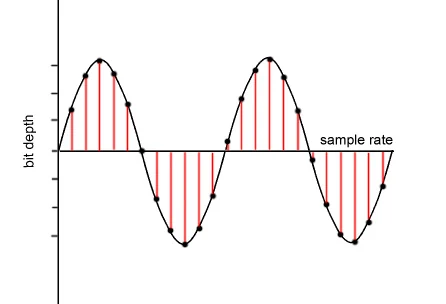
Before knocking you out (we promise we won’t hit too hard) with barbaric acronyms in every way, let’s first focus on two essential notions of modern audio, namely sampling rate and bit depth. These two elements give an idea of ​​the recording precision of a song.

but depth

As you know, computers run on bits, which are sets of 0 and 1. During a passage in the studio, music produced by an artist must be digitized, therefore transformed into 0 and 1 in order to be recorded on CD or transmitted to through transmission services. This is where the sampling rate and bit depth come into play.

Take the example of a CD. Our beloved empanadas are recorded in 16-bit / 44.1 kHz. The 44.1 kHz sampling rate means that the music produced by our musician is analyzed 44,100 times per second by studio recording devices. As for the bit depth, it gives an indication of the number of information recorded during this same period. The greater the depth, the more information will be encoded at the end.

However, CD quality is not the best in the world, even if it far exceeds MP3. Thus, we find 24-bit / 192 kHz recordings. The DSD goes even further with a frequency that rises to several MHz. But for simplicity, just remember that the higher the values ​​described above, the more accurate the recording will be in your sound reproduction.

Lossy formats: MP3, AAC, OGG

In general, there are two types of formats in the audio world: lossy, lossy in English, and lossy, or lossless. If you want the best audio quality, stay away from compressed formats.

The best known of all is MP3. True dinosaur in the audio world, this type of file was developed at a time when the capacities of our hard drives were determined in MB and not in TB. Therefore, we had to compress the recordings as much as possible, even if that meant putting quality aside.

It is true that MP3 encoded music weighs only a few megabytes. But the applied algorithm is very aggressive, it simply cuts the frequencies considered inaudible by the human ear. In fact, MP3 loses many audible parts. To get an idea, click the link below, you will hear these famous truncated parts. The pieces seem flat, devoid of life. Listening can even become unpleasant after several tens of minutes. Suffice it to say that, apart from its small size, MP3 is no longer really interesting in our time if we are looking for quality music.

To make things better, Apple, meanwhile, released another audio format, AAC, for advanced audio encoding. This is also a lossy format which therefore loses details during data compression. However, the algorithm used is more efficient, cutting fewer important frequencies, at least on paper. In absolute terms, the difference from MP3 is not necessarily stark and the debate has been raging for years in the audiophile environment to find out if the AAC format is really better than MP3.

Finally, there is also the OGG Vorbis, another lossy compressed format. Like AAC, it is supposed to work better than MP3. This is the type of file Spotify uses. Her interest is to enable efficient transmission while reducing quality. However, the songs encoded in this format are not fabulous. The ideal is really to become lossless.


Free Download Mp4Gain
picture


Mp4Gain Main Window
picture


Mp4Gain Features
picture


Free Download Mp4Gain
picture

Some of the most popular digital audio formats.

Main audio formats without loss of quality.


WAVE (.wav) – This is the most common uncompressed audio file format. When you rip audio from a music CD on your computer, this will be the format you get. It takes up a lot of space (1411 KB of information per second on 4400 Hz / 16 bits of stereo music), but reproduces the sounds in a quiet way. In terms of quality and amount of information, it resembles the AIFF (.aif) format, which is mainly part of the Mac world. Suitable for audio files and those that record music.

FLAC (.flac) – Free Lossless Audio Codec: It is an open source codec that is often used to store music CDs on the computer without loss of quality. While .wav offers uncompressed audio, .flacs are called “lossless c compressed”. However, compression is minimal and the vast majority of people do not notice differences between a Wave file and a FLAC file. However, they take up less space than WAV files. This is possible because they use a variable amount of compression as needed. This means that, in the case of very complex and rich music parts, it uses encodings that are equal to WAV files (1411 Kb / s data). However, in the case of the “simpler” parts, the number of bits used to represent them will be smaller. It is suitable for demanding ears who also want to save some space on their hard drives.

APE Monkey’s Audio is one of the most powerful and popular lossless multimedia compression algorithms for audio files.
The lossless format, that is without data loss, ensures that the original sound quality is maintained in smaller files than compressed sample formats (such as WAV).
The format used is “.ape”, Monkey’s Audio allows compression of a WAVin mono source and also the opposite procedure, ie mono decoding for other formats such as WAV or MP3

ALAC Apple Lossless Audio Codec: Similar to FLAC, which always uses maximum compression. The quality is good on average, but the format is not as effective as FLAC in terms of weight. Not all players support it, so if your life is not exclusively dedicated to Apple and its products, it’s not a recommended format. Other important but less popular lossless audio formats are Monkey’s Audio (.ape) and OptimFROG (.ofr).

AIFF Audio Interchange File Format is a standard file format used to store audio recordings on a personal computer. The format was developed by the Apple computer based on Electronic Arts electronic exchange format and is often used on Apple Macintosh systems, which is why it is also called Apple Interchange File Format.
The audio data in the AIFF file is not compressed, so the file tends to be much larger than other formats, both lost and lost, such as ALE or MP3. One minute sound records approx. 10 MB of data, this is because it is a format created for sharing, although it is also used for editing.
However, there are compressed formats, called AIFFC (AIFF compressed), that can reduce the file size by a third (AIFF3) or a sixth (AIFF6), but this results in a great loss of quality, so there is virtually no use.

The most important sound quality formats in loss quality.

MP3 (.mp3) or MPEG-1 or MPEG-2 Audio Layer III – is the best known compressed audio standard. It was the forerunner of the category (it was published as an international standard in 1998) and is still the most widely used. Minifying a WAV file to MP3 makes it up to 90% easier for MB. The quality varies depending on the bit rate, ranging from 32 to 320 Kbit information for every second of music. The default is 128 Kb / s. At 320 the performance is pretty good.

AAC (.aac) – Advanced audio coding. It’s an Apple standard that iTunes uses by default when importing music. It works like MP3, and with the same bit rate, it takes the same space. The difference is in the way compression is handled. In simple words, “music” sums up another way. According to many people it sounds better than MP3. Especially suitable for those who use iPhone and iPod to listen to music.

WMA (.wma) – This is a proprietary format from Microsoft and is considered Redmund’s response to MP3. Its incompatibility with the iPod makes it very uncomfortable. Incidentally, although most players support MP3, WMA does not. Basically, unless your music world starts and ends with Windows Media Player, it’s a generally discouraged format. It is not compatible with Mac and iTunes.


OGG VORBIS: It is an open source or free format, which means that it does not require any license to be implemented in an audio player (the details are irrelevant for us users). The quality is comparable to MP3, perhaps a little higher. A noble and well-made creation, but not widespread enough to justify its massive use. In light of all this, therefore, recording music in WAV and broadcasting it in MP3 or AAC is the most reasonable option. In this way, you will have quality when you need it and the guarantee of usability of music wherever you are.