MP3 Compression: Bitrate and Audio Quality Tradeoffs
MP3 CompressionMP3 Compression
MP3 Compression
MP3 is a popular format for digital audio. It is a lossy format, which means that some of the original audio data is discarded in order to reduce the file size. The amount of data that is discarded is determined by the bitrate, which is a measure of the amount of data per second. A higher bitrate results in a higher quality audio file, but also a larger file size.
How MP3 Compression Works
MP3 compression works by using a technique called psychoacoustic coding. Psychoacoustic coding takes advantage of the fact that the human ear is not equally sensitive to all frequencies. For example, we can hear lower frequencies better than higher frequencies. Psychoacoustic coding uses this information to discard frequencies that are not as important to human hearing.
Bitrate and Audio Quality
The bitrate is the most important factor that determines the audio quality of an MP3 file. A higher bitrate results in a higher quality audio file, but also a larger file size. For example, a 128 kbps MP3 file will sound better than a 64 kbps MP3 file, but the 128 kbps file will be twice as large.
Choosing the Right Bitrate
The best bitrate to choose depends on how you plan to use the MP3 file. If you are going to listen to the file on a high-quality audio system, then you will want to use a high bitrate. If you are going to listen to the file on a portable device, then you may want to use a lower bitrate to save space.
Other Factors That Affect Audio Quality
In addition to the bitrate, there are other factors that can affect the audio quality of an MP3 file. These factors include the sampling rate, the bit depth, and the encoder used.
The sampling rate is the number of times per second that the audio signal is sampled. A higher sampling rate results in a higher quality audio file.
The bit depth is the number of bits used to represent each sample. A higher bit depth results in a higher quality audio file.
The encoder is the software that is used to compress the audio file. Different encoders use different algorithms, and some encoders produce better quality audio files than others.
Conclusion
MP3 compression is a popular and effective way to reduce the file size of digital audio files. By using a high bitrate, you can ensure that the audio quality of your MP3 files is good enough for your needs.
Frequently Asked Questions
What is the difference between MP3 and lossless audio formats?
MP3 is a lossy format, which means that some of the original audio data is discarded in order to reduce the file size. Lossless audio formats, such as FLAC and WAV, do not discard any data, so they retain the original audio quality. However, lossless audio files are much larger than MP3 files.
What is the best bitrate for MP3 files?
The best bitrate for MP3 files depends on how you plan to use them. If you are going to listen to the files on a high-quality audio system, then you will want to use a high bitrate. If you are going to listen to the files on a portable device, then you may want to use a lower bitrate to save space.
What are some tips for improving the audio quality of MP3 files?
There are a few things you can do to improve the audio quality of MP3 files. First, use a high bitrate. Second, use a high-quality encoder. Third, avoid using compression plugins or software that may degrade the audio quality.
What are some common problems with MP3 files?
Some common problems with MP3 files include:
Crackling or popping noises
Loss of high-frequency sounds
Muffled or distorted sound
These problems can be caused by a number of factors, including:
Low bitrate
Poor quality encoder
Damage to the file
If you are experiencing problems with your MP3 files, try using a different encoder or a higher bitrate. You can also try repairing the file using a file repair utility.
As someone who has been working with audio files for years, I can tell you that MP3 compression is one of the most important topics in the industry. It’s a technique that has revolutionized the way we listen to music, and it’s something that every audio enthusiast should understand.
How MP3 Compression Works
At its core, MP3 compression is all about removing data that the human ear can’t hear. This is done by analyzing the audio file and identifying sounds that are outside of the range of human hearing. These sounds are then removed, resulting in a smaller file size without any noticeable loss in quality.
As the book “The Art of Digital Audio” explains, “MP3 compression is based on the psychoacoustic principle that the human ear cannot discern certain sounds that are masked by other sounds.” This means that by removing these masked sounds, we can significantly reduce the file size of an audio file without sacrificing quality.
The Benefits of MP3 Compression
One of the biggest benefits of MP3 compression is the ability to store more music on your device. Before MP3 compression, most audio files were too large to be stored on a computer or portable music player. With MP3 compression, you can store hundreds or even thousands of songs on a single device.
Another benefit of MP3 compression is the ability to stream music over the internet. Without MP3 compression, streaming music would be nearly impossible due to the large file sizes of most audio files. MP3 compression allows for fast and efficient streaming, making it possible to listen to music on the go.
The Future of MP3 Compression
While MP3 compression has been around for decades, it’s still an evolving technology. As new audio formats and compression techniques are developed, we can expect MP3 compression to continue to improve.
One area where MP3 compression is likely to see significant growth is in the field of virtual and augmented reality. As these technologies become more advanced, the need for high-quality, low-latency audio will become increasingly important. MP3 compression is likely to play a key role in meeting this need.
MP3 Compression vs. Other Audio Formats
When it comes to audio formats, there are a lot of options out there. From WAV to FLAC to AAC, each format has its own strengths and weaknesses. So how does MP3 compression stack up against the competition?
MP3 Compression vs. WAV
WAV is a lossless audio format that is often used in professional audio production. While WAV files offer the highest possible audio quality, they also come with a large file size. This makes them impractical for most consumer applications.
MP3 compression, on the other hand, offers a good balance between file size and audio quality. While MP3 files are not as high-quality as WAV files, they are much smaller and more practical for everyday use.
MP3 Compression vs. FLAC
FLAC is another lossless audio format that is often used by audiophiles. Like WAV, FLAC files offer high-quality audio, but they also come with a large file size.
While FLAC files are great for archiving and preserving high-quality audio, they are not practical for everyday use. MP3 compression, on the other hand, offers a good compromise between file size and audio quality, making it the ideal format for most consumer applications.
MP3 Compression vs. AAC
AAC is a newer audio format that was developed by Apple. Like MP3 compression, AAC is a lossy format that offers a good balance between file size and audio quality.
While AAC files are generally smaller than MP3 files, they also tend to offer slightly better audio quality. However, because AAC is a proprietary format, it is not as widely supported as MP3 compression.
The Science Behind MP3 Compression
At its core, MP3 compression is all about the science of sound. By understanding how sound works and how the human ear perceives it, we can create audio files that are smaller and more efficient without sacrificing quality.
The Psychoacoustic Model
The key to MP3 compression is the psychoacoustic model. This model is based on the fact that the human ear is not equally sensitive to all frequencies of sound. In fact, our ears are much more sensitive to sounds in the midrange frequencies than they are to sounds in the high or low frequencies.
By taking advantage of this fact, MP3 compression is able to remove sounds that are outside of the range of human hearing. This results in a smaller file size without any noticeable loss in quality.
The Bitrate
Another important factor in MP3 compression is the bitrate. The bitrate is the amount of data that is used to represent each second of audio. A higher bitrate means that more data is being used, which results in a higher-quality audio file.
However, higher bitrates also mean larger file sizes. This is why most MP3 files are encoded at a bitrate of 128 kbps or 192 kbps. These bitrates offer a good balance between file size and audio quality.
The Future of MP3 Compression
As technology continues to evolve, we can expect MP3 compression to continue to improve. New compression techniques and audio formats are likely to emerge, offering even better audio quality and smaller file sizes.
However, even as new technologies emerge, MP3 compression is likely to remain a key part of the audio industry. Its ability to offer high-quality audio in a small file size makes it the ideal format for most consumer applications.
MP3 Compression Techniques
There are a number of different techniques that can be used to compress MP3 files. Each technique has its own strengths and weaknesses, and the best technique to use will depend on the specific needs of the user.
Constant Bitrate Encoding
Constant bitrate encoding is the simplest and most common technique used to compress MP3 files. With constant bitrate encoding, the bitrate is kept constant throughout the entire audio file.
While constant bitrate encoding is easy to implement, it can result in larger file sizes than other techniques. This is because the bitrate is not adjusted to match the complexity of the audio.
Variable Bitrate Encoding
Variable bitrate encoding is a more advanced technique that adjusts the bitrate based on the complexity of the audio. This means that more data is used to represent complex sounds, while less data is used to represent simpler sounds.
Variable bitrate encoding can result in smaller file sizes than constant bitrate encoding, while still maintaining high audio quality. However, it can be more difficult to implement than constant bitrate encoding.
Joint Stereo Encoding
Joint stereo encoding is a technique that takes advantage of the fact that most audio files are recorded in stereo. With joint stereo encoding, the left and right channels of the audio are analyzed separately, and the data is compressed based on the similarities between the two channels.
This technique can result in smaller file sizes than other techniques, while still maintaining high audio quality. However, it can also result in some loss of stereo separation.
The Benefits of MP3 Compression
As someone who has been working with audio files for years, I can tell you that MP3 compression is one of the most important topics in the industry. It’s a technique that has revolutionized the way we listen to music, and it’s something that every audio enthusiast should understand.
Storing More Music
One of the biggest benefits of MP3 compression is the ability to store more music on your device. Before MP3 compression, most audio files were too large to be stored on a computer or portable music player. With MP3 compression, you can store hundreds or even thousands of songs on a single device.
This is something that I’ve personally experienced. As someone who loves music, I used to have to carry around a large collection of CDs or cassette tapes. With MP3 compression, I can now carry my entire music collection in my pocket.
Streaming Music
Another benefit of MP3 compression is the ability to stream music over the internet. Without MP3 compression, streaming music would be nearly impossible due to the large file sizes of most audio files. MP3 compression allows for fast and efficient streaming, making it possible to listen to music on the go.
This is something that I’ve personally experienced as well. As someone who travels frequently, I rely on streaming music services to keep me entertained on long flights or train rides. Without MP3 compression, this would not be possible.
The Future of MP3 Compression
While MP3 compression has been around for decades, it’s still an evolving technology. As new audio formats and compression techniques are developed, we can expect MP3 compression to continue to improve.
One area where MP3 compression is likely to see significant growth is in the field of virtual and augmented reality. As these technologies become more advanced, the need for high-quality, low-latency audio will become increasingly important. MP3 compression is likely to play a key role in meeting this need.
MP3 Compression for Beginners
If you’re new to the world of audio files, MP3 compression can seem like a daunting topic. However, with a little bit of knowledge, you can quickly become an expert.
Choosing the Right Bitrate
One of the most important things to consider when compressing MP3 files is the bitrate. The bitrate is the amount of data that is used to represent each second of audio. A higher bitrate means that more data is being used, which results in a higher-quality audio file.
However, higher bitrates also mean larger file sizes. This is why most MP3 files are encoded at a bitrate of 128 kbps or 192 kbps. These bitrates offer a good balance between file size and audio quality.
Using the Right Software
Another important factor to consider when compressing MP3 files is the software that you use. While there are many different programs available for compressing audio files, not all of them are created equal.
If you’re looking for a reliable and easy-to-use program for compressing MP3 files, I would recommend checking out MP4Gain. This program offers a wide range of compression options, making it easy to find the right settings for your needs.
Conclusion
In conclusion, MP3 compression is an important topic for anyone who works with audio files. Whether you’re a professional audio engineer or just someone who loves music, understanding MP3 compression is essential.
By taking advantage of the techniques and technologies available for MP3 compression, you can store more music on your device, stream music over the internet, and enjoy high-quality audio without sacrificing file size. So if you haven’t already, I would encourage you to start exploring the world of MP3 compression today.
1. Overview:
MP3 files are made up of frames, and frames are the smallest unit of MP3 files. The full name of MP3 must be MPEG1 Layer 3 audio files. MPEG
(Motion Picture Experts Group) translates into Chinese as Moving Picture Experts Group, and refers specifically to moving video and audio compression standards.
MPEG1 standard, also known as MPEG audio layer, which is divided into three layers based on compression quality and encoding complexity, namely,
Layer-1, Layer2 and Layer3, which correspond to the three sound files of MP1, MP2 and MP3 respectively, and use different
levels of audio files according to different purposes. The higher the MPEG audio encoding level, the more complex the encoder and the higher the compression ratio. The compression ratios of MP1 and MP2 are 4:1 and
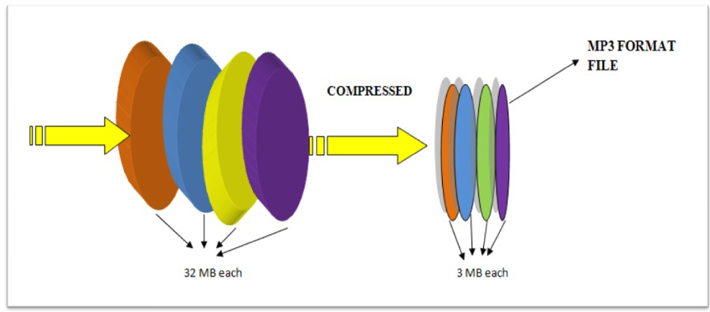
6:1-8:1 respectively, while the compression ratio of MP3 is as high as 10:1-8:1. 12:1, meaning one minute of CD-quality music requires 10MB
of storage space without compression, but only about 1 MB after MP3 compression encoding. However, MP3 uses a lossy compression method for audio signals. To reduce
sound distortion, MP3 adopts “sensory coding technology”, that is, it first analyzes the frequency spectrum of audio files during encoding, and then uses filters to filter the
noise . levels. Then the remaining bits are spread and arranged by means of quantization, and finally an MP3 file with a higher compression ratio is formed, and the
compressed file can achieve a sound effect closer to the original sound source during playback.
2. The whole structure of
MP3 files: MP3 files are roughly divided into three parts: TAG_V2 (ID3V2), Frame, TAG_V1 (ID3V1)
ID3V2 contains information like author, composer, album, etc. The length is not fixed, which expands the information volume of ID3V1.
A series of frames, the number is determined by the size of the file and the length of the frame. The length of each frame of the
frame
may not be fixed or fixed, and is determined by the bitrate
.
Each table is divided into two parts: table header and data entity Header of data.
frame
Record the bit rate, sample rate, version and other information of mp3, and each frame is independent of each other The frame
ID3V1 contains information like author, composer, album, etc., and the length is 128BYTE . 3. MP3 FRAME format: each FRAME has a FRAMEHEADER frame header, the length is 4BYTE (32 bits), there may be two CRC check bytes after the frame header, the existence of these two bytes depends on the FRAMEHEADER information If bit 16 is 0, there is no checksum after the frame header, and if it is 1, there is a checksum. The checksum length is 2 bytes, followed by the FRAMEHEADER, followed by the frame entity data. The format is as follows: FRAMEHEADER CRC (free) MAIN_DATA 4 BYTE 0 OR 2 BYTE The length is calculated from frame header 1. The format of the FRAMEHEADER frame header is as follows: AAAAAAAA AAABCCD EEEEFFGH IIJJKLMM