MP3 Compression: Bitrate and Audio Quality Tradeoffs
MP3 CompressionMP3 Compression
MP3 Compression
MP3 is a popular format for digital audio. It is a lossy format, which means that some of the original audio data is discarded in order to reduce the file size. The amount of data that is discarded is determined by the bitrate, which is a measure of the amount of data per second. A higher bitrate results in a higher quality audio file, but also a larger file size.
How MP3 Compression Works
MP3 compression works by using a technique called psychoacoustic coding. Psychoacoustic coding takes advantage of the fact that the human ear is not equally sensitive to all frequencies. For example, we can hear lower frequencies better than higher frequencies. Psychoacoustic coding uses this information to discard frequencies that are not as important to human hearing.
Bitrate and Audio Quality
The bitrate is the most important factor that determines the audio quality of an MP3 file. A higher bitrate results in a higher quality audio file, but also a larger file size. For example, a 128 kbps MP3 file will sound better than a 64 kbps MP3 file, but the 128 kbps file will be twice as large.
Choosing the Right Bitrate
The best bitrate to choose depends on how you plan to use the MP3 file. If you are going to listen to the file on a high-quality audio system, then you will want to use a high bitrate. If you are going to listen to the file on a portable device, then you may want to use a lower bitrate to save space.
Other Factors That Affect Audio Quality
In addition to the bitrate, there are other factors that can affect the audio quality of an MP3 file. These factors include the sampling rate, the bit depth, and the encoder used.
The sampling rate is the number of times per second that the audio signal is sampled. A higher sampling rate results in a higher quality audio file.
The bit depth is the number of bits used to represent each sample. A higher bit depth results in a higher quality audio file.
The encoder is the software that is used to compress the audio file. Different encoders use different algorithms, and some encoders produce better quality audio files than others.
Conclusion
MP3 compression is a popular and effective way to reduce the file size of digital audio files. By using a high bitrate, you can ensure that the audio quality of your MP3 files is good enough for your needs.
Frequently Asked Questions
What is the difference between MP3 and lossless audio formats?
MP3 is a lossy format, which means that some of the original audio data is discarded in order to reduce the file size. Lossless audio formats, such as FLAC and WAV, do not discard any data, so they retain the original audio quality. However, lossless audio files are much larger than MP3 files.
What is the best bitrate for MP3 files?
The best bitrate for MP3 files depends on how you plan to use them. If you are going to listen to the files on a high-quality audio system, then you will want to use a high bitrate. If you are going to listen to the files on a portable device, then you may want to use a lower bitrate to save space.
What are some tips for improving the audio quality of MP3 files?
There are a few things you can do to improve the audio quality of MP3 files. First, use a high bitrate. Second, use a high-quality encoder. Third, avoid using compression plugins or software that may degrade the audio quality.
What are some common problems with MP3 files?
Some common problems with MP3 files include:
Crackling or popping noises
Loss of high-frequency sounds
Muffled or distorted sound
These problems can be caused by a number of factors, including:
Low bitrate
Poor quality encoder
Damage to the file
If you are experiencing problems with your MP3 files, try using a different encoder or a higher bitrate. You can also try repairing the file using a file repair utility.
As someone who has been working with audio files for years, I can tell you that MP3 compression is one of the most important topics in the industry. It’s a technique that has revolutionized the way we listen to music, and it’s something that every audio enthusiast should understand.
How MP3 Compression Works
At its core, MP3 compression is all about removing data that the human ear can’t hear. This is done by analyzing the audio file and identifying sounds that are outside of the range of human hearing. These sounds are then removed, resulting in a smaller file size without any noticeable loss in quality.
As the book “The Art of Digital Audio” explains, “MP3 compression is based on the psychoacoustic principle that the human ear cannot discern certain sounds that are masked by other sounds.” This means that by removing these masked sounds, we can significantly reduce the file size of an audio file without sacrificing quality.
The Benefits of MP3 Compression
One of the biggest benefits of MP3 compression is the ability to store more music on your device. Before MP3 compression, most audio files were too large to be stored on a computer or portable music player. With MP3 compression, you can store hundreds or even thousands of songs on a single device.
Another benefit of MP3 compression is the ability to stream music over the internet. Without MP3 compression, streaming music would be nearly impossible due to the large file sizes of most audio files. MP3 compression allows for fast and efficient streaming, making it possible to listen to music on the go.
The Future of MP3 Compression
While MP3 compression has been around for decades, it’s still an evolving technology. As new audio formats and compression techniques are developed, we can expect MP3 compression to continue to improve.
One area where MP3 compression is likely to see significant growth is in the field of virtual and augmented reality. As these technologies become more advanced, the need for high-quality, low-latency audio will become increasingly important. MP3 compression is likely to play a key role in meeting this need.
MP3 Compression vs. Other Audio Formats
When it comes to audio formats, there are a lot of options out there. From WAV to FLAC to AAC, each format has its own strengths and weaknesses. So how does MP3 compression stack up against the competition?
MP3 Compression vs. WAV
WAV is a lossless audio format that is often used in professional audio production. While WAV files offer the highest possible audio quality, they also come with a large file size. This makes them impractical for most consumer applications.
MP3 compression, on the other hand, offers a good balance between file size and audio quality. While MP3 files are not as high-quality as WAV files, they are much smaller and more practical for everyday use.
MP3 Compression vs. FLAC
FLAC is another lossless audio format that is often used by audiophiles. Like WAV, FLAC files offer high-quality audio, but they also come with a large file size.
While FLAC files are great for archiving and preserving high-quality audio, they are not practical for everyday use. MP3 compression, on the other hand, offers a good compromise between file size and audio quality, making it the ideal format for most consumer applications.
MP3 Compression vs. AAC
AAC is a newer audio format that was developed by Apple. Like MP3 compression, AAC is a lossy format that offers a good balance between file size and audio quality.
While AAC files are generally smaller than MP3 files, they also tend to offer slightly better audio quality. However, because AAC is a proprietary format, it is not as widely supported as MP3 compression.
The Science Behind MP3 Compression
At its core, MP3 compression is all about the science of sound. By understanding how sound works and how the human ear perceives it, we can create audio files that are smaller and more efficient without sacrificing quality.
The Psychoacoustic Model
The key to MP3 compression is the psychoacoustic model. This model is based on the fact that the human ear is not equally sensitive to all frequencies of sound. In fact, our ears are much more sensitive to sounds in the midrange frequencies than they are to sounds in the high or low frequencies.
By taking advantage of this fact, MP3 compression is able to remove sounds that are outside of the range of human hearing. This results in a smaller file size without any noticeable loss in quality.
The Bitrate
Another important factor in MP3 compression is the bitrate. The bitrate is the amount of data that is used to represent each second of audio. A higher bitrate means that more data is being used, which results in a higher-quality audio file.
However, higher bitrates also mean larger file sizes. This is why most MP3 files are encoded at a bitrate of 128 kbps or 192 kbps. These bitrates offer a good balance between file size and audio quality.
The Future of MP3 Compression
As technology continues to evolve, we can expect MP3 compression to continue to improve. New compression techniques and audio formats are likely to emerge, offering even better audio quality and smaller file sizes.
However, even as new technologies emerge, MP3 compression is likely to remain a key part of the audio industry. Its ability to offer high-quality audio in a small file size makes it the ideal format for most consumer applications.
MP3 Compression Techniques
There are a number of different techniques that can be used to compress MP3 files. Each technique has its own strengths and weaknesses, and the best technique to use will depend on the specific needs of the user.
Constant Bitrate Encoding
Constant bitrate encoding is the simplest and most common technique used to compress MP3 files. With constant bitrate encoding, the bitrate is kept constant throughout the entire audio file.
While constant bitrate encoding is easy to implement, it can result in larger file sizes than other techniques. This is because the bitrate is not adjusted to match the complexity of the audio.
Variable Bitrate Encoding
Variable bitrate encoding is a more advanced technique that adjusts the bitrate based on the complexity of the audio. This means that more data is used to represent complex sounds, while less data is used to represent simpler sounds.
Variable bitrate encoding can result in smaller file sizes than constant bitrate encoding, while still maintaining high audio quality. However, it can be more difficult to implement than constant bitrate encoding.
Joint Stereo Encoding
Joint stereo encoding is a technique that takes advantage of the fact that most audio files are recorded in stereo. With joint stereo encoding, the left and right channels of the audio are analyzed separately, and the data is compressed based on the similarities between the two channels.
This technique can result in smaller file sizes than other techniques, while still maintaining high audio quality. However, it can also result in some loss of stereo separation.
The Benefits of MP3 Compression
As someone who has been working with audio files for years, I can tell you that MP3 compression is one of the most important topics in the industry. It’s a technique that has revolutionized the way we listen to music, and it’s something that every audio enthusiast should understand.
Storing More Music
One of the biggest benefits of MP3 compression is the ability to store more music on your device. Before MP3 compression, most audio files were too large to be stored on a computer or portable music player. With MP3 compression, you can store hundreds or even thousands of songs on a single device.
This is something that I’ve personally experienced. As someone who loves music, I used to have to carry around a large collection of CDs or cassette tapes. With MP3 compression, I can now carry my entire music collection in my pocket.
Streaming Music
Another benefit of MP3 compression is the ability to stream music over the internet. Without MP3 compression, streaming music would be nearly impossible due to the large file sizes of most audio files. MP3 compression allows for fast and efficient streaming, making it possible to listen to music on the go.
This is something that I’ve personally experienced as well. As someone who travels frequently, I rely on streaming music services to keep me entertained on long flights or train rides. Without MP3 compression, this would not be possible.
The Future of MP3 Compression
While MP3 compression has been around for decades, it’s still an evolving technology. As new audio formats and compression techniques are developed, we can expect MP3 compression to continue to improve.
One area where MP3 compression is likely to see significant growth is in the field of virtual and augmented reality. As these technologies become more advanced, the need for high-quality, low-latency audio will become increasingly important. MP3 compression is likely to play a key role in meeting this need.
MP3 Compression for Beginners
If you’re new to the world of audio files, MP3 compression can seem like a daunting topic. However, with a little bit of knowledge, you can quickly become an expert.
Choosing the Right Bitrate
One of the most important things to consider when compressing MP3 files is the bitrate. The bitrate is the amount of data that is used to represent each second of audio. A higher bitrate means that more data is being used, which results in a higher-quality audio file.
However, higher bitrates also mean larger file sizes. This is why most MP3 files are encoded at a bitrate of 128 kbps or 192 kbps. These bitrates offer a good balance between file size and audio quality.
Using the Right Software
Another important factor to consider when compressing MP3 files is the software that you use. While there are many different programs available for compressing audio files, not all of them are created equal.
If you’re looking for a reliable and easy-to-use program for compressing MP3 files, I would recommend checking out MP4Gain. This program offers a wide range of compression options, making it easy to find the right settings for your needs.
Conclusion
In conclusion, MP3 compression is an important topic for anyone who works with audio files. Whether you’re a professional audio engineer or just someone who loves music, understanding MP3 compression is essential.
By taking advantage of the techniques and technologies available for MP3 compression, you can store more music on your device, stream music over the internet, and enjoy high-quality audio without sacrificing file size. So if you haven’t already, I would encourage you to start exploring the world of MP3 compression today.
MP3 Compressor: A Technical Guide to Audio Compression
MP3 Compressor
Audio compression is a vital technique in the music industry. The MP3 file format has been widely used for decades and is one of the most popular file formats for music files. In this article, we will delve into the technical aspects of MP3 compression, its algorithmic processes, and explore the potential drawbacks of this commonly used format.
MP3 Compressor
Understanding Audio Compression
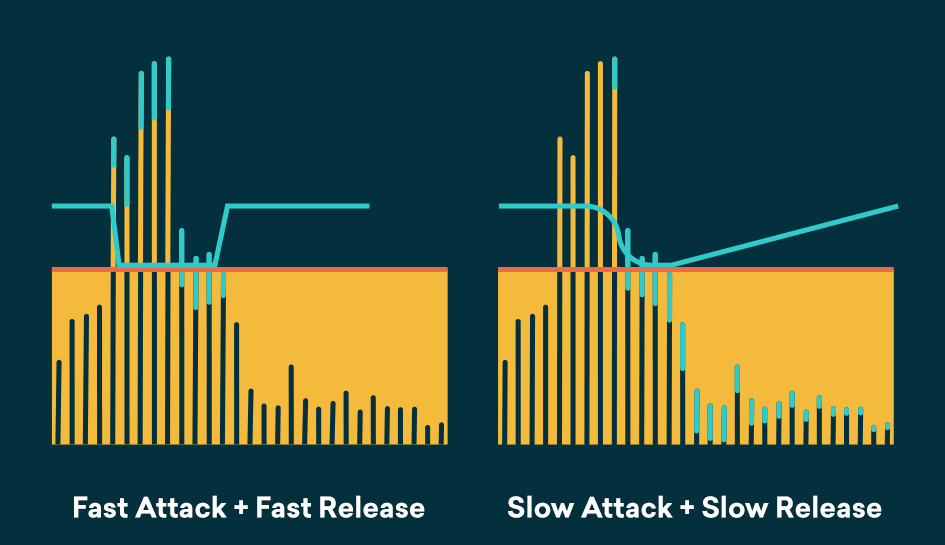
Audio compression is the process of reducing the dynamic range of an audio signal. This is achieved by analyzing the audio waveform and then reducing the amplitude of any signal that exceeds a certain threshold. This process can be done manually, but it is usually automated with specialized software.
There are several types of audio compressors, including peak, RMS, and multiband compressors. Each type of compressor has its own set of uses and parameters that can be adjusted to achieve the desired result. Peak compressors, for example, reduce the volume of any signal that exceeds a certain threshold, whereas RMS compressors average the signal over time and reduce the volume of signals that are too loud.
Understanding MP3 Compression
MP3 is a lossy compression format that is designed to reduce the file size of digital audio files. MP3 compression achieves this by discarding information that is not essential to the human ear. The compression is achieved by analyzing the audio data and removing frequencies that are not perceived by the human ear.
The MP3 Algorithm
The MP3 algorithm uses a process called perceptual coding to identify sounds that are less important to human perception and eliminate them from the audio signal. The algorithm then quantizes the remaining data, assigning values to each of the remaining samples. The resulting data is then further compressed through Huffman encoding, a type of lossless compression algorithm that replaces frequently occurring values with shorter codes.
The result is a file that has been reduced in size by approximately 90% with relatively little loss in perceived sound quality.
MP3 Bitrate
MP3 compression also utilizes a technique called variable bitrate encoding (VBR). This technique adjusts the bitrate of the MP3 file in real-time, allowing for more detailed encoding when it is needed and more aggressive encoding when it is not.
The quality of an MP3 file is determined by its bitrate. Higher bitrates result in higher sound quality and larger file sizes, while lower bitrates result in lower sound quality and smaller file sizes. Bitrates are typically measured in kilobits per second (kbps), with a higher number indicating a higher bitrate.
The Drawbacks of MP3 Compression
While MP3 compression is a popular format, there are potential drawbacks to using it. One of the main issues is the loss of audio quality. MP3 compression removes frequencies that are not essential to the human ear, but this can result in a loss of audio quality, particularly for complex and dynamic recordings.
Additionally, the MP3 algorithm can introduce audible artifacts, such as ringing or “smearing” of the audio signal. This can be particularly noticeable in high-frequency content and can be exacerbated by aggressive compression settings or lower bitrates.
MP3 Compressor Alternatives
While MP3 compression is a popular format, there are other compression formats that offer similar features. One alternative is MP4Gain, which offers a functionally similar functionality to a compressor in its normalizer. MP4Gain is a tool that analyzes and adjusts the volume of audio files, providing a way to adjust audio levels without losing audio quality.
Unlike traditional audio compression, MP4Gain doesn’t remove audio data, and it doesn’t have a negative impact on sound quality. Instead, it adjusts the levels of the audio signal to provide a more consistent listening experience across different tracks.
Overall, MP3 compression remains one of the most widely used audio compression formats, and for good reason. It provides a high level of compression without sacrificing too much audio quality, making it an ideal format for sharing and distributing music online. However, it is important to understand the technical aspects of MP3 compression and to be aware of its potential drawbacks to make informed decisions when working with audio files.
The History of Audio Compressors
Early Days of Audio Compression
Audio compression has been used in various forms since the early days of audio recording. In the early 20th century, record producers used a technique called “overdubbing” to layer multiple tracks on top of each other to create a fuller, more dynamic sound. However, this technique also led to some tracks being too loud and others too quiet, which made the final mix sound unbalanced.
To solve this problem, audio engineers began using a technique called “gain reduction,” which involved reducing the volume of the louder tracks and boosting the volume of the quieter ones to achieve a more balanced sound. This technique laid the foundation for the modern audio compressor.
The Birth of the Audio Compressor
The first modern audio compressor was invented by the American electrical engineer, C.P. Boner, in 1936. Boner’s compressor used a photoelectric cell to detect changes in audio levels and adjust the gain accordingly. This invention was a game-changer for the music industry and paved the way for the development of more advanced compressors in the years to come.
The Rise of Digital Audio Compression
In the 1980s, digital audio compression became more popular with the advent of the Compact Disc (CD) format. The CD format was designed to hold more audio data than traditional vinyl records, but this required compressing the audio to fit more data on the disc.
One of the most popular audio compression formats of the 1980s and 1990s was the MPEG-1 Audio Layer 3, or MP3 for short. This format revolutionized the music industry by allowing users to share and distribute music online, but it also sparked controversy over issues such as music piracy and loss of audio quality.
Today, audio compression remains a critical tool in music production, broadcasting, and other areas of the audio industry. Advanced compression techniques, such as multi-band compression and dynamic range compression, continue to evolve, providing musicians and engineers with new ways to shape and control the sound of their recordings.
In fact, there are many audio compression technologies and MP3 compression technology is not the best.
MP3 compression
But now it seems that it is still mainstream.
Musical signals have many redundant components, including spacing and information that the human ear cannot distinguish (such as weak signals mixed with a strong background). The CD sound is not compressed and uses a fixed sampling frequency of 44.1 kHz, which can ensure good playback of maximum dynamic music. Of course, the amount of data where the amount of information is less is also the same, so there is a possibility of compression. The audio bandwidth of 20 ~ 20 kHz (upper CD player can be extended up to 2 Hz) has become the current music standard. To reduce sound distortion, MP3 adopts an encoding algorithm called “sensory encoding technology”: when encoding, first perform spectrum analysis on the audio file, then use a filter to reduce the noise level, and then quantize the noise. remaining bits are scattered and arranged, and finally an MP3 file with a higher compression ratio is formed, and the compressed file can achieve a sound effect closer to the original sound source during playback. Although it is a lossy compression, its biggest advantage is very little sound distortion in exchange for a higher compression ratio. And now MP3 adopts a variable compression ratio (VBR) compression technology similar to Dolby AC-3. The sampling compression ratio depends on the amount of information in the music, and the masking effect of the human ear is used to reduce redundant data.
The format known as mp3 was created with the intention of being able to contain the audio that a WAV contained, for example, but occupying much less space.
That is, it is not an audio container variant made for other purposes. It was specifically designed, created and thought to be able to compress an audio that to human ears would sound the same as the original WAV but that by various means would occupy much less space.
Obviously the first tool is zip compression and redundancy compression.
For example, if a piece to be compressed was the following:
00000111110000011111
The mathematical way to compress it (seen from a simplified point of view) would be:
0(5)1(5)0(5)1(5)
That is, five zeros, followed by 6 zeros, followed by 4 zeros and ending with 6 zeros.
It is much easier to decipher it that way and it occupies much less space uew using the zeros and ones.
That is the basic way to save space: looking for a way to express the same thing, but using much fewer signs or elements.
Imagine that the first three seconds are silent:
000000000000000000000000 and so on for 200 zeros. It is easier to write in some way that at the beginning there will be 324 zero numbers.
Later, and we will see this later, the mp3 uses the well-known way in which the human ear captures sound, to decide which elements can be eliminated (for example, frequencies that the human ear cannot distinguish) and thus save more space.
How to compress an mp3 so that it takes up less space on the hard drive?
Mp3 compression
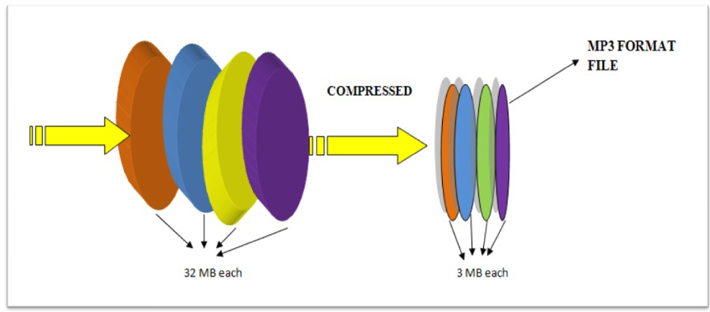
An mp3 occupies one eleventh of the original on average.
Mp3 compression
Sometimes people don’t realize that literally compressing an mp3 means making the data take up a lot less space on the hard drive.
A WAV usually takes up a lot of space, especially because it saves as much information as possible.
A long time ago it was determined that the human ear was not very precise and therefore there were many sounds that could not be heard.
Based on an analysis of all this information about the peculiarities of human perception with respect to sound, an algorithm could be achieved to remove all this information, which was contained in the original WAVs, but since it could be removed without major impact, achieved that the compression was not only of the zip type, but also auditory.
The result was surprising, since an mp3 managed to occupy an average of one eleventh of the size of the original audio with hardly any differences being perceived.
Over time this has improved even more and it has been achieved, according to many tests carried out by many different researchers, to determine that an mp3 with a bitrate of 192 or more and a samplerate of 410 or more is almost impossible to distinguish from some audio without lost for 99.99% of people.
Especially if we consider the quality of equipment and headphones available today.
A handful of German inventors from the Fraunhofer Institute in white coats invent a revolutionary process against all odds to compress music files to one-twelfth of their original size compared to CD with virtually no loss of quality. When was the moment they felt : Are we doing something bigger here?
There are several moments. When I was still a student at the University of Erlangen in 1988 and doing basic research, someone visited our laboratory. My PhD supervisor, Dieter Seitzer, proudly demonstrated to this guest what we were currently working on: compressing digital music files. And when he asked what could become of our work, I replied: “Either our work will be forgotten and it will be accumulating dust in the library, or technology will become a standard that will be used by millions of people.” But I did not dare to dream about it. that really happened.
Developing mp3
In 1977, his PhD supervisor, Seitzer, from Erlangen, had the idea of transmitting music by telephone wire. And they all said, “I can’t.” And then you came. What application did you originally have in mind? Was it music in your pocket?
Back then, all textbooks said that you could compress images, videos, and voice, but definitely not music. It is too sensitive and complex. That was the starting point.
We asked ourselves: How can we compress music in that way, that is, reduce the amount of data per piece of music, so that people don’t hear the difference?
The question is to understand how the human ear works so that very similar things happen in our encoder, which compresses the music, as in the inner ear. Even in the inner ear, not all data is transmitted to the brain through nerve fibers. The brain always compares pitches with an internal reference, basically checking what it knows. In addition, there are so-called masking effects: if the sensory hairs tremble in the ear, the other sensory hairs are also automatically stimulated. This leads to the fact that the tones overlap and cannot be perceived at all. This is due to the mechanics of the inner ear. We use this as a guide when we come to the question: For what data can we reduce the level of detail, without being heard? Where would a coarser data structure be acceptable? We did not invent this trick in Erlangen. We weren’t the only ones working on it. We have only brought this knowledge to concrete results faster and optimized it better.
Is it true that you bought records for 1,000 marks in a music store in Erlangen to have compression material?
It is true. We had requested the project and absolutely needed better speakers, a small sound booth, and most of all, lots of audio samples. So I went to buy records: simple pieces, complex pieces, music of all genres, in all areas. We didn’t know what would work and, more importantly, what wouldn’t.
You mean the famous example of the Suzanne Vegas song “Tom’s Diner”, whose a cappella intro with “Da da da da …” was used to fine-tune the psychoacoustic MP3 model. What exactly was it about?
That was a special challenge: dense tones that the ear can still filter very well. My dissertation was almost done at the time and I really believed: I’m done, my process works for all kinds of music. But then I read in a hi-fi magazine that Suzanne Vegas’ voice had been used to test speakers. A colleague bought the CD because we wanted to know: What happens if we compress this music? The result was a disaster.
And how did you solve the problem?
There were two solutions. The first was to realize that what we had read in the specialized literature about how the masking of signals so rich in spectra works was not really true. Then we realized that psychoacoustics in these cases works differently than what the publications of the time suggested. We then test what happens when we transmit the lower frequencies very precisely and become less complex at the higher frequencies in favor of less storage space. That worked
The MP3 Encoder is that program that analyzes the uncompressed digital file (for example, a Wav file) and transforms it into an MP3 file.
The audio signal is filtered and divided into 576 areas (called subbands) through a process that uses DCT (Discrete Cosine Transformation) and manages to eliminate all unnecessary frequencies. The human ear, as already stated, perceives sounds only beyond a certain threshold so that all the audio below is not encoded.
At this point, the resulting signal passes through the psychoacoustic model in which the masking thresholds of which we have spoken previously are identified. This is done using the discrete Fourier transform (DFT, Discrete Fourier Transform).
During the masking of the 576 subbands, the frequencies to be masked are determined and therefore can be removed.
After masking, the defined Stereo Ensemble process is applied. Below a certain frequency, the ear cannot perceive the spatial position of sounds, so they can be recorded on a single channel (therefore in mono format) with significant space savings.
Once the file is ready, the data is further analyzed and compressed using Hufmann encoding which allows for a data reduction (without loss of information) of approximately 20%.
At this point, after all the data has been collected, the encoder proceeds to create the bit stream that will form the final MP3 file.
Compression criteria
To perform such compression, the MP3 format is based on a simple concept: filter a digital musical piece and eliminate all unnecessary information, thus reducing space.
The human ear is an almost perfect instrument but it also has its limits. The human ear pass band extends from 20 Hz to 20,000 Hz, but is much more sensitive to those in the mid-range, 700 to 6,000 Hz, where most of the information is concentrated.
The study of auditory perception is a matter of psychoacoustics that mainly analyzes 2 factors that are later used in MP3 encoding:
Auditory perception
In the area of sounds, only a few can be heard by the human ear. The following figure shows these areas that represent the different sound frequencies. Only those in the white area are audible from our ear.
Masking
Masking is nothing more than the superposition of weak sounds with loud sounds. It almost always happens that the sounds of different instruments overlap each other. In cases where the loudest sound completely covers the lowest, there is a so-called masking. In MP3 files, masking allows you to remove the information from the weakest sounds, which, however, because they are not perceived by the ear, are virtually irrelevant.
Many people do not have a clear idea that in general most audio formats compress music.
In fact, thanks to that compression, the mp3 became so popular. It is not because it sounded better, as an uncle of mine creates … but because it allows you to store much more music on a USB stick, on a CD, etc. even when it sacrifices a bit of quality.
That is to say, technically the mp3 sounds worse than the original raw format like a wav.
But handling wavs is usually unmanageable, unless you are an audio professional.
But, going back to talk about my uncle, who wants to listen to Frank Sinatra in his car, using the mp3 is much more friendly. Even because it has a metadata (artist name, track, lyrics, etc.) and also, if a good bitrate is used (160 m or more) it is almost imperceptible to most of the people the difference between an mp3 and a wav .
Experiments have been carried out in famous universities that managed to show that not even the people who claimed to have an auditory training (for being musicians, djs, etc.) managed to distinguish in most cases a 192-bit mp3 from the original wav.
This explains why mp3 is still king, even before the appearance of FLAC for example, that it is free (without patents) and that it has a much better quality.
But, again to mention my uncle, he believes that FLAC is a colorful cereal … and he still says that he really likes that cereal for breakfast !!
Compression
But then, the fame of the mp3 is due exclusively to its ability to save space?
Yes.
And how does the music compress the mp3?
Follow several methods. Here I will tell you superficially and only by way of introduction how it manages to save space.
The first tactic is almost logical. As the human ear only listens to a part of the sound spectrum, the mp3 erases everything that is outside that spectrum, thus saving a lot of space.
Then it uses another well-known mechanism of the human ear (if you look at the mp3 it is based on the ability to perceive the human ear … THAT’S why people DO NOT manage to perceive a good mp3 from the original wav !!).
That mechanism is called masking, and it’s about the following. If there are two or more sounds at nearby frequencies and one of them suddenly sounds loud enough, the ear will NOT hear the other sounds that are lower in volume at nearby frequencies. So the mp3 uses that acoustic principle of the human ear and gets rid of those other sounds with which it again removes information.
And removing information means SAVING SPACE.
And if you finally use some mechanism to compress (type .zip or type .rar), a great saving of space is achieved.
For example, let’s imagine (it is a false example, but it illustrates what I mean), if we had this string in the audio “xxxxxxxxxxxxxxxxxxxx”, one way to compress it would be to say that there are 20 x, instead of writing 10 x, note :
xxxxxxxxxxxxxxxxxxxx
20x
Which takes up more space and which takes less?
Both strings of signs or characters say the same thing, there are 20 x, but it is shorter to write it as 20x, than to write “xxxxxxxxxxxxxxxxxxxx”
Onbiamente in all loss of information, there is a loss of quality. But the same thing happens with colors.
They say there are computers capable of handling not how many millions of different colors … it would be smart to ask how many different colors the human eye can perceive.
So, there will always be a purist who says that the mp3 loses quality … but it would be good to see if her ear can distinguish it. Music is made to be heard by human ears, with its limitations.
Well, in short, this is how you make an mp3 to save space. I will send a copy of this article to my uncle.
First of all, remember that “MP3” is short for the term “Audio MPEG-1/2 Layer 3 Compression”, which is an audio data encoding format that allows you to divide the weight of a computer file by more than ten.
The word MP3 also refers by extension to portable audio players that play the audio in MP3 format.
The main role of the MP3 format is to compress music so that it is lighter (to store more in our player) without the listener noticing the differences.
Therefore, we will remove everything considered “superfluous” from the audio signal, but this is the whole controversy: what is really superfluous or unimportant or superfluous in the sound to be encoded?
Some people who oppose this method of storage speak of signal mutilation. Others describe this operation with a nice comparison: “The more potatoes you put in a pan? It’s simple, we make it puree!
In fact it is not that simple, the compression method is much more complex than you think.
Music compression
To make MP3 music lighter, it is compressed, but without the user hearing or perceiving the difference. The principle is to eliminate sounds that are inaudible to the human ear, such as ultrasound (treble) or infrasound (bass). But be careful, this “light” music (12 times less heavy than the standard format music) should remain “of good quality” to satisfy listeners.
To achieve this, MP3 does not encode all the data necessary for full sound reproduction, but only what is perceived by the human ear. This is how we achieve what we call the “skinny”.
1st phase: the first skimming takes place in all sounds that are not perceived by the ear. They are simply removed.
Compression allows the spectrometric components of an audio signal to be analyzed and a psychoacoustic model applied to them, so that only “audible” sounds are preserved.
The human ear can distinguish sounds on average between 0.02 kHz and 20 kHz, knowing that the sensitivity is maximum for frequencies between 2 and 5 kHz, according to a curve given by Fletcher and Munson’s law. Therefore, this first compression phase consists of determining the sounds we do not hear and eliminating them, therefore it is a destructive compression, that is, with loss of information.
2nd step: Next we will more accurately encode the sounds to which the ear is most sensitive (those between 2 and 5 kilohertz). The rest of the sounds contain the frequencies that are less perceived by the ear and will be encoded with less precision. Then they will be of lesser quality, and, that is the goal, they will take up less space because they are almost undetected. The listener will not notice this “degradation” of the original sound because these are frequencies to which the ear is not sensitive.
In this same phase, a second treatment is added: dynamic compression. Dynamic compression consists of raising the weak levels and the low levels to keep them lower, to erase the contrasts the music has.
These two stages will lighten music without altering the perception of sound.
Sound masking
After heavily compressing the sound, the MP3 continues using the masking phenomenon. When a sound reaches a certain intensity, it masks the sounds with the lowest intensities closest to it. The ear does not detect the weakest sound and MP3 will therefore easily remove these so-called “masked” sounds.
If you look at the sun and a bird goes along its axis, you will not see it because the light from the sun is too important. It is the same in acoustics. If there are loud sounds, you cannot hear the weakest. For example, if a sound of 80 dB with a frequency of 1000 Hz is followed by a sound of 20 dB and has the same frequency, formatting in MP3 will preserve the sound of 80 dB and hide the others
Therefore, the blue sound is masked by the black sound.
The danger of this size
The MP3 format poses two kinds of danger to our hearing: – The first is that it encourages the listener to increase the volume of the sound from his player.
Second, our ears are getting used to this type of sound, which we could describe as “dematerialized,” and it is getting slow.
Special hearing disorders related to MP3 formatting. The human ear is used to perceiving strong dynamic contrasts and is not made for compressed MP3 format signals. In fact, the compression of the music will act as an optical illusion. If we listen to this compressed music, we will unconsciously