An mp3 has lower sound quality than a wav?


Free Download Mp4Gain
picture

An mp3 has lower sound quality than a wav?

Mp3 High Quality
Mp3 High Quality

The format is used to know which audio file has the highest quality?
Mp3 High Quality
Mp3 High Quality

No, the answer is nmo for both questions.

The first thing that should be clearly stated is that what we call audio quality is expressed and only thought of in terms of human hearing, human ears.

Because we don’t listen like many animals. Each one has its most efficient frequencies and others that it does not perceive, according to its survival needs. Exactly how some animals see better in the dark or perceive colors differently, and all this has been so because of the environment where they live and where they must survive.

Even a child or teenager can often perceive that an adult cannot.

Then, we will have to understand that quality is not synonymous with an absolute capacity to reproduce all frequencies, but rather that for us quality is something that sounds in a certain way to the human ear.

With that understood, we will say that an mp3 with 192 kbs and 44100 or more samplerate is of sufficient quality and can hardly be distinguished from other formats.

Only less than 1% of the population can perceive a slight and uncertain difference if the mp3 has that quality.

We will see in other articles how it is that those frequencies that we cannot perceive are the ones used to compress the audio and that is why a good quality mp3, which only eliminated frequencies that the human ear cannot distinguish, sounds 99.9999999% the same as other files promoted as better quality.



Free Download Mp4Gain
picture


Mp4Gain Main Window
picture


Mp4Gain Features
picture


Free Download Mp4Gain
picture

What is the MP3 compression principle?

What is the MP3 compression principle?

MP3 compression
MP3 compression

In fact, there are many audio compression technologies and MP3 compression technology is not the best.

MP3 compression
MP3 compression

But now it seems that it is still mainstream.
Musical signals have many redundant components, including spacing and information that the human ear cannot distinguish (such as weak signals mixed with a strong background). The CD sound is not compressed and uses a fixed sampling frequency of 44.1 kHz, which can ensure good playback of maximum dynamic music. Of course, the amount of data where the amount of information is less is also the same, so there is a possibility of compression. The audio bandwidth of 20 ~ 20 kHz (upper CD player can be extended up to 2 Hz) has become the current music standard. To reduce sound distortion, MP3 adopts an encoding algorithm called “sensory encoding technology”: when encoding, first perform spectrum analysis on the audio file, then use a filter to reduce the noise level, and then quantize the noise. remaining bits are scattered and arranged, and finally an MP3 file with a higher compression ratio is formed, and the compressed file can achieve a sound effect closer to the original sound source during playback. Although it is a lossy compression, its biggest advantage is very little sound distortion in exchange for a higher compression ratio. And now MP3 adopts a variable compression ratio (VBR) compression technology similar to Dolby AC-3. The sampling compression ratio depends on the amount of information in the music, and the masking effect of the human ear is used to reduce redundant data.

How to compress an mp3 so that it takes up less space on the hard drive?

How to compress an mp3 so that it takes up less space on the hard drive?

Mp3 compression
Mp3 compression

An mp3 occupies one eleventh of the original on average.

Mp3 compression
Mp3 compression

Sometimes people don’t realize that literally compressing an mp3 means making the data take up a lot less space on the hard drive.

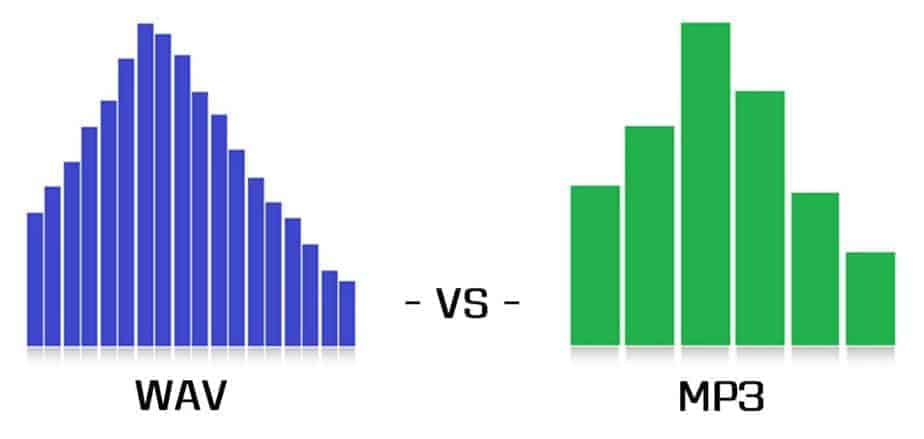
A WAV usually takes up a lot of space, especially because it saves as much information as possible.

A long time ago it was determined that the human ear was not very precise and therefore there were many sounds that could not be heard.

Based on an analysis of all this information about the peculiarities of human perception with respect to sound, an algorithm could be achieved to remove all this information, which was contained in the original WAVs, but since it could be removed without major impact, achieved that the compression was not only of the zip type, but also auditory.

The result was surprising, since an mp3 managed to occupy an average of one eleventh of the size of the original audio with hardly any differences being perceived.

Over time this has improved even more and it has been achieved, according to many tests carried out by many different researchers, to determine that an mp3 with a bitrate of 192 or more and a samplerate of 410 or more is almost impossible to distinguish from some audio without lost for 99.99% of people.

Especially if we consider the quality of equipment and headphones available today.

Mp3 Normalizer with Mp4Gain

Mp3 Normalizer with Mp4Gain


Many people believe, wrongly, that the only Mp4Gain normalizes audio from videos and it is not. Also normalizes the audio of many audio formats.

Let Mp4Gain which normalizes formats:

Video Formats:
mp4, flv, avi, mpeg, mpg, 3gp, wmv

Audio Formats:
mp3, mp2, flac, ogg, m4a, aac, wav, ac3

All these formats can be standardized using Mp4Gain, which is great and is the only software that can do both.

Besides being able to do things like change the pitch without affecting the tempo (which are the beats per minute) or the reverse: change the speed of an audio track or a video, without affecting the pitch.

Mp4Gain is completely new wave, the new fashion. Fits Itunes, Ipad, Ipod, any music player software, any player, whether a laptop or not any of these audio and video formats. For something has caught the attention of the way he has managed, for his tremendous ability.

And talk about the quality of their normalization, we talk about the top of the normalizing, there is nothing better to normalize audio files or audio from videos. Just try it and you will see that not only is one of a kind, very low cost to its capacity and quality, but it s the best on the market normalizing.
Someone has said that is the normalizer of 2013, said that perhaps another 2020. Totalemte is a concept according to the times and what the user needs today. Just try it, descarghandoi the trial version and it absolutely love the Mp4Gain and understand why it is the latest and is gaining such popularity.


Mp3 Normalizer – Mp4 Normalizer – Flv Normalizer

Mp3 Normalizer – Mp4 Normalizer – Flv Normalizer

As it has been a boom in the normalization mp3 audio during the last decade and as it has evolved into a more sophisticated, to achieve true high fidelaidad results, so necsidad has emerged to normalize the audio file video formats like flv, mp4, wmv, avi, etc..

True, it is possible to normalize Mp4Gain audio and video.

Video Formats:
mp4, flv, avi
mpeg, mpg
3gp, wmv

Audio Formats:
mp3, mp2, flac
ogg, m4a, aac
wav, ac3

All these formats can now be normalized to the highest quality. From the classic mp3 to mp4 or flv very common, but also formats used by Apple with MP4 or M4A.

Nomalizar, technically speaking, is the ability to make every millisecond of audio has his best, is perfectly audible and not distorted in any sense.

Mp4Gain get all that and more.


Normalizing audio for the videos

Normalizing audio for the videos

After many years, finally there is the possibility of normalizing the audio of the video, as it is could normalize the audio of mp3s.

But … what is the meaning of normalize audio volume or loudness of the audio?

It means we can match the loudness of our audio archvios or our videos. Why Mp4Gain also nomaliza mp3s and many other audio formats like FLAC, Oog, M4a, etc.. Besides vcideo current formats like flv, mp4, avi, etc.

For that, very often, when you have a rather large collection of videos or audio files, you find that there is disparity in the loudness of some files and must correct manipulating the volume control each time you start a song or video.

Well, this is over.

On the other hand, there are parts that are just perfectly audible and will be redeemed by the Mp4Gain.

Our advice is to “download our trial version and test on your own computer”, will be delighted with the results.

Mp4Gain a normalizer audio and also audio from the videos.

Mp4Gain a normalizer audio and also audio from the videos.

Mp4Gain is ultimately the only audio normalizer that normalizes (principalesm in all formats like mp3, wma, m4a, flac. Ogg, etc.) and also the major audio video formats like avi, mp4, flv, mpeg, etc.

But not only normalizes audio formats and so many possibilities, but does so in a unique way and get totally satisfactory results.

Mp4Gain normalizes each of the thousands of frames that make up a song or video, making every sound, every voice and every instrument sound its best, thus giving better clarity and sound quality, plus get all their audio or video have a uniform sound, avoiding having to this up and down manually to the volume control in each new song or each new video.

So we invite you to download the trial verion of the program and try it out on your own computer.